Introduction
Open SWE represents a paradigm shift in how organizations approach software development automation. Developed by LangChain, this open-source asynchronous coding agent has garnered over 9,300 stars on GitHub, demonstrating significant community interest in autonomous coding solutions. Unlike traditional CI/CD pipelines that execute predefined scripts, Open SWE acts as an intelligent agent capable of understanding natural language requests, planning implementation strategies, and executing code changes across multiple platforms.
The project addresses a critical gap in modern software engineering: the need for continuous, intelligent code maintenance and feature development without requiring constant human intervention. Organizations can deploy Open SWE to handle routine coding tasks, bug fixes, documentation updates, and even complex feature implementations while developers focus on higher-level architectural decisions and creative problem-solving.
What sets Open SWE apart from other coding assistants is its asynchronous architecture. While tools like GitHub Copilot provide real-time suggestions within an IDE, Open SWE operates independently, processing requests through platforms like Slack, Linear, or GitHub webhooks. This decoupling allows it to work on tasks in the background, providing updates through real-time messaging as it progresses through implementation steps.
The system leverages LangGraph as its runtime foundation, enabling sophisticated agent workflows with state management, checkpointing, and recovery capabilities. This architecture ensures that long-running tasks can be paused, resumed, and monitored throughout their lifecycle, making Open SWE suitable for enterprise environments where reliability and auditability are paramount.
Architecture Overview
Understanding the Seven-Layer Architecture
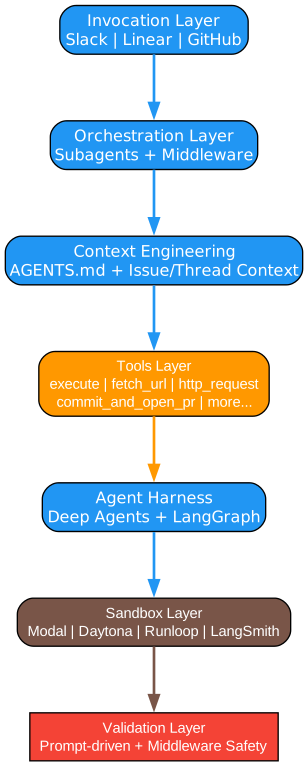
The architecture diagram above illustrates Open SWE’s sophisticated seven-layer design, each layer serving a distinct purpose in the request-to-deployment pipeline. This layered approach ensures separation of concerns, making the system modular, maintainable, and extensible for various organizational needs.
Layer 1: Invocation Layer
The invocation layer serves as the entry point for all user requests, supporting multiple platforms through a unified interface. This layer implements webhook handlers for Slack commands, Linear issue updates, and GitHub events, translating platform-specific payloads into a standardized internal format. The design follows the adapter pattern, allowing new platforms to be integrated without modifying core agent logic.
Each invocation channel implements authentication and authorization checks, ensuring that only authorized users can trigger agent actions. The Slack integration supports slash commands and mentions, while the Linear integration responds to issue status changes and comments. GitHub webhooks enable automatic triggering on pull request events, issue creation, or repository dispatches.
Layer 2: Orchestration Layer
The orchestration layer manages the overall workflow execution, coordinating between subagents and middleware hooks. At its core, a LangGraph state machine defines the execution flow, with nodes representing different stages of task processing. The orchestrator maintains conversation history, tracks task progress, and handles error recovery through checkpointing.
Subagents are specialized agents designed for specific task types, such as code generation, testing, or documentation. The orchestrator can delegate tasks to appropriate subagents based on task classification, enabling parallel execution of independent subtasks. Middleware hooks provide extensibility points for custom logic, such as approval workflows, logging, or integration with external systems.
Layer 3: Context Engineering
Context engineering is perhaps the most critical layer for agent effectiveness. This layer aggregates information from multiple sources to provide the LLM with comprehensive context for decision-making. The AGENTS.md pattern, pioneered by this project, allows repositories to define custom context, coding standards, and architectural guidelines that the agent should follow.
Beyond repository-level context, this layer incorporates issue descriptions, thread conversations, and relevant code snippets retrieved through semantic search. The context window is carefully managed to include only relevant information, using techniques like conversation summarization and selective code inclusion to stay within token limits while maintaining coherence.
Layer 4: Tools Layer
The tools layer provides the agent with capabilities to interact with the external world. Core tools include execute (for running shell commands), fetch_url (for retrieving web content), http_request (for API calls), and commit_and_open_pr (for Git operations). Each tool implements safety checks and sandboxing to prevent unintended consequences.
Tools are designed with composability in mind, allowing the agent to chain multiple tool calls to accomplish complex tasks. For example, the agent might use fetch_url to retrieve documentation, execute to run tests, and commit_and_open_pr to submit changes. Tool definitions include input schemas, output schemas, and usage examples to guide the LLM in proper invocation.
Layer 5: Agent Harness
The agent harness wraps the underlying LLM with additional capabilities for reasoning, planning, and self-correction. Deep Agents, a concept central to Open SWE, enable the agent to engage in extended reasoning chains, breaking down complex problems into manageable steps. The harness implements reflection loops where the agent evaluates its own outputs before proceeding.
LangGraph provides the runtime for executing agent graphs, managing state transitions, and handling persistence. The harness includes prompt templates optimized for coding tasks, few-shot examples for common patterns, and structured output parsing to ensure responses conform to expected formats. Error handling and retry logic are built into the harness to manage LLM API failures gracefully.
Layer 6: Sandbox Layer
The sandbox layer provides isolated execution environments for code generated by the agent. This isolation is crucial for security and reproducibility, preventing agent actions from affecting production systems or other users’ work. Multiple sandbox providers are supported, including Modal, Daytona, Runloop, and LangSmith, each offering different trade-offs between cost, latency, and features.
Sandbox environments come pre-configured with common development tools, language runtimes, and package managers. The agent can install additional dependencies, run tests, and validate changes within the sandbox before proposing them for integration. Sandbox lifecycle management, including creation, cleanup, and resource limits, is handled automatically by the platform.
Layer 7: Validation Layer
The validation layer ensures that agent outputs meet quality and safety standards before being applied. Prompt-driven validation uses LLM-based checks to verify code correctness, style compliance, and adherence to requirements. Middleware safety nets provide additional guardrails, such as preventing changes to critical files or requiring human approval for sensitive operations.
Validation rules can be customized per repository or organization, allowing teams to enforce specific coding standards, security policies, or compliance requirements. The layer generates detailed validation reports, highlighting issues and suggesting fixes, which can be incorporated into the agent’s feedback loop for iterative improvement.
Workflow Pipeline
Understanding the Task Execution Pipeline
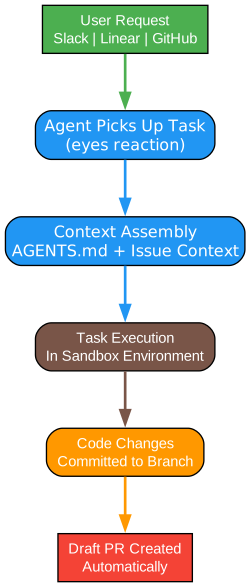
The workflow diagram illustrates how user requests flow through Open SWE’s processing pipeline, from initial invocation to final pull request creation. This pipeline design ensures consistent handling of tasks while providing visibility and control at each stage.
Stage 1: Request Reception
The pipeline begins when a user submits a request through one of the supported platforms. Whether it is a Slack message like “@openswe fix the login bug”, a Linear issue status change, or a GitHub webhook event, the invocation layer captures the request and normalizes it into a standard format. This normalization includes extracting the user identity, request content, and relevant context such as the target repository and branch.
Request reception also involves initial validation to ensure the request is well-formed and actionable. Malformed requests are rejected with helpful error messages, while valid requests are queued for processing. The queue system enables asynchronous handling, allowing the platform to manage multiple concurrent requests without overwhelming resources.
Stage 2: Context Aggregation
Once a request is accepted, the context engineering layer begins gathering relevant information. This includes parsing the AGENTS.md file from the target repository to understand project-specific conventions, retrieving the issue or thread conversation for background context, and identifying relevant code files through semantic search.
Context aggregation is iterative and adaptive. Initial context is used to generate a preliminary plan, which may reveal the need for additional context. The agent can request more information, such as specific file contents or documentation, to refine its understanding. This iterative approach balances comprehensiveness with efficiency, avoiding unnecessary context retrieval.
Stage 3: Planning and Decomposition
With sufficient context, the agent enters the planning phase where it decomposes the task into actionable steps. For complex tasks, this involves breaking down the request into subtasks, identifying dependencies between subtasks, and determining the optimal execution order. The plan is represented as a directed acyclic graph (DAG), enabling parallel execution of independent subtasks.
Planning leverages the agent’s reasoning capabilities to anticipate challenges and prepare contingency approaches. The agent considers edge cases, potential conflicts with existing code, and testing requirements. The resulting plan is stored in the state graph, allowing for progress tracking and recovery in case of interruptions.
Stage 4: Parallel Execution
Execution occurs within isolated sandbox environments, with independent subtasks running in parallel when possible. The orchestration layer manages sandbox allocation, ensuring each subagent has the resources it needs. Real-time messaging keeps users informed of progress, with updates posted to the originating platform (Slack, Linear, or GitHub).
During execution, the agent uses its tools to read files, write code, run tests, and validate changes. Each action is logged for auditability, and the agent can adjust its approach based on intermediate results. For example, if tests fail, the agent analyzes the failure and attempts fixes before proceeding.
Stage 5: Validation and Review
Before changes are committed, the validation layer applies quality checks. Code is analyzed for style compliance, potential bugs, and security vulnerabilities. Tests are executed to verify functionality, and the agent’s changes are compared against the original requirements to ensure completeness.
Validation results are compiled into a report that accompanies the pull request. This report includes test outcomes, code quality metrics, and any warnings or notes from the agent. Human reviewers can use this information to quickly understand the changes and focus their attention on critical areas.
Stage 6: Pull Request Creation
The final stage creates a pull request with all changes, validation results, and a comprehensive description. The PR description includes the original request, the agent’s approach, key changes made, and any considerations for reviewers. Links to related issues or Linear tickets are automatically added for traceability.
Pull request creation triggers standard repository workflows, such as CI/CD pipelines and required approvals. The agent monitors the PR status and can respond to review feedback by making additional changes if needed. This creates a collaborative loop where the agent and human reviewers work together to refine the implementation.
Sandbox Integration

Understanding the Pluggable Sandbox Architecture
The sandbox architecture diagram demonstrates Open SWE’s flexible approach to isolated code execution. By supporting multiple sandbox providers, the platform can adapt to different organizational requirements, from cost-effective cloud solutions to enterprise-grade dedicated environments.
Why Sandboxes Matter
Code generated by AI agents must be executed in isolated environments for several critical reasons. First, security: untrusted code should never run directly on production systems or developer machines. Second, reproducibility: sandboxed environments ensure consistent behavior regardless of where the agent is deployed. Third, resource management: sandboxes provide controlled resource limits, preventing runaway processes from affecting other operations.
Open SWE’s sandbox abstraction layer provides a unified interface for code execution, regardless of the underlying provider. This abstraction includes operations like file system access, command execution, environment variable management, and process lifecycle control. Each provider implements this interface, translating calls into provider-specific API operations.
Modal Integration
Modal offers serverless, on-demand compute with fast cold starts and automatic scaling. This makes it ideal for organizations with variable workloads or those seeking to minimize infrastructure management. Modal sandboxes are created dynamically for each task, ensuring clean environments without state leakage between executions.
The Modal integration supports custom container images, allowing teams to pre-install dependencies and tools specific to their projects. Resource limits (CPU, memory, GPU) can be configured per task, enabling cost optimization for different task types. Modal’s pricing model, based on actual compute time, aligns well with the asynchronous nature of Open SWE tasks.
Daytona Integration
Daytona provides development environment management with a focus on consistency and developer experience. It excels in scenarios where teams need standardized environments that mirror production configurations. Daytona workspaces can be persisted between tasks, allowing for incremental development and state preservation.
For Open SWE, Daytona integration enables the agent to work within environments that closely match what developers use locally. This reduces the gap between agent-generated code and human review, as both operate in identical environments. Daytona also supports team collaboration features, allowing multiple agents or humans to work on the same workspace.
Runloop Integration
Runloop specializes in AI agent execution environments, offering features specifically designed for autonomous coding tasks. Its architecture optimizes for the iterative nature of agent work, where code is written, tested, modified, and retested multiple times. Runloop provides intelligent caching of dependencies and build artifacts to accelerate these cycles.
The Runloop integration includes advanced debugging capabilities, allowing the agent to inspect running processes, analyze memory state, and capture diagnostic information. This is particularly valuable for complex debugging tasks where the agent needs deep visibility into execution behavior.
LangSmith Integration
LangSmith, part of the LangChain ecosystem, provides tracing and observability for LLM applications. While primarily a monitoring tool, LangSmith also offers sandbox capabilities for testing and development. This integration is particularly useful for teams already using LangSmith for their LLM observability needs.
The LangSmith sandbox integration provides detailed traces of agent reasoning, tool calls, and LLM interactions. This visibility is invaluable for debugging agent behavior, optimizing prompts, and understanding decision-making processes. Teams can replay agent sessions to analyze what went right or wrong in specific tasks.
Choosing the Right Sandbox
Selecting a sandbox provider depends on organizational priorities. Modal offers the best cost-efficiency for sporadic workloads. Daytona excels in enterprise environments with strict compliance requirements. Runloop provides the most advanced features for complex agent tasks. LangSmith integrates seamlessly with existing LangChain observability workflows.
Organizations can configure multiple providers and route tasks based on requirements. For example, simple bug fixes might use Modal for cost efficiency, while complex feature development might use Runloop for its advanced debugging capabilities. The abstraction layer makes this routing transparent to the agent itself.
Key Features
Understanding the Core Capabilities
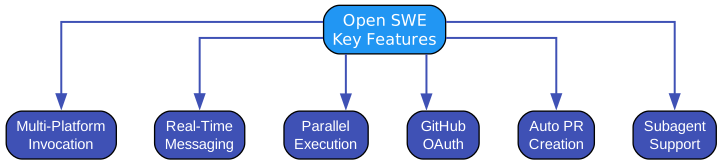
The features diagram highlights Open SWE’s key capabilities that distinguish it from other coding assistants and automation tools. Each feature addresses specific needs in the software development lifecycle, enabling comprehensive automation of coding tasks.
Multi-Platform Invocation
Open SWE’s multi-platform support allows teams to interact with the agent through their preferred tools. Slack integration enables natural language commands within team channels, making it easy to request code changes without leaving the conversation. Linear integration connects agent tasks to project management workflows, automatically updating issue status as work progresses. GitHub webhooks enable event-driven automation, triggering agent actions on pull request creation, issue assignment, or custom repository dispatches.
This multi-platform approach ensures that Open SWE fits into existing workflows rather than requiring teams to adopt new tools. Each integration is designed to feel native to its platform, using familiar interaction patterns and providing context-appropriate responses. The unified backend ensures consistent behavior regardless of the invocation source.
Real-Time Messaging
Unlike batch processing systems that provide results only upon completion, Open SWE maintains continuous communication throughout task execution. Real-time messaging keeps stakeholders informed of progress, challenges, and intermediate results. This transparency builds trust and allows for early intervention if the agent’s approach diverges from expectations.
Messages include status updates, code snippets being worked on, test results, and questions for clarification. Users can respond to these messages to provide additional guidance, effectively collaborating with the agent in real-time. This interactive model combines the autonomy of an agent with the oversight of human-in-the-loop systems.
Parallel Execution
Complex tasks often involve independent subtasks that can be executed concurrently. Open SWE’s orchestration layer identifies these opportunities and dispatches subtasks to multiple sandbox environments in parallel. This parallelization significantly reduces overall task completion time, especially for tasks involving multiple files or services.
Parallel execution is managed through a dependency graph that tracks which subtasks depend on others. The orchestrator schedules tasks based on this graph, maximizing parallelism while respecting dependencies. Resource allocation ensures that parallel tasks do not compete for limited resources, maintaining stable performance even under heavy load.
GitHub OAuth Integration
Security is paramount when granting an AI agent access to code repositories. Open SWE uses GitHub OAuth for secure, scoped authentication, ensuring the agent only accesses repositories it is explicitly authorized to modify. OAuth tokens are managed securely, with support for token rotation and revocation.
The integration supports fine-grained permissions, allowing organizations to restrict agent access to specific repositories, branches, or file types. Audit logs capture all agent actions, providing a complete record for compliance and security review. This enterprise-ready security model makes Open SWE suitable for organizations with strict access control requirements.
Automatic PR Creation
The culmination of an agent task is a pull request containing the implemented changes. Open SWE automates this process, creating well-structured PRs with comprehensive descriptions, test results, and validation reports. The PR description includes the original request, the agent’s approach, key changes, and any considerations for reviewers.
Automatic PR creation integrates with existing repository workflows, triggering CI/CD pipelines and notifying reviewers as configured. The agent monitors PR status and can respond to review feedback by making additional changes. This creates a seamless handoff between agent execution and human review, combining AI efficiency with human judgment.
Subagent Support
For complex tasks requiring specialized expertise, Open SWE can delegate work to subagents. Subagents are specialized agents designed for specific domains, such as testing, documentation, or security analysis. The main orchestrator coordinates subagent activities, aggregating results and managing dependencies.
Subagent support enables a divide-and-conquer approach to complex problems. A feature implementation might involve a code generation subagent, a testing subagent, and a documentation subagent working in concert. Each subagent operates within its domain of expertise, producing higher-quality results than a generalist agent could achieve alone.
AGENTS.md Pattern
The AGENTS.md pattern is a key innovation for providing repository-specific context to the agent. This file, placed in the repository root, contains coding standards, architectural guidelines, preferred libraries, and other context the agent should consider when working on the codebase. This ensures agent-generated code aligns with project conventions.
AGENTS.md can also define custom tools, validation rules, and approval workflows specific to the repository. This extensibility allows teams to tailor agent behavior to their unique needs without modifying the core platform. The pattern has been adopted by other agent frameworks, becoming a de facto standard for repository context.
Installation
Installing Open SWE requires setting up several components: the core agent service, sandbox provider(s), and platform integrations. The following steps outline a typical installation using Modal as the sandbox provider and Slack as the invocation platform.
Prerequisites
Before installation, ensure you have the following:
- Python 3.10 or higher
- A Modal account with API credentials
- A Slack workspace with admin access for app installation
- GitHub repository access with OAuth permissions
- LangChain API key for LLM access
Step 1: Clone the Repository
git clone https://github.com/langchain-ai/open-swe.git
cd open-swe
Step 2: Install Dependencies
pip install -e .
This installs the Open SWE package and all required dependencies, including LangChain, LangGraph, and provider-specific SDKs.
Step 3: Configure Environment Variables
Create a .env file with your credentials:
# LLM Configuration
LANGCHAIN_API_KEY=your_langchain_api_key
LANGCHAIN_TRACING_V2=true

# Modal Configuration
MODAL_TOKEN_ID=your_modal_token_id
MODAL_TOKEN_SECRET=your_modal_token_secret

# Slack Configuration
SLACK_BOT_TOKEN=your_slack_bot_token
SLACK_SIGNING_SECRET=your_slack_signing_secret

# GitHub Configuration
GITHUB_TOKEN=your_github_token
Step 4: Configure AGENTS.md
Create an AGENTS.md file in your repository root:
# Agent Context

## Coding Standards
- Use Python 3.10+ features
- Follow PEP 8 style guidelines
- Write docstrings for all public functions

## Architecture
- This is a Django application
- Use Django ORM for database operations
- Follow the repository pattern for data access

## Testing
- Run tests with pytest
- Maintain 80% code coverage minimum
- Use factory_boy for test data

## Deployment
- Changes require approval from @code-owner
- Never modify files in the /config directory
Step 5: Start the Service
python -m open_swe.server
The server will start listening for webhooks from Slack, Linear, and GitHub. You can now invoke the agent through your configured platforms.
Usage Examples
Basic Bug Fix via Slack
@openswe fix the null pointer exception in the user authentication module
The agent will:
- Analyze the authentication module code
- Identify the null pointer issue
- Implement a fix with proper null checks
- Run tests to verify the fix
- Create a pull request with the changes
Feature Implementation via Linear
When you assign a Linear issue to Open SWE:
- The agent reads the issue description
- Plans the implementation approach
- Creates necessary files and modifications
- Writes tests for the new feature
- Updates documentation
- Creates a pull request linked to the issue
GitHub Webhook Automation
Configure GitHub webhooks to trigger Open SWE on specific events:
- Issue creation: Automatically triage and provide initial analysis
- Pull request creation: Run automated code review
- Repository dispatch: Custom automation workflows
Advanced Configuration
Custom Subagents
Define custom subagents for specialized tasks:
from open_swe import Subagent

class SecurityAuditSubagent(Subagent):
    name = "security-audit"
    description = "Performs security audit on code changes"

    def execute(self, context):
        # Custom security analysis logic
        vulnerabilities = self.analyze_code(context.files)
        return self.format_report(vulnerabilities)
Middleware Hooks
Add custom middleware for approval workflows:
from open_swe import Middleware

class ApprovalMiddleware(Middleware):
    def before_pr_creation(self, context):
        if context.affects_critical_files:
            return self.request_approval(context)
        return context
Comparison with Industry Leaders
Open SWE is part of a growing ecosystem of autonomous coding agents. Understanding how it compares to industry leaders helps organizations choose the right tool for their needs.
Stripe Minions
Stripe’s Minions system, described in their engineering blog, represents an early approach to autonomous coding at scale. Minions focuses on batch processing of well-defined tasks, such as dependency updates and code migrations. It excels in scenarios where tasks are repetitive and well-scoped.
Comparison: Open SWE provides more flexibility for ad-hoc, natural language requests. While Minions requires predefined task templates, Open SWE can interpret and plan novel tasks. However, Minions’ batch-oriented approach may be more efficient for large-scale, repetitive operations.
Ramp Inspect
Ramp’s Inspect system focuses on code review automation, using LLMs to analyze pull requests and provide feedback. It integrates with CI/CD pipelines to add automated review comments on style, potential bugs, and best practices.
Comparison: Open SWE encompasses the full development lifecycle, including code generation, not just review. While Inspect provides feedback on human-written code, Open SWE can write code itself. Organizations might use both: Open SWE for implementation and Inspect for additional review.
Coinbase Cloudbot
Cloudbot, Coinbase’s internal agent, specializes in infrastructure automation. It handles cloud resource provisioning, configuration management, and deployment automation. Cloudbot integrates deeply with cloud provider APIs and infrastructure-as-code tools.
Comparison: Open SWE has broader applicability for application code, while Cloudbot is optimized for infrastructure tasks. Organizations with significant cloud infrastructure might use both: Cloudbot for infrastructure and Open SWE for application development.
Key Differentiators
| Feature | Open SWE | Stripe Minions | Ramp Inspect | Coinbase Cloudbot |
|---|---|---|---|---|
| Code Generation | Yes | Limited | No | No |
| Code Review | Yes | No | Yes | No |
| Infrastructure | No | No | No | Yes |
| Multi-Platform | Yes | No | No | No |
| Open Source | Yes | No | No | No |
| Async Execution | Yes | Yes | No | Yes |
Conclusion
Open SWE represents a significant advancement in autonomous coding agents, offering organizations a powerful tool for automating software development tasks. Its seven-layer architecture provides a robust foundation for handling complex tasks, while its pluggable sandbox system ensures security and flexibility.
The multi-platform invocation model, real-time messaging, and subagent support make Open SWE suitable for diverse organizational needs. Whether you are looking to automate bug fixes, implement features, or maintain documentation, Open SWE provides the capabilities to reduce manual effort and accelerate development cycles.
As an open-source project with strong community support, Open SWE continues to evolve with new features, integrations, and improvements. Organizations can contribute customizations back to the community while benefiting from ongoing development by the LangChain team and contributors worldwide.
Resources
Related Posts
- AgentSkillOS: Skill Orchestration System
- MattPocock Skills: AI Agent Workflows
- DESIGN.md: AI-Powered Design Systems