OpenDataLoader PDF: Transform PDFs into AI-Ready Data
In the era of large language models and retrieval-augmented generation (RAG), extracting structured data from PDFs has become a critical bottleneck. OpenDataLoader PDF emerges as the definitive solution, ranking #1 in extraction benchmarks while providing the first open-source end-to-end PDF accessibility automation pipeline.
The PDF Problem
PDFs are everywhere. They contain valuable information locked in complex layouts, multi-column structures, tables, and scanned images. Traditional PDF parsers struggle with:
- Incorrect reading order in multi-column documents
- Broken table structures that lose semantic meaning
- Missing element coordinates needed for source citations
- No accessibility tags for compliance with regulations
OpenDataLoader PDF solves all these problems with a deterministic, high-performance parsing engine that outputs AI-ready data formats.
Architecture Overview
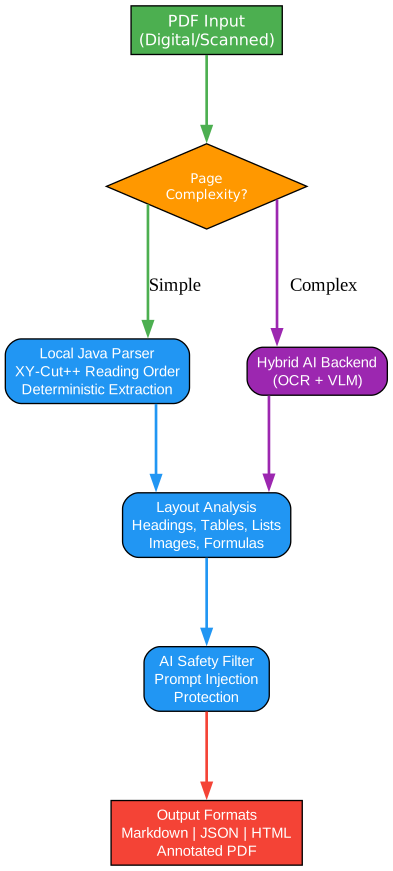
Understanding the Architecture
The architecture diagram above illustrates the intelligent dual-mode processing system that makes OpenDataLoader PDF unique. Let’s break down each component:
PDF Input Layer
The system accepts any PDF format, whether digital (with selectable text) or scanned documents requiring OCR. This flexibility is crucial for enterprises dealing with legacy document archives. The input layer performs initial validation, detecting whether the PDF has embedded structure tags or requires full layout analysis.
Complexity Detection Router
At the heart of the architecture sits an intelligent router that analyzes page complexity in real-time. This decision point uses heuristics such as:
- Text density and distribution patterns
- Presence of complex table structures (merged cells, nested tables)
- Image-to-text ratios
- Mathematical formula indicators
- Multi-column layout detection
Simple pages with straightforward layouts route to the fast local parser (0.02s/page), while complex pages with tables, formulas, or scanned content route to the hybrid AI backend (0.46s/page). This routing ensures optimal performance without sacrificing accuracy.
Local Java Parser
The deterministic local parser is the core engine, built on Java 11+ for cross-platform compatibility. It implements the XY-Cut++ algorithm for reading order detection, which recursively partitions the page space to identify logical reading sequences. This algorithm excels at:
- Multi-column document layouts
- Sidebars and callout boxes
- Headers and footers separation
- Figure and table caption associations
The parser operates entirely locally with no external API calls, ensuring data privacy for sensitive documents in legal, healthcare, and financial domains.
Hybrid AI Backend
For complex content that exceeds rule-based parsing capabilities, the hybrid backend leverages:
- Vision Language Models (VLM) for chart and image understanding
- OCR engines supporting 80+ languages
- Formula recognition for LaTeX extraction
- Advanced table structure detection for borderless tables
The backend runs locally on your infrastructure, maintaining the same privacy guarantees as the local parser. Organizations can deploy it on-premises or in private clouds.
Layout Analysis Engine
Both processing paths converge at the layout analysis engine, which performs comprehensive structure detection:
- Heading hierarchy (H1-H6) with font analysis
- List detection (numbered, bulleted, nested)
- Table extraction with cell relationships
- Image and figure extraction with coordinates
- Formula detection and LaTeX conversion
The engine outputs structured data with bounding boxes for every element, enabling precise source citations in RAG applications.
AI Safety Filter
A critical but often overlooked component is the prompt injection protection layer. PDFs can contain hidden text, zero-size fonts, and off-page content designed to manipulate AI systems. OpenDataLoader automatically filters:
- Transparent text overlays
- Zero-size font attacks
- Content outside visible page boundaries
- Suspicious invisible layers
This protection is essential for enterprises deploying AI systems that process untrusted PDF documents.
Output Generation
The final stage produces multiple output formats simultaneously:
- JSON: Structured data with bounding boxes, semantic types, and element IDs
- Markdown: Clean text preserving hierarchy and table structures
- HTML: Styled web-ready output
- Annotated PDF: Visual debugging overlay showing detected structures
Each format serves different use cases, from RAG pipelines to web display to compliance auditing.
PDF Parsing Pipeline

Understanding the Parsing Pipeline
The parsing pipeline represents the sequential processing stages that transform raw PDF bytes into structured, AI-ready data. Each stage builds upon the previous, progressively adding semantic understanding.
Stage 1: PDF Input
The pipeline begins with raw PDF ingestion. OpenDataLoader handles all PDF versions (1.0 through 2.0) and variants including:
- Linearized (fast web view) PDFs
- Encrypted PDFs (with password)
- Compressed object streams
- PDF/A archival formats
The input stage also performs initial validation, checking for corruption, encryption status, and embedded metadata extraction.
Stage 2: Text Extraction
Text extraction goes beyond simple string extraction. The engine:
- Decodes all font encodings including custom encodings
- Handles Unicode mappings correctly
- Preserves text positioning information
- Extracts font properties (family, size, weight, color)
- Identifies text direction for multi-language documents
This stage produces a raw text stream with position metadata, ready for layout analysis.
Stage 3: Layout Detection
Layout detection is where the magic happens. Using computer vision techniques adapted for document analysis:
- Connected component analysis identifies text blocks
- White space analysis separates columns and sections
- Geometric clustering groups related elements
- Visual hierarchy detection identifies headings by font size and weight
The result is a structured understanding of page regions and their relationships.
Stage 4: Table Parsing
Tables are notoriously difficult for PDF parsers. OpenDataLoader uses multiple strategies:
- Border detection for standard tables
- Cell alignment analysis for borderless tables
- Header row identification
- Merged cell handling (rowspan/colspan)
- Nested table detection
The table parser outputs structured data that can be converted to Markdown tables, HTML, or JSON arrays with preserved cell relationships.
Stage 5: Reading Order
The XY-Cut++ algorithm determines the logical reading order:
- Recursively partition the page into regions
- Apply heuristics to determine reading direction
- Handle special cases (sidebars, callouts, captions)
- Produce a linear sequence matching human reading patterns
This stage is critical for RAG applications where context order affects retrieval quality.
Stage 6: Bounding Box Generation
Every element receives precise coordinates:
- Format: [left, bottom, right, top] in PDF points (72pt = 1 inch)
- Page number reference for multi-page documents
- Element ID for cross-referencing
These bounding boxes enable “click to source” functionality in RAG interfaces, showing users exactly where information originated.
Stage 7: Structured Output
The final stage assembles all extracted information into the requested output formats. The structured output includes:
- Element type classification
- Confidence scores (in hybrid mode)
- Cross-references between elements
- Metadata preservation
This comprehensive output enables downstream applications to make informed decisions about content processing.
Hybrid Mode: Best of Both Worlds
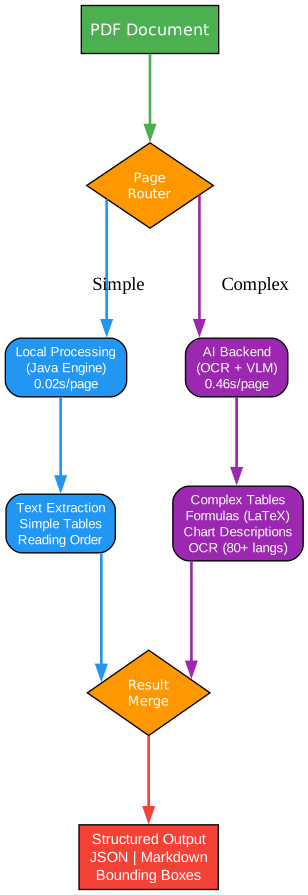
Understanding Hybrid Mode
Hybrid mode represents the optimal balance between speed and accuracy, combining deterministic local processing with AI-powered analysis for complex content. This architecture ensures you never sacrifice performance when you don’t need to, while still having the power to handle challenging documents.
Page Router: The Decision Engine
The page router is the intelligent traffic controller of hybrid mode. It analyzes each page in milliseconds using lightweight heuristics:
- Text density metrics
- Font variation count
- Image coverage percentage
- Table structure indicators
- Formula presence detection
Pages scoring below complexity thresholds route to the local Java engine (0.02s/page), while complex pages route to the AI backend (0.46s/page). This routing happens transparently without user intervention.
Local Processing Path
The local Java engine excels at:
- Standard text extraction with perfect accuracy
- Simple tables with clear borders
- Single-column layouts
- Digital PDFs with embedded fonts
- Documents with consistent formatting
Running at 60+ pages per second on CPU, the local path handles the majority of enterprise documents efficiently. No GPU required, no external dependencies, complete data privacy.
AI Backend Path
When complexity demands it, the AI backend provides:
- Complex Table Understanding: Borderless tables, merged cells, nested tables
- Formula Recognition: Mathematical equations converted to LaTeX notation
- Chart Description: AI-generated descriptions of charts and figures
- OCR: 80+ language support for scanned documents
- Picture Understanding: VLM-based image content analysis
The AI backend runs locally on your infrastructure, typically leveraging GPU acceleration when available but functioning on CPU for smaller workloads.
Feature Extraction
Both paths feed into comprehensive feature extraction:
- Local path: Text, simple tables, reading order, bounding boxes
- AI path: Complex tables, formulas, OCR text, image descriptions
The extraction stage normalizes outputs from both paths into a unified format, ensuring consistent downstream processing regardless of which path handled the content.
Result Merge
The merge stage combines results from both processing paths:
- Maintains page-level ordering
- Preserves element relationships
- Handles edge cases where pages were processed differently
- Produces unified JSON/Markdown/HTML output
This seamless integration means users never need to worry about which mode processed which content.
Performance Characteristics
| Metric | Local Mode | Hybrid Mode |
|---|---|---|
| Speed | 0.02s/page | 0.46s/page |
| Accuracy (Overall) | 0.831 | 0.907 |
| Table Accuracy | 0.489 | 0.928 |
| GPU Required | No | No (optional) |
| Data Privacy | Complete | Complete |
The hybrid mode achieves #1 ranking in benchmarks while maintaining reasonable throughput and complete data privacy.
PDF Accessibility Automation
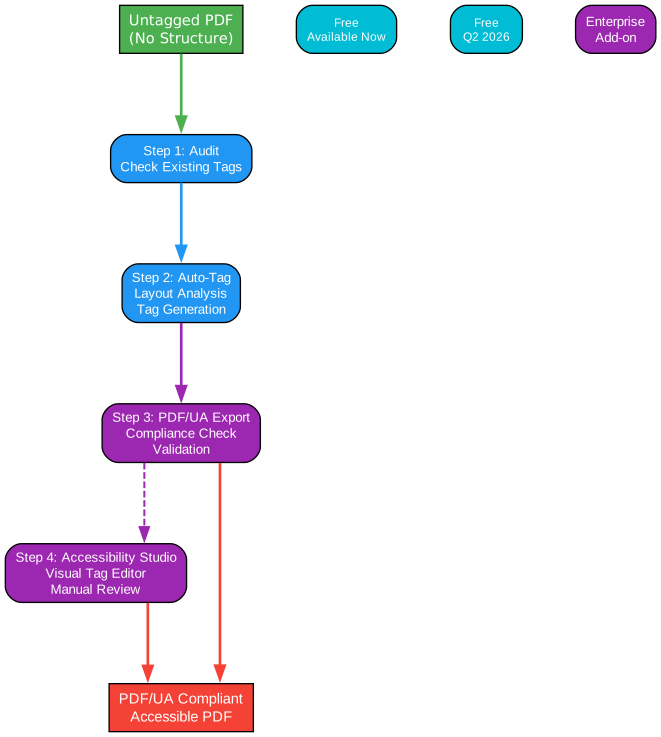
Understanding the Accessibility Pipeline
The accessibility pipeline addresses a critical compliance gap affecting millions of documents. With regulations like the European Accessibility Act (EAA) requiring accessible digital products by June 2025, organizations face expensive manual remediation. OpenDataLoader provides the first open-source end-to-end automation.
Step 1: Audit (Available Now)
The audit stage examines existing PDFs to determine their accessibility status:
- Detects presence of structure tags
- Identifies untagged content
- Reports compliance gaps
- Provides remediation estimates
This free feature helps organizations understand the scope of their accessibility challenges before committing resources.
Step 2: Auto-Tag (Q2 2026)
The revolutionary auto-tagging feature will generate structure tags for untagged PDFs:
- Layout analysis identifies document structure
- Heading hierarchy is determined and tagged
- Tables receive proper TH/TD markup
- Lists are identified and structured
- Reading order is encoded
This will be released under Apache 2.0 license, making it freely available for commercial use. No proprietary SDK dependencies.
Step 3: PDF/UA Export (Enterprise)
Converting Tagged PDFs to PDF/UA-1 or PDF/UA-2 compliance requires:
- ISO 14289-1 validation
- Accessibility metadata injection
- Alternative text verification
- Color contrast validation
- Navigation structure validation
This enterprise add-on provides the final step for regulatory compliance, validated using veraPDF (the industry-reference open-source validator).
Step 4: Accessibility Studio (Enterprise)
For complex documents requiring manual review:
- Visual tag editor
- Structure tree navigation
- Reading order adjustment
- Alternative text management
- Validation dashboard
The studio enables accessibility specialists to review and correct auto-generated tags efficiently.
Why This Matters
Manual PDF remediation costs $50-200 per document and doesn’t scale. Organizations with thousands of documents face impossible economics. OpenDataLoader’s automation pipeline reduces this to a computational cost, making accessibility achievable at scale.
The collaboration with PDF Association and Dual Lab (veraPDF developers) ensures the output meets the Well-Tagged PDF specification, validated programmatically rather than relying on manual review.
Output Formats
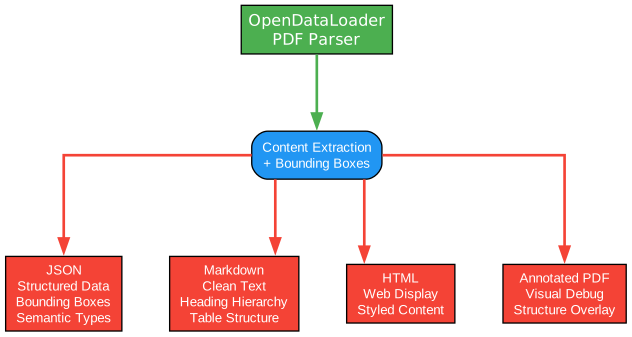
Understanding Output Options
OpenDataLoader produces multiple output formats simultaneously, each serving different use cases in the document processing pipeline.
JSON Output
The JSON format provides maximum structure for programmatic processing:
- Every element has type, ID, and bounding box
- Semantic types: heading, paragraph, table, list, image, caption, formula
- Page references for multi-page documents
- Font metadata: family, size, weight, color
- Cross-references between related elements
Example JSON structure:
{
  "type": "heading",
  "id": 42,
  "level": "Title",
  "page number": 1,
  "bounding box": [72.0, 700.0, 540.0, 730.0],
  "heading level": 1,
  "font": "Helvetica-Bold",
  "font size": 24.0,
  "text color": "[0.0]",
  "content": "Introduction"
}
This structure enables precise RAG retrieval with source citations.
Markdown Output
Markdown provides clean text for LLM context windows:
- Preserves heading hierarchy with # notation
- Tables rendered in Markdown format
- Lists with proper indentation
- Code blocks for formulas
- Image references with alt text
The Markdown output is ideal for:
- Direct LLM context injection
- Semantic chunking for RAG
- Documentation generation
- Web publishing
HTML Output
HTML output provides styled web-ready content:
- Preserves visual hierarchy
- Table structures with CSS classes
- Image embedding options
- Responsive layout support
Annotated PDF
The annotated PDF output overlays detected structures:
- Bounding boxes around each element
- Color-coded by type (headings, tables, images)
- Element IDs for debugging
- Confidence scores (in hybrid mode)
This format is invaluable for:
- Debugging extraction accuracy
- Training data validation
- Compliance auditing
- Visual documentation
Installation and Quick Start
Python Installation
pip install -U opendataloader-pdf
Basic Usage
import opendataloader_pdf

# Batch process multiple files
opendataloader_pdf.convert(
    input_path=["file1.pdf", "file2.pdf", "folder/"],
    output_dir="output/",
    format="markdown,json"
)
Hybrid Mode for Complex Documents
# Install with hybrid support
pip install -U "opendataloader-pdf[hybrid]"

# Terminal 1: Start backend server
opendataloader-pdf-hybrid --port 5002

# Terminal 2: Process documents
opendataloader-pdf --hybrid docling-fast file1.pdf file2.pdf folder/
LangChain Integration
from langchain_opendataloader_pdf import OpenDataLoaderPDFLoader

loader = OpenDataLoaderPDFLoader(
    file_path=["file1.pdf", "file2.pdf", "folder/"],
    format="text"
)
documents = loader.load()
Key Features Summary
| Feature | Capability | Status |
|---|---|---|
| Text Extraction | Correct reading order, bounding boxes | Available |
| Table Parsing | Simple and complex tables | Available |
| OCR | 80+ languages | Available (Hybrid) |
| Formula Extraction | LaTeX output | Available (Hybrid) |
| Chart Description | AI-generated descriptions | Available (Hybrid) |
| AI Safety | Prompt injection filtering | Available |
| Auto-Tagging | Tagged PDF generation | Q2 2026 |
| PDF/UA Export | Compliance validation | Enterprise |
Benchmark Performance
OpenDataLoader PDF ranks #1 overall in extraction benchmarks:
| Engine | Overall | Reading Order | Table | Heading | Speed |
|---|---|---|---|---|---|
| OpenDataLoader [hybrid] | 0.907 | 0.934 | 0.928 | 0.821 | 0.463s |
| docling | 0.882 | 0.898 | 0.887 | 0.824 | 0.762s |
| marker | 0.861 | 0.890 | 0.808 | 0.796 | 53.93s |
| unstructured [hi_res] | 0.841 | 0.904 | 0.588 | 0.749 | 3.008s |
Scores normalized to [0, 1]. Higher is better for accuracy, lower is better for speed.
Why OpenDataLoader PDF?
For RAG Applications: Structured output with bounding boxes enables precise source citations. Users can click to see exactly where in the original PDF the answer originated.
For Data Extraction: #1 benchmark accuracy ensures reliable extraction from complex documents including scientific papers, financial reports, and legal documents.
For Accessibility Compliance: First open-source end-to-end PDF accessibility pipeline, validated by PDF Association and veraPDF.
For Privacy: 100% local processing. No API calls, no cloud dependencies. Your documents never leave your infrastructure.
For Performance: 60+ pages per second in local mode, 2+ pages per second in hybrid mode. No GPU required.
Conclusion
OpenDataLoader PDF represents a paradigm shift in PDF processing for AI applications. By combining deterministic parsing with AI-powered analysis, it achieves best-in-class accuracy while maintaining complete data privacy. The upcoming accessibility automation features will make PDF compliance achievable at scale, eliminating the manual remediation bottleneck.
Whether you’re building RAG pipelines, extracting structured data, or preparing documents for accessibility compliance, OpenDataLoader PDF provides the tools you need with open-source transparency and enterprise-grade capabilities.
Related Posts
- AgentSkillOS: Skill Orchestration System
- MattPocock Skills: AI Agent Workflows
- DESIGN.md: AI-Powered Design Systems

Enjoyed this post? Never miss out on future posts by following us
