Reddit Video Maker Bot: Automated Content Creation from Reddit
RedditVideoMakerBot is an innovative open-source project that automates the creation of engaging video content from Reddit posts. With over 10,302 GitHub stars and 2,553 forks, this project has become a go-to solution for content creators looking to produce viral-style videos for TikTok, YouTube Shorts, and Instagram Reels. Created by Lewis Menelaws and developed by TMRRW, the bot eliminates the tedious process of video editing by programmatically generating videos complete with text-to-speech narration, background footage, and synchronized screenshots.
The project addresses a common challenge in content creation: the time-consuming process of gathering materials, editing videos, and adding voiceovers. By automating these steps, RedditVideoMakerBot enables creators to focus on content strategy rather than production mechanics. The bot leverages Python’s powerful ecosystem, including Playwright for web automation, FFmpeg for video processing, and multiple text-to-speech engines for voice generation.
Architecture Overview
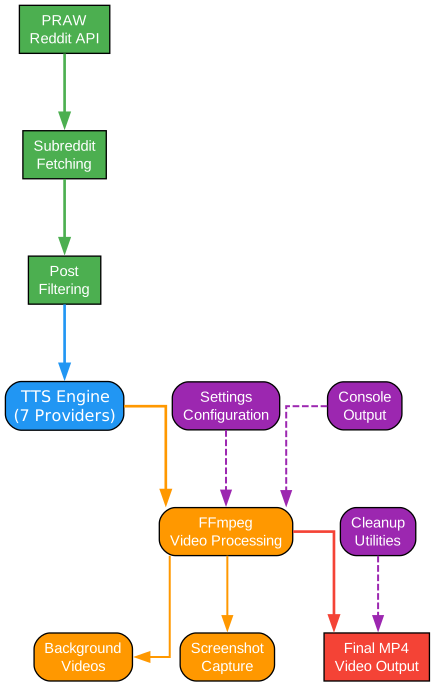
Understanding the Architecture
The architecture of RedditVideoMakerBot is designed with modularity and extensibility at its core. The system is organized into four primary components that work together seamlessly to transform raw Reddit content into polished video output.
Reddit Integration Layer (PRAW)
The Reddit Integration Layer serves as the data acquisition component of the system. Built on the Python Reddit API Wrapper (PRAW), this layer handles authentication, content discovery, and data extraction from Reddit’s vast repository of user-generated content. The integration supports multiple subreddit sources, allowing users to target specific communities or discover trending content automatically. The layer implements intelligent filtering mechanisms that can exclude NSFW content, identify previously processed posts, and sort submissions by various metrics including upvotes, comments, and relevance using AI-powered similarity algorithms.
TTS Engine Module
The Text-to-Speech Engine Module represents one of the most sophisticated components of the architecture. Supporting seven different TTS providers, this module offers unparalleled flexibility in voice selection. Each provider has unique characteristics: TikTok TTS provides access to popular Disney character voices with a 200-character limit per request; Google Translate TTS offers free, unlimited usage with support for 5000 characters; AWS Polly delivers neural voice quality with a 3000-character capacity; ElevenLabs provides premium AI-generated voices for professional output; Streamlabs Polly offers a free alternative with 550-character segments; OpenAI TTS brings cutting-edge AI voices with 4096-character support; and PyTTSx enables completely offline operation for privacy-focused workflows.
Video Creation Pipeline
The Video Creation Pipeline orchestrates the assembly of all media elements into the final output. This component manages background video selection from a curated library including Minecraft parkour, GTA gameplay, and other engaging footage. It handles screenshot capture through Playwright, ensuring high-quality captures of Reddit posts and comments. The pipeline implements sophisticated timing algorithms that synchronize audio narration with visual elements, creating a seamless viewing experience. FFmpeg serves as the rendering engine, providing hardware-accelerated encoding through NVENC support for faster processing times.
Utilities and Configuration
The Utilities layer provides essential supporting functionality including configuration management through TOML files, console output formatting with Rich library integration, cleanup operations for temporary files, and thumbnail generation for video metadata. The configuration system supports both interactive setup and manual editing, allowing users to customize every aspect of the video generation process from voice selection to background audio volume levels.
Workflow Pipeline

Understanding the Workflow Pipeline
The workflow pipeline demonstrates the complete journey from Reddit content discovery to final video output. This seven-stage process ensures consistent, high-quality video generation with minimal user intervention.
Stage 1: Initialization and Configuration
The workflow begins with initialization, where the bot loads user preferences from the configuration file or prompts for missing values. This stage establishes Reddit API credentials, selects the target subreddit, and configures TTS preferences. The system validates all settings before proceeding, catching potential issues early in the process. Configuration options include video resolution (default 1080x1920 for vertical format), opacity settings for screenshot overlays, background video selection, and audio volume levels for both narration and background music.
Stage 2: Reddit Content Fetching
During content fetching, the bot connects to Reddit using PRAW and retrieves posts based on user-defined criteria. The system can filter by post type (text, link, video), minimum upvote threshold, and content age. For thread-based videos, the bot also fetches top comments, ranking them by engagement metrics. The AI similarity sorting feature can identify comments that are most relevant to the post topic, ensuring coherent narrative flow in the final video. All fetched content is stored temporarily for processing.
Stage 3: Text-to-Speech Generation
The TTS generation stage converts textual content into audio narration. The system processes the post title first, followed by the post body (in story mode) or individual comments. Each TTS engine implements a standardized interface, allowing seamless switching between providers. The module handles text chunking for engines with character limits, automatically splitting long content into appropriate segments. Generated audio files are saved as MP3s with metadata tracking their position in the narrative sequence.
Stage 4: Screenshot Capture
Screenshot capture utilizes Playwright’s headless browser capabilities to capture high-quality images of Reddit posts and comments. The system supports both light and dark mode captures, with cookie-based authentication enabling access to age-restricted content. Screenshots are captured at configurable resolutions and automatically cropped to remove unnecessary UI elements. The capture process includes dynamic content loading handling, ensuring all images and text are fully rendered before capture.
Stage 5: Background Preparation
Background preparation involves selecting and processing background video footage. The system maintains a library of background videos in the assets folder, with options including Minecraft parkour, GTA driving scenes, and other visually engaging content. Background audio tracks are also prepared at this stage, with volume normalization to ensure consistent audio levels. The preparation stage crops background videos to match the target aspect ratio (typically 9:16 for vertical video formats) and prepares them for overlay composition.
Stage 6: Video Assembly
Video assembly is the most computationally intensive stage, where all elements are combined using FFmpeg. The process begins with audio concatenation, joining individual MP3 files into a continuous soundtrack. Background audio is mixed with TTS audio at user-configurable volume levels. Screenshots are overlaid onto the background video with precise timing, synchronized to match the corresponding audio segments. Opacity settings allow the background to remain visible, creating depth and visual interest. The system supports both standard comment-based videos and story-mode videos that present the entire post content as a narrative.
Stage 7: Final Output
The final output stage renders the complete video using hardware-accelerated encoding when available. Output files are saved to the results directory, organized by subreddit name. The system can optionally generate thumbnails for video platforms and save metadata about the created content. A cleanup process removes all temporary files, ensuring efficient disk space usage. The final video is ready for manual upload to content platforms, with the bot intentionally avoiding automatic uploads to comply with platform guidelines and community standards.
TTS Engines Comparison
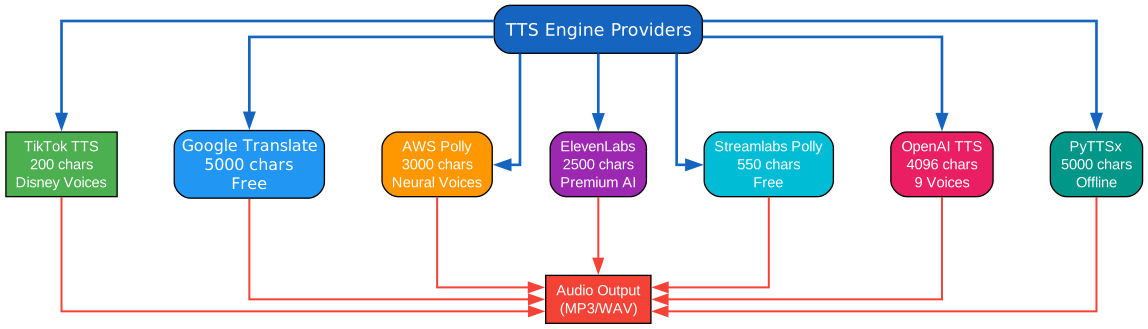
Understanding TTS Engine Options
RedditVideoMakerBot’s support for seven distinct TTS engines provides creators with unprecedented flexibility in voice selection. Each engine offers unique advantages, and understanding their capabilities helps users make informed decisions based on their specific requirements.
TikTok TTS: Popular Character Voices
TikTok TTS is the default engine, offering access to popular character voices that have become synonymous with viral Reddit content. With a 200-character limit per request, this engine requires text chunking for longer content. The engine provides over 30 voice options including beloved Disney characters like C-3PO, Chewbacca, Ghostface, Rocket, and Stitch. These voices have become iconic in the Reddit video genre, instantly recognizable to audiences. The service is free to use but may have rate limiting considerations for high-volume production. TikTok TTS is ideal for creators seeking that authentic viral video sound without additional cost.
Google Translate TTS: Free and Unlimited
Google Translate TTS offers a completely free solution with an impressive 5000-character capacity per request. This engine supports multiple languages and accents, making it suitable for international content creation. While the voice quality may not match premium services, the unlimited usage and high character limit make it an excellent choice for creators on a budget or those producing long-form content. The engine requires no API keys or authentication, simplifying the setup process significantly.
AWS Polly: Professional Neural Voices
Amazon Web Services Polly delivers professional-grade neural voices with natural intonation and pronunciation. Supporting up to 3000 characters per request, AWS Polly offers both standard and neural voice options. Neural voices provide superior quality with more natural prosody, breathing patterns, and emotional expression. The service requires an AWS account and API credentials, with pricing based on character usage. AWS Polly is recommended for professional content creators who prioritize voice quality and are willing to invest in premium TTS capabilities.
ElevenLabs: Premium AI Voice Generation
ElevenLabs represents the cutting edge of AI voice synthesis, offering voices that are nearly indistinguishable from human narration. With a 2500-character limit, this premium service provides exceptional voice cloning and custom voice creation capabilities. The platform supports multiple languages and offers both instant voice options and custom voice training. ElevenLabs is ideal for creators seeking the highest quality voice output and those interested in creating unique, branded voices for their content channels. Pricing scales with usage, making it suitable for both occasional and high-volume creators.
Streamlabs Polly: Free Alternative
Streamlabs Polly offers a free TTS solution with a 550-character limit per request. While more limited than other options, it provides a reliable free tier for creators getting started with automated video production. The service offers multiple voice options and requires no API authentication. Streamlabs Polly serves as an excellent backup option when primary TTS services are unavailable or for creators testing the platform before committing to paid alternatives.
OpenAI TTS: Advanced AI Voices
OpenAI’s TTS API brings the company’s advanced AI capabilities to voice synthesis. Supporting 4096 characters per request, this engine offers nine distinct voices with natural prosody and pronunciation. The service integrates seamlessly with other OpenAI products and provides consistent, high-quality output. OpenAI TTS is particularly suitable for creators already using OpenAI’s ecosystem or those seeking modern AI voice quality with reasonable pricing. The API requires authentication and follows OpenAI’s usage-based pricing model.
PyTTSx: Offline Voice Synthesis
PyTTSx is the only fully offline TTS option, utilizing the system’s built-in speech synthesis capabilities. With support for 5000 characters, this engine requires no internet connection or API keys, making it ideal for privacy-focused workflows or offline production environments. Voice quality depends on installed system voices, which vary by operating system. PyTTSx is recommended for creators with limited internet access, those concerned about API rate limits, or users requiring complete data privacy. The offline nature also eliminates latency issues associated with API-based services.
Video Creation Pipeline
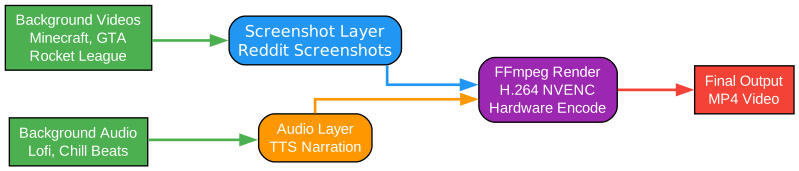
Understanding the Video Creation Pipeline
The video creation pipeline represents the technical implementation of video assembly, demonstrating how RedditVideoMakerBot transforms raw components into polished video content through sophisticated FFmpeg operations.
Background Video Layer
The foundation of every generated video is the background layer, sourced from a curated library of engaging footage. Popular options include Minecraft parkour videos, which provide dynamic movement without distracting from the overlaid content; GTA driving scenes, offering urban landscapes and smooth motion; and custom user-provided backgrounds. The background video is processed first, cropped to match the target aspect ratio (typically 9:16 for vertical video platforms). The system uses FFmpeg’s crop filter to ensure proper framing: ffmpeg.input(background).filter("crop", f"ih*({W}/{H})", "ih"). This ensures the background fills the entire frame without distortion.
Background Audio Integration
Audio atmosphere is created through background music tracks that play beneath the narration. The system maintains a JSON configuration of background audio options, allowing users to select tracks that match their content style. Volume levels are configurable through the background_audio_volume setting, enabling precise control over the audio mix. The FFmpeg amix filter combines the TTS audio with background music: ffmpeg.filter([audio, bg_audio], "amix", duration="longest"). This creates a professional audio blend where narration remains clear while background music adds emotional depth.
Screenshot Overlay Layer
Screenshots of Reddit posts and comments are captured using Playwright’s headless browser capabilities. These images are overlaid onto the background video with configurable opacity, typically set between 0.8 and 1.0 for optimal visibility. The overlay positioning uses FFmpeg’s overlay filter with time-based enable expressions: enable=f"between(t,{start_time},{end_time})". This precise timing ensures each screenshot appears exactly when its corresponding audio segment plays. The screenshots are scaled to occupy approximately 45% of the video width, centered both horizontally and vertically for optimal viewing.
Audio Synchronization Layer
The audio synchronization process begins with concatenating all TTS-generated MP3 files in narrative order. For comment-based videos, this includes the post title followed by each selected comment. For story-mode videos, the title audio is followed by the full post content, either as a single file or chunked segments. The system probes each audio file to determine its duration, creating a timeline for screenshot synchronization. This duration data drives the overlay timing, ensuring visual elements change precisely when the narration transitions to new content.
FFmpeg Rendering Engine
FFmpeg serves as the rendering backbone, providing hardware-accelerated encoding through NVENC (NVIDIA Video Encode) when available. The rendering command specifies codec parameters for optimal quality and file size: "c:v": "h264_nvenc", "b:v": "20M", "b:a": "192k". The H.264 codec ensures broad compatibility across platforms, while the 20Mbps video bitrate provides high-quality output suitable for 1080p content. The system utilizes multiprocessing for parallel encoding, leveraging all available CPU cores: "threads": multiprocessing.cpu_count(). Progress tracking is implemented through a custom FFmpeg progress callback that monitors encoding status in real-time.
Final Output Generation
The final output stage produces MP4 files saved to the results directory, organized by subreddit name. The system generates sanitized filenames from post titles, removing special characters and limiting length to 251 characters to prevent filesystem errors. Optional thumbnail generation creates preview images for video platforms. The cleanup process removes all temporary files from the assets/temp directory, including downloaded images, generated audio files, and intermediate video segments. The final video is ready for manual upload to TikTok, YouTube Shorts, Instagram Reels, or other content platforms.
Installation
Prerequisites
Before installing RedditVideoMakerBot, ensure your system meets the following requirements:
- Python 3.10 or higher
- FFmpeg (for video processing)
- Git (for cloning the repository)
Installation Steps
- Clone the repository:
git clone https://github.com/elebumm/RedditVideoMakerBot.git cd RedditVideoMakerBot - Create and activate a virtual environment:
Windows:
python -m venv ./venv
.\venv\Scripts\activate
macOS and Linux:
python3 -m venv ./venv
source ./venv/bin/activate
- Install dependencies:
pip install -r requirements.txt - Install Playwright and its dependencies:
python -m playwright install python -m playwright install-deps - Run the bot:
python main.py - Configure Reddit API access:
- Visit the Reddit Apps page
- Create a new app of type “script”
- Add any URL in the redirect URL field
- Enter your credentials when prompted by the bot
Configuration
The bot stores configuration in config.toml. To reconfigure, simply edit or delete the relevant lines and run the bot again.
Usage
Basic Usage
Run the bot with default settings:
python main.py
The bot will guide you through the initial setup, asking for:
- Reddit API credentials
- Subreddit selection
- TTS engine preference
- Background video choice
GUI Mode
For a graphical interface, run:
python GUI.py
The GUI provides a user-friendly interface for:
- Selecting subreddits
- Choosing TTS voices
- Previewing background videos
- Configuring video settings
Command Line Options
| Option | Description |
|---|---|
--subreddit | Specify target subreddit |
--background | Choose background video |
--voice | Select TTS voice |
--story | Enable story mode |
Features
Feature Comparison
| Feature | Description | Status |
|---|---|---|
| Multiple TTS Engines | Support for 7 different TTS providers | Implemented |
| Background Videos | Customizable background footage library | Implemented |
| Background Audio | Optional background music tracks | Implemented |
| Subreddit Selection | Choose any subreddit as content source | Implemented |
| Thread Selection | Manual thread selection available | Implemented |
| Story Mode | Full post narration vs. comments | Implemented |
| Light/Dark Mode | Screenshot theme options | Implemented |
| NSFW Filter | Automatic filtering of NSFW content | Implemented |
| Duplicate Detection | Skip already processed videos | Implemented |
| Translation Support | Multi-language content support | Implemented |
| AI Similarity Sorting | Intelligent comment ranking | Implemented |
| Thumbnail Generation | Automatic thumbnail creation | Implemented |
Story Mode
Story mode allows creators to produce videos that narrate the entire Reddit post content, rather than just the title and comments. This is ideal for storytelling subreddits like r/nosleep or r/tifu where the post body contains the primary content.
Translation Support
The bot supports automatic translation of post content to different languages, enabling creators to reach international audiences. Configure the target language in config.toml under reddit.thread.post_lang.
AI Similarity Sorting
The AI similarity sorting feature uses machine learning to identify and prioritize comments that are most relevant to the post topic, ensuring coherent narrative flow in comment-based videos.
Troubleshooting
Common Issues
FFmpeg Not Found Ensure FFmpeg is installed and added to your system PATH. On Windows, download from ffmpeg.org and add the bin directory to PATH.
Playwright Installation Fails Run python -m playwright install-deps to install browser dependencies. On Linux, you may need additional system packages.
Reddit API Authentication Errors Verify your Reddit app credentials are correct. Ensure the app type is “script” and the redirect URI matches your configuration.
TTS Rate Limiting Some TTS providers have rate limits. Consider using a different engine or implementing delays between requests.
Video Rendering Slow Enable hardware acceleration by ensuring NVIDIA drivers are installed. The bot automatically uses NVENC when available.
Memory Issues with Long Videos For very long content, consider splitting into multiple videos or increasing system memory. The bot processes all content in memory during rendering.
Conclusion
RedditVideoMakerBot represents a powerful solution for automated content creation, combining Reddit’s vast content repository with sophisticated video generation capabilities. The modular architecture supporting seven TTS engines, flexible background options, and intelligent content filtering makes it suitable for creators at all levels. Whether you’re producing content for TikTok, YouTube Shorts, or Instagram Reels, this open-source tool eliminates the tedious aspects of video production while maintaining creative control.
The project’s active development community continues to add features and improvements, ensuring it remains relevant in the rapidly evolving content creation landscape. With over 10,000 GitHub stars and thousands of forks, RedditVideoMakerBot has proven its value to the creator community. The comprehensive documentation and supportive Discord community make it accessible even for those new to programming or video production.
GitHub Repository: https://github.com/elebumm/RedditVideoMakerBot
Documentation: https://reddit-video-maker-bot.netlify.app/
Related Posts
- AgentSkillOS: Skill Orchestration System
- MattPocock Skills: AI Agent Workflows
- DESIGN.md: AI-Powered Design Systems