Claude Code MCP Guide - Complete Model Context Protocol Reference
MCP (Model Context Protocol) is a standardized way for Claude to access external tools, APIs, and real-time data sources. Unlike Memory, MCP provides live access to changing data.
What is MCP?
MCP provides:
- Real-time access to external services
- Live data synchronization
- Extensible architecture
- Secure authentication
- Tool-based interactions
MCP Architecture
Claude Code → MCP Server → External Service
     ↑            ↓
     └────────────┘
Claude communicates with MCP servers, which in turn interact with external services like GitHub, databases, Slack, and more.
MCP Ecosystem
Claude → Filesystem MCP → Local Files
      → GitHub MCP → GitHub Repos
      → Database MCP → PostgreSQL/MySQL
      → Slack MCP → Slack Workspace
      → Google Docs MCP → Google Drive
MCP Architecture Overview
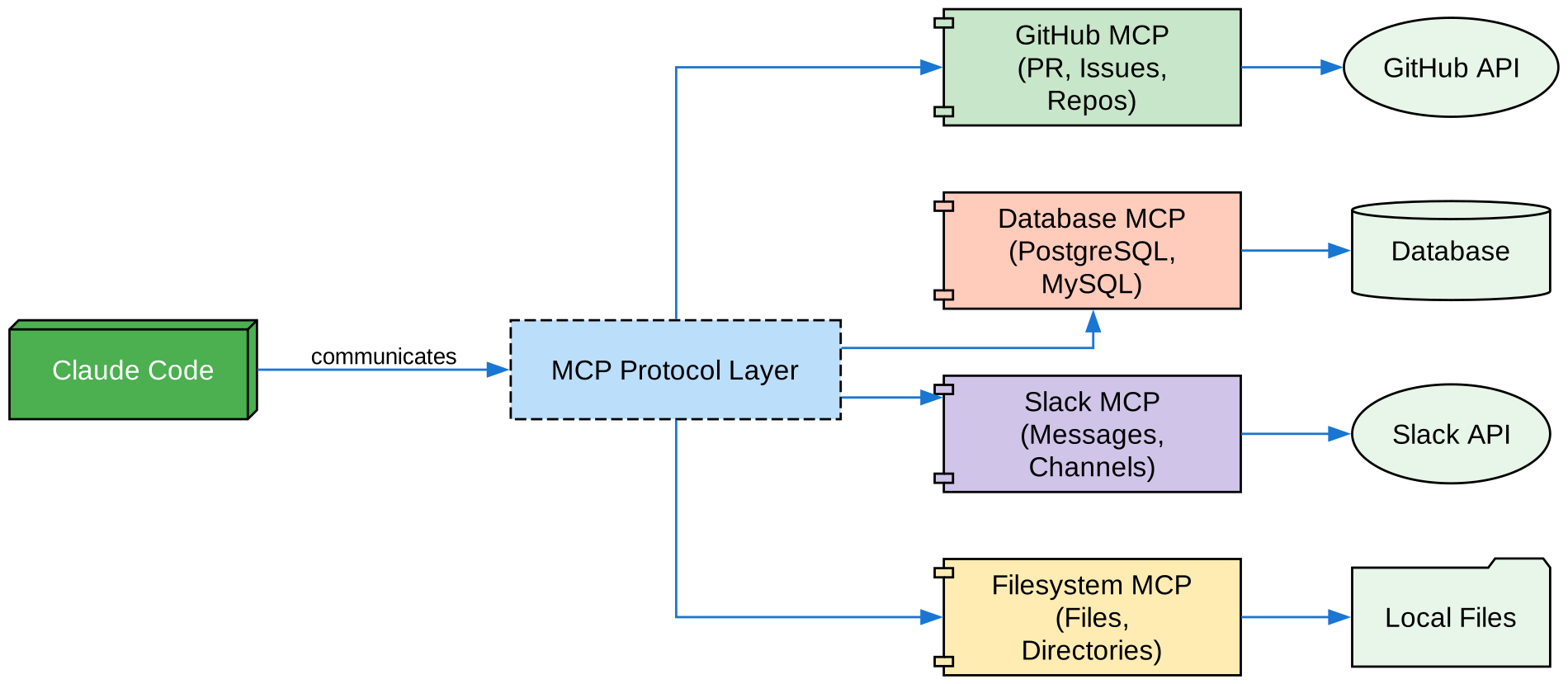
Claude Code communicates through the MCP Protocol Layer to various MCP servers (GitHub, Database, Slack, Filesystem), which then connect to their respective external APIs and services.
Installation Methods
HTTP Transport (Recommended)
# Basic HTTP connection
claude mcp add --transport http notion https://mcp.notion.com/mcp

# With authentication header
claude mcp add --transport http api https://api.example.com/mcp \
  --header "Authorization: Bearer your-token"
Stdio Transport (Local)
# Local Node.js server
claude mcp add --transport stdio myserver -- npx @myorg/mcp-server

# With environment variables
claude mcp add --transport stdio myserver --env KEY=value -- npx server

# Windows-specific: use cmd /c
claude mcp add --transport stdio my-server -- cmd /c npx -y @some/package
WebSocket Transport
claude mcp add --transport ws realtime wss://example.com/mcp
SSE Transport (Deprecated)
# Still supported but HTTP is recommended
claude mcp add --transport sse legacy-server https://example.com/sse
OAuth 2.0 Authentication
Claude Code supports OAuth 2.0 for MCP servers that require it:
# Interactive OAuth flow
claude mcp add --transport http my-service https://my-service.example.com/mcp

# Pre-configured OAuth
claude mcp add --transport http my-service https://my-service.example.com/mcp \
  --client-id "your-client-id" \
  --client-secret "your-client-secret" \
  --callback-port 8080
OAuth Features:
- Interactive browser-based flow
- Pre-configured OAuth clients for common services
- Token storage in system keychain
- Step-up authentication for privileged operations
- Discovery caching for faster reconnections
Override OAuth Metadata Discovery
{
  "mcpServers": {
    "my-server": {
      "type": "http",
      "url": "https://mcp.example.com/mcp",
      "oauth": {
        "authServerMetadataUrl": "https://auth.example.com/.well-known/openid-configuration"
      }
    }
  }
}
MCP Scopes
| Scope | Location | Description | Shared With |
|---|---|---|---|
| Local | ~/.claude.json | Private, current project only | Just you |
| Project | .mcp.json | Checked into git | Team members |
| User | ~/.claude.json | Available across all projects | Just you |
MCP Configuration File
Create .mcp.json in your project:
{
  "mcpServers": {
    "github": {
      "type": "http",
      "url": "https://mcp.github.com/mcp"
    },
    "filesystem": {
      "type": "stdio",
      "command": "npx",
      "args": ["@modelcontextprotocol/server-filesystem"]
    },
    "postgres": {
      "type": "stdio",
      "command": "npx",
      "args": ["@modelcontextprotocol/server-postgres"],
      "env": {
        "DATABASE_URL": "postgresql://user:pass@localhost/db"
      }
    }
  }
}
Environment Variable Expansion
{
  "mcpServers": {
    "api-server": {
      "type": "http",
      "url": "${API_BASE_URL:-https://api.example.com}/mcp",
      "headers": {
        "Authorization": "Bearer ${API_KEY}"
      }
    },
    "local-server": {
      "command": "${MCP_BIN_PATH:-npx}",
      "args": ["${MCP_PACKAGE:-@company/mcp-server}"],
      "env": {
        "DB_URL": "${DATABASE_URL:-postgresql://localhost/dev}"
      }
    }
  }
}
${VAR}- Uses environment variable, error if not set${VAR:-default}- Uses environment variable, falls back to default
Popular MCP Servers
GitHub MCP
export GITHUB_TOKEN="your_github_token"
claude mcp add --transport stdio github -- npx @modelcontextprotocol/server-github
Available Tools:
| Tool | Description |
|---|---|
list_prs | List all PRs in repository |
get_pr | Get PR details including diff |
create_pr | Create new PR |
merge_pr | Merge PR to main branch |
review_pr | Add review comments |
list_issues | List all issues |
create_issue | Create new issue |
close_issue | Close issue |
search_code | Search across codebase |
Example:
/mcp__github__get_pr 456

# Returns:
Title: Add dark mode support
Author: @alice
Status: OPEN
Reviewers: @bob, @charlie
Filesystem MCP
claude mcp add --transport stdio filesystem -- npx @modelcontextprotocol/server-filesystem
Available Tools:
read_file- Read file contentswrite_file- Write to filelist_directory- List directory contentscreate_directory- Create new directorysearch_files- Search for files
Database MCP
export DATABASE_URL="postgresql://user:pass@localhost/mydb"
claude mcp add --transport stdio database -- npx @modelcontextprotocol/server-database
Available Tools:
query- Execute SQL querieslist_tables- List all tablesdescribe_table- Get table schemainsert- Insert recordsupdate- Update records
Example:
User: Fetch all users with more than 10 orders

Claude:
SELECT u.*, COUNT(o.id) as order_count
FROM users u
LEFT JOIN orders o ON u.id = o.user_id
GROUP BY u.id
HAVING COUNT(o.id) > 10;

# Results:
- Alice: 15 orders
- Bob: 12 orders
Slack MCP
claude mcp add --transport http slack https://mcp.slack.com/mcp
Available Tools:
send_message- Send message to channellist_channels- List all channelsget_thread- Get thread repliesadd_reaction- Add emoji reaction
Available MCP Servers Table
| MCP Server | Purpose | Auth | Real-time |
|---|---|---|---|
| Filesystem | File operations | OS permissions | ✅ |
| GitHub | Repository management | OAuth/Token | ✅ |
| Slack | Team communication | Token | ✅ |
| Database | SQL queries | Credentials | ✅ |
| Google Docs | Document access | OAuth | ✅ |
| Asana | Project management | API Key | ✅ |
| Stripe | Payment data | API Key | ✅ |
| Memory | Persistent memory | Local | ❌ |
| Notion | Notes & docs | OAuth | ✅ |
| Jira | Issue tracking | OAuth/Token | ✅ |
Using MCP Tools
Via Slash Commands
MCP tools appear as slash commands:
/mcp__github__list_issues
/mcp__github__create_pr
/mcp__postgres__query "SELECT * FROM users"
Via @ Mentions
Reference MCP resources directly:
@database:postgres://mydb/users
@github:repo://owner/repo/main/src
In Conversation
> List all open issues in the repository
> Create a pull request with these changes
> Send a message to #dev-team about the deployment
MCP Prompts as Commands
MCP servers can expose prompts as slash commands:
/mcp__<server-name>__<prompt-name> [arguments]
Examples:
/mcp__github__list_prs
/mcp__github__pr_review 456
/mcp__jira__create_issue "Bug title" high
Dynamic Tool Updates
Claude Code supports MCP list_changed notifications. When an MCP server dynamically adds, removes, or modifies its available tools, Claude Code receives the update automatically—no reconnection required.
MCP Tool Search
When MCP tool descriptions exceed 10% of the context window, Claude Code automatically enables tool search:
| Setting | Value | Description |
|---|---|---|
ENABLE_TOOL_SEARCH | auto (default) | Enables when tools exceed 10% context |
ENABLE_TOOL_SEARCH | auto:<N> | Custom threshold of N tools |
ENABLE_TOOL_SEARCH | true | Always enabled |
ENABLE_TOOL_SEARCH | false | Disabled |
MCP Elicitation
MCP servers can request structured input from users via interactive dialogs. This allows servers to ask for confirmations, selections, or required fields mid-workflow.
Managing MCP Servers
CLI Commands
# Add server
claude mcp add --transport http github https://mcp.github.com/mcp

# List all servers
claude mcp list

# Get server details
claude mcp get github

# Remove server
claude mcp remove github

# Reset project approval choices
claude mcp reset-project-choices

# Import from Claude Desktop
claude mcp add-from-claude-desktop
In-Session Commands
/mcp              # Open MCP management
/mcp__server__*   # Use MCP tools
MCP Permission Syntax
Control MCP server access in permissions:
mcp__github- Access entire GitHub MCP servermcp__github__*- Wildcard access to all toolsmcp__github__get_issue- Specific tool access
Claude.ai MCP Connectors
MCP servers configured in your Claude.ai account are automatically available in Claude Code. To disable:
ENABLE_CLAUDEAI_MCP_SERVERS=false claude
Multi-MCP Workflow Example
Daily Report Generation:
# Step 1: Fetch GitHub Data
/mcp__github__list_prs completed:true last:7days

Output:
- Total PRs: 42
- Average merge time: 2.3 hours

# Step 2: Query Database
SELECT COUNT(*) as sales, SUM(amount) as revenue
FROM orders
WHERE created_at > NOW() - INTERVAL '1 day'

Output:
- Sales: 247
- Revenue: $12,450

# Step 3: Post to Slack
/mcp__slack__send_message #daily-standup "Daily Report: 42 PRs, $12,450 revenue"
Security Considerations
- Review permissions: Understand what each MCP server can access
- Use OAuth: Prefer OAuth over static tokens when possible
- Limit scope: Grant minimum necessary permissions
- Audit regularly: Review connected servers periodically
- Tool description cap: 2 KB cap per server prevents context bloat
Troubleshooting
Connection Failed
# Check server status
claude mcp list

# Test connection
claude mcp test server-name
Authentication Issues
# Re-authenticate
claude mcp auth server-name

# Clear stored credentials
claude mcp clear-auth server-name
Tool Not Found
- Check server is running:
claude mcp list - Verify tool name format:
/mcp__server__tool - Check permissions for the tool
Best Practices
- Start with HTTP: Prefer HTTP transport for simplicity
- Use OAuth: More secure than static tokens
- Document servers: Keep track of what each server does
- Regular audits: Review and remove unused servers
- Test first: Verify MCP servers in isolation
- Use environment variables: Don’t hardcode credentials
- Project scope for teams: Use
.mcp.jsonfor shared configurations
Related Guides
- Claude Code Complete Guide
- Claude Code Subagents Guide
- Claude Code Skills Guide
- Claude Code Hooks Guide