Claude Code Hooks - Complete Event-Driven Automation Guide
Hooks are automated scripts that execute in response to specific events during Claude Code sessions. They enable automation, validation, permission management, and custom workflows.
What Are Hooks?
Hooks are automated actions that execute automatically when specific events occur in Claude Code. They receive JSON input and communicate results via exit codes and JSON output.
Key features:
- Event-driven automation
- JSON-based input/output
- Support for command, HTTP, prompt, and agent hook types
- Pattern matching for tool-specific hooks
Hooks Flow Overview
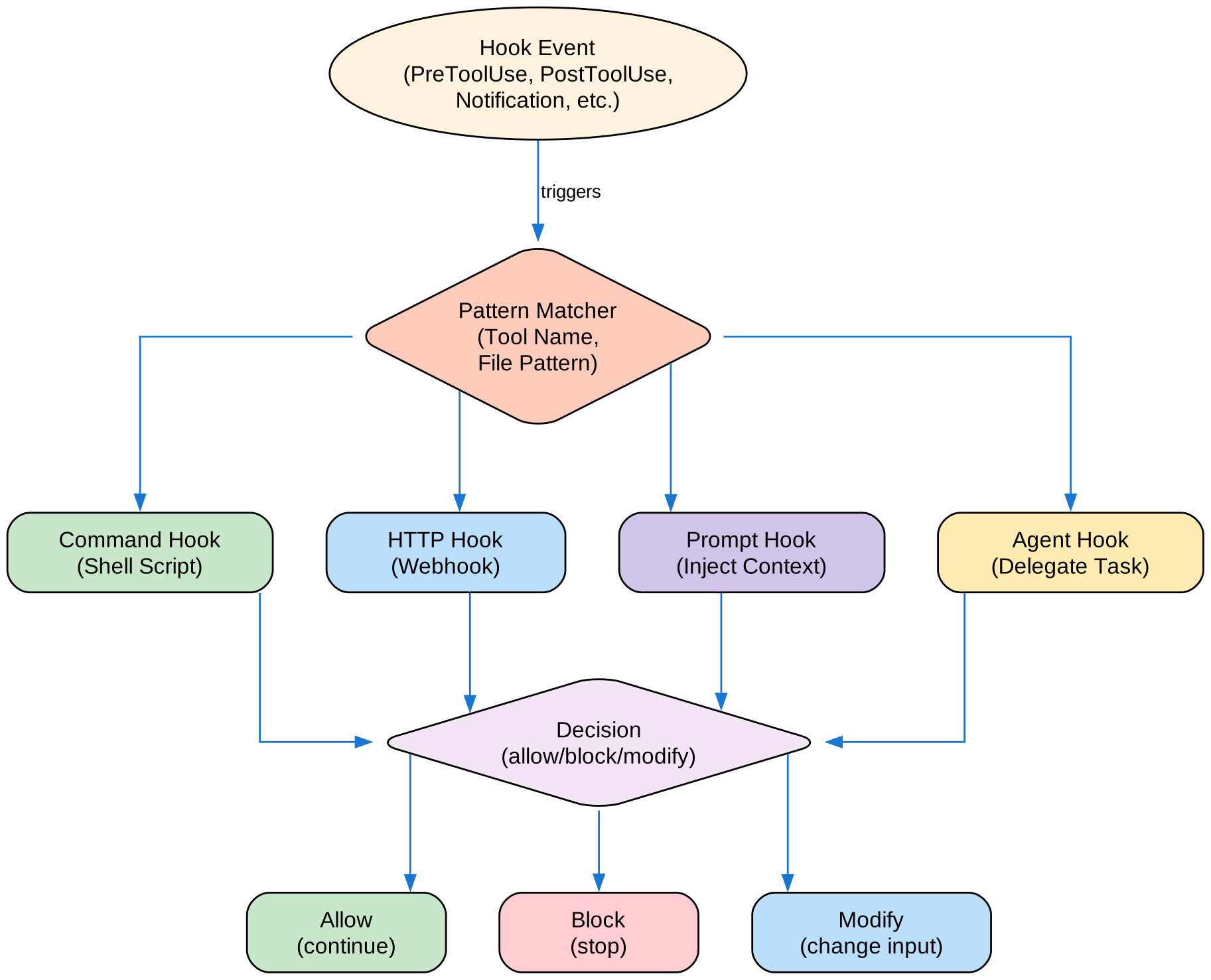
Hook events trigger pattern matching, which routes to different hook types (Command, HTTP, Prompt, Agent). Each hook can return allow, block, or modify decisions.
Hook Types
Claude Code supports four hook types:
1. Command Hooks (Default)
Executes a shell command and communicates via JSON stdin/stdout and exit codes.
{
  "type": "command",
  "command": "python3 \"$CLAUDE_PROJECT_DIR/.claude/hooks/validate.py\"",
  "timeout": 60
}
2. HTTP Hooks
Remote webhook endpoints that receive JSON input and return JSON response.
{
  "hooks": {
    "PostToolUse": [{
      "type": "http",
      "url": "https://my-webhook.example.com/hook",
      "matcher": "Write"
    }]
  }
}
3. Prompt Hooks
LLM-evaluated prompts for intelligent task completion checking.
{
  "type": "prompt",
  "prompt": "Evaluate if Claude completed all requested tasks.",
  "timeout": 30
}
4. Agent Hooks
Subagent-based verification hooks that can use tools and perform multi-step reasoning.
{
  "type": "agent",
  "prompt": "Verify the code changes follow our architecture guidelines.",
  "timeout": 120
}
All Hook Events (25 Events)
| Event | When Triggered | Can Block | Common Use |
|---|---|---|---|
| SessionStart | Session begins/resumes | No | Environment setup |
| InstructionsLoaded | After CLAUDE.md loaded | No | Modify instructions |
| UserPromptSubmit | User submits prompt | Yes | Validate prompts |
| PreToolUse | Before tool execution | Yes | Validate, modify inputs |
| PermissionRequest | Permission dialog shown | Yes | Auto-approve/deny |
| PostToolUse | After tool succeeds | No | Add context, feedback |
| PostToolUseFailure | Tool execution fails | No | Error handling |
| Notification | Notification sent | No | Custom notifications |
| SubagentStart | Subagent spawned | No | Subagent setup |
| SubagentStop | Subagent finishes | Yes | Subagent validation |
| Stop | Claude finishes | Yes | Task completion check |
| StopFailure | API error ends turn | No | Error recovery |
| TeammateIdle | Agent team idle | Yes | Teammate coordination |
| TaskCompleted | Task marked complete | Yes | Post-task actions |
| TaskCreated | Task created | No | Task tracking |
| ConfigChange | Config file changes | Yes | React to updates |
| CwdChanged | Working directory changes | No | Directory setup |
| FileChanged | Watched file changes | No | File monitoring |
| PreCompact | Before context compaction | No | Pre-compact actions |
| PostCompact | After compaction | No | Post-compact actions |
| WorktreeCreate | Worktree being created | Yes | Worktree init |
| WorktreeRemove | Worktree removed | No | Worktree cleanup |
| Elicitation | MCP server requests input | Yes | Input validation |
| ElicitationResult | User responds to elicitation | Yes | Response processing |
| SessionEnd | Session terminates | No | Cleanup, logging |
Configuration
File Locations
| Location | Scope | Shared |
|---|---|---|
~/.claude/settings.json | User settings | All projects |
.claude/settings.json | Project settings | Via git |
.claude/settings.local.json | Local settings | Not committed |
Plugin hooks/hooks.json | Plugin-scoped | Via plugin |
| Skill/Agent frontmatter | Component lifetime | Via skill |
Basic Structure
{
  "hooks": {
    "EventName": [
      {
        "matcher": "ToolPattern",
        "hooks": [
          {
            "type": "command",
            "command": "your-command-here",
            "timeout": 60
          }
        ]
      }
    ]
  }
}
Configuration Fields
| Field | Description | Example |
|---|---|---|
matcher | Pattern to match tool names | "Write", "Edit\|Write", "*" |
hooks | Array of hook definitions | [{ "type": "command", ... }] |
type | Hook type | "command", "prompt", "http", "agent" |
command | Shell command to execute | "$CLAUDE_PROJECT_DIR/.claude/hooks/format.sh" |
timeout | Timeout in seconds (default 60) | 30 |
once | Run only once per session | true |
Matcher Patterns
| Pattern | Description | Example |
|---|---|---|
| Exact string | Matches specific tool | "Write" |
| Regex pattern | Matches multiple tools | "Edit\|Write" |
| Wildcard | Matches all tools | "*" or "" |
| MCP tools | Server and tool pattern | "mcp__memory__.*" |
PreToolUse Hooks
Runs before tool execution. Can block or modify the action.
Example: Block Dangerous Commands
{
  "hooks": {
    "PreToolUse": [
      {
        "matcher": "Bash",
        "hooks": [
          {
            "type": "command",
            "command": "$CLAUDE_PROJECT_DIR/.claude/hooks/validate-bash.py"
          }
        ]
      }
    ]
  }
}
Script: validate-bash.py
#!/usr/bin/env python3
import json
import sys

data = json.load(sys.stdin)
command = data.get("input", {}).get("command", "")

# Block dangerous patterns
dangerous = ["rm -rf", "DROP TABLE", "DELETE FROM", ":(){ :|:& };:"]
for pattern in dangerous:
    if pattern in command:
        print(json.dumps({
            "decision": "deny",
            "reason": f"Blocked dangerous pattern: {pattern}"
        }))
        sys.exit(0)

# Allow
sys.exit(0)
Example: Validate File Writes
{
  "hooks": {
    "PreToolUse": [
      {
        "matcher": "Write|Edit",
        "hooks": [
          {
            "type": "command",
            "command": "$CLAUDE_PROJECT_DIR/.claude/hooks/validate-write.py"
          }
        ]
      }
    ]
  }
}
Output control:
permissionDecision:"allow","deny", or"ask"permissionDecisionReason: Explanation for decisionupdatedInput: Modified tool input parameters
PostToolUse Hooks
Runs after tool completion. Useful for verification and logging.
Example: Security Scan After Write
{
  "hooks": {
    "PostToolUse": [
      {
        "matcher": "Write|Edit",
        "hooks": [
          {
            "type": "command",
            "command": "$CLAUDE_PROJECT_DIR/.claude/hooks/security-scan.py"
          }
        ]
      }
    ]
  }
}
Script: security-scan.py
#!/usr/bin/env python3
import json
import sys
import re

data = json.load(sys.stdin)
content = data.get("result", {}).get("content", "")

# Check for secrets
patterns = [
    (r'api[_-]?key\s*=\s*["\'][^"\']+["\']', "API key detected"),
    (r'password\s*=\s*["\'][^"\']+["\']', "Password detected"),
    (r'secret\s*=\s*["\'][^"\']+["\']', "Secret detected"),
]

issues = []
for pattern, message in patterns:
    if re.search(pattern, content, re.IGNORECASE):
        issues.append(message)

if issues:
    print(json.dumps({
        "additionalContext": f"⚠️ Security Warning: {', '.join(issues)}"
    }))

sys.exit(0)
Example: Auto-Format Code
{
  "hooks": {
    "PostToolUse": [
      {
        "matcher": "Write",
        "hooks": [
          {
            "type": "command",
            "command": "prettier --write \"$FILE_PATH\""
          }
        ]
      }
    ]
  }
}
Stop and SubagentStop Hooks
Run when Claude finishes or a subagent completes. Supports prompt-based evaluation.
Example: Task Completion Check
{
  "hooks": {
    "Stop": [
      {
        "hooks": [
          {
            "type": "prompt",
            "prompt": "Evaluate if Claude completed all requested tasks. If not, explain what's missing.",
            "timeout": 30
          }
        ]
      }
    ]
  }
}
UserPromptSubmit Hooks
Runs when user submits a prompt, before Claude processes it.
Example: Validate User Prompts
{
  "hooks": {
    "UserPromptSubmit": [
      {
        "hooks": [
          {
            "type": "command",
            "command": "$CLAUDE_PROJECT_DIR/.claude/hooks/validate-prompt.py"
          }
        ]
      }
    ]
  }
}
SessionStart Hooks
Runs when session begins, resumes, clears, or compacts.
Example: Environment Setup
{
  "hooks": {
    "SessionStart": [
      {
        "hooks": [
          {
            "type": "command",
            "command": "$CLAUDE_PROJECT_DIR/.claude/hooks/session-init.sh"
          }
        ]
      }
    ]
  }
}
Script: session-init.sh
#!/bin/bash

# Log session start
echo "$(date): Session started" >> ~/.claude/session.log

# Check for required tools
if ! command -v node &> /dev/null; then
    echo '{"additionalContext": "⚠️ Node.js is not installed"}'
fi

exit 0
Hook Input/Output
Input (stdin)
Hooks receive JSON input via stdin:
{
  "tool": "Bash",
  "input": {
    "command": "npm test"
  },
  "result": {
    "output": "All tests passed",
    "exitCode": 0
  }
}
Output (stdout)
| Exit Code | Meaning |
|---|---|
| 0 | Allow/success |
| 2 | Block with error |
| Other | Unexpected error |
Output Fields
{
  "decision": "block",
  "reason": "Explanation for blocking",
  "additionalContext": "Context to add for Claude",
  "permissionDecision": "allow|deny|ask",
  "updatedInput": {
    "modified": "input parameters"
  }
}
Skill-Scoped Hooks
Define hooks within a skill:
---
name: safe-deploy
description: Deploy with safety checks
hooks:
  PreToolUse:
    - matcher: "Bash"
      hooks:
        - type: command
          command: "./scripts/pre-deploy-check.sh"
  PostToolUse:
    - matcher: "Bash(git push*)"
      hooks:
        - type: command
          command: "./scripts/notify-team.sh"
---

Deploy the application with safety checks...
Practical Examples
Example 1: Comprehensive Security Hook
{
  "hooks": {
    "PreToolUse": [
      {
        "matcher": "Write|Edit",
        "hooks": [
          {
            "type": "command",
            "command": "$CLAUDE_PROJECT_DIR/.claude/hooks/security-check.py"
          }
        ]
      }
    ],
    "PostToolUse": [
      {
        "matcher": "Write|Edit",
        "hooks": [
          {
            "type": "command",
            "command": "$CLAUDE_PROJECT_DIR/.claude/hooks/secret-scan.py"
          }
        ]
      }
    ]
  }
}
Example 2: Git Workflow Automation
{
  "hooks": {
    "PreToolUse": [
      {
        "matcher": "Bash(git push*)",
        "hooks": [
          {
            "type": "command",
            "command": "$CLAUDE_PROJECT_DIR/.claude/hooks/pre-push.sh"
          }
        ]
      }
    ],
    "PostToolUse": [
      {
        "matcher": "Bash(git push*)",
        "hooks": [
          {
            "type": "command",
            "command": "$CLAUDE_PROJECT_DIR/.claude/hooks/post-push.sh"
          }
        ]
      }
    ]
  }
}
Example 3: Notification System
{
  "hooks": {
    "PostToolUse": [
      {
        "matcher": "Bash(npm run deploy*)",
        "hooks": [
          {
            "type": "http",
            "url": "https://hooks.slack.com/services/YOUR/WEBHOOK/URL"
          }
        ]
      }
    ]
  }
}
Example 4: Auto-Testing
{
  "hooks": {
    "PostToolUse": [
      {
        "matcher": "Write|Edit",
        "hooks": [
          {
            "type": "command",
            "command": "npm test -- --related --passWithNoTests"
          }
        ]
      }
    ]
  }
}
Best Practices
- Keep hooks fast: They run synchronously (use timeout)
- Handle errors gracefully: Don’t break the workflow
- Log everything: For debugging and auditing
- Test thoroughly: Verify hooks work as expected
- Document clearly: Explain what each hook does
- Use environment variables:
$CLAUDE_PROJECT_DIRfor project paths - Return proper exit codes: 0 for success, 2 for block
Debugging Hooks
Enable Debug Logging
CLAUDE_DEBUG_HOOKS=1 claude
Test Hook Script
# Test manually with JSON input
echo '{"tool":"Bash","input":{"command":"test"}}' | python3 ./hooks/my-hook.py

# Check exit code
echo $?
Common Issues
| Issue | Solution |
|---|---|
| Hook not running | Check matcher pattern |
| Permission denied | Make script executable (chmod +x) |
| Timeout | Increase timeout field |
| Wrong exit code | Return proper JSON output |
Related Guides
- Claude Code Complete Guide
- Claude Code Skills Guide
- Claude Code MCP Guide
- Claude Code Subagents Guide

Enjoyed this post? Never miss out on future posts by following us


