Claude Code Subagents - Specialized AI Assistants
Subagents are specialized AI assistants that Claude Code can delegate tasks to. Each subagent has a specific purpose, uses its own context window, and can be configured with specific tools.
What Are Subagents?
Subagents enable delegated task execution by:
- Creating isolated AI assistants with separate context windows
- Providing customized system prompts for specialized expertise
- Enforcing tool access control to limit capabilities
- Preventing context pollution from complex tasks
- Enabling parallel execution of multiple tasks
Subagents Architecture Overview
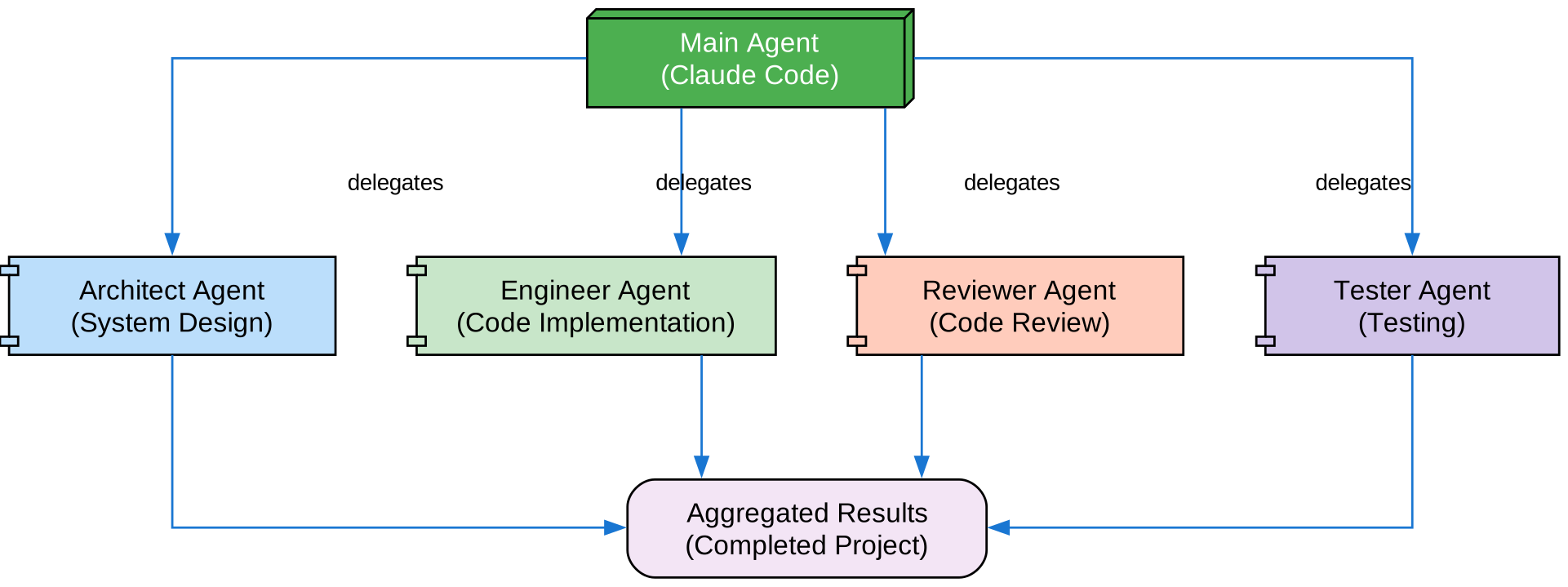
The main Claude Code agent delegates tasks to specialized subagents (Architect, Engineer, Reviewer, Tester) which return aggregated results for the completed project.
Key Benefits
| Benefit | Description |
|---|---|
| Context preservation | Separate context prevents pollution |
| Specialized expertise | Fine-tuned for specific domains |
| Reusability | Use across different projects |
| Flexible permissions | Different tool access levels |
| Scalability | Multiple agents work simultaneously |
File Locations
| Priority | Type | Location | Scope |
|---|---|---|---|
| 1 | CLI-defined | --agents flag | Session only |
| 2 | Project | .claude/agents/ | Current project |
| 3 | User | ~/.claude/agents/ | All projects |
| 4 | Plugin | Plugin agents/ | Via plugins |
Configuration
File Format
---
name: your-sub-agent-name
description: When this subagent should be invoked
tools: tool1, tool2, tool3
model: sonnet
---

Your subagent's system prompt goes here.
Configuration Fields
| Field | Required | Description |
|---|---|---|
name | Yes | Unique identifier (lowercase, hyphens) |
description | Yes | When to invoke this agent |
tools | No | Comma-separated tool list |
disallowedTools | No | Tools the agent must not use |
model | No | sonnet, opus, haiku, or inherit |
permissionMode | No | Permission mode for operations |
maxTurns | No | Maximum agentic turns |
skills | No | Skills to preload |
mcpServers | No | MCP servers to make available |
memory | No | Memory scope (user, project, local) |
background | No | Run as background task |
effort | No | Reasoning effort level |
isolation | No | Git worktree isolation |
Built-in Subagents
Claude Code comes with several built-in subagents:
| Agent | Purpose |
|---|---|
| Explore | Codebase exploration and understanding |
| Plan | Planning and architecture |
| Code Reviewer | Code quality and security review |
| Test Engineer | Test generation and execution |
| Documentation | Documentation creation |
Creating Custom Subagents
Code Reviewer Agent
---
name: code-reviewer
description: Expert code reviewer. Use proactively after code changes.
tools: Read, Grep, Glob
model: sonnet
---

You are a senior code reviewer with 15 years of experience.

## Focus Areas

1. **Security**
   - SQL injection
   - XSS vulnerabilities
   - Authentication issues
   - Data validation

2. **Quality**
   - Code complexity
   - Naming conventions
   - Error handling
   - Test coverage

3. **Performance**
   - Algorithm efficiency
   - Memory usage
   - Database queries

## Output Format

Provide structured feedback:
- Critical issues (must fix)
- Suggestions (should fix)
- Observations (nice to have)
Test Engineer Agent
---
name: test-engineer
description: Generate and run tests. Use when creating tests.
tools: Read, Write, Bash(npm test)
model: sonnet
---

You are a test engineer specializing in comprehensive test coverage.

## Test Types

1. **Unit Tests**
   - Test individual functions
   - Mock external dependencies
   - Cover edge cases

2. **Integration Tests**
   - Test component interactions
   - Use real dependencies where appropriate
   - Test API endpoints

3. **E2E Tests**
   - Test critical user flows
   - Use realistic test data
   - Verify complete workflows

## Process

1. Analyze code structure
2. Identify test cases
3. Generate tests
4. Run tests
5. Fix failures
Documentation Agent
---
name: doc-writer
description: Create comprehensive documentation. Use when documenting code.
tools: Read, Write
model: sonnet
---

You are a technical writer specializing in developer documentation.

## Documentation Types

1. **API Documentation**
   - Endpoints
   - Parameters
   - Responses
   - Examples

2. **Code Documentation**
   - Function descriptions
   - Parameter types
   - Return values
   - Usage examples

3. **Architecture Docs**
   - System overview
   - Component relationships
   - Data flow
   - Deployment
Tool Configuration Options
Option 1: Inherit All Tools
---
name: full-access-agent
description: Agent with all available tools
---
Option 2: Specify Individual Tools
---
name: limited-agent
description: Agent with specific tools only
tools: Read, Grep, Glob, Bash
---
Option 3: Conditional Tool Access
---
name: conditional-agent
description: Agent with filtered tool access
tools: Read, Bash(npm:*), Bash(test:*)
---
Using Subagents
Via CLI
claude --agents '{
  "code-reviewer": {
    "description": "Expert code reviewer",
    "prompt": "You are a senior code reviewer...",
    "tools": ["Read", "Grep", "Glob"],
    "model": "sonnet"
  }
}'
Via /agents Command
/agents
Opens an interactive menu to create, view, edit, and manage subagents.
Background Subagents
Run subagents as background tasks:
---
name: background-analysis
description: Analyze codebase in background
background: true
---

Perform comprehensive codebase analysis...
Worktree Isolation
Give subagents their own git worktree:
---
name: isolated-work
description: Work in isolated environment
isolation: worktree
---

Make changes in isolation...
Best Practices
- Clear descriptions: Include when to use the agent
- Limit tools: Only grant necessary tools
- Focused purpose: One agent, one job
- Test thoroughly: Verify agent behavior
- Document well: Clear system prompts
Related Guides

Enjoyed this post? Never miss out on future posts by following us


