Claude Code Memory Guide - Persistent Context with CLAUDE.md
Memory is one of Claude Code’s most powerful features. It allows Claude to retain context across sessions, understand your project conventions, and provide more relevant assistance.
What is Claude Code Memory?
Memory in Claude Code provides persistent context that carries across multiple sessions and conversations. Unlike temporary context windows, memory files allow you to:
- Share project standards across your team
- Store personal development preferences
- Maintain directory-specific rules
- Import external documentation
- Version control memory as part of your project
Memory System Overview
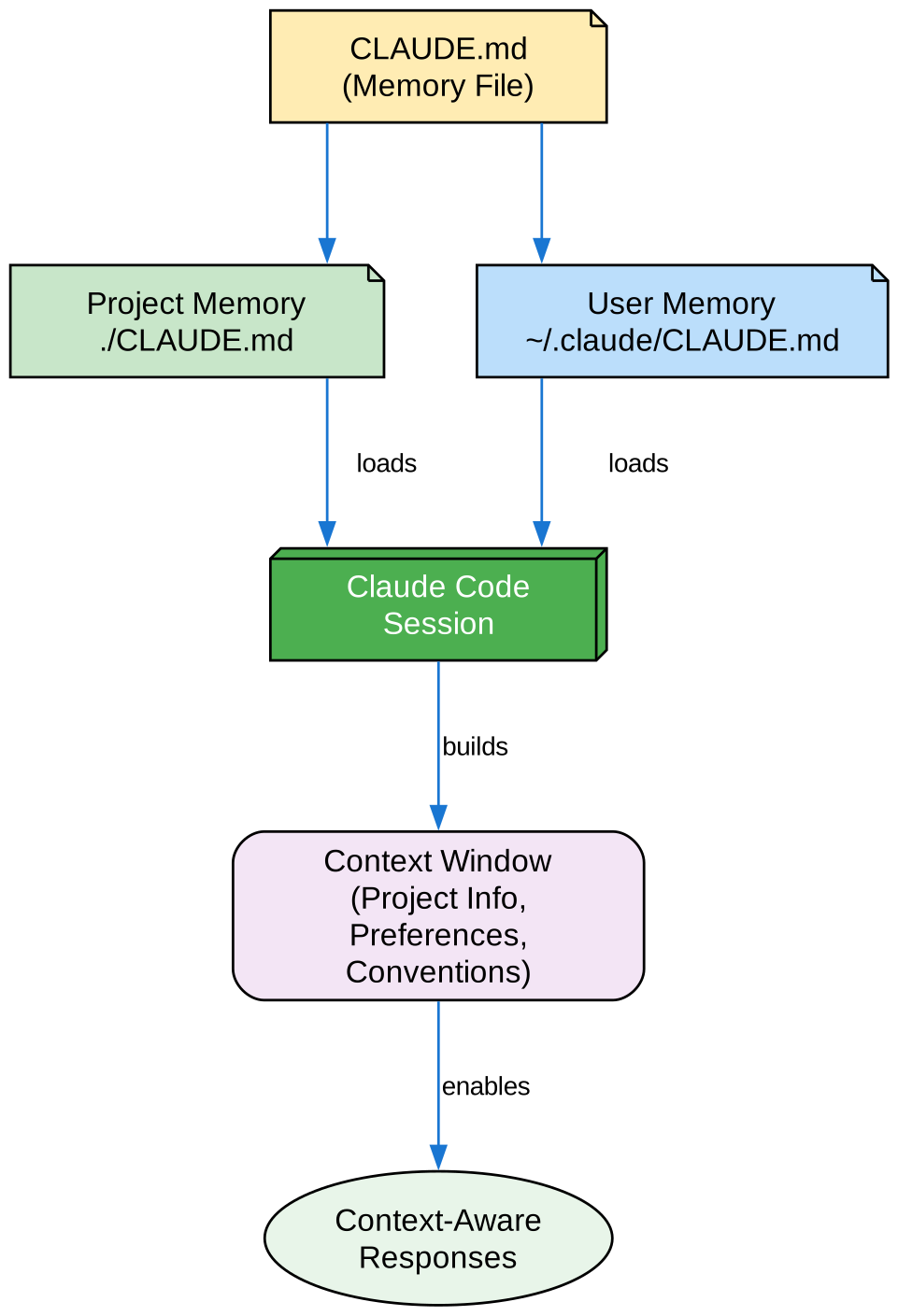
The memory system loads project and user memory files, builds a context window with project information and preferences, and enables context-aware responses.
Quick Start: Initialize Memory
The /init Command
The fastest way to set up project memory:
/init
This creates a CLAUDE.md file with foundational project documentation.
Quick Memory Updates with #
Add information to memory during any conversation:
# Always use TypeScript strict mode in this project

# Prefer async/await over promise chains

# Run npm test before every commit
The /memory Command
Edit memory files directly:
/memory
Opens your memory files in your default editor for comprehensive editing.
Memory Hierarchy
Claude Code uses a multi-tier hierarchical memory system:
| Priority | Location | Scope | Best For |
|---|---|---|---|
| 1 | Managed Policy | Organization | Company-wide policies |
| 2 | ./CLAUDE.md | Project | Team standards |
| 3 | .claude/rules/*.md | Project | Path-specific rules |
| 4 | ~/.claude/CLAUDE.md | User | Personal preferences |
| 5 | ./CLAUDE.local.md | Local | Personal project settings |
Project Memory Structure
File: ./CLAUDE.md
# Project Configuration

## Project Overview
- **Name**: E-commerce Platform
- **Tech Stack**: Node.js, PostgreSQL, React 18, Docker
- **Team Size**: 5 developers

## Architecture
@docs/architecture.md
@docs/api-standards.md

## Development Standards

### Code Style
- Use TypeScript strict mode
- Prefer functional components
- Use Zod for validation

### Testing
- Write unit tests for all utilities
- Integration tests for API endpoints
- E2E tests for critical flows

### Git Workflow
- Feature branches from main
- Squash merge PRs
- Conventional commit messages

## Commands
- `npm run dev` - Start development server
- `npm test` - Run test suite
- `npm run build` - Production build
Modular Rules System
Create path-specific rules using .claude/rules/:
your-project/
├── .claude/
│   ├── CLAUDE.md
│   └── rules/
│       ├── code-style.md
│       ├── testing.md
│       └── api/
│           ├── conventions.md
│           └── validation.md
Path-Specific Rules
---
paths: src/api/**/*.ts
---

# API Development Rules

- All endpoints must include input validation
- Use Zod for schema validation
- Document all parameters and response types
- Include error handling for all operations
Memory Imports
Use @path/to/file to include external content:
# Project Documentation
See @README.md for project overview
See @package.json for available npm commands
See @docs/architecture.md for system design
Features:
- Both relative and absolute paths supported
- Recursive imports up to 5 levels deep
- First-time imports trigger approval dialog
- Safe inside code blocks for documentation
Auto Memory
Auto memory is where Claude automatically records learnings:
~/.claude/projects/<project>/memory/
├── MEMORY.md              # Main file (first 200 lines loaded)
├── debugging.md           # Topic file (loaded on demand)
└── api-conventions.md     # Topic file (loaded on demand)
Enable Auto Memory
# Enable (default)
CLAUDE_CODE_DISABLE_AUTO_MEMORY=0 claude

# Disable
CLAUDE_CODE_DISABLE_AUTO_MEMORY=1 claude
Practical Examples
Example 1: Team Standards
# Team Standards

## Code Review
- All PRs require 2 approvals
- Check for security issues
- Verify test coverage

## Documentation
- Update README for new features
- Document API changes
- Keep architecture docs current
Example 2: API Conventions
---
paths: src/api/**/*.ts
---

# API Conventions

## Endpoints
- Use RESTful naming
- Return consistent error format
- Include request validation

## Responses
```json
{
  "success": true,
  "data": {},
  "error": null
}
### Example 3: Personal Preferences

**File:** `~/.claude/CLAUDE.md`

```markdown
# Personal Preferences

## Code Style
- Prefer arrow functions
- Use const over let
- Explicit return types

## Workflow
- Run tests before commits
- Use conventional commits
- Create draft PRs early
Best Practices
- Start with
/init: Let Claude create initial memory - Use imports: Reference existing docs instead of duplicating
- Be specific: Clear rules lead to better assistance
- Update regularly: Keep memory current with project changes
- Use path-specific rules: Different rules for different areas
Memory Commands Reference
| Command | Purpose | Usage |
|---|---|---|
/init | Initialize project memory | /init |
/memory | Edit memory files | /memory |
# prefix | Quick memory add | # Your rule here |
# remember this | Natural language memory | # remember this\nYour instruction |
@path/to/file | Import external content | @README.md |