Dify: The Open-Source LLM App Development Platform
Building production-ready applications on top of large language models remains one of the most significant engineering challenges of the current AI era. Teams must orchestrate model inference, retrieval-augmented generation, agent logic, workflow pipelines, and observability – often stitching together dozens of disparate tools and libraries. Dify, an open-source platform with over 138,000 GitHub stars, addresses this complexity head-on by providing a unified, self-hosted environment that combines visual workflow building, a sophisticated RAG pipeline, multi-strategy agent execution, model management across 100+ providers, and full observability into a single deployable stack. Rather than assembling a fragmented toolchain, developers can spin up Dify with Docker Compose and immediately begin constructing LLM-powered applications through an intuitive web interface backed by a robust multi-service architecture. This post examines the technical foundations of Dify in depth, covering its platform architecture, workflow engine, RAG pipeline, and agent system.
Platform Architecture
Dify is built as a multi-service application orchestrated through Docker Compose, designed for both self-hosted deployments and cloud-managed instances. The architecture separates concerns across several independently scalable services that communicate through well-defined interfaces, ensuring that each component can be upgraded, replaced, or scaled without disrupting the overall system.
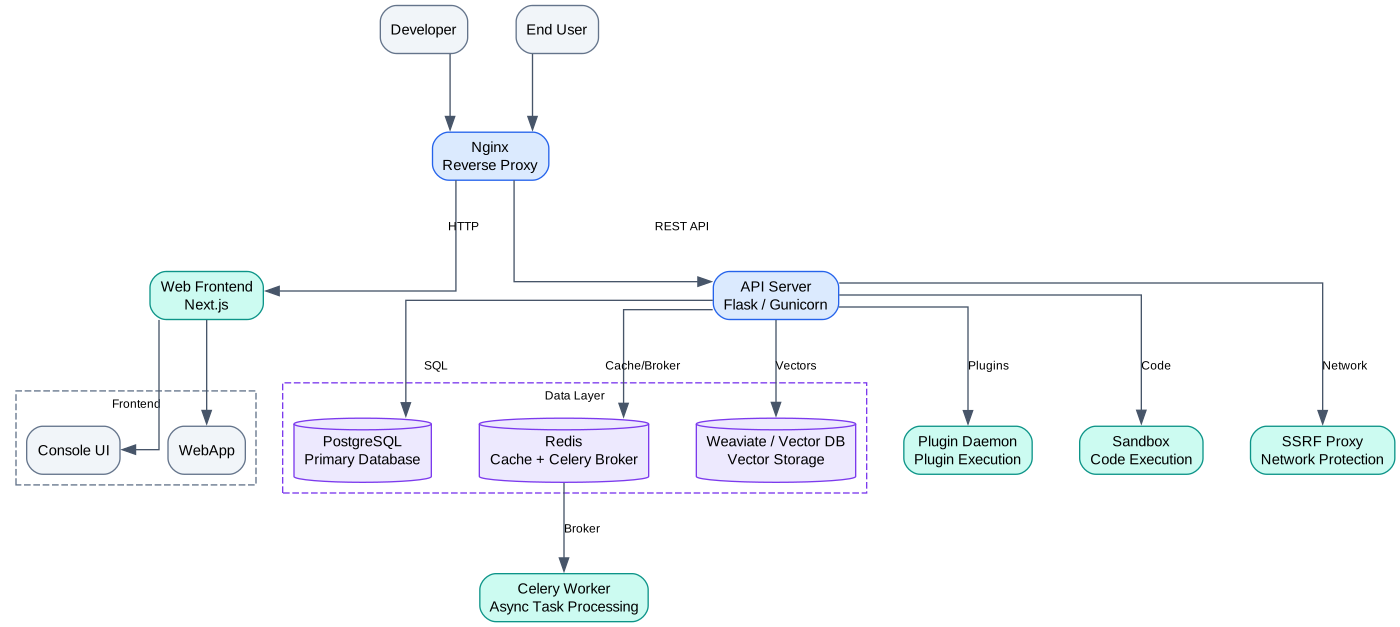
The platform architecture diagram illustrates the layered design of Dify’s deployment topology. At the top, the Next.js frontend serves as the primary user interface, providing the visual workflow editor, conversation management panels, knowledge base configuration screens, and agent builder tools. This React-based application communicates with the backend exclusively through a RESTful API layer, maintaining a clean separation between presentation and business logic.
The Flask API server acts as the central orchestration hub, handling all incoming requests from the frontend and routing them to the appropriate internal services. It manages authentication, authorization, workspace isolation, and request validation. The API server also implements the core business logic for application configuration, prompt template management, and conversation state persistence. It connects to PostgreSQL for relational data storage – including user accounts, application definitions, conversation histories, and workflow configurations – and to Redis for caching, session management, and as a message broker for asynchronous task dispatch.
Celery workers form the asynchronous execution backbone of the platform. Long-running operations such as document embedding, batch inference, workflow execution, and data export are dispatched to the Celery task queue via Redis. The worker pool can be horizontally scaled by adding more worker processes, allowing the platform to handle increased load without modifying the API layer. Each worker pulls tasks from named queues, enabling priority-based routing where critical operations receive dedicated worker capacity.
The vector database layer is pluggable, supporting 27+ backends including Weaviate, Qdrant, Milvus, Pinecone, Chroma, Pgvector, OpenSearch, and others. This abstraction allows teams to choose the vector store that best fits their latency, scalability, and licensing requirements. The API server and Celery workers both interact with the vector database through a unified interface that normalizes operations across providers.
Nginx sits at the perimeter as a reverse proxy, terminating TLS, serving static assets, and load-balancing requests across API server instances. The storage layer abstracts file persistence across local filesystem, S3-compatible object storage, Azure Blob, and Google Cloud Storage, ensuring that uploaded documents, generated images, and other assets are durably stored regardless of the deployment environment.
The Docker Compose configuration ties these services together with health checks, dependency ordering, volume mounts for persistent data, and network isolation between internal services. This architecture enables teams to deploy the entire platform with a single command while retaining the flexibility to swap individual components as their requirements evolve.
Workflow Engine
Dify’s workflow engine is the core execution runtime that powers both standalone workflow applications and the internal logic of agent and chatbot applications. Built on a custom graph execution framework called “graphon,” the engine processes directed acyclic graphs (DAGs) where each node represents a discrete operation and edges define data flow and execution dependencies.

The workflow engine diagram depicts the end-to-end lifecycle of a workflow from visual authoring through parallel execution to result aggregation. On the left side, the visual DAG builder – implemented with ReactFlow – provides a drag-and-drop canvas where users compose workflows by placing nodes onto a grid and connecting their input and output ports. The builder enforces type checking on connections, ensuring that only compatible data types flow between nodes, and it validates the graph for cycles before allowing publication.
The engine supports 14+ built-in node types, each encapsulating a specific capability. The LLM node invokes a language model with a configured prompt template and optional context variables. The Knowledge Retrieval node queries a configured knowledge base using the RAG pipeline. The Code node executes user-written Python or JavaScript snippets in a sandboxed environment. The Conditional node implements if-else branching logic. The Iteration node loops over a list variable, executing a sub-graph for each element. The Variable Aggregator node collects outputs from parallel branches. The HTTP Request node calls external APIs. The Template Transform node applies Jinja2 templates to reshape data. The Question Classifier node routes user input to different branches based on semantic classification. The Tool node invokes built-in or custom tools. The Parameter Extractor node pulls structured data from unstructured text. Each node declares its input schema, output schema, and runtime behavior, enabling the engine to perform static type checking before execution.
When a workflow is triggered, the graphon engine constructs an execution plan by performing a topological sort on the DAG. Nodes with no unresolved dependencies are scheduled for immediate execution, and the engine dispatches them to a worker pool that processes nodes concurrently. A variable pool maintains the state of all node outputs, and as each node completes, its outputs are written to the pool, potentially unblocking downstream nodes. This data-driven scheduling model maximizes parallelism while guaranteeing that no node executes before its inputs are available.
For collaborative editing, Dify implements CRDT-based (Conflict-free Replicated Data Type) synchronization, allowing multiple team members to edit the same workflow simultaneously without conflicts. Changes are propagated in real-time through WebSocket connections, and the CRDT layer ensures that concurrent edits to the same node or edge converge to a consistent state without requiring a central lock. This is particularly valuable for teams co-authoring complex workflows where different members may be responsible for different branches of the graph.
The worker pool scales dynamically based on queue depth, and each worker is isolated to prevent a misbehaving node from affecting the execution of other workflows. Execution traces, including node-level latency, token consumption, and error states, are captured and surfaced in the observability dashboard, enabling developers to identify bottlenecks and optimize their workflows iteratively.
RAG Pipeline
Retrieval-augmented generation is one of the most widely adopted patterns for grounding LLM outputs in factual, domain-specific knowledge. Dify provides a comprehensive RAG pipeline that handles the full lifecycle of document ingestion, from raw file upload through extraction, cleaning, segmentation, embedding, indexing, retrieval, and reranking. The pipeline is deeply integrated with both the workflow engine and the chatbot runtime, allowing knowledge bases to be queried as first-class operations within any application.
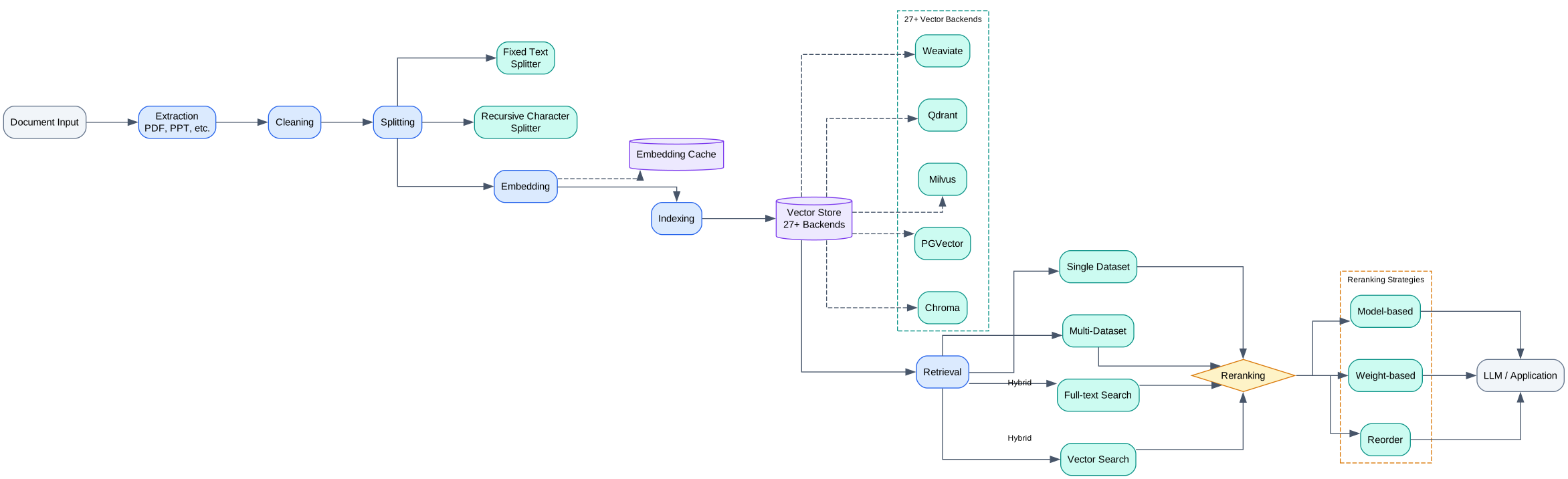
The RAG pipeline diagram traces the journey of a document from upload to retrieval-augmented response. The ingestion stage begins when a user uploads documents through the knowledge base interface. Supported formats include PDF, DOCX, TXT, Markdown, HTML, CSV, Excel, and others. The extraction module parses each file into raw text, handling format-specific challenges such as PDF layout extraction, table detection, and metadata preservation.
Once extracted, the text passes through a cleaning stage that removes boilerplate, normalizes whitespace, strips control characters, and applies optional rules such as regex-based filtering or deduplication. The cleaned text then enters the segmentation stage, where it is split into chunks according to a configurable strategy. Dify supports automatic segmentation, where the engine detects natural boundaries such as paragraph breaks and heading hierarchies, as well as custom delimiter-based splitting and fixed-length chunking with overlap. Each chunk is annotated with metadata including its source document, page number, and positional index.
The embedding stage converts each chunk into a dense vector representation using a configured embedding model. Dify supports embedding models from OpenAI, Cohere, Jina, local models via Ollama, and many others. The resulting vectors are indexed in one of 27+ supported vector store backends. The choice of vector store affects retrieval latency, scalability, and filtering capabilities. For instance, Pgvector enables tight integration with the existing PostgreSQL deployment, while dedicated vector databases like Milvus and Qdrant offer higher throughput for large-scale deployments. Weaviate and OpenSearch provide hybrid search capabilities out of the box.
At query time, the retrieval stage accepts a user query, embeds it using the same embedding model, and performs a similarity search against the vector store. Dify supports multiple retrieval modes: semantic search using vector similarity, full-text search using keyword matching, and hybrid search that combines both approaches with configurable weighting. Hybrid search is particularly effective because it captures both the semantic intent of the query and the specific terminology used in the source documents.
After initial retrieval, the reranking stage reorders the candidate chunks to improve relevance. Dify integrates with reranking models such as Cohere Rerank and BGE Reranker, which take the query and the top-K retrieved chunks as input and produce a relevance-scored ordering. This second-pass scoring significantly improves precision, especially for queries where the initial vector similarity search returns marginally relevant results.
The final stage assembles the reranked chunks into a context window that is prepended to the LLM prompt. The pipeline respects configurable limits on context length, chunk count, and score thresholds, ensuring that only the most relevant and concise context is included. The entire pipeline is observable, with each stage logging its inputs, outputs, and latency, enabling continuous optimization of retrieval quality.
Agent System
Dify’s agent system provides a flexible runtime for building autonomous AI agents that can reason about tasks, select and invoke tools, and iterate toward a solution. The system supports two primary agent strategies – Function Calling and ReAct (Reasoning + Acting) – and integrates with over 50 built-in tools, custom tool definitions, workflow-as-tool composition, and the Model Context Protocol (MCP) for external tool discovery.
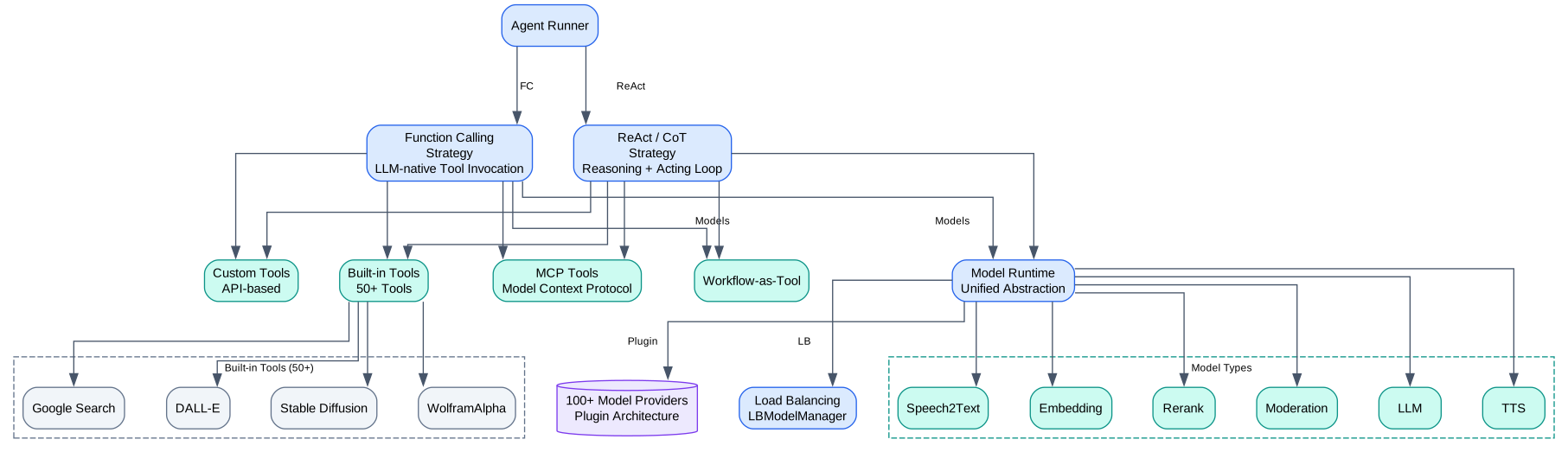
The agent system diagram illustrates the layered architecture from the user prompt at the top through the agent strategy layer, tool registry, model runtime, and down to the external service integrations. The Function Calling strategy leverages the native tool-use capabilities of models such as GPT-4, Claude, and Gemini, where the model directly generates structured tool call requests as part of its output. This approach is fast and deterministic, as the model’s output is parsed into a tool name and arguments without additional reasoning steps. It works best with models that have been fine-tuned or prompted for tool use and where the set of available tools is well-defined.
The ReAct strategy implements a Reason-then-Act loop inspired by the ReAct paper. In each iteration, the model first generates a thought – a natural language reasoning step that analyzes the current state and decides what action to take. It then produces an action, which is a tool invocation with arguments. The tool result is fed back as an observation, and the loop continues until the model produces a final answer. This strategy is more flexible and interpretable, as the reasoning trace is visible and auditable, but it consumes more tokens and may be slower due to the additional reasoning steps. It is particularly effective for complex, multi-step tasks where the agent must explore and adapt its approach.
The tool registry manages the available tools for each agent. Dify ships with 50+ built-in tools organized into categories: web search (Google, Bing, DuckDuckGo, Tavily), weather (OpenWeatherMap), news (Google News), calculator, code interpreter, Wikipedia, arXiv, and many more. Beyond built-in tools, users can define custom tools using OpenAPI/Swagger specifications, allowing the agent to call any HTTP API. The workflow-as-tool feature enables an entire Dify workflow to be published as a tool, allowing agents to invoke complex multi-step processes as single operations. MCP integration extends the tool surface further by allowing the agent to discover and invoke tools exposed by MCP-compatible servers, creating a bridge to external tool ecosystems.
The model runtime layer abstracts communication with 100+ model providers, including OpenAI, Anthropic, Google, Mistral, Cohere, local models via Ollama and LM Studio, and cloud providers such as AWS Bedrock, Azure OpenAI, and Google Vertex AI. Each provider integration normalizes the API interface, handling authentication, request formatting, response parsing, and error handling. The runtime also implements load balancing across multiple model instances, failover when a provider is unavailable, and token usage tracking for cost management. Model routing can be configured per-application, allowing different components of the same system to use different models based on their specific requirements for quality, latency, and cost.
The combination of flexible agent strategies, a rich tool ecosystem, and a provider-agnostic model runtime makes Dify’s agent system suitable for a wide range of applications, from simple question-answering bots to complex autonomous agents that orchestrate multiple external services in pursuit of a user goal.
Getting Started
Setting up Dify locally requires Docker and Docker Compose. The following commands clone the repository and start all services:
git clone https://github.com/langgenius/dify.git
cd dify/docker
cp .env.example .env
docker compose up -d
After the containers are running, the Dify web interface is accessible at http://localhost/install, where the initial administrator account is created. The .env file contains all configuration options, including database connections, storage backends, and model provider API keys.
To connect model providers, add API keys to the .env file or configure them through the web interface under Settings > Model Providers:
# OpenAI
OPENAI_API_KEY=sk-xxxxxxxxxxxxxxxxxxxxxxxx

# Anthropic
ANTHROPIC_API_KEY=sk-ant-xxxxxxxxxxxxxxxxxxxxxxxx

# For local models via Ollama
OLLAMA_API_BASE_URL=http://host.docker.internal:11434
For production deployments, configure the vector database and object storage backends:
# Vector store (options: weaviate, qdrant, milvus, chroma, pgvector, etc.)
VECTOR_STORE=pgvector

# Object storage (options: local, s3, azure-blob, google-storage)
STORAGE_TYPE=s3
S3_ENDPOINT=https://s3.amazonaws.com
S3_BUCKET_NAME=dify-storage
S3_ACCESS_KEY=your-access-key
S3_SECRET_KEY=your-secret-key
Once configured, navigate to the Applications page to create your first app. Dify offers four application types: Chatbot, Completion, Workflow, and Agent. Each type comes with a visual configuration interface and a built-in debugging console. The platform also provides API endpoints for every application, enabling seamless integration with existing systems.
Conclusion
Dify stands out in the crowded LLM tooling landscape by offering a genuinely integrated platform rather than a loose collection of libraries. Its multi-service architecture provides the operational maturity expected in production environments – horizontal scalability, pluggable storage and vector backends, and full observability. The graphon-based workflow engine delivers a visual yet powerful composition model that supports complex branching, iteration, and parallel execution. The RAG pipeline handles the complete document lifecycle with support for 27+ vector stores and hybrid retrieval. The agent system accommodates both the speed of Function Calling and the interpretability of ReAct reasoning, backed by 50+ tools and 100+ model providers.
For teams that need to move from prototype to production quickly, Dify eliminates the integration overhead of assembling a custom stack. For organizations with specific compliance or data residency requirements, the self-hosted deployment model provides full control over data and infrastructure. The active community, comprehensive documentation, and growing ecosystem of plugins and extensions make Dify a compelling choice for any team building LLM-powered applications. The repository is available at https://github.com/langgenius/dify. Enjoyed this post? Never miss out on future posts by following us 


