PageIndex: Vectorless Reasoning-Based RAG That Achieves 98.7% on FinanceBench
PageIndex is a vectorless, reasoning-based RAG system that replaces vector similarity search with LLM reasoning over hierarchical tree indexes, achieving state-of-the-art 98.7% accuracy on FinanceBench. Traditional RAG pipelines rely on embedding similarity to find relevant document chunks, but similarity and relevance are fundamentally different concepts. PageIndex addresses this gap by building an AI-generated Table of Contents from documents and then using LLM reasoning to navigate that structure, much like how a human expert would scan a document’s table of contents to locate the most relevant section. With nearly 30,000 GitHub stars, PageIndex has rapidly become one of the most popular open-source RAG alternatives for professionals working with long, complex documents such as financial reports, legal filings, and academic papers.
The core insight behind PageIndex is that vector embeddings capture semantic similarity, not true relevance. When you ask a question about a specific clause in a 200-page SEC filing, the most semantically similar text might be a completely different section that happens to use similar vocabulary. PageIndex’s hierarchical tree search, inspired by AlphaGo’s approach to game-tree navigation, uses LLM reasoning at each step to decide which branch of the document tree is most likely to contain the answer. This reasoning-driven approach produces retrieval results that are traceable, explainable, and far more accurate than embedding-based alternatives.
The Problem with Vector RAG
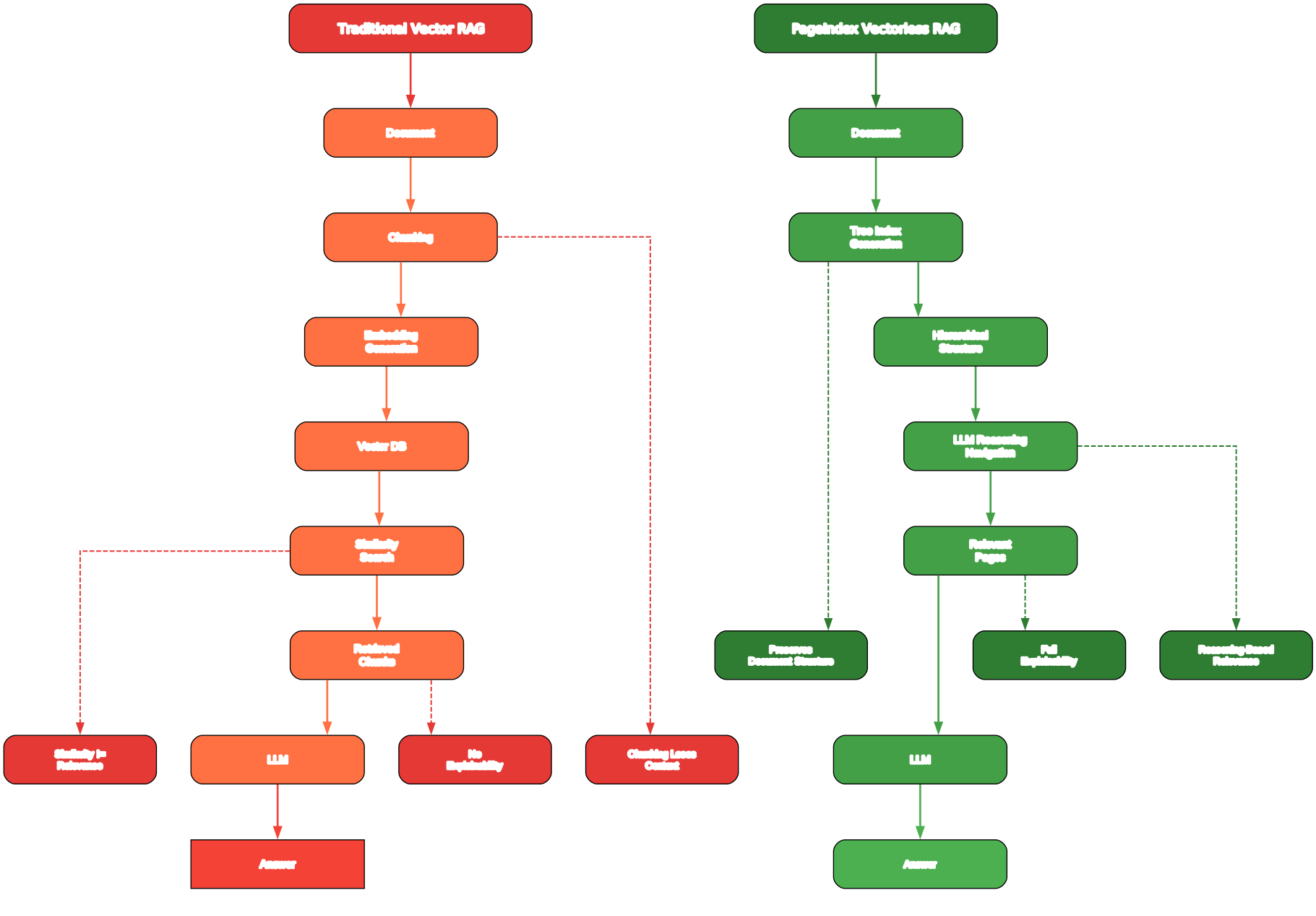
Understanding the Vectorless vs Vector RAG Comparison
The comparison diagram above illustrates the fundamental architectural difference between traditional vector-based RAG and PageIndex’s vectorless approach. Understanding this distinction is critical for anyone evaluating RAG systems for professional document analysis.
Vector-Based RAG Pipeline (Left Side)
In a traditional vector RAG system, documents are processed through a multi-step pipeline that begins with chunking. The document is split into fixed-size or semantic chunks, each of which is then passed through an embedding model that converts the text into a high-dimensional vector. These vectors are stored in a vector database such as Pinecone, Weaviate, or ChromaDB. At query time, the user’s question is also embedded into a vector, and the system performs a nearest-neighbor search to find the chunks whose vectors are closest to the query vector. The top-k chunks are then injected into the LLM prompt as context.
This approach has several well-documented limitations. First, chunking destroys document structure. A section heading on one page and its corresponding content on the next page may end up in different chunks, losing the hierarchical relationship that gives the text meaning. Second, similarity search is fundamentally approximate. It finds text that is semantically similar to the query, but similarity does not equal relevance. A question about “risk factors related to supply chain disruption” might retrieve chunks about “risk factors related to cybersecurity” because both use similar vocabulary. Third, vector search is opaque. When the system returns a chunk, there is no way to trace why that chunk was selected or where it sits in the document’s overall structure.
PageIndex Vectorless RAG Pipeline (Right Side)
PageIndex takes a radically different approach. Instead of chunking and embedding, it builds a hierarchical tree index from the document. This tree structure is analogous to an AI-generated Table of Contents, where each node contains a title, a page range (start_index and end_index), a summary, and a unique node_id. At query time, the LLM reasons over this tree structure, evaluating each node to determine which branch is most likely to contain the answer. This is a tree search process, not a similarity search.
The key advantages are immediately apparent. The tree structure preserves the document’s natural hierarchy, so sections and subsections remain connected. The LLM can reason about the content at each level, making decisions based on relevance rather than similarity. And the retrieval results are fully traceable: you can see exactly which nodes the LLM traversed and why it chose one branch over another.
Key Insight: Vector embeddings find semantically similar text, but retrieval needs reasoning about relevance. PageIndex achieves 98.7% on FinanceBench by replacing similarity search with hierarchical tree search, where the LLM reasons about which document section is most relevant at each step.
How PageIndex Works
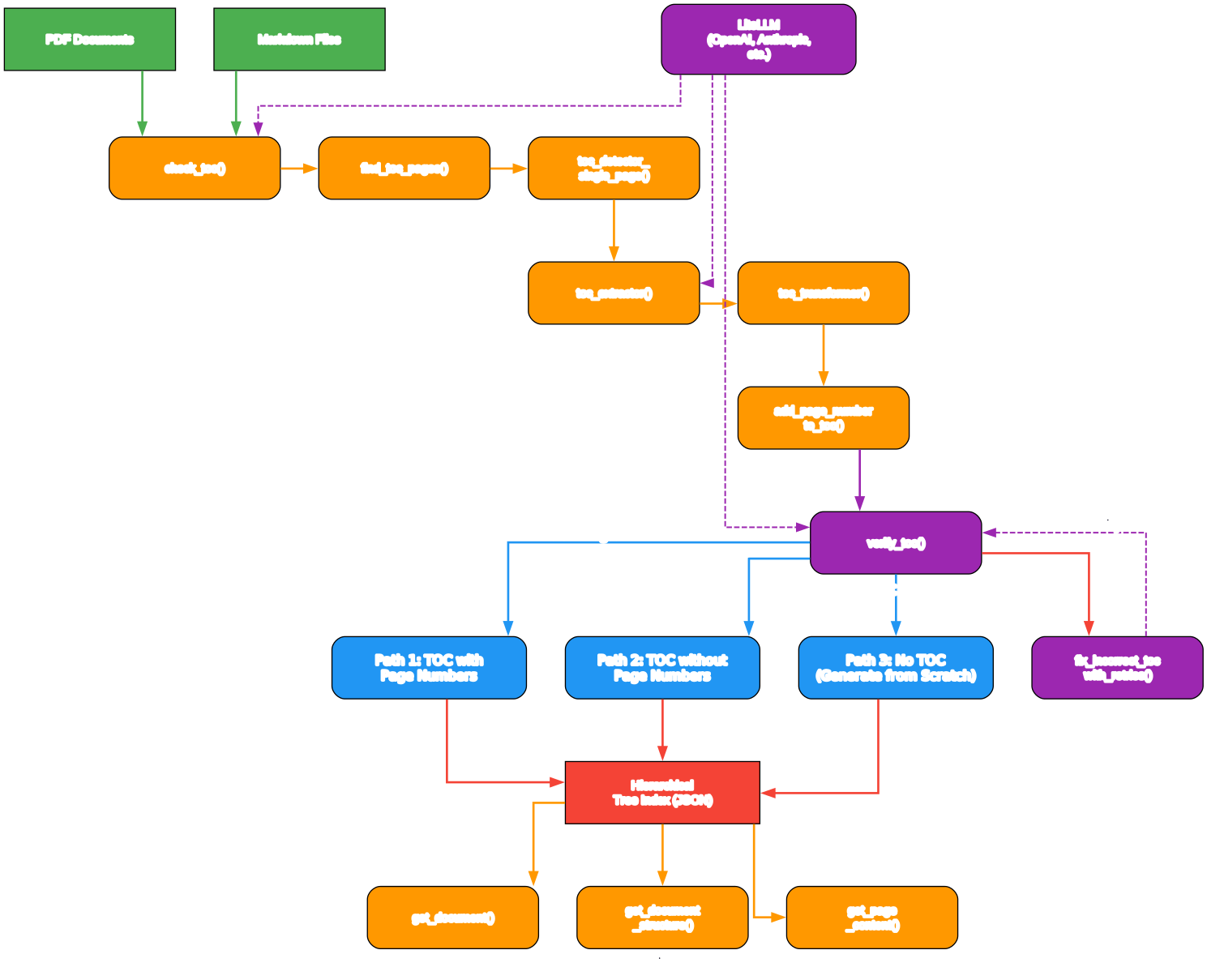
Understanding the PageIndex Architecture
The architecture diagram above shows the complete PageIndex pipeline, from document input through tree construction to retrieval. Each component plays a specific role in transforming a raw document into a searchable, reasoning-ready index.
Document Input Layer
PageIndex supports two input formats: PDF and Markdown. For PDF documents, the system uses PyMuPDF (fitz) for text extraction, which provides reliable page-level text content. For Markdown files, the system parses heading levels (hash symbols) to determine the document’s natural hierarchy. The input layer handles format detection automatically through the PageIndexClient.index() method, which accepts a file path and determines the processing mode based on the file extension.
Tree Construction Engine
The tree construction engine is the heart of PageIndex. It operates in three distinct modes depending on what the document contains:
-
TOC with Page Numbers (
process_toc_with_page_numbers): When the document has a Table of Contents with page numbers, the system extracts the TOC, transforms it into a structured JSON format, and then maps TOC entries to physical page indices. It calculates a page offset by matching TOC page numbers to actual document pages, then applies that offset to all entries. -
TOC without Page Numbers (
process_toc_no_page_numbers): When a TOC exists but lacks page numbers, the system first transforms the TOC into structured JSON, then uses LLM reasoning to match each TOC entry to its physical location in the document by scanning page content. -
No TOC (
process_no_toc): When no TOC exists at all, the system generates the entire tree structure from scratch. It divides the document into manageable chunks based on token limits, generates an initial tree from the first chunk, and then incrementally extends the tree by processing subsequent chunks.
Self-Healing Verification Pipeline
After tree construction, PageIndex runs a verification pass that checks whether each section title actually appears at its assigned page location. The verify_toc() function samples section titles and uses the LLM to confirm their presence on the indicated pages. If accuracy falls below 60%, the system automatically degrades to a simpler processing mode. If accuracy is between 60% and 100%, the fix_incorrect_toc_with_retries() function attempts to correct the misaligned entries, with up to 3 retry attempts. This self-healing loop ensures that the final tree structure is accurate and reliable.
Retrieval Layer
The retrieval layer provides three core functions through the PageIndexClient:
get_document(doc_id): Returns document metadata including name, description, type, and page count.get_document_structure(doc_id): Returns the hierarchical tree structure with text fields removed to save tokens.get_page_content(doc_id, pages): Retrieves the actual text content for specified page ranges, supporting formats like “5-7”, “3,8”, or “12”.
These functions are designed to work with agentic RAG systems, where an AI agent first examines the document structure, then selectively retrieves only the pages it needs based on its reasoning about the tree.
Amazing: The self-healing verification pipeline in PageIndex checks every section title against its assigned page location and automatically corrects misalignments with up to 3 retry attempts. If accuracy falls below 60%, the system degrades gracefully to a simpler processing mode rather than returning incorrect results.
The Retrieval Workflow
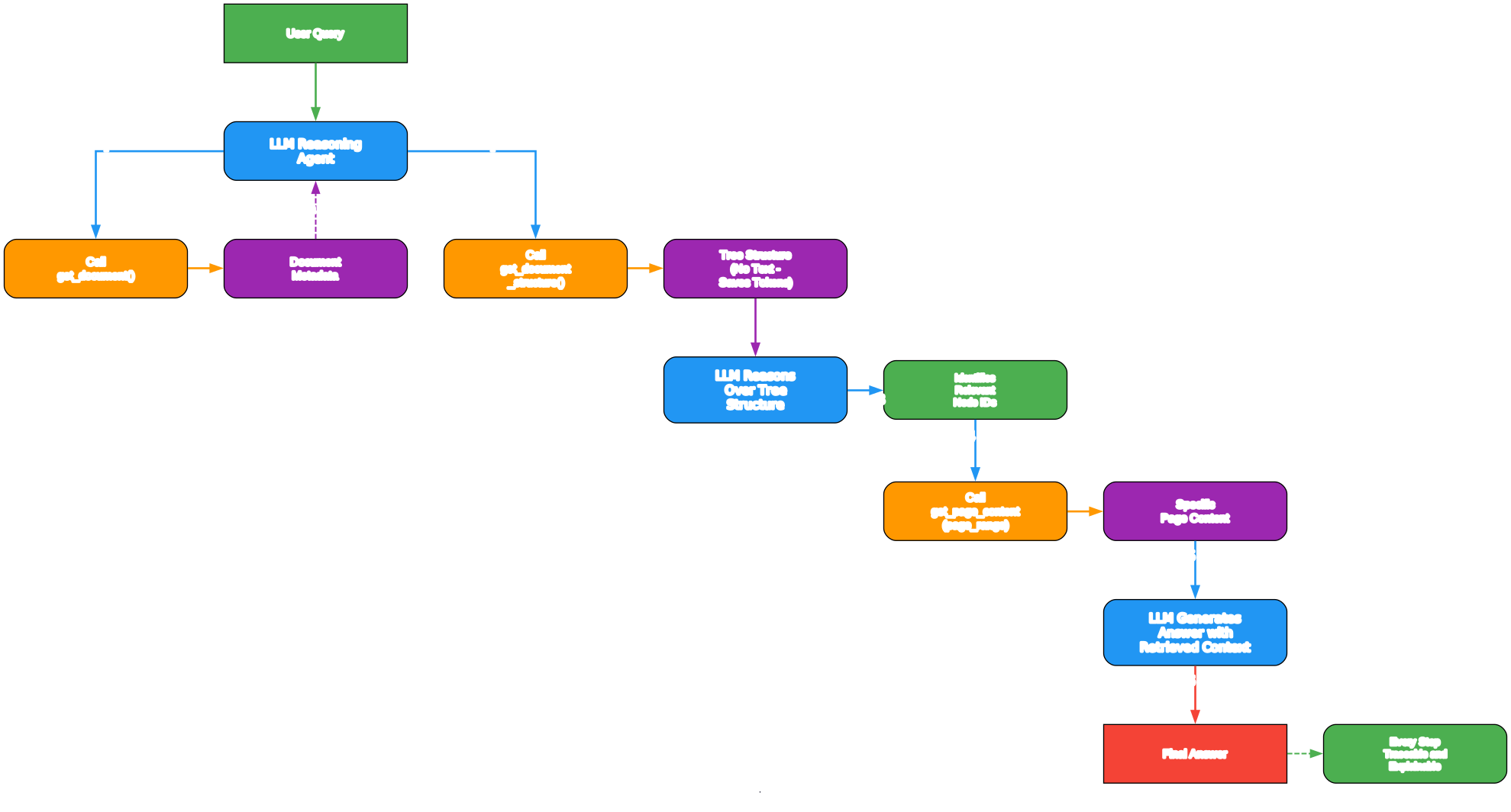
Understanding the Retrieval Workflow
The retrieval workflow diagram above shows how an AI agent uses PageIndex to answer a question about a document. This is the core value proposition of the system: instead of retrieving chunks by similarity, the agent reasons through the document’s structure to find the most relevant content.
Step 1: Document Indexing
The workflow begins when a document is indexed through PageIndexClient.index(file_path). This triggers the full tree construction pipeline described in the architecture section. The result is a hierarchical tree structure stored in memory (or persisted to a workspace directory for later use). Each node in the tree contains:
title: The section heading textnode_id: A unique identifier (e.g., “0001”, “0002”)start_index: The starting page numberend_index: The ending page numbersummary: An LLM-generated summary of the section’s contentnodes: An array of child nodes (for hierarchical nesting)
The indexing process is one-time: once a document is indexed, the tree structure can be reused for any number of queries without reprocessing.
Step 2: Structure Examination
When a query arrives, the agent first calls get_document_structure(doc_id) to retrieve the tree structure. This returns the complete hierarchy without the full text content, which keeps the token count manageable even for very long documents. The agent then reasons over this structure, evaluating each node’s title and summary to determine which branches are most likely to contain the answer.
Step 3: Targeted Page Retrieval
Once the agent has identified the relevant nodes, it calls get_page_content(doc_id, pages) to retrieve only the specific pages referenced by those nodes. For example, if the agent determines that the answer is likely in the “Risk Factors” section covering pages 21-28, it requests only those pages rather than the entire document. This targeted retrieval dramatically reduces token usage compared to injecting the full document or large chunks into the LLM prompt.
Step 4: Answer Generation
With the relevant page content in hand, the agent generates its final answer. Because the retrieval was based on reasoning about document structure rather than vector similarity, the answer is grounded in the correct section of the document, and the agent can cite specific page numbers and section titles to support its response.
Agentic RAG Integration
PageIndex integrates cleanly with the OpenAI Agents SDK through a set of tool functions. The agentic_vectorless_rag_demo.py example in the repository demonstrates how to wire up PageIndex as a set of agent tools:
from pageindex import PageIndexClient

client = PageIndexClient(api_key="your-openai-key")
doc_id = client.index("/path/to/document.pdf")
The agent is given three tools: get_document, get_document_structure, and get_page_content. It autonomously decides when to call each tool based on the user’s question, first examining the structure, then retrieving specific pages, and finally synthesizing an answer. This agentic approach is far more flexible than traditional RAG pipelines, where the retrieval strategy is fixed at design time.
Takeaway: With PageIndex, you index a document once and then query it any number of times. The agent reasons through the tree structure to find relevant sections, retrieves only the pages it needs, and generates answers grounded in the correct document context. No vector database, no chunking, no similarity search required.
Three Processing Modes
PageIndex automatically detects the best processing mode for each document, but understanding these modes helps you interpret results and troubleshoot issues.
Mode 1: TOC with Page Numbers
When a document contains a Table of Contents with page numbers, PageIndex uses the most efficient processing path. The system:
- Detects TOC pages using the
find_toc_pages()function, which scans the first N pages (configurable via--toc-check-pages, default 20) for TOC content - Extracts the TOC content and transforms it into structured JSON using
toc_transformer() - Maps TOC page numbers to physical page indices by matching section titles to their actual locations in the document
- Calculates a page offset to reconcile differences between TOC page numbers and physical page indices
- Verifies the result and self-corrects any misalignments
This mode produces the most accurate results because the document itself provides the structural blueprint.
Mode 2: TOC without Page Numbers
When a document has a TOC but no page numbers (common in digital-only publications), PageIndex:
- Extracts and transforms the TOC structure
- Scans the document content page by page to match each TOC entry to its physical location
- Uses
add_page_number_to_toc()to assign page indices based on where each section actually begins
This mode is less precise than Mode 1 but still produces reliable results because the document’s own structure provides guidance.
Mode 3: No TOC (Generated from Scratch)
When no TOC exists (common in research papers, internal documents, and many PDFs), PageIndex generates the entire tree structure from scratch:
- Divides the document into manageable chunks based on token limits (configurable via
--max-tokens-per-node, default 20,000) - Generates an initial tree from the first chunk using
generate_toc_init() - Incrementally extends the tree by processing subsequent chunks with
generate_toc_continue() - Assigns physical page indices based on the
<physical_index_X>tags embedded in the chunked text
This mode requires the most LLM calls but produces useful tree structures even for documents with no inherent organization.
Self-Healing Verification Pipeline
One of PageIndex’s most distinctive features is its self-healing verification pipeline. After constructing the tree index, the system does not simply accept the result. Instead, it runs a verification pass that checks the accuracy of the index and corrects any errors.
The verification process works as follows:
-
verify_toc()samples section titles from the tree and checks whether each title actually appears on its assigned page. For each sampled title, it sends the title and the page text to the LLM, which determines if the section starts on that page. -
If accuracy is 100%, the tree is accepted as-is. If accuracy is between 60% and 100%, the system enters the
fix_incorrect_toc_with_retries()loop, which attempts to correct misaligned entries by searching nearby pages for the correct location. This loop runs up to 3 times, with each iteration fixing more entries. -
If accuracy falls below 60%, the system degrades gracefully to a simpler processing mode. For example, if Mode 1 (TOC with page numbers) produces low accuracy, it automatically falls back to Mode 2 (TOC without page numbers). If Mode 2 also fails, it falls back to Mode 3 (no TOC).
This self-healing approach ensures that PageIndex always produces the best possible result, even when documents have unusual formatting, corrupted TOC entries, or other edge cases that would break simpler systems.
Important: PageIndex’s verification pipeline does not just check accuracy; it actively corrects errors. The
fix_incorrect_toc_with_retries()function identifies misaligned entries, searches nearby pages for the correct location, and updates the tree structure. This self-healing capability is what enables PageIndex to achieve 98.7% on FinanceBench, where documents often have complex formatting and inconsistent page numbering.
Installation and Setup
Prerequisites
PageIndex requires Python 3.8 or later and an OpenAI API key (or any LLM provider supported by LiteLLM).
Installation
Clone the repository and install dependencies:
git clone https://github.com/VectifyAI/PageIndex.git
cd PageIndex
pip3 install --upgrade -r requirements.txt
The requirements.txt includes the following core dependencies:
litellm==1.83.7
pymupdf==1.26.4
PyPDF2==3.0.1
python-dotenv==1.2.2
pyyaml==6.0.2
API Key Configuration
Create a .env file in the project root directory with your LLM API key:
OPENAI_API_KEY=your_openai_key_here
PageIndex uses LiteLLM for multi-provider support, so you can also use keys from Anthropic, Google, or other providers by setting the appropriate environment variables and specifying the model in the configuration.
Default Configuration
PageIndex reads default settings from pageindex/config.yaml. The key configuration options are:
model: gpt-4o-2024-11-20
retrieve_model: gpt-5.4
toc_check_page_num: 20
max_page_num_each_node: 10
max_token_num_each_node: 20000
if_add_node_id: "yes"
if_add_node_summary: "yes"
if_add_doc_description: "yes"
if_add_node_text: "yes"
The default indexing model is gpt-4o-2024-11-20, and the default retrieval model is gpt-5.4. You can override these settings via command-line arguments or the Python API.
Usage Examples
CLI: Indexing a PDF Document
python3 run_pageindex.py --pdf_path /path/to/your/document.pdf
This generates a tree structure JSON file in the ./results/ directory. You can customize the processing with optional parameters:
python3 run_pageindex.py \
  --pdf_path /path/to/your/document.pdf \
  --model gpt-4o-2024-11-20 \
  --toc-check-pages 20 \
  --max-pages-per-node 10 \
  --max-tokens-per-node 20000 \
  --if-add-node-id yes \
  --if-add-node-summary yes \
  --if-add-doc-description yes \
  --if-add-node-text yes
CLI: Indexing a Markdown File
python3 run_pageindex.py --md_path /path/to/your/document.md
PageIndex uses heading levels (#, ##, ###) to determine the document hierarchy for Markdown files.
Python API: Basic Indexing and Retrieval
from pageindex import PageIndexClient

# Initialize the client
client = PageIndexClient(api_key="your-openai-key")

# Index a document
doc_id = client.index("/path/to/document.pdf")

# Get document metadata
metadata = client.get_document(doc_id)
print(metadata)

# Get the tree structure
structure = client.get_document_structure(doc_id)
print(structure)

# Get specific page content
content = client.get_page_content(doc_id, "21-28")
print(content)
Python API: Agentic Vectorless RAG
from pageindex import PageIndexClient

# Initialize with workspace for persistence
client = PageIndexClient(
    api_key="your-openai-key",
    workspace="./my_workspace"
)

# Index a document (stored in workspace for reuse)
doc_id = client.index("/path/to/financial_report.pdf")

# The agent can now reason over the structure
structure = client.get_document_structure(doc_id)

# Retrieve only the relevant pages
content = client.get_page_content(doc_id, "45-52")
The PageIndexClient supports workspace persistence, so indexed documents are saved to disk and can be reloaded without reprocessing. This is especially useful for large documents that take time to index.
Python API: Multi-Provider LLM Support
from pageindex import PageIndexClient

# Use Anthropic Claude instead of OpenAI
client = PageIndexClient(
    api_key="your-anthropic-key",
    model="claude-sonnet-4-20250514"
)

# Or use any LiteLLM-supported provider
client = PageIndexClient(
    model="litellm/anthropic/claude-sonnet-4-20250514"
)
PageIndex uses LiteLLM under the hood, which means you can use any of the 100+ LLM providers that LiteLLM supports, including OpenAI, Anthropic, Google, Mistral, and local models through Ollama.
Key Features Summary
| Feature | Description | Benefit |
|---|---|---|
| Vectorless Retrieval | Uses LLM reasoning over tree indexes instead of vector similarity | More accurate retrieval for complex documents |
| Hierarchical Tree Index | Builds an AI-generated Table of Contents with page ranges and summaries | Preserves document structure and context |
| Three Processing Modes | TOC with page numbers, TOC without, and no TOC (generated from scratch) | Handles any document format |
| Self-Healing Verification | verify_toc() + fix_incorrect_toc_with_retries() loop with 3 retries | Ensures index accuracy automatically |
| Dual Format Support | PDF and Markdown input | Works with the most common document types |
| Agentic RAG Integration | Clean API for OpenAI Agents SDK | Build reasoning-based RAG agents easily |
| Multi-Provider LLM | LiteLLM support for 100+ providers | Use any LLM provider you prefer |
| Workspace Persistence | Save and reload indexed documents | Avoid reprocessing large documents |
| 98.7% FinanceBench | State-of-the-art accuracy on financial document QA | Proven performance on professional documents |
| MIT License | Fully open source | Use commercially without restrictions |
Conclusion
PageIndex represents a fundamental shift in how we think about document retrieval for RAG systems. By replacing vector similarity search with LLM reasoning over hierarchical tree indexes, it achieves superior accuracy on complex professional documents where traditional RAG systems struggle. The 98.7% score on FinanceBench demonstrates that reasoning-based retrieval is not just a theoretical improvement but a practical one that delivers measurable results.
The self-healing verification pipeline ensures reliability even with poorly formatted documents, and the three processing modes mean PageIndex can handle any document regardless of whether it has a Table of Contents. The clean Python API and OpenAI Agents SDK integration make it straightforward to build agentic RAG systems that reason about document structure rather than relying on approximate similarity search.
For teams working with financial reports, legal filings, academic papers, or any long-form professional documents, PageIndex offers a compelling alternative to vector-based RAG that delivers better accuracy, better explainability, and better traceability. The project is open source under the MIT license and available on GitHub. Enjoyed this post? Never miss out on future posts by following us 


