Claude Context: Semantic Code Search MCP Server
Claude Desktop is a powerful AI assistant, but its ability to understand your codebase is limited by what you manually paste into the conversation. Claude Context from Zilliz Tech bridges this gap by providing a Model Context Protocol (MCP) server that gives Claude real-time semantic search over your entire codebase. Instead of copying files back and forth, Claude can now search your code intelligently – finding relevant functions, classes, and patterns through natural language queries.
Built on Zilliz Cloud (the managed Milvus vector database) and OpenAI embeddings, Claude Context implements a hybrid search architecture that combines dense vector similarity with BM25 keyword matching, delivering results that are both semantically relevant and lexically precise.
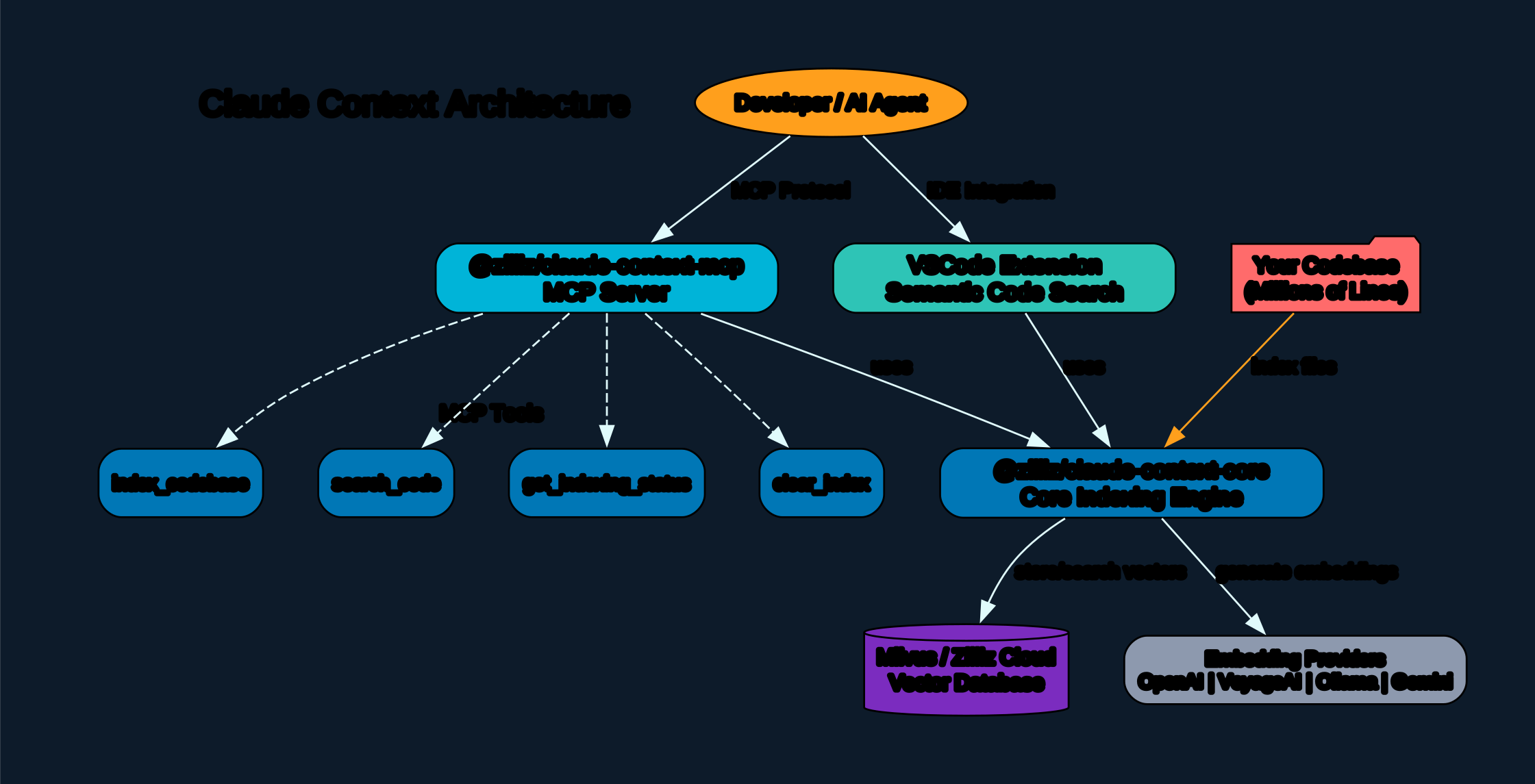
How It Works
Claude Context operates as an MCP server that runs alongside Claude Desktop. When you ask Claude a question about your code, the MCP server intercepts the query, performs a hybrid search across your indexed codebase, and returns the most relevant code snippets directly into the conversation context.
Understanding the Architecture
The architecture diagram above illustrates the three-layer design that powers Claude Context’s semantic search capabilities. Let’s break down each component:
MCP Server Layer The MCP (Model Context Protocol) server acts as the bridge between Claude Desktop and your codebase. It exposes a set of tools that Claude can invoke during conversations – primarily the semantic search tool. When Claude needs to understand your code, it calls the MCP server’s search endpoint rather than asking you to paste code manually. This layer handles authentication, request routing, and response formatting, ensuring that search results are presented in a structure that Claude can reason about effectively.
Core Engine Layer The core engine is where the real intelligence lives. It orchestrates two complementary search strategies:
- Dense Vector Search – Uses OpenAI embeddings to convert code and queries into high-dimensional vectors, then finds the most semantically similar code chunks via approximate nearest neighbor search in Zilliz Cloud
- Sparse Vector Search (BM25) – Uses traditional keyword-based matching to find exact term occurrences, ensuring that searches for specific function names, variable names, or error messages return precise hits
The hybrid approach merges results from both strategies using reciprocal rank fusion (RRF), producing a ranked list that captures both semantic meaning and lexical precision.
Storage Layer All indexed code is stored in Zilliz Cloud, the managed version of the open-source Milvus vector database. Zilliz Cloud handles the heavy lifting of vector indexing, approximate nearest neighbor search, and distributed storage – meaning you don’t need to manage any database infrastructure yourself.
Hybrid Search: Dense + Sparse
The key innovation in Claude Context is its hybrid search approach. Pure vector search excels at finding conceptually related code (“where is authentication handled?”) but can miss exact matches. Pure keyword search finds exact terms (“find the validateToken function”) but misses semantically related code that uses different terminology.

Understanding Hybrid Search
The hybrid search diagram demonstrates how Claude Context combines two fundamentally different search paradigms into a single, more powerful retrieval system. This dual-strategy approach addresses a well-known limitation in information retrieval: no single search method captures all types of relevance.
Dense Vector Path When a query enters the dense vector path, it is first converted into an embedding using OpenAI’s text-embedding models. This embedding captures the semantic meaning of the query – not just the literal words, but the intent behind them. The embedding is then compared against pre-computed embeddings of your code chunks stored in Zilliz Cloud. The result is a ranked list of code snippets that are semantically related to your query, even if they use completely different vocabulary.
For example, a query like “how does user login work” might return code containing authenticateUser(), sessionManager.create(), or OAuth2Handler.verify() – none of which contain the word “login” but all of which are semantically relevant.
Sparse Vector Path (BM25) The sparse vector path uses BM25, the industry-standard algorithm for keyword-based search. BM25 computes a score based on term frequency, inverse document frequency, and document length normalization. This path excels at finding exact matches – if you search for validateToken, it will find every occurrence of that exact string, weighted by how rare and significant that term is across your codebase.
Reciprocal Rank Fusion (RRF) The two result sets are merged using RRF, a simple but effective ensemble method. For each result, RRF computes a score based on its rank position in each list: score = 1 / (k + rank), where k is a constant (typically 60). This means a result that ranks highly in both lists gets a strong combined score, while a result that only appears in one list gets a moderate score. The final merged ranking balances semantic relevance with lexical precision.
Practical Impact In practice, this hybrid approach means Claude Context can handle both types of queries that developers commonly ask:
- Conceptual queries: “where is error handling for API calls?” – dense vector search finds the relevant error handling code
- Exact lookups: “where is
processPaymentdefined?” – BM25 finds the exact function definition
MCP Integration with Claude Desktop
Claude Context integrates with Claude Desktop through the Model Context Protocol, an open standard that allows AI assistants to interact with external tools and data sources.
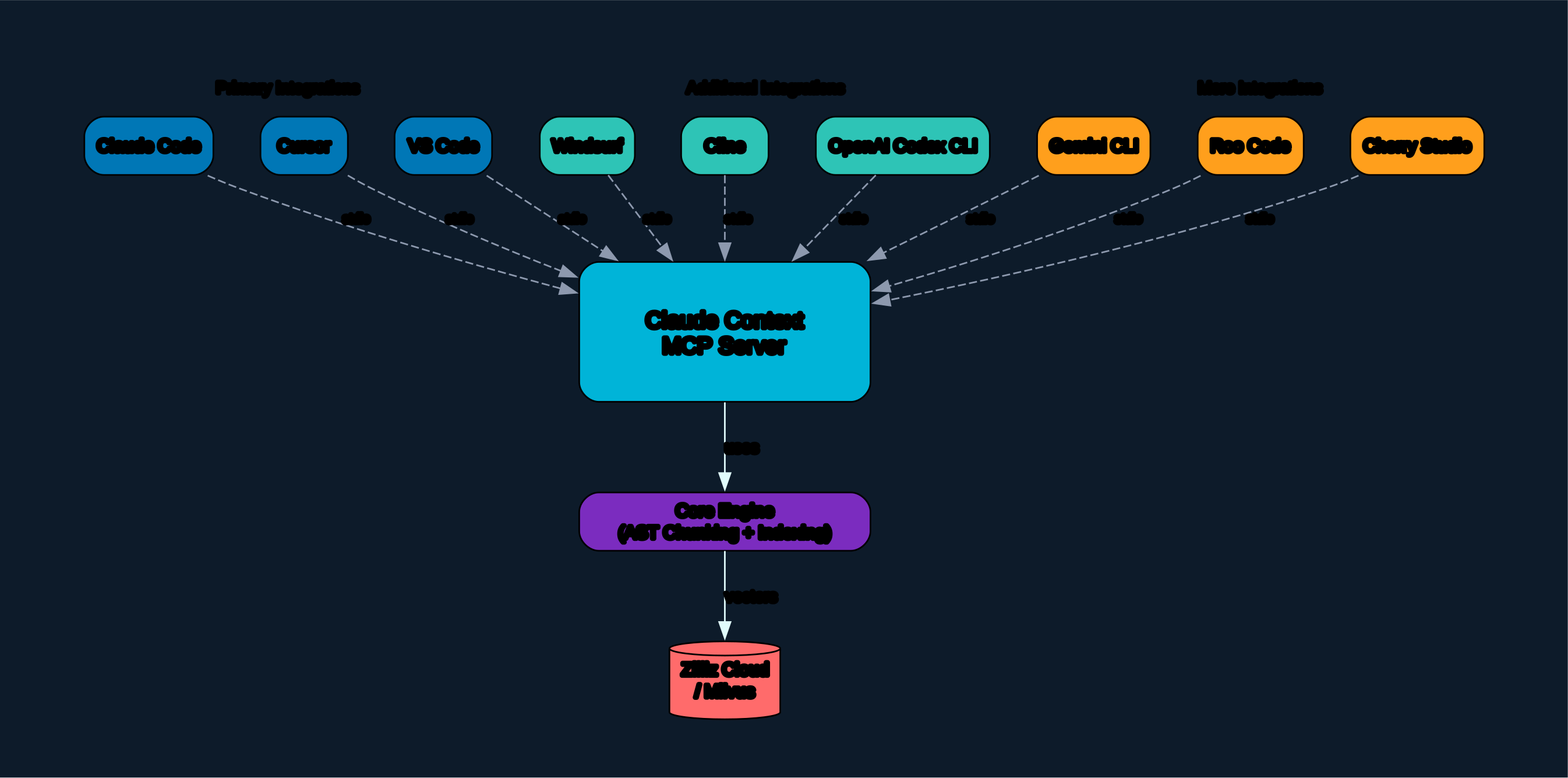
Understanding MCP Integration
The MCP integration diagram shows how Claude Context fits into the broader Claude Desktop ecosystem. MCP is designed as a standardized protocol that lets AI models access external capabilities without hardcoding specific integrations.
Tool Registration When Claude Context starts, it registers its available tools with Claude Desktop via the MCP protocol. The primary tool exposed is the semantic code search function, which accepts a natural language query and returns ranked code results. Claude Desktop makes these tools available to the AI model during conversations, so when you ask a code-related question, Claude knows it can invoke the search tool.
Request Flow The request flow follows this sequence:
- You ask Claude a question about your codebase
- Claude determines that semantic search would help answer the question
- Claude invokes the MCP tool with an appropriate search query
- The MCP server receives the request, performs hybrid search against Zilliz Cloud
- Results are returned to Claude as structured context
- Claude incorporates the code snippets into its response
Environment Configuration The MCP server is configured with environment variables for API keys and connection details. This keeps sensitive credentials out of your codebase while allowing the server to authenticate with Zilliz Cloud and OpenAI. The claude mcp add command handles this configuration, storing the settings in Claude Desktop’s MCP configuration file.
Supported Integrations Beyond Claude Desktop, Claude Context also provides a VSCode extension (Semantic Code Search by Zilliz) that brings the same hybrid search capabilities directly into your editor. This means you can use semantic code search whether you’re working in the terminal with Claude or in VSCode writing code.
Installation
Quick Start with npx
The fastest way to get started is using npx, which downloads and runs the MCP server without requiring a global install:
claude mcp add claude-context \
  -e OPENAI_API_KEY=sk-your-openai-key \
  -e MILVUS_ADDRESS=https://your-instance.zillizcloud.com \
  -e MILVUS_TOKEN=your-zilliz-token \
  -- npx @zilliz/claude-context-mcp@latest
This single command:
- Registers the MCP server with Claude Desktop
- Configures your API keys and Zilliz Cloud connection
- Sets up the server to run automatically when Claude Desktop starts
Prerequisites
Before installing, ensure you have:
- Node.js >= 20.0.0 and < 24.0.0
- OpenAI API key – for generating text embeddings
- Zilliz Cloud account – for vector storage and search (free tier available)
From Source (Development)
To contribute or customize Claude Context, clone and build from source:
git clone https://github.com/zilliztech/claude-context.git
cd claude-context
pnpm install
pnpm build
VSCode Extension
For semantic code search directly in VSCode, install the Semantic Code Search by Zilliz extension from the VSCode Marketplace. Search for zilliz.semanticcodesearch in the Extensions panel.
Usage
Indexing Your Codebase
Before searching, you need to index your codebase into Zilliz Cloud. The indexing pipeline processes your source files, splits them into semantic chunks, generates embeddings, and stores them in vector collections.
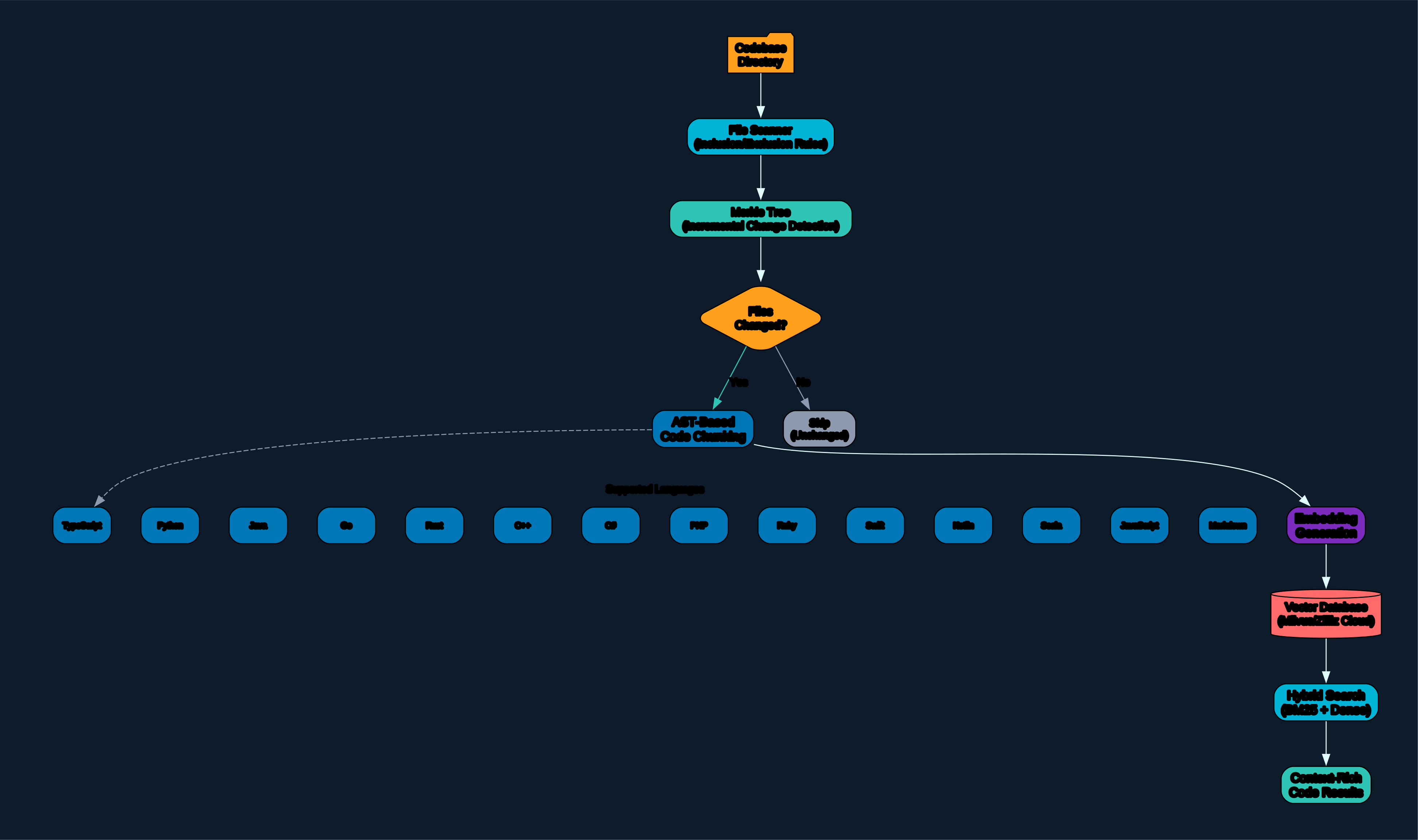
Understanding the Indexing Pipeline
The indexing pipeline diagram illustrates the multi-stage process that transforms raw source code into a searchable vector collection. Each stage is designed to preserve semantic meaning while optimizing for retrieval performance.
File Discovery The pipeline begins by scanning your project directory, identifying source code files based on language-specific extensions. It respects .gitignore patterns and can be configured to include or exclude specific paths. This ensures that only relevant code is indexed, avoiding noise from build artifacts, dependencies, and generated files.
Chunking Strategy Source files are split into semantic chunks using a structure-aware splitting algorithm. Rather than splitting at arbitrary character limits, the chunker respects code structure – function boundaries, class definitions, and logical blocks. Each chunk includes:
- The code content itself
- File path and line numbers for traceability
- Language metadata for filtering
- Surrounding context (function/class name) for better retrieval
This structure-aware chunking is critical for retrieval quality. A chunk that contains a complete function is far more useful than a chunk that cuts mid-expression.
Embedding Generation Each chunk is converted into a dense vector embedding using OpenAI’s text-embedding models. The embedding captures the semantic meaning of the code, enabling similarity-based retrieval. The same embedding model is used at query time, ensuring that query embeddings and document embeddings live in the same vector space.
Vector Storage Embeddings and metadata are stored in Zilliz Cloud collections. Each programming language gets its own collection, enabling language-specific search when needed. The collections are configured with appropriate index parameters for fast approximate nearest neighbor search.
Incremental Indexing The pipeline supports incremental updates – when files change, only the modified chunks are re-indexed. This avoids the cost of re-embedding the entire codebase on every update, making it practical for large projects that evolve over time.
Searching with Claude
Once indexed, you can ask Claude natural language questions about your code:
- “Where is the database connection pool configured?”
- “Find all API endpoint handlers”
- “How does the authentication middleware work?”
- “Where is the
processPaymentfunction defined?”
Claude will automatically invoke the semantic search tool and incorporate the results into its response.
Features
| Feature | Description |
|---|---|
| Hybrid Search | Combines dense vector search (OpenAI embeddings) with sparse BM25 keyword matching |
| Multi-Language Support | Indexes and searches code in TypeScript, JavaScript, Python, Go, Rust, Java, C++, and more |
| MCP Integration | Runs as a native MCP server for Claude Desktop |
| VSCode Extension | Semantic Code Search extension available in VSCode Marketplace |
| Zilliz Cloud Backend | Managed Milvus vector database – no infrastructure to manage |
| Incremental Indexing | Only re-indexes changed files, not the entire codebase |
| Structure-Aware Chunking | Splits code at function/class boundaries, not arbitrary character limits |
| Reciprocal Rank Fusion | Merges dense and sparse search results for optimal relevance |
Troubleshooting
Node.js Version Issues
Claude Context requires Node.js >= 20.0.0 and < 24.0.0. Check your version:
node --version
If you have an incompatible version, use nvm to switch:
nvm install 22
nvm use 22
Zilliz Cloud Connection Errors
If you see connection errors, verify:
- Your
MILVUS_ADDRESSURL is correct (should behttps://...zillizcloud.com) - Your
MILVUS_TOKENis valid and not expired - Your Zilliz Cloud instance is running (check the Zilliz Cloud console)
OpenAI API Key Issues
If embedding generation fails:
- Verify your
OPENAI_API_KEYstarts withsk- - Ensure your OpenAI account has available credits
- Check that the API key has access to the embeddings endpoint
MCP Server Not Appearing in Claude
If the MCP server doesn’t appear after running claude mcp add:
- Restart Claude Desktop completely
- Check the MCP configuration file for syntax errors
- Verify the
npxcommand works independently:npx @zilliz/claude-context-mcp@latest --help
Conclusion
Claude Context represents a significant step forward in AI-assisted coding. By giving Claude the ability to semantically search your codebase through a standardized MCP interface, it eliminates the tedious cycle of manually copying code into conversations. The hybrid search architecture – combining dense vector similarity with BM25 keyword matching – ensures that both conceptual and exact-match queries return relevant results.
The project’s architecture is well-designed for real-world use: structure-aware chunking preserves code semantics, incremental indexing keeps large codebases practical, and the Zilliz Cloud backend removes infrastructure burden. Whether you use it through Claude Desktop or the VSCode extension, Claude Context brings genuine code understanding to your AI workflow.
Links
- GitHub Repository: https://github.com/zilliztech/claude-context
- npm Package:
@zilliz/claude-context-mcp - VSCode Extension: Search for
zilliz.semanticcodesearchin VSCode Marketplace - Zilliz Cloud: https://zilliz.com/cloud

Enjoyed this post? Never miss out on future posts by following us


