PolyData: Comprehensive Polymarket Data Pipeline for Trading Analysis
Polymarket has emerged as one of the most popular prediction markets, allowing users to trade on the outcomes of real-world events. But accessing and structuring the raw trading data from Polymarket is no trivial task – the data is scattered across multiple APIs, stored in different formats, and requires careful processing to transform raw order events into meaningful trade records.
PolyData (warproxxx/poly_data) is an open-source Python pipeline that solves this problem comprehensively. It fetches market metadata from the Polymarket Gamma API, scrapes order-filled events from the Goldsky subgraph, and processes everything into structured, analysis-ready trade data. With resumable operations, automatic error handling, and missing market discovery, PolyData is built for reliability and ease of use.
Understanding the Architecture
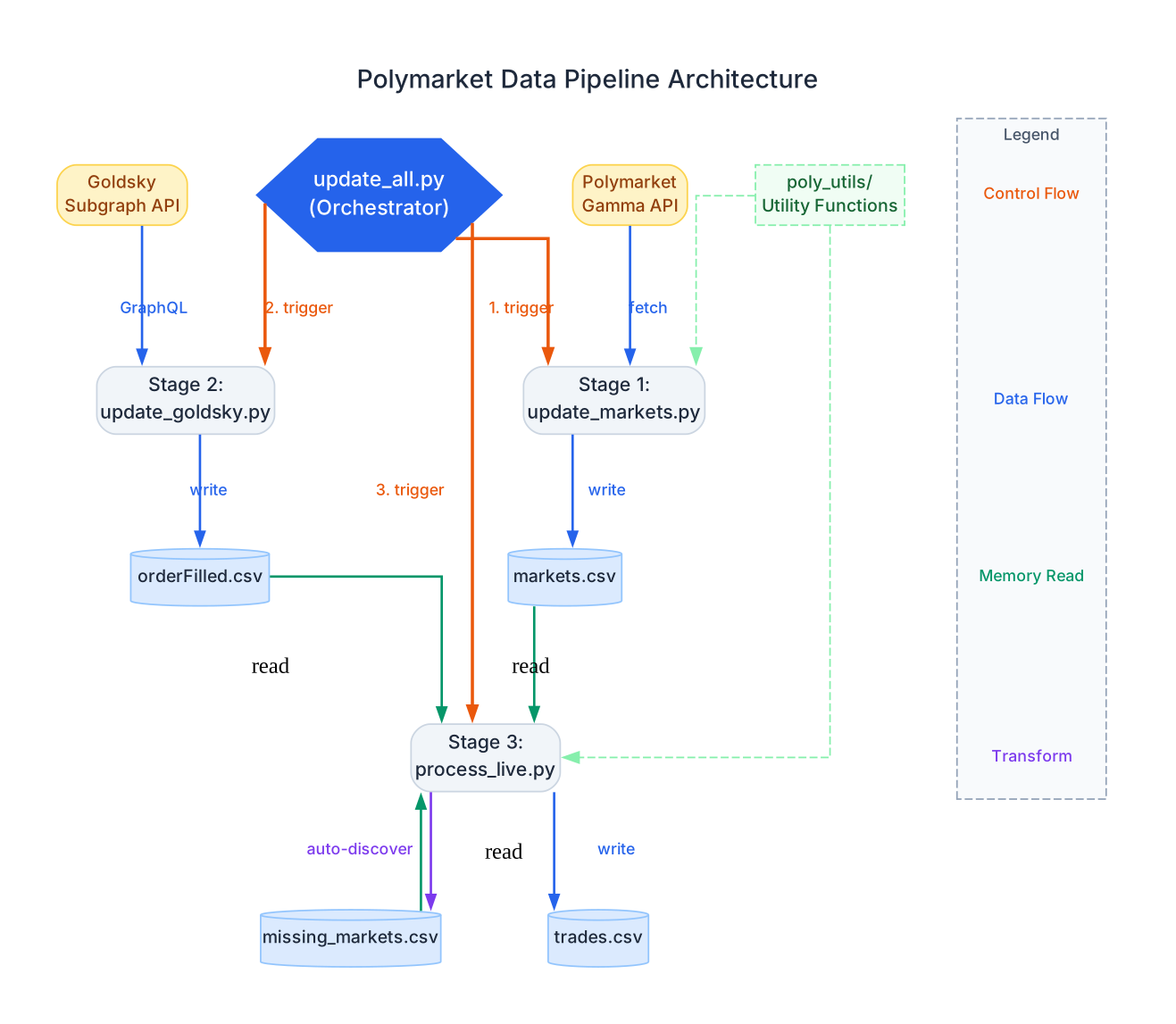
The architecture diagram above illustrates the three-stage pipeline and how data flows through the system. Let’s break down each component:
Orchestrator (update_all.py) The main entry point coordinates the three pipeline stages in sequence. It triggers each stage one after another, ensuring that market data is available before order events are processed, and that order events are available before trades are computed. This sequential design guarantees data dependencies are satisfied at each step.
Stage 1: Market Data Collection The update_markets.py module fetches all Polymarket markets from the Gamma API. It retrieves market questions, outcome tokens, condition IDs, trading volume, and other metadata. The module uses batch fetching (500 markets per request) with automatic resume from the last offset, making it idempotent and safe to re-run at any time.
Stage 2: Order Event Scraping The update_goldsky.py module scrapes order-filled events from the Goldsky subgraph using GraphQL queries. This is where the raw trading activity lives – each event records the maker, taker, asset IDs, fill amounts, and transaction hashes. The module implements a sophisticated cursor-based pagination system with “sticky timestamp” handling to ensure no events are lost at timestamp boundaries.
Stage 3: Trade Processing The process_live.py module transforms raw order events into structured trades. It maps asset IDs to markets, calculates trade directions (BUY/SELL), computes prices, and normalizes amounts. This stage also features automatic missing market discovery – if a trade references a token not in the existing market data, it fetches the market details from the Polymarket API on the fly.
Utility Module (poly_utils/) Shared utility functions for loading market data and handling missing tokens. The get_markets() function combines data from both markets.csv and missing_markets.csv, deduplicates, and sorts by creation date. Platform wallet addresses are tracked here for filtering purposes.
Data Flow The diagram shows how data moves through the system:
- The Polymarket Gamma API feeds market data into Stage 1
- The Goldsky GraphQL API feeds order events into Stage 2
- Stage 3 reads from both
markets.csvandorderFilled.csvto producetrades.csv - Missing markets are auto-discovered and fed back into the processing pipeline
How It Works
The pipeline performs three main operations that transform raw on-chain data into analysis-ready trade records:
Understanding the Pipeline Flow
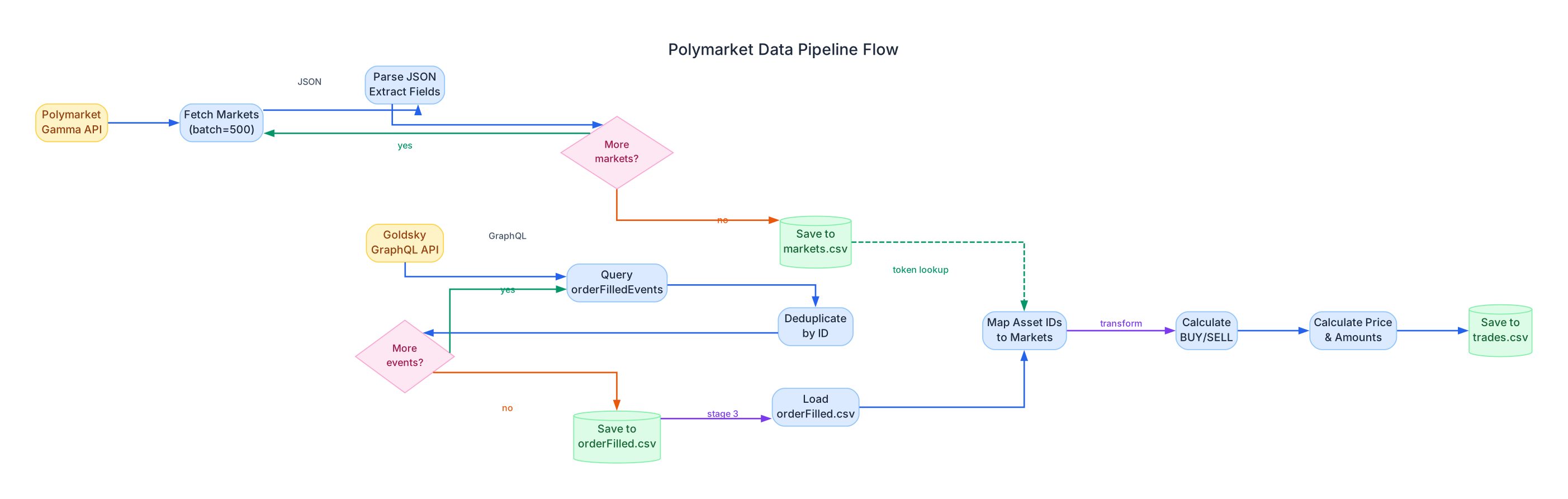
The pipeline flow diagram shows the detailed data processing steps within each stage. Let’s examine each stage:
Stage 1: Market Data Collection The market collection process begins by querying the Polymarket Gamma API with batch requests of 500 markets each. The API returns JSON data containing market questions, outcome options, CLOB token IDs, condition IDs, and volume metrics. The module parses nested JSON fields (outcomes and clobTokenIds), extracts the relevant columns, and writes them to markets.csv. A decision node checks whether more markets exist – if so, it increments the offset and fetches the next batch. This continues until the API returns fewer markets than the batch size, indicating the end of available data.
Stage 2: Order Event Scraping The Goldsky scraper uses GraphQL queries to fetch orderFilledEvents from the subgraph API. Each query returns up to 1000 events ordered by timestamp. After receiving a batch, the module deduplicates events by ID to handle any overlapping data from resume operations. The deduplication step is critical because the cursor-based resume mechanism may intentionally overlap by one second to ensure no data is lost. A decision node checks whether more events exist at the current timestamp or beyond.
Stage 3: Trade Processing The trade processor reads the raw order-filled events and transforms them through several steps:
- Load orderFilled.csv – Reads the raw event data using Polars with streaming for memory efficiency
- Map Asset IDs to Markets – Joins each trade’s non-USDC asset ID against the market token lookup table to recover the market ID and which side (token1 or token2) was traded
- Calculate BUY/SELL Direction – Determines trade direction based on whether the taker is paying USDC (BUY) or receiving USDC (SELL)
- Calculate Price and Amounts – Computes the price as USDC amount divided by token amount, and normalizes all values by dividing by 10^6
The market data from Stage 1 feeds into the asset mapping step via a dashed green arrow, representing a memory read operation that provides the token-to-market lookup table.
Resumable Operations
One of PolyData’s most powerful features is its resumability. Every stage can be interrupted and restarted without data loss or duplication:
Understanding the Resume Mechanism
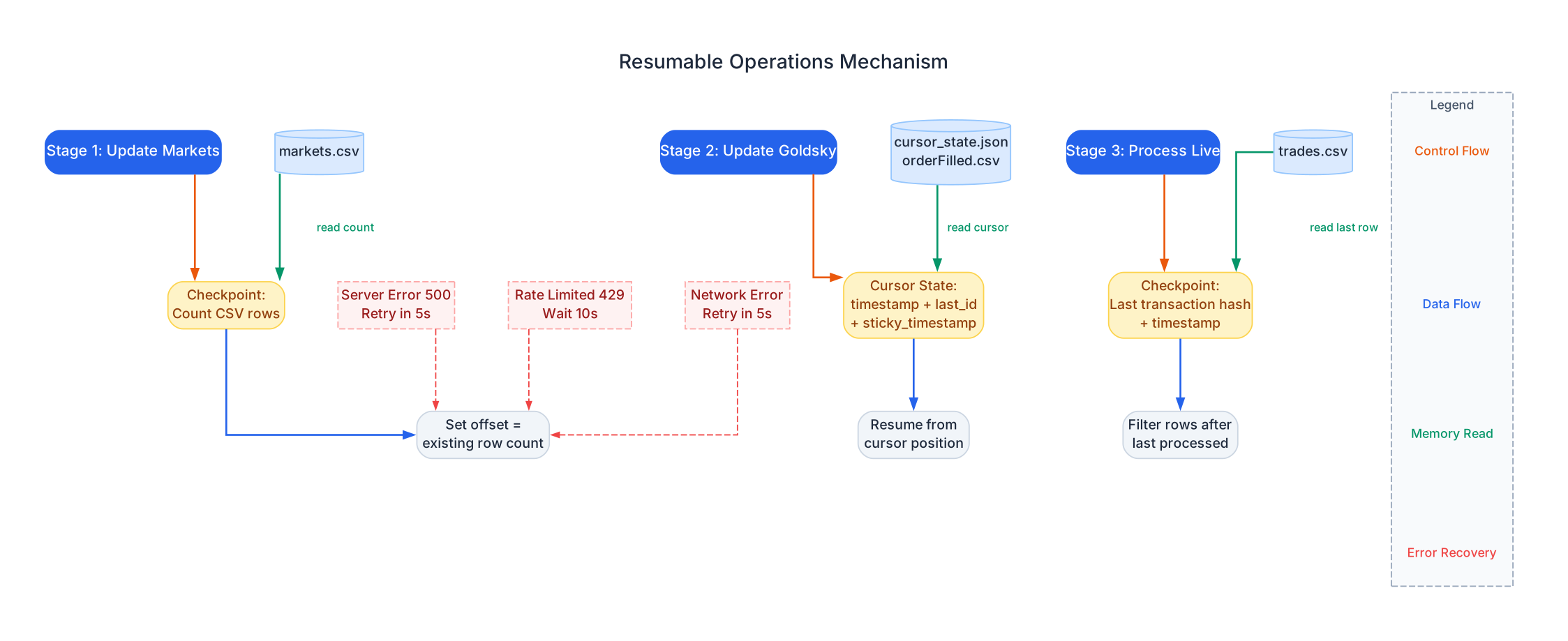
The resume mechanism diagram illustrates how each pipeline stage implements checkpointing to support safe interruption and resumption. This is essential for a data pipeline that may need to process millions of records over hours or even days.
Stage 1: CSV Row Counting The market collection stage uses a simple but effective checkpoint strategy: it counts the number of existing data rows in markets.csv (excluding the header) and uses that count as the API offset for the next fetch. If the pipeline is interrupted after fetching 5,000 markets, the next run will automatically start from offset 5,000. This approach is idempotent – running it multiple times without new markets simply results in zero new fetches.
Stage 2: Cursor State File The Goldsky scraper uses a more sophisticated cursor system stored in cursor_state.json. The cursor contains three fields:
last_timestamp: The Unix timestamp of the last processed eventlast_id: The unique ID of the last event at that timestampsticky_timestamp: A special flag for handling timestamp boundaries
The “sticky timestamp” mechanism is particularly clever. When a batch of 1000 events all share the same timestamp, simply advancing to the next timestamp would miss events at the boundary. Instead, the cursor “sticks” to the current timestamp and paginates by ID until all events at that timestamp are exhausted. Only then does it advance to the next timestamp.
If the cursor file is missing, the module falls back to reading the last timestamp from orderFilled.csv and subtracting one second for safety (which may create minor duplicates that are handled by deduplication).
Stage 3: Transaction Hash Checkpointing The trade processor uses the last row in trades.csv as its checkpoint. It reads the last transaction hash, timestamp, maker, and taker from the processed file, then finds that row in the source data and processes only the rows that come after it. This ensures incremental processing without gaps.
Error Recovery All three stages share a common error handling pattern:
- Server Error (500): Retry after 5 seconds
- Rate Limiting (429): Wait 10 seconds before retrying
- Network Errors: Retry after 5 seconds with exponential backoff
These recovery mechanisms ensure the pipeline can handle transient API failures gracefully without manual intervention.
Trade Processing Logic
The most complex part of the pipeline is the trade processing stage, which transforms raw order events into human-readable trade data:
Understanding Trade Processing
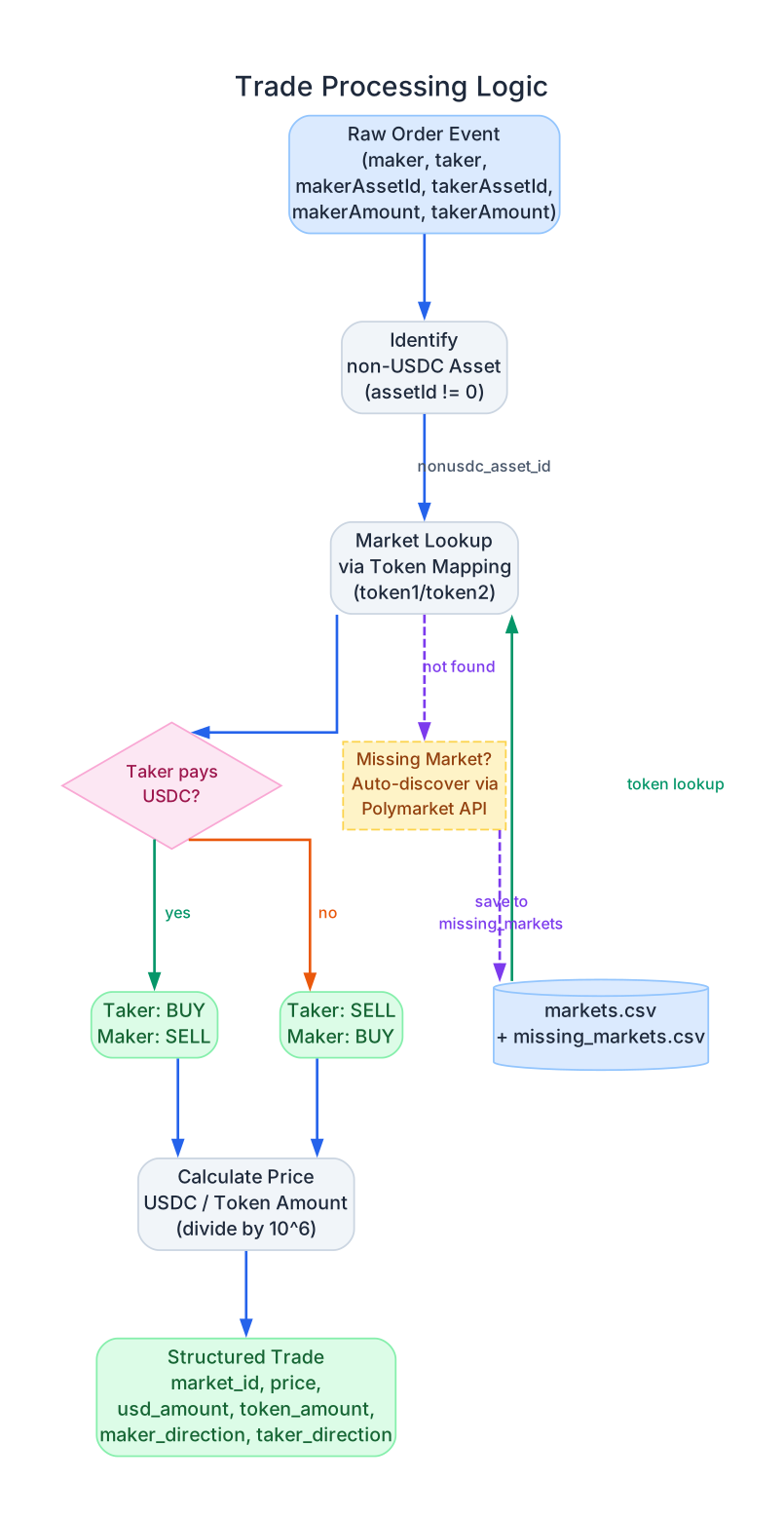
The trade processing diagram details the step-by-step logic for converting raw order-filled events into structured trades. This is where the raw blockchain data becomes meaningful for analysis.
Step 1: Identify the Non-USDC Asset Every trade on Polymarket involves two assets: USDC (the stablecoin used for pricing) and an outcome token (representing YES or NO for a market). The raw event records both makerAssetId and takerAssetId, where an ID of “0” represents USDC. The first step identifies which asset is the non-USDC token by checking which asset ID is not zero.
Step 2: Market Lookup via Token Mapping The non-USDC asset ID is matched against the market data to determine which market the trade belongs to and which side (token1 or token2) was traded. The market data is loaded from both markets.csv and missing_markets.csv, combined, deduplicated, and sorted. This lookup is performed using a Polars join operation for efficiency.
If the asset ID is not found in the existing market data, the pipeline automatically discovers the missing market by querying the Polymarket API with the token ID. The discovered market is saved to missing_markets.csv for future use, and the processing continues seamlessly.
Step 3: Determine Trade Direction The trade direction is determined by examining which side (maker or taker) is paying USDC:
- If the taker is paying USDC (takerAssetId == “0”), the taker is BUYING the outcome token and the maker is SELLING
- If the taker is receiving USDC, the taker is SELLING the outcome token and the maker is BUYING
This logic follows the Polymarket CLOB (Central Limit Order Book) convention where the taker initiates the trade against a resting maker order.
Step 4: Calculate Price and Amounts Price is calculated as the USDC amount divided by the token amount, representing the price per outcome token (always between 0 and 1 for Polymarket). All raw amounts are divided by 10^6 to convert from the on-chain 6-decimal format to standard decimal notation.
Output: Structured Trade Data The final output contains: timestamp, market_id, maker, taker, nonusdc_side (token1 or token2), maker_direction (BUY/SELL), taker_direction (BUY/SELL), price, usd_amount, token_amount, and transactionHash. This structured format is immediately usable for analysis, backtesting, and research.
Installation
PolyData uses UV for fast, reliable package management.
Install UV
# macOS/Linux
curl -LsSf https://astral.sh/uv/install.sh | sh

# Windows
powershell -c "irm https://astral.sh/uv/install.ps1 | iex"

# Or with pip
pip install uv
Clone and Install Dependencies
git clone https://github.com/warproxxx/poly_data.git
cd poly_data

# Install all dependencies
uv sync

# Install with development dependencies (Jupyter, etc.)
uv sync --extra dev
First-Time Setup: Download Data Snapshot
For first-time users, downloading the latest data snapshot is highly recommended. This saves over 2 days of initial data collection time:
# Download the complete orderFilled data snapshot
wget https://polydata-archive.s3.us-east-1.amazonaws.com/orderFilled_complete.csv.xz

# Extract it in the main repository directory
xz -d orderFilled_complete.csv.xz
mkdir goldsky
mv orderFilled_complete.csv goldsky/
Usage
Run the Complete Pipeline
# Run with UV (recommended)
uv run python update_all.py

# Or activate the virtual environment first
source .venv/bin/activate  # On Windows: .venv\Scripts\activate
python update_all.py
This will sequentially run all three pipeline stages:
- Update markets from Polymarket API
- Update order-filled events from Goldsky
- Process new orders into trades
Run Individual Stages
# Stage 1: Update markets only
uv run python -c "from update_utils.update_markets import update_markets; update_markets()"

# Stage 2: Update Goldsky events only
uv run python -c "from update_utils.update_goldsky import update_goldsky; update_goldsky()"

# Stage 3: Process trades only
uv run python -c "from update_utils.process_live import process_live; process_live()"
Analyzing the Data
import pandas as pd
import polars as pl
from poly_utils import get_markets, PLATFORM_WALLETS

# Load markets
markets_df = get_markets()

# Load trades with streaming for large datasets
df = pl.scan_csv("processed/trades.csv").collect(streaming=True)
df = df.with_columns(
    pl.col("timestamp").str.to_datetime().alias("timestamp")
)

# Filter trades for a specific user
USERS = {
    'domah': '0x9d84ce0306f8551e02efef1680475fc0f1dc1344',
    '50pence': '0x3cf3e8d5427aed066a7a5926980600f6c3cf87b3',
}

# Get all trades for a specific user (filter by maker column)
trader_df = df.filter((pl.col("maker") == USERS['domah']))
Important: When filtering for a specific user’s trades, filter by the maker column. Even though it appears you’re only getting trades where the user is the maker, this is how Polymarket generates events at the contract level. The maker column shows trades from that user’s perspective including price.
Features
| Feature | Description |
|---|---|
| Resumable Operations | All stages automatically resume from where they left off – safe to interrupt and restart |
| Automatic Error Handling | Retries on network failures, rate limiting (429), and server errors (500) with exponential backoff |
| Missing Market Discovery | Automatically discovers and fetches markets not in the initial data via Polymarket API |
| Cursor-Based Pagination | Goldsky scraper uses sticky timestamp cursors to ensure no events are lost at boundaries |
| Batch Processing | Markets fetched in batches of 500; order events in batches of 1000 for efficiency |
| Deduplication | Automatic deduplication of order events by ID to handle overlapping resume data |
| Streaming Data Loading | Uses Polars streaming mode for memory-efficient processing of large datasets |
| Incremental Processing | Trade processor only processes new rows after the last checkpoint |
| Data Snapshot | First-time users can download a pre-built data snapshot to skip 2+ days of initial collection |
Data Schema
markets.csv
| Field | Description |
|---|---|
createdAt | Market creation timestamp |
id | Unique market identifier |
question | The prediction market question |
answer1 | First outcome (typically “Yes”) |
answer2 | Second outcome (typically “No”) |
neg_risk | Negative risk indicator flag |
market_slug | URL-friendly market slug |
token1 | CLOB token ID for first outcome |
token2 | CLOB token ID for second outcome |
condition_id | Condition ID for the market |
volume | Trading volume |
ticker | Market ticker symbol |
closedTime | Market close timestamp |
processed/trades.csv
| Field | Description |
|---|---|
timestamp | Trade timestamp (datetime) |
market_id | Market identifier |
maker | Maker wallet address |
taker | Taker wallet address |
nonusdc_side | Which token was traded (token1 or token2) |
maker_direction | Maker trade direction (BUY/SELL) |
taker_direction | Taker trade direction (BUY/SELL) |
price | Price per outcome token (USDC) |
usd_amount | USDC amount in the trade |
token_amount | Outcome token amount in the trade |
transactionHash | Blockchain transaction hash |
Troubleshooting
| Issue | Solution |
|---|---|
| Markets not found during processing | Run update_markets() first, or let process_live() auto-discover them |
| Duplicate trades | Deduplication is automatic – re-run processing from scratch if needed |
| Rate limiting | The pipeline handles this automatically with exponential backoff |
| Large memory usage | Polars streaming mode is used by default for large datasets |
| Missing data after resume | The cursor system ensures no data loss; check cursor_state.json for the current position |
Conclusion
PolyData provides a robust, production-ready pipeline for accessing Polymarket trading data. Its three-stage architecture – market collection, order event scraping, and trade processing – transforms scattered on-chain data into clean, analysis-ready trade records. The resumable operations, automatic error handling, and missing market discovery make it reliable for both one-time data extraction and continuous data updates.
Whether you are building trading strategies, conducting market research, or analyzing prediction market behavior, PolyData gives you the structured data foundation you need. The combination of Polars for fast data processing, GraphQL for efficient event scraping, and UV for reliable dependency management makes this pipeline both performant and easy to set up.
Links
- GitHub Repository: https://github.com/warproxxx/poly_data
- Data Snapshot: https://polydata-archive.s3.us-east-1.amazonaws.com/orderFilled_complete.csv.xz
- UV Package Manager: https://docs.astral.sh/uv/

Enjoyed this post? Never miss out on future posts by following us


