Craft Agents OSS: The Open-Source Agent-Native Desktop Application
Craft Agents OSS is an open-source, agent-native desktop application built by the team at craft.do for working with AI agents. With over 4,189 stars on GitHub, it provides a polished alternative to CLI-based tools like Claude Code, offering a beautiful Electron-based UI with multi-session management, real-time streaming, and deep integration with external services via MCP (Model Context Protocol) servers and REST APIs.
The core philosophy behind Craft Agents is “agent-native software” – you describe what you want in natural language, and the agent figures out how. This extends to configuration itself: you can tell the agent “add Linear as a source” and it discovers APIs, reads documentation, sets up credentials, and configures everything automatically.
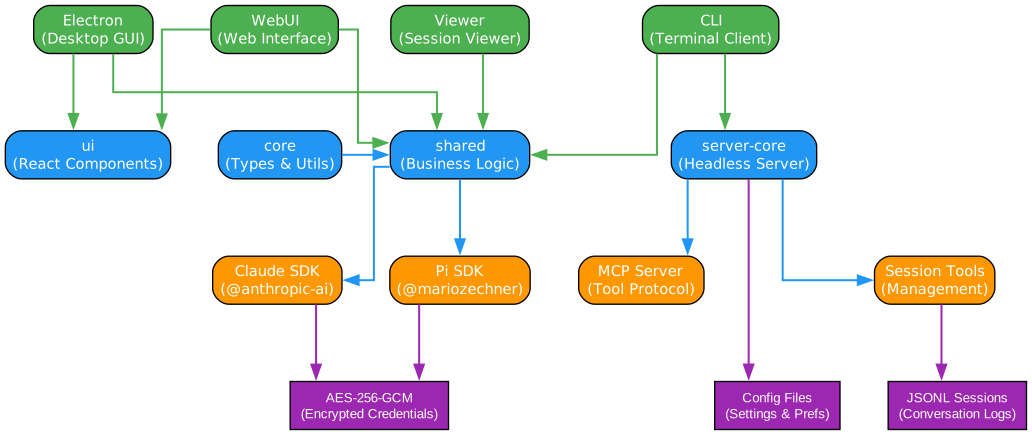
Understanding the Monorepo Architecture
The architecture diagram above illustrates the layered structure of the Craft Agents OSS monorepo. Let us examine each layer and its responsibilities:
Apps Layer (Green) The application layer contains four distinct entry points that cater to different usage scenarios. The Electron app serves as the primary desktop GUI, providing the full-featured agent experience with native OS integration. The WebUI enables browser-based access to a headless server, making it possible to interact with agents from any device. The CLI offers a terminal-based interface for scripting and automation workflows, with a self-contained run command that spawns a server, executes a prompt, and exits. The Viewer is a standalone session viewer for reviewing past conversations without needing the full application stack.
Core Packages (Blue) The shared package is the heart of the system, containing all business logic including agent backends, permission management, source management, prompt construction, and session persistence. The core package provides shared types and utilities used across the entire monorepo. The ui package contains the React component library with rich rendering capabilities for markdown, code, diffs, PDFs, and more. The server-core package implements the headless server infrastructure with WebSocket RPC transport.
Agent Backends (Orange) Two agent SDKs operate side by side: the Claude Agent SDK for Anthropic models and the Pi SDK for multi-provider support including Google, OpenAI, and GitHub Copilot. The session MCP server provides session-scoped tools via stdio transport, while session-tools-core contains shared tool logic used by both backends.
Data Stores (Purple) Session data is persisted as JSONL files for full conversation history replay. Credentials are encrypted using AES-256-GCM, avoiding dependency on OS keychain services. Configuration files support hot-reloading through the ConfigWatcherManager.
Dual Agent Backend Architecture
One of the most distinctive design decisions in Craft Agents is its dual agent backend system. Rather than tying the application to a single LLM provider, the project implements a Strategy Pattern that abstracts both Claude and Pi providers behind a unified AgentBackend interface.
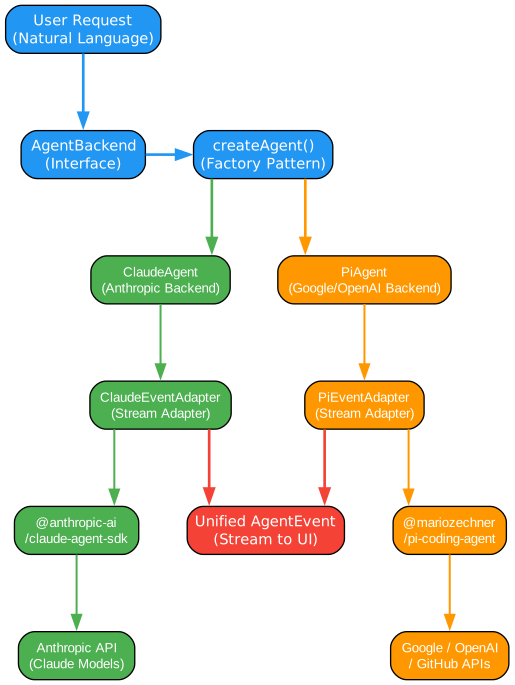
Understanding the Dual Backend Pattern
The dual backend architecture diagram demonstrates how Craft Agents achieves provider-agnostic agent execution through careful abstraction. Let us walk through each component:
AgentBackend Interface (Blue) The AgentBackend interface defines the contract that all agent implementations must follow. It specifies methods for starting sessions, sending messages, receiving streaming events, and managing tool calls. This interface is the key abstraction that allows the UI layer to remain completely provider-agnostic – it never needs to know whether it is talking to Claude, Google, or any other provider.
Factory Pattern: createAgent() (Blue) The createAgent() factory function examines the provider type from the workspace configuration and instantiates the appropriate backend. When a user selects Anthropic as their provider, the factory returns a ClaudeAgent instance. When they choose Google or OpenAI, it returns a PiAgent instance. This pattern centralizes the creation logic and makes it trivial to add new providers in the future.
ClaudeAgent Path (Green) The left branch shows the Claude-specific implementation. The ClaudeAgent extends BaseAgent and delegates to the @anthropic-ai/claude-agent-sdk package. The ClaudeEventAdapter transforms Claude-specific event formats into the unified AgentEvent type that the UI understands. This adapter pattern ensures that provider-specific quirks – such as Claude’s thinking blocks, tool use format, or streaming protocol – are normalized before reaching the UI layer.
PiAgent Path (Orange) The right branch shows the Pi-specific implementation. The PiAgent also extends BaseAgent but communicates with the @mariozechner/pi-coding-agent package, which itself supports multiple providers including Google AI Studio, OpenAI, and GitHub Copilot. The PiEventAdapter performs the same normalization role, converting Pi-specific event formats into the unified AgentEvent stream. Notably, the Pi agent runs as a separate subprocess communicating via JSONL over stdio, providing process isolation that prevents agent crashes from affecting the main application.
Unified AgentEvent Stream (Red) Both paths converge into a single AgentEvent stream that the UI consumes. This means the entire rendering pipeline – from markdown display to tool visualization to session management – works identically regardless of which provider is active. Users can switch providers mid-conversation or even use different providers in different workspaces without any UI changes.
BaseAgent Shared Logic The BaseAgent abstract class (1,226 lines) extracts common functionality including model configuration, thinking mode management, permission handling, source lifecycle, prompt building, planning heuristics, config watching, and usage tracking. This ensures consistent behavior across providers while allowing provider-specific overrides where needed.
WebSocket RPC Protocol
Rather than relying on REST or GraphQL, Craft Agents implements a custom binary WebSocket RPC protocol for real-time bidirectional communication between clients and the headless server. This design choice is fundamental to the application’s streaming capabilities.
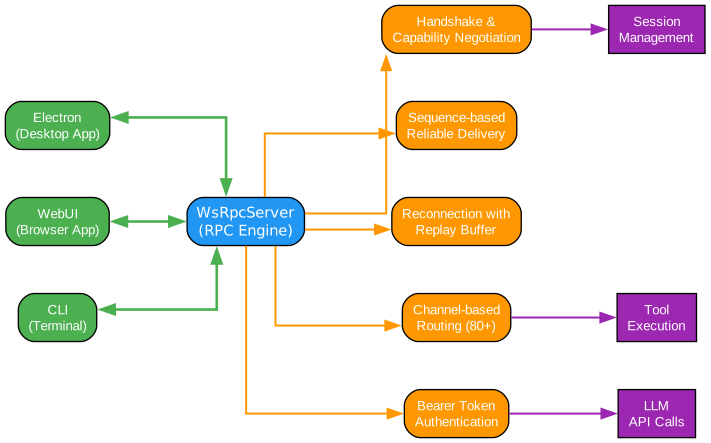
Understanding the WebSocket RPC Protocol
The WebSocket RPC protocol diagram illustrates the sophisticated communication layer that enables real-time agent interaction. Let us examine each component in detail:
Client Applications (Green) Three client types connect to the headless server: the Electron desktop app, the WebUI browser interface, and the CLI terminal client. All three use the same WebSocket RPC protocol, ensuring consistent behavior regardless of how users access the system. The Electron app can also run in local mode where the server is embedded, but the protocol remains identical.
WsRpcServer (Blue) The central WsRpcServer component handles all client connections and implements several critical features. The Handshake and Capability Negotiation step occurs when a client first connects, exchanging protocol versions and feature flags to ensure compatibility. This prevents issues when upgrading the server while clients are still running older versions.
Protocol Features (Orange) The Sequence-based Reliable Delivery system assigns monotonic sequence numbers to every message, enabling clients to detect gaps in the message stream. When a client reconnects after a network interruption, it provides its last received sequence number, and the server replays any missed messages from its buffer. This guarantees message delivery even over unstable connections.
The Reconnection with Replay Buffer maintains a configurable replay buffer of recent messages per client. When a client disconnects and reconnects, it provides its lastSeq and reconnectClientId, allowing the server to resume the session exactly where it left off without losing any events.
The Channel-based Routing system organizes the API into over 80 named channels grouped by domain namespace: sessions:*, workspaces:*, server:*, transfer:*, and more. Each channel represents a specific RPC endpoint, creating a clean API contract between client and server that is easy to document, test, and extend.
Bearer Token Authentication secures remote server access by requiring clients to present a valid token during the WebSocket handshake. This enables safe deployment on VPS instances where the server is exposed to the internet.
Headless Server Processes (Purple) The server-side processes handle the actual work: Session Management creates, persists, and retrieves conversation history as JSONL files. Tool Execution runs MCP tools, shell commands, and browser automation in isolated contexts. LLM Calls manage the streaming connections to Anthropic, Google, OpenAI, and other providers, handling rate limits, retries, and error recovery.
Key Features and Integrations
Craft Agents provides a comprehensive feature set that goes well beyond simple chat interfaces. The platform integrates multiple LLM providers, external services, security mechanisms, and automation capabilities into a cohesive agent-native experience.

Understanding the Feature Landscape
The features diagram provides a comprehensive overview of what Craft Agents offers across four major categories. Let us explore each quadrant:
Multi-Provider LLM Support (Green, Top) Craft Agents supports six distinct provider pathways. Anthropic integration works via API key or Claude Max/Pro OAuth, providing access to the Claude model family with extended thinking and tool use. Google AI Studio connects through API keys with native Google Search grounding for real-time information retrieval. ChatGPT Plus/Pro connects via Codex OAuth sign-in. GitHub Copilot uses OAuth device code flow for enterprise authentication. OpenRouter and Vercel AI Gateway provide access to hundreds of models through unified endpoints. Ollama enables fully local model execution for privacy-sensitive workflows. Each workspace can configure a different default provider, allowing users to match model capabilities to task requirements.
Sources and Integrations (Orange, Left) The Sources system provides four categories of external integration. MCP Servers connect to Craft’s own 32+ document tools, as well as Linear, GitHub, Notion, and any custom MCP server via stdio transport. REST APIs integrate with Google services (Gmail, Calendar, Drive, YouTube, Search Console), Slack, and Microsoft products. Local Files provide access to the filesystem, Obsidian vaults, and Git repositories. The agent-native setup feature means you can simply tell the agent to add a source, and it will discover APIs, read documentation, set up OAuth, and configure everything automatically – no manual configuration required.
Security (Purple, Right) Security is implemented at multiple layers. AES-256-GCM encrypted credential storage avoids OS keychain dependencies while providing strong encryption at rest. MCP Server Isolation filters sensitive environment variables like ANTHROPIC_API_KEY, AWS_*, and GITHUB_TOKEN from local MCP subprocesses, preventing credential leakage to third-party tools. TLS support for remote server connections ensures data in transit is protected. Permission Modes offer three levels: Explore (read-only, blocks all writes), Ask to Edit (prompts for approval, the default), and Auto (auto-approves all commands). Permissions are customizable per workspace and per source.
Features (Red, Bottom) The Automations engine provides event-driven triggers supporting label changes, status transitions, scheduler ticks, tool use events, and session lifecycle events. Actions include creating new agent sessions or sending webhooks, with cron-based scheduling and timezone support. The Skills System stores specialized agent instructions per workspace, invocable via @mention syntax mid-conversation, and can import Claude Code skills automatically. Session Management provides an inbox-style interface with status workflow (Todo, In Progress, Needs Review, Done), flagging, AI-generated titles, and deep linking via craftagents:// URLs. The Rich UI component library renders Markdown, LaTeX, Mermaid diagrams, PDFs, JSON, HTML, spreadsheets, code with syntax highlighting, unified diffs, and terminal output with ANSI parsing. The CLI Mode offers a self-contained run command that spawns a server, executes a prompt, and exits – perfect for scripting and automation.
Installation
Prerequisites
- Bun runtime (v1.0+)
- Node.js 18+ (for some dependencies)
- Git
Building from Source
# Clone the repository
git clone https://github.com/lukilabs/craft-agents-oss.git
cd craft-agents-oss

# Install dependencies
bun install

# Build all packages
bun run build

# Start the desktop application
bun run dev
Running the Headless Server
For server deployment, Craft Agents provides a headless mode that runs without a GUI:
# Build the server
bun run build:server

# Start the server
bun run start:server

# Or use the CLI for one-shot execution
craft-cli run "Explain this codebase" --provider anthropic --model claude-sonnet-4-20250514
Docker Deployment
The headless server supports Docker deployment for VPS hosting:
# Build the Docker image
docker build -t craft-agents .

# Run with persistent data
docker run -d \
  -p 3000:3000 \
  -v craft-data:/data \
  -e ANTHROPIC_API_KEY=your-key \
  craft-agents
Usage Examples
Basic Agent Interaction
// The agent-native approach: just describe what you want
// In the Craft Agents UI, type:
// "Add Linear as a source and create a project for my current workspace"

// The agent will:
// 1. Discover the Linear API
// 2. Read the documentation
// 3. Set up OAuth credentials
// 4. Configure the source
// 5. Create the project
Configuring Permission Modes
// permissions.json - Per-workspace permission configuration
{
  "mode": "ask",
  "overrides": {
    "sources": {
      "linear": {
        "mode": "auto"
      },
      "filesystem": {
        "mode": "explore"
      }
    }
  }
}
Setting Up Automations
// Automations configuration
{
  "name": "Auto-review on status change",
  "trigger": {
    "event": "SessionStatusChange",
    "condition": {
      "newStatus": "needs-review"
    }
  },
  "action": {
    "type": "prompt",
    "message": "Review this session and provide feedback"
  }
}
Using Skills with @mention
@code-reviewer Review the latest changes in src/agent/
@docs-generator Create API documentation for the new endpoints
@linear Create a ticket for this bug
Architecture Deep Dive
The BaseAgent Pattern
The BaseAgent abstract class at packages/shared/src/agent/base-agent.ts (1,226 lines) is the foundation of the agent system. It extracts common functionality into focused manager classes:
| Manager | Responsibility |
|---|---|
PermissionManager | Centralized permission mode management per workspace and source |
SourceManager | MCP/API source lifecycle, discovery, and configuration |
PromptBuilder | System prompt construction with skill injection and context |
ConfigWatcherManager | Hot-reload configuration changes without restart |
UsageTracker | Token usage tracking and cost estimation |
Session Persistence
Sessions are stored as JSONL files, with each line representing a conversation event. This format enables:
- Streaming append: New events are added without rewriting the entire file
- Partial recovery: If a session is interrupted, all events up to the failure point are preserved
- Efficient replay: The UI can reconstruct any session by replaying its event log
Large Response Handling
When tool responses exceed approximately 60KB, Craft Agents automatically summarizes them using Claude Haiku with intent-aware context. The system injects an _intent field into MCP tool schemas, allowing the summarization model to focus on the most relevant information rather than producing generic summaries.
Troubleshooting
| Issue | Solution |
|---|---|
| Bun install fails | Ensure you have Bun v1.0+ installed: curl -fsSL https://bun.sh/install \| bash |
| Electron app won’t start | Run bun run clean then bun run dev to rebuild |
| WebSocket connection refused | Check that the headless server is running and the port is not blocked by a firewall |
| MCP server not connecting | Verify the server command in your workspace config and check stdio transport |
| Credentials not saving | Ensure the data directory is writable and AES-256-GCM encryption is available |
| Permission denied errors | Check your permission mode setting; switch from “explore” to “ask” for write operations |
Conclusion
Craft Agents OSS represents a significant step forward in how developers interact with AI agents. By combining a polished desktop experience with enterprise-grade architecture – dual agent backends, custom WebSocket RPC, encrypted credential storage, and a full automation engine – it delivers a production-ready platform that works with multiple LLM providers.
The project’s agent-native philosophy, where configuration itself becomes a conversational task, fundamentally changes the user experience. Instead of navigating settings panels and editing config files, you simply tell the agent what you need, and it handles the rest.
With 4,189 stars and 622 forks, the project has strong community momentum. The monorepo architecture with clearly separated packages makes it approachable for contributors, while the headless server mode enables deployment scenarios from local development to enterprise VPS hosting.
Links:
- GitHub: https://github.com/lukilabs/craft-agents-oss
- Documentation: Available in the repository README
- License: Check repository for license details

Enjoyed this post? Never miss out on future posts by following us


