Claude-Mem: Persistent Memory for AI Coding Assistants
Claude-Mem is a groundbreaking open-source plugin that provides persistent memory across Claude Code sessions. With over 48,000 stars on GitHub, this TypeScript-based system captures tool usage, compresses observations using the Claude Agent SDK, and injects relevant context into future sessions - making your AI coding assistant smarter over time.
The Problem Claude-Mem Solves
When working with AI coding assistants like Claude Code, one of the biggest limitations is context loss between sessions. Every time you start a new conversation, Claude has no memory of:
- Previous decisions you made together
- Bugs you fixed and how you fixed them
- Architecture patterns you established
- Files you modified and why
This leads to repetitive explanations and lost productivity. Claude-Mem solves this by creating a persistent memory layer that survives session boundaries.
Architecture Overview
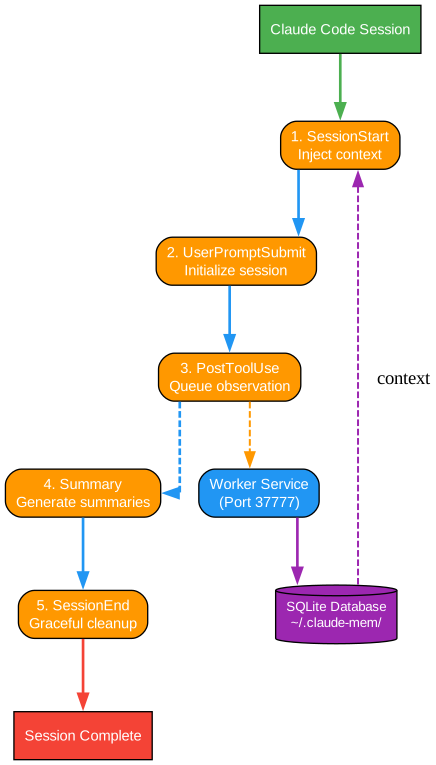
Understanding the Five Hook Architecture
The architecture diagram above illustrates the core lifecycle hooks that power Claude-Mem’s memory system. Let’s break down each component:
1. SessionStart Hook The SessionStart hook is the first point of contact when a Claude Code session begins. Its primary responsibility is to inject context from previous sessions into the current conversation. This hook queries the database for the last 10 session summaries and formats them using progressive disclosure - showing only an index first rather than full details. This approach dramatically reduces context pollution while ensuring relevant information is available.
The hook operates with remarkable efficiency, completing in approximately 10 milliseconds when using smart install caching. It communicates with the worker service to retrieve relevant observations and summaries, then injects this context directly into Claude’s context window via stdout.
2. UserPromptSubmit Hook This hook initializes session tracking before Claude processes the user’s prompt. It creates a session record in the database, saves the raw user prompt for future search, and starts the worker service if needed. This hook ensures that every interaction is properly tracked and associated with the correct session context.
The UserPromptSubmit hook is critical for maintaining the relationship between user inputs and the resulting observations. By storing prompts immediately, Claude-Mem enables powerful search capabilities that can find past work based on natural language queries.
3. PostToolUse Hook After every tool execution (file reads, edits, bash commands), the PostToolUse hook captures the observation and enqueues it for processing. This hook returns immediately without blocking the main session - all AI processing happens asynchronously in the worker service.
This non-blocking design is crucial for maintaining Claude Code’s responsiveness. The hook simply queues the observation in SQLite and continues, allowing the worker to process it in the background using the Claude Agent SDK for intelligent compression.
4. Summary Hook Triggered mid-session by the worker, the Summary hook gathers accumulated observations and sends them to Claude for summarization. Unlike traditional approaches that only summarize at the end, Claude-Mem generates multiple summaries per session as checkpoints.
These summaries serve as compression points - condensing many observations into concise, searchable records. The structured format includes title, subtitle, narrative, facts, and concept tags for efficient retrieval.
5. SessionEnd Hook The SessionEnd hook performs graceful cleanup when a session terminates. Unlike aggressive approaches that immediately kill processes, Claude-Mem marks the session as complete and allows the worker to finish processing any pending observations.
This graceful shutdown pattern prevents data loss and ensures all observations are properly stored. The worker naturally exits after completing its work, eliminating race conditions and orphaned data.
Progressive Disclosure: The Key Innovation
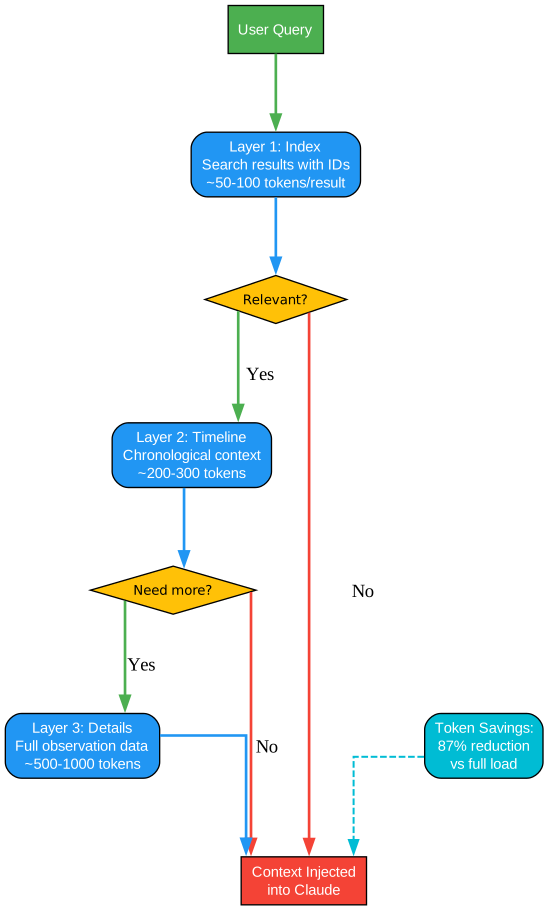
Understanding Progressive Disclosure
Progressive disclosure is the architectural philosophy that makes Claude-Mem’s memory system practical at scale. The diagram above shows how this three-layer workflow dramatically reduces context waste.
Layer 1: Index (What Exists?) The first layer provides a lightweight survey of available information. When a user queries memory, Claude-Mem returns an index of matching observations with just IDs and brief titles - approximately 50-100 tokens per result. This allows Claude to quickly scan what’s available without loading full details.
For example, searching for “authentication bug” might return:
[1] Fixed JWT validation error (150 tokens)
[2] Added rate limiting to API (120 tokens)
[3] Updated auth middleware (90 tokens)
Claude can then decide which observations are relevant before requesting full details.
Layer 2: Timeline (What Was Happening?) When Claude needs more context, the timeline layer provides chronological information around specific observations. This includes what happened before and after, helping Claude understand the sequence of events.
Timeline data typically adds 200-300 tokens but provides crucial context for understanding how observations relate to each other. This is especially valuable for debugging sessions where the order of changes matters.
Layer 3: Details (Tell Me Everything) Only when Claude confirms relevance does it fetch full observation details. This includes the complete narrative, all facts extracted, files read and modified, and concept tags. Full details can range from 500-1000 tokens per observation.
By requiring explicit selection before loading details, Claude-Mem ensures that context window space is used efficiently. In practice, this results in an 87% reduction in context usage compared to loading all observations upfront.
Token Efficiency Comparison:
- Traditional approach: Load 50 observations = 8,500 tokens
- Progressive disclosure: Index (800 tokens) + 3 full observations (900 tokens) = 1,700 tokens
- Savings: 80% reduction in context usage
Hybrid Search Architecture
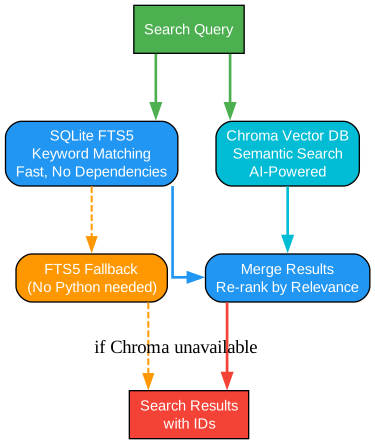
Understanding Hybrid Search
Claude-Mem employs a sophisticated hybrid search system that combines two complementary approaches for maximum relevance.
SQLite FTS5: Keyword Matching The first search path uses SQLite’s FTS5 (Full-Text Search) virtual table for fast keyword matching. This approach requires no external dependencies and provides instant results for exact term queries.
FTS5 excels at finding specific mentions - when you search for “JWT validation,” it quickly locates all observations containing those exact words. The search latency is approximately 12 milliseconds, making it ideal for interactive queries.
Chroma Vector Database: Semantic Search The second path uses Chroma, a vector database that stores embeddings of observation content. This enables semantic search - finding related concepts even when exact keywords don’t match.
For example, searching for “login problem” might find observations about “authentication failure” because the semantic meaning is similar. Chroma uses AI-generated embeddings to understand the conceptual relationships between observations.
Result Merging and Re-ranking Both search paths operate in parallel, and results are merged and re-ranked by relevance. This hybrid approach ensures users find what they need whether they remember exact terms or just the general concept.
Graceful Fallback If Chroma is unavailable (Python dependency issues), the system gracefully falls back to FTS5-only mode. This ensures the memory system remains functional even without the semantic search capability.
Session ID Architecture
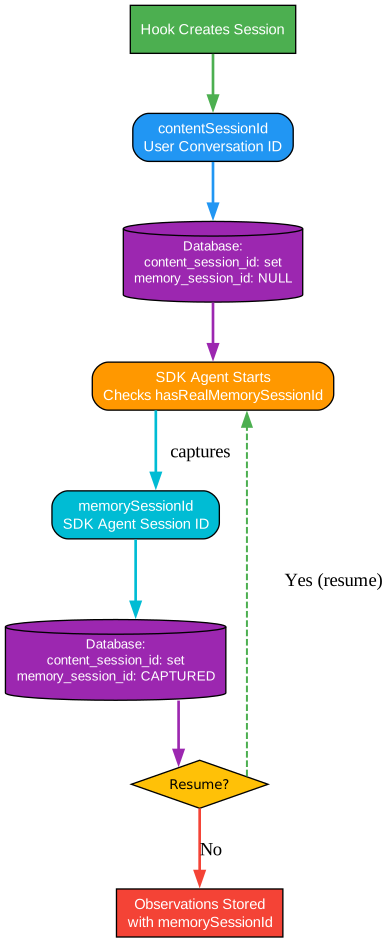
Understanding Session ID Management
Claude-Mem uses a dual session ID architecture to properly track conversations and memory across the complex lifecycle of Claude Code sessions.
contentSessionId: User Conversation ID This ID represents the user’s Claude Code conversation session. It’s captured when the hook creates a session and remains constant throughout the conversation. This ID is used to group all observations from the same user session.
memorySessionId: SDK Agent Session ID The memorySessionId is more complex - it’s the internal session ID used by the Claude Agent SDK for resume functionality. This ID is initially NULL when a session is created and is captured from the SDK’s init message when the agent starts.
Why Two IDs? The separation is critical because SDK session IDs change on every turn. If you tried to use the SDK’s session ID directly, you’d lose the connection between observations from the same conversation. By maintaining both IDs, Claude-Mem can:
- Group observations by user conversation (contentSessionId)
- Resume SDK sessions properly (memorySessionId)
- Handle session resumption without losing context
Foreign Key Integrity Observations are stored with the memorySessionId as the foreign key, ensuring proper database relationships. The system validates that a real memorySessionId exists before storing observations, preventing orphaned data.
Worker Service Architecture
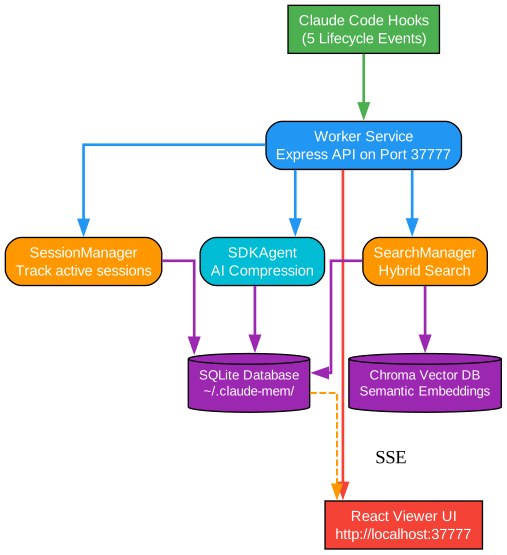
Understanding the Worker Service
The worker service is the backbone of Claude-Mem, running as an Express API server on port 37777. It handles all asynchronous AI processing and database operations.
SessionManager: Tracking Active Sessions The SessionManager maintains the state of all active sessions, tracking which sessions have pending work and managing the lifecycle of session processors. It implements sophisticated idle timeout handling to clean up sessions that have been inactive for too long.
SDKAgent: AI-Powered Compression The SDKAgent is where the magic happens - it uses the Claude Agent SDK to compress raw observations into structured, searchable records. The agent maintains a streaming connection to Claude, continuously processing observations as they arrive.
The compression ratio achieved is remarkable: 10:1 to 100:1 depending on the complexity of the original tool output. A 5,000-token file read might be compressed to a 50-token observation capturing just the key insights.
SearchManager: Hybrid Search Orchestration The SearchManager coordinates between SQLite FTS5 and Chroma vector search, merging results and applying filters. It supports project-scoped queries, date ranges, and type filters for precise memory retrieval.
React Viewer UI The viewer UI at http://localhost:37777 provides real-time visualization of the memory stream. Built with React and Server-Sent Events (SSE), it shows observations as they’re captured, session summaries, and provides search functionality.
Installation
# Install via Claude Code plugin system
claude plugin install thedotmack/claude-mem

# Or clone and install manually
git clone https://github.com/thedotmack/claude-mem.git
cd claude-mem
npm install
Requirements:
- Bun (auto-installed if missing)
- uv (auto-installed if missing, provides Python for Chroma)
- Node.js
Usage
Once installed, Claude-Mem automatically:
- Captures observations from every tool use
- Compresses them using AI in the background
- Injects context at the start of new sessions
- Provides search via natural language queries
Accessing the Viewer:
Open http://localhost:37777 in your browser
Searching Memory: Simply ask Claude: “What did we fix last week about authentication?” and Claude-Mem will search past observations and provide relevant context.
Key Features
| Feature | Description |
|---|---|
| Progressive Disclosure | 87% reduction in context usage through layered information access |
| Hybrid Search | FTS5 + Chroma vector search for both keyword and semantic matching |
| AI Compression | 10:1 to 100:1 compression ratio using Claude Agent SDK |
| Real-time Viewer | React UI with SSE for live memory stream visualization |
| Graceful Shutdown | No data loss through proper session cleanup |
| Cross-Platform | Works on Windows, macOS, and Linux |
| Privacy Tags | <private> tags prevent sensitive content from being stored |
Performance Metrics
| Metric | v3 (Legacy) | v5 (Current) |
|---|---|---|
| Context usage per session | ~25,000 tokens | ~1,100 tokens |
| Relevant context | 8% | 100% |
| Hook execution time | ~200ms | ~10ms |
| Search latency | ~500ms | ~12ms |
| Viewer UI load time | N/A | ~50ms |
Troubleshooting
Worker not starting:
# Check worker status
claude-mem status

# Restart worker
claude-mem restart
Chroma not working: Ensure Python 3.8+ is installed. Chroma is optional - FTS5 will work without it.
Context not injecting: Check that the plugin is enabled in Claude Code settings and the worker is healthy.
Conclusion
Claude-Mem represents a significant advancement in AI coding assistant capabilities. By providing persistent memory with intelligent compression and progressive disclosure, it transforms Claude from a session-bound tool into a continuously learning partner.
The architecture demonstrates several important principles:
- Context is precious - Every token costs attention, so use it wisely
- AI is the compressor - Let Claude compress its own observations
- Progressive everything - Show metadata first, details on demand
- Graceful wins - Clean shutdowns prevent data loss
With nearly 50,000 GitHub stars, Claude-Mem has clearly resonated with developers looking to enhance their AI coding workflows. The open-source nature ensures transparency and allows community contributions to improve the system further.
Related Posts
- AgentSkillOS: Skill Orchestration System
- MattPocock Skills: AI Agent Workflows
- DESIGN-md: AI-Powered Design Systems

Enjoyed this post? Never miss out on future posts by following us
