What Is Personal AI Infrastructure (PAI)?
Personal AI Infrastructure (PAI) is an open-source Life Operating System created by Daniel Miessler that transforms how you interact with AI. Rather than treating AI as a chatbot you occasionally consult, PAI builds a persistent, context-aware Digital Assistant (DA) that knows your goals, remembers your decisions, and continuously works to close the gap between your current state and your ideal state.
With over 13,000 stars on GitHub and growing at more than 400 stars per day, PAI has rapidly become one of the most popular frameworks for personal AI infrastructure. Built natively on Claude Code with TypeScript and Bun, it provides 45 skills, 171 workflows, 37 hooks, and a sophisticated seven-phase Algorithm that drives every non-trivial task from observation through verification and learning.
Key Insight: PAI is not another agent harness or prompt library. It is a complete Life Operating System where your DA sits at the center, orchestrating skills, memory, hooks, and agents to pursue your TELOS-articulated ideal state across every domain of your life – work, health, relationships, finances, and creative pursuits.
The Three-Layer Architecture
PAI operates on three interconnected layers that stack to form a complete personal AI platform:
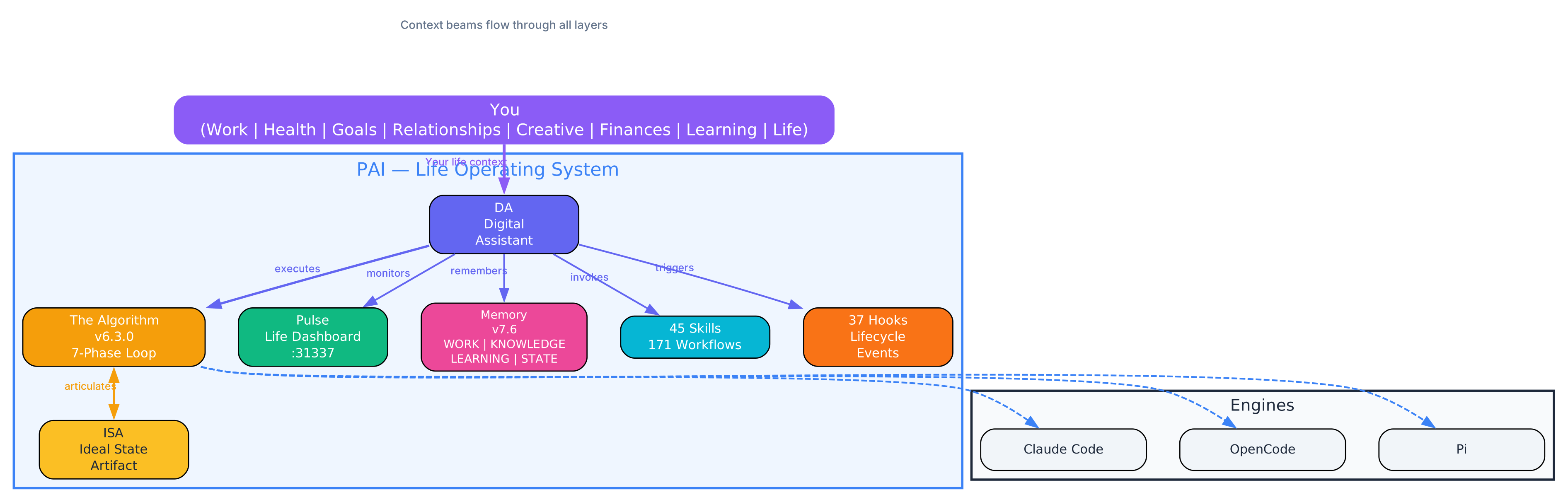
The architecture diagram above illustrates the three-layer PAI stack. At the top sits You – the human principal whose life context (work, health, goals, relationships, creative pursuits, finances, learning) provides the ultimate direction. In the middle, the PAI Life Operating System orchestrates the Algorithm, your DA, Pulse, Memory, Skills, and Hooks. At the bottom, the Engine Layer runs on Claude Code, OpenCode, or Pi – providing the raw AI capability that PAI scaffolds with context and structure.
The key insight is that context beams flow through all three layers. Your DA wraps around you as the primary interface, reaching into skills, memory, the Algorithm, hooks, agents, Pulse, the web, devices, and other people’s DAs. You never talk to an army of agents – you talk to one entity that has the army.
Layer 1: PAI – The Operating System
PAI itself is the OS layer containing skills, memory, the Algorithm, your TELOS, and your identity files. Everything is stored as plain text and Markdown – no opaque databases, no RAG pipelines. Your filesystem is the index, and rg (ripgrep) is the search engine.
Layer 2: Pulse – The Life Dashboard
Pulse is the unified daemon running on port 31337. It provides:
- Voice notifications via ElevenLabs TTS
- Hook execution across the entire PAI lifecycle
- Observability with tool activity tracking and satisfaction signals
- The Life Dashboard – a Next.js app with 22 routes covering Life, Health, Finances, Business, Work, TELOS, Goals, and more
- Cron scheduling for recurring jobs
- Wiki API exposing your KNOWLEDGE archive over HTTP
- Optional integrations including Telegram bot and iMessage bridge
Layer 3: The DA – Your Digital Assistant
The DA is the named entity you interact with daily. After installation, you run /interview and your DA guides you through naming itself, picking a voice, capturing your TELOS (mission, goals, beliefs, wisdom, challenges). The DA identity files – PRINCIPAL_IDENTITY.md and DA_IDENTITY.md – are loaded at every session start so your assistant always has full context about who you are.
The Algorithm: Current State to Ideal State
At the heart of PAI is The Algorithm v6.3.0 – a seven-phase execution loop modeled on the scientific method that drives every non-trivial task from your current state toward your ideal state.
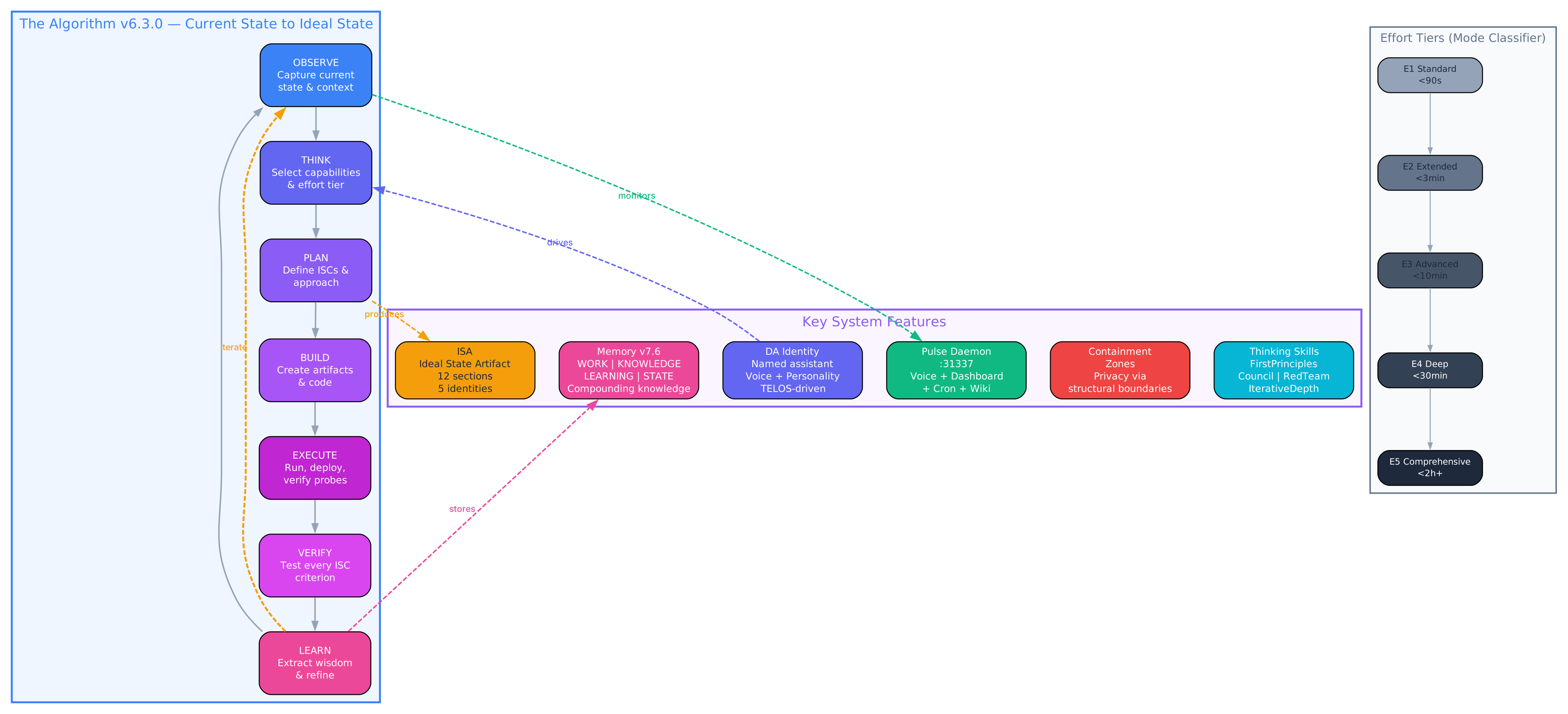
The features diagram above shows the seven-phase Algorithm loop (OBSERVE, THINK, PLAN, BUILD, EXECUTE, VERIFY, LEARN) alongside the key system features and effort tiers. Each phase has a specific role:
- OBSERVE – Captures the current state, reverse-engineers explicit and implicit wants, and runs preflight gates
- THINK – Selects thinking capabilities and effort tier based on the mode classifier
- PLAN – Defines ISCs (Ideal State Criteria) and the approach for reaching them
- BUILD – Creates artifacts, code, and documentation
- EXECUTE – Runs, deploys, and verifies with live probes
- VERIFY – Tests every ISC criterion with specific evidence, not rubber-stamp approval
- LEARN – Extracts wisdom, captures feedback, and refines the system for future iterations
The Algorithm is not optional for complex tasks. A Sonnet-backed mode classifier at the UserPromptSubmit hook decides whether each prompt runs in MINIMAL, NATIVE, or ALGORITHM mode, and assigns an effort tier (E1 through E5) accordingly.
Important: The Algorithm’s experiential metric is euphoric surprise – what you feel when work converges on what you actually wanted. An answer that clicks in a way you could not have predicted but instantly recognize as true. This is not about meeting specifications; it is about exceeding expectations in a way that feels inevitable in retrospect.
The ISA: Ideal State Artifact
The second major innovation in PAI v5.0.0 is the Ideal State Artifact (ISA), which replaces the traditional PRD as the unit of work across the entire system. An ISA is one document with twelve sections:
| Section | Purpose |
|---|---|
| Problem | What is wrong or missing |
| Vision | What the ideal state looks like |
| Out of Scope | What is explicitly not included |
| Principles | Substrate-independent thinking constraints |
| Constraints | Immovable architectural mandates |
| Goal | The specific outcome to achieve |
| Criteria | Testable ISC claims that define “done” |
| Test Strategy | How each criterion will be verified |
| Features | What will be built |
| Decisions | Design choices made during pursuit |
| Changelog | Conjecture/refutation/learning log |
| Verification | Final proof that all criteria pass |
The ISA has five simultaneous identities: it is the ideal state articulation, the test harness, the build verification, the done condition, and the system of record. This eliminates the need for separate acceptance criteria, test specs, or tracking documents – the ISA is all of them at once.
Takeaway: The ISA is not just a document format. It is a thinking framework that forces you to articulate what “done” looks like before you start building, then verifies that you actually got there. The ISC (Ideal State Criteria) are the testable claims that decompose the ideal state into binary pass/fail checks.
Memory That Compounds
PAI’s memory system (v7.6) is structured by purpose, not by type. Five tiers capture different kinds of knowledge:
- WORK – Active task ISAs and session artifacts
- KNOWLEDGE – Typed graph across People, Companies, Ideas, Research, and Blogs
- LEARNING – Meta-patterns, failure analysis, and algorithm reflections
- RELATIONSHIP – DA-Principal interaction notes and preferences
- OBSERVABILITY – Every tool call, hook firing, and satisfaction signal
The key principle is that memory compounds. Every session adds to the knowledge base, and future sessions can search and retrieve relevant context. The LoadContext hook injects relationship, learning, and work summaries at session start, so your DA always has the big picture without you re-explaining.
Amazing: PAI has avoided RAG entirely since June 2025. Rich text with cross-references plus fast search (ripgrep) gives everything people normally want from RAG – without the embedding complexity, retrieval flakiness, or loss of fidelity. Your filesystem is the index.
Skills, Hooks, and Thinking Capabilities
45 Skills
PAI ships with 45 public skills organized into categories like Research, Security, Content, Thinking, and Development. Each skill follows a deterministic hierarchy: code first, then CLI to run the code, then workflows that prompt the CLI, then a SKILL.md that routes between workflows. Prompts wrap code; code does not wrap prompts.
Notable skills include:
| Skill | Purpose |
|---|---|
| Council | Multi-agent structured debate with visible transcripts |
| RedTeam | 32-agent adversarial stress-test |
| FirstPrinciples | Physics-style deconstruct/challenge/rebuild |
| IterativeDepth | 2-8 structured passes from different lenses |
| ISA | Scaffold, Interview, CheckCompleteness, Reconcile, Seed, Append |
| Research | Multi-agent parallel research in quick/standard/extensive/deep modes |
| ExtractWisdom | Dynamic content-adaptive insights from any source |
| BeCreative | Verbalized Sampling divergent ideation |
| WorldThreatModel | 11-horizon stress-test from 6 months to 50 years |
| Fabric | 240+ prompt patterns for content analysis |
37 Hooks
Hooks fire across the entire session lifecycle: SessionStart, UserPromptSubmit, PreToolUse, PostToolUse, Stop, SubagentStop, PreCompact, and SessionEnd. Key hooks include:
- SecurityPipeline – Blocks dangerous commands and cross-zone containment violations
- PromptProcessing – Runs the mode classifier (MINIMAL/NATIVE/ALGORITHM + tier)
- ContainmentGuard – Enforces privacy zones so personal data never leaks to public repos
- SatisfactionCapture – Captures session ratings for self-improvement
- WorkCompletionLearning – Extracts learnings when sessions end
- LoadContext – Injects relationship, learning, and work context at session start
Thinking Capabilities
The Algorithm draws from a closed enumeration of 19 thinking capabilities. At effort tiers E2 and above, a hard floor ensures sufficient thinking depth:
- IterativeDepth – Multi-angle exploration
- ApertureOscillation – Tactical/strategic scope oscillation
- FirstPrinciples – Deconstruct/challenge/rebuild
- SystemsThinking – Iceberg model, causal loops, leverage points
- RootCauseAnalysis – 5 Whys, Fishbone, Apollo, Swiss Cheese
- Council – Multi-agent debate
- RedTeam – 32-agent adversarial stress-test
- Science – Hypothesis-plural falsifiable experiments
- BeCreative – Verbalized Sampling divergent ideation
- Ideate – 9-phase evolutionary idea generation
Key Insight: The thinking capability vocabulary is a closed enumeration. Inventing generic labels like “deep reasoning” or “tradeoff analysis” counts as a phantom capability and triggers a CRITICAL FAILURE. This discipline prevents the system from pretending to think deeply when it is actually shortcutting.
Effort Tiers and Mode Classification
PAI uses a five-tier effort system that determines how much processing depth each task receives:
| Tier | Budget | ISC Floor | Thinking Floor | Use Case |
|---|---|---|---|---|
| E1 Standard | <90s | None | 0-1 | Normal requests |
| E2 Extended | <3min | 16+ | 2+ | Quality must be extraordinary |
| E3 Advanced | <10min | 32+ | 4+ | Substantial multi-file work |
| E4 Deep | <30min | 128+ | 6+ | Complex design |
| E5 Comprehensive | <2h+ | 256+ | 8+ | No time pressure |
The time budget is the hard constraint. ISC floor is a soft minimum on count. The thinking floor is a hard minimum – difficult work earns thinking depth, full stop. You can override auto-detection with shortcuts: /e1 through /e5.
Installation and Setup
Prerequisites
- Bun runtime (the installer will verify)
- Git (for cloning and version control)
- Claude Code (the foundation PAI runs on)
- ElevenLabs API key (optional – voice falls back to desktop notifications if not provided)
One-Line Install (Recommended)
curl -sSL https://ourpai.ai/install.sh | bash
The installer wizard handles everything: Bun verification, Git setup, Claude Code check, ElevenLabs key configuration, DA identity setup, voice picker, Pulse launchd registration, and validation. Your existing ~/.claude/ directory is automatically backed up to ~/.claude.backup-{TIMESTAMP} before anything is overwritten.
Manual Install
git clone https://github.com/danielmiessler/Personal_AI_Infrastructure.git
cd Personal_AI_Infrastructure/Releases/v5.0.0
cp -R .claude ~/
cd ~/.claude && ./install.sh
Post-Install Setup
After installation, open the Life Dashboard:
open http://localhost:31337
Then run the interview in Claude Code:
/interview
Your DA will guide you through four phases:
- Phase 1 – TELOS: Mission, Goals, Beliefs, Wisdom, Challenges, Books, Mental models, Narratives
- Phase 2 – IDEAL_STATE: What does success look like for you?
- Phase 3 – Preferences: Tools, conventions, working style
- Phase 4 – Identity: Final DA personality tuning
Post-Upgrade Checklist
After upgrading from v4.x, verify:
# Check Pulse health
curl -s http://localhost:31337/api/pulse/health | jq

# Test voice notifications
curl -s -X POST http://localhost:31337/notify \
  -H "Content-Type: application/json" \
  -d '{"message": "Hello from your DA"}'

# Verify dashboard renders
open http://localhost:31337

# Check DA identity
cat ~/.claude/PAI/USER/DA_IDENTITY.md

# Verify TELOS captured
ls ~/.claude/PAI/USER/TELOS/
PAI Packs
Packs are standalone, AI-installable capabilities you can add to any AI coding harness without installing PAI itself. Each pack is a self-contained prompt your DA can read and execute. Simply point it at the pack directory and say “install this,” and it handles the rest.
Available packs span categories like Agents, Thinking, Research, Security, Content, and Development. Browse all packs in the Packs/ directory.
Platform Compatibility
| Platform | Status | Notes |
|---|---|---|
| macOS | Fully Supported | Primary development platform |
| Linux | Fully Supported | Ubuntu/Debian tested, other distros via community |
| Windows | Not Supported | Community contributions welcome |
PAI uses platform detection patterns throughout its codebase:
# Shell scripts
OS_TYPE="$(uname -s)"
if [ "$OS_TYPE" = "Darwin" ]; then
  # macOS-specific code
elif [ "$OS_TYPE" = "Linux" ]; then
  # Linux-specific code
fi
// TypeScript/Bun code
if (process.platform === 'darwin') {
  // macOS-specific code
} else if (process.platform === 'linux') {
  // Linux-specific code
}
Troubleshooting
Pulse Will Not Start
# Check if Pulse is already running
lsof -i :31337

# Kill existing process if needed
kill -9 $(lsof -t -i :31337)

# Restart Pulse
cd ~/.claude/PAI/PULSE && ./start-pulse.sh
Voice Notifications Not Working
- Verify your ElevenLabs API key is set in
~/.claude/.env - Test the notification endpoint directly:
curl -s -X POST http://localhost:31337/notify \ -H "Content-Type: application/json" \ -d '{"message": "Test notification"}' - On Linux, ensure
mpg123ormpvis installed for audio playback - Check Pulse logs at
~/.config/pai/pulse.log
Mode Classifier Not Triggering
The mode classifier runs as a UserPromptSubmit hook. If it is not firing:
- Verify
PromptProcessing.hook.tsexists in~/.claude/hooks/ - Check that
settings.jsonincludes the hook underUserPromptSubmit - Look for errors in
~/.config/pai/pulse.log - Ensure your Claude Code session has the correct
--append-system-prompt-fileflag
Context Not Loading at Session Start
The LoadContext hook injects relationship, learning, and work context at session start. If context seems missing:
- Verify
LoadContext.hook.tsis in~/.claude/hooks/ - Check that
MEMORY/directories exist under~/.claude/PAI/ - Run
/interviewagain to populate TELOS and identity files - Ensure
dynamicContextis enabled insettings.json
Containment Zone Violations
If you see “ContainmentGuard blocked cross-zone access” errors:
- Check
containment-zones.tsfor the directory’s privacy zone - Ensure you are not trying to write personal data to a public repo
- Review the
ContainmentGuard.hook.tsconfiguration - PAI’s privacy model is structural – personal data stays in
USER/, public data in the release
Comparison with Alternatives
| Feature | PAI | Fabric | Standard Claude Code | Cursor |
|---|---|---|---|---|
| Persistent Memory | Yes (5-tier) | No | No | No |
| Life Operating System | Yes | No | No | No |
| Algorithm-Driven Execution | Yes (7-phase) | No | No | No |
| Ideal State Artifacts | Yes (ISA) | No | No | No |
| Named Digital Assistant | Yes (DA) | No | No | No |
| Voice Notifications | Yes (ElevenLabs) | No | No | No |
| Life Dashboard | Yes (Pulse) | No | No | No |
| Self-Improvement Loop | Yes | No | No | No |
| Thinking Capabilities | 19 closed-list | Pattern-based | None | None |
| Effort Tiers | E1-E5 | No | No | No |
| Containment Zones | Yes | No | No | No |
PAI and Fabric are complementary. Fabric provides AI prompt patterns for specific tasks; PAI provides the infrastructure for how your DA operates with memory, skills, routing, context, and self-improvement. Many PAI users integrate Fabric patterns into their skills.
Key Technical Details
Tech Stack
- Language: TypeScript (Bun runtime)
- AI Foundation: Claude Code (Anthropic)
- Voice: ElevenLabs TTS API
- Dashboard: Next.js (served from Pulse)
- Daemon: Bun single-process on port 31337
- Storage: Plain text and Markdown (no databases)
- Search: ripgrep (
rg) - Platform: macOS (primary), Linux (supported), Windows (not yet)
File Structure
~/.claude/
  CLAUDE.md                    # Operational procedures and format templates
  settings.json                # Single source of truth for all PAI config
  PAI/
    PAI_SYSTEM_PROMPT.md       # Constitutional rules (highest priority)
    ALGORITHM/                  # Algorithm versions and doctrine
    PULSE/                      # Unified daemon (voice, hooks, dashboard)
    MEMORY/                     # WORK, KNOWLEDGE, LEARNING, STATE, RELATIONSHIP
    TOOLS/                      # Inference.ts and other CLI tools
    USER/                       # PRINCIPAL_IDENTITY, DA_IDENTITY, TELOS
    DOCUMENTATION/              # Architecture, system docs
  hooks/                        # 37 lifecycle hooks
  skills/                       # 45+ public skills
  agents/                       # Agent personality definitions
Security Model
PAI takes a structural approach to privacy through containment zones. The containment-zones.ts file declares every directory’s privacy zone, and the ContainmentGuard PreToolUse hook blocks cross-zone leaks. Twelve security gates run on every public release, and a two-stage release process (stage then publish) never auto-chains.
Conclusion
Personal AI Infrastructure represents a paradigm shift in how we think about AI tooling. Instead of treating AI as a chatbot or a code assistant, PAI frames it as a Life Operating System where your Digital Assistant knows who you are, what you care about, and where you are trying to go – and then continuously works to close the gap between your current state and your ideal state.
With its seven-phase Algorithm, ISA primitive, compounding memory, 45 skills, 37 hooks, and the Pulse daemon providing a real-time Life Dashboard, PAI offers the most complete personal AI infrastructure available today. The fact that it is open source, built on plain text, and avoids RAG entirely makes it both transparent and sustainable.
Whether you are a developer looking to augment your workflow, a knowledge worker seeking a persistent AI companion, or someone who wants AI that actually understands your life goals, PAI provides the framework to make it happen.
Repository: github.com/danielmiessler/Personal_AI_Infrastructure
Documentation: docs.ourpai.ai
Install: Enjoyed this post? Never miss out on future posts by following us curl -sSL https://ourpai.ai/install.sh | bash 


