AI coding agents write code fast – but that code is not always good React code. State in the wrong place, effects that cascade, missing accessibility attributes, security holes in server actions. React Doctor, an open-source tool from the Million team, scans your codebase and outputs a health score from 0 to 100, along with actionable diagnostics across 14 categories. With over 9,000 stars on GitHub and growing at 620 stars per day, it has become the go-to tool for keeping AI-generated React code honest.
What Is React Doctor?
React Doctor is a CLI tool and lint plugin that diagnoses React codebases for security, performance, correctness, accessibility, and architecture issues. It works with Next.js, Vite, and React Native projects out of the box. A single command gives you a health score and a prioritized list of problems to fix.
The tool detects your framework and React version automatically, then activates the appropriate rule set. It integrates with 50+ coding agents – Claude Code, Cursor, Codex, Windsurf, and more – teaching them React best practices so they stop writing bad code in the first place.
Key Insight: React Doctor counts unique rules triggered, not total instances. Fixing 49 of 50
no-barrel-importviolations does not change your score; fixing all 50 removes the 0.75 penalty for that rule. This design choice pushes you toward eliminating entire categories of problems rather than whack-a-mole fixes.
Architecture Overview
The diagram below shows how React Doctor’s components fit together, from input sources through the core engine to output surfaces:
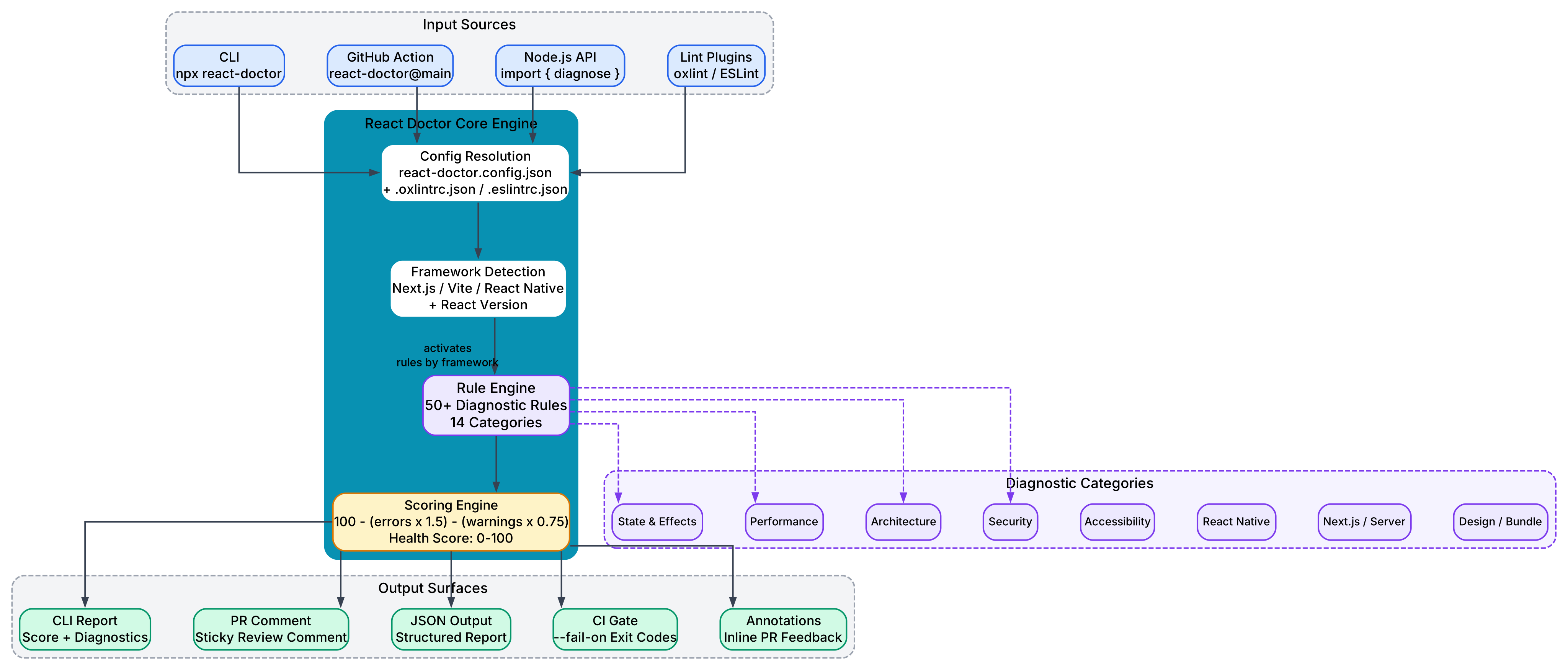
The architecture follows a pipeline model. Input sources – the CLI, GitHub Actions, the Node.js API, or standalone lint plugins – feed into the core engine. The engine resolves configuration, detects the framework, activates the relevant rule set, and runs diagnostics. Results flow through the scoring engine and out to five output surfaces: the terminal report, PR comments, JSON output, CI gates, and inline annotations.
The rule engine is the heart of the system. It houses over 50 diagnostic rules organized into 14 categories: State and Effects, Performance, Architecture, Security, Accessibility, React Native, Next.js/Server, Design/Bundle, and more. Rules toggle automatically based on your framework and React version, so you never see React Native rules firing on a Vite project.
Companion plugins – eslint-plugin-react-hooks (v6/v7) and eslint-plugin-react-you-might-not-need-an-effect – fold their rules into the same scan when installed. This means one command covers your entire React quality surface without running multiple tools separately.
Diagnostic Workflow
The following diagram illustrates the four-step diagnostic workflow, from scanning your codebase to producing scored output:

Step 1: Scan. You run npx react-doctor@latest at your project root. The tool detects your framework (Next.js, Vite, or React Native), loads your react-doctor.config.json plus any existing .oxlintrc.json or .eslintrc.json configs, and determines whether to scan the full codebase or only changed files via --diff or --staged modes.
Step 2: Analyze. The rule engine runs 50+ diagnostic rules across 14 categories, toggled by your detected framework. Companion plugins contribute additional rules. Inline suppression comments (// react-doctor-disable-next-line) and config-level ignores filter the results.
Step 3: Score. The scoring formula is straightforward: 100 - (unique_error_rules x 1.5) - (unique_warning_rules x 0.75). Scores of 75 and above are labeled “Great,” 50-74 is “Needs Work,” and below 50 is “Critical.” The score is calculated via the react.doctor API, but --offline mode skips the network call entirely.
Step 4: Output. Results reach you through five channels: the terminal report with score and top issues, sticky PR comments on GitHub, structured JSON for automation, CI exit codes via --fail-on, and inline PR annotations. Each channel can be tuned independently through surface controls.
Installation and Quick Start
Getting started with React Doctor takes one command:
npx react-doctor@latest
Run this at your project root. React Doctor will detect your framework, scan your codebase, and output a health score with a prioritized list of issues. No configuration file is required for the initial run.
To install for your coding agent:
npx react-doctor@latest install
This command detects which coding agents you use (Claude Code, Cursor, Codex, etc.) and writes agent-specific rule files (SKILL.md, AGENTS.md, .cursorrules) into your project so agents learn React best practices before they write code.
For CI integration, add the GitHub Action to .github/workflows/react-doctor.yml:
name: React Doctor

on:
  pull_request:
  push:
    branches: [main]

permissions:
  contents: read
  pull-requests: write

jobs:
  react-doctor:
    runs-on: ubuntu-latest
    steps:
      - uses: actions/checkout@v5
        with:
          fetch-depth: 0
      - uses: millionco/react-doctor@main
        with:
          diff: main
          github-token: $
For standalone lint integration, install the oxlint or ESLint plugin:
# oxlint plugin
npm install oxlint-plugin-react-doctor

# ESLint plugin
npm install eslint-plugin-react-doctor
Then configure in .oxlintrc.json:
{
  "jsPlugins": [{ "name": "react-doctor", "specifier": "oxlint-plugin-react-doctor" }],
  "rules": {
    "react-doctor/no-fetch-in-effect": "warn",
    "react-doctor/no-derived-state-effect": "warn"
  }
}
Or in ESLint flat config:
import reactDoctor from "eslint-plugin-react-doctor";

export default [
  reactDoctor.configs.recommended,
  reactDoctor.configs.next,
];
Features at a Glance
| Feature | Description |
|---|---|
| Health Score | 0-100 score with Great / Needs Work / Critical labels |
| 50+ Diagnostic Rules | Across 14 categories: State & Effects, Performance, Architecture, Security, Accessibility, React Native, Next.js/Server, Design, Bundle Size, and more |
| Framework Detection | Auto-detects Next.js, Vite, React Native and toggles rules accordingly |
| Diff and Staged Modes | --diff main scans only changed files; --staged scans git staging area |
| GitHub Actions | Composite action with PR comments, annotations, and score output |
| Agent Integration | install command writes rule files for 50+ coding agents |
| Lint Plugins | Ships as both oxlint and ESLint plugins for existing workflows |
| Companion Plugins | Folds in eslint-plugin-react-hooks and eslint-plugin-react-you-might-not-need-an-effect |
| Inline Suppressions | // react-doctor-disable-next-line comments for per-line exemptions |
| Surface Controls | Independent tuning of CLI, PR comments, score, and CI failure channels |
| Node.js API | import { diagnose } from "react-doctor/api" for programmatic use |
| JSON Output | --json for structured reports; --score for numeric-only output |
| Monorepo Support | Per-package boundary detection for mixed React Native + web workspaces |
Configuration
Create a react-doctor.config.json file in your project root to customize behavior:
{
  "ignore": {
    "rules": ["react/no-danger", "jsx-a11y/no-autofocus"],
    "files": ["src/generated/**"],
    "overrides": [
      {
        "files": ["components/modules/diff/**"],
        "rules": ["react-doctor/no-array-index-as-key", "react-doctor/no-render-in-render"]
      }
    ]
  }
}
Three nested keys give you three layers of granularity:
ignore.rulessilences a rule across the whole codebase.ignore.filessilences every rule on matched files (use sparingly).ignore.overridessilences only the listed rules on matched files, leaving other rules active.
You can also configure surface controls to tune what appears in each output channel:
{
  "surfaces": {
    "prComment": {
      "includeTags": ["design"],
      "excludeCategories": ["Performance"]
    },
    "score": { "includeRules": ["react-doctor/design-no-redundant-size-axes"] },
    "ciFailure": { "excludeTags": ["test-noise"] }
  }
}
Each surface – cli, prComment, score, and ciFailure – accepts includeTags, excludeTags, includeCategories, excludeCategories, includeRules, and excludeRules. Include wins over exclude when both match.
Takeaway: The
designtag (Tailwind shorthand cleanup, pure-black backgrounds, gradient text) is visible on the local CLI by default but excluded from PR comments, scores, and the--fail-ongate. This means style cleanup suggestions never dilute meaningful React findings in your CI pipeline.
Scoring Explained
The health score formula is:
Score = 100 - (unique_error_rules x 1.5) - (unique_warning_rules x 0.75)
Key details:
- The score counts unique rules triggered, not total instances. A rule that fires 50 times costs the same as a rule that fires once.
- Error-severity rules cost 1.5 points each. Warning-severity rules cost 0.75 points each.
- Category breakdowns in the output are for display only and do not weight the score.
- Scores may decrease across releases as new rules are added. Pin to a specific version in CI if you need stable scores.
Amazing: The leaderboard at react.doctor/leaderboard ranks real-world React codebases by their React Doctor score. Top projects like
executor(94) andnodejs.org(86) demonstrate what clean React code looks like.
PR Blocking and CI Integration
Two independent gates can block a PR:
--fail-on <level> exits non-zero on diagnostics: error (default), warning (any diagnostic), or none (never). Combine with --diff <base> to scope the gate to only changed files.
Score floor – a follow-up step that reads the action’s score output and exits when it drops below a threshold:
- id: doctor
  uses: millionco/react-doctor@main
  with:
    fail-on: error
    github-token: $
- env:
    SCORE: $
    FLOOR: "80"
  run: |
    if [ -n "$SCORE" ] && [ "$SCORE" -lt "$FLOOR" ]; then
      echo "::error::React Doctor score $SCORE is below floor $FLOOR"
      exit 1
    fi
Important: Pin a specific
react-doctorversion when using a score floor. New rule releases can lower the score even when your code has not changed, because each new rule that fires introduces an additional penalty.
React Native in Mixed Monorepos
React Doctor handles mixed React Native + web monorepos intelligently. Every rn-* rule walks up to the file’s nearest package.json before running:
- Packages declaring
react-native,expo, or Metro’s resolution field get React Native rules turned ON. - Packages declaring
next,vite, or plainreact-domwithout an RN sibling get React Native rules turned OFF. - File extensions override:
*.web.tsxfiles are always skipped;*.ios.tsxand*.android.tsxfiles are always scanned.
The detection is bidirectional: a web-rooted monorepo still loads rn-* rules when any workspace targets React Native, with file-level boundaries keeping them silent on web workspaces.
Troubleshooting
Score not showing: The score requires a network call to the react.doctor API. In CI environments, --offline is implied automatically and the score is omitted. If you need a score locally, ensure your network connection is working and remove the --offline flag.
Suppression not working: Run react-doctor --explain <file:line> (or --why <file:line>) to diagnose why a rule fired or why a nearby suppression did not apply. The tool distinguishes between adjacent comments for different rules, broken comment chains, and missing suppressions entirely.
React Native rules firing on web code: Check that your web packages declare a web framework (next, vite, etc.) in their package.json. React Doctor uses these declarations to determine which rules apply to which packages.
Too many design rules in PR comments: The design tag is excluded from PR comments and the --fail-on gate by default. If you see design rules in PR comments, check your surfaces.prComment configuration – you may have explicitly included the design tag.
Companion plugin rules not appearing: Ensure eslint-plugin-react-hooks (v6 or v7) and/or eslint-plugin-react-you-might-not-need-an-effect (v0.10+) are installed as peer dependencies. They are optional and will not be loaded unless present.
Exit code always 0 in CI: The default --fail-on level is error. If no error-severity diagnostics are found, the exit code is 0. Use --fail-on warning to fail on any diagnostic, or combine with a score floor for stricter gating.
CLI Reference
Usage: react-doctor [directory] [options]

Options:
  -v, --version           display the version number
  --no-lint               skip linting
  --verbose               show every rule and per-file details
  --score                 output only the score
  --json                  output a single structured JSON report
  -y, --yes               skip prompts, scan all workspace projects
  --full                  skip prompts, always run a full scan
  --project <name>        select workspace project (comma-separated)
  --diff [base]           scan only files changed vs base branch
  --staged                scan only staged files (for pre-commit hooks)
  --offline               skip the score API and share URL
  --fail-on <level>       exit with error on diagnostics: error, warning, none
  --annotations           output diagnostics as GitHub Actions annotations
  --pr-comment            tune CLI output for sticky PR comments
  --explain <file:line>   diagnose why a rule fired or suppression didn't apply
  --why <file:line>       alias for --explain
  -h, --help              display help
Node.js API
For programmatic integration:
import { diagnose, toJsonReport, summarizeDiagnostics } from "react-doctor/api";

const result = await diagnose("./path/to/your/react-project");

console.log(result.score);        // { score: 82, label: "Great" } or null
console.log(result.diagnostics);  // Diagnostic[]
console.log(result.project);      // detected framework, React version, etc.

const report = toJsonReport(result, { version: "1.0.0" });
const counts = summarizeDiagnostics(result.diagnostics);
The diagnose function accepts a second argument: { lint?: boolean }. The API re-exports JsonReport, JsonReportSummary, JsonReportProjectEntry, JsonReportMode, plus the lower-level buildJsonReport and buildJsonReportError builders.
Conclusion
React Doctor fills a critical gap in the modern development workflow: catching the bad React code that AI agents write before it reaches production. With its 0-100 health score, 50+ diagnostic rules across 14 categories, and seamless integration with CI pipelines and coding agents, it provides the guardrails that every React team needs when working with AI-generated code. Whether you run it locally, in CI, or as a lint plugin in your existing workflow, React Doctor gives you actionable diagnostics – not just a list of problems, but a clear path to better React code.
Install it today with Enjoyed this post? Never miss out on future posts by following us npx react-doctor@latest and see how your codebase scores. 


