CrewAI: Multi-Agent Orchestration Framework for Autonomous AI Collaboration
Building multi-agent AI systems has traditionally been a complex endeavor, requiring developers to juggle orchestration logic, state management, tool integration, and LLM communication all at once. CrewAI changes this equation entirely. With over 49,000 stars on GitHub and more than 100,000 certified developers, CrewAI has rapidly become the go-to framework for building autonomous AI agent teams that collaborate, delegate, and deliver results.
CrewAI is a lean, lightning-fast Python framework built entirely from scratch – completely independent of LangChain or any other agent framework. It empowers developers with both high-level simplicity and precise low-level control, making it ideal for creating autonomous AI agents tailored to any scenario, from simple automation tasks to complex enterprise-grade workflows.
In this post, we will explore CrewAI’s architecture, its two core paradigms (Crews and Flows), agent collaboration patterns, key features, and how to get started building your own multi-agent systems.
Understanding the Architecture
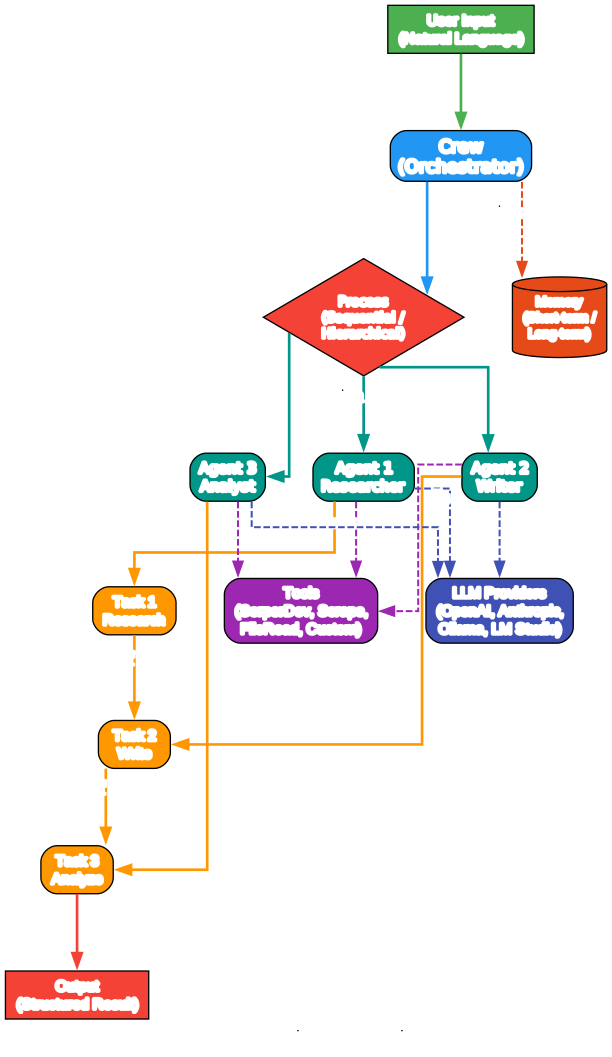
The architecture diagram above illustrates the core components of CrewAI and how they interact. Let us break down each component:
Crew (Orchestrator) The Crew is the top-level container that coordinates everything. It defines which agents are available, what tasks need to be completed, and the process by which work gets done. A Crew can operate in sequential mode (tasks execute one after another) or hierarchical mode (a manager agent delegates work to specialized agents).
Process (Sequential / Hierarchical) The Process determines how tasks flow through the system. In sequential mode, each task’s output becomes the next task’s input, creating a clear pipeline. In hierarchical mode, a manager agent takes responsibility for planning, delegating, and validating results – similar to how a real team lead operates.
Agents Each Agent is defined by a role, goal, and backstory. This role-playing approach is central to CrewAI’s design philosophy. By giving agents distinct identities and expertise, they make more focused and contextually appropriate decisions. Agents can use tools, access memory, and delegate tasks to other agents.
Tasks Tasks define what needs to be done. Each task has a description, an expected output, and is assigned to a specific agent. Tasks can depend on each other, and their outputs flow through the pipeline to inform subsequent work.
Tools Agents can be equipped with tools to interact with the outside world – searching the web, reading files, scraping websites, or calling custom APIs. CrewAI provides a rich set of built-in tools and supports creating custom tools for any use case.
LLM Providers CrewAI supports multiple LLM backends including OpenAI, Anthropic, Google Gemini, and local models through Ollama and LM Studio. This flexibility means you can choose the right model for each agent based on cost, speed, and capability requirements.
Memory The memory system enables agents to maintain context across interactions. CrewAI supports short-term memory (within a single execution), long-term memory (persisted across runs), and entity memory (tracking specific entities and their attributes).
Crews and Flows: Two Complementary Paradigms
CrewAI offers two powerful, complementary approaches that work seamlessly together:
Crews: Autonomous Agent Teams
Crews are teams of AI agents with true autonomy and agency, working together to accomplish complex tasks through role-based collaboration. Crews enable:
- Natural, autonomous decision-making between agents
- Dynamic task delegation and collaboration
- Specialized roles with defined goals and expertise
- Flexible problem-solving approaches
When you define a Crew, you specify the agents, their tasks, and the process. The agents then collaborate autonomously to complete the work, delegating tasks and sharing information as needed.
Flows: Event-Driven Workflow Control
Flows provide production-ready, event-driven workflows that deliver precise control over complex automations. Flows offer:
- Fine-grained control over execution paths for real-world scenarios
- Secure, consistent state management between tasks
- Clean integration of AI agents with production Python code
- Conditional branching for complex business logic
Flows use decorators like @start, @listen, and @router to define execution paths. They support logical operators (or_ and and_) for combining multiple conditions, enabling sophisticated triggering logic.
Agent Collaboration Patterns
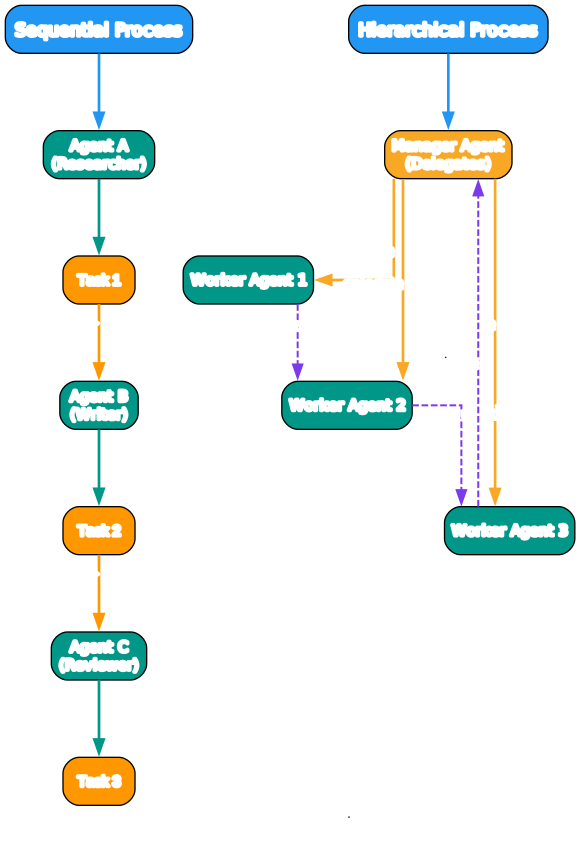
The diagram above illustrates the two primary collaboration patterns in CrewAI. Understanding these patterns is essential for designing effective multi-agent systems.
Sequential Process
In the sequential pattern, agents execute tasks in a defined order. Agent A completes Task 1 and passes its output to Agent B, which uses that output to inform Task 2, and so on. This creates a clear, predictable pipeline where each agent builds on the work of its predecessor.
This pattern works well for linear workflows like research-then-write-then-review pipelines. The output of each task automatically becomes available context for the next agent, ensuring continuity and coherence.
Hierarchical Process
In the hierarchical pattern, a manager agent takes on the role of orchestrator. The manager delegates tasks to specialized worker agents, validates their results, and can re-delegate work if the output does not meet quality standards. Worker agents can also delegate to each other when they encounter tasks outside their expertise.
This pattern mirrors how real teams operate and is particularly effective for complex tasks where the optimal execution order is not known in advance. The manager agent uses its LLM reasoning capabilities to plan, delegate, and validate – providing a level of intelligent orchestration that static workflows cannot achieve.
Delegation Between Agents
One of CrewAI’s most powerful features is inter-agent delegation. When allow_delegation=True is set on an agent, that agent can ask another agent in the crew to handle a subtask. This creates emergent collaboration patterns where agents naturally distribute work based on their specialized capabilities.
Key Features
Understanding the Features
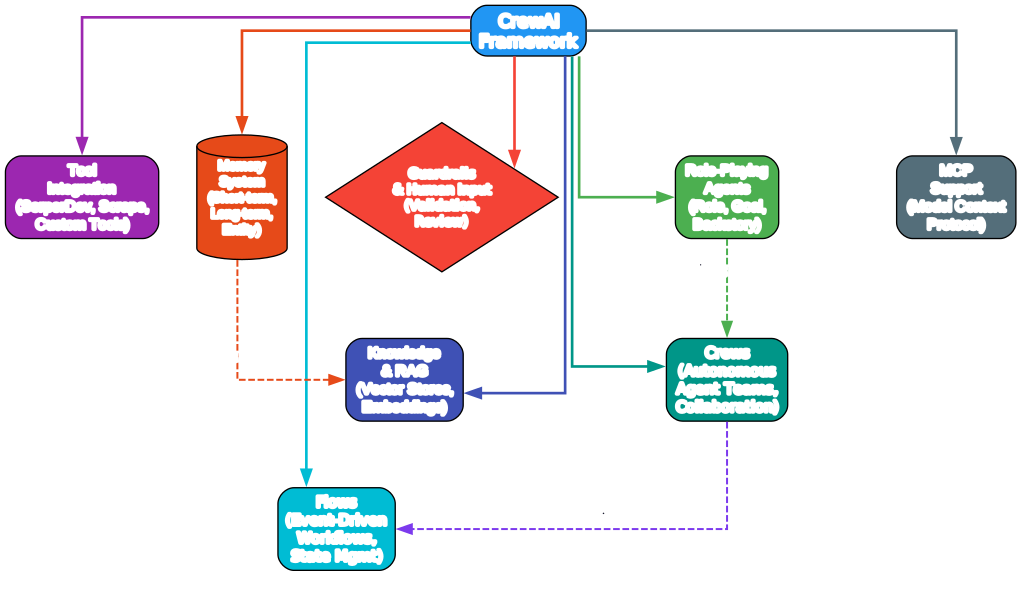
The features diagram above shows the core capabilities that make CrewAI stand out. Let us explore each one:
Role-Playing Agents Every agent in CrewAI is defined by a role, goal, and backstory. This is not just cosmetic – it fundamentally shapes how the agent approaches tasks. A “Senior Data Researcher” with a backstory about uncovering cutting-edge developments will produce different output than a “Reporting Analyst” focused on clarity and conciseness. This role-playing approach leads to more focused, contextually appropriate agent behavior.
Crews (Autonomous Agent Teams) Crews provide the high-level abstraction for defining teams of agents that work together. The @CrewBase decorator and @agent, @task, @crew annotations make it easy to define crew structures declaratively, while YAML configuration files keep agent and task definitions clean and maintainable.
Flows (Event-Driven Workflows) Flows deliver the precision and control needed for production deployments. With structured state management (using Pydantic models), conditional routing via @router, and logical operators for complex triggering, Flows enable sophisticated automation pipelines that combine AI agents with regular Python code.
Tool Integration CrewAI provides a rich ecosystem of built-in tools including SerperDev (web search), ScrapeWebsiteTool, FileReadTool, and many more. Custom tools can be created by subclassing BaseTool, and MCP (Model Context Protocol) support enables integration with external tool servers.
Memory System The three-tier memory system – short-term, long-term, and entity memory – enables agents to maintain context and learn from past interactions. Short-term memory keeps context within a single crew execution, long-term memory persists across runs, and entity memory tracks specific entities and their attributes.
Guardrails and Human Input CrewAI includes built-in guardrails for validating agent outputs and supporting human-in-the-loop workflows. The human_input=True flag on tasks enables real-time human review and feedback, ensuring quality and safety in production deployments.
Knowledge and RAG The knowledge system integrates with vector stores and embedding models to provide agents with access to external knowledge bases. This RAG (Retrieval-Augmented Generation) capability enables agents to ground their responses in specific documents and data sources.
MCP Support Model Context Protocol support allows CrewAI agents to interact with MCP-compatible tool servers, extending their capabilities through a standardized protocol for tool communication.
How It Works: Code Examples
Creating a Crew with YAML Configuration
The recommended way to build a CrewAI project is using the CLI scaffolding:
# Install CrewAI
uv pip install crewai

# Install with optional tools
uv pip install 'crewai[tools]'

# Create a new project
crewai create crew my_project
This creates a project with the following structure:
my_project/
  ├── .gitignore
  ├── pyproject.toml
  ├── README.md
  ├── .env
  └── src/
      └── my_project/
          ├── main.py
          ├── crew.py
          ├── tools/
          │   └── custom_tool.py
          └── config/
              ├── agents.yaml
              └── tasks.yaml
Defining Agents in YAML
# src/my_project/config/agents.yaml
researcher:
  role: >
    {topic} Senior Data Researcher
  goal: >
    Uncover cutting-edge developments in {topic}
  backstory: >
    You're a seasoned researcher with a knack for uncovering the latest
    developments in {topic}. Known for your ability to find the most relevant
    information and present it in a clear and concise manner.

reporting_analyst:
  role: >
    {topic} Reporting Analyst
  goal: >
    Create detailed reports based on {topic} data analysis and research findings
  backstory: >
    You're a meticulous analyst with a keen eye for detail. You're known for
    your ability to turn complex data into clear and concise reports.
Defining Tasks in YAML
# src/my_project/config/tasks.yaml
research_task:
  description: >
    Conduct a thorough research about {topic}
    Make sure you find any interesting and relevant information.
  expected_output: >
    A list with 10 bullet points of the most relevant information about {topic}
  agent: researcher

reporting_task:
  description: >
    Review the context you got and expand each topic into a full section
    for a report. Make sure the report is detailed and contains any and
    all relevant information.
  expected_output: >
    A fully fledge reports with the mains topics, each with a full
    section of information. Formatted as markdown without code blocks.
  agent: reporting_analyst
  output_file: report.md
Building the Crew in Python
# src/my_project/crew.py
from crewai import Agent, Crew, Process, Task
from crewai.project import CrewBase, agent, crew, task
from crewai_tools import SerperDevTool
from crewai.agents.agent_builder.base_agent import BaseAgent
from typing import List

@CrewBase
class LatestAiDevelopmentCrew():
    """LatestAiDevelopment crew"""
    agents: List[BaseAgent]
    tasks: List[Task]

    @agent
    def researcher(self) -> Agent:
        return Agent(
            config=self.agents_config['researcher'],
            verbose=True,
            tools=[SerperDevTool()]
        )

    @agent
    def reporting_analyst(self) -> Agent:
        return Agent(
            config=self.agents_config['reporting_analyst'],
            verbose=True
        )

    @task
    def research_task(self) -> Task:
        return Task(
            config=self.tasks_config['research_task'],
        )

    @task
    def reporting_task(self) -> Task:
        return Task(
            config=self.tasks_config['reporting_task'],
            output_file='report.md'
        )

    @crew
    def crew(self) -> Crew:
        """Creates the LatestAiDevelopment crew"""
        return Crew(
            agents=self.agents,
            tasks=self.tasks,
            process=Process.sequential,
            verbose=True,
        )
Running the Crew
#!/usr/bin/env python
# src/my_project/main.py
import sys
from latest_ai_development.crew import LatestAiDevelopmentCrew

def run():
    """Run the crew."""
    inputs = {
        'topic': 'AI Agents'
    }
    LatestAiDevelopmentCrew().crew().kickoff(inputs=inputs)
Combining Crews and Flows
The true power of CrewAI emerges when combining Crews and Flows. Here is an example of orchestrating multiple Crews within an event-driven Flow:
from crewai.flow.flow import Flow, listen, start, router, or_
from crewai import Crew, Agent, Task, Process
from pydantic import BaseModel

# Define structured state for precise control
class MarketState(BaseModel):
    sentiment: str = "neutral"
    confidence: float = 0.0
    recommendations: list = []

class AdvancedAnalysisFlow(Flow[MarketState]):
    @start()
    def fetch_market_data(self):
        self.state.sentiment = "analyzing"
        return {"sector": "tech", "timeframe": "1W"}

    @listen(fetch_market_data)
    def analyze_with_crew(self, market_data):
        analyst = Agent(
            role="Senior Market Analyst",
            goal="Conduct deep market analysis with expert insight",
            backstory="You're a veteran analyst known for identifying patterns"
        )
        researcher = Agent(
            role="Data Researcher",
            goal="Gather and validate supporting market data",
            backstory="You excel at finding and correlating data sources"
        )

        analysis_task = Task(
            description="Analyze {sector} sector data for the past {timeframe}",
            expected_output="Detailed market analysis with confidence score",
            agent=analyst
        )
        research_task = Task(
            description="Find supporting data to validate the analysis",
            expected_output="Corroborating evidence and potential contradictions",
            agent=researcher
        )

        analysis_crew = Crew(
            agents=[analyst, researcher],
            tasks=[analysis_task, research_task],
            process=Process.sequential,
            verbose=True
        )
        return analysis_crew.kickoff(inputs=market_data)

    @router(analyze_with_crew)
    def determine_next_steps(self):
        if self.state.confidence > 0.8:
            return "high_confidence"
        elif self.state.confidence > 0.5:
            return "medium_confidence"
        return "low_confidence"

    @listen("high_confidence")
    def execute_strategy(self):
        strategy_crew = Crew(
            agents=[
                Agent(role="Strategy Expert",
                      goal="Develop optimal market strategy")
            ],
            tasks=[
                Task(description="Create detailed strategy based on analysis",
                     expected_output="Step-by-step action plan")
            ]
        )
        return strategy_crew.kickoff()

    @listen(or_("medium_confidence", "low_confidence"))
    def request_additional_analysis(self):
        self.state.recommendations.append("Gather more data")
        return "Additional analysis required"
This example demonstrates how to use Python code for basic data operations, create and execute Crews as steps in a workflow, use Flow decorators to manage execution sequence, and implement conditional branching based on Crew results.
CrewAI Ecosystem
Understanding the Ecosystem
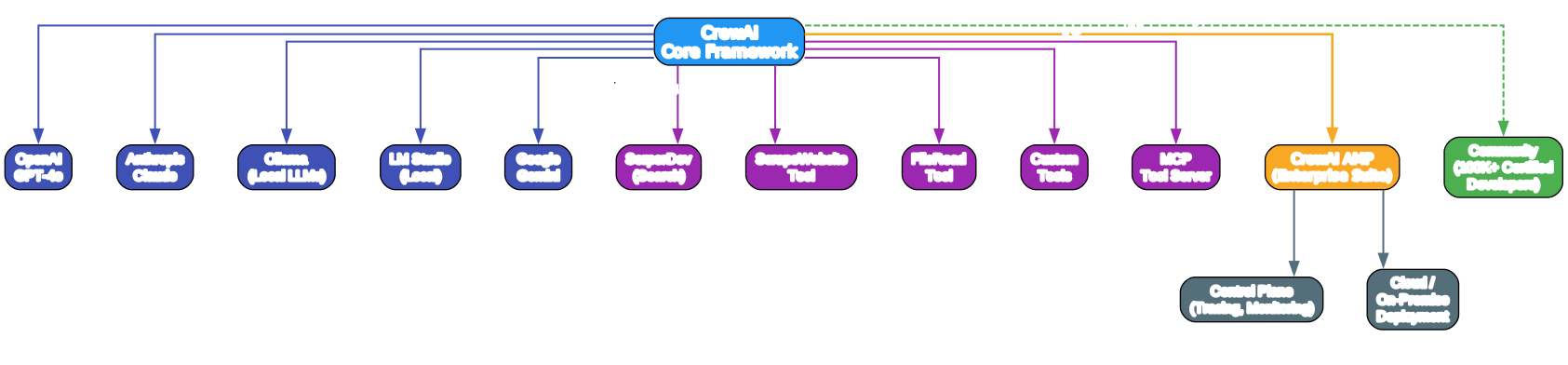
The ecosystem diagram illustrates the breadth of CrewAI’s integrations and extensions. Here is a detailed breakdown:
LLM Providers CrewAI supports a wide range of LLM backends, giving developers the flexibility to choose the right model for each agent:
- OpenAI GPT-4o – The default provider, offering strong general-purpose capabilities
- Anthropic Claude – Excellent for nuanced reasoning and long-context tasks
- Google Gemini – Google’s multimodal model family
- Ollama – Run local open-source models like Llama, Mistral, or Qwen on your own hardware
- LM Studio – Another option for local model deployment with a user-friendly GUI
This multi-provider support means you can mix and match models within a single crew – using a powerful cloud model for complex reasoning tasks while keeping simpler tasks on local models to reduce costs.
Tool Integrations CrewAI’s tool ecosystem provides agents with the ability to interact with the real world:
- SerperDev – Web search capabilities for finding current information
- ScrapeWebsiteTool – Extract content from web pages
- FileReadTool – Read local files and documents
- Custom Tools – Build any tool by subclassing
BaseTool - MCP Tool Server – Connect to Model Context Protocol-compatible tool servers for standardized tool communication
CrewAI AMP (Enterprise Suite) For organizations requiring enterprise-grade features, CrewAI AMP provides:
- Control Plane – Centralized monitoring, tracing, and observability for all agents and workflows
- Cloud and On-Premise Deployment – Choose the deployment model that meets your security and compliance requirements
- 24/7 Enterprise Support – Dedicated support for production deployments
Community With over 100,000 certified developers, CrewAI has one of the most active communities in the AI agent space. The community provides comprehensive documentation, courses on DeepLearning.AI, and a forum for sharing patterns and getting help.
Getting Started
Prerequisites
- Python >=3.10, <3.14
- UV package manager (recommended)
Installation
# Install CrewAI
uv pip install crewai

# Install with tools
uv pip install 'crewai[tools]'

# Create a new project
crewai create crew my_project

# Navigate to the project
cd my_project

# Install dependencies (optional)
crewai install
Configuration
Set your API keys in the .env file:
OPENAI_API_KEY=sk-...
SERPER_API_KEY=your_key_here
Running
# Run the crew
crewai run
Or run directly with Python:
python src/my_project/main.py
Comparison with Other Agent Frameworks
| Feature | CrewAI | LangGraph | AutoGen | ChatDev |
|---|---|---|---|---|
| Standalone Framework | Yes | No (LangChain) | Yes | Yes |
| Process Abstraction | Sequential + Hierarchical | Graph-based | Conversational | Rigid pipeline |
| Event-Driven Flows | Yes | Yes | No | No |
| Role-Based Agents | Yes | No | Partial | Yes |
| Tool Integration | Rich built-in + MCP | Via LangChain | Limited | Limited |
| Memory System | 3-tier (Short/Long/Entity) | Manual state | Basic | Basic |
| Local LLM Support | Ollama, LM Studio | Via LangChain | Partial | No |
| Enterprise Offering | CrewAI AMP | LangSmith | No | No |
| Community | 100K+ certified | Large | Active | Small |
| Performance | 5.76x faster than LangGraph (QA tasks) | Baseline | Moderate | Slow |
CrewAI’s key differentiator is its combination of autonomous agent intelligence (Crews) with precise workflow control (Flows), all in a standalone framework that does not depend on LangChain or any other agent framework. This independence means faster execution, lighter resource demands, and more flexibility in how you design your systems.
Conclusion
CrewAI represents a significant step forward in multi-agent AI orchestration. By combining the autonomy of role-playing agents with the precision of event-driven Flows, it provides developers with a framework that is both powerful and practical. The standalone architecture ensures performance and flexibility, while the rich ecosystem of tools, LLM providers, and enterprise features makes it suitable for everything from personal projects to large-scale production deployments.
Whether you are building a simple research pipeline or a complex enterprise automation system, CrewAI’s intuitive API, comprehensive documentation, and thriving community make it an excellent choice. The framework’s independence from LangChain means you get a leaner, faster experience without the overhead of unnecessary dependencies.
If you are looking to build multi-agent AI systems, CrewAI deserves a serious look. Start with the CLI scaffolding, define your agents and tasks in YAML, and iterate from there. The combination of high-level simplicity and low-level control means you will never hit a ceiling – CrewAI grows with your ambitions.
Links
- GitHub Repository: https://github.com/crewAIInc/crewAI
- PyPI Package: https://pypi.org/project/crewai/
- Documentation: https://docs.crewai.com
- CrewAI Cloud Trial: https://app.crewai.com
- DeepLearning.AI Course: https://www.deeplearning.ai/short-courses/multi-ai-agent-systems-with-crewai/
- Community Forum: https://community.crewai.com
- CrewAI Examples: https://github.com/crewAIInc/crewAI-examples

Enjoyed this post? Never miss out on future posts by following us


