DESIGN.md: Google’s Visual Identity Specification for AI Coding Agents
DESIGN.md is a format specification from Google Labs that gives AI coding agents a persistent, structured understanding of a design system. With over 7,300 stars on GitHub, this open-source project solves a fundamental problem in AI-assisted development: how do you ensure that an AI agent consistently applies your brand’s visual identity across multiple coding sessions? The answer lies in combining machine-readable design tokens with human-readable design rationale in a single, plain-text file that both humans and AI can understand and refine.
The Problem: Design Consistency in AI-Generated Code
When AI coding agents like Claude Code, Cursor, or GitHub Copilot generate UI code, they often produce visually inconsistent results. One session might use a slightly different shade of your primary color, or a different border radius, or an entirely different font stack. This happens because these agents lack a persistent, structured understanding of your design system.
Traditional approaches have limitations:
- Design system documentation is written for humans, not machines. AI agents cannot reliably extract exact color values, spacing scales, or typography rules from prose descriptions.
- Figma files are visual and interactive, but not directly consumable by code agents in a structured way.
- CSS variables define values but lack the context and rationale that guides how and when to use them.
- Tailwind configs are framework-specific and do not capture the “why” behind design decisions.
DESIGN.md bridges this gap by providing a single file that contains both the exact values (as machine-readable tokens) and the design rationale (as human-readable prose).
How DESIGN.md Works
Understanding the Token Architecture
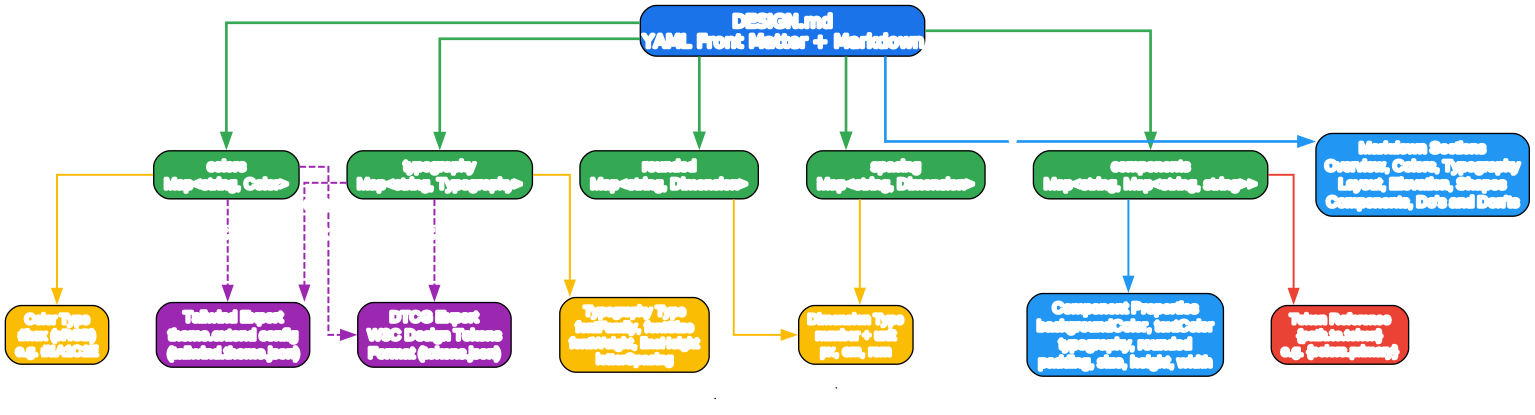
The token architecture diagram above illustrates how DESIGN.md organizes design information into a structured, hierarchical system. Let us break down each component:
YAML Front Matter - The Machine-Readable Layer
At the top of every DESIGN.md file, YAML front matter (delimited by --- fences) contains the machine-readable design tokens. These tokens are the normative values - the exact specifications that AI agents and export tools consume programmatically. The token schema supports five primary groups:
- colors: A map of token names to hex color values in sRGB color space (e.g.,
primary: "#1A1C1E") - typography: A map of token names to typography objects containing
fontFamily,fontSize,fontWeight,lineHeight,letterSpacing,fontFeature, andfontVariation - rounded: A map of scale levels to dimension values for border radii (e.g.,
sm: 4px,md: 8px) - spacing: A map of scale levels to dimension values or unitless numbers for layout spacing
- components: A map of component names to groups of sub-token properties, supporting references like
{colors.primary}
Token Types and References
The DESIGN.md specification defines four token types that cover all common design values:
- Color: Hex values starting with
#in sRGB (e.g.,"#1A1C1E","#B8422E") - Dimension: Numeric values with unit suffixes -
px,em, orrem(e.g.,48px,-0.02em,1.5rem) - Token Reference: Cross-references using
{path.to.token}syntax (e.g.,{colors.primary},{typography.label-md}) - Typography: Composite objects combining font properties into a single named token
The token reference system is particularly powerful. When you define a component like button-primary, you can reference previously defined tokens rather than duplicating values:
components:
  button-primary:
    backgroundColor: "{colors.tertiary}"
    textColor: "{colors.on-tertiary}"
    typography: "{typography.label-md}"
    rounded: "{rounded.sm}"
    padding: 12px
This ensures consistency across your entire design system - change colors.tertiary once, and every component that references it updates automatically.
Markdown Body - The Human-Readable Layer
Below the YAML front matter, the markdown body provides design rationale organized into canonical sections. These sections can be omitted, but those present must appear in a specific order:
- Overview (or “Brand & Style”): A holistic description of the product’s look and feel, brand personality, and target audience
- Colors: Color palette definitions with semantic roles and usage guidance
- Typography: Font strategy, hierarchy, and treatment rules
- Layout (or “Layout & Spacing”): Grid systems, spacing scales, and container strategies
- Elevation & Depth: How visual hierarchy is conveyed through shadows, tonal layers, or other methods
- Shapes: Corner radius, shape language, and geometric treatment rules
- Components: Style guidance for UI component atoms (buttons, cards, inputs, etc.)
- Do’s and Don’ts: Practical guardrails and common pitfalls
The prose tells agents why these values exist and how to apply them - context that pure token values cannot convey.
A Complete DESIGN.md Example
Here is a real example from the project - the “Heritage” design system:
---
name: Heritage
colors:
  primary: "#1A1C1E"
  secondary: "#6C7278"
  tertiary: "#B8422E"
  neutral: "#F7F5F2"
typography:
  h1:
    fontFamily: Public Sans
    fontSize: 3rem
  body-md:
    fontFamily: Public Sans
    fontSize: 1rem
  label-caps:
    fontFamily: Space Grotesk
    fontSize: 0.75rem
rounded:
  sm: 4px
  md: 8px
spacing:
  sm: 8px
  md: 16px
---

## Overview

Architectural Minimalism meets Journalistic Gravitas. The UI evokes a
premium matte finish - a high-end broadsheet or contemporary gallery.

## Colors

The palette is rooted in high-contrast neutrals and a single accent color.

- **Primary (#1A1C1E):** Deep ink for headlines and core text.
- **Secondary (#6C7278):** Sophisticated slate for borders, captions, metadata.
- **Tertiary (#B8422E):** "Boston Clay" - the sole driver for interaction.
- **Neutral (#F7F5F2):** Warm limestone foundation, softer than pure white.
An agent that reads this file will produce a UI with deep ink headlines in Public Sans, a warm limestone background, and Boston Clay call-to-action buttons - exactly as the designer intended.
The Design-to-Code Workflow
Understanding the Design-to-Code Pipeline
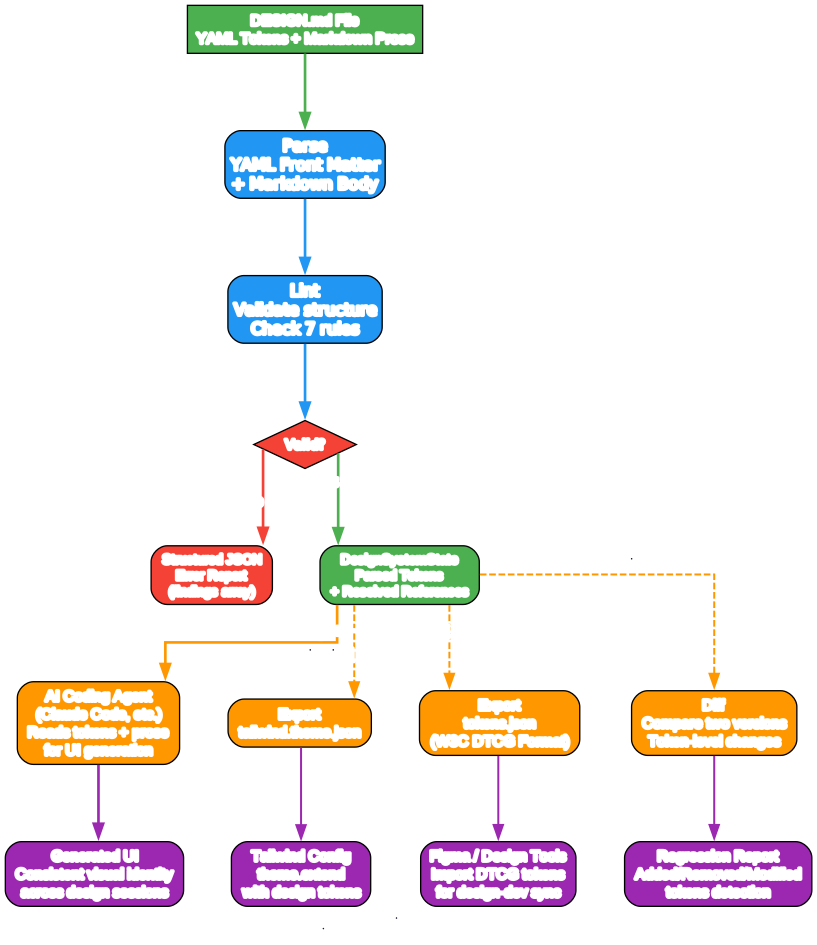
The workflow diagram above shows how a DESIGN.md file moves from creation to consistent UI output. Here is how each stage works:
1. Parse: YAML Front Matter + Markdown Body
The first step is parsing. The DESIGN.md CLI reads the file and separates the YAML front matter (between the --- delimiters) from the markdown body. The YAML is parsed into structured token maps, while the markdown sections are extracted in their canonical order. This dual-layer parsing ensures that both the exact values and their contextual rationale are available to downstream consumers.
2. Lint: Validate Structure and Check 7 Rules
The linter validates the parsed design system against seven rules, each at a fixed severity level:
| Rule | Severity | What It Checks |
|---|---|---|
broken-ref | error | Token references that do not resolve to any defined token |
missing-primary | warning | Colors defined but no primary color exists |
contrast-ratio | warning | Component backgroundColor/textColor pairs below WCAG AA (4.5:1) |
orphaned-tokens | warning | Color tokens defined but never referenced by any component |
token-summary | info | Summary of how many tokens are defined in each section |
missing-sections | info | Optional sections absent when other tokens exist |
missing-typography | warning | Colors defined but no typography tokens |
The linter outputs structured JSON that agents can act on programmatically:
{
  "findings": [
    {
      "severity": "warning",
      "path": "components.button-primary",
      "message": "textColor (#ffffff) on backgroundColor (#1A1C1E) has contrast ratio 15.42:1 - passes WCAG AA."
    }
  ],
  "summary": { "errors": 0, "warnings": 1, "info": 1 }
}
3. DesignSystemState: Parsed Tokens + Resolved References
When linting passes, the parser produces a DesignSystemState object - a fully resolved data structure where all token references (like {colors.primary}) have been replaced with their actual values. This is the canonical internal representation that all export and consumption operations work from.
4. Three Output Paths
From the DesignSystemState, three distinct paths emerge:
- AI Coding Agents consume the DESIGN.md directly as context, reading both tokens and prose to generate UI code that faithfully follows the design system
- Export to Tailwind converts tokens into a
tailwind.theme.jsonfile that can be merged into any Tailwind CSS configuration - Export to DTCG converts tokens into the W3C Design Tokens Format (tokens.json), enabling interoperability with Figma, Tokens Studio, and other design tools
5. Diff: Compare Two Versions
The diff command compares two DESIGN.md files and reports token-level changes, detecting added, removed, and modified tokens. It also checks for regressions - if the “after” file has more errors or warnings than the “before” file, it flags a regression.
The CLI: Your Design System Toolkit
The @google/design.md npm package provides a comprehensive CLI for working with DESIGN.md files:
Installation
npm install @google/design.md
Or run directly without installation:
npx @google/design.md lint DESIGN.md
Lint Command
Validate a DESIGN.md file for structural correctness:
npx @google/design.md lint DESIGN.md
npx @google/design.md lint --format json DESIGN.md
cat DESIGN.md | npx @google/design.md lint -
Diff Command
Compare two DESIGN.md files and report token-level changes:
npx @google/design.md diff DESIGN.md DESIGN-v2.md
The diff output shows exactly what changed between versions:
{
  "tokens": {
    "colors": { "added": ["accent"], "removed": [], "modified": ["tertiary"] },
    "typography": { "added": [], "removed": [], "modified": [] }
  },
  "regression": false
}
Export Command
Export DESIGN.md tokens to other formats:
npx @google/design.md export --format tailwind DESIGN.md > tailwind.theme.json
npx @google/design.md export --format dtcg DESIGN.md > tokens.json
Spec Command
Output the DESIGN.md format specification - useful for injecting spec context into agent prompts:
npx @google/design.md spec
npx @google/design.md spec --rules
npx @google/design.md spec --rules-only --format json
The Integration Ecosystem
Understanding the Integration Landscape
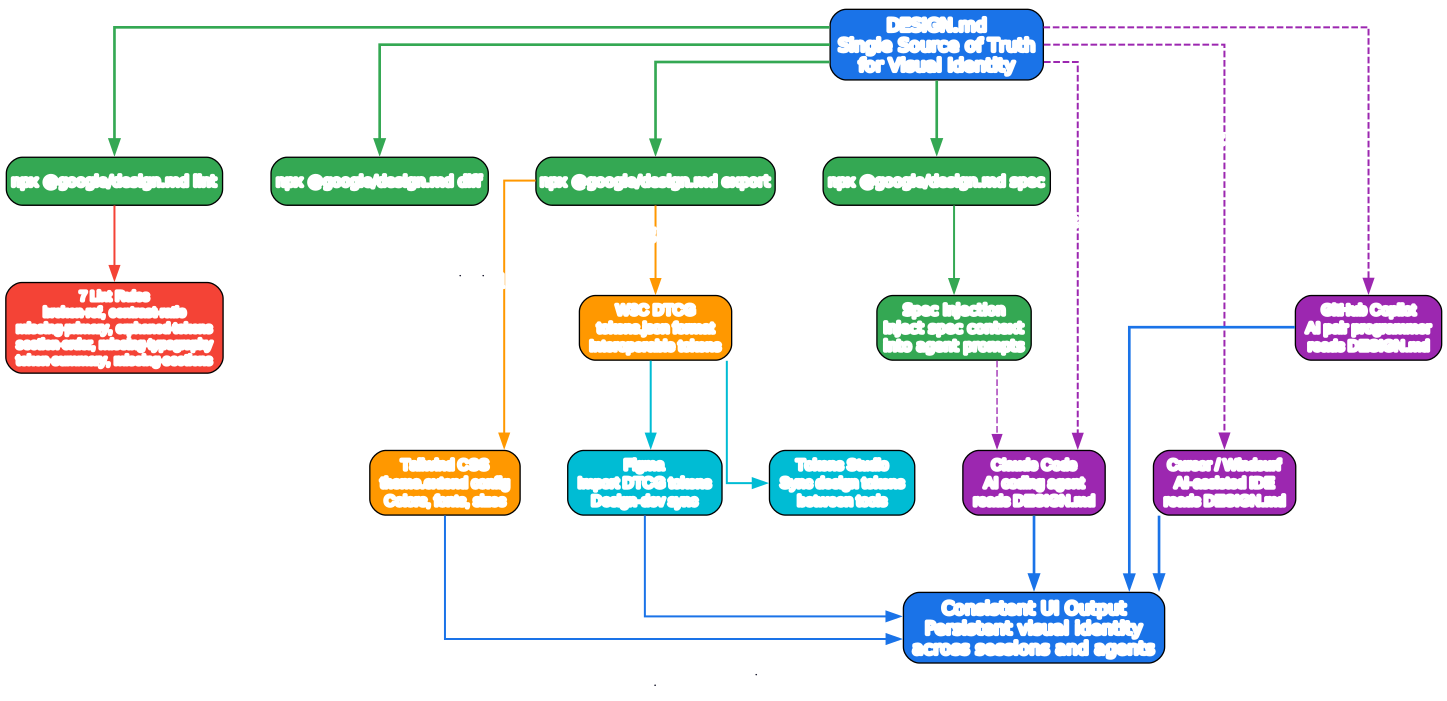
The ecosystem diagram above illustrates how DESIGN.md serves as the single source of truth for visual identity, connecting to multiple tools and workflows. Here is a detailed breakdown:
CLI Commands: Four Pillars
The @google/design.md CLI provides four core commands, each serving a distinct purpose in the design system lifecycle:
- lint: Validates structure and checks seven rules (broken references, contrast ratios, missing sections, etc.). This is the first line of defense against design system drift.
- diff: Compares two versions of a DESIGN.md to detect token-level regressions. Essential for design system versioning and code review.
- export: Converts tokens to Tailwind CSS or W3C DTCG format. This bridges the gap between design specification and implementation.
- spec: Outputs the format specification itself, which can be injected into AI agent prompts to give them context about the DESIGN.md format.
AI Agent Integration: Context is King
DESIGN.md integrates with AI coding agents through context injection. When an agent reads a DESIGN.md file, it gains:
- Exact values: No more guessing at colors, spacing, or typography
- Semantic meaning: Understanding that
primaryis for headlines andtertiaryis for interactions - Design rationale: The “why” behind each decision, enabling the agent to make informed choices when exact tokens are not specified
- Component specifications: Pre-defined component tokens that tell the agent exactly how buttons, cards, and inputs should look
The spec command enables a powerful workflow: inject the DESIGN.md format specification into your agent’s system prompt, and it will understand not just your specific design system, but the entire DESIGN.md format - enabling it to create, modify, and validate DESIGN.md files autonomously.
Design Tool Interoperability: The DTCG Bridge
The W3C Design Tokens Format (DTCG) export creates a bridge to the broader design tool ecosystem:
- Figma can import DTCG tokens through plugins, keeping design files in sync with code
- Tokens Studio can sync design tokens between Figma, code repositories, and other tools
- Any DTCG-compatible tool can consume the exported tokens.json, ensuring your design system is truly universal
Tailwind CSS Integration: From Tokens to Theme
The Tailwind export generates a theme.extend configuration that maps directly to Tailwind’s design token system:
{
  "theme": {
    "extend": {
      "colors": {
        "primary": "#1A1C1E",
        "secondary": "#6C7278",
        "tertiary": "#B8422E"
      },
      "fontFamily": {
        "h1": ["Public Sans"],
        "body-md": ["Public Sans"],
        "label-caps": ["Space Grotesk"]
      },
      "fontSize": {
        "h1": ["3rem", { "lineHeight": "1.1" }],
        "body-md": ["1rem", { "lineHeight": "1.6" }]
      },
      "borderRadius": {
        "sm": "4px",
        "md": "8px"
      },
      "spacing": {
        "sm": "8px",
        "md": "16px"
      }
    }
  }
}
This means you can define your design system once in DESIGN.md and have it automatically propagate to your Tailwind configuration - no manual translation required.
Real-World Examples
The DESIGN.md repository includes three complete examples that demonstrate different design philosophies:
Atmospheric Glass
A Glassmorphism weather app design with translucent surfaces, backdrop blur effects, and a vibrant gradient background. This example showcases how DESIGN.md handles complex visual effects like rgba() values and backdrop-filter references in the prose sections.
Paws & Paths
A pet services app with a warm, friendly aesthetic using “Golden Retriever” orange as the primary color. This example demonstrates a complete component system with buttons, cards, inputs, badges, and list items - all with hover state variants.
Totality Festival
A cosmic-themed festival app with dark surfaces, amber/gold accents, and glassmorphism effects. This example shows how DESIGN.md can express complex design philosophies like “Cosmic Premium” with dual-font strategies and ambient glow effects.
Programmatic API
For developers who want to integrate DESIGN.md validation into their own tools, the linter is available as a library:
import { lint } from '@google/design.md/linter';

const report = lint(markdownString);

console.log(report.findings);       // Finding[]
console.log(report.summary);        // { errors, warnings, info }
console.log(report.designSystem);   // Parsed DesignSystemState
This enables custom CI/CD pipelines, editor integrations, or automated design system governance tools.
Consumer Behavior for Unknown Content
One of the most thoughtful aspects of the DESIGN.md specification is its approach to extensibility. When a consumer encounters content not defined by the spec:
| Scenario | Behavior |
|---|---|
| Unknown section heading | Preserve; do not error |
| Unknown color token name | Accept if value is valid |
| Unknown typography token name | Accept as valid typography |
| Unknown component property | Accept with warning |
| Duplicate section heading | Error; reject the file |
This means you can extend DESIGN.md with custom sections like ## Iconography or ## Motion without breaking compatibility. The spec is designed to grow with your needs.
Component Tokens and Variants
The components section is where DESIGN.md truly shines for AI agents. Instead of leaving component styling to guesswork, you define explicit component tokens:
components:
  button-primary:
    backgroundColor: "{colors.tertiary}"
    textColor: "{colors.on-tertiary}"
    typography: "{typography.label-md}"
    rounded: "{rounded.sm}"
    padding: 12px
  button-primary-hover:
    backgroundColor: "{colors.tertiary-container}"
Variants (hover, active, pressed) are expressed as separate component entries with related key names. An AI agent reading this knows exactly how a primary button should look in both its default and hover states.
Valid component properties include: backgroundColor, textColor, typography, rounded, padding, size, height, and width.
Current Status and Future
The DESIGN.md format is currently at version alpha. The spec, token schema, and CLI are under active development. Expect changes to the format as it matures based on community feedback and real-world usage.
The project is open source under the Apache 2.0 license and welcomes contributions through the standard GitHub PR process.
Conclusion
DESIGN.md represents a significant step forward in how we communicate design systems to AI coding agents. By combining machine-readable tokens with human-readable rationale in a single, version-controllable file, it solves the fundamental problem of design consistency in AI-generated code.
The key innovations are:
- Dual-layer format: YAML tokens for machines, markdown prose for humans and AI context
- Token references:
{path.to.token}syntax ensures consistency and reduces duplication - Built-in linting: Seven rules catch common mistakes before they reach production
- Export interoperability: Direct export to Tailwind CSS and W3C DTCG format
- Diff and regression detection: Track design system changes across versions
- AI agent integration: The
speccommand enables agents to understand the format itself
Whether you are building a small project with a single AI coding agent or managing a large design system across multiple teams and tools, DESIGN.md provides the structured bridge between design intent and code implementation.
Links
- GitHub Repository: https://github.com/google-labs-code/design.md
- npm Package: https://www.npmjs.com/package/@google/design.md
- W3C Design Tokens Format: https://tr.designtokens.org/format/

Enjoyed this post? Never miss out on future posts by following us


