MoneyPrinterTurbo: AI-Powered One-Click Short Video Generation
Creating short-form video content typically requires a multi-step workflow: writing a script, recording voiceover, finding stock footage, adding subtitles, and mixing background music. Each step demands different tools and skills, making the process time-consuming and inaccessible for many creators. MoneyPrinterTurbo, an open-source project with over 56,000 stars on GitHub, eliminates this complexity by automating the entire pipeline from a single topic or keyword.
Built with Python and a clean MVC architecture, MoneyPrinterTurbo integrates large language models for script generation, edge TTS and Azure Speech for voice synthesis, Pexels and Pixabay for copyright-free HD footage, and MoviePy with FFmpeg for video composition. The result is a production-ready HD short video generated with minimal human intervention.
Architecture Overview
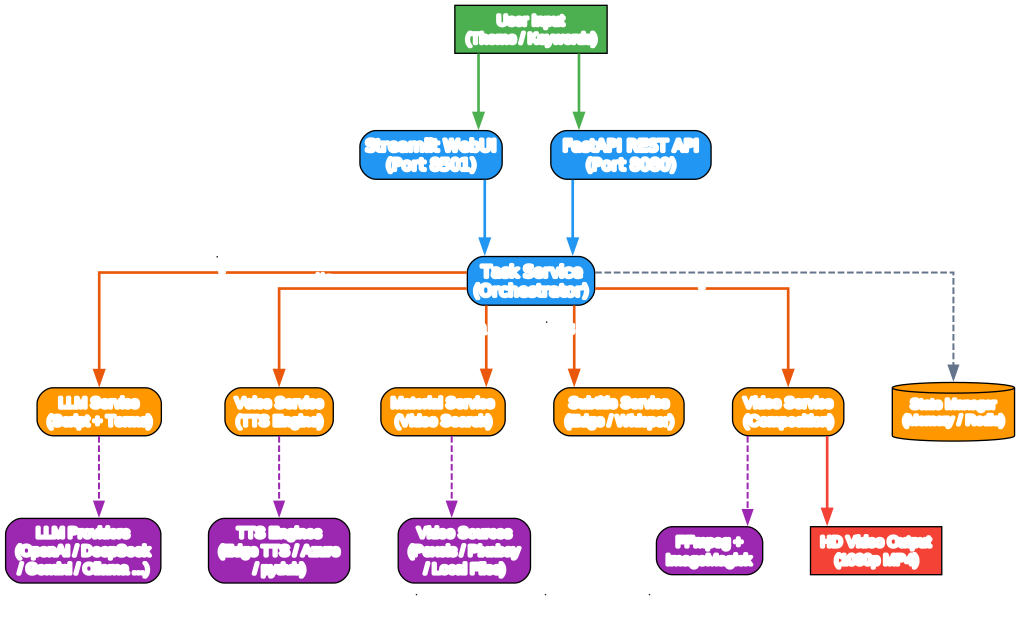
MoneyPrinterTurbo follows a modular MVC architecture that cleanly separates concerns across services. The system exposes two interfaces – a Streamlit-based WebUI for interactive use and a FastAPI REST API for programmatic access. Both interfaces route through a central Task Service orchestrator that coordinates the five core services: LLM, Voice, Material, Subtitle, and Video.
Understanding the Architecture
The architecture diagram above illustrates how MoneyPrinterTurbo’s components interact. Let us break down each layer:
User Input Layer Users provide a video topic or keyword through either the Streamlit WebUI (port 8501) or the FastAPI REST API (port 8080). The WebUI offers a browser-based interface with real-time preview of TTS voices and configuration panels, while the API enables programmatic integration for batch processing or automation workflows.
Task Orchestrator The Task Service sits at the center of the system, coordinating the execution flow across all downstream services. It manages the sequential pipeline: script generation, search term extraction, TTS audio creation, material search, subtitle generation, and final video composition. The orchestrator also handles state management through either an in-memory store or Redis for distributed deployments.
Core Services
- LLM Service – Generates video scripts and extracts search keywords using configurable LLM providers
- Voice Service – Converts scripts to speech using Edge TTS (free) or Azure Speech (premium)
- Material Service – Searches and downloads HD video clips from Pexels or Pixabay APIs
- Subtitle Service – Creates word-level synchronized subtitles using Edge (fast) or Whisper (high quality)
- Video Service – Composes the final video using MoviePy for clip assembly and FFmpeg for encoding
External Dependencies The system relies on external LLM APIs for text generation, TTS engines for audio, stock video APIs for footage, and FFmpeg/ImageMagick for rendering. This design keeps the core application lightweight while leveraging powerful cloud and local services.
Video Generation Pipeline
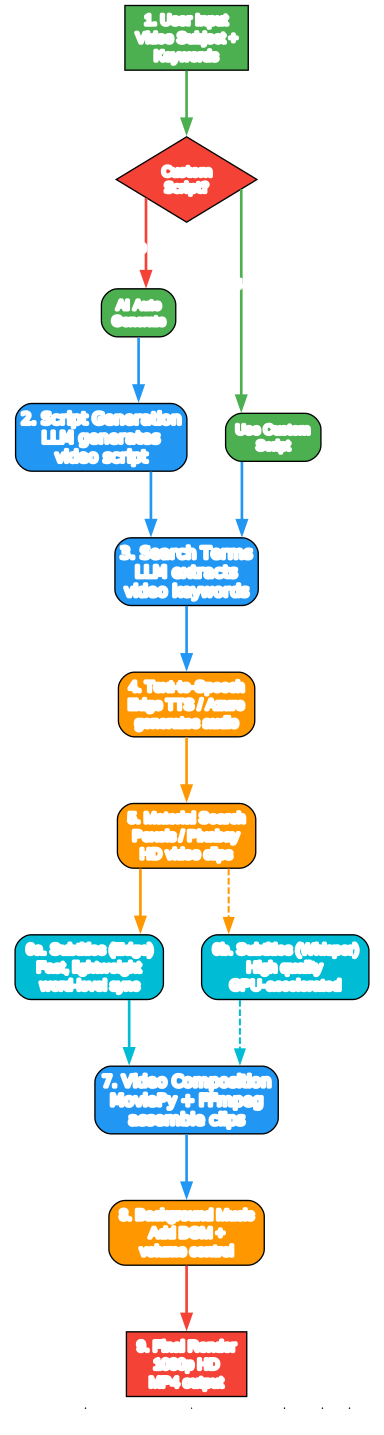
The video generation pipeline follows a deterministic 9-step process that transforms a simple topic into a finished HD video. Each step builds on the output of the previous one, creating a seamless production workflow.
Understanding the Pipeline
The pipeline diagram shows the complete flow from user input to final render. Here is a detailed breakdown:
Step 1-3: Content Generation The pipeline begins with a user-provided topic or keyword. If no custom script is provided, the LLM Service automatically generates a video script tailored to the subject. The same LLM then extracts 5 search terms from the script, which are used to find relevant video footage. This dual-LLM approach ensures that both the narrative content and visual search terms are semantically aligned.
Step 4: Text-to-Speech The script is converted to audio using the configured TTS engine. Edge TTS provides free, fast synthesis with dozens of voice options across languages. Azure Speech offers 9 premium voices with more natural prosody for production-quality output. The TTS engine returns both the audio file and word-level timing data used for subtitle synchronization.
Step 5: Material Search Using the extracted search terms, the Material Service queries Pexels or Pixabay APIs for HD video clips. The service downloads clips that match the search terms, selecting footage with appropriate duration and resolution. Users can also provide local video files as custom materials.
Step 6: Subtitle Generation Two subtitle engines are available. Edge mode generates subtitles quickly using word-level timing from the TTS engine – it requires no GPU and works on any hardware. Whisper mode uses the faster-whisper library with the large-v3 model for higher quality alignment, though it requires more computational resources and a 3GB model download from HuggingFace.
Step 7-9: Composition and Render The Video Service assembles all components using MoviePy: video clips are concatenated with configurable transitions (random, sequential, fade, slide), subtitles are overlaid with customizable fonts and positioning, and background music is mixed at a configurable volume. FFmpeg handles the final encoding to 1080p MP4 using libx264 video codec and AAC audio at 192kbps.
Key Features
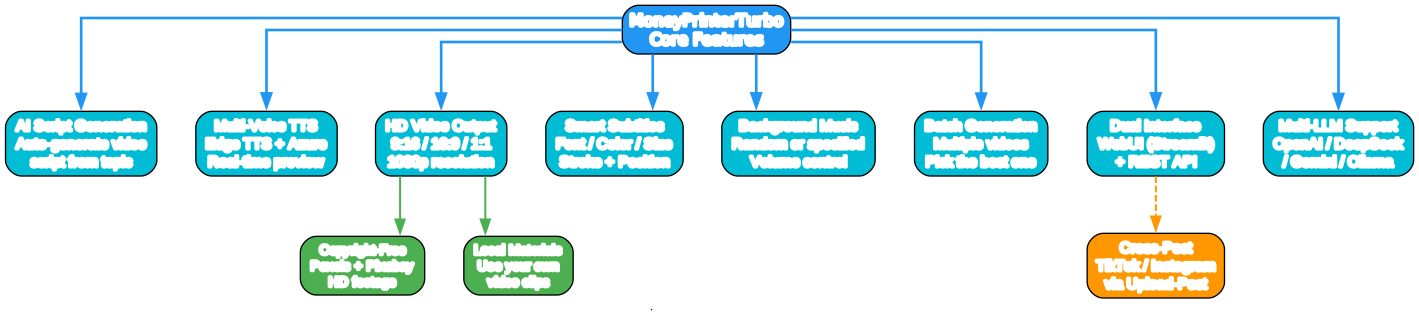
MoneyPrinterTurbo packs a comprehensive set of features that cover every aspect of short video production. The feature set is designed to give creators maximum control while maintaining the simplicity of one-click generation.
Understanding the Features
The features diagram maps out the eight core capability areas of MoneyPrinterTurbo:
AI Script Generation The LLM integration automatically generates video scripts from a topic. Scripts can be produced in Chinese or English, with configurable paragraph counts. Users can also provide custom scripts to override AI generation, giving full creative control when needed.
Multi-Voice TTS The voice system supports Edge TTS with real-time preview – users can listen to different voices before committing. Azure Speech adds 9 premium voices with more natural intonation. Voice rate is adjustable, and the system supports both male and female voices across multiple languages.
HD Video Output Three aspect ratios are supported: portrait 9:16 (1080x1920) for TikTok and Instagram Reels, landscape 16:9 (1920x1080) for YouTube, and square 1:1 (1080x1080) for Instagram posts. All outputs are rendered at 1080p resolution using H.264 encoding.
Smart Subtitles Subtitles offer full customization: font family, font size, text color, stroke color, stroke width, and vertical position (top, center, bottom, or custom percentage). The system supports CJK fonts for Chinese and Japanese content, with font files stored in the resource/fonts directory.
Background Music The system includes default royalty-free music tracks in resource/songs. Users can specify a particular track or use random selection. Background music volume is independently configurable to ensure the voiceover remains clear.
Batch Generation Multiple videos can be generated in a single batch run. This is particularly useful for A/B testing content – generate several variations and select the best one. The max_concurrent_tasks setting controls parallelism (default: 5).
Dual Interface The Streamlit WebUI provides an intuitive browser-based experience with configuration panels, while the FastAPI REST API enables automation and integration with other tools. API documentation is auto-generated at /docs using Swagger UI.
Multi-LLM Support The system supports 12+ LLM providers, making it accessible worldwide regardless of regional API availability. This is covered in detail in the ecosystem section below.
Integration Ecosystem
One of MoneyPrinterTurbo’s strongest advantages is its extensive integration ecosystem. The project supports 12 LLM providers, multiple TTS engines, several video sources, and cross-posting capabilities – all configurable through a single TOML file.

Understanding the Ecosystem
The ecosystem diagram shows how MoneyPrinterTurbo connects to external services across five categories:
LLM Providers (12+ options) The project supports an impressive range of LLM backends: OpenAI (GPT-4o-mini), DeepSeek (deepseek-chat), Google Gemini (2.5 Flash), Ollama (local models), Moonshot (v1-8k), Qwen (qwen-max), Azure OpenAI (gpt-35-turbo), GPT4Free, MiniMax (M2.7), Wenxin Yiyan (ERNIE), Pollinations (openai-fast), and ModelScope (Qwen3-32B). For users in China, DeepSeek and Moonshot are recommended as they are directly accessible without VPN.
TTS Engines Edge TTS is the default free option with broad language support and real-time preview. Azure Cognitive Services Speech adds 9 premium voices with more natural prosody, requiring an API key configuration.
Video Sources Pexels is the default source for copyright-free HD stock footage. Pixabay serves as an alternative source. Users can also specify local file paths for custom video materials, giving complete control over visual content.
Subtitle Engines Edge subtitles are fast and lightweight, requiring no GPU. Whisper subtitles use the faster-whisper library with the large-v3 model for higher quality alignment, with optional GPU acceleration via CUDA.
Rendering Pipeline MoviePy 2.1.2 handles video composition and effects. FFmpeg performs the final encoding with libx264 and AAC codecs. ImageMagick renders subtitle text with custom fonts and effects.
Cross-Posting The Upload-Post integration enables automatic posting to TikTok and Instagram after video generation, completing the content creation pipeline from ideation to publication.
Getting Started
Prerequisites
- Python 3.11 (3.12 is not yet supported)
- ImageMagick (static build for Windows)
- FFmpeg (auto-downloaded in most cases)
- Pexels API key (free at https://www.pexels.com/api/)
- An LLM API key (OpenAI, DeepSeek, or any supported provider)
Installation with uv (Recommended)
git clone https://github.com/harry0703/MoneyPrinterTurbo.git
cd MoneyPrinterTurbo
uv python install 3.11
uv sync --frozen
Installation with venv + pip
python3.11 -m venv .venv
source .venv/bin/activate  # Linux/MacOS
pip install -r requirements.txt
Configuration
Copy the example configuration and add your API keys:
cp config.example.toml config.toml
Edit config.toml to set your Pexels API key and LLM provider:
[app]
video_source = "pexels"
pexels_api_keys = ["your-pexels-api-key"]
llm_provider = "openai"
openai_api_key = "your-openai-api-key"
openai_model_name = "gpt-4o-mini"
For DeepSeek users in China:
llm_provider = "deepseek"
deepseek_api_key = "your-deepseek-api-key"
deepseek_model_name = "deepseek-chat"
Launch the WebUI
uv run streamlit run ./webui/Main.py --browser.gatherUsageStats=False
Or on Windows with an activated virtual environment:
webui.bat
The WebUI opens automatically at http://localhost:8501.
Launch the API Server
uv run python main.py
The API documentation is available at http://127.0.0.1:8080/docs.
Docker Deployment
cd MoneyPrinterTurbo
docker-compose up
Access the WebUI at http://0.0.0.0:8501 and the API at http://0.0.0.0:8080/docs.
How It Works: A Complete Example
Here is a minimal Python example using the REST API to generate a video:
import requests

# Create a video generation task
response = requests.post(
    "http://127.0.0.1:8080/api/v1/video/generate",
    json={
        "video_subject": "The meaning of life",
        "video_aspect": "9:16",
        "voice_name": "en-US-JennyNeural",
        "video_concat_mode": "random",
        "video_clip_duration": 5,
    }
)

task_id = response.json()["task_id"]

# Check task status
status = requests.get(f"http://127.0.0.1:8080/api/v1/video/status/{task_id}")
print(status.json())
The API returns a task ID immediately, and the video is generated asynchronously. Once complete, the video can be downloaded from the returned URL.
Use Cases
Content Creators Social media creators on TikTok, Instagram Reels, and YouTube Shorts can rapidly produce videos from topic ideas. The batch generation feature enables testing multiple variations to find the most engaging content.
Educators and Trainers Educational content benefits from the automatic script generation and subtitle support. The Whisper subtitle engine ensures accurate transcription for accessibility compliance.
Marketing Teams Marketing teams can generate product explainers, brand stories, and social ads at scale. The REST API enables integration with content management systems and scheduling tools.
Developers The clean MVC architecture and REST API make MoneyPrinterTurbo easy to extend and integrate. Developers can add new LLM providers, video sources, or post-processing effects by implementing the service interfaces.
Non-Technical Users The Streamlit WebUI requires no programming knowledge. Windows users can download the one-click launcher package for the simplest possible setup – just double-click start.bat.
Configuration Deep Dive
The config.toml file is the central configuration hub. Key sections include:
| Section | Purpose | Key Settings |
|---|---|---|
[app] | Core application | video_source, pexels_api_keys, llm_provider, max_concurrent_tasks |
[whisper] | Whisper subtitle engine | model_size, device (CPU/CUDA), compute_type |
[proxy] | Network proxy | http, https proxy URLs |
[azure] | Azure Speech TTS | speech_key, speech_region |
[siliconflow] | SiliconFlow API | api_key |
[ui] | UI settings | hide_log, subtitle_position |
The subtitle_provider setting accepts three values: "edge" for fast lightweight subtitles, "whisper" for high-quality GPU-accelerated subtitles, or empty to disable subtitles entirely.
Troubleshooting
FFmpeg Not Found If you encounter RuntimeError: No ffmpeg exe could be found, download FFmpeg from https://www.gyan.dev/ffmpeg/builds/ and set the path in config.toml:
[app]
ffmpeg_path = "C:\\Users\\youruser\\Downloads\\ffmpeg.exe"
ImageMagick Security Policy On Linux, ImageMagick may block temporary file operations. Edit the policy.xml file and change rights="none" to rights="read|write" for the pattern containing @.
Too Many Open Files On Linux/MacOS, increase the file descriptor limit:
ulimit -n 10240
Whisper Model Download Failed If HuggingFace is inaccessible, download the whisper-large-v3 model manually and place it at ./MoneyPrinterTurbo/models/whisper-large-v3/.
Conclusion
MoneyPrinterTurbo represents a significant step forward in democratizing video content creation. By combining LLM-powered script generation, multi-engine TTS, automated footage sourcing, and professional video composition into a single open-source tool, it removes the traditional barriers to short-form video production.
The project’s modular architecture, extensive LLM provider support, and dual WebUI/API interfaces make it suitable for everyone from individual creators to enterprise content teams. With 56K+ GitHub stars and active development (v1.2.7), MoneyPrinterTurbo has proven its value to the creator community.
Whether you are a content creator looking to scale your output, a developer building video automation pipelines, or simply curious about AI-powered video generation, MoneyPrinterTurbo offers a production-ready starting point that is both powerful and accessible.
Links
- GitHub Repository: https://github.com/harry0703/MoneyPrinterTurbo
- Google Colab Notebook: https://colab.research.google.com/github/harry0703/MoneyPrinterTurbo/blob/main/docs/MoneyPrinterTurbo.ipynb

Enjoyed this post? Never miss out on future posts by following us


