CyberVerse: Open-Source Digital Human Agent Platform with Real-Time Video Calling
CyberVerse is an open-source digital human agent platform that transforms a single photograph into a living, breathing AI character you can talk to face-to-face in real time. Unlike pre-recorded avatars or turn-based chatbots, CyberVerse delivers live video calling with approximately 1.5-second first-frame latency, natural lip-sync, and subtle idle breathing animations – all driven by state-of-the-art neural avatar models and a pluggable inference architecture. Built with Go, Python, and Vue 3, it gives developers full control over every component: the brain (LLM), the face (avatar model), the voice (TTS), and the ears (ASR).
What is CyberVerse?
CyberVerse answers a deceptively simple question: what if you could video-call an AI? Upload one photo, and the platform generates a digital human that speaks, listens, and reacts in real time. The experience feels like a video call – not a chatbot with a static profile picture, not a pre-rendered loop, but a live conversation where the digital human’s mouth moves in sync with its words, its expression shifts naturally, and it even breathes while waiting for you to speak.
The project is licensed under GPL v3.0 and targets developers who want self-hosted, customizable digital humans. It ships with two avatar backends – FlashHead 1.3B (quality-focused) and LiveAct 18B (high-fidelity full-head motion) – and supports multiple LLM, TTS, and ASR providers through a YAML-driven plugin system. A single Doubao Voice API key is enough to get a full conversation running today.
Key Insight: CyberVerse achieves ~1.5s first-frame latency for real-time video calls using FlashHead 1.3B parameters in Lite mode on a single RTX 4090 at 512x512 resolution and 25+ FPS, or in Pro mode on an RTX 5090 at the same resolution.
Architecture Overview
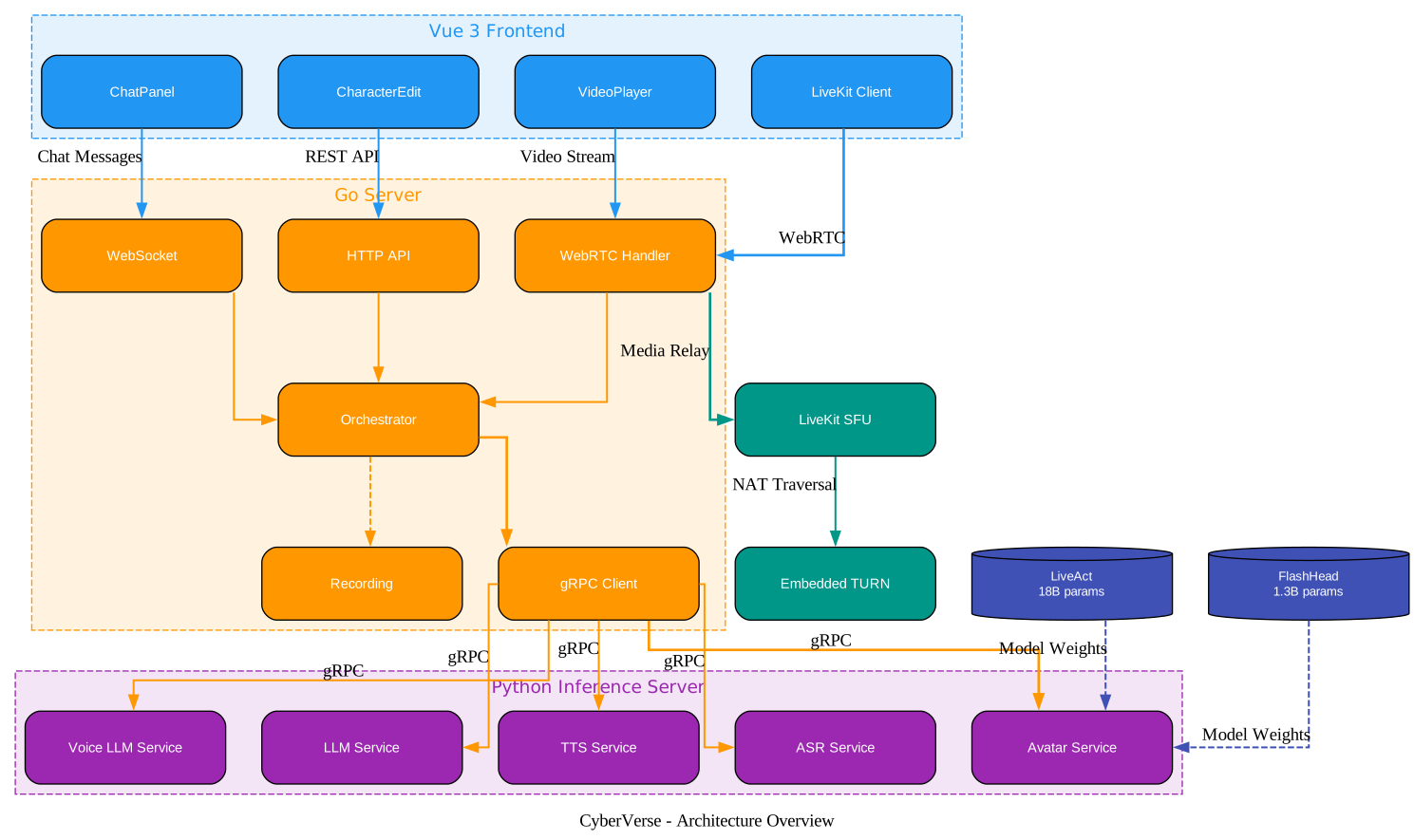
Understanding the Three-Service Architecture
CyberVerse deploys as three independent services that communicate through well-defined protocols. This separation allows each service to scale, restart, and evolve independently – a critical design choice when the Python inference server holds GPU-heavy model weights while the Go server handles lightweight HTTP/WebRTC orchestration.
Go API Server (server/)
The Go server is the central orchestrator. Built with Go 1.25, it handles HTTP API requests for character CRUD, session management, and health checks. It also manages WebRTC connectivity through two modes: direct P2P with an embedded TURN server (for simple deployments and SSH tunnel access), and LiveKit SFU integration (for production multi-party scenarios). The server communicates with the Python inference process exclusively over gRPC, sending audio chunks for ASR, text for LLM and TTS, and receiving generated video frames back. It also supports session recording – producing MP4 video, raw WAV audio, and transcript files for each conversation turn.
Python Inference Server (inference/)
The inference server is where the neural heavy lifting happens. It runs as an async gRPC server on port 50051, exposing five service endpoints: AvatarService, LLMService, TTSService, ASRService, and VoiceLLMService. The server uses a plugin registry pattern – at startup, it reads the YAML config, dynamically imports plugin classes via their fully qualified Python paths, registers them, and initializes only the ones needed for the current session. In multi-GPU mode (using torchrun), only rank 0 binds the gRPC port; other ranks stay alive as distributed workers for model-parallel inference.
Vue 3 Frontend (frontend/)
The frontend is a single-page application built with Vue 3, Vite, and Tailwind CSS. It provides a VideoPlayer component for the real-time avatar stream, a ChatPanel for text-based interaction alongside voice, a CharacterEdit page for uploading reference photos and configuring personality, and a settings page where API keys and service endpoints can be changed at runtime without editing .env files. The frontend connects to the Go server via WebSocket for control messages and WebRTC for media streaming. Internationalization support covers both Chinese and English.
Communication Flow
Data flows through the system in two pipelines depending on the mode. In omni mode, the user’s microphone audio goes directly to a voice LLM plugin (Doubao Realtime or Qwen Omni) that handles ASR, LLM reasoning, and TTS in a single streaming WebSocket connection. The generated audio is then sent to the avatar plugin for facial animation. In standard mode, audio passes through separate ASR, LLM, and TTS plugins in sequence. Both pipelines converge at the avatar plugin, which generates video frames and streams them back through WebRTC to the browser.
Plugin System
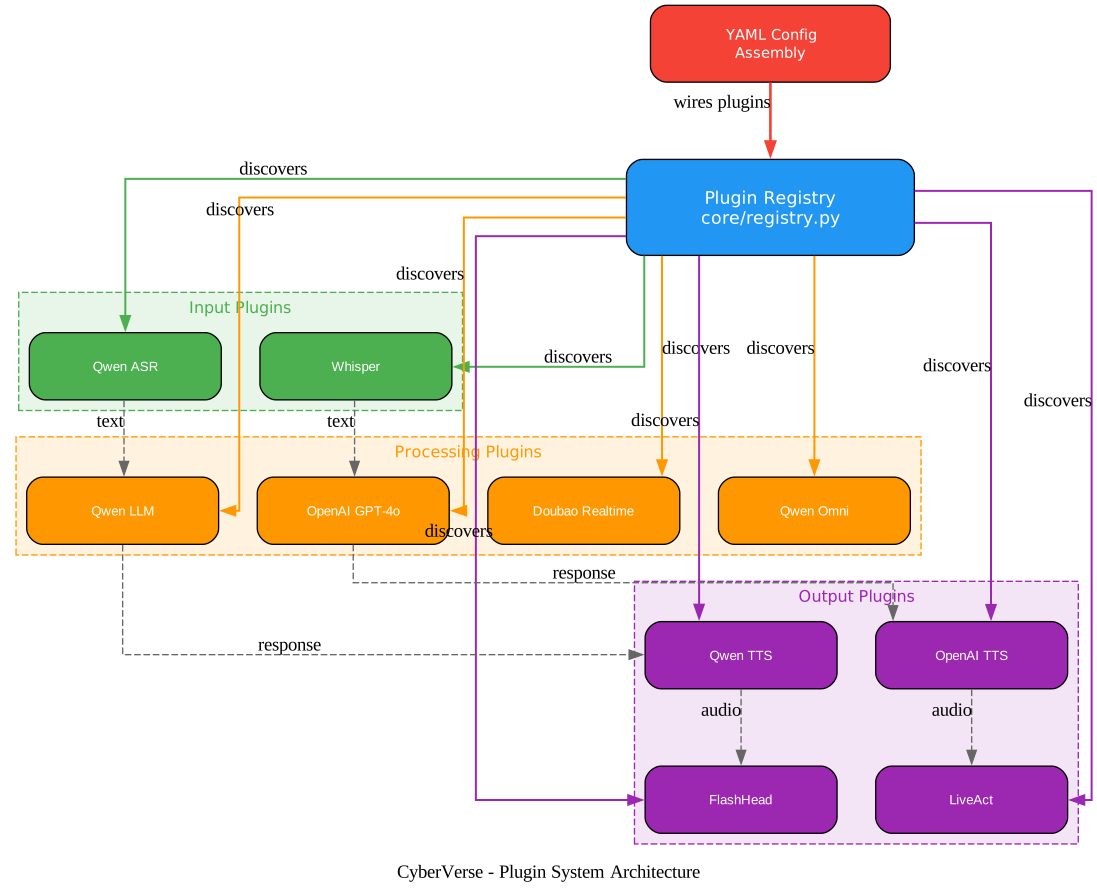
Understanding the Plugin Architecture
CyberVerse’s plugin system is what makes it truly extensible. Every cognitive and perceptual component of the digital human – the face, the brain, the voice, the ears – is a swappable plugin, not a hardcoded dependency. This means you can switch from Qwen to OpenAI GPT-4o for language, from Qwen TTS to OpenAI TTS for speech, or from FlashHead to LiveAct for the avatar, all by editing a few lines in cyberverse_config.yaml.
Plugin Categories
The system defines six plugin categories, each corresponding to a gRPC service:
| Category | Purpose | Available Plugins |
|---|---|---|
avatar | Facial animation and video generation | FlashHead 1.3B (Pro/Lite), LiveAct 18B |
voice_llm | Unified ASR+LLM+TTS via omni model | Doubao Realtime, Qwen Omni Realtime |
llm | Text-based language model | Qwen (qwen3.6-plus), OpenAI (GPT-4o) |
tts | Text-to-speech synthesis | Qwen TTS (Momo voice), OpenAI TTS (nova voice) |
asr | Automatic speech recognition | Qwen ASR, Whisper (base/large) |
omni | Alias for voice_llm in config | Same as voice_llm |
Plugin Discovery and Registration
The inference server discovers plugins at startup by scanning the YAML config. For each category, it reads every named entry, extracts the plugin_class field (a fully qualified Python class path like inference.plugins.avatar.flash_head_plugin.FlashHeadAvatarPlugin), dynamically imports the class, and registers it in the PluginRegistry. Plugins without a plugin_class field are silently skipped, making it safe to keep partial configurations in the file.
Initialization Strategy
Not all plugins are initialized at startup. LLM, TTS, ASR, and voice_llm plugins are lightweight – they are API clients that cost nothing to keep warm, so every configured entry in these categories gets initialized. Avatar plugins, by contrast, load multi-gigabyte model weights onto the GPU. Only the default avatar plugin is initialized to avoid wasting VRAM. You select which avatar model to activate by setting inference.avatar.default to either flash_head or live_act.
Configuration-Driven Assembly
The YAML config acts as the wiring board for the entire system. Each plugin entry specifies its class path and any parameters that plugin needs – API keys, model names, voice selections, sample rates, and inference parameters like resolution and FPS. Shared settings (GPU device IDs, world size for multi-GPU, warmup behavior) are propagated from parent sections down to individual plugins. This means changing the digital human’s personality, voice, or face is a config edit and a restart – no code changes required.
Takeaway: With a single YAML file, you can assemble a digital human that speaks through Qwen TTS, reasons with GPT-4o, listens via Whisper, and animates with FlashHead – or swap any of those components for alternatives in minutes.
Real-Time Video Call Flow
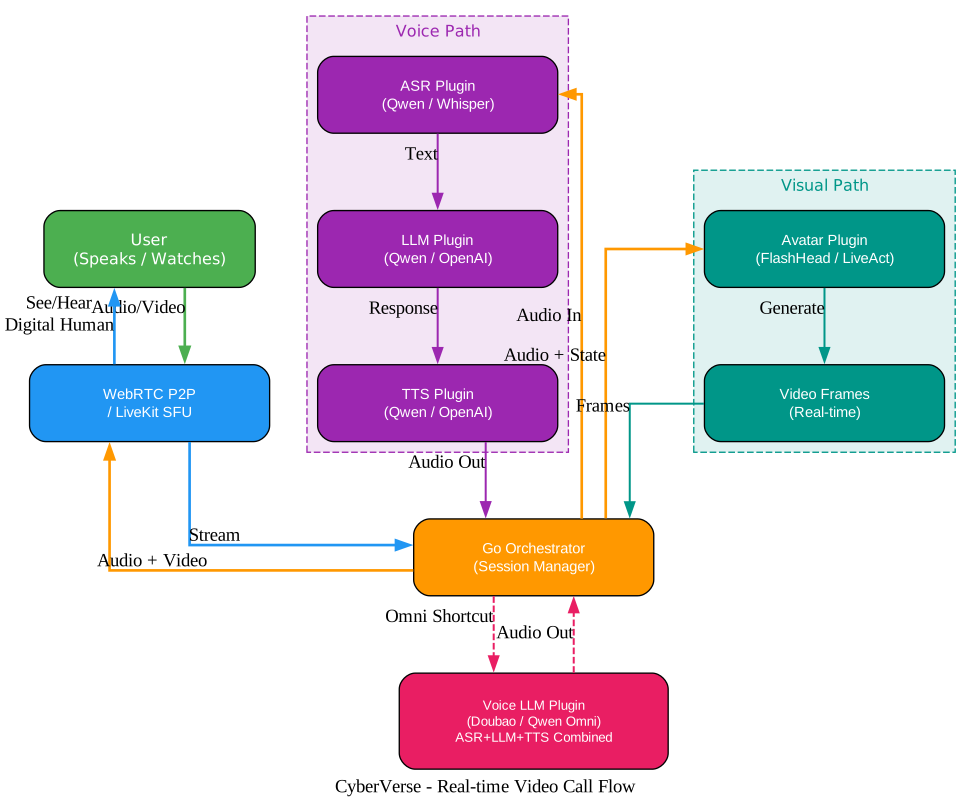
Understanding the Real-Time Pipeline
The video call flow is what distinguishes CyberVerse from every other AI chatbot. When a user opens a session, the browser establishes a WebRTC connection to the Go server (either direct P2P or through LiveKit SFU). The microphone stream flows from the browser through WebRTC to the Go orchestrator, which forwards it over gRPC to the Python inference server. The inference server processes the audio, generates a response, animates the avatar, and streams video frames back through the same path in reverse.
Omni Mode Pipeline
In omni mode, the voice_llm plugin handles the entire conversation in a single streaming connection. The user’s audio is sent directly to the Doubao Realtime or Qwen Omni API, which performs speech recognition, language model inference, and speech synthesis in one continuous stream. The generated audio chunks are forwarded to the avatar plugin, which drives facial animation from the audio waveform. This pipeline minimizes latency because there is no handoff between separate ASR, LLM, and TTS services – the omni model handles all three.
Standard Mode Pipeline
In standard mode, the pipeline chains three separate services. The ASR plugin transcribes the microphone audio into text. The LLM plugin generates a text response. The TTS plugin converts that response into audio. Finally, the avatar plugin animates the face from the audio. Each step communicates through gRPC, and the Go orchestrator manages the sequencing. This mode offers more flexibility – you can mix and match any ASR, LLM, and TTS provider – at the cost of slightly higher latency due to the sequential chain.
Avatar Rendering
The avatar plugin is the final stage in both pipelines. FlashHead uses a diffusion-based architecture with a WAV2Vec audio feature extractor to drive facial animation from audio waveforms. It generates video frames at configurable resolution (up to 512x512) and frame rate (up to 25 FPS in Lite mode). The model applies color correction, lip-sync alignment, and subtle idle breathing animations to make the digital human appear alive even during pauses. LiveAct uses a different architecture based on the Wan video generation framework, supporting full-head motion with text prompts for expression control.
WebRTC Transport
Video frames travel from the inference server back to the Go server via gRPC, then from the Go server to the browser via WebRTC. In direct P2P mode, the Go server embeds a TURN server on port 8443/TCP for NAT traversal, making it possible to reach remote browsers through SSH tunnels. In LiveKit mode, the Go server acts as a LiveKit client that publishes video tracks to the SFU, which then distributes them to all subscribers. The pipeline.streaming_mode config key selects between direct and livekit.
Amazing: A single photograph is all it takes – CyberVerse’s avatar models generate real-time facial animation with natural lip-sync and idle breathing from just one reference image, no 3D modeling or motion capture required.
Installation
Prerequisites
Before installing CyberVerse, ensure your system meets these requirements:
| Requirement | Version | Notes |
|---|---|---|
| Node.js | 18+ | Node 22 recommended (see .nvmrc) |
| Go | 1.25 | Required for protoc-gen-go and protoc-gen-go-grpc |
| Python | 3.10+ | Conda environment recommended |
| PyTorch | 2.8 | CUDA 12.8 build |
| CUDA | 12.8+ | GPU with CUDA support required |
| FFmpeg | with libvpx | Required for video encoding |
| Conda | Any recent | For Python environment management |
Verify your environment:
node --version
go version
protoc --version
ffmpeg -version | grep libvpx
conda --version
Step 1: Clone the Repository
git clone https://github.com/dsd2077/CyberVerse.git
cd CyberVerse
Step 2: Create Python Environment
conda create -n cyberverse python=3.10
conda activate cyberverse
Install PyTorch with CUDA 12.8 support:
pip3 install torch==2.8.0 torchvision==0.23.0 --index-url https://download.pytorch.org/whl/cu128
Step 3: Configure Environment Variables
cp infra/.env.example .env
Edit .env and fill in your API keys. At minimum, you need a Doubao Voice API key for omni mode:
DOUBAO_ACCESS_TOKEN=your_doubao_access_token
DOUBAO_APP_ID=your_doubao_app_id
You can also add Qwen (DashScope) and OpenAI keys for additional plugin support. After the stack is running, these values can be changed from the web UI at /settings.
Step 4: Download Model Weights
Install the Hugging Face CLI:
pip install "huggingface_hub[cli]"
For FlashHead (recommended for most GPUs):
hf download Soul-AILab/SoulX-FlashHead-1_3B \
  --local-dir ./checkpoints/SoulX-FlashHead-1_3B

hf download facebook/wav2vec2-base-960h \
  --local-dir ./checkpoints/wav2vec2-base-960h
For LiveAct (higher fidelity, requires more GPU memory):
hf download Soul-AILab/LiveAct \
  --local-dir ./checkpoints/LiveAct

hf download TencentGameMate/chinese-wav2vec2-base \
  --local-dir ./checkpoints/chinese-wav2vec2-base
Step 5: Create Local Configuration
cp infra/cyberverse_config.example.yaml cyberverse_config.yaml
Edit cyberverse_config.yaml to match your checkpoint paths and GPU setup. The key settings are:
inference:
  avatar:
    default: "flash_head"
    runtime:
      cuda_visible_devices: 0
      world_size: 1
    flash_head:
      checkpoint_dir: "./checkpoints/SoulX-FlashHead-1_3B"
      wav2vec_dir: "./checkpoints/wav2vec2-base-960h"
      model_type: "lite"
      compile_model: true
      compile_vae: true
Set model_type to "pro" for higher visual quality (requires more GPU), or "lite" for faster inference on consumer hardware.
Step 6: Install Project Dependencies
make setup
This single command installs the Python package in editable mode with dev and inference extras, generates gRPC protobuf stubs, and installs frontend npm dependencies. For selective installs:
# All optional groups at once
pip install -e ".[all]"

# Or cherry-pick what you need
pip install -e ".[omni,flash_head]"
pip install -e ".[live_act]"
Step 7: Start Services
CyberVerse requires three running services. Open three terminals:
Terminal 1 – Python inference server:
conda activate cyberverse
make inference
Wait until you see Active avatar model initialized: flash_head and CyberVerse Inference Server started on port 50051.
Terminal 2 – Go API server:
make server
Terminal 3 – Frontend:
make frontend
Step 8: Verify
curl -s http://localhost:8080/api/v1/health
Open http://localhost:5173 in your browser to start creating digital humans.
Docker Deployment
For containerized deployment, use Docker Compose:
cd infra
docker compose up --build
The Docker Compose stack includes LiveKit server, Redis, the Go API server, the Python inference server (with GPU passthrough), and an nginx frontend proxy. Make sure to set the required environment variables (DOUBAO_API_KEY, DOUBAO_APP_ID, OPENAI_API_KEY) in your .env file before starting.
Important: The inference container requires NVIDIA GPU passthrough with CUDA 12.8+. The Docker Compose file configures GPU access via the nvidia container runtime. Model checkpoints must be mounted as a volume at
/app/checkpoints.
Key Features
| Feature | Description |
|---|---|
| One Photo to Digital Human | Upload a single photo to create a fully animated digital human – no 3D modeling or motion capture |
| Real-Time Video Calling | Live, unlimited-duration video calls with ~1.5s first-frame latency via WebRTC |
| Natural Lip-Sync | Audio-driven facial animation with precise mouth movement synchronized to speech |
| Idle Breathing | Subtle breathing animations during pauses make the digital human appear alive |
| Pluggable Architecture | Swap LLM, TTS, ASR, and avatar backends through YAML configuration |
| Dual Avatar Models | FlashHead 1.3B (Pro/Lite) for quality-speed tradeoff, LiveAct 18B for high-fidelity motion |
| Omni Mode | Single-stream ASR+LLM+TTS via Doubao Realtime or Qwen Omni for minimal latency |
| Standard Mode | Separate ASR, LLM, TTS chain for maximum provider flexibility |
| Voice Interruption | Interrupt the digital human mid-sentence, just like a real conversation |
| Hybrid Input | Use both voice and text in the same conversation session |
| Face-to-Face | User-side camera and screen sharing input for visual context |
| Session Recording | Per-turn MP4 video, WAV audio, and transcript files |
| Character Management | CRUD with multiple reference images, personality, welcome message, system prompt |
| Voice Cloning | Supports Doubao voice cloning for custom voice identities |
| Web UI Settings | Change API keys and service endpoints at runtime from /settings |
| Multi-GPU Support | FlashHead model-parallel inference across multiple GPUs via torchrun |
| i18n | Built-in Chinese and English localization |
| Docker Compose | Full stack deployment with LiveKit, Redis, nginx, and GPU passthrough |
Configuration
CyberVerse uses a single YAML file (cyberverse_config.yaml) to wire the entire system. The configuration is organized into these top-level sections:
Server settings control the HTTP/gRPC ports and CORS policy:
server:
    host: "0.0.0.0"
    http_port: 8080
    grpc_port: 50051
    cors_origins: ["*"]
Inference plugins define every AI component. Each category has a default selector and named plugin entries with their class paths and parameters:
inference:
    llm:
        default: "qwen"
        qwen:
            plugin_class: "inference.plugins.llm.qwen_plugin.QwenLLMPlugin"
            api_key: "${DASHSCOPE_API_KEY}"
            model: "qwen3.6-plus"
            temperature: 0.7
        openai:
            plugin_class: "inference.plugins.llm.openai_plugin.OpenAILLMPlugin"
            api_key: "${OPENAI_API_KEY}"
            model: "gpt-4o"
            temperature: 0.7
Pipeline settings control the streaming mode and visual input:
pipeline:
    default_mode: "omni"
    streaming_mode: "direct"
    turn_enabled: true
    turn_port: 8443
Set streaming_mode to "direct" for P2P WebRTC with embedded TURN, or "livekit" for LiveKit SFU. Set default_mode to "omni" for the unified voice LLM pipeline, or "standard" for the separate ASR/LLM/TTS chain.
Session limits prevent resource exhaustion:
session:
    max_concurrent: 4
    idle_timeout_s: 300
    max_duration_s: 3600
Recording captures conversation artifacts:
recording:
    enabled: true
    output_dir: "./recordings"
    crf: 23
Environment variable expansion (${DASHSCOPE_API_KEY}) is supported throughout the config, with values loaded from the .env file at startup. This keeps secrets out of the YAML file while allowing the config to reference them naturally.
Hardware Requirements
Real-time digital human conversation demands GPU acceleration. The following benchmarks come from the CyberVerse repository:
| Model | Quality | GPU | Count | Resolution | FPS | Real-Time? |
|---|---|---|---|---|---|---|
| FlashHead 1.3B | Pro | RTX 5090 | 2 | 512x512 | 25+ | Yes |
| FlashHead 1.3B | Pro | RTX 5090 | 1 | 464x464 | 20 | Yes |
| FlashHead 1.3B | Pro | RTX PRO 6000 | 1 | 512x512 | 20 | Yes |
| FlashHead 1.3B | Pro | RTX 4090 | 1 | 512x512 | ~10.8 | No |
| FlashHead 1.3B | Lite | RTX 4090 | 1 | 512x512 | 25+ | Yes |
| LiveAct 18B | – | RTX PRO 6000 | 2 | 320x480 | 20 | Yes |
| LiveAct 18B | – | RTX PRO 6000 | 1 | 256x417 | 20 | Yes |
Pro mode favors visual quality; Lite mode favors speed. An RTX 4090 can run FlashHead Lite at full 512x512 resolution and 25+ FPS, making it the most accessible option for real-time conversation. The RTX 5090 unlocks Pro mode at the same resolution. LiveAct 18B, with its 18 billion parameters, requires professional-grade GPUs like the RTX PRO 6000.
Conclusion
CyberVerse represents a significant step toward making digital human technology accessible to developers. By combining state-of-the-art avatar models with a clean plugin architecture and real-time WebRTC streaming, it delivers an experience that feels genuinely like video-calling an AI. The YAML-driven configuration means you can experiment with different LLMs, voices, and avatar models without touching code, while the three-service architecture keeps concerns cleanly separated for production deployment.
The project’s roadmap points toward even more ambitious capabilities: long-term memory across sessions, tool use and function calling, and eventually an agent network where multiple digital humans communicate and collaborate. Whether you are building virtual companions, customer service agents, or interactive characters, CyberVerse provides the foundation to bring them to life from a single photograph.
Links:
- GitHub Repository: https://github.com/dsd2077/CyberVerse

Enjoyed this post? Never miss out on future posts by following us


