Pi Mono: The Full-Stack AI Agent Toolkit From libGDX Creator Mario Zechner
The pi-mono AI agent toolkit has rapidly become one of the most starred open-source projects in the AI coding space, accumulating over 39,132 stars on GitHub. Created by Mario Zechner – better known as badlogic, the creator of libGDX, the widely-used Java game development framework – pi-mono is a full-stack monorepo containing five interconnected npm packages that together form a complete agent infrastructure. Published under the @earendil-works scope and licensed under MIT, every package shares lockstep versioning (currently 0.74.0), ensuring compatibility across the stack. What sets pi-mono apart from other coding agents is its philosophy: a minimal core that refuses to bake in features like sub-agents, plan mode, or permission popups, instead pushing all customization to its extension system. The result is a framework where every layer – from the unified LLM API to the terminal UI framework – is independently usable and extensible.
Key Insight: pi-mono is not just another coding agent CLI – it is a complete agent infrastructure stack where every layer is independently usable, from the LLM API to the terminal UI framework. You can use pi-ai as a standalone library in your own projects without ever touching the coding agent.
What is Pi Mono?
Pi-mono is a self-extensible coding agent CLI and its underlying library stack, organized as a monorepo with five npm packages. The project lives at github.com/badlogic/pi-mono and its website is pi.dev.
The five packages under the @earendil-works scope are:
- pi-ai – Unified multi-provider LLM API
- pi-agent-core – Agent runtime with tool calling and state management
- pi-coding-agent – Interactive coding agent CLI
- pi-tui – Terminal UI library with differential rendering
- pi-web-ui – Web components for AI chat interfaces
All five packages are versioned at 0.74.0 and released together using lockstep versioning. This means every release updates all packages simultaneously, eliminating dependency conflicts between layers.
The core philosophy is minimal but extensible. Pi deliberately omits features that other coding agents bake in:
- No MCP – Build CLI tools with READMEs (Skills), or add MCP support via extensions
- No sub-agents – Spawn pi instances via tmux, or build your own orchestration with extensions
- No permission popups – Run in a container, or build your own confirmation flow with extensions
- No plan mode – Write plans to files, or build it with extensions
- No built-in to-dos – They confuse models; use a TODO.md file instead
This design philosophy means the core stays lean while users shape pi to fit their workflow through extensions, skills, prompt templates, themes, and pi packages.
Architecture Overview
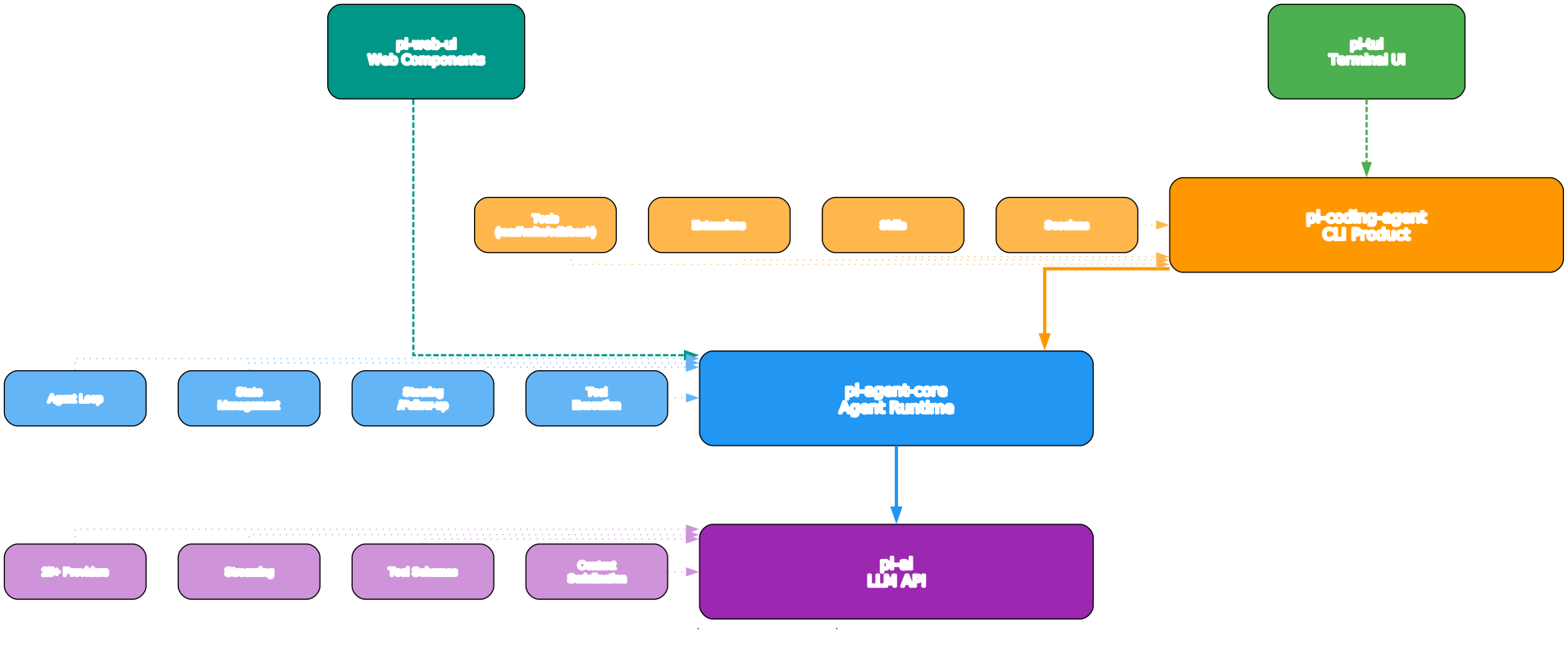
Understanding the Architecture
The architecture diagram above illustrates pi-mono’s layered design, where each package builds upon the one below it while remaining independently usable. This is not a monolithic application – it is a stack of composable libraries.
Layer 1: pi-ai (Foundation)
At the base sits pi-ai, the unified LLM API. This is the only layer that communicates directly with LLM providers. It handles streaming, tool calling, context serialization, and cross-provider handoffs. Every other layer in the stack depends on pi-ai for model access, but pi-ai itself has no dependencies on the upper layers. This means you can use pi-ai as a standalone library in any Node.js or browser project without pulling in the agent, TUI, or web UI code.
Layer 2: pi-agent-core (Agent Runtime)
Built on top of pi-ai, pi-agent-core provides the stateful Agent class with methods like prompt(), continue(), and abort(). It manages conversation state, tool execution, event dispatch, and hook points for beforeToolCall and afterToolCall. The agent runtime is transport-agnostic – it does not care whether input comes from a terminal, a web interface, or an RPC channel.
Layer 3: pi-coding-agent (CLI Application)
The coding agent layer adds four built-in tools (read, write, edit, bash) and multiple interaction modes (interactive TUI, print, JSON, RPC, SDK). It also introduces session management with tree-structured JSONL files, compaction for long conversations, and the extension system. This is what users interact with when they run pi from the command line.
Layer 4: pi-tui (Terminal UI)
The TUI library provides differential rendering with a three-strategy system, CSI 2026 synchronized output for flicker-free updates, component-based architecture, inline image support, and IME handling for CJK input. While built to serve the coding agent, pi-tui is a general-purpose terminal UI library that can be used independently.
Layer 5: pi-web-ui (Web Components)
At the top sits pi-web-ui, offering ChatPanel and AgentInterface web components for browser-based AI chat. It includes an ArtifactsPanel for rendering HTML, SVG, and Markdown, a JavaScript REPL tool, document extraction for PDF/DOCX/XLSX/PPTX, and IndexedDB storage. Like pi-tui, it is independently usable.
Data Flow
User input enters through the top layer (TUI for terminal, web-ui for browser) and flows down through the agent runtime to pi-ai, which communicates with LLM providers. Responses stream back up through the same layers. The extension system hooks into the agent runtime, allowing custom tools, commands, and UI components to inject behavior at any point in the flow.
Key Design Decisions
The lockstep versioning ensures that all five packages are always compatible. The dependency graph is strictly linear: pi-web-ui depends on pi-tui and pi-ai, pi-coding-agent depends on pi-agent-core, pi-tui, and pi-ai, pi-agent-core depends on pi-ai, and pi-ai stands alone. This clean separation means you can adopt pi-mono incrementally – start with just the LLM API, then add the agent runtime, then the full coding agent.
The Five Packages
1. pi-ai: Unified Multi-Provider LLM API
pi-ai is the foundation of the entire stack. It provides a single, consistent API for communicating with over 25 LLM providers, eliminating the need to learn each provider’s SDK individually. The package is published as @earendil-works/pi-ai on npm and can be used entirely independently of the other packages.
Supported providers include: OpenAI, Anthropic, Google Gemini, Azure OpenAI, DeepSeek, Amazon Bedrock, Mistral, Groq, Cerebras, Cloudflare AI Gateway, Cloudflare Workers AI, xAI, OpenRouter, Vercel AI Gateway, MiniMax, Together AI, GitHub Copilot, Fireworks, Kimi For Coding, Xiaomi MiMo, Hugging Face, OpenCode Zen, OpenCode Go, and any OpenAI-compatible API (Ollama, vLLM, LM Studio, etc.).
Key capabilities:
- Streaming with granular events – Every response streams as typed events (text, tool_call, thinking, usage, stop), giving you fine-grained control over how to process LLM output
- Tool calling with TypeBox schemas – Define tools using TypeBox (a TypeScript JSON Schema builder) for type-safe parameter validation and automatic schema generation
- Cross-provider handoffs – Switch models mid-conversation while preserving full context including thinking blocks and tool calls
- Context serialization – Serialize and deserialize conversation state for persistence, replay, and transfer between sessions
- OAuth support – Built-in OAuth flows for Anthropic, OpenAI Codex, GitHub Copilot, and Gemini CLI, so users can authenticate with their existing subscriptions
- Faux provider – A mock provider for deterministic testing without API calls
- Cost tracking – Automatic token counting and cost calculation per provider pricing
- Browser support – Works in both Node.js and browser environments

Understanding the LLM Provider Ecosystem
The LLM provider ecosystem diagram above shows how pi-ai abstracts 25+ providers behind a single unified interface. This is not a thin wrapper – pi-ai handles the significant differences between provider APIs, including streaming protocols, tool calling formats, thinking/reasoning modes, and authentication mechanisms.
Provider Categories
The providers fall into several categories. First-party providers like OpenAI, Anthropic, and Google offer their own SDKs and APIs, which pi-ai wraps with consistent streaming and error handling. Aggregation providers like OpenRouter, Vercel AI Gateway, and Together AI provide access to multiple models through a single endpoint. Subscription-based providers like GitHub Copilot and OpenAI Codex use OAuth authentication, allowing users to leverage their existing paid subscriptions rather than paying per API call. Regional providers like Xiaomi MiMo offer separate endpoints for different geographic regions (China, Amsterdam, Singapore).
Authentication Flexibility
One of pi-ai’s most practical features is its authentication flexibility. You can use API keys for direct access, or OAuth for subscription-based providers. The /login command in the coding agent walks you through OAuth setup for supported providers. For custom deployments, you can add providers via ~/.pi/agent/models.json if they speak a supported API (OpenAI, Anthropic, or Google format). For entirely custom APIs or OAuth flows, you can write an extension.
Streaming Architecture
pi-ai uses an event-stream architecture for all responses. Instead of buffering the entire response, it emits granular events as they arrive: text for content chunks, tool_call for function invocations, thinking for reasoning blocks, usage for token counts, and stop for completion. This enables real-time UI updates, progressive rendering, and early abort capabilities. The streaming architecture also supports partial JSON parsing for tool calls, so you can start processing tool arguments before the full call completes.
Model Discovery
pi-ai maintains an up-to-date list of tool-capable models for each provider, updated with every release. This means you never have to manually track which models support function calling – pi-ai handles it automatically. The getModel() function provides type-safe model selection with autocomplete for both provider and model names.
Amazing: pi-ai supports cross-provider handoffs – you can start a conversation with Claude, switch to GPT-4o mid-stream, and continue with Gemini, all while preserving context including thinking blocks and tool calls. This is not a simple model swap; the full conversation state, including tool call results and reasoning traces, transfers seamlessly between providers.
2. pi-agent-core: Agent Runtime
pi-agent-core provides the stateful Agent class that powers the coding agent and can power your own agent applications. Published as @earendil-works/pi-agent-core, it handles the core agent loop: receiving prompts, dispatching to the LLM, processing tool calls, and managing conversation state.
Core features:
- Stateful Agent class – The
Agentclass maintains conversation history, tool definitions, and configuration across multiple turns. Methods includeprompt()for new messages,continue()for follow-ups, andabort()for cancellation - Event-driven architecture – All agent actions emit typed events, enabling reactive UI updates and extension hooks
- Tool execution with parallel support – Tools can execute in parallel when the LLM returns multiple tool calls in a single response
- Steering and follow-up – Queue messages while the agent is working: steering messages deliver after the current tool call batch, follow-up messages deliver after the agent finishes all work
- beforeToolCall/afterToolCall hooks – Extensions can intercept tool calls before execution and modify or block them, and receive results after execution
- Custom message types via declaration merging – Extend the agent’s message types using TypeScript declaration merging for custom event handling
The agent runtime is deliberately transport-agnostic. It does not know or care whether input comes from a terminal, a web interface, an RPC channel, or an SDK call. This separation makes it straightforward to embed agent capabilities in any application context.
3. pi-coding-agent: Interactive CLI
The pi-coding-agent is what most people think of when they hear “pi.” Published as @earendil-works/pi-coding-agent and invoked via the pi command, it is a full-featured interactive coding agent with four built-in tools: read, write, edit, and bash.
Five interaction modes:
- Interactive TUI mode (default) – Full terminal UI with editor, message display, tool output, and keyboard shortcuts
- Print mode (
-pflag) – Output the response and exit; supports piped stdin for processing files - JSON mode (
--mode json) – Output all events as JSON lines for programmatic consumption - RPC mode (
--mode rpc) – Stdin/stdout JSONL protocol for non-Node.js integrations - SDK mode – Embed in your own Node.js applications using
createAgentSession()
Session management with tree structure:
Sessions are stored as JSONL files where each entry has an id and parentId, enabling in-place branching without creating new files. The /tree command lets you navigate the session tree, jump to any previous point, and continue from there. The /fork command creates a new session from a previous message, and /clone duplicates the current branch.
Compaction for long conversations:
When conversations approach the context window limit, pi automatically compacts older messages by summarizing them while keeping recent messages intact. You can also trigger manual compaction with /compact or /compact <custom instructions>.
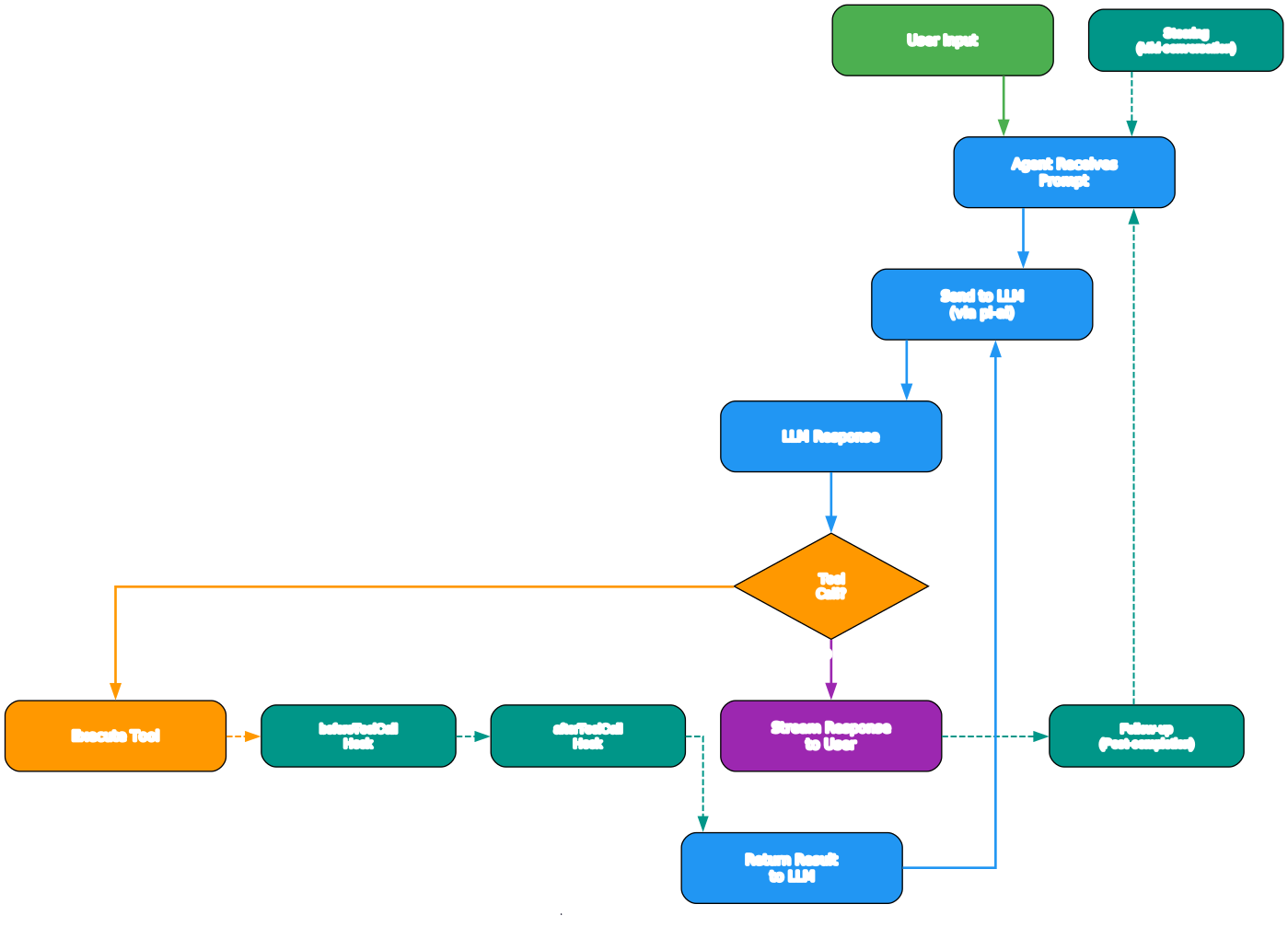
Understanding the Agent Workflow
The agent workflow diagram above illustrates how a user prompt flows through the pi-coding-agent system, from input through tool execution to response rendering.
Input Processing
When a user submits a prompt in the TUI, the message enters the agent runtime’s event loop. The runtime packages the prompt along with conversation history, loaded context files (AGENTS.md), and any active skill instructions into a context that gets sent to the LLM via pi-ai. If the user has queued steering or follow-up messages, those are held in a message queue and delivered at the appropriate point in the agent’s turn.
LLM Communication
pi-ai handles the actual API call, streaming back events as they arrive. The coding agent processes these events in real time: text events render in the message area, tool_call events trigger tool execution, and thinking events display in collapsible blocks. The streaming architecture means the user sees output immediately, not after the entire response completes.
Tool Execution
When the LLM returns tool calls, the agent runtime dispatches them to the appropriate tool handlers. The four built-in tools (read, write, edit, bash) execute in the local filesystem and shell environment. Extensions can register custom tools that receive the same execution context. Tool calls can execute in parallel when the LLM returns multiple calls in a single response, and the beforeToolCall/afterToolCall hooks allow extensions to intercept, modify, or block tool execution.
Session Persistence
Every message, tool call, and tool result is appended to the session’s JSONL file with an id and parentId. This tree structure means you can branch at any point without duplicating history. The /tree view shows the full conversation tree, and you can jump to any node and continue from there. Compaction summarizes older messages when the context window fills, but the full history always remains in the JSONL file.
Extension Integration
Extensions hook into the workflow at multiple points: they can register custom tools, add commands, bind keyboard shortcuts, handle events, and even replace the editor UI. The extension API provides full system access, and extensions are hot-reloadable TypeScript modules that load at startup.
Important: pi-coding-agent uses a tree-structured JSONL session format with id/parentId, enabling in-place branching without creating new files. This means you can explore multiple solution paths from the same conversation point, and the full history is always preserved even after compaction.
4. pi-tui: Terminal UI Library
pi-tui is a general-purpose terminal UI library published as @earendil-works/pi-tui. While it was built to serve the coding agent’s interface, it is designed as a standalone library for building any terminal application.
Key features:
- Differential rendering with 3-strategy system – pi-tui uses three rendering strategies (full repaint, differential update, and scroll region) to minimize terminal output and achieve smooth, flicker-free updates even on slow connections
- CSI 2026 synchronized output – Uses the terminal’s synchronized output protocol to prevent partial renders, ensuring the display is never in an inconsistent state
- Component-based architecture – Build complex UIs from composable components with a declarative API
- Inline images – Supports Kitty and iTerm2 image protocols for displaying images directly in the terminal
- IME support – Full Input Method Editor support for CJK (Chinese, Japanese, Korean) text input
- Virtual terminal for testing – Includes a virtual terminal implementation for testing TUI applications without a real terminal
The differential rendering system is particularly noteworthy. Rather than redrawing the entire screen on every update, pi-tui computes the minimal set of changes needed and applies only those. Combined with CSI 2026 synchronized output, this produces terminal interfaces that feel as responsive as native GUI applications.
5. pi-web-ui: Web Components for AI Chat
pi-web-ui provides reusable web components for building browser-based AI chat interfaces. Published as @earendil-works/pi-web-ui, it offers two main components:
ChatPanel and AgentInterface:
- ChatPanel – A full-featured chat interface component with message rendering, input handling, and streaming support
- AgentInterface – A higher-level component that combines ChatPanel with agent-specific features like tool call display and session management
ArtifactsPanel:
The ArtifactsPanel renders HTML, SVG, and Markdown content in a sandboxed iframe, providing a safe way to display LLM-generated content. It supports live preview of code artifacts with syntax highlighting.
Additional capabilities:
- JavaScript REPL tool – Execute JavaScript in a sandboxed environment and return results to the LLM
- Document extraction – Extract text from PDF, DOCX, XLSX, and PPTX files for LLM processing
- IndexedDB storage – Persist conversations locally in the browser
- CORS proxy and custom providers – Built-in support for cross-origin requests and custom LLM provider configuration
- Mini-Lit framework – Uses @mariozechner/mini-lit as a lightweight alternative to Lit for web component rendering
Extensibility: The Core Philosophy

Understanding the Extensibility Ecosystem
The extensibility diagram above shows the three mechanisms pi-mono provides for extending its capabilities, each serving a different use case and requiring a different level of technical expertise.
1. Extensions (TypeScript Modules)
Extensions are the most powerful extensibility mechanism. They are TypeScript modules that export a default function receiving the ExtensionAPI object, which provides access to the full agent runtime. With extensions, you can:
- Register custom tools (or replace built-in tools entirely)
- Add slash commands that appear in the command palette
- Bind custom keyboard shortcuts
- Handle events like
tool_call,message, andsession_start - Replace the editor UI with custom components
- Add status lines, headers, footers, and overlays
- Implement sub-agents, plan mode, permission gates, and MCP integration
- Build games (yes, Doom runs as an extension)
Extensions are placed in ~/.pi/agent/extensions/ for global access, .pi/extensions/ for project-local access, or distributed via pi packages. They are hot-reloadable – modify the extension file and pi immediately applies the changes without restart.
The extension API is designed for full system access. Extensions run with the same permissions as the pi process itself, which is why the documentation warns users to review source code before installing third-party packages. This is a deliberate trade-off: rather than sandboxing extensions in a limited API, pi gives them complete control, enabling use cases that would be impossible in a restricted environment.
2. Skills (SKILL.md Files)
Skills follow the agentskills.io standard and are on-demand capability packages defined in Markdown. They are the lightest-weight extension mechanism, requiring no code at all. A skill is simply a SKILL.md file that describes when to use the skill and what steps to follow:
<!-- ~/.pi/agent/skills/my-skill/SKILL.md -->
# My Skill
Use this skill when the user asks about X.

## Steps
1. Do this
2. Then that
Skills are invoked via /skill:name or loaded automatically by the agent when it determines the skill is relevant. They can be placed in ~/.pi/agent/skills/, ~/.agents/skills/, .pi/skills/, or .agents/skills/ (searched from the current directory up through parent directories), or distributed via pi packages.
The agentskills.io standard means skills are portable across different agent frameworks that support the format. This is a significant advantage over proprietary extension formats: a skill written for pi can work in any agent that implements the agentskills.io specification.
3. Pi Packages (npm/git Bundles)
Pi packages bundle extensions, skills, prompts, and themes into installable units distributed via npm or git. They use a pi key in package.json to declare their contents:
{
  "name": "my-pi-package",
  "keywords": ["pi-package"],
  "pi": {
    "extensions": ["./extensions"],
    "skills": ["./skills"],
    "prompts": ["./prompts"],
    "themes": ["./themes"]
  }
}
Installation is straightforward:
pi install npm:@foo/pi-tools
pi install git:github.com/user/repo
pi install https://github.com/user/repo
Packages install to ~/.pi/agent/git/ for git sources or global npm for npm packages. Project-local installs use the -l flag. The pi config command lets you enable or disable individual resources within installed packages.
The Philosophy Behind Three Mechanisms
The three-tier extensibility system reflects pi’s core philosophy: minimal core, maximum extensibility. Skills handle the common case of adding instructions and workflows without code. Extensions handle the complex case of adding tools, commands, and UI components with full code. Pi packages handle the distribution case of sharing both with the community. By keeping the core minimal and pushing features to extensions, pi avoids the bloat that plagues other coding agents while remaining more flexible.
Takeaway: With pi-mono’s extension system, you can add custom tools, commands, keybindings, and even UI components – all with full system access and hot-reloadable TypeScript modules. The three-tier extensibility model (skills for no-code, extensions for code, packages for distribution) means there is always an appropriate mechanism for your use case.
Installation and Quick Start
Installing pi-mono is straightforward. The recommended method uses curl:
# Install via curl (recommended)
curl -fsSL https://pi.dev/install.sh | sh
Alternatively, install via npm:
# Install globally via npm
npm install -g @earendil-works/pi-coding-agent
Authentication:
Set your API key as an environment variable:
# Set API key
export ANTHROPIC_API_KEY=sk-ant-...

# Run pi
pi
Or use OAuth login with your existing subscription:
pi
/login  # Select provider: Anthropic, OpenAI Codex, GitHub Copilot, or Gemini CLI
Usage modes:
# Interactive TUI mode (default)
pi

# Print mode - output response and exit
pi -p "Explain this code"

# Pipe stdin into prompt
cat README.md | pi -p "Summarize this text"

# JSON mode - output events as JSON lines
pi --mode json "List files in current directory"

# RPC mode - for process integration
pi --mode rpc

# Continue most recent session
pi -c

# Resume a specific session
pi -r

# Ephemeral mode (don't save session)
pi --no-session

# Specify provider and model
pi --provider anthropic --model claude-sonnet-4-20250514

# List available models
pi --list-models
SDK mode for embedding in applications:
import { AuthStorage, createAgentSession, ModelRegistry, SessionManager } from "@earendil-works/pi-coding-agent";

const authStorage = AuthStorage.create();
const modelRegistry = ModelRegistry.create(authStorage);
const { session } = await createAgentSession({
  sessionManager: SessionManager.inMemory(),
  authStorage,
  modelRegistry,
});

await session.prompt("What files are in the current directory?");
Using pi-ai standalone:
import { Type, getModel, stream, Tool, StringEnum } from "@earendil-works/pi-ai";

// Fully typed with auto-complete for providers and models
const model = getModel("openai", "gpt-4o-mini");

// Define tools with TypeBox schemas
const tools: Tool[] = [{
  name: "get_time",
  description: "Get the current time",
  parameters: Type.Object({
    timezone: Type.Optional(Type.String({ description: "Optional timezone" }))
  })
}];

// Stream responses with granular events
for await (const event of stream({ model, messages, tools })) {
  if (event.type === "text") process.stdout.write(event.text);
  if (event.type === "tool_call") handleToolCall(event);
}
Key Features Comparison
| Feature | pi-mono | Claude Code | Cursor | Aider |
|---|---|---|---|---|
| LLM Providers | 25+ | 1 | 3+ | 5+ |
| Cross-Provider Handoffs | Yes | No | No | No |
| Terminal UI | Custom TUI | Terminal | Electron | Terminal |
| Web UI Components | Yes | No | Built-in | No |
| Extension System | TypeScript | No | Extensions | No |
| Skills Standard | agentskills.io | No | No | No |
| Session Branching | Tree | Linear | Linear | Linear |
| Open Source | MIT | No | No | Apache 2.0 |
| OAuth Login | Yes | Yes | Yes | No |
| Context Compaction | Yes | Yes | Yes | No |
| Package Manager | npm/git | No | No | No |
| SDK Embedding | Yes | No | No | No |
| RPC Mode | Yes | No | No | No |
Practical Use Cases
1. Multi-Model Coding Agent
Use pi as your daily coding agent and switch between models mid-conversation. Start a complex refactoring task with Claude for its strong reasoning, then switch to GPT-4o for code generation, and use Gemini for documentation – all within the same session, with full context preservation.
2. Browser-Based AI Chat Application
Use pi-web-ui’s ChatPanel and AgentInterface components to build a custom AI chat application in the browser. The components handle streaming, tool calls, document extraction, and session persistence out of the box. Add your own branding, custom tools, and provider configuration.
3. Custom Agent with Domain-Specific Tools
Write a TypeScript extension that registers domain-specific tools (database queries, API calls, deployment scripts) and use pi-coding-agent as the foundation for a specialized agent. The extension system gives you full access to the agent runtime, so you can build anything from a database administration tool to a CI/CD pipeline controller.
4. Testing Agent Behavior with Faux Provider
Use pi-ai’s built-in faux provider to test agent behavior deterministically without making real API calls. This is invaluable for integration testing, regression testing, and benchmarking. The faux provider returns predictable responses, enabling you to verify that your tools, extensions, and workflows behave correctly.
5. Building a Slack Bot with Agent Capabilities
Embed pi-coding-agent in SDK mode within a Slack bot. The agent handles the LLM interaction, tool execution, and session management, while your bot handles Slack API integration. Users can interact with the agent through Slack messages, receiving the same capabilities as the terminal interface.
Conclusion
Pi-mono stands out in the crowded AI coding agent space by refusing to be just another CLI tool. Instead, it offers a complete, composable infrastructure stack where every layer is independently usable and extensible. The unified LLM API supports 25+ providers with cross-provider handoffs. The agent runtime provides a clean abstraction for building any kind of agent application. The coding agent CLI delivers a polished terminal experience with tree-structured sessions and compaction. The TUI library brings GUI-quality rendering to the terminal. And the web UI components make it straightforward to build browser-based chat interfaces.
Created by Mario Zechner – the developer behind libGDX, one of the most successful open-source game frameworks with millions of downloads – pi-mono brings the same philosophy of composability and extensibility that made libGDX a staple in game development. The 39,000+ stars on GitHub confirm that this approach resonates with developers who want control over their tools rather than being locked into a single provider’s ecosystem.
Whether you need a coding agent, an LLM API layer, a terminal UI framework, or web chat components, pi-mono has a package for you. And if none of the built-in features fit your workflow, the extension system lets you build exactly what you need without forking the core.
Links:
- GitHub: https://github.com/badlogic/pi-mono
- Website: https://pi.dev
- npm: https://www.npmjs.com/package/@earendil-works/pi-coding-agent
- Agent Skills Standard: https://agentskills.io
- Discord: https://discord.com/invite/3cU7Bz4UPx

Enjoyed this post? Never miss out on future posts by following us


