RAGFlow: Open-Source RAG Engine with Deep Document Understanding
RAGFlow is a leading open-source Retrieval-Augmented Generation engine that fuses cutting-edge RAG with Agent capabilities to create a superior context layer for LLMs. With nearly 80,000 GitHub stars and a thriving community, RAGFlow offers a streamlined RAG workflow adaptable to enterprises of any scale, powered by a converged context engine and pre-built agent templates that transform complex data into high-fidelity, production-ready AI systems.
Key Insight: RAGFlow’s DeepDoc engine recognizes 10 distinct layout components - including text, titles, figures, tables, headers, footers, references, and equations - enabling document understanding that goes far beyond simple text extraction.
What is RAGFlow?
RAGFlow is an open-source RAG engine built by InfiniFlow that focuses on deep document understanding as its core differentiator. Unlike generic RAG frameworks that treat documents as flat text, RAGFlow uses its proprietary DeepDoc engine to parse, analyze, and chunk documents with human-level comprehension of layout, structure, and semantics.
The project is written primarily in Python with a React/TypeScript frontend, and runs as a Docker-based service with Elasticsearch (or Infinity) for vector storage, MinIO for object storage, Redis for caching, and MySQL for metadata. Version 0.25.1 brings support for DeepSeek v4, agentic workflows, MCP protocol integration, and a Python/JavaScript code executor for agents.
Understanding the Architecture
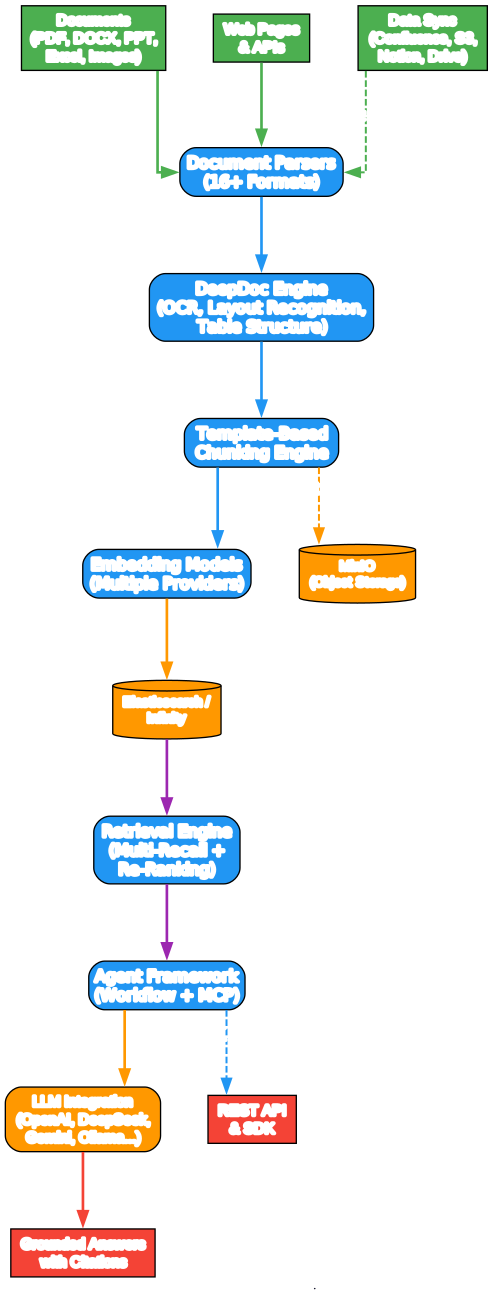
The architecture diagram above illustrates how data flows through RAGFlow from ingestion to answer generation. Let us break down each component:
Document Parsers (16+ Formats) RAGFlow supports PDF, DOCX, PPT, Excel, images, scanned copies, structured data, web pages, and more. The parser layer normalizes these heterogeneous formats into a unified internal representation, handling everything from complex table structures in financial reports to mathematical equations in academic papers.
DeepDoc Engine The heart of RAGFlow’s differentiation. DeepDoc combines three core capabilities:
- OCR with support for 15+ languages, extracting text from scanned documents and images
- Layout recognition that identifies 10 component types: text, title, figure, figure caption, table, table caption, header, footer, reference, and equation
- Table Structure Recognition (TSR) that handles hierarchy headers, spanning cells, and projected row headers, reassembling table content into LLM-comprehensible sentences
Template-Based Chunking Engine Rather than naively splitting text by character count or token limits, RAGFlow applies intelligent, explainable chunking strategies. Multiple templates are available for different document types, and the chunking process is fully visualizable, allowing human intervention to correct any misalignment.
Embedding Models RAGFlow supports multiple embedding providers out of the box, including OpenAI, Cohere, Voyage AI, and local models via Ollama. The embedding layer is fully configurable, letting you swap models without changing your pipeline.
Vector Store (Elasticsearch / Infinity) By default, RAGFlow uses Elasticsearch for both full-text and vector search. You can switch to Infinity, InfiniFlow’s own high-performance vector engine, for scenarios requiring lower latency or higher throughput.
Retrieval Engine with Multi-Recall and Re-Ranking RAGFlow implements multiple recall strategies (keyword, vector, hybrid) and fuses results through configurable re-ranking, ensuring that the most relevant chunks surface for the LLM.
Agent Framework with Workflow and MCP The agent layer supports orchestrable workflows with MCP (Model Context Protocol) integration, enabling agents to use external tools, execute code in sandboxes, and maintain conversation memory across sessions.
Takeaway: RAGFlow’s converged context engine combines document parsing, intelligent chunking, multi-strategy retrieval, and agentic orchestration into a single streamlined workflow - eliminating the need to stitch together multiple RAG tools.
Key Features

Understanding the Features
The features diagram shows how RAGFlow’s six core capability areas branch into specific implementations:
Deep Document Understanding The DeepDoc engine is RAGFlow’s signature feature. It processes documents the way humans read them - recognizing that a table caption belongs to the table above it, that a figure caption describes the image beside it, and that headers and footers are metadata rather than content. The OCR component handles 15+ languages, making it effective for multilingual enterprise documents. Layout recognition identifies 10 distinct component types, and Table Structure Recognition (TSR) handles even the most complex table layouts with hierarchy headers and spanning cells.
Template-Based Chunking RAGFlow rejects the one-size-fits-all approach to text splitting. Instead, it offers multiple chunking templates tailored to different document types - legal contracts, research papers, resumes, books, and more. Each template applies domain-specific rules about where and how to split, and the results are fully visualizable so humans can intervene and correct any misalignment.
Grounded Citations with Reduced Hallucinations Every answer RAGFlow produces comes with traceable citations back to the source document. The chunk visualization interface lets you see exactly which text segments were used to generate each answer, making it possible to verify accuracy and reduce LLM hallucinations.
Heterogeneous Data Sources RAGFlow ingests data from 16+ file formats and 6 data synchronization sources including Confluence, S3, Notion, Discord, and Google Drive. This means you can point RAGFlow at your existing knowledge base and start querying it immediately.
Agentic Workflow with MCP The agent framework supports orchestrable workflows with MCP protocol integration, a Python/JavaScript code executor for custom logic, and conversation memory that persists across sessions. Agents can use external tools, make API calls, and execute code in sandboxed environments.
Streamlined RAG Orchestration Configurable LLMs and embedding models, multiple recall strategies paired with fused re-ranking, and intuitive APIs for seamless business integration make RAGFlow production-ready out of the box.
Amazing: RAGFlow supports data synchronization from 6 major platforms - Confluence, S3, Notion, Discord, Google Drive, and more - meaning you can connect your existing knowledge base and start querying within minutes rather than weeks.
Document Processing and Query Workflow
Understanding the Workflow
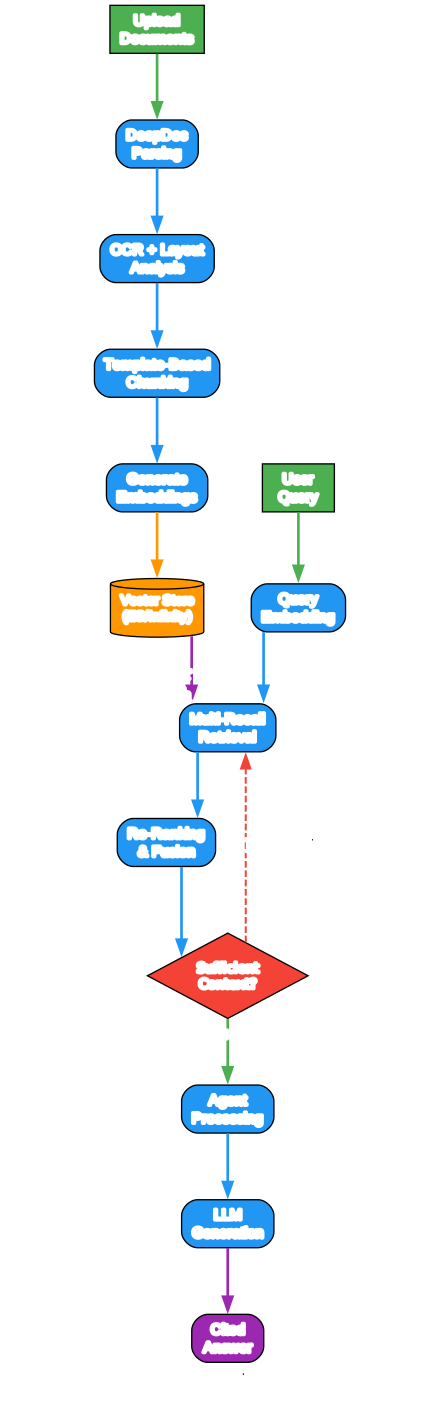
The workflow diagram illustrates the two parallel pipelines that power RAGFlow: the ingestion pipeline (left) and the query pipeline (right), connected through the vector store.
Ingestion Pipeline
-
Upload Documents - Users upload documents in any of the 16+ supported formats, or configure data synchronization from Confluence, S3, Notion, Discord, or Google Drive.
-
DeepDoc Parsing - The DeepDoc engine processes each document through OCR (for scanned content and images), layout recognition (identifying the 10 component types), and table structure recognition (for complex table layouts).
-
OCR + Layout Analysis - This step extracts text from images, identifies structural elements like titles, figures, and tables, and maps the spatial relationships between components.
-
Template-Based Chunking - Based on the document type and selected template, the chunking engine splits the parsed content into semantically coherent segments. This is where RAGFlow’s deep understanding pays off - chunks respect document structure rather than arbitrarily splitting at character boundaries.
-
Generate Embeddings - Each chunk is embedded using the configured embedding model (OpenAI, Cohere, local models, etc.).
-
Store in Vector Store - Embeddings and metadata are stored in Elasticsearch or Infinity for fast retrieval, while raw text is stored in MinIO object storage.
Query Pipeline
-
User Query - A user submits a natural language question.
-
Query Embedding - The query is embedded using the same model as the document chunks.
-
Multi-Recall Retrieval - RAGFlow searches the vector store using multiple strategies (keyword, vector, hybrid) and combines the results.
-
Re-Ranking and Fusion - Retrieved chunks are re-ranked and fused to ensure the most relevant context surfaces first.
-
Sufficient Context Check - If the retrieved context is insufficient, the system refines the query and retrieves again (shown as the “No - Refine” loop). This iterative refinement ensures high-quality answers.
-
Agent Processing - The agent framework processes the context, potentially using tools, code execution, or MCP integrations.
-
LLM Generation - The LLM generates a grounded answer with citations.
-
Cited Answer - The final output includes traceable references to source documents.
Important: RAGFlow’s iterative retrieval refinement loop is a critical quality feature. When initial retrieval does not yield sufficient context, the system automatically refines the query and retries - ensuring that answers are always grounded in adequate evidence rather than hallucinated from thin context.
Installation
Prerequisites
Before installing RAGFlow, ensure your system meets these requirements:
- CPU: 4 cores minimum
- RAM: 16 GB minimum
- Disk: 50 GB minimum
- Docker: version 24.0.0 or later
- Docker Compose: version 2.26.1 or later
- gVisor: Required only if using the code executor (sandbox) feature
Quick Start with Docker
The fastest way to get RAGFlow running is with Docker Compose:
# 1. Ensure vm.max_map_count is at least 262144
sysctl vm.max_map_count
# If needed:
sudo sysctl -w vm.max_map_count=262144

# 2. Clone the repository
git clone https://github.com/infiniflow/ragflow.git
cd ragflow

# 3. Start with CPU for DeepDoc tasks
cd docker
docker compose -f docker-compose.yml up -d

# Or use GPU acceleration:
# sed -i '1i DEVICE=gpu' .env
# docker compose -f docker-compose.yml up -d
After starting the containers, check the logs to confirm successful initialization:
docker logs -f docker-ragflow-cpu-1
You should see the RAGFlow ASCII art banner, confirming the system is running. Then open your browser and navigate to http://YOUR_SERVER_IP to access the web interface.
Configuration
RAGFlow uses three main configuration files:
| File | Purpose |
|---|---|
docker/.env | System settings: ports, passwords, basic setup |
docker/service_conf.yaml.template | Backend service configuration, LLM factory selection, API keys |
docker/docker-compose.yml | Container orchestration and networking |
To configure your LLM provider, edit service_conf.yaml.template and set the user_default_llm factory along with the corresponding API_KEY:
user_default_llm:
  factory: "OpenAI"  # Or: DeepSeek, Gemini, Ollama, etc.
  api_key: "your-api-key-here"
After making configuration changes, restart all containers:
docker compose -f docker-compose.yml up -d
Switching to Infinity Vector Engine
By default, RAGFlow uses Elasticsearch. To switch to Infinity for higher performance:
# 1. Stop all containers (this deletes volumes)
docker compose -f docker/docker-compose.yml down -v

# 2. Set DOC_ENGINE to infinity in docker/.env
# Edit docker/.env and set: DOC_ENGINE=infinity

# 3. Start containers
docker compose -f docker-compose.yml up -d
Development Setup
For contributing to RAGFlow or running from source:
# 1. Install uv and pre-commit
pipx install uv pre-commit

# 2. Clone and install dependencies
git clone https://github.com/infiniflow/ragflow.git
cd ragflow
uv sync --python 3.12
uv run python3 download_deps.py
pre-commit install

# 3. Start dependent services
docker compose -f docker/docker-compose-base.yml up -d

# 4. Add hosts entry
# Add to /etc/hosts: 127.0.0.1 es01 infinity mysql minio redis sandbox-executor-manager

# 5. Set HuggingFace mirror (if needed)
export HF_ENDPOINT=https://hf-mirror.com

# 6. Launch backend
source .venv/bin/activate
export PYTHONPATH=$(pwd)
bash docker/launch_backend_service.sh

# 7. Launch frontend
cd web
npm install
npm run dev
Using the Python SDK
RAGFlow provides a Python SDK for programmatic access:
from ragflow_sdk import RAGFlow

# Connect to your RAGFlow instance
ragflow = RAGFlow(api_key="your-api-key", base_url="http://localhost")

# Create a dataset
dataset = ragflow.create_dataset(name="my-knowledge-base")

# Upload documents
dataset.upload_documents([
    "/path/to/document.pdf",
    "/path/to/presentation.pptx"
])

# Create a chat assistant
assistant = ragflow.create_chat(
    name="my-assistant",
    dataset_ids=[dataset.id]
)

# Query the assistant
result = assistant.chat("What are the key findings in the report?")
print(result.answer)
for citation in result.citations:
    print(f"Source: {citation.document_name}, Page: {citation.page}")
Technology Stack
RAGFlow is built on a robust, production-grade technology stack:
| Component | Technology |
|---|---|
| Backend | Python 3.12+, Flask/Quart |
| Frontend | React, TypeScript, Vite |
| Vector Store | Elasticsearch or Infinity |
| Object Storage | MinIO |
| Cache | Redis |
| Database | MySQL |
| Document Parsing | DeepDoc (OCR, Layout, TSR) |
| LLM Integration | LiteLLM (100+ providers) |
| Embedding | Multiple providers (OpenAI, Cohere, Voyage, Ollama) |
| Agent Framework | Custom workflow engine with MCP |
| Code Execution | gVisor sandbox |
| Containerization | Docker, Docker Compose |
RAGFlow vs Other RAG Solutions
| Feature | RAGFlow | LangChain RAG | LlamaIndex |
|---|---|---|---|
| Deep Document Understanding | Yes (DeepDoc) | Limited | Limited |
| Template-Based Chunking | Yes | Manual | Manual |
| Visual Chunk Inspection | Yes | No | No |
| Built-in OCR | Yes (15+ languages) | External | External |
| Table Structure Recognition | Yes | No | No |
| Agentic Workflow | Yes (with MCP) | Via LangGraph | Limited |
| Data Sync Connectors | 6 sources | Manual | Manual |
| Self-Hosted | Yes (Docker) | Yes | Yes |
| Production UI | Yes (web interface) | No | No |
| Citation Tracking | Yes | Manual | Manual |
Important: RAGFlow’s DeepDoc engine with OCR, layout recognition, and table structure recognition is its primary differentiator. While other RAG frameworks require you to pre-process documents externally, RAGFlow handles the entire pipeline from raw document to cited answer within a single system.
Troubleshooting
| Issue | Solution |
|---|---|
vm.max_map_count error | Set sudo sysctl -w vm.max_map_count=262144 and add to /etc/sysctl.conf for persistence |
| Network abnormal error on login | Wait for full initialization; check docker logs -f docker-ragflow-cpu-1 |
| ARM64 Docker images not available | Build from source following the development setup guide |
| HuggingFace model download fails | Set export HF_ENDPOINT=https://hf-mirror.com |
| jemalloc not found | Install: sudo apt-get install libjemalloc-dev (Ubuntu) or equivalent |
| Port 80 already in use | Edit docker-compose.yml and change 80:80 to YOUR_PORT:80 |
Links
- GitHub Repository: https://github.com/infiniflow/ragflow
- Documentation: https://ragflow.io/docs/dev/
- Cloud Service: https://cloud.ragflow.io
- Discord Community: https://discord.gg/NjYzJD3GM3
Conclusion
RAGFlow stands out in the crowded RAG landscape by focusing on what matters most for production deployments: deep document understanding. Its DeepDoc engine, template-based chunking, and visual chunk inspection address the fundamental problem that most RAG systems ignore - garbage in, garbage out. With nearly 80,000 GitHub stars, active development (v0.25.1), and a comprehensive feature set including agentic workflows, MCP integration, and multi-source data synchronization, RAGFlow is a compelling choice for any organization building RAG-powered applications.
Whether you are processing legal contracts, financial reports, research papers, or multilingual documents, RAGFlow’s ability to understand document structure and generate grounded, cited answers makes it one of the most production-ready open-source RAG engines available today. Enjoyed this post? Never miss out on future posts by following us 


