UI-TARS Desktop: ByteDance’s Open-Source Multimodal AI Agent That Controls Your Computer
ByteDance’s UI-TARS-desktop is a multimodal AI agent stack that lets you control computers and browsers through natural language, powered by Vision-Language Models (VLMs). With over 31,000 stars on GitHub and growing at more than 500 stars per day, this open-source project represents one of the most ambitious attempts to bridge the gap between human intention and machine interaction. Rather than requiring users to write scripts or record macros, UI-TARS-desktop understands what you want to accomplish and executes it by seeing the screen, interpreting the visual layout, and taking precise actions – clicking buttons, typing text, scrolling pages, and navigating complex interfaces just as a human would.
The project ships two distinct but complementary products: Agent TARS, a general-purpose multimodal AI agent with a CLI and Web UI that integrates with MCP (Model Context Protocol) tools, and UI-TARS Desktop, a native Electron application for local and remote computer control. Both are built on top of the UI-TARS model family, which was introduced in the research paper “UI-TARS: Pioneering Automated GUI Interaction with Native Agents” (arXiv:2501.12326). The entire stack is open source under the Apache License 2.0, making it accessible for developers who want to build, customize, or self-host their own GUI automation agents.
Architecture Overview
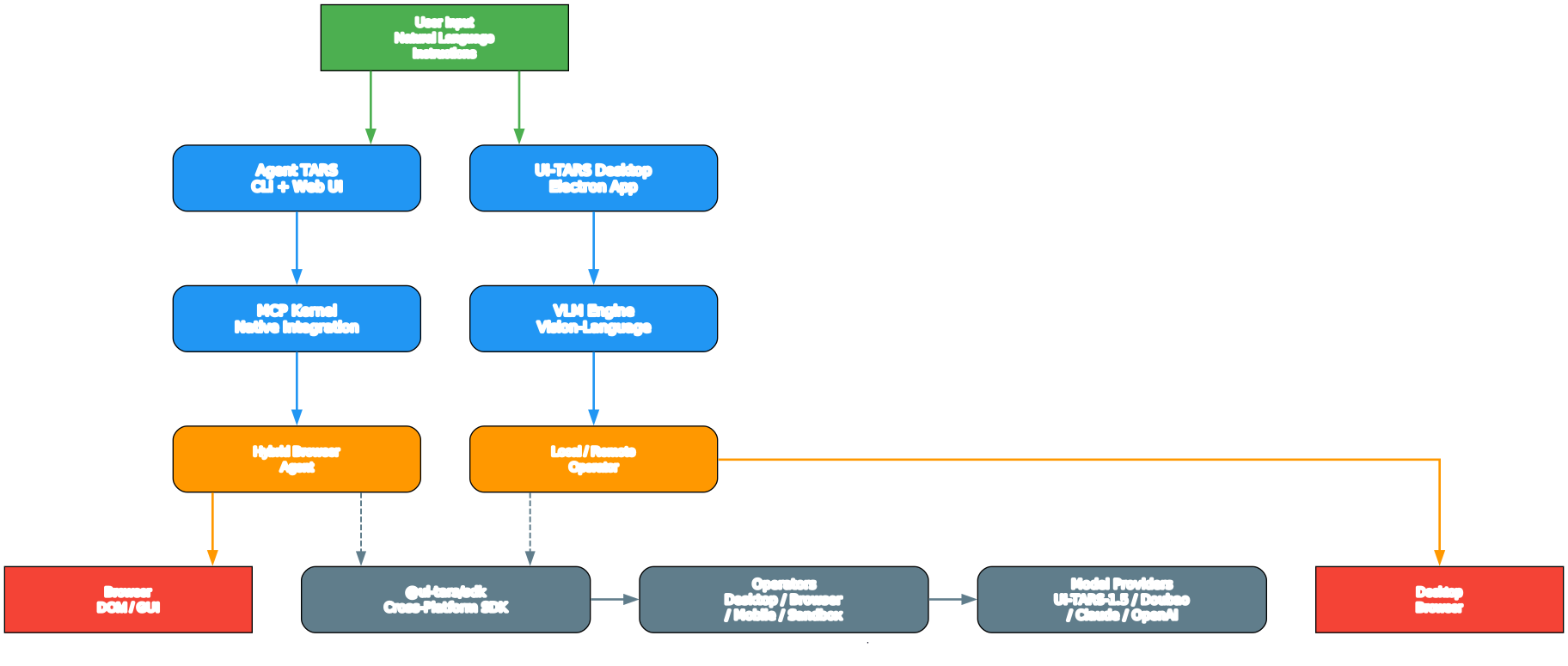
Understanding the UI-TARS-desktop Architecture
The architecture diagram above illustrates the dual-project structure that makes UI-TARS-desktop a comprehensive multimodal AI agent stack. At the top level, the project is organized as a pnpm monorepo managed by Turborepo, which orchestrates builds across dozens of interconnected packages. This monorepo approach enables shared dependencies, consistent tooling, and atomic cross-package changes – a critical advantage when coordinating releases across a CLI, a desktop app, an SDK, and 20+ supporting packages.
Agent TARS occupies the left branch of the architecture. It is designed as a general-purpose multimodal agent that can operate in multiple environments: your terminal via the CLI, a browser through the Web UI, or embedded into your own product through the SDK. The core of Agent TARS is the MCP Kernel, which implements the Model Context Protocol as a first-class citizen. Every tool, resource, and prompt flows through MCP, making the agent inherently extensible. When you launch Agent TARS, it connects to MCP servers for tool discovery, routes user instructions through a context engineering pipeline, and delegates execution to the appropriate operator – whether that is a browser agent, a shell command runner, or a custom MCP tool.
UI-TARS Desktop occupies the right branch. It is a native Electron application that provides a graphical interface for controlling computers locally or remotely. The desktop app integrates directly with the UI-TARS model family (UI-TARS-1.5, Doubao-1.5) and the Seed-1.5-VL/1.6 series models. When you type a natural language instruction, the app captures a screenshot, sends it along with your instruction to the VLM, receives a parsed action prediction (such as click coordinates or text to type), and executes that action through the appropriate operator. The desktop app supports both a Local Operator for controlling your own machine and a Remote Operator for controlling another computer over the network.
The SDK Layer sits at the bottom of the architecture, providing the @ui-tars/sdk package as the foundational abstraction. The SDK defines the Operator interface with two core methods: screenshot() for capturing the current screen state, and execute() for performing actions based on model predictions. This clean contract enables developers to create custom operators for any platform – desktop, browser, mobile, or embedded devices – while reusing the same agent loop, model integration, and event streaming infrastructure.
Key Insight: UI-TARS-desktop combines Vision-Language Models with a hybrid browser agent that can switch between GUI, DOM, and combined strategies – making it the first open-source framework to offer all three interaction modes in a single stack.
How the Hybrid Browser Agent Works
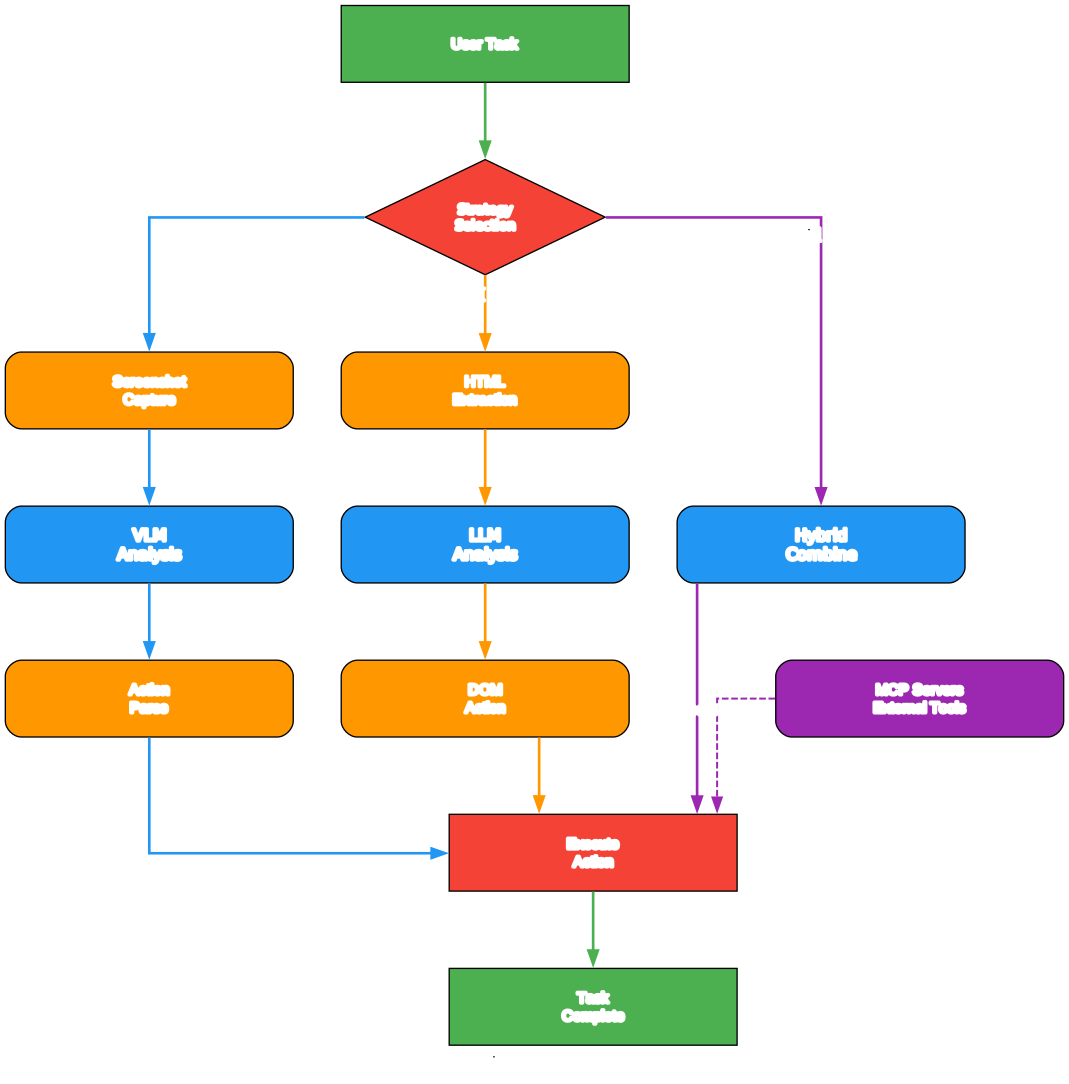
Understanding the Hybrid Browser Agent Strategy
The hybrid browser agent diagram above reveals one of the most sophisticated aspects of Agent TARS: its ability to dynamically select the optimal interaction strategy for any given web task. Unlike traditional browser automation tools that are locked into a single approach, Agent TARS evaluates the current context and chooses between three distinct strategies, each with its own strengths and trade-offs.
GUI Agent Strategy (Visual Grounding): This is the most human-like approach. The agent captures a screenshot of the browser viewport, sends it to the VLM, and receives action predictions that include precise pixel coordinates. The VLM identifies UI elements by their visual appearance – buttons, links, input fields, dropdowns – and generates actions like click(start_box='(27,496)') or type(content='hello world'). This strategy excels at handling dynamic content, canvas-based applications, and visual layouts where no DOM structure is available. It is the most general-purpose approach but can be slower due to the screenshot-to-prediction round-trip for every action.
DOM Strategy (Structural Interaction): When the web page provides a clean DOM structure, the DOM strategy bypasses visual processing entirely. The agent extracts the page’s accessibility tree or DOM snapshot, identifies elements by their structural properties (tag name, ARIA labels, text content, CSS selectors), and interacts with them directly through Playwright’s automation API. This approach is significantly faster because it avoids the VLM inference step for element identification, and it produces more reliable interactions on well-structured pages. However, it struggles with visually rendered content that lacks semantic markup, such as canvas elements or complex visualizations.
Hybrid Strategy (Combined Approach): The hybrid strategy represents the best of both worlds. It uses the DOM as the primary interaction method when the page structure is available and reliable, but falls back to visual grounding when the DOM is insufficient or ambiguous. The agent continuously evaluates which strategy is optimal for the current step, switching seamlessly between them within a single task. For example, when filling out a form on a well-structured page, it might use the DOM strategy for the input fields, but switch to visual grounding to verify that a CAPTCHA challenge has been solved correctly. This adaptive approach maximizes both speed and reliability.
The strategy selection is driven by the agent’s context engineering pipeline, which analyzes the current page state, the task requirements, and historical success rates to make an informed decision. The Event Stream architecture ensures that every action, observation, and strategy switch is logged and observable, giving developers full visibility into the agent’s decision-making process.
Takeaway: With a single
npx @agent-tars/cli@latestcommand, you get a fully functional multimodal AI agent that can control browsers, desktops, and mobile devices through natural language instructions.
Ecosystem and SDK
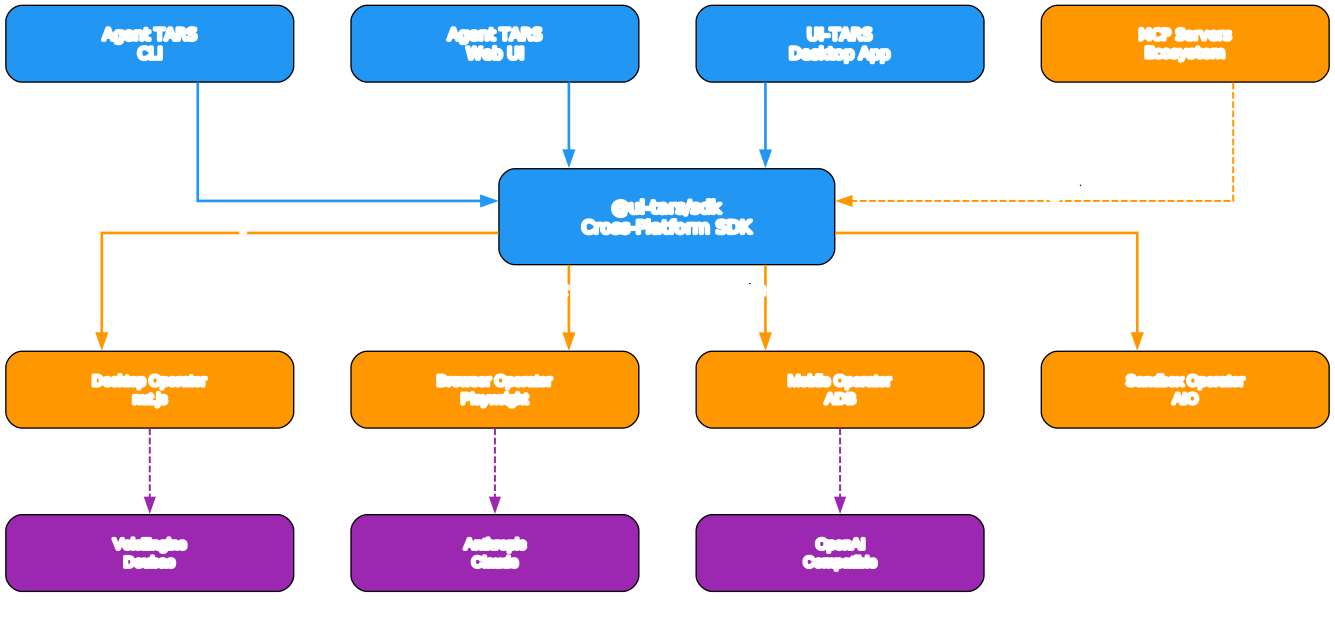
Understanding the UI-TARS Ecosystem and Cross-Platform SDK
The ecosystem diagram above maps out the full scope of the UI-TARS-desktop project, revealing a layered architecture that spans from model providers at the top to platform-specific operators at the bottom. This comprehensive design is what enables the same agent framework to control desktops, browsers, and mobile devices through a unified interface.
Model Provider Layer: At the top of the ecosystem, UI-TARS supports multiple VLM backends. The primary models are UI-TARS-1.5 (available on Hugging Face as a 7B parameter model) and the Doubao-1.5 series from ByteDance’s VolcEngine cloud platform. Additionally, the framework supports Claude models from Anthropic and any OpenAI-compatible API, giving developers the flexibility to choose the model that best fits their performance, cost, and privacy requirements. The model configuration follows the standard OpenAI API contract (baseURL, apiKey, model), making it straightforward to swap providers without changing application code.
Agent Framework Layer (Tarko): The middle layer houses the Tarko framework, which is the engine that powers Agent TARS. Tarko consists of over 20 packages organized into functional domains. The agent package provides the core agent loop, the context-engineer package manages conversation history and prompt construction, the llm and llm-client packages handle model communication, the model-provider package abstracts provider differences, and the mcp-agent and mcp-agent-interface packages implement the MCP integration. Supporting packages include agent-snapshot for state persistence, agent-ui and agent-ui-builder for the web interface, agio for I/O management, and shared-utils for common utilities. This modular architecture means developers can adopt individual packages or the entire stack.
Operator Layer: At the bottom of the ecosystem, four operators translate abstract actions into platform-specific interactions. The Desktop Operator uses nut.js for cross-platform desktop automation (mouse, keyboard, screen capture on Windows and macOS). The Browser Operator leverages Playwright for web automation with full DOM access. The ADB Operator connects to Android devices via the Android Debug Bridge for mobile automation. The AIO Sandbox Operator provides an isolated execution environment for running untrusted code safely. Each operator implements the same Operator interface from @ui-tars/sdk, ensuring that the agent loop remains platform-agnostic.
SDK Package (@ui-tars/sdk): The SDK is the glue that binds the ecosystem together. It provides the GUIAgent class that orchestrates the perception-action loop: capture a screenshot, send it to the VLM with the user’s instruction and action space definition, receive a prediction, parse it into structured actions, and execute those actions through the operator. The SDK handles all the complexity of coordinate scaling, device pixel ratio management, action parsing, and conversation history management. Developers can extend the system by creating custom operators that implement the screenshot() and execute() methods, then plug them into the same GUIAgent loop.
Amazing: The Tarko framework inside Agent TARS contains over 20 packages covering everything from context engineering to model providers – making it one of the most comprehensive open-source agent frameworks available.
Key Features
| Feature | Description |
|---|---|
| Natural Language Control | Issue instructions in plain English and the VLM interprets and executes them on your screen |
| Hybrid Browser Agent | Dynamically switches between GUI, DOM, and combined strategies for optimal browser interaction |
| MCP-Native Architecture | Built on the Model Context Protocol for seamless tool integration and extensibility |
| Cross-Platform SDK | @ui-tars/sdk provides a unified Operator interface for desktop, browser, Android, and sandbox environments |
| Local and Remote Operators | Control your own machine or connect to a remote computer over the network |
| Event Stream Architecture | Protocol-driven event stream provides full observability into agent actions and decisions |
| Multiple Model Support | Works with UI-TARS-1.5, Doubao-1.5, Claude, and any OpenAI-compatible VLM |
| CLI and Web UI | Agent TARS ships with both a terminal CLI and a browser-based Web UI |
| Privacy-First Design | Fully local processing option means no data leaves your machine |
| Visual Grounding | The VLM identifies UI elements by their visual appearance, not just DOM structure |
| Action Parsing | Model predictions are parsed into structured actions with coordinates, content, and reflection |
| Abort Signal Support | Cancel long-running agent tasks at any time using AbortController |
Getting Started
Agent TARS CLI
The fastest way to get started with Agent TARS is through the CLI. It requires Node.js version 22 or later:
# Launch directly with npx (no installation required)
npx @agent-tars/cli@latest

# Or install globally
npm install @agent-tars/cli@latest -g

# Run with a specific model provider
agent-tars --provider volcengine --model doubao-1-5-thinking-vision-pro-250428 --apiKey your-api-key
agent-tars --provider anthropic --model claude-3-7-sonnet-latest --apiKey your-api-key
When you run npx @agent-tars/cli@latest, it launches an interactive session where you type natural language instructions and the agent executes them in real time. The CLI supports both headful mode (with the Web UI) and headless server mode for programmatic access.
UI-TARS Desktop App
For users who prefer a graphical interface, the UI-TARS Desktop application is available for download from the GitHub releases page:
# Download the latest release from GitHub
# https://github.com/bytedance/UI-TARS-desktop/releases/latest

# macOS users can also install via Homebrew
brew install --cask ui-tars
After installing, configure the model provider in the Settings panel. For UI-TARS-1.5 on Hugging Face:
Language: en
VLM Provider: Hugging Face for UI-TARS-1.5
VLM Base URL: https://your-endpoint.huggingface.co/v1/
VLM API KEY: your_api_key
VLM Model Name: your_model_name
For Doubao-1.5-UI-TARS on VolcEngine:
Language: cn
VLM Provider: VolcEngine Ark for Doubao-1.5-UI-TARS
VLM Base URL: https://ark.cn-beijing.volces.com/api/v3
VLM API KEY: your_api_key
VLM Model Name: doubao-1.5-ui-tars-250328
SDK Usage
For developers who want to build custom agents, the @ui-tars/sdk package provides the core abstractions:
import { GUIAgent } from '@ui-tars/sdk';
import { NutJSOperator } from '@ui-tars/operator-nut-js';

const guiAgent = new GUIAgent({
  model: {
    baseURL: 'https://your-model-endpoint.com/v1/',
    apiKey: 'your-api-key',
    model: 'ui-tars-1.5-7b',
  },
  operator: new NutJSOperator(),
  onData: ({ data }) => {
    console.log(data);
  },
  onError: ({ data, error }) => {
    console.error(error, data);
  },
});

await guiAgent.run('open Chrome and navigate to github.com');
The SDK also supports abort signals for cancelling long-running tasks:
const abortController = new AbortController();

const guiAgent = new GUIAgent({
  model: { /* config */ },
  operator: new NutJSOperator(),
  signal: abortController.signal,
});

// Press Ctrl+C to cancel
process.on('SIGINT', () => {
  abortController.abort();
});
Building from Source
For contributors who want to work on the codebase directly:
# Clone the repository
git clone https://github.com/bytedance/UI-TARS-desktop.git
cd UI-TARS-desktop

# Install dependencies (requires pnpm)
pnpm install

# Build all packages
pnpm build

# Run the UI-TARS Desktop app in development mode
pnpm dev:ui-tars
Important: UI-TARS-desktop supports fully local processing with no data leaving your machine, addressing the privacy concerns that come with cloud-based computer use agents.
The Tarko Framework
The Tarko framework is the engine that powers Agent TARS, and it is one of the most comprehensive open-source agent frameworks available today. Organized as a collection of 20+ packages within the multimodal/tarko/ directory of the monorepo, Tarko covers every aspect of building and running a multimodal AI agent.
Core Agent Packages:
agent– The main agent loop that orchestrates the perception-action cycleagent-cli– Command-line interface for running agents from the terminalagent-serverandagent-server-next– Server implementations for headless agent executionagent-interface– Type definitions and contracts shared across agent implementationsagent-snapshot– State persistence and recovery for long-running agent sessions
Intelligence Packages:
context-engineer– Manages conversation history, prompt construction, and context window optimizationllmandllm-client– Abstract LLM communication with support for streaming, tool calls, and vision inputsmodel-provider– Provider-agnostic model configuration supporting UI-TARS, Doubao, Claude, and OpenAI-compatible APIs
MCP Integration:
mcp-agent– The MCP Kernel that routes all tool calls through the Model Context Protocolmcp-agent-interface– Type definitions for MCP agent interactions- The
agent-infrapackage group provides MCP servers, MCP client libraries, and MCP HTTP server implementations
User Interface:
agent-ui– React components for the Web UIagent-ui-builder– Toolkit for building custom agent interfacesui– Shared UI component library
Infrastructure:
agio– Input/output management for agent communicationconfig-loader– Configuration management across environmentsshared-utilsandshared-media-utils– Common utilities used across all packages
This modular architecture means you can use Tarko at multiple levels of abstraction. At the highest level, you run Agent TARS CLI and get a fully functional agent out of the box. At the lowest level, you import individual packages like @tarko/llm-client or @tarko/context-engineer and compose your own agent pipeline. The framework handles the complexity of model communication, action parsing, coordinate scaling, error recovery, and event streaming so you can focus on your specific use case.
Comparison with Alternatives
| Feature | UI-TARS Desktop | Anthropic Computer Use | OpenAI Operator | Playwright MCP |
|---|---|---|---|---|
| Open Source | Yes (Apache 2.0) | No | No | Yes |
| Local Processing | Yes | No (cloud API) | No (cloud API) | Yes |
| Vision-Language Model | UI-TARS-1.5, Doubao-1.5, Claude | Claude 3.5 Sonnet | GPT-4o | None (DOM only) |
| Hybrid Browser Strategy | GUI + DOM + Hybrid | GUI only | GUI only | DOM only |
| Desktop Control | Yes (nut.js) | Limited | No | No |
| Mobile Control | Yes (ADB) | No | No | No |
| MCP Integration | Native | No | No | Yes |
| SDK for Custom Agents | Yes (@ui-tars/sdk) | No | No | Limited |
| CLI Interface | Yes | No | No | No |
| Web UI | Yes | No | Yes (ChatGPT) | No |
| Self-Hosted Models | Yes (Hugging Face) | No | No | N/A |
| Event Stream Observability | Yes | Limited | No | No |
The key differentiator for UI-TARS-desktop is its hybrid browser agent strategy. While Anthropic’s Computer Use relies purely on visual grounding (taking screenshots and predicting actions), and Playwright MCP operates exclusively through DOM manipulation, UI-TARS-desktop can dynamically switch between both approaches within a single task. This means it can use fast DOM interactions when the page structure is clean, and fall back to visual grounding when the DOM is insufficient – achieving both speed and reliability.
Another significant advantage is the local processing capability. With UI-TARS-1.5 deployed on Hugging Face endpoints or self-hosted infrastructure, no screen data or user instructions need to leave your network. This is a critical requirement for enterprise deployments, financial applications, and any workflow that handles sensitive information.
The MCP-native architecture also sets UI-TARS-desktop apart. Rather than treating tool integration as an afterthought, the entire agent loop is built on top of the Model Context Protocol. This means every tool call, resource access, and prompt template flows through a standardized interface, making it straightforward to extend the agent with custom MCP servers for databases, APIs, file systems, or any other external system.
Conclusion
ByteDance’s UI-TARS-desktop represents a significant milestone in the evolution of GUI automation agents. By combining Vision-Language Models with a hybrid browser strategy, MCP-native tool integration, and a cross-platform SDK, it delivers a complete stack that works across desktops, browsers, and mobile devices. The project’s open-source Apache 2.0 license, combined with support for self-hosted models, makes it accessible to developers and organizations who need full control over their automation infrastructure.
Whether you want a quick command-line tool for browser automation, a desktop application for controlling your computer with natural language, or a comprehensive SDK for building custom agents, UI-TARS-desktop provides the building blocks. The Tarko framework’s 20+ packages offer granular control over every aspect of the agent pipeline, while the pre-built CLI and Desktop app let you get started in minutes without writing a single line of code.
Links:
- GitHub: https://github.com/bytedance/UI-TARS-desktop
- Paper: https://arxiv.org/abs/2501.12326
- Agent TARS Documentation: https://agent-tars.com
- UI-TARS-1.5 Model: https://huggingface.co/ByteDance-Seed/UI-TARS-1.5-7B

Enjoyed this post? Never miss out on future posts by following us


