Deep-Live-Cam: Real-Time Face Swap with Single Image
Deep-Live-Cam is a powerful open-source tool that enables real-time face swapping using just a single source image. Whether you want to appear in live streams, video calls, or create entertaining content, Deep-Live-Cam makes it happen with impressive accuracy.

How Face Swap Works
The face swapping process involves several sophisticated steps working together in real-time:
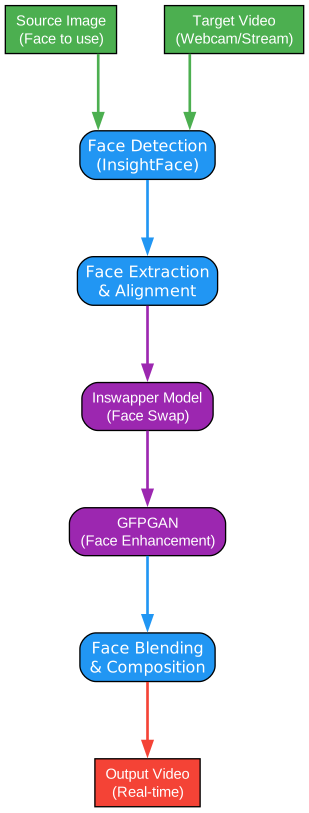
- Source Image Input: A single photo of the target face you want to use
- Face Detection: Using InsightFace for accurate face landmark detection
- Face Extraction and Alignment: Aligning facial features for proper mapping
- Inswapper Model: The neural network that performs the actual face swap
- GFPGAN Enhancement: Improving face quality and details
- Face Blending: Seamlessly compositing the swapped face into the video
- Real-Time Output: Streaming the result to webcam or video file
Supported Execution Providers
Deep-Live-Cam supports multiple GPU backends for optimal performance on different hardware:
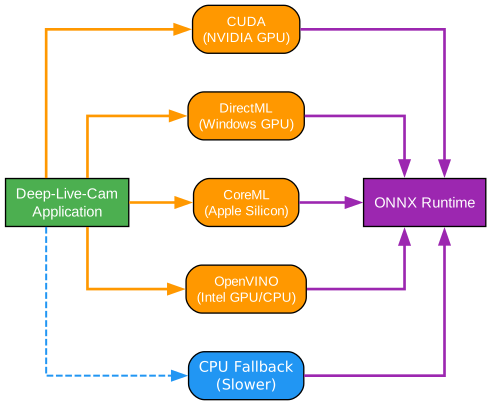
| Provider | Best For | Performance |
|---|---|---|
| CUDA | NVIDIA GPUs | Excellent |
| DirectML | Windows with AMD/Intel GPUs | Good |
| CoreML | Apple Silicon (M1/M2/M3) | Excellent |
| OpenVINO | Intel GPUs and CPUs | Good |
| CPU | Fallback option | Slow |
Installation
Option 1: Automated Installation (Recommended)
We provide automated installation scripts that handle all the steps automatically.
Windows Installation Script
Download and run the automated installation script:
# Download the script
# Run it by double-clicking: tools/install_deep_live_cam.bat
# Or run from command prompt:
cmd /c tools\install_deep_live_cam.bat
The script will:
- Check prerequisites (Python, FFmpeg)
- Clone the Deep-Live-Cam repository
- Create a virtual environment
- Install all dependencies
- Verify the installation
Test Installation
After installation, verify everything works with our test script:
# Navigate to Deep-Live-Cam directory
cd %USERPROFILE%\Deep-Live-Cam

# Activate the virtual environment
call venv\Scripts\activate

# Run the test script
python ..\tools\test_deep_live_cam.py
Option 2: Manual Installation
Prerequisites
IMPORTANT: FFmpeg is REQUIRED and must be installed before running the app. Without FFmpeg, the app will crash on startup.
Before installing Deep-Live-Cam, ensure you have:
- Python 3.10 or 3.11
- FFmpeg (required for video processing - CRITICAL)
- Visual Studio 2022 Runtimes (Windows only)
- A compatible GPU for acceleration (recommended)
To install FFmpeg on Windows:
winget install ffmpeg
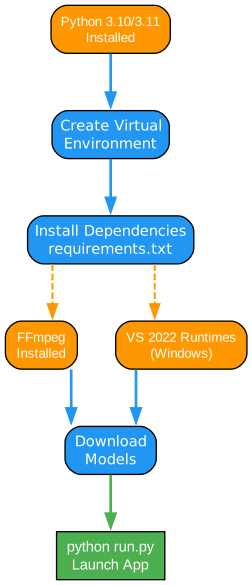
Installation Flow
Step-by-Step Installation
1. Clone the Repository
git clone https://github.com/hacksider/Deep-Live-Cam.git
cd Deep-Live-Cam
2. Create Virtual Environment
# Create environment with Python 3.11
python -m venv venv

# Activate on Windows
venv\Scripts\activate

# Activate on Linux/macOS
source venv/bin/activate
3. Install Dependencies
pip install -r requirements.txt
Note: If you encounter errors installing insightface due to missing Microsoft Visual C++ compiler, use:
pip install insightface --only-binary=:all:
This installs a pre-built binary version of insightface.
4. Install FFmpeg
Windows (using winget):
winget install ffmpeg
macOS:
brew install ffmpeg
Linux (Ubuntu/Debian):
sudo apt install ffmpeg
5. Download Models
Deep-Live-Cam requires two model files:
- Inswapper Model (inswapper_128.onnx) - The main face swapping model
- GFPGAN Model - For face enhancement
These are automatically downloaded on first run, or you can place them in the models/ directory.
Verifying Installation
After installation completes, run the test script to verify all dependencies:
python tools/test_deep_live_cam.py
Expected output should show most dependencies as [OK]. GPU support will show [OK] for available providers (CUDA, DirectML, CoreML, or OpenVINO depending on your hardware).
Usage
Basic Usage
Launch the application:
python run.py
The GUI will open with the following controls:
- Select Face Image: Click to choose your source face image
- Select Camera/Video: Choose webcam or video file
- Click “Live”: Start the face swap in real-time
Command Line Arguments
For advanced users, command line options are available:
python run.py -s source_image.jpg -t 0 -m inswapper_128.onnx
| Argument | Description |
|---|---|
-s, --source | Source face image path |
-t, --target | Target camera index or video path |
-m, --model | Path to face swap model |
-o, --output | Output video file path |
-F, --face-enhancer | Enable GFPGAN face enhancement |
Use Cases
Live Streaming
Perfect for content creators who want to appear as different characters in real-time streams.

Video Calls
Appear as your favorite character during video conferences or online meetings.
Content Creation
Create entertaining videos, memes, and social media content with face swap effects.

Movie and Show Recreation
Put your face in famous movie scenes or TV show clips.

Troubleshooting
Common Issues
Q: Face swap is slow
- Ensure you have a compatible GPU installed
- Try switching to CUDA (NVIDIA), DirectML (Windows), or CoreML (Apple Silicon)
- Reduce video resolution
Q: Face not detected
- Ensure good lighting on the source image
- Use a clear, front-facing photo
- Avoid faces that are partially covered
Q: Model download fails
- Manually download from the project’s model releases
- Place in the
models/directory
Q: “Error loading face swapper model: error on model routing” This error can occur due to several reasons:
-
FP16 Model Incompatibility: The FP16 model (inswapper_128_fp16.onnx) may not work with certain insightface versions. The app automatically falls back to the standard model.
-
Missing cuDNN for CUDA: If using CUDA execution provider without cuDNN 9 installed.
Solutions:
- Run with CPU (most reliable):
python run.py --execution-provider cpuOr use the pre-made CPU batch file:
run-cpu.bat -
Install cuDNN 9 for CUDA support (NVIDIA GPUs):
The CUDA Execution Provider requires:
- cuDNN 9.x
- CUDA 12.x
- Latest Microsoft Visual C++ Runtime
Download cuDNN from: https://developer.nvidia.com/cudnn
After installation, ensure cuDNN DLLs are in your PATH.
- Use DirectML instead of CUDA (Windows with AMD/Intel GPUs):
python run.py --execution-provider directmlDirectML is included in Windows 10/11 and doesn’t require additional installation.
Q: “FaceAnalysis.__init__() got an unexpected keyword argument ‘providers’“ This error occurs with older versions of insightface (0.2.1) that don’t support the providers argument.
Solution: The app has been updated to work with older insightface versions. If you still encounter this error, try:
pip install insightface --only-binary=:all:
Q: Memory Error when loading face analysis model The buffalo_l model is large (~300MB) and may cause memory issues on systems with limited RAM.
Solutions:
- Close other applications to free up memory
- The app automatically tries to use the smaller buffalo_sc model first
- Use CPU mode which is more memory-efficient:
python run.py --execution-provider cpu
Q: Webcam not showing video feed This can be caused by FFmpeg codec issues or camera permissions.
Solutions:
- Ensure FFmpeg is installed and in your PATH
- Check camera permissions in Windows Settings > Privacy > Camera
- Try a different camera index (0, 1, 2, etc.)
GPU Acceleration
For best performance, install GPU-specific dependencies:
NVIDIA (CUDA) - Requires cuDNN 9:
pip install torch torchvision --index-url https://download.pytorch.org/whl/cu118
Note: CUDA requires cuDNN 9 library. If you encounter “error on model routing” errors, use DirectML instead.
AMD/Intel/ NVIDIA (DirectML on Windows) - RECOMMENDED: DirectML is included in Windows 10/11 and provides GPU acceleration without additional setup.
python run.py --execution-provider directml
Or use the pre-made batch file: run-directml.bat
Apple Silicon (CoreML): CoreML support is built into macOS with Apple Silicon chips.
Disclaimer
This tool is provided for educational and entertainment purposes only. Users are responsible for ensuring their use of face swap technology complies with all applicable laws, including:
- Privacy laws and regulations
- Consent requirements for using others’ images
- Anti-deepfake legislation in their jurisdiction
Always obtain proper consent before swapping someone’s face into content, especially for harmful or deceptive purposes.
Conclusion
Deep-Live-Cam represents an impressive advancement in real-time face swapping technology. With support for multiple platforms and GPU backends, it makes AI-powered face manipulation accessible to everyone. Whether you’re a content creator, developer, or just experimenting with AI, Deep-Live-Cam offers a powerful and user-friendly solution.
For more information and updates, visit the official GitHub repository.