Introduction
AI agents are powerful, but they are also fragile. When an agent encounters an error, a performance bottleneck, or a new feature request, the typical response is ad hoc: a developer manually tweaks a prompt, patches a configuration file, or rewrites an instruction block. This approach is unsustainable at scale. Every tweak is a one-off fix that is never recorded, never audited, and never reusable. Over time, the agent’s behavior drifts, regressions creep in, and institutional knowledge about what worked and what failed is lost.
Evolver is a GEP-powered self-evolution engine designed to solve this problem. Built on the Genome Evolution Protocol (GEP), Evolver turns ad hoc prompt tweaks into auditable, reusable evolution assets. Instead of manually patching agent behavior, Evolver watches for signals – errors, performance patterns, feature requests – and automatically generates, validates, and records evolution steps that improve the agent over time. Every change is tracked in a structured audit trail, every mutation is reversible, and every evolution cycle follows a disciplined protocol that prevents runaway changes.
The project’s tagline captures its philosophy succinctly: “Evolution is not optional. Adapt or die.” With over 3,604 stars on GitHub and a growth rate of 812 stars per day, Evolver has clearly struck a chord with the developer community. Written in JavaScript and running on Node.js, it is released under the GPL-3.0-or-later license, making it fully open source and freely available for anyone to use, study, and extend. You can find the repository at https://github.com/EvoMap/evolver.
In this post, we will walk through Evolver’s architecture, the GEP protocol that drives it, the evolution lifecycle from signal detection to solidification, the proxy mailbox architecture that isolates agent-Hub communication, and the comprehensive safety features that keep self-evolution under control. By the end, you will understand how Evolver enables AI agents to repair themselves, optimize their own prompts, and innovate new capabilities – all while maintaining a complete audit trail and built-in rollback mechanisms.
Architecture Overview
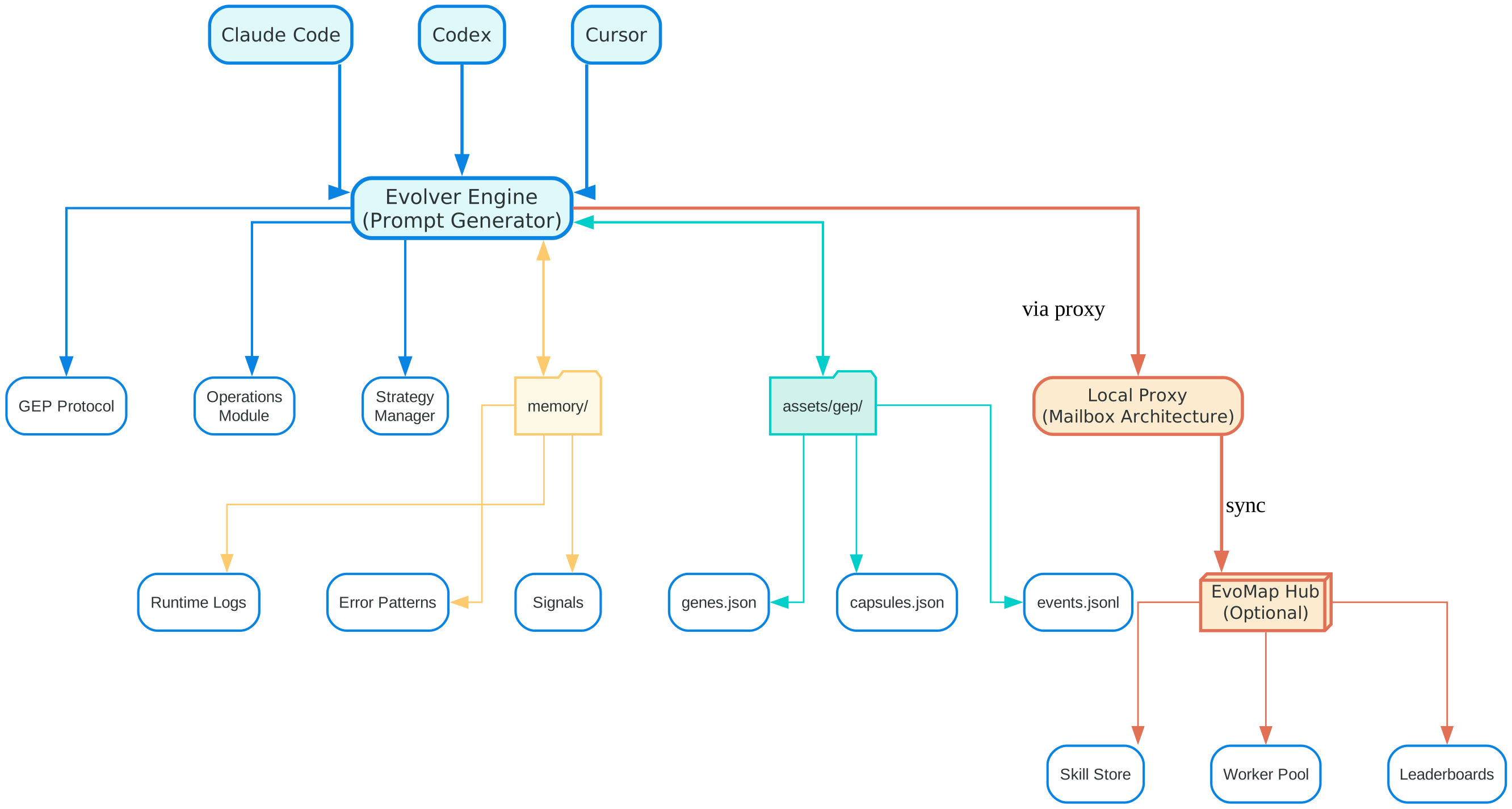
The architecture diagram above illustrates the five major layers that compose the Evolver system. At the top sits the AI Agent layer, which includes adapters for Claude Code, Codex, and Cursor. These adapters are the integration hooks that allow Evolver to communicate with different AI coding agents. Each adapter translates agent-specific events – such as session starts, session ends, and signal detections – into the internal format that Evolver understands. This pluggable adapter design means Evolver is not tied to any single agent; it can evolve any agent that has an adapter implementation.
Below the agent layer sits the Evolver Engine core, which is the heart of the system. The engine contains three major subsystems: the GEP Protocol module, the Operations Module, and the Strategy Manager. The GEP Protocol module implements the four-step evolution cycle (Scan, Select, Emit, Record) and manages the gene and capsule assets. The Operations Module handles health checks, cleanup tasks, innovation operations, self-repair routines, and lifecycle management. The Strategy Manager controls which gene types are active and in what proportions, using presets like balanced, innovate, harden, and repair-only to shape the evolution behavior.
On the left side of the diagram is the Memory Directory, which serves as the agent’s runtime memory. This directory contains runtime logs, error patterns, and signals that the GEP Protocol scans during its Scan phase. The memory directory is the primary input source for evolution – it is where the engine looks to understand what is going wrong, what is running slowly, and what opportunities exist for improvement. The structure of the memory directory is standardized so that the scanner can reliably extract signals regardless of which agent adapter is in use.
At the bottom of the diagram are the GEP Assets, which include genes.json, capsules.json, and events.jsonl. Genes are the fundamental evolution units – each gene defines a signal pattern to match and a mutation strategy to apply. Capsules are reusable evolution packages that bundle related genes together for coordinated changes. The events.jsonl file is the append-only audit trail that records every evolution event, creating a complete history of all changes made to the agent. This audit trail is critical for debugging, compliance, and understanding the long-term evolution of an agent.
On the right side is the Local Proxy with its mailbox architecture, which handles communication between the local Evolver instance and the optional EvoMap Hub. The proxy ensures that the AI agent never directly accesses Hub authentication credentials. Instead, all communication flows through a local mailbox store that uses JSONL format for message persistence. The proxy includes extensions for direct message handling, session management, and skill updates, along with a sync engine that manages inbound and outbound message queues. The EvoMap Hub provides optional network features such as a skill store, worker pool, and leaderboards, but Evolver operates fully in offline mode without any Hub connection.
The GEP Protocol
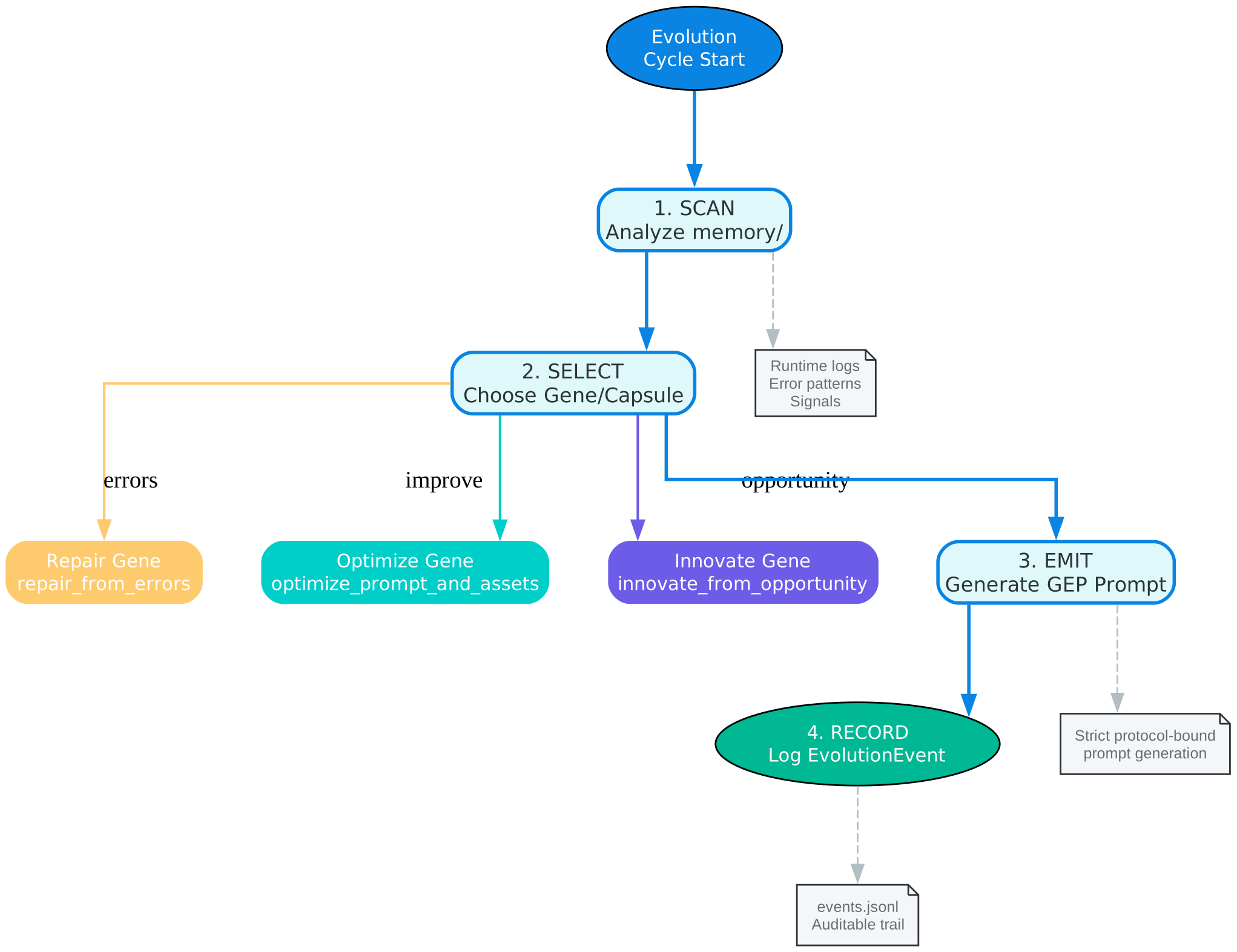
The Genome Evolution Protocol (GEP) is the structured methodology that governs how Evolver evolves AI agents. Rather than allowing arbitrary changes, GEP enforces a disciplined four-step cycle: Scan, Select, Emit, and Record. Each step has a clearly defined responsibility, and together they ensure that every evolution is purposeful, validated, and auditable.
The Scan phase is the first step in every evolution cycle. During scanning, the GEP Protocol examines the memory directory for runtime logs, error patterns, and signals. Signals are structured data points that represent something the agent has experienced – an error, a performance metric, a feature request, or any other observable event. The scanner de-duplicates signals to prevent redundant evolution triggers, ensuring that the same error pattern does not cause multiple parallel evolution attempts. Signal de-duplication is essential for efficiency and for preventing conflicting mutations.
The Select phase takes the de-duplicated signals and matches them against the active gene pool. Each gene defines a signal pattern that it can handle and a mutation strategy for addressing it. The selector evaluates which genes are the best match for the current signals, considering the active strategy preset. For example, if the strategy is set to “harden,” the selector will prefer repair and optimize genes over innovate genes. If the strategy is “innovate,” the selector will weight innovate genes more heavily. This selection process ensures that the evolution direction aligns with the operator’s intent.
The Emit phase is where the actual evolution happens. Once a gene is selected, it generates a mutation – a structured change to the agent’s prompt assembly, configuration, or behavior. There are three built-in gene types, each designed for a specific category of evolution. The gene_gep_repair_from_errors gene matches error and exception signals and applies the smallest reversible patch that fixes the issue. The gene_gep_optimize_prompt_and_assets gene matches protocol, GEP, and prompt-related signals and refactors the prompt assembly for better performance or clarity. The gene_gep_innovate_from_opportunity gene matches feature requests and performance bottleneck signals and designs minimal, testable implementations for new capabilities.
Beyond individual genes, GEP also introduces the concept of Capsules. A capsule is a reusable evolution package that bundles multiple related genes together. When a complex evolution requires coordinated changes across multiple aspects of the agent, a capsule ensures that all the necessary mutations are applied together as a unit. Capsules can be shared between agents, allowing one agent’s learned evolution to benefit another. This is particularly powerful in team environments where multiple agents face similar challenges.
The Record phase completes the cycle by writing an EvolutionEvent to the events.jsonl audit trail. Every evolution event includes the signal that triggered it, the gene that was selected, the mutation that was emitted, the validation result, and a timestamp. This creates a complete, append-only history of all evolution activity. The audit trail is invaluable for debugging unexpected behavior, demonstrating compliance, and understanding the long-term trajectory of an agent’s evolution. Because the trail is append-only, records cannot be tampered with retroactively, providing a trustworthy account of every change.
Evolution Lifecycle
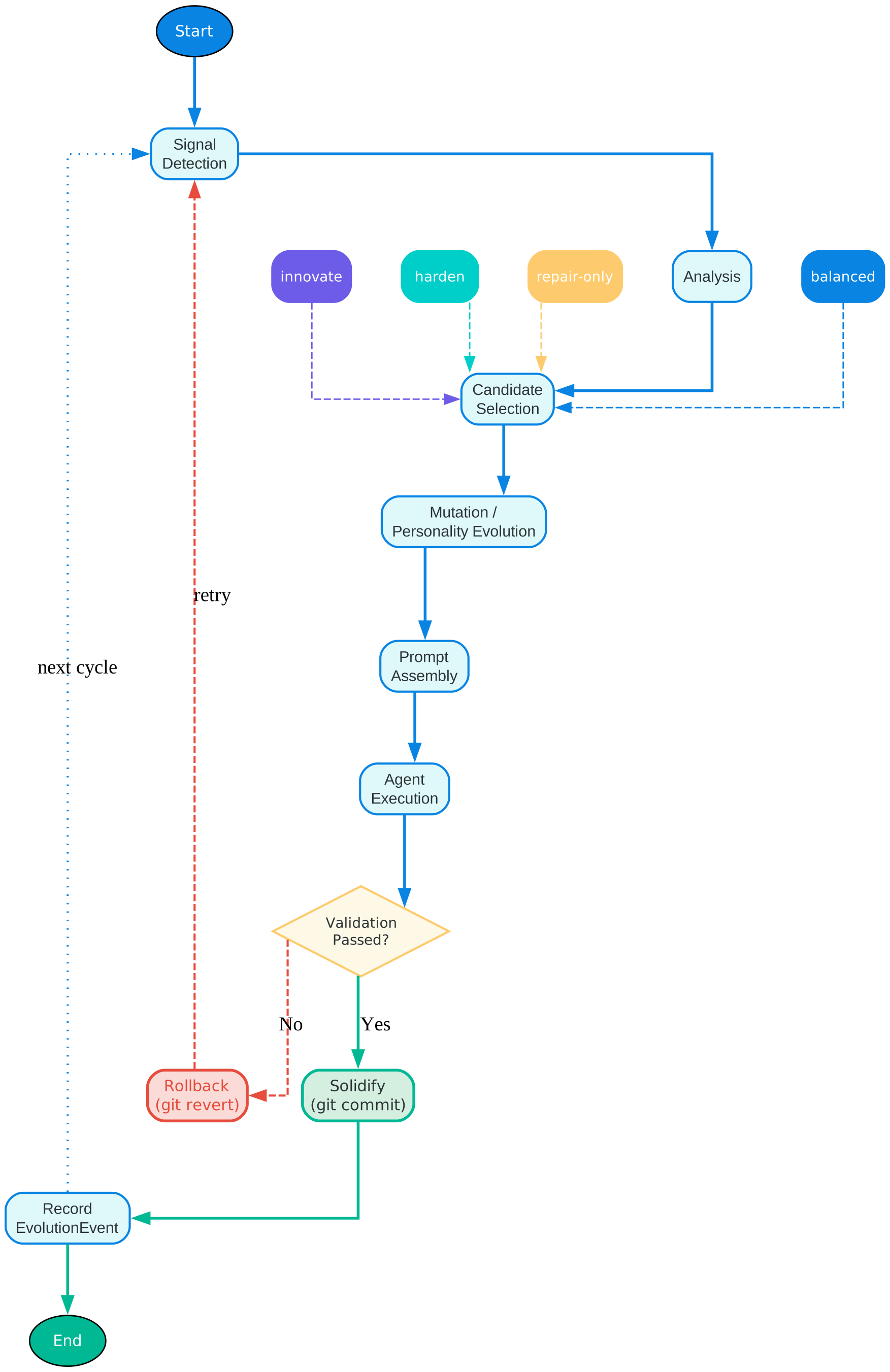
The evolution lifecycle diagram above shows the complete journey from signal detection to a solidified, recorded evolution. Understanding this lifecycle is key to understanding how Evolver transforms raw agent experiences into structured, auditable improvements.
The lifecycle begins with Signal Detection. As the AI agent operates – writing code, running tests, encountering errors – it generates signals that are captured in the memory directory. These signals can be errors, exceptions, performance metrics, feature requests, or any other observable event. The Evolver engine continuously monitors the memory directory for new signals, and when it detects one, the lifecycle begins.
Next is Analysis, where the detected signal is examined to understand its nature and severity. The analyzer determines whether the signal represents a repair opportunity (something is broken), an optimization opportunity (something works but could be better), or an innovation opportunity (something new could be built). This classification determines which gene types will be considered in the next step.
The Candidate Selection phase evaluates the available genes against the analyzed signal. The selector considers the active strategy preset to weight the candidates appropriately. In “balanced” mode, repair, optimize, and innovate genes receive equal consideration. In “innovate” mode, innovate genes are weighted more heavily, encouraging the agent to explore new capabilities. In “harden” mode, repair and optimize genes are preferred, focusing the agent on stability and performance. In “repair-only” mode, only the repair gene is active, ensuring that the agent focuses exclusively on fixing what is broken.
Once a candidate gene is selected, the Mutation and Personality Evolution phase generates the actual change. Mutation refers to the structural modification of the agent’s prompt assembly or configuration. Personality Evolution refers to adjustments in the agent’s behavioral tendencies – how it communicates, what it prioritizes, and how it approaches problems. Both types of evolution are guided by the selected gene’s strategy, ensuring that changes are purposeful and aligned with the signal that triggered them.
The Prompt Assembly phase takes the generated mutations and assembles them into a coherent prompt that the AI agent will use in its next session. This is a critical step because the prompt must be well-structured and internally consistent. If multiple mutations conflict with each other, the assembly process resolves the conflicts according to the strategy preset and the priority of the originating signals.
Agent Execution follows, where the AI agent operates using the newly assembled prompt. During execution, the agent’s behavior is observed and compared against expected outcomes. This observation period is essential for the next phase.
Validation checks whether the evolution had the intended effect. Did the repair gene actually fix the error? Did the optimization gene improve performance? Did the innovation gene produce a working implementation? If validation passes, the lifecycle proceeds to the Solidify phase. If validation fails, the lifecycle follows a Rollback Path that reverts the changes using Git. Git rollback is a core safety mechanism – because every evolution is committed to Git before it takes effect, a failed evolution can always be undone by reverting to the previous commit.
The Solidify phase is the final step for a successful evolution. Solidification performs two actions: it runs a final validation to confirm the evolution is stable, and it commits the changes to Git with a descriptive message that references the evolution event. This Git commit creates a permanent checkpoint that can be returned to at any time. After solidification, the Record phase writes the EvolutionEvent to the audit trail, completing the lifecycle.
Proxy Mailbox Architecture
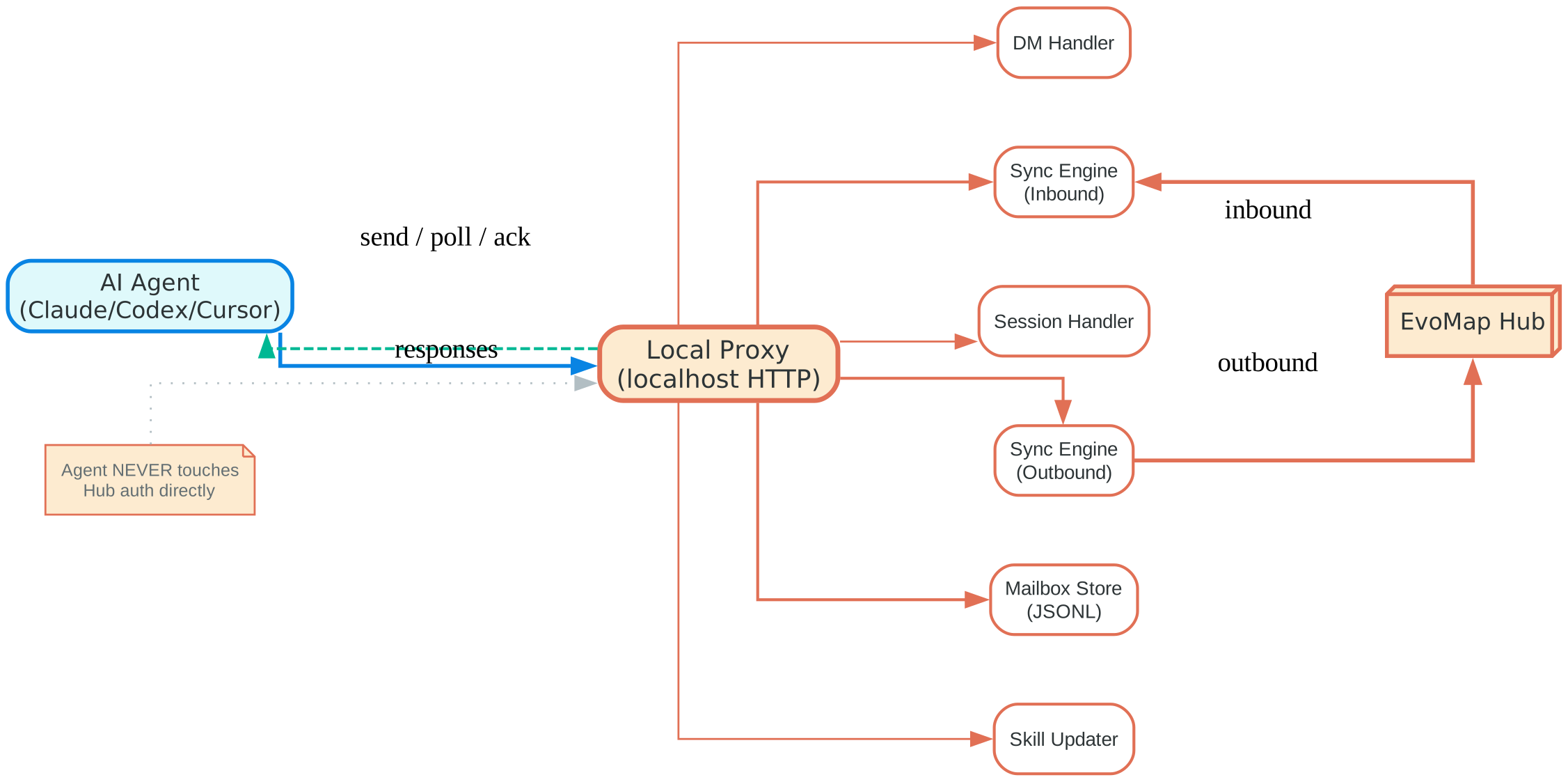
The proxy mailbox architecture is one of Evolver’s most thoughtful design decisions. It addresses a fundamental security concern: if an AI agent can directly access the EvoMap Hub, it could potentially leak authentication credentials, make unauthorized API calls, or expose sensitive data. The proxy mailbox architecture eliminates this risk by ensuring that the agent never touches Hub authentication directly.
At the center of the architecture is the Mailbox Store, which uses JSONL (JSON Lines) format for message persistence. JSONL is chosen because it is append-only, human-readable, and easy to parse. Every message between the local Evolver instance and the EvoMap Hub passes through the mailbox store, creating a complete record of all communication. This record is useful for debugging, auditing, and understanding the flow of information between the agent and the Hub.
The proxy includes three Extensions that handle specific types of messages. The DM Handler processes direct messages from the Hub, such as skill recommendations or evolution suggestions from other agents. The Session Handler manages session lifecycle events, ensuring that the proxy correctly tracks when an agent session starts and ends. The Skill Updater handles skill store updates, downloading new skills from the Hub and installing them locally. Each extension operates independently, so a failure in one extension does not affect the others.
The Sync Engine manages the flow of messages between the local mailbox and the remote Hub. It has two components: the Inbound sync pulls new messages from the Hub and writes them to the local mailbox store. The Outbound sync takes messages from the local mailbox store and pushes them to the Hub. The sync engine operates asynchronously, so the agent can continue operating even when the Hub is temporarily unreachable. Messages are queued locally and synced when connectivity is restored.
The proxy exposes five API operations that the agent can use: send (enqueue a message for the Hub), poll (check for new messages from the Hub), ack (acknowledge receipt of a message), status (check the current state of the proxy and its connections), and list (retrieve a list of pending messages). These operations are simple and well-defined, making it easy for any agent adapter to integrate with the proxy.
The security benefits of this architecture are significant. Because the agent communicates only with the local proxy, it never has access to Hub credentials. The proxy holds the credentials and handles authentication on the agent’s behalf. This means that even if the agent is compromised or behaves unexpectedly, it cannot leak Hub authentication tokens. Additionally, because all messages pass through the mailbox store, there is a complete audit trail of all agent-Hub communication. This is essential for compliance in environments where data flow must be monitored and controlled.
Safety Features
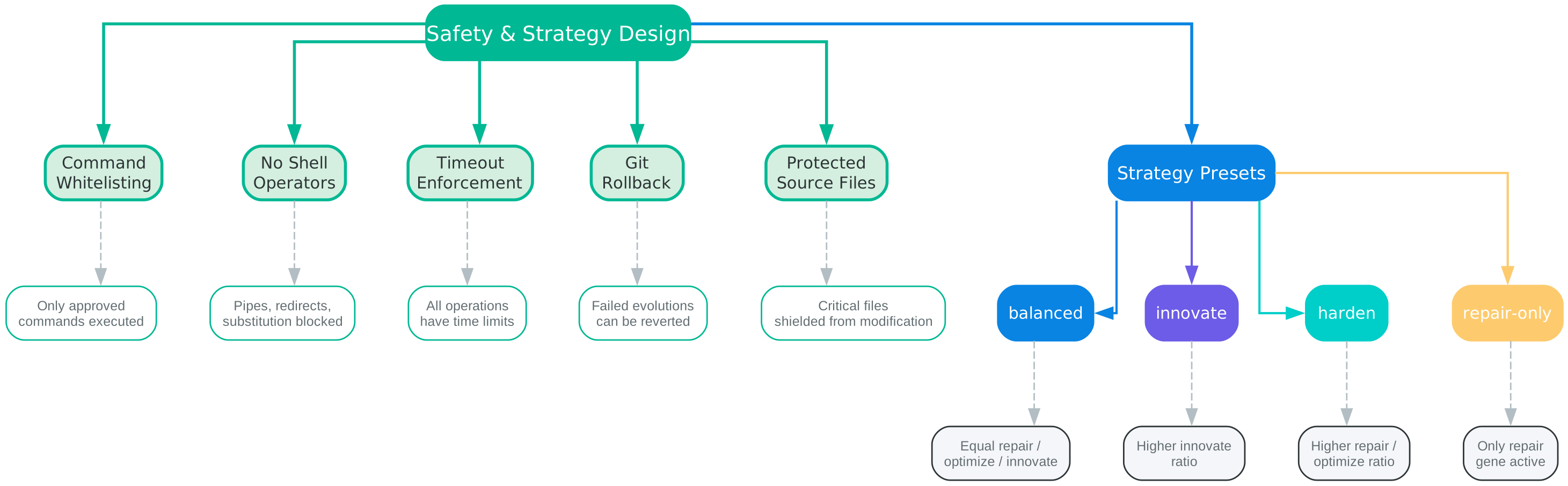
Self-evolving AI agents sound powerful, but they also sound dangerous. What prevents an agent from making changes that break the system, expose sensitive data, or escalate its own privileges? Evolver addresses these concerns with a comprehensive set of safety features that constrain what evolutions can do and provide recovery mechanisms when things go wrong.
Command Whitelisting is the first line of defense. Evolver maintains a whitelist of approved commands that evolution-generated code is allowed to execute. Any command not on the whitelist is blocked before execution. This prevents an evolution from introducing arbitrary system commands that could damage the environment or access restricted resources. The whitelist is configurable, so operators can adjust it to match their security requirements, but the default list is intentionally restrictive.
No Shell Operators is a complementary restriction that blocks the use of shell operators such as pipes (|), redirects (>, >>), and command substitution ($(), backticks). Even if a whitelisted command is used, it cannot be chained with shell operators to create unexpected behavior. For example, an evolution cannot use rm -rf / | echo done because the pipe operator is blocked. This eliminates a broad category of shell injection attacks that could otherwise be triggered by a malicious or buggy evolution.
Timeout Enforcement ensures that no operation can run indefinitely. Every evolution step, every validation check, and every agent execution has a configurable time limit. If an operation exceeds its timeout, it is terminated and the evolution is marked as failed. This prevents evolutions from getting stuck in infinite loops or hanging on unresponsive network calls. Timeouts also limit the blast radius of a failed evolution – if something goes wrong, it will be detected and terminated within a known time window.
Git Rollback is the primary recovery mechanism. Before any evolution takes effect, Evolver commits the current state to Git. If the evolution fails validation or produces undesirable results, the system can revert to the previous Git commit, effectively undoing the evolution. This is a critical safety net because it means that no evolution is truly irreversible. Even if an evolution passes initial validation but causes problems later, the operator can always roll back to a known-good state. The Git commit message includes a reference to the evolution event, making it easy to trace which commit corresponds to which evolution.
Protected Source Files shield critical files from modification by evolutions. The Evolver engine itself, its configuration files, and other essential system files are marked as protected. Any evolution that attempts to modify a protected file is rejected before execution. This prevents an evolution from corrupting the engine that drives it – a scenario that could lead to unpredictable behavior or a complete system failure. The list of protected files is defined in the configuration and can be extended by the operator.
Strategy Presets serve as high-level safety controls. By selecting a strategy preset, the operator determines which gene types are active and in what proportions. The “repair-only” preset is the most restrictive – it allows only repair genes, ensuring that the agent can fix bugs but cannot make optimization or innovation changes. The “harden” preset allows repair and optimization but not innovation, focusing the agent on stability. The “balanced” preset allows all gene types equally, and the “innovate” preset weights innovation more heavily. These presets give operators a simple, high-level lever to control the risk profile of their evolving agents.
Together, these safety features create a defense-in-depth approach to self-evolution. No single mechanism is sufficient on its own, but the combination of whitelisting, operator blocking, timeouts, Git rollback, file protection, and strategy presets ensures that evolutions are constrained, observable, and reversible.
Installation
Getting started with Evolver is straightforward. The project requires Node.js version 18 or higher and Git installed on your system. Git is not optional – it is used for rollback operations, blast radius calculation, and the solidify process that commits successful evolutions.
# Clone the repository
git clone https://github.com/EvoMap/evolver.git

# Navigate into the project directory
cd evolver

# Install dependencies
npm install

# Start Evolver
node index.js
If you do not have Node.js 18 or later, you will need to upgrade before running Evolver. You can check your current Node.js version with node --version. If Git is not installed, Evolver will log an error on startup because it cannot perform rollback or solidify operations without Git.
Usage
Starting Evolver
The simplest way to start Evolver is to run the entry point directly:
node index.js
This starts the Evolver engine with the default configuration, which uses the “balanced” strategy preset and operates in offline mode (no Hub connection).
Strategy Presets
You can configure the strategy preset to control how Evolver prioritizes different gene types. The available presets are:
- balanced: Equal weight for repair, optimize, and innovate genes. This is the default and is suitable for most use cases.
- innovate: Higher weight for innovate genes. Use this when you want the agent to explore new capabilities and features.
- harden: Higher weight for repair and optimize genes. Use this when stability and performance are the top priorities.
- repair-only: Only the repair gene is active. Use this when you want the agent to focus exclusively on fixing bugs without making any other changes.
Available npm Scripts
Evolver includes several npm scripts for common operations:
# Start Evolver (default)
npm start

# Run with specific configuration
npm run run

# Solidify pending evolutions (validate + git commit)
npm run solidify

# Review evolution history and audit trail
npm run review

# Export A2A (Agent-to-Agent) protocol data
npm run a2a:export

# Ingest A2A protocol data from another agent
npm run a2a:ingest

# Promote a capsule from local to shared status
npm run a2a:promote
Each script maps to a specific Evolver operation. The solidify command is particularly important – it validates pending evolutions and commits them to Git, creating permanent checkpoints. The review command lets you inspect the evolution audit trail to understand what changes have been made and why. The A2A scripts enable inter-agent communication and capsule sharing through the Agent-to-Agent protocol.
Key Features
| Feature | Description |
|---|---|
| Auto-Log Analysis | Scans memory/ directory for runtime logs and error patterns |
| Self-Repair Guidance | Generates repair prompts from error signals |
| GEP Protocol | Genome Evolution Protocol for structured evolution |
| Mutation + Personality Evolution | Evolves agent behavior and personality over time |
| Strategy Presets | balanced, innovate, harden, repair-only modes |
| Signal De-duplication | Prevents redundant evolution triggers |
| Operations Module | Health checks, cleanup, innovation ops, lifecycle management |
| Protected Source Files | Critical files shielded from modification |
| Skill Store | Download and share reusable skills |
| EvoMap Hub | Optional network features (skill store, worker pool, leaderboards) |
| Multi-platform Adapters | Claude Code, Codex, Cursor integration hooks |
| Proxy Mailbox | Agent-Hub communication through local proxy |
Troubleshooting
Node.js Version Requirements
Evolver requires Node.js 18 or later. If you see an error like SyntaxError: Unexpected token or a message about unsupported features, check your Node.js version:
node --version
If the version is below 18, upgrade Node.js using your preferred method (nvm, direct download, or package manager).
Git Not Installed Errors
If Git is not installed or not available in your PATH, Evolver will log errors related to rollback and solidify operations. Git is a hard requirement – it is used for:
- Rollback: Reverting failed evolutions to the previous state
- Blast radius calculation: Determining how many files an evolution would affect
- Solidify: Committing successful evolutions as permanent checkpoints
Install Git from https://git-scm.com and ensure it is available in your PATH.
Offline vs Hub-Connected Mode
Evolver operates fully in offline mode by default. You do not need an EvoMap Hub connection to use the core GEP Protocol, evolution lifecycle, or safety features. Hub-connected mode enables additional features such as the skill store, worker pool, and leaderboards, but these are entirely optional. If you see connection errors related to the Hub, you can safely ignore them if you are operating in offline mode.
Core Engine Obfuscation
Note that some core engine files in the Evolver source are obfuscated. This is by design – the obfuscated files contain proprietary logic that the EvoMap team has chosen to protect while still making the overall system open source under GPL-3.0-or-later. The obfuscated portions do not affect your ability to use, extend, or contribute to Evolver, and all safety-critical logic is implemented in the open, auditable portions of the codebase.
Conclusion
Evolver represents a significant step forward in how we manage AI agent behavior. Instead of treating agent prompts as static configurations that require manual intervention, Evolver treats them as living artifacts that can evolve, adapt, and improve over time. The Genome Evolution Protocol provides the structure and discipline needed to make self-evolution safe and auditable, while the comprehensive safety features – command whitelisting, shell operator blocking, timeout enforcement, Git rollback, and protected source files – ensure that evolutions remain constrained and reversible.
Whether you are running a single AI agent for personal projects or managing a fleet of agents in a production environment, Evolver gives you the tools to keep your agents healthy, optimized, and innovative without sacrificing control. The strategy presets let you dial the risk profile up or down depending on your needs, and the audit trail ensures that every change is recorded and traceable.
To get started with Evolver, visit the GitHub repository at https://github.com/EvoMap/evolver. For more information about the EvoMap platform and the GEP Protocol, visit https://evomap.ai or check the GEP Wiki at https://evomap.ai/wiki. Enjoyed this post? Never miss out on future posts by following us 


