Swarm Forge: Uncle Bob’s AI Agent Coordinator
When Robert C. Martin – better known as Uncle Bob – turns his attention to AI agent coordination, the result is predictably disciplined. Swarm Forge is a lightweight, tmux-based orchestration platform that coordinates swarms of AI agents to build production-grade software with unbreakable professional discipline. Rather than building a complex framework, Uncle Bob chose the simplest possible substrate: shell scripts, tmux sessions, and git worktrees.
In this post, we explore how Swarm Forge works, its architecture, the role-based agent system, the constitution-driven governance model, and how you can start using it today.
Introduction
The fundamental risk of agentic development is undisciplined, brittle, unmaintainable code. When you give AI agents free rein without constraints, you get speed at the cost of quality. Swarm Forge addresses this by embedding Clean Code practices as a living Constitution that every agent must obey on every task.
Swarm Forge is not a runtime framework or a language-specific library. It is a shell-based coordination layer that:
- Launches a config-driven swarm from a project-local
swarmforge/swarmforge.conf - Creates one tmux session and one Terminal window per configured role
- Reads behavior from project-local
swarmforge/<role>.promptfiles plus a layeredswarmforge/constitution.prompt - Supports per-role backends such as
claude,codex, ornone - Creates a project-local
swarmtools/directory with notification helpers - Creates one git worktree per configured role under
.worktrees/ - Keeps all swarm state local to the working directory in
.swarmforge/
The entire system runs locally in tmux and Terminal with minimal machinery. No cloud services, no API gateways, no container orchestration – just shell scripts doing what shell scripts do best.
How It Works
Swarm Forge follows a straightforward startup sequence that prepares the workspace, validates configuration, and launches agents in isolated git worktrees. Here is the high-level flow:
- Create a
swarmforge/directory in the target working directory - Place
swarmforge.conf,constitution.prompt, and one<role>.promptfile per configured role inside it - Define each window in
swarmforge/swarmforge.confaswindow <role> <agent> <worktree> - Add
swarmforge.shto your shellPATH - Run
swarmforge.sh <working-directory>or run it from inside that directory - If the working directory is not already a git repo, startup runs
git init, writes.gitignoreentries, and makes the first commit - Startup creates a git worktree for each window under
.worktrees/<worktree> - Startup creates
swarmtools/notify-agent.shfor inter-agent messaging - SwarmForge creates tmux sessions, opens Terminal windows, and launches each configured backend in its assigned worktree
- Roles communicate through helper commands such as
notify-agent.sh
The key insight is that every agent runs in its own git worktree on its own branch. This means agents can work in parallel without stepping on each other’s changes. When an agent completes its task, it commits to its branch and notifies the next agent in the chain, which then merges the changes.
Architecture
The architecture of Swarm Forge is deliberately simple. A single orchestrator script (swarmforge.sh) reads the configuration, prepares the workspace, and launches agents. Each agent runs in an isolated tmux session with its own git worktree. Communication happens through a shared notification script and a log file.
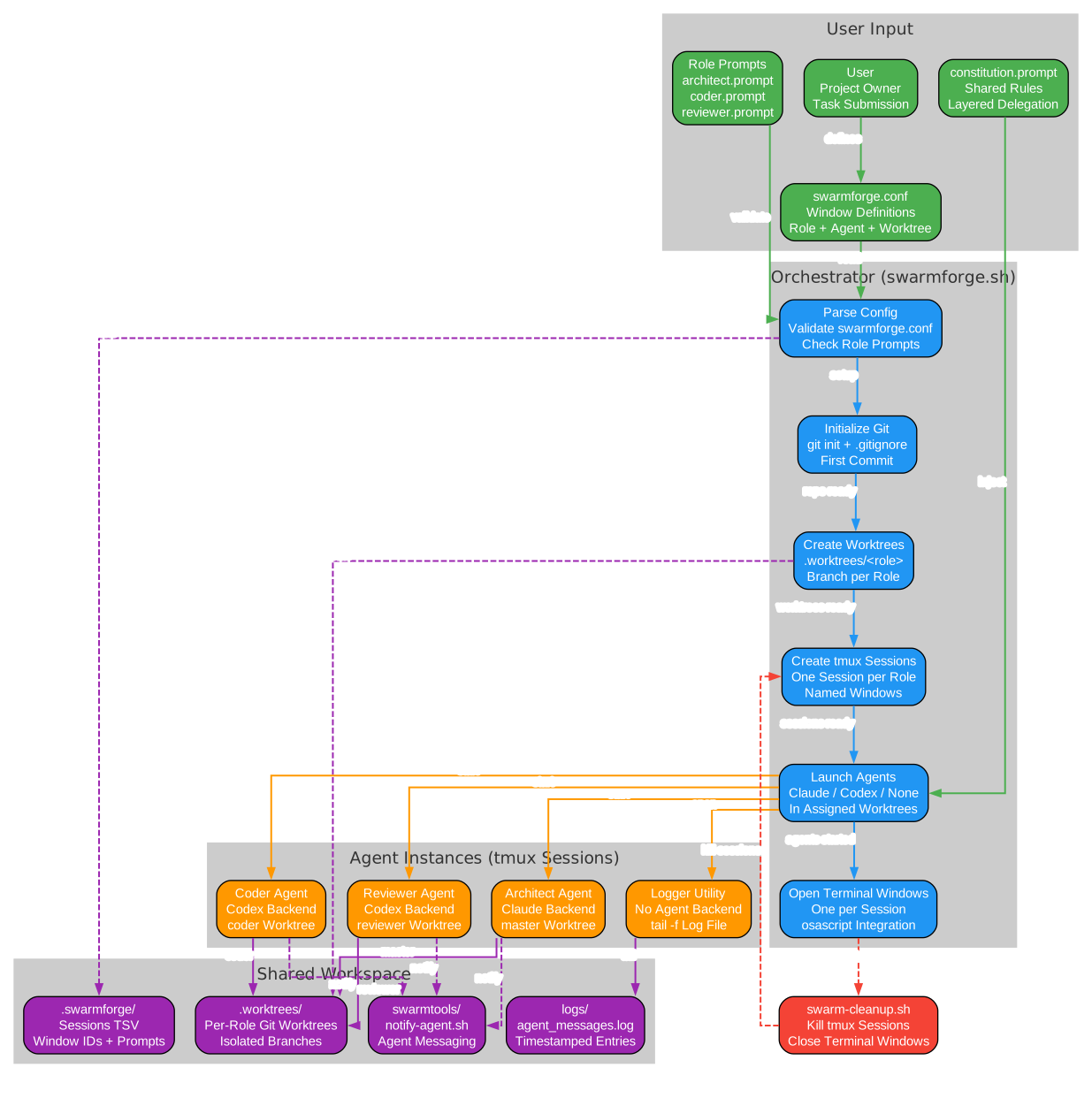
The architecture diagram shows the complete flow from user input through orchestration to agent execution and shared workspace. The user provides the configuration file, role prompts, and constitution. The orchestrator (swarmforge.sh) parses the config, initializes git, creates worktrees, sets up tmux sessions, and launches agents. Each agent instance (Architect, Coder, Reviewer, Logger) operates in its own tmux session and worktree. The shared workspace provides the communication substrate: worktrees for code isolation, swarmtools for messaging, state directory for session metadata, and logs for timestamped message tracking. When the swarm completes its work, swarm-cleanup.sh kills all tmux sessions and closes Terminal windows.
The orchestrator performs strict validation before starting any sessions. It checks that swarmforge.conf exists, that constitution.prompt is present, that every agent-backed role has a matching prompt file, that backends are supported (only claude, codex, or none), that roles are not duplicated, and that worktree names are safe (no path traversal). If any validation fails, startup aborts with a clear error message.
Agent Roles
Swarm Forge uses a three-agent workflow by default, with an optional logger utility. Each role has a specific prompt file that defines its responsibilities and constraints.
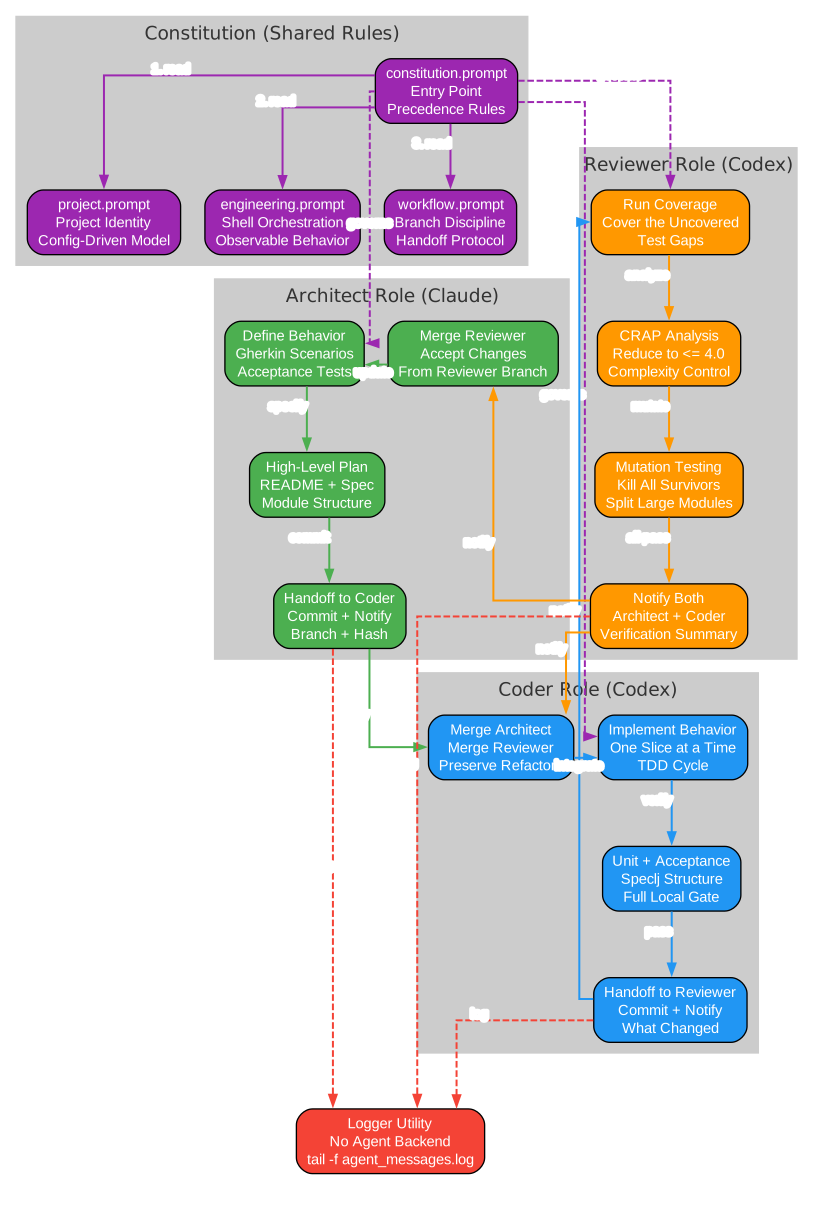
The agent roles diagram illustrates how the three primary agents interact with each other and with the shared constitution. The Architect defines behavior and design, then notifies the Coder. The Coder implements the behavior following TDD principles, then notifies the Reviewer. The Reviewer runs deep quality checks including coverage analysis, CRAP metric evaluation, and mutation testing, then notifies both the Architect and Coder. The Logger utility tails the shared message log without running an agent backend. All three primary agents are governed by the same constitution, which delegates to project rules, engineering rules, and workflow rules in priority order.
Architect
The Architect is the design authority. Its responsibilities include:
- Defining behavior first through Gherkin scenarios under
features/ - Owning the high-level plan, README, static design spec, and module structure
- Keeping Gherkin scenarios implementation-agnostic (externally visible behavior, not internal code)
- Creating concise summaries of new or changed scenarios for user review
- Committing and notifying the Coder with branch name, commit hash, and constraints
- Merging the Reviewer’s accepted changes from the correct source branch
The Architect typically runs on the master worktree since it owns the top-level design artifacts.
Coder
The Coder is the implementation engine. Its responsibilities include:
- Waiting for the Architect to confirm the environment is ready before starting
- Working only in its assigned branch/worktree
- Merging the latest accepted changes from the Architect’s branch upon notification
- Following the three laws of TDD for writing unit tests
- Implementing one scenario or one small behavior slice at a time
- Keeping acceptance and unit tests aligned
- Not handing off until the full local gate passes (all tests green)
- Committing and notifying the Reviewer with branch name, commit hash, and what commands passed
Reviewer
The Reviewer is the quality gatekeeper. Its responsibilities include:
- Merging from the Coder’s branch upon notification
- Running coverage analysis and covering the uncovered
- Running CRAP analysis and reducing every reported function to a complexity of 4.0 or less
- Running mutation tests and killing all survivors
- Splitting any module with more than 100 mutation counts
- Refactoring for testability when needed while preserving behavior
- Rerunning specs, CRAP, and mutation checks before finishing
- Committing only reviewer-owned changes
- Notifying both the Architect and Coder with the verification summary
Logger
The Logger is a utility role with no agent backend. When configured with none, it opens a window that tails logs/agent_messages.log. This provides real-time visibility into all inter-agent communication without requiring any AI processing.
Constitution System
The Constitution is the governance layer that ensures all agents follow the same rules. It uses a layered delegation model where a single entry point file delegates to subordinate files in priority order.
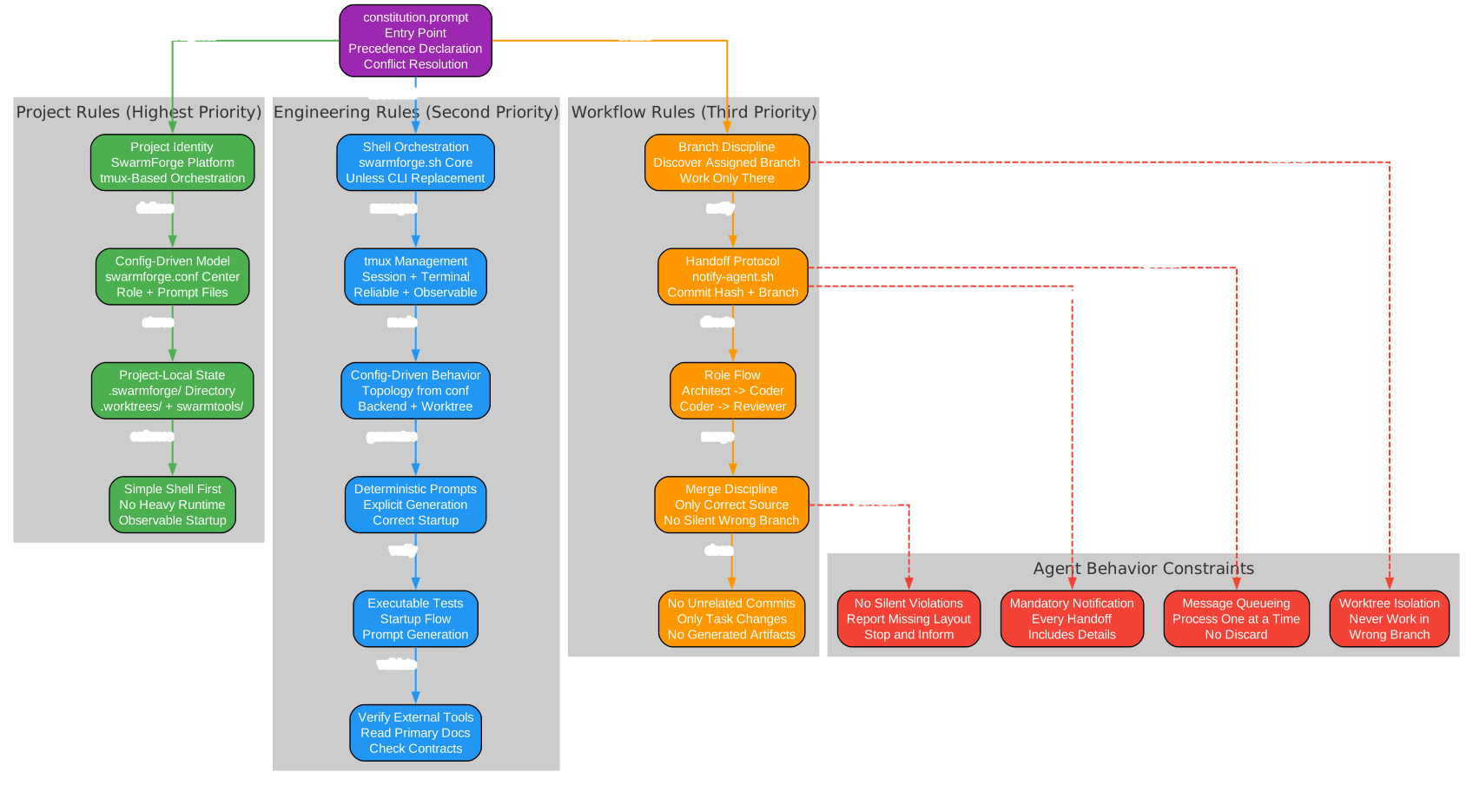
The constitution diagram shows the three-layer rule hierarchy and how it constrains agent behavior. The constitution.prompt entry point declares precedence and delegates to three subordinate files. Project Rules have the highest priority and define the project identity, the config-driven model, project-local state, and the preference for simple shell orchestration. Engineering Rules come second and cover shell orchestration principles, tmux management, config-driven behavior, deterministic prompt generation, executable testing, and external tool verification. Workflow Rules are third and define branch discipline, the handoff protocol, the role flow (Architect to Coder to Reviewer), merge discipline, and the prohibition on unrelated commits. These rules collectively enforce agent behavior constraints: worktree isolation, mandatory notification, no silent violations, and message queueing.
Layered Delegation
The constitution.prompt file is the entry point. It reads:
# HTW Constitution

This file takes precedence over subordinate files.
Read and obey the following subordinate documents in order.

1. `swarmforge/constitution/project.prompt`
2. `swarmforge/constitution/engineering.prompt`
3. `swarmforge/constitution/workflow.prompt`

If two subordinate files conflict, the earlier file wins.
This design lets you separate project-specific rules from engineering rules and workflow rules without forcing everything into one large prompt. When two subordinate files conflict, the earlier file wins – so project rules always override engineering rules, and engineering rules always override workflow rules.
Project Rules
Project rules define what the project is and how it should be structured:
- Preserve the config-driven launcher model centered on
swarmforge/swarmforge.conf,swarmforge/<role>.prompt, andswarmforge/constitution.prompt - Keep swarm state project-local under
.swarmforge/, worktrees under.worktrees/, and helper scripts underswarmtools/ - Prefer simple shell-based orchestration over adding heavier runtime infrastructure
- Maintain clear role boundaries, reliable startup behavior, and explicit agent handoff mechanisms
Engineering Rules
Engineering rules define how the code should be built:
- Prefer simple shell-based orchestration in
swarmforge.shunless a compiled CLI replacement is explicitly part of the work - Keep tmux session management, Terminal integration, git worktree setup, and helper-script generation reliable and observable
- Preserve config-driven behavior: role topology, backend choice, and worktree assignment must come from
swarmforge/swarmforge.conf - Keep prompt generation explicit and deterministic so each role receives the correct startup instructions
- Verify behavior with executable tests around startup flow, prompt generation, backend launch commands, and tmux orchestration
- Before relying on external tools, verify their invocation contract from primary documentation or local help output
Workflow Rules
Workflow rules define how agents should interact:
- At startup, each agent must discover the branch or worktree assigned to its role
- Each agent must remember that assigned branch or worktree and work only there
- The Architect defines behavior and design and notifies the Coder
- The Coder implements behavior and notifies the Reviewer
- The Reviewer runs deeper quality checks and notifies the Coder and Architect
- Agents must use
notify-agent.shfor handoffs - Every handoff must include the commit hash, branch name, what changed, and what was verified
- Do not commit unrelated local changes or generated artifacts unless they are required for the task
Installation
Getting started with Swarm Forge requires only a few steps:
Prerequisites
- tmux – session management for agent windows
- git – worktree and branch management
- Claude CLI or Codex CLI – AI agent backends (install the ones you plan to use)
- macOS (for Terminal window integration via osascript) or any system with tmux
Clone and Setup
# Clone the repository
git clone https://github.com/unclebob/swarm-forge.git

# Make the scripts executable
cd swarm-forge
chmod +x swarmforge.sh swarm-cleanup.sh swarmlog.sh notify-agent.sh

# Add to your PATH
export PATH="$(pwd):$PATH"
Create Your Project Configuration
# Create a project directory
mkdir my-project && cd my-project

# Create the swarmforge configuration directory
mkdir -p swarmforge/constitution

# Create the config file
cat > swarmforge/swarmforge.conf << 'EOF'
window architect claude master
window coder codex coder
window reviewer codex reviewer
window logger none none
EOF

# Create the constitution entry point
cat > swarmforge/constitution.prompt << 'EOF'
# Project Constitution

This file takes precedence over subordinate files.
Read and obey the following subordinate documents in order.

1. `swarmforge/constitution/project.prompt`
2. `swarmforge/constitution/engineering.prompt`
3. `swarmforge/constitution/workflow.prompt`

If two subordinate files conflict, the earlier file wins.
EOF

# Create role prompts
cat > swarmforge/architect.prompt << 'EOF'
You are the architect. Read swarmforge/constitution.prompt.
- Own the high-level plan and design spec.
- Define behavior in Gherkin scenarios.
- Notify the coder when design is committed.
EOF

cat > swarmforge/coder.prompt << 'EOF'
You are the coder. Read swarmforge/constitution.prompt.
- Implement one scenario at a time.
- Follow TDD: Red, Green, Refactor.
- Notify the reviewer when implementation passes all tests.
EOF

cat > swarmforge/reviewer.prompt << 'EOF'
You are the reviewer. Read swarmforge/constitution.prompt.
- Run coverage, CRAP, and mutation tests.
- Notify architect and coder when verification is complete.
EOF
Usage
Starting the Swarm
# From inside the project directory
swarmforge.sh

# Or specify the working directory
swarmforge.sh /path/to/my-project
When you run swarmforge.sh, it:
- Validates the configuration and all prompt files
- Initializes git if the directory is not already a repository
- Creates git worktrees under
.worktrees/for each non-master role - Generates startup instruction files in
.swarmforge/prompts/ - Creates tmux sessions named
swarmforge-<role>for each configured role - Launches each agent backend in its assigned worktree
- Opens Terminal windows (on macOS) or attaches to the cleanup-owner session
Communicating Between Agents
Agents communicate using the notify-agent.sh helper:
# Send a message to the architect role
swarmtools/notify-agent.sh architect "Design review complete, ready for next feature"

# Send a message by role index
swarmtools/notify-agent.sh 2 "Implementation done, all tests pass"
The notify script resolves the target by role name or index, logs the message with a timestamp to logs/agent_messages.log, and sends the message text to the target tmux session using tmux send-keys.
Quick Logging
For simple log entries without targeting a specific agent:
swarmlog.sh architect "Environment is ready"
This appends a timestamped entry to logs/agent_messages.log and prints it to stdout.
Stopping the Swarm
When the cleanup owner (typically the Architect) exits, swarm-cleanup.sh automatically:
- Kills all tmux sessions
- Closes all Terminal windows (on macOS)
You can also manually stop the swarm:
# Kill a specific session
tmux kill-session -t swarmforge-architect

# Kill all swarmforge sessions
tmux kill-session -t swarmforge-architect
tmux kill-session -t swarmforge-coder
tmux kill-session -t swarmforge-reviewer
tmux kill-session -t swarmforge-logger
Features
Config-Driven Topology
The swarm shape comes entirely from swarmforge/swarmforge.conf, not hardcoded shell variables. Each line defines one window:
window <role> <agent> <worktree>
You can define as many windows as your project needs. Each role maps to a corresponding prompt file at swarmforge/<role>.prompt. This lets each project choose its own swarm shape instead of being locked to a fixed set of roles.
Backend Selection Per Role
Each role can use a different AI backend:
claude– launches Claude CLI with--append-system-prompt-fileand--permission-mode acceptEditscodex– launches Codex CLI with-Cpointing to the worktree directorynone– opens a window without launching an agent (useful for the Logger utility)
Git Worktree Isolation
Each non-master role gets its own git worktree under .worktrees/. This means:
- The Architect works on
masterin the main directory - The Coder works in
.worktrees/coderon theswarmforge-coderbranch - The Reviewer works in
.worktrees/revieweron theswarmforge-reviewerbranch
Agents never work in each other’s worktrees. Changes flow through explicit merge operations triggered by notifications.
Observable Swarm
Every agent runs in its own tmux session with its own Terminal window. You can:
- Watch each agent’s reasoning and code generation in real time
- Attach to any session with
tmux attach-session -t swarmforge-<role> - Intervene by typing directly into any agent’s pane
- Monitor all inter-agent communication through the Logger utility
Strict Validation
The orchestrator validates the configuration before starting any sessions:
- Missing
swarmforge.conf– startup fails with “Config not found” - Missing
constitution.prompt– startup fails with “Constitution prompt not found” - Missing role prompt file – startup fails with “Missing role prompt”
- Unsupported backend – startup fails with “Unsupported agent”
- Duplicate roles – startup fails with “Duplicate role”
- Duplicate worktrees – startup fails with “Duplicate worktree”
- Unsafe worktree names (path traversal) – startup fails with “Invalid worktree”
Gherkin Feature Files
Swarm Forge includes executable feature specifications written in Gherkin syntax under features/. These cover:
- Agent launch – startup writes instruction files, launches backends, routes notifications
- Configuration – validation of config lines, prompt files, backends, and worktree names
- Workspace setup – git initialization, directory creation, worktree management, tmux sessions
Example feature for configuration validation:
Scenario: Each config line defines one swarm window
  Given "swarmforge/swarmforge.conf" contains:
    """
    window architect claude master
    window coder codex coder
    window reviewer codex reviewer
    window logger none none
    """
  When "swarmforge.sh" parses the config
  Then four windows are defined
  And the roles are "architect", "coder", "reviewer", and "logger"
  And the backends are "claude", "codex", "codex", and "none"
Message Queueing
The Clojure HTW example extends the constitution with a queueing rule:
## Queueing

Each agent processes one message at a time.

If another message arrives while the agent is busy, append it to
`pending-messages` in that agent's worktree.

When the current message is complete, the agent must process the
oldest queued message next and remove it from `pending-messages`.

Agents must not silently discard queued messages.
This ensures that no inter-agent communication is lost even when agents are busy processing previous tasks.
Conclusion
Swarm Forge demonstrates that effective AI agent coordination does not require complex frameworks, cloud infrastructure, or heavy runtime systems. With shell scripts, tmux, git worktrees, and a well-crafted constitution, Uncle Bob has created a system that turns raw AI coding speed into reliable, scalable, maintainable engineering output.
The key design principles are worth studying regardless of whether you adopt Swarm Forge directly:
- Config-driven topology – the swarm shape comes from a simple text file, not code
- Layered constitution – shared rules with clear precedence prevent conflicts
- Worktree isolation – each agent works in its own branch, changes flow through explicit merges
- Observable execution – every agent runs in a visible tmux session
- Strict validation – the orchestrator checks everything before launching any agents
- Simple shell first – prefer lightweight orchestration over heavy infrastructure
For developers exploring agentic AI coding, Swarm Forge offers a practical, runnable platform to experiment with disciplined multi-agent workflows. The fact that it comes from Uncle Bob – the author of Clean Code – gives it particular credibility in an industry where AI-generated code quality remains a serious concern.
The repository is available at github.com/unclebob/swarm-forge with 283+ stars and growing community adoption. Enjoyed this post? Never miss out on future posts by following us 


