Project N.O.M.A.D.: Offline-First Knowledge Server with AI
In an age where internet connectivity is often taken for granted, having access to critical knowledge and tools without relying on external servers is becoming increasingly valuable. Project N.O.M.A.D. (Node for Offline Media, Archives, and Data) addresses this need by providing a self-contained, offline-first knowledge and education server that keeps you informed and empowered - anytime, anywhere.
What is Project N.O.M.A.D.?
Project N.O.M.A.D. is a comprehensive offline survival computer that packages essential tools, knowledge bases, and AI capabilities into a single, easy-to-deploy system. Whether you’re preparing for emergency situations, working in remote locations, or simply want to reduce your dependence on cloud services, N.O.M.A.D. provides a robust solution for accessing information without an internet connection.
Understanding the Architecture
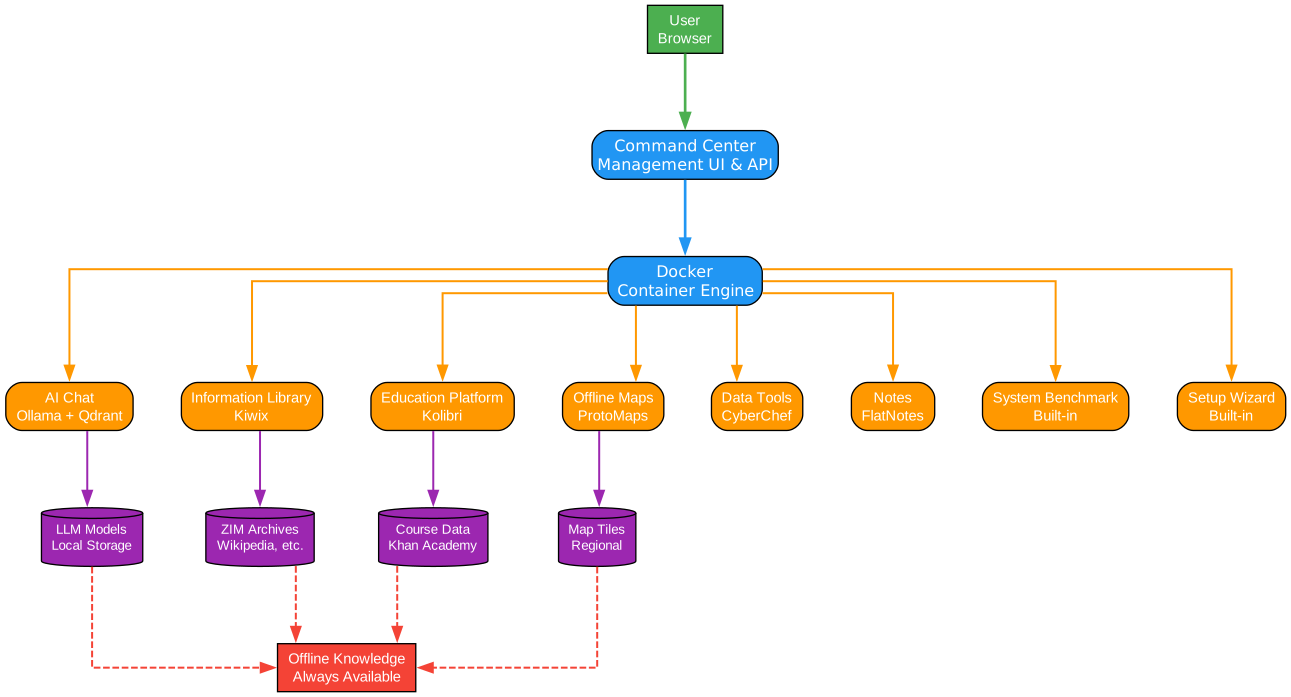
The architecture diagram above illustrates the core components and their interactions within Project N.O.M.A.D. Let’s break down each component:
User Layer: The user interacts with N.O.M.A.D. through a standard web browser, accessing the system via http://localhost:8080 or through a local network connection. This browser-based approach ensures compatibility across devices without requiring specialized client software.
Command Center: The Command Center serves as the central management UI and API that orchestrates all containerized tools and resources. It handles installation, configuration, updates, and provides a unified interface for accessing all capabilities. The Command Center is designed to be intuitive, featuring a Setup Wizard for first-time configuration.
Docker Container Engine: N.O.M.A.D. leverages Docker for containerization, ensuring that each tool runs in isolation with its own dependencies. This approach provides several benefits:
- Clean separation of concerns between different services
- Easy installation and removal of individual components
- Consistent behavior across different host systems
- Simplified updates and maintenance
Core Services: The system includes eight primary services, each addressing a specific need:
- AI Chat (Ollama + Qdrant) - Local AI chat with document upload and semantic search capabilities using RAG (Retrieval-Augmented Generation)
- Information Library (Kiwix) - Offline Wikipedia, medical references, survival guides, and ebooks
- Education Platform (Kolibri) - Khan Academy courses with progress tracking and multi-user support
- Offline Maps (ProtoMaps) - Downloadable regional maps with search and navigation
- Data Tools (CyberChef) - Encryption, encoding, hashing, and data analysis utilities
- Notes (FlatNotes) - Local note-taking with markdown support
- System Benchmark - Hardware scoring with community leaderboard
- Setup Wizard - Guided first-time configuration with curated content collections
Storage Layer: Each service maintains its own storage for offline access:
- LLM Models stored locally for AI capabilities
- ZIM Archives containing Wikipedia and other reference materials
- Course Data from Khan Academy for educational content
- Map Tiles for regional offline navigation
Output: Offline Knowledge: The ultimate output is always-available offline knowledge, ensuring that users can access critical information regardless of internet connectivity.
Key Features and Capabilities
Understanding the Features
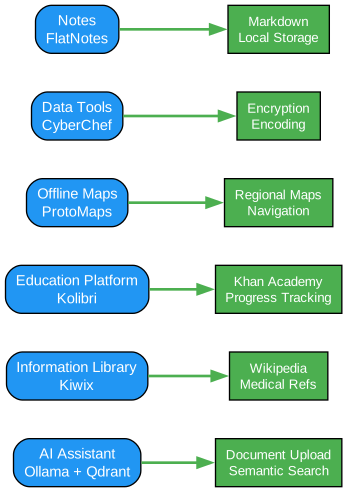
The features diagram demonstrates the relationship between each core capability and its specific benefits. Let’s explore each feature in detail:
AI Assistant (Ollama + Qdrant): The AI assistant provides intelligent chat capabilities powered by local language models. Key benefits include:
- Document Upload: Users can upload PDFs, text files, and other documents for analysis
- Semantic Search: Qdrant enables vector-based search, allowing users to find information based on meaning rather than exact keywords
- Privacy: All processing happens locally, ensuring sensitive documents never leave your system
- Model Flexibility: Supports various LLM sizes depending on available hardware
Information Library (Kiwix): Kiwix transforms your N.O.M.A.D. into a comprehensive offline reference library:
- Wikipedia: Complete offline Wikipedia with images
- Medical References: Critical medical knowledge for emergency situations
- Ebooks: Public domain literature and educational materials
- Survival Guides: Essential information for emergency preparedness
Education Platform (Kolibri): Kolibri brings structured learning to offline environments:
- Khan Academy Courses: Full course library with video lessons
- Progress Tracking: Monitor learning progress across subjects
- Multi-user Support: Different profiles for family members or students
- Offline Exercises: Practice problems without internet connectivity
Offline Maps (ProtoMaps): Regional maps ensure navigation capabilities without network access:
- Downloadable Regions: Select specific geographic areas for offline use
- Search Functionality: Find locations without online services
- Navigation: Basic routing capabilities for downloaded regions
Data Tools (CyberChef): CyberChef provides powerful data manipulation capabilities:
- Encryption/Decryption: Secure sensitive information
- Encoding/Decoding: Convert between various data formats
- Hashing: Verify file integrity and create checksums
- Analysis Tools: Examine and transform data structures
Notes (FlatNotes): Local note-taking with full markdown support:
- Markdown Support: Format notes with rich text
- Local Storage: Notes remain on your system
- Search: Quickly find information within notes
- Organization: Categorize and tag notes for easy retrieval
Installation and Setup
Understanding the Installation Workflow
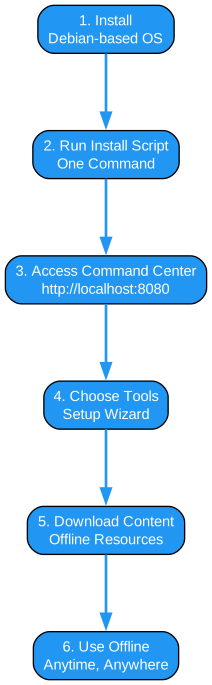
The workflow diagram illustrates the straightforward installation process for Project N.O.M.A.D.:
Step 1: Install Debian-based OS N.O.M.A.D. is designed for Debian-based operating systems, with Ubuntu being the recommended choice. The system can run on minimal hardware for basic functionality, or on powerful GPU-backed systems for full AI capabilities.
Step 2: Run Install Script A single command handles the entire installation process:
sudo apt-get update && \
sudo apt-get install -y curl && \
curl -fsSL https://raw.githubusercontent.com/Crosstalk-Solutions/project-nomad/refs/heads/main/install/install_nomad.sh \
  -o install_nomad.sh && \
sudo bash install_nomad.sh
This script automatically:
- Installs Docker and Docker Compose
- Downloads and configures the Command Center
- Sets up the management interface
- Prepares the system for tool installation
Step 3: Access Command Center After installation, access the Command Center through any web browser at http://localhost:8080 or http://DEVICE_IP:8080 for remote access on your local network.
Step 4: Choose Tools The Setup Wizard guides users through selecting which tools and content to install. This modular approach allows users to customize their N.O.M.A.D. based on available storage and specific needs.
Step 5: Download Content For tools requiring offline content (Wikipedia, maps, courses), N.O.M.A.D. provides a content management interface for downloading and organizing resources. This step requires internet connectivity but only needs to be performed once.
Step 6: Use Offline Once configured, N.O.M.A.D. operates completely offline. All tools, knowledge bases, and AI capabilities remain accessible without any internet connection.
System Requirements
Minimum Specifications
For a barebones installation of the management application:
- Processor: 2 GHz dual-core processor or better
- RAM: 4GB system memory
- Storage: At least 5 GB free disk space
- OS: Debian-based (Ubuntu recommended)
- Network: Stable internet connection (required during install only)
Optimal Specifications
For running LLMs and other AI tools:
- Processor: AMD Ryzen 7 or Intel Core i7 or better
- RAM: 32 GB system memory
- Graphics: NVIDIA RTX 3060 or AMD equivalent or better (more VRAM = run larger models)
- Storage: At least 250 GB free disk space (preferably on SSD)
- OS: Debian-based (Ubuntu recommended)
Data Flow and Privacy
Understanding the Data Flow
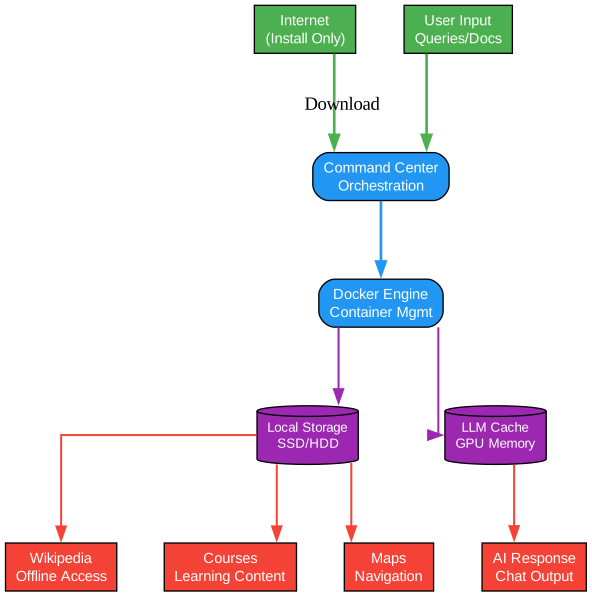
The data flow diagram illustrates how information moves through the N.O.M.A.D. system:
Input Sources:
- Internet (Install Only): Internet connectivity is only required during initial installation and when downloading additional content. The system does not require ongoing internet access.
- User Input: Queries, documents, and commands from the user interface
Processing Layer:
- Command Center: Orchestrates all requests and routes them to appropriate services
- Docker Engine: Manages container lifecycle and resource allocation
Storage Layer:
- Local Storage (SSD/HDD): Persistent storage for documents, ZIM files, course data, and map tiles
- LLM Cache (GPU Memory): Fast access to loaded AI models for responsive chat
Output:
- AI Response: Chat output from the local LLM
- Wikipedia Access: Offline encyclopedia content
- Course Access: Educational materials from Khan Academy
- Maps Navigation: Regional maps and routing
Privacy by Design: N.O.M.A.D. has zero built-in telemetry. The only external connection it makes is to Cloudflare’s utility endpoint (https://1.1.1.1/cdn-cgi/trace) to test internet connectivity. All data remains on your local system, ensuring complete privacy and control.
Running AI Models on Different Hosts
By default, N.O.M.A.D.’s installer sets up Ollama on the host when the AI Assistant is installed. However, you can run AI models on a different host:
- Configure Remote Ollama: Go to AI Assistant settings and input the URL for your Ollama server
- Start Ollama with External Access: Run Ollama with
OLLAMA_HOST=0.0.0.0to accept external connections - OpenAI-Compatible APIs: You can also use LM Studio or other OpenAI-compatible servers
This flexibility allows you to leverage more powerful hardware for AI processing while keeping the N.O.M.A.D. interface on a separate device.
Security Considerations
By design, Project N.O.M.A.D. is intended to be open and available without authentication barriers. This approach prioritizes ease of use for offline scenarios. However, there are important security considerations:
Network Exposure: N.O.M.A.D. is not designed to be exposed directly to the internet. If you plan to share your instance on a local network, use network-level controls to manage access.
Future Authentication: User authentication may be added in future releases based on community demand. Potential use cases include:
- Family use with parental controls
- Classroom use with teacher/admin accounts
- Multi-user environments with different permission levels
For now, network-level security is the recommended approach for multi-user scenarios.
Community and Resources
- Website: www.projectnomad.us - Learn more about the project
- Discord: Join the Community - Get help, share builds, connect with other users
- Benchmark Leaderboard: benchmark.projectnomad.us - Compare your hardware against other N.O.M.A.D. builds
- Troubleshooting Guide: Available in the repository for common issues
- FAQ: Answers to frequently asked questions
Conclusion
Project N.O.M.A.D. represents a significant step toward digital self-sufficiency. By combining AI capabilities, educational resources, reference materials, and practical tools into a single offline-first system, it provides a robust solution for anyone seeking to reduce their dependence on cloud services or prepare for scenarios where internet access may be unavailable.
Whether you’re a prepper building an emergency information system, a remote worker needing reliable offline access, or simply someone who values privacy and local control over their data, N.O.M.A.D. offers a comprehensive and well-designed solution.
The modular architecture allows you to start small and expand as needed, while the Docker-based deployment ensures consistency and ease of maintenance. With active development and a growing community, Project N.O.M.A.D. is positioned to become an essential tool for offline knowledge management. Enjoyed this post? Never miss out on future posts by following us 


