Google Magika: AI-Powered File Type Detection
File type detection is a fundamental problem in computing. Whether you’re building a security scanner, a file browser, or a content management system, knowing what type of file you’re dealing with is crucial. Traditional approaches rely on file extensions (unreliable) or magic bytes (limited). Google’s Magika changes the game by using deep learning to achieve approximately 99% accuracy across 200+ content types.
Magika is a novel AI-powered file type detection tool that leverages recent advances in deep learning to provide accurate detection. Under the hood, Magika employs a custom, highly optimized model that only weighs about a few MBs, and enables precise file identification within milliseconds, even when running on a single CPU.
How Magika Works
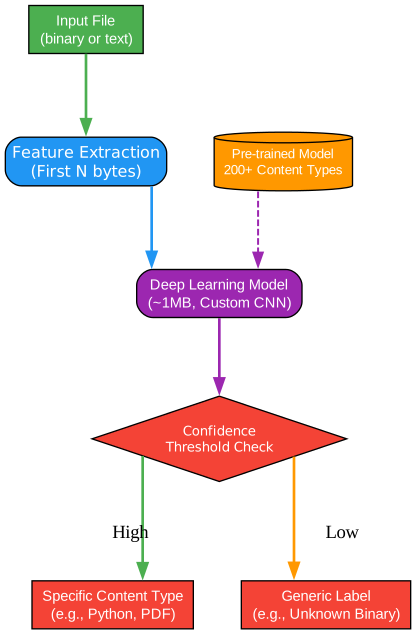
Understanding the Magika Architecture
The architecture diagram above illustrates the core components and data flow of the Magika file type detection system. Let’s break down each component in detail:
Input Layer: File Processing
The input layer is responsible for receiving and preprocessing files before they are analyzed by the neural network. This layer handles multiple input methods including file paths, byte streams, and standard input. The preprocessing step extracts a limited subset of the file’s content, which is crucial for maintaining near-constant inference time regardless of file size.
The input layer performs several critical operations:
- File reading with optimized buffering for large files
- Byte extraction from the beginning, middle, and end of files
- Handling of empty files and special cases
- Support for recursive directory scanning with the
-rflag
Feature Extraction Engine
The feature extraction engine transforms raw bytes into a format suitable for the neural network. This component is designed to capture the essential characteristics of file content while minimizing computational overhead. The engine extracts features from specific byte positions that have been determined to be most informative during the model training phase.
Key aspects of the feature extraction process:
- Extraction of bytes from strategic positions within the file
- Normalization of byte values for consistent model input
- Handling of files smaller than the expected input size
- Efficient memory usage through streaming processing
Neural Network Model
At the heart of Magika is a custom deep learning model specifically designed for file type classification. The model architecture has been optimized for both accuracy and speed, achieving the remarkable balance of high precision with minimal computational requirements. The model weighs only a few megabytes, making it practical for deployment in various environments.
The neural network characteristics include:
- Custom architecture optimized for file type classification
- Trained on approximately 100 million samples
- Support for 200+ content types including binary and textual formats
- Optimized inference time of about 5 milliseconds per file on a single CPU
Output Processing and Threshold System
The output processing layer applies Magika’s unique per-content-type threshold system. This sophisticated mechanism determines whether to trust the model’s prediction or return a more generic label. The threshold system is key to Magika’s reliability, preventing false positives in ambiguous cases.
The output processing includes:
- Confidence score calculation for each prediction
- Per-content-type threshold comparison
- Fallback to generic labels when confidence is low
- Support for different prediction modes (high-confidence, medium-confidence, best-guess)
Result Aggregation
The final component aggregates results and presents them in various formats. This layer supports multiple output formats including human-readable descriptions, JSON, JSONL, and custom formats. The aggregation layer also handles batch processing results efficiently.

Understanding the Detection Pipeline
The detection pipeline diagram demonstrates the complete flow from file input to final classification output. This pipeline is designed for both accuracy and efficiency, processing files in milliseconds while maintaining high precision.
Stage 1: File Acquisition
The pipeline begins with file acquisition, which supports multiple input methods. Users can provide individual file paths, directories for recursive scanning, or even pipe content through standard input. This flexibility makes Magika suitable for various integration scenarios.
File acquisition features:
- Single file analysis with direct path specification
- Recursive directory scanning with the
-rflag - Standard input processing for pipeline integration
- Batch processing of thousands of files simultaneously
Stage 2: Content Sampling
Content sampling is a critical optimization that enables Magika’s near-constant inference time. Instead of processing entire files, Magika extracts bytes from specific positions that are most informative for classification. This approach dramatically reduces processing time for large files without sacrificing accuracy.
The sampling strategy includes:
- Extraction from file header (first bytes)
- Middle section sampling for format identification
- Footer sampling for formats with magic bytes at the end
- Intelligent handling of small files that don’t have all sections
Stage 3: Model Inference
The model inference stage processes the sampled bytes through the neural network. This stage is highly optimized, achieving approximately 5 milliseconds per file on a single CPU. The model has been trained to recognize patterns across 200+ content types, including both binary and textual formats.
Inference characteristics:
- One-time model loading overhead (cached for subsequent calls)
- Approximately 5ms inference time per file
- Single CPU operation (no GPU required)
- Memory-efficient processing
Stage 4: Confidence Scoring
After inference, the system calculates confidence scores for each potential content type. The scoring mechanism considers the model’s raw output and applies content-specific thresholds. This approach ensures that predictions are only returned when the model is sufficiently confident.
Confidence scoring process:
- Raw probability distribution from the neural network
- Application of per-content-type thresholds
- Comparison against confidence thresholds
- Determination of final prediction reliability
Stage 5: Output Generation
The final stage generates the output in the requested format. Magika supports multiple output formats to accommodate different use cases, from human-readable descriptions for command-line use to structured JSON for programmatic integration.
Output format options:
- Human-readable descriptions (default)
- JSON format for API integration
- JSONL format for streaming processing
- Custom format with placeholders for specific fields

Understanding Supported File Types
The file types diagram illustrates the breadth of content types that Magika can identify. With support for over 200 content types, Magika covers the vast majority of files encountered in typical computing environments.
Code and Programming Languages
Magika excels at identifying source code files across numerous programming languages. Unlike traditional methods that rely on file extensions, Magika analyzes the actual content to determine the language, making it resistant to mislabeled files.
Supported programming languages include:
- Python, JavaScript, TypeScript, and related formats
- C, C++, C#, and header files
- Java, Kotlin, and Scala
- Ruby, PHP, Perl, and Go
- Assembly, Shell scripts, and batch files
- Configuration formats (JSON, YAML, TOML, INI)
Document Formats
Document detection covers a wide range of office and publishing formats. Magika can distinguish between different versions of formats (e.g., Word 2007+ vs. older formats) and identify document components.
Document types supported:
- Microsoft Office formats (DOCX, XLSX, PPTX)
- OpenDocument formats (ODT, ODS, ODP)
- PDF documents and related formats
- Electronic publications (EPUB, MOBI)
- Rich Text Format (RTF)
- Plain text documents
Media Files
Media file detection includes images, audio, and video formats. Magika identifies the specific codec and container format, providing more detailed information than simple MIME type detection.
Media categories:
- Image formats (JPEG, PNG, GIF, WebP, SVG, BMP, TIFF)
- Audio formats (MP3, WAV, FLAC, AAC, OGG)
- Video formats (MP4, WebM, AVI, MKV, MOV)
- Container format identification
Archive and Compressed Files
Archive detection identifies various compression and archive formats, including nested archives. This is particularly useful for security scanning where archives may contain malicious content.
Archive types:
- ZIP, TAR, GZIP, BZIP2
- RAR, 7Z, XZ
- Compressed archive combinations
- Package formats (DEB, RPM)
Binary and Executable Files
Binary file detection is crucial for security applications. Magika identifies executable formats, libraries, and system files with high accuracy.
Binary categories:
- Windows executables (EXE, DLL)
- Linux executables (ELF)
- macOS bundles and applications
- Shared libraries and object files
- System binaries
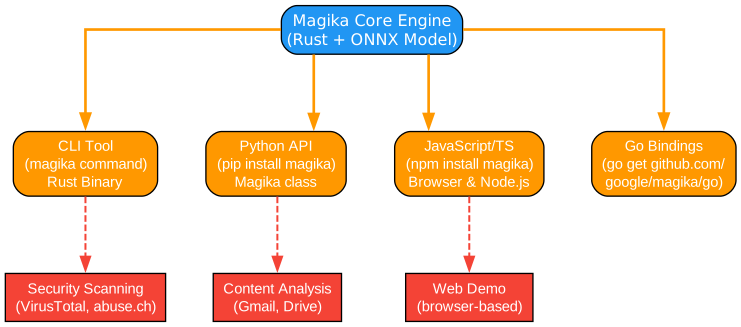
Understanding Integration Options
The integration diagram shows the various ways Magika can be integrated into different systems and workflows. Magika’s flexibility makes it suitable for a wide range of applications, from command-line tools to enterprise security systems.
Command Line Interface (CLI)
The CLI is the most direct way to use Magika. Written in Rust for performance, the CLI provides a powerful interface for file type detection with numerous output format options.
CLI features:
- Written in Rust for optimal performance
- Multiple installation methods (pipx, brew, cargo, installer script)
- Recursive directory scanning
- JSON, JSONL, and custom output formats
- Color output support
- Standard input processing
Python API
The Python API provides programmatic access to Magika’s detection capabilities. This is ideal for integrating Magika into Python applications, scripts, and data processing pipelines.
Python API capabilities:
- Simple
Magikaclass interface - Multiple identification methods (path, bytes, stream)
- Detailed result objects with confidence scores
- Integration with existing Python workflows
- Compatible with Python 3.8+
JavaScript/TypeScript Package
The JavaScript package enables Magika usage in web applications and Node.js environments. An experimental npm package powers the web demo, running entirely in the browser.
JavaScript package features:
- Browser and Node.js support
- WebAssembly-based inference
- Client-side processing (no server required)
- TypeScript type definitions
- Integration with web applications
Go Language Bindings
Go bindings are available for integrating Magika into Go applications. This is particularly useful for cloud-native and infrastructure tools written in Go.
Go binding characteristics:
- Native Go package
- CGO-free implementation
- Suitable for production use
- Integration with Go toolchains
Enterprise Integration
Magika is designed for enterprise-scale deployment. Google uses Magika at scale to route Gmail, Drive, and Safe Browsing files to proper security scanners, processing hundreds of billions of samples weekly.
Enterprise use cases:
- Email attachment scanning
- Cloud storage security
- Malware detection pipelines
- Content policy enforcement
- Data loss prevention
Installation
Magika offers multiple installation methods to suit different environments and use cases.
Command Line Tool Installation
Using pipx (Recommended for Python users):
pipx install magika
Using Homebrew (macOS/Linux):
brew install magika
Using the installer script (Linux/macOS):
curl -LsSf https://securityresearch.google/magika/install.sh | sh
Using PowerShell (Windows):
powershell -ExecutionPolicy Bypass -c "irm https://securityresearch.google/magika/install.ps1 | iex"
Using Cargo (Rust users):
cargo install --locked magika-cli
Python Package Installation
pip install magika
JavaScript Package Installation
npm install magika
Usage
Command Line Examples
Basic file detection:
magika document.pdf
# Output: document.pdf: PDF document (document)
Recursive directory scanning:
magika -r ./project_directory
JSON output format:
magika ./code.py --json
Example JSON output:
[
  {
    "path": "./code.py",
    "result": {
      "status": "ok",
      "value": {
        "dl": {
          "description": "Python source",
          "extensions": ["py", "pyi"],
          "group": "code",
          "is_text": true,
          "label": "python",
          "mime_type": "text/x-python"
        },
        "output": {
          "description": "Python source",
          "extensions": ["py", "pyi"],
          "group": "code",
          "is_text": true,
          "label": "python",
          "mime_type": "text/x-python"
        },
        "score": 0.996999979019165
      }
    }
  }
]
Reading from standard input:
cat config.ini | magika -
# Output: -: INI configuration file (text)
Output with confidence score:
magika -s document.docx
# Output: document.docx: Microsoft Word 2007+ document (0.998)
MIME type output:
magika -i image.png
# Output: image.png: image/png
Python API Examples
Basic usage:
from magika import Magika

# Initialize the detector
m = Magika()

# Identify from bytes
result = m.identify_bytes(b'function log(msg) {console.log(msg);}')
print(result.output.label)  # Output: javascript

# Identify from file path
result = m.identify_path('./config.ini')
print(result.output.label)  # Output: ini

# Identify from file stream
with open('./document.pdf', 'rb') as f:
    result = m.identify_stream(f)
    print(result.output.label)  # Output: pdf
Accessing detailed information:
from magika import Magika

m = Magika()
result = m.identify_path('./script.py')

# Access all available information
print(f"Label: {result.output.label}")
print(f"Description: {result.output.description}")
print(f"MIME Type: {result.output.mime_type}")
print(f"Group: {result.output.group}")
print(f"Extensions: {result.output.extensions}")
print(f"Is Text: {result.output.is_text}")
print(f"Score: {result.score}")
Batch processing:
from magika import Magika
import os

m = Magika()

# Process multiple files
for root, dirs, files in os.walk('./project'):
    for file in files:
        filepath = os.path.join(root, file)
        result = m.identify_path(filepath)
        print(f"{filepath}: {result.output.description}")
Features
| Feature | Description |
|---|---|
| 200+ Content Types | Supports detection of over 200 file types including code, documents, media, archives, and binaries |
| ~99% Accuracy | Achieves approximately 99% average precision and recall on the test set |
| ~5ms Inference | Processes files in about 5 milliseconds on a single CPU after model loading |
| Multiple Languages | Available as CLI (Rust), Python package, JavaScript/TypeScript, and Go bindings |
| Near-Constant Time | Inference time is nearly constant regardless of file size |
| Confidence Modes | Supports high-confidence, medium-confidence, and best-guess prediction modes |
| Threshold System | Per-content-type thresholds prevent false positives |
| Batch Processing | Can process thousands of files in a single invocation |
| Recursive Scanning | Built-in support for recursive directory scanning |
| Multiple Output Formats | JSON, JSONL, MIME type, labels, and custom formats |
| Standard Input | Supports piping content through stdin |
| Web Demo | Browser-based demo running entirely client-side |
Key Advantages Over Traditional Methods
Superior to File Extensions:
File extensions are notoriously unreliable. Users can easily rename files, and malicious actors often use misleading extensions. Magika analyzes actual content, making it immune to extension-based deception.
Better Than Magic Bytes:
Traditional magic byte detection relies on fixed signatures at specific file positions. This approach is limited to known signatures and can be fooled by crafted files. Magika’s neural network learns patterns from millions of samples, enabling it to detect file types even when signatures are missing or corrupted.
Handles Ambiguous Cases:
Many file formats share similar structures or are subsets of other formats. Magika’s confidence scoring system handles these cases gracefully, returning generic labels when certainty is low rather than making potentially incorrect predictions.
Troubleshooting
Common Issues and Solutions
Issue: Model download fails
If the model download fails during first use, check your internet connection and try again. The model is downloaded automatically on first use and cached locally.
# Clear cache and retry
rm -rf ~/.cache/magika
magika --version  # This will trigger model download
Issue: Slow first run
The first run includes model loading overhead. Subsequent runs are much faster as the model is cached. For batch processing, process multiple files in a single invocation to amortize the loading cost.
Issue: Low confidence predictions
If Magika returns generic labels like “Generic text document” or “Unknown binary data”, the file may be genuinely ambiguous or corrupted. Use the --output-score flag to see confidence scores.
magika -s ambiguous_file.txt
Issue: Python import error
Ensure you have the correct version of Python installed (3.8+) and that the package is installed in the correct environment.
python --version
pip install --upgrade magika
Issue: Permission denied errors
When scanning directories, ensure you have read permissions for all files. Use --no-dereference to avoid following symbolic links that may point to restricted locations.
magika --no-dereference -r ./directory
Issue: Memory usage with large batches
When processing thousands of files, memory usage may increase. Consider processing in smaller batches or using streaming output formats.
# Use JSONL for streaming output
magika --jsonl -r ./large_directory
Conclusion
Google Magika represents a significant advancement in file type detection technology. By leveraging deep learning trained on approximately 100 million samples, it achieves approximately 99% accuracy across 200+ content types while maintaining blazing-fast inference times of about 5 milliseconds per file.
The tool’s versatility makes it suitable for a wide range of applications:
- Security scanning and malware detection
- Content management systems
- File browsers and explorers
- Data processing pipelines
- Email and document processing
With multiple installation options (CLI, Python, JavaScript, Go) and flexible output formats, Magika can be easily integrated into existing workflows. The fact that Google uses it at scale for Gmail, Drive, and Safe Browsing demonstrates its production readiness and reliability.
Whether you’re building a security tool, a file management system, or simply need reliable file type detection, Magika offers a modern, AI-powered solution that outperforms traditional approaches.
Resources
- Magika Website
- GitHub Repository
- Research Paper (ICSE 2025)
- Web Demo
- Python Documentation
- Announcement Post

Enjoyed this post? Never miss out on future posts by following us


