Introduction
Most people interact with LLMs and documents through RAG: you upload files, the LLM retrieves relevant chunks at query time, and generates an answer. This works, but the LLM is rediscovering knowledge from scratch on every question. There is no accumulation. Ask a subtle question that requires synthesizing five documents, and the LLM has to find and piece together the relevant fragments every time. Nothing is built up.
LLM Wiki takes a fundamentally different approach. Instead of just retrieving from raw documents at query time, the LLM incrementally builds and maintains a persistent wiki – a structured, interlinked collection of markdown files that sits between you and the raw sources. When you add a new source, the LLM does not just index it for later retrieval. It reads it, extracts the key information, and integrates it into the existing wiki – updating entity pages, revising topic summaries, noting where new data contradicts old claims, strengthening or challenging the evolving synthesis. The knowledge is compiled once and then kept current, not re-derived on every query.
Based on Andrej Karpathy’s LLM Wiki pattern, this project transforms an abstract design pattern into a full cross-platform desktop application with 2,600+ stars on GitHub. Built with Tauri v2, React 19, and TypeScript, it delivers a polished knowledge management experience that goes far beyond the original concept.
How It Works
The core idea is simple but powerful: the wiki is a persistent, compounding artifact. The cross-references are already there. The contradictions have already been flagged. The synthesis already reflects everything you have read. The wiki keeps getting richer with every source you add and every question you ask.
You never write the wiki yourself – the LLM writes and maintains all of it. You are in charge of sourcing, exploration, and asking the right questions. The LLM does all the grunt work – the summarizing, cross-referencing, filing, and bookkeeping that makes a knowledge base actually useful over time.
The architecture follows Karpathy’s three-layer design:
- Raw Sources – your curated collection of source documents (PDF, DOCX, MD, PPTX, XLSX). These are immutable. The LLM reads from them but never modifies them.
- The Wiki – a directory of LLM-generated markdown files. Summaries, entity pages, concept pages, comparisons, an overview, a synthesis. The LLM owns this layer entirely.
- The Schema – a document that tells the LLM how the wiki is structured, what the conventions are, and what workflows to follow.
Three core operations drive the system:
- Ingest – drop a new source and the LLM processes it, writes a summary page, updates the index, updates relevant entity and concept pages, and appends an entry to the log.
- Query – ask questions against the wiki. The LLM searches for relevant pages, reads them, and synthesizes an answer with citations.
- Lint – periodically health-check the wiki for contradictions, stale claims, orphan pages, and missing cross-references.
Architecture
The diagram below illustrates the overall architecture of LLM Wiki, showing how user inputs flow through the Tauri desktop shell into the core engine and down to the storage layer.
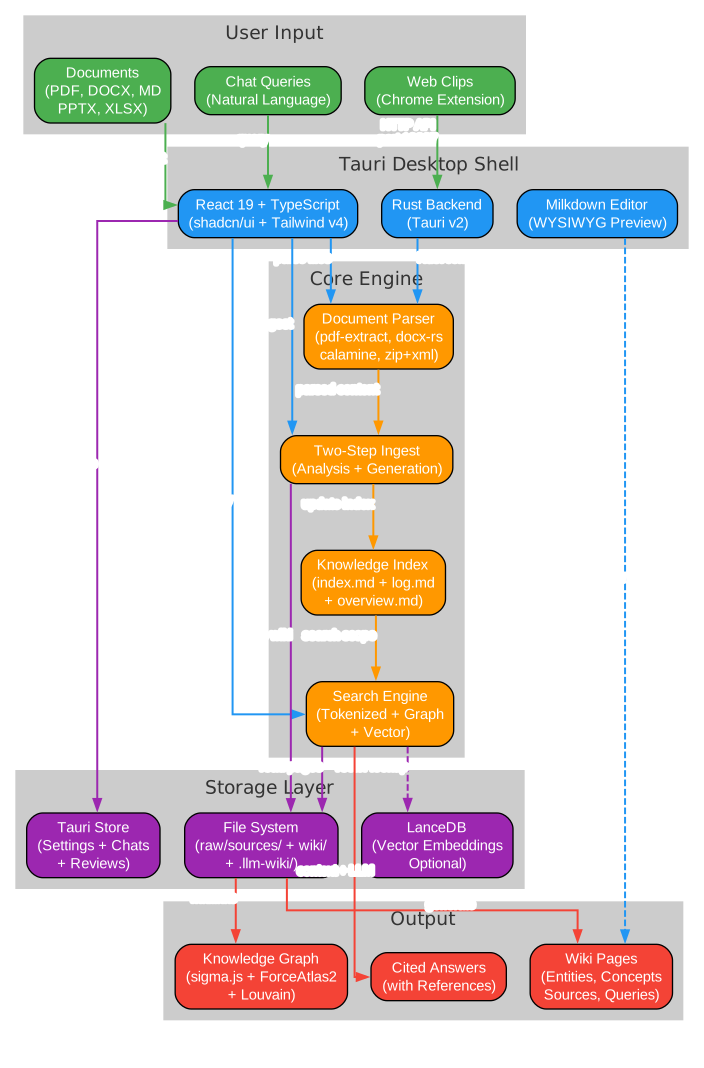
The architecture is organized into five distinct layers. At the top, the User Input layer accepts documents in multiple formats (PDF, DOCX, Markdown, PPTX, XLSX), natural language chat queries, and web clips from the Chrome extension. These inputs enter the Tauri Desktop Shell, which combines a React 19 + TypeScript frontend with shadcn/ui and Tailwind v4, a Rust backend powered by Tauri v2, and a Milkdown WYSIWYG editor for wiki page preview and editing.
The Core Engine houses the document parser (supporting pdf-extract, docx-rs, calamine, and zip+xml for various formats), the two-step ingest engine (analysis then generation), the knowledge index (index.md, log.md, overview.md), and the multi-phase search engine (tokenized, graph, and vector search). Below that, the Storage Layer persists everything to the file system (raw/sources/, wiki/, .llm-wiki/), LanceDB for optional vector embeddings, and Tauri Store for settings, chats, and reviews. Finally, the Output layer produces wiki pages (entities, concepts, sources, queries), an interactive knowledge graph visualization using sigma.js with ForceAtlas2 and Louvain community detection, and cited chat answers with reference tracking.
Knowledge Vault System
The knowledge vault is the heart of LLM Wiki. The diagram below shows how documents are transformed into a persistent, searchable knowledge base.
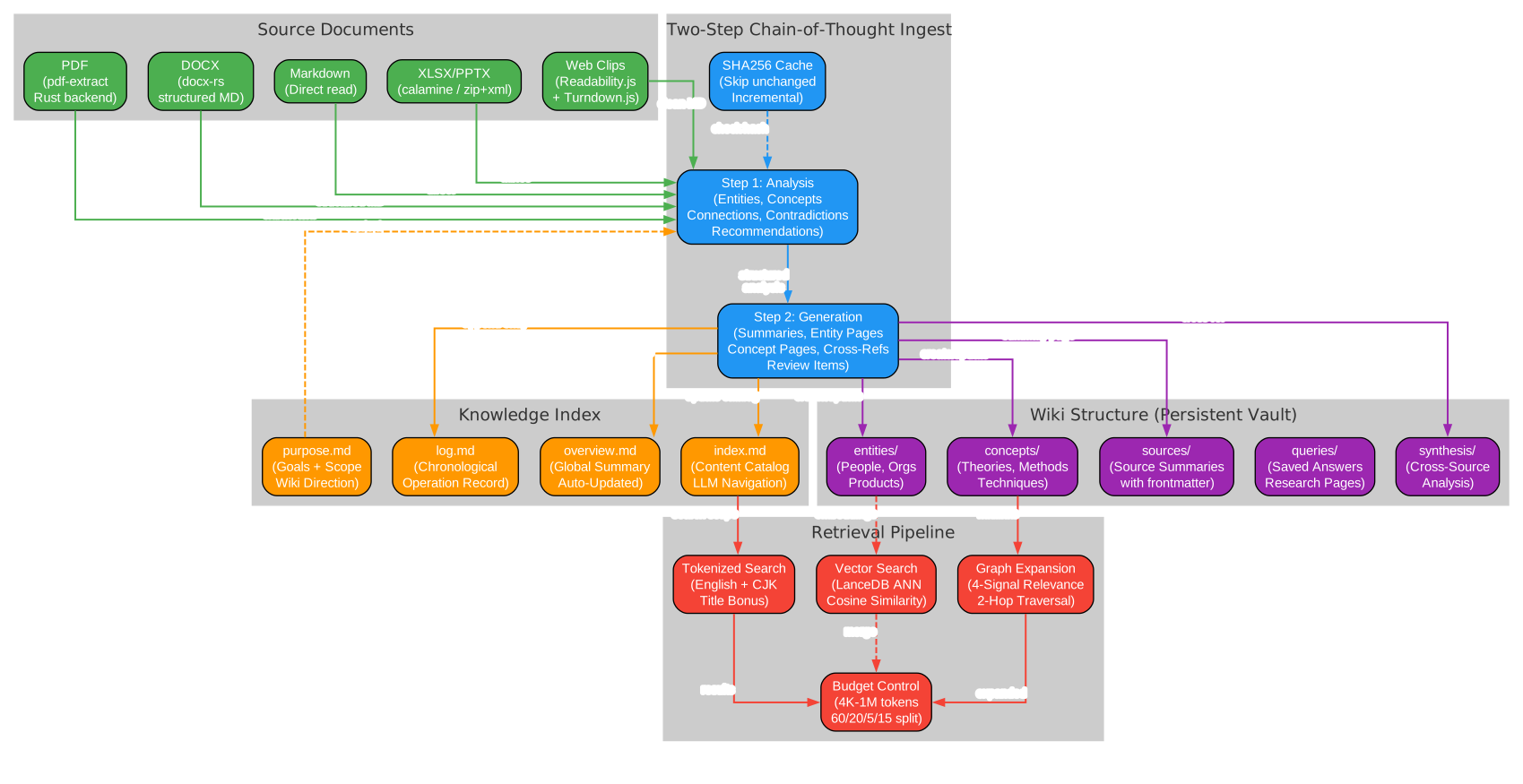
The vault system begins with Source Documents in five supported formats: PDF (parsed via pdf-extract with Rust backend), DOCX (converted to structured Markdown via docx-rs), Markdown (read directly), XLSX/PPTX (parsed via calamine and zip+xml), and Web Clips (extracted via Readability.js and converted to Markdown via Turndown.js). All sources flow into the Two-Step Chain-of-Thought Ingest pipeline.
Step 1 is Analysis: the LLM reads the source and produces a structured analysis identifying key entities, concepts, arguments, connections to existing wiki content, contradictions with existing knowledge, and recommendations for wiki structure. A SHA256 cache checks whether the source has changed since the last ingest, skipping unchanged files to save LLM tokens and time.
Step 2 is Generation: the LLM takes the analysis and generates wiki files including source summaries with YAML frontmatter (type, title, sources array), entity pages, concept pages with cross-references, updated index.md, log.md, and overview.md, review items for human judgment, and search queries for Deep Research.
The generated content populates the Knowledge Index (index.md as content catalog, log.md as chronological record, overview.md as auto-updated global summary, and purpose.md defining the wiki’s goals and scope) and the Wiki Structure (entities/, concepts/, sources/, queries/, and synthesis/ directories). Every wiki page includes a sources: [] field in YAML frontmatter linking back to the raw source files that contributed to it.
The Retrieval Pipeline operates in multiple phases: tokenized search (with English word splitting and CJK bigram tokenization, plus title match bonus), optional vector semantic search (via LanceDB with cosine similarity for finding semantically related pages without keyword overlap), graph expansion (using the 4-signal relevance model with 2-hop traversal and decay), and budget control (configurable 4K to 1M token context window with 60/20/5/15 proportional allocation for wiki pages, chat history, index, and system prompt).
Workflow
The workflow diagram below shows the complete lifecycle from document import through cross-session access.
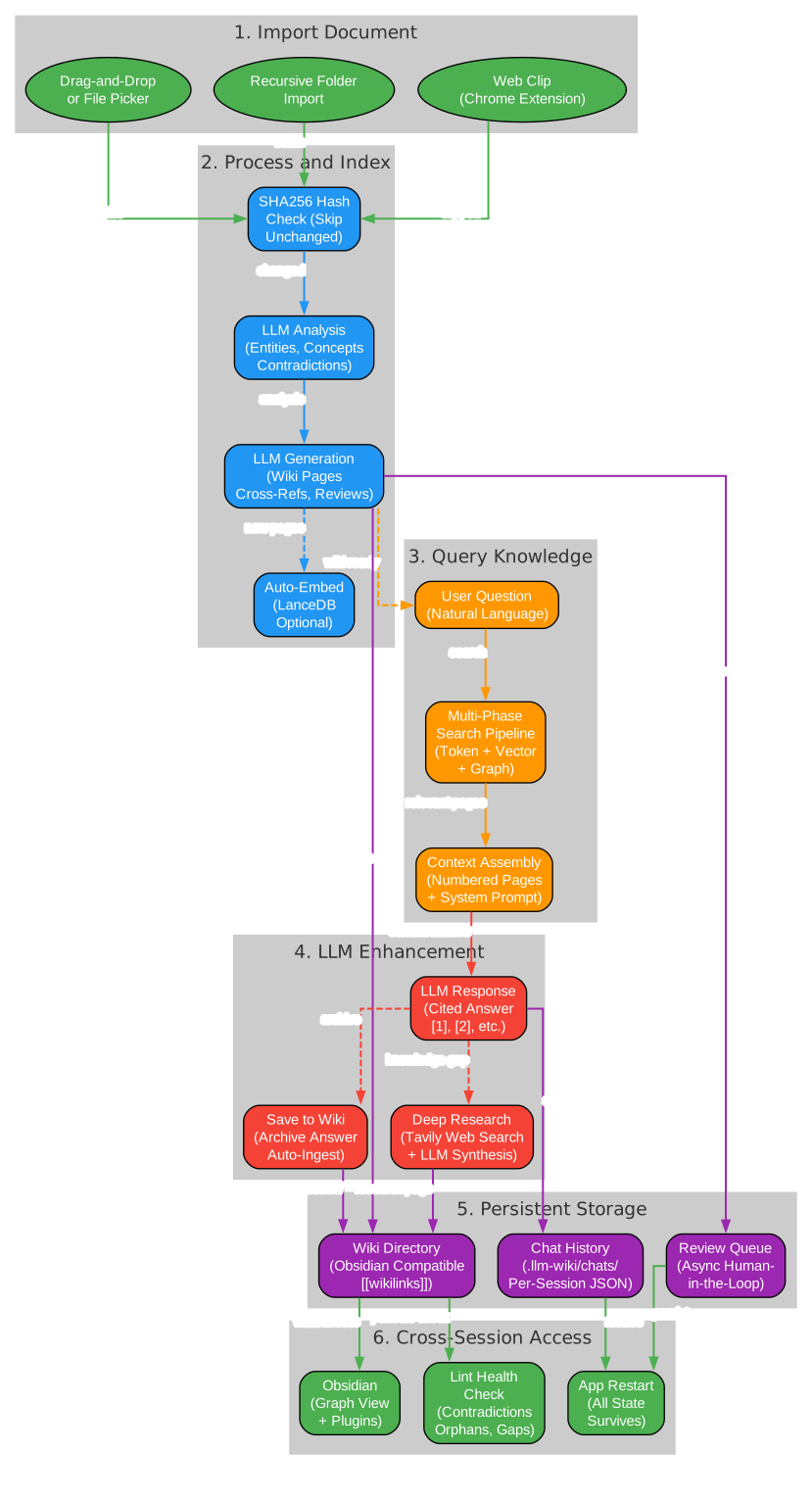
Phase 1 – Import Document: Users can import documents through three channels: drag-and-drop or file picker for individual files, recursive folder import preserving directory structure (with folder paths passed as LLM classification context), and web clips from the Chrome extension that automatically trigger the ingest pipeline.
Phase 2 – Process and Index: Imported files first undergo a SHA256 hash check. Unchanged files are skipped automatically. Changed files enter the two-step LLM ingest: analysis identifies entities, concepts, and contradictions; generation creates wiki pages, cross-references, and review items. When vector search is enabled, new pages are automatically embedded into LanceDB.
Phase 3 – Query Knowledge: Users ask natural language questions. The multi-phase search pipeline combines tokenized search, optional vector search, and graph expansion to find relevant pages. Context assembly numbers the pages and includes the system prompt with purpose.md, language rules, citation format, and index.md.
Phase 4 – LLM Enhancement: The LLM generates a cited answer referencing pages by number (e.g., [1], [2]). Valuable answers can be archived to the wiki’s queries/ directory and auto-ingested to extract entities and concepts. When knowledge gaps are detected, Deep Research triggers Tavily web search with LLM-optimized queries, synthesizes findings into a research page, and auto-ingests the results.
Phase 5 – Persistent Storage: All wiki pages are written to the file system in an Obsidian-compatible directory structure with [[wikilinks]] syntax. Chat history is saved per-session as JSON in .llm-wiki/chats/. The review queue persists items flagged by the LLM for human judgment.
Phase 6 – Cross-Session Access: The wiki directory works as an Obsidian vault with graph view and plugins. All state survives app restarts – conversations, settings, review items, and project configuration. Periodic lint health checks detect contradictions, orphan pages, and knowledge gaps.
Installation
Pre-built Binaries
Download from the Releases page:
- macOS:
.dmg(Apple Silicon + Intel) - Windows:
.msi - Linux:
.deb/.AppImage
Build from Source
# Prerequisites: Node.js 20+, Rust 1.70+
git clone https://github.com/nashsu/llm_wiki.git
cd llm_wiki
npm install
npm run tauri dev      # Development
npm run tauri build    # Production build
Chrome Extension
- Open
chrome://extensions - Enable “Developer mode”
- Click “Load unpacked”
- Select the
extension/directory
Usage
- Launch the app and create a new project (choose from Research, Reading, Personal Growth, Business, or General templates)
- Go to Settings and configure your LLM provider (API key + model)
- Go to Sources and import documents (PDF, DOCX, MD, etc.)
- Watch the Activity Panel as the LLM automatically builds wiki pages
- Use Chat to query your knowledge base with natural language
- Browse the Knowledge Graph to see connections between entities and concepts
- Check Review for items needing your attention
- Run Lint periodically to maintain wiki health
Features
Two-Step Chain-of-Thought Ingest
The original Karpathy pattern describes a single-step ingest where the LLM reads and writes simultaneously. LLM Wiki splits this into two sequential LLM calls for significantly better quality:
Step 1 (Analysis): LLM reads source -> structured analysis
  - Key entities, concepts, arguments
  - Connections to existing wiki content
  - Contradictions and tensions with existing knowledge
  - Recommendations for wiki structure

Step 2 (Generation): LLM takes analysis -> generates wiki files
  - Source summary with frontmatter (type, title, sources[])
  - Entity pages, concept pages with cross-references
  - Updated index.md, log.md, overview.md
  - Review items for human judgment
  - Search queries for Deep Research
Additional ingest enhancements include SHA256 incremental caching (unchanged files are skipped), persistent ingest queue with crash recovery and auto-retry (up to 3 times), folder import preserving directory structure, queue visualization with progress bars, auto-embedding when vector search is enabled, source traceability via frontmatter sources: [] fields, and language-aware generation (English or Chinese).
4-Signal Knowledge Graph
The knowledge graph uses a 4-signal relevance model to quantify relationships between wiki pages:
| Signal | Weight | Description |
|---|---|---|
| Direct link | x3.0 | Pages linked via [[wikilinks]] |
| Source overlap | x4.0 | Pages sharing the same raw source (via frontmatter sources[]) |
| Adamic-Adar | x1.5 | Pages sharing common neighbors (weighted by neighbor degree) |
| Type affinity | x1.0 | Bonus for same page type (entity to entity, concept to concept) |
The graph visualization uses sigma.js with graphology and ForceAtlas2 layout. Node colors indicate page type or community, sizes scale by link count. Edge thickness and color reflect relevance weight (green for strong, gray for weak). Hover interactions keep neighbors visible while dimming non-neighbors, with relevance score labels on highlighted edges.
Louvain Community Detection
Automatic discovery of knowledge clusters using the Louvain algorithm discovers which pages naturally group together based on link topology, independent of predefined page types. Each community is scored by intra-edge density, with low-cohesion clusters (below 0.15) flagged with warnings. A 12-color palette provides distinct visual separation, and the legend shows top node label, member count, and cohesion per cluster.
Graph Insights
The system automatically analyzes graph structure to surface actionable insights:
- Surprising Connections – unexpected cross-community edges, cross-type links, and peripheral-to-hub couplings ranked by composite surprise score
- Knowledge Gaps – isolated pages (degree 1 or less), sparse communities (cohesion below 0.15 with 3+ pages), and bridge nodes connecting 3+ clusters
- Interactive – click any insight card to highlight corresponding nodes and edges in the graph; knowledge gaps and bridge nodes have a Deep Research button
Optimized Query Retrieval
The multi-phase retrieval pipeline combines tokenized search (with English word splitting and CJK bigram tokenization), optional vector semantic search (via LanceDB with cosine similarity), graph expansion (4-signal relevance model with 2-hop traversal), and budget control (configurable 4K to 1M token context window with 60/20/5/15 proportional allocation). Vector search is fully optional – disabled by default, enabled in Settings with independent endpoint, API key, and model configuration. Benchmarks show overall recall improved from 58.2% to 71.4% with vector search enabled.
Multi-Conversation Chat
Full multi-conversation support with independent chat sessions, a conversation sidebar for quick switching, per-conversation persistence to .llm-wiki/chats/{id}.json, configurable history depth (default 10 messages), cited references panel showing which wiki pages were used, and a regenerate button for re-generating the last response. Valuable answers can be archived to wiki/queries/ and auto-ingested to extract entities and concepts.
Deep Research
When the LLM identifies knowledge gaps, Deep Research uses the Tavily API for web search with full content extraction (no truncation). Multiple search queries per topic are LLM-generated at ingest time and optimized for search engines. When triggered from Graph Insights, the LLM reads overview.md and purpose.md to generate domain-specific topics. A user confirmation dialog shows editable topic and search queries before research starts. The LLM synthesizes findings into a wiki research page with cross-references, and results are automatically ingested to extract entities and concepts.
Async Review System
The LLM flags items needing human judgment during ingest with predefined action types (Create Page, Deep Research, Skip) to prevent hallucination of arbitrary actions. Search queries are pre-generated at ingest time for each review item. Users handle reviews at their convenience without blocking the ingest pipeline.
Browser Extension
The Chrome extension (Manifest V3) provides one-click web page capture with auto-ingest into the knowledge base:
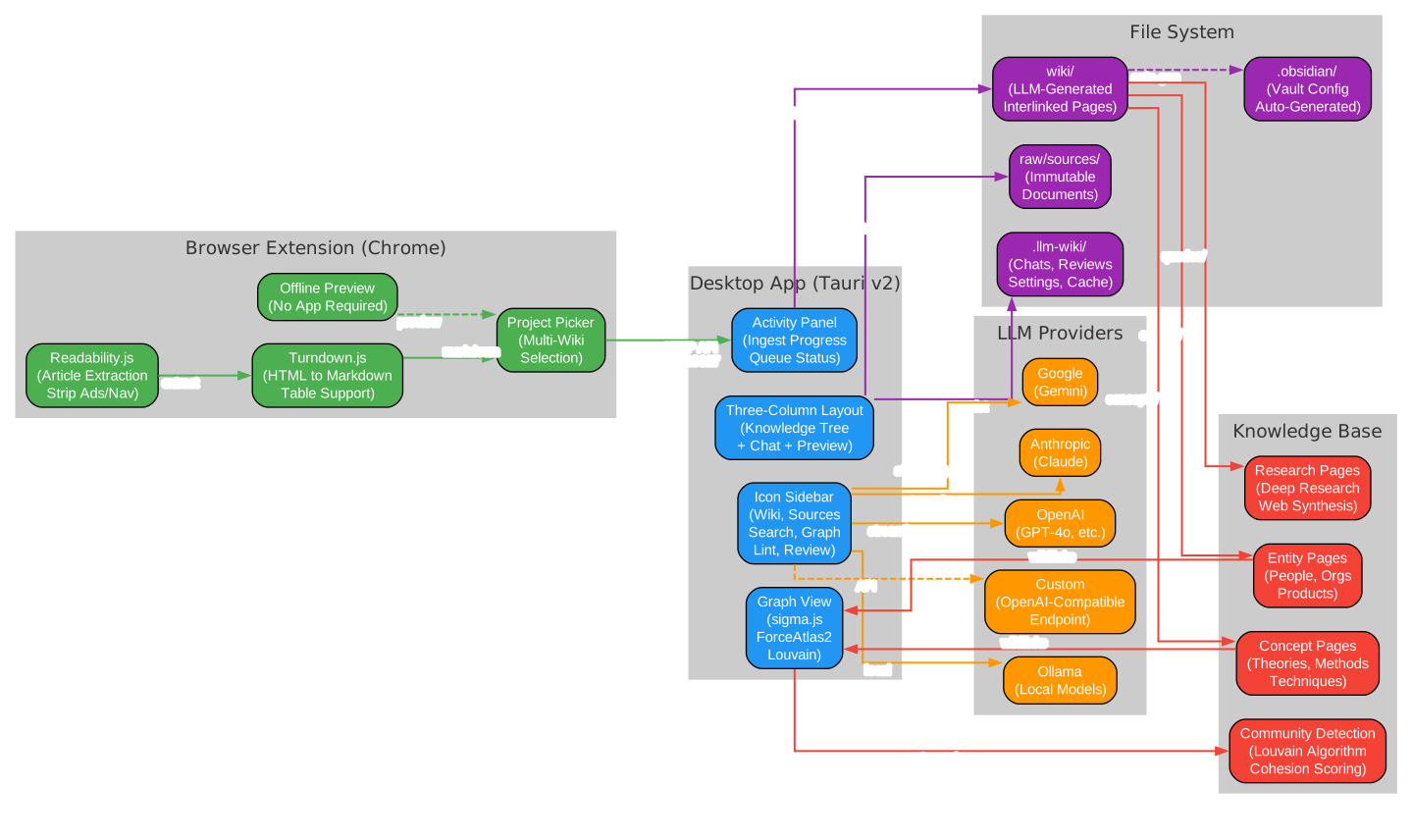
The ecosystem diagram above shows how the desktop app, browser extension, file system, LLM providers, and knowledge base all interconnect. The Desktop App provides the three-column layout (knowledge tree, chat, preview), icon sidebar for switching between views, activity panel for ingest progress, and graph view with sigma.js and Louvain community detection. The Browser Extension uses Mozilla Readability.js for accurate article extraction (stripping ads, navigation, sidebars), Turndown.js for HTML-to-Markdown conversion with table support, a project picker for multi-wiki selection, and offline preview when the app is not running. Communication between the extension and app uses a local HTTP API on port 19827 (tiny_http), with a clip watcher polling every 3 seconds for new clips.
The File System stores raw sources (immutable documents), the wiki directory (LLM-generated interlinked pages), Obsidian configuration (auto-generated), and app configuration (chats, reviews, settings, cache). LLM Providers include OpenAI, Anthropic, Google, Ollama, and custom OpenAI-compatible endpoints, each with provider-specific streaming and headers. The Knowledge Base contains entity pages, concept pages, research pages, and community detection results from the Louvain algorithm with cohesion scoring.
Extension Setup
- Open
chrome://extensionsin Chrome - Enable “Developer mode” (toggle in top right)
- Click “Load unpacked”
- Select the
extension/directory from the LLM Wiki repository - The extension icon appears in the toolbar – click it to clip any web page
- Choose which wiki project to clip into using the project picker
- The clipped content is automatically sent to the desktop app and ingested
Multi-Format Document Support
LLM Wiki supports structured extraction preserving document semantics across multiple formats:
| Format | Method |
|---|---|
| pdf-extract (Rust) with file caching | |
| DOCX | docx-rs – headings, bold/italic, lists, tables to structured Markdown |
| PPTX | ZIP + XML – slide-by-slide extraction with heading/list structure |
| XLSX/XLS/ODS | calamine – proper cell types, multi-sheet support, Markdown tables |
| Images | Native preview (png, jpg, gif, webp, svg, etc.) |
| Video/Audio | Built-in player |
| Web clips | Readability.js + Turndown.js to clean Markdown |
Project Structure
my-wiki/
|-- purpose.md              # Goals, key questions, research scope
|-- schema.md               # Wiki structure rules, page types
|-- raw/
|   |-- sources/            # Uploaded documents (immutable)
|   '-- assets/             # Local images
|-- wiki/
|   |-- index.md            # Content catalog
|   |-- log.md              # Operation history
|   |-- overview.md         # Global summary (auto-updated)
|   |-- entities/           # People, organizations, products
|   |-- concepts/           # Theories, methods, techniques
|   |-- sources/            # Source summaries
|   |-- queries/            # Saved chat answers + research
|   |-- synthesis/          # Cross-source analysis
|   '-- comparisons/        # Side-by-side comparisons
|-- .obsidian/              # Obsidian vault config (auto-generated)
'-- .llm-wiki/              # App config, chat history, review items
Tech Stack
| Layer | Technology |
|---|---|
| Desktop | Tauri v2 (Rust backend) |
| Frontend | React 19 + TypeScript + Vite |
| UI | shadcn/ui + Tailwind CSS v4 |
| Editor | Milkdown (ProseMirror-based WYSIWYG) |
| Graph | sigma.js + graphology + ForceAtlas2 |
| Search | Tokenized search + graph relevance + optional vector (LanceDB) |
| Vector DB | LanceDB (Rust, embedded, optional) |
| pdf-extract | |
| Office | docx-rs + calamine |
| i18n | react-i18next |
| State | Zustand |
| LLM | Streaming fetch (OpenAI, Anthropic, Google, Ollama, Custom) |
| Web Search | Tavily API |
Conclusion
LLM Wiki represents a significant evolution in personal knowledge management. By implementing Karpathy’s LLM Wiki pattern as a full desktop application, it transforms the abstract idea of “LLM-maintained knowledge bases” into a practical, polished tool that anyone can use. The two-step chain-of-thought ingest produces higher-quality wiki pages than single-pass approaches. The 4-signal knowledge graph with Louvain community detection reveals connections and clusters that would be invisible in a traditional folder structure. The multi-phase retrieval pipeline with optional vector search delivers cited answers with source traceability.
The key insight remains the one Karpathy articulated: the tedious part of maintaining a knowledge base is not the reading or the thinking – it is the bookkeeping. Updating cross-references, keeping summaries current, noting when new data contradicts old claims, maintaining consistency across dozens of pages. Humans abandon wikis because the maintenance burden grows faster than the value. LLMs do not get bored, do not forget to update a cross-reference, and can touch 15 files in one pass. The wiki stays maintained because the cost of maintenance is near zero.
With 2,600+ stars, cross-platform support (macOS, Windows, Linux), a Chrome extension for web clipping, Obsidian compatibility, and support for seven document formats, LLM Wiki is ready for anyone who wants to build a persistent, compounding knowledge vault on their desktop. Enjoyed this post? Never miss out on future posts by following us 


