Security auditing and penetration testing have traditionally required deep expertise across dozens of specialized tools, each with its own syntax, installation quirks, and runtime requirements. HackingTool-Plugin changes the equation by wrapping 183 pentesting and OSINT tools into a single Claude Code plugin-skill, letting AI agents execute security assessments through natural language prompts.
For authorized security testing, bug bounty programs, CTFs, and research only.
What is HackingTool-Plugin?
HackingTool-Plugin is a Claude Code plugin that wraps the popular Z4nzu/hackingtool toolkit into an AI-friendly skill interface. Instead of manually installing, configuring, and invoking individual security tools, you describe what you want in plain English and the AI agent handles tool selection, execution, and result parsing automatically.
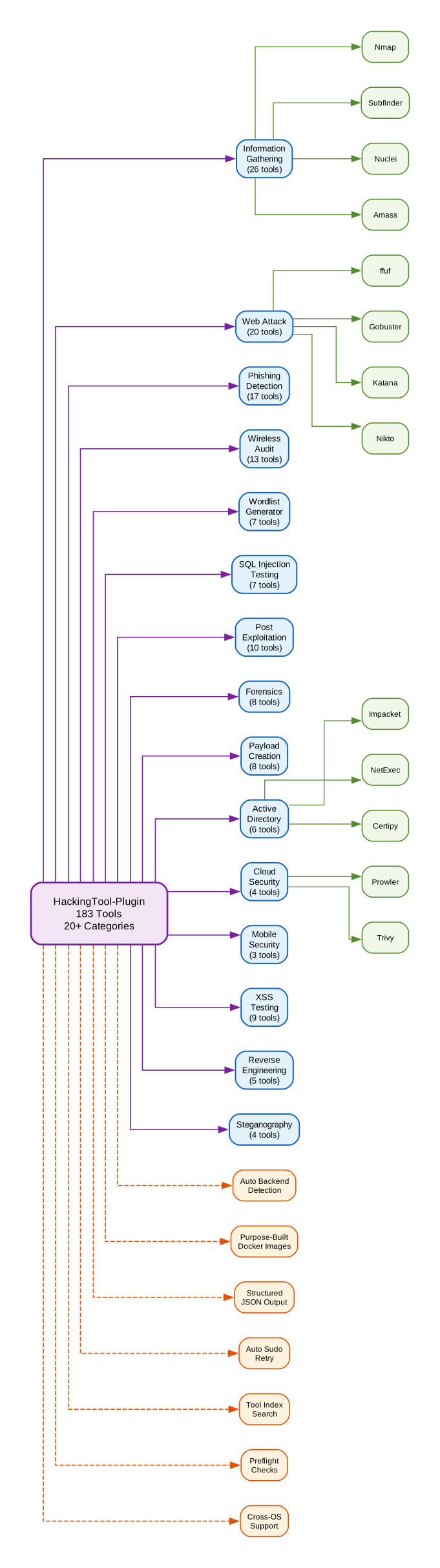
The plugin covers 20+ security categories with 183 tools ranging from network reconnaissance and vulnerability scanning to forensics and cloud security auditing. It runs locally on any OS — native Bash on Linux/macOS, WSL on Windows, or purpose-built Docker images when available.
Key Features
- 183 Security Tools — Covers information gathering, web attack, phishing detection, wireless audit, SQL injection testing, forensics, cloud security, Active Directory enumeration, and more
- Automatic Backend Detection —
ht_env.pydetects the host OS and picks the optimal execution backend (native, WSL, or Docker) without manual configuration - Purpose-Built Docker Images — Maps 20+ tools to optimized Docker images (e.g.,
instrumentisto/nmap,projectdiscovery/nuclei,caffix/amass) for fast pulls and clean execution - Structured JSON Output — Every tool invocation returns structured JSON with
status,stdout,stderr, andreturncodefor programmatic parsing - Auto Sudo Retry — On permission-denied errors, the runner automatically retries with
sudo -non native/WSL backends - Tool Index Search — Query the 183-tool index by keyword, category, tag, capability, or OS to find the right tool instantly
- Preflight Checks —
ht_preflight.pyvalidates the environment before any tool runs, surfacing missing dependencies and setup recommendations - Cross-OS Support — Works on Linux, macOS, and Windows (via WSL or Docker Desktop)
How It Works
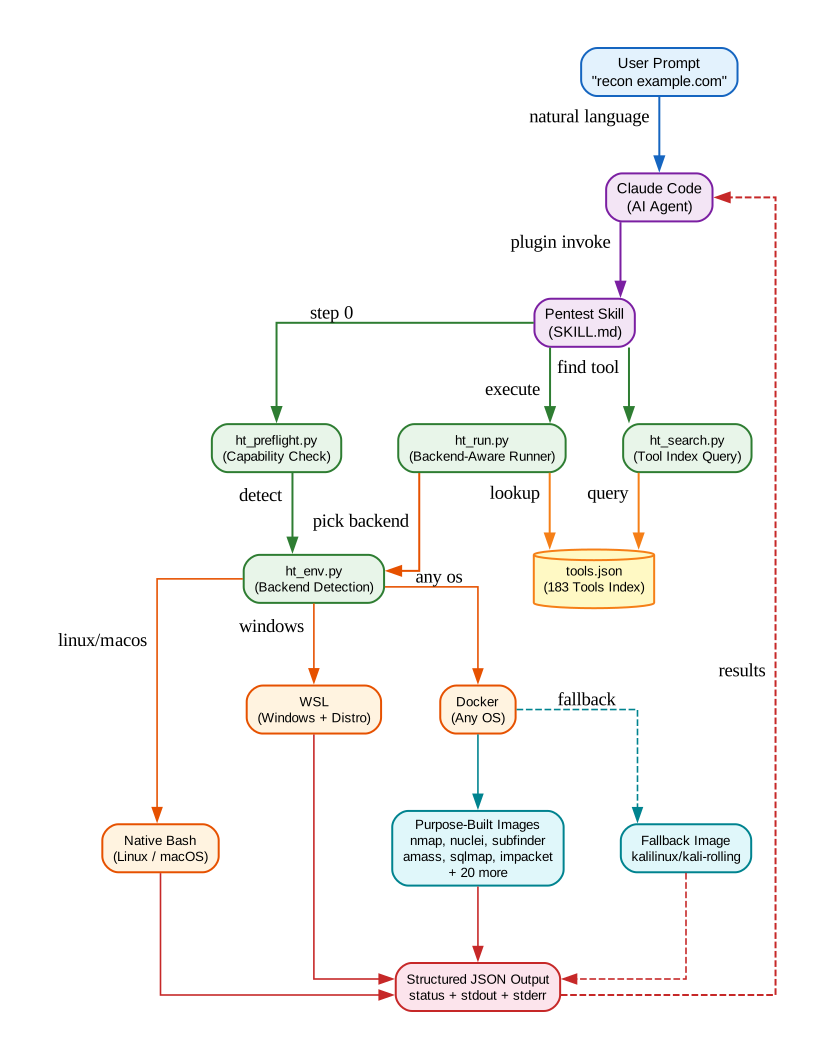
The plugin follows a try-first execution model. Every tool invocation flows through ht_run.py, which acts as the central dispatcher:
- Preflight —
ht_preflight.pychecks the environment and returns a verdict:ready,partial, orblocked - Backend Selection —
ht_env.pydetects the host OS and available runtimes, selecting native Bash, WSL, or Docker as the execution backend - Tool Lookup —
ht_search.pyqueries thetools.jsonindex to find the right tool by ID, category, or keyword - Execution —
ht_run.pydispatches the command to the selected backend, mapping tools to purpose-built Docker images when available - Error Classification — On failure, the runner classifies errors (permission denied, not installed, no device, stdin needed) and either retries with sudo or returns a structured fallback with actionable hints
- Result — Structured JSON output flows back to the AI agent for interpretation and chaining
The only pre-block is for interactive tools that read from stdin mid-run. These tools cannot be answered through captured pipes, so the plugin returns a fallback with instructions for manual execution or non-interactive overrides.
Docker Image Mapping
Rather than pulling a full Kali Linux image for every tool, the plugin maps common tools to lightweight, purpose-built Docker images:
| Category | Docker Images |
|---|---|
| Port Scanning | instrumentisto/nmap, ilyaglow/masscan, rustscan/rustscan |
| Subdomain Recon | projectdiscovery/subfinder, caffix/amass, projectdiscovery/httpx |
| Vulnerability Scanning | projectdiscovery/nuclei, projectdiscovery/katana |
| OSINT | megadose/holehe, soxoj/maigret, spiderfoot/spiderfoot |
| Secret Scanning | trufflesecurity/trufflehog, zricethezav/gitleaks |
| Web Fuzzing | secsi/ffuf, devopsworks/gobuster |
| SQL Injection | paoloo/sqlmap |
| Active Directory | rflathers/impacket, byt3bl33d3r/netexec |
| Fallback | kalilinux/kali-rolling |
Getting Started
Install the plugin through the Claude Code marketplace:
/plugin marketplace add AKCODEZ/hackingtool-plugin
/plugin install hackingtool@hackingtool-marketplace
Then point Claude at a target using natural language:
"recon example.com"
"scan my repo for vulnerabilities"
"investigate the username johndoe"
"check for leaked secrets in this repository"
The AI agent automatically selects the right tools, executes them through the optimal backend, and presents the results. For direct tool invocation:
python ${CLAUDE_PLUGIN_ROOT}/scripts/ht_run.py information_gathering.Subfinder --args "-d example.com -silent"
python ${CLAUDE_PLUGIN_ROOT}/scripts/ht_run.py web_attack.Nuclei --args "-l live.txt"
python ${CLAUDE_PLUGIN_ROOT}/scripts/ht_search.py --q "subdomain"
Named Workflows
The plugin includes predefined workflows for common security tasks:
- Domain Recon —
subfindertohttpxtonuclei(subdomain enumeration, live host probing, vulnerability scanning) - Username Investigation —
sherlocktomaigret(OSINT across 3000+ sites) - Email Investigation —
holehetoinfoga(email-to-service mapping and public source gathering) - Leaked Secrets Scan —
trufflehogtogitleaks(deep secret scanning with complementary rulesets) - Web App Recon —
wafw00ftokatanatoarjuntoffuftonuclei(full web application assessment) - Active Directory —
netexectoimpackettokerbrutetocertipy(AD enumeration and abuse)
Why HackingTool-Plugin Matters
The security tooling landscape is fragmented. A typical pentest engagement might require nmap for port scanning, subfinder for subdomain enumeration, nuclei for vulnerability detection, sqlmap for injection testing, and a dozen more specialized utilities — each with different installation methods, runtime dependencies, and output formats.
HackingTool-Plugin solves three critical problems:
- Tool Discovery — Instead of memorizing 183 tool names and their capabilities, security professionals describe their intent and the AI agent maps it to the right tool chain
- Environment Compatibility — The automatic backend detection eliminates the “works on my machine” problem. The same plugin runs on Linux, macOS, and Windows without configuration changes
- Output Standardization — Every tool returns structured JSON, making it trivial to chain results between tools and build automated assessment pipelines
The plugin’s try-first philosophy means it attempts execution immediately rather than preemptively falling back based on capability flags. Fallback only happens after an actual run fails, and only for errors a one-shot retry cannot fix.
Conclusion
HackingTool-Plugin represents a significant step toward AI-assisted security auditing. By wrapping 183 pentesting tools into a unified, AI-friendly interface with automatic backend detection, purpose-built Docker images, and structured JSON output, it transforms security assessments from a manual, multi-tool chore into a conversational workflow. Whether you are running bug bounty programs, CTF challenges, or authorized penetration tests, this plugin gives your AI agent a comprehensive security toolkit at its fingertips.
| Repository: AKCodez/hackingtool-plugin | License: MIT | Stars: 448 |

Enjoyed this post? Never miss out on future posts by following us