Building Unity games involves a relentless cycle of writing C# scripts, tweaking scene hierarchies, debugging runtime state, and managing asset references. What if an AI agent could handle the tedious parts while you focus on creative decisions? Locus for Unity is an open-source AI agent that operates directly inside your Unity workflow, writing code, reading and modifying assets, debugging runtime behavior, and even maintaining project knowledge across sessions.
What is Locus?
Locus is an open-source Unity Dev Agent that runs as a standalone desktop application built with Rust, Tauri, and Vue.js. Unlike simple code-completion tools, Locus operates as a full development partner: it writes and executes C# code inside the Unity Editor, navigates and edits scene assets through a proprietary intermediate representation, captures runtime state for debugging, and maintains an automated knowledge system that preserves project understanding across conversations.
Locus is designed as a standalone process, not a Unity Editor plugin or MCP server. This architectural choice unlocks capabilities that would be difficult or nearly impossible inside the Unity Editor.
Key Features
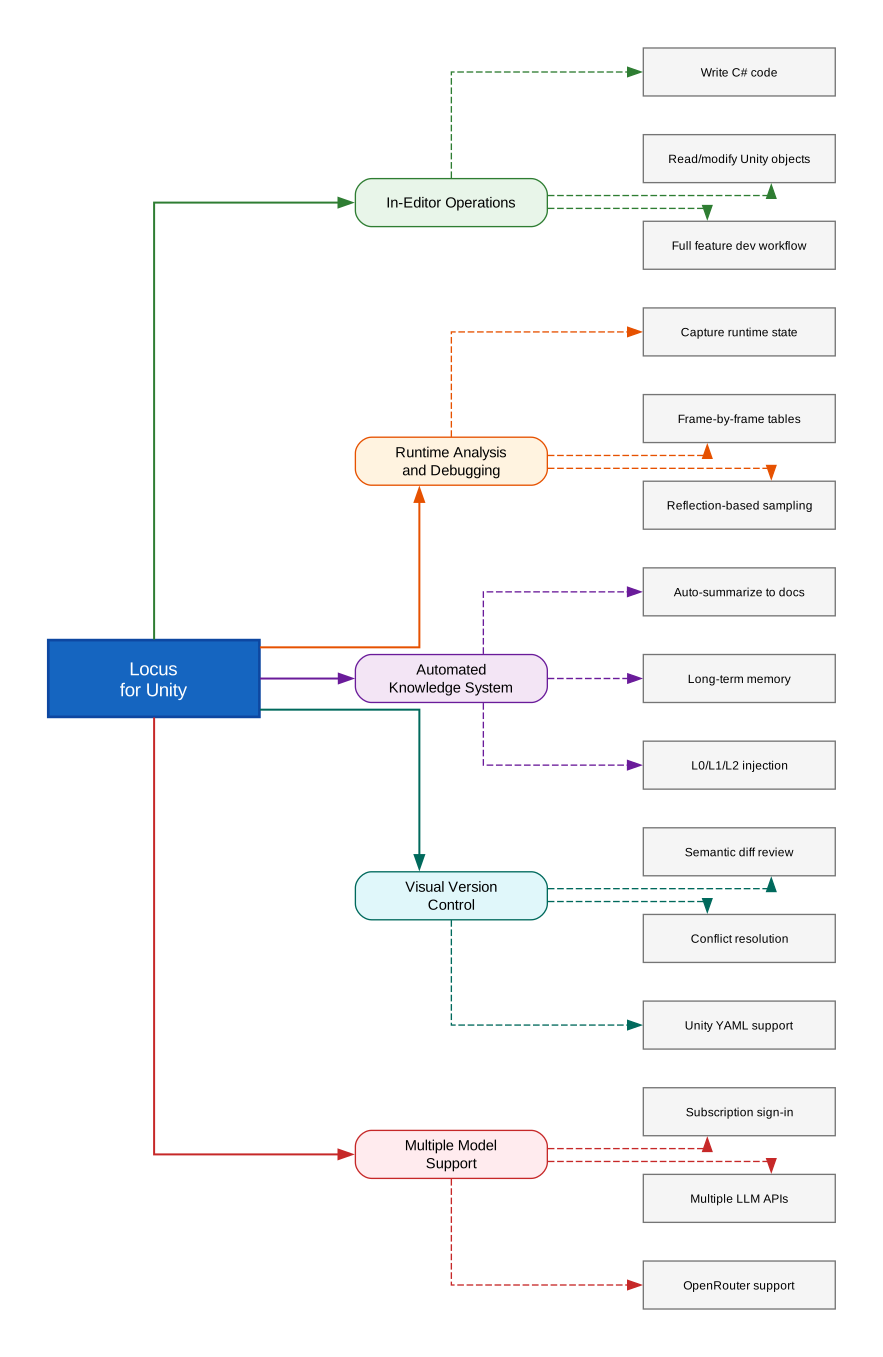
- In-Editor Operations: Write C# code, read and modify Unity objects and assets, and complete the full feature development workflow directly from the chat interface
- Runtime Analysis and Debugging: Autonomously operate and capture runtime state to help fix bugs and optimize performance, including frame-by-frame state sampling through reflection
- Automated Knowledge System: Automatically summarize conversation requirements into design documents and preserve project understanding in long-term memory with L0/L1/L2 injection control
- Visual Version Control: Provide a visual version control interface with semantic diff analysis and conflict handling for Unity YAML assets
- Multiple Model Support: Support subscription account sign-in and compatibility with multiple LLM API capabilities including OpenRouter
How It Works
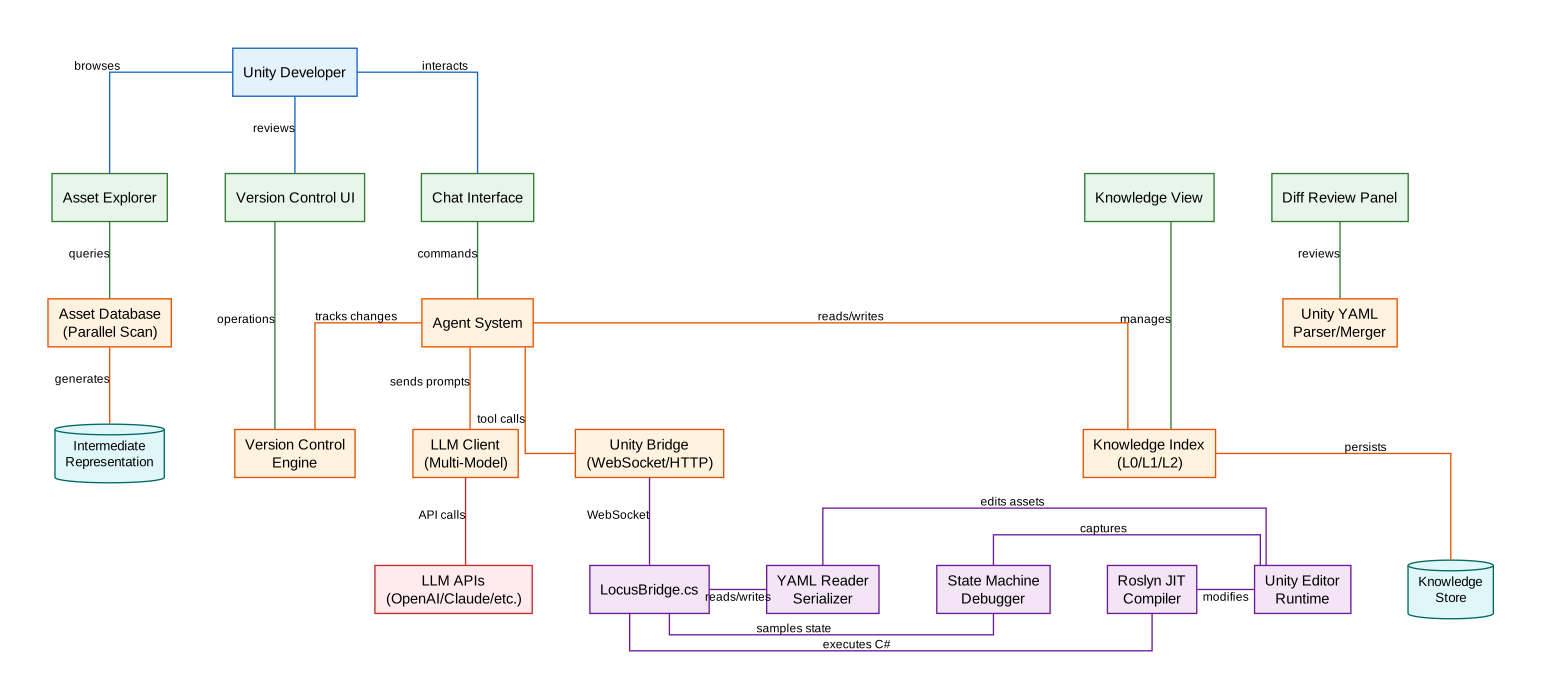
Locus runs as an independent process alongside the Unity Editor, communicating through a WebSocket/HTTP bridge. This architecture is fundamental to understanding why Locus can do things that in-editor solutions cannot.
The Rust Backend
The Rust backend is the core of Locus. It handles:
- Agent System: Orchestrates LLM conversations, tool calls, and multi-step workflows
- Asset Database: Performs highly parallel asset database scans using Rust’s parallel ecosystem, enabling fast semantic parsing for large scenes and reference queries that go beyond what the Unity Editor API provides
- Knowledge Index: Manages the automated knowledge system with configurable AI maintenance modes, L0/L1/L2 injection control, and native lexical and syntactic retrieval
- Unity YAML Parser/Merger: Provides semantic diff review and conflict resolution for Unity YAML files
- Version Control Engine: Tracks all changes the agent makes during a conversation so users can review and revert
The Unity Bridge
On the Unity side, LocusBridge.cs connects the editor to the Rust backend. Through this bridge, Locus can:
// Locus uses Roslyn to JIT-compile and execute C# code
// inside the Unity Editor for semantic asset edits
// Example: The agent can create, modify, or query
// any Unity object at runtime
The Roslyn JIT compiler allows Locus to compile and execute C# code on the fly, making real-time semantic edits to assets. The state machine tools enable the agent to sample internal state through reflection at specific frames or events, output frame-by-frame tables, and dynamically debug multi-frame behavior.
The Vue.js Frontend
Locus uses Vue.js to deliver a modern frontend experience with better UX than the limited controls provided by the Unity Editor API. The frontend includes a chat interface, asset explorer, knowledge view, diff review panel, and version control UI. It embeds into the Unity window through Windows APIs, providing a seamless integrated experience.
The Intermediate Representation
One of Locus’s most innovative technical features is its proprietary intermediate representation. This IR allows the agent to progressively read large scenes and assets, along with retrieval tools that help the agent quickly locate target objects. Instead of loading entire scene hierarchies into context, the agent can navigate assets incrementally, keeping token usage efficient even for large projects.
Getting Started
Installation
Windows is currently the only supported platform (macOS support is planned). Download the installer from the GitHub Releases page.
Locus supports Unity 2021 or later on Windows.
Build from Source
If you want to build from source, you will need bun and the Tauri 2 toolchain:
# Run in development mode
bun tauri dev

# Build the installer
bun tauri build
The build command rebuilds the merged Roslyn DLL, prepares the managed Python and Git runtimes, builds the frontend, generates the third-party license bundle, and packages the desktop app. The default output is a Windows NSIS installer under src-tauri/target/release/bundle/nsis/.
Why Locus Matters
The game development industry has been slower to adopt AI coding tools compared to web and enterprise software. Unity’s unique architecture – with its YAML-based assets, component systems, and scene hierarchies – makes generic AI assistants ineffective. Locus addresses this gap with purpose-built tooling:
If Locus were implemented inside the Unity Editor, or designed as an MCP server, most of these capabilities would be difficult to deliver and some would be nearly impossible technically.
The standalone architecture is the key differentiator. By running as an independent process, Locus can perform highly parallel asset database scans, maintain its own version control tracking, JIT-compile C# code through Roslyn, and provide a modern UI that surpasses what the Unity Editor API allows. The automated knowledge system means the agent gets smarter about your project over time, reducing repeated exploration and context loss between sessions.
For Unity developers who spend hours on repetitive tasks like wiring up references, debugging state machines, or managing asset conflicts, Locus represents a significant step toward AI-augmented game development.
Conclusion
Locus for Unity is a technically ambitious open-source project that reimagines what an AI development agent can be for game development. Its standalone Rust + Tauri + Vue.js architecture, proprietary intermediate representation for asset navigation, Roslyn-powered JIT code execution, and automated knowledge system set it apart from generic AI coding tools. At version 0.2.8, it is still in early testing, but the architecture and feature set demonstrate a thoughtful approach to solving real pain points in Unity development. If you are a Unity developer looking to accelerate your workflow, Locus is worth watching – and trying.
Repository: github.com/r1n7aro/Locus Enjoyed this post? Never miss out on future posts by following us
Documentation: unity.farlocus.com
License: GPL-3.0-or-later