Creating a compelling PowerPoint presentation is harder than it looks. Most AI-powered PPT tools fall into two traps: they either produce generic template-filled slides that look polished but lack substance, or they generate shallow content that reads like a PPT but cannot actually support a real presentation. PPT Image-First takes a fundamentally different approach — it treats presentation creation as a conversation-first, image-first design workflow where real visual previews drive every decision.
PPT Image-First is not a template-first or form-first tool. It is a staged proposal workflow that builds content before style, shows real image previews before confirming direction, and treats review as a mandatory step — not an afterthought.
How It Works
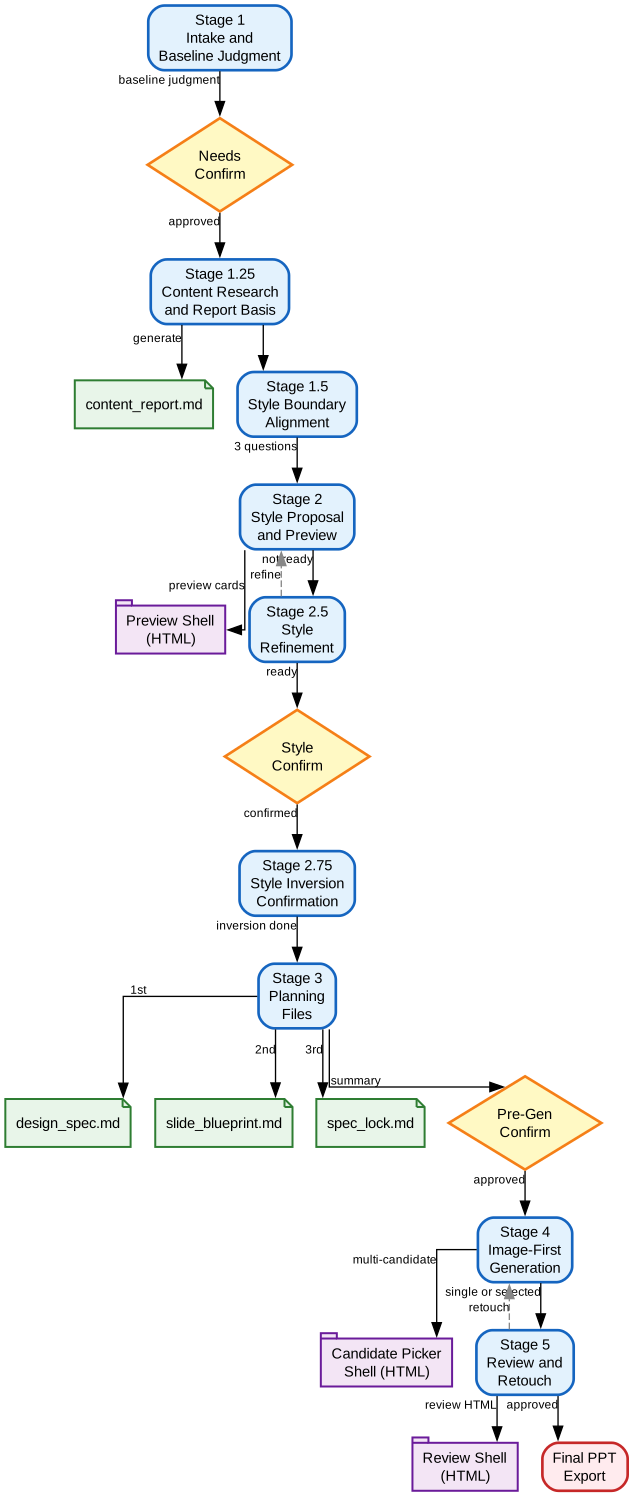
The PPT Image-First skill follows a carefully structured 5-stage workflow with built-in confirmation gates that prevent premature decisions and ensure quality at every step.
Stage 1: Intake and Baseline Judgment
The workflow starts with a lightweight intake — not a long questionnaire. It collects only the essentials: purpose, audience, rough length, existing materials, and identity anchors (school, company, lab, brand). The agent then outputs a short baseline judgment covering deck goal, target audience, recommended deck type, page range, narrative spine, and missing information. The user confirms or corrects this before proceeding.
Stage 1.25: Content Before Style
If the user has not provided complete report-like content, the skill generates a content_report.md — a small research-style report that serves as the upstream content basis. This ensures that later previews and planning files are grounded in real content rather than generic placeholder structures.
The key insight: content comes before style. Previews should be content-bearing, not empty shells. When the topic is thin, the skill first builds a content foundation before any visual work begins.
Stage 2: Style Proposal and Preview
After a short style-boundary alignment (just 3 questions about brightness, professional vs. stylized, and number of directions), the skill generates multiple style directions with real image previews. Each direction includes cover page, table-of-contents page, and body page previews — all generated using GPT Image 2. Users see actual visual output, not text descriptions or ASCII mockups.
Stage 3: Planning Files
Once the style is confirmed through a unique “style inversion confirmation” process (where the agent reverse-engineers what the selected previews actually show), three planning artifacts are generated in order:
design_spec.md— global deck rationale and visual systemslide_blueprint.md— page-by-page intent and content planspec_lock.md— execution constraints and generation guardrails
Stage 4-5: Generation, Review, and Retouch
The final pages are generated using the image-first path — GPT Image 2 produces complete page visuals that are then packaged into the PPTX container. A mandatory review stage uses a dedicated HTML shell for structured feedback with visual markup support. The retouch loop continues until the user explicitly approves the result.
Key Features
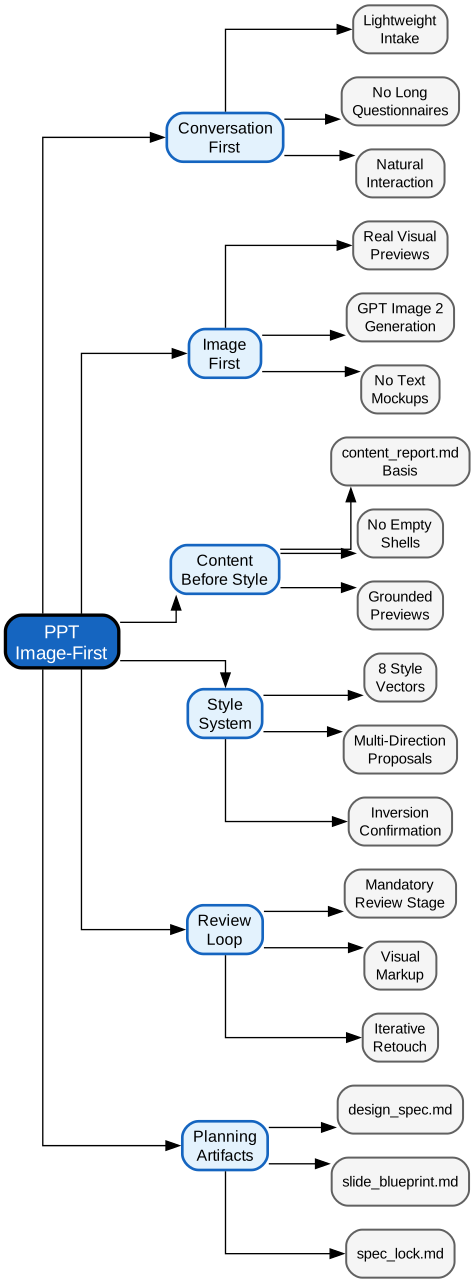
- Conversation-First Interaction: Lightweight intake with no long questionnaires; the user acts as the client, the agent as the proposing designer
- Image-First Previews: Real visual previews generated by GPT Image 2, not text mockups or placeholder shells
- Content Before Style: Generates
content_report.mdas upstream content basis when materials are thin, ensuring grounded previews - 8-Vector Style System: Parameterized style vectors (V1-V8) covering layout, texture, lighting, color, containers, density, text-visual balance, and brand constraints
- Style Inversion Confirmation: Reverse-engineers what selected previews actually show to lock stable visual facts before planning
- Mandatory Review Loop: Review is not optional — a dedicated HTML shell supports visual markup, structured feedback, and iterative retouch
- 3 Built-in Workflow Shells: Preview Shell, Candidate Picker Shell, and Review Shell provide structured UI for each workflow stage
- 4 Planning Artifacts:
content_report.md,design_spec.md,slide_blueprint.md, andspec_lock.mdcreate a complete generation-ready plan - Multi-Candidate Generation: Option to generate multiple candidates per slide and pick the best before final review
- 16:9 Default Ratio: All preview images and final page visuals default to 16:9 unless the user specifies otherwise
Getting Started
To use PPT Image-First as a Claude Code skill, clone the repository and reference the SKILL.md file:
git clone https://github.com/NyxTides/ppt-image-first.git
The skill is activated when you ask Claude Code to create a PPT, presentation, deck, or any similar request. Simply describe what you need:
Help me create a PPT for my thesis defense on meteorology
The skill will guide you through each stage automatically, from intake to final export. You can also provide existing materials:
Turn this research report into a 15-slide presentation for an investor pitch
The skill’s progressive loading system reads reference files only when needed, keeping the interaction lightweight while ensuring deep expertise is available at each stage.
Why PPT Image-First Matters
Most PPT generation tools make one of two mistakes. Template-first approaches produce slides that look professional but lack content depth — every deck looks like it came from the same corporate template library. Text-first approaches generate outlines and bullet points that read like a document, not a visual presentation.
PPT Image-First solves both problems by inverting the typical workflow:
- Content is built before style is discussed, so previews are never empty shells
- Style is confirmed through real images, not through parameter forms or text descriptions
- Review is mandatory, not optional — preventing the “first draft = final draft” problem
- Generation stays image-first, avoiding the trap of generating backgrounds and then patching them with overlays
The style inversion confirmation step is particularly innovative. Instead of trusting the original prompt text, the agent reads the actual generated preview images as evidence, extracts what the model really produced, and distinguishes between stable visual facts and one-off rendering accidents. This makes the downstream planning files far more concrete than what the original prompt alone could support.
Conclusion
PPT Image-First represents a mature approach to AI-assisted presentation creation — one that respects the iterative nature of real design work. By combining conversation-first interaction, image-first generation, content-before-style sequencing, and mandatory review, it produces presentations that are both visually compelling and substantively grounded. For anyone who has been disappointed by template-heavy or content-shallow PPT tools, this skill offers a workflow that genuinely mirrors how a professional designer would approach the task. Enjoyed this post? Never miss out on future posts by following us