Imagine controlling your Android phone entirely through natural language – opening apps, tapping buttons, reading files, running shell commands, and searching the web, all from a single chat interface. That is exactly what Aether delivers. Built as a native Android app with a stunning UI, Aether brings the power of AI agents directly to your pocket without requiring a desktop, a VM, or a cloud relay.
Aether is dedicated to bringing a modern, local AI Agent experience to Android devices. Say goodbye to bloated virtual machine configurations and cumbersome terminal interfaces.
What is Aether?
Aether is an open-source, general-purpose AI agent for Android that runs entirely on-device. It pairs a minimalist, lightweight UI with immense extensibility through a rich tool-calling system, Anthropic Agent Skills, and the Model Context Protocol (MCP). Whether you need to automate repetitive tasks, interact with apps visually, or run shell commands through Termux, Aether provides a unified agent experience on Android 12+.
Key Features
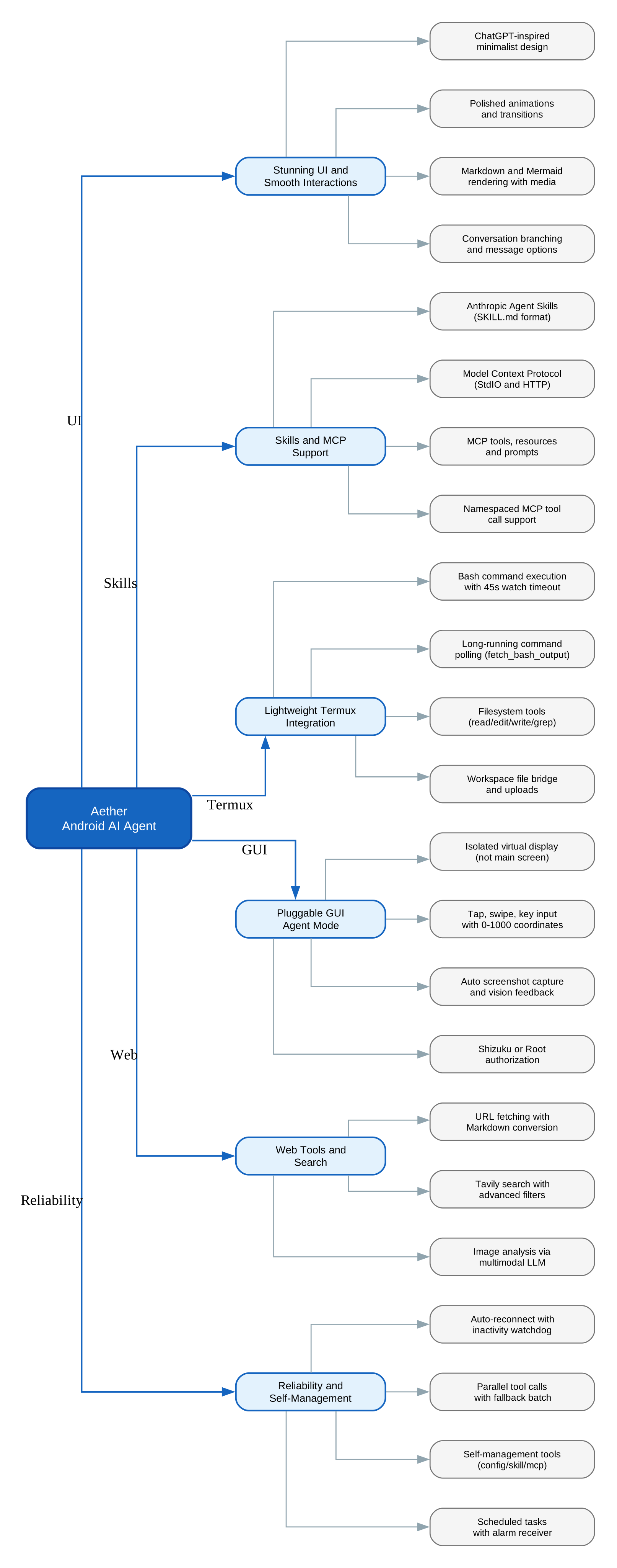
- Stunning UI and Silky Smooth Interactions – Distilling the design essence of top-tier apps like ChatGPT, Aether delivers a minimalist, modern, and elegant interface with polished animations and transitions
- Comprehensive Skill and MCP Support – Fully supports Anthropic Agent Skills (SKILL.md format) and the Model Context Protocol (MCP), connecting to data sources like Google Search, GitHub, and local files
- Lightweight Termux Integration – Connects directly to Termux for Bash command execution, avoiding the heavy built-in Ubuntu/Alpine VM approach for greater freedom and efficiency
- Pluggable GUI Agent Mode – Launches an isolated virtual display on demand to handle complex visual interactions where standard CLI commands fall short
- Multi-Provider LLM Support – Works with OpenAI, Anthropic, Google Gemini, and Vertex AI through a unified OpenAI-compatible client
- Parallel Tool Calls – Supports native parallel tool calls with automatic fallback to batched sequential execution
- Auto-Reconnect with Watchdog – Built-in inactivity timeout detection and automatic reconnection for reliable long-running sessions
- Scheduled Tasks – Schedule agent tasks with Android alarm receivers for recurring automation
- Self-Management Tools – The agent can inspect and update its own configuration, manage skills, MCP servers, and Termux setup
How It Works
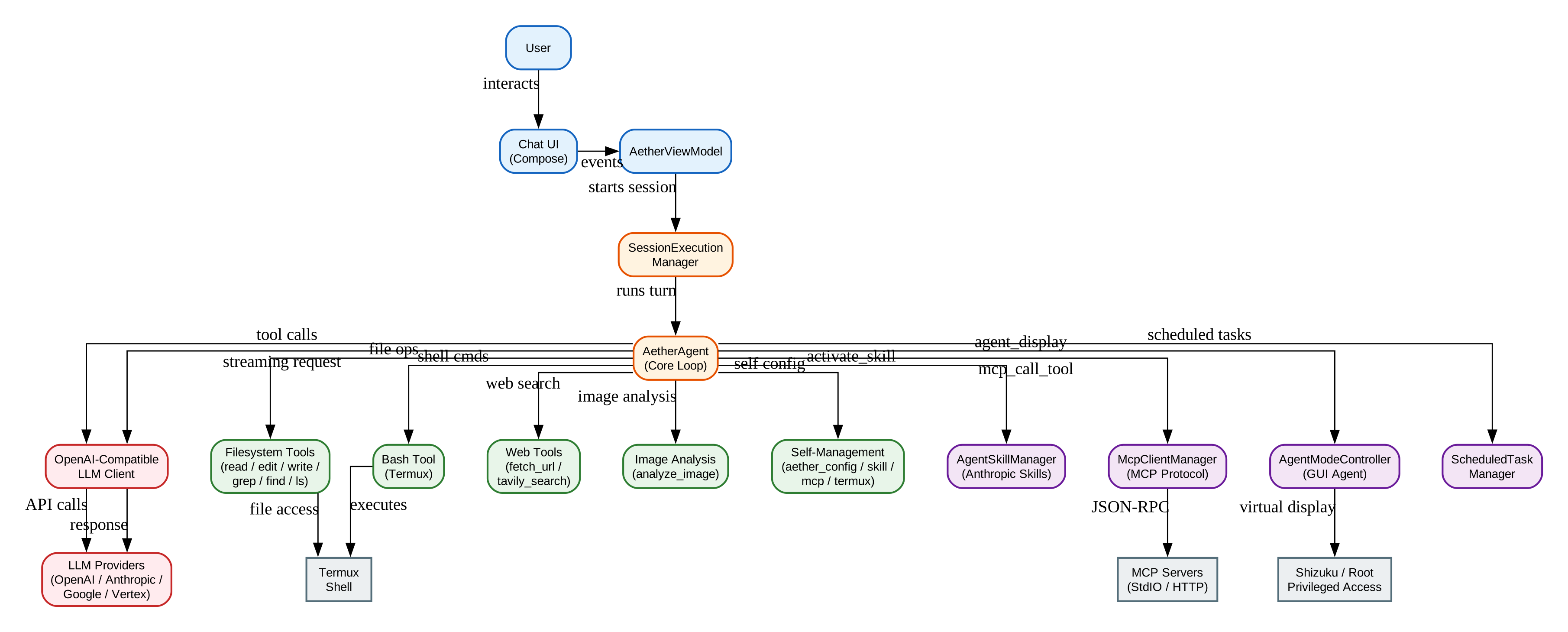
Aether operates through an agentic loop powered by the AetherAgent class. Here is how a typical turn flows:
- User Input – The user sends a message through the Chat UI (built with Jetpack Compose)
- System Prompt Assembly – The agent builds a comprehensive system prompt that includes workspace context, available skills, active MCP servers, and tool compatibility mode
- LLM Streaming – The OpenAI-compatible client streams a chat completion request to the configured LLM provider, with an inactivity watchdog that triggers automatic reconnection
- Tool Execution – When the LLM returns tool calls, the agent dispatches them to the appropriate tool handler, supporting parallel execution for independent operations
- Result Feedback – Tool results are injected back into the conversation, and the loop continues until the LLM produces a final text response
The Agent Mode Controller is what sets Aether apart from terminal-only agents. When enabled, it creates an isolated virtual display (not the user’s main screen) and provides actions like tap, swipe, key, text, and screenshot using normalized 0-1000 coordinates. After each visual action, a screenshot is automatically captured and fed back to the LLM as an image, following the Ruto/AutoGLM workflow. Authorization is handled through Shizuku or Root access.
The MCP Client Manager supports both StdIO and Streamable HTTP transports, implementing the full MCP lifecycle including initialization, tool discovery, resource listing, prompt retrieval, and server-initiated requests like roots/list, sampling, and elicitation.
Getting Started
Prerequisites
- Android 12 or higher
- Optional: Rooted device or Shizuku installed (for GUI Agent Mode)
- Optional: Termux installed (for shell commands)
Installation
# Download the latest APK from GitHub Releases
# https://github.com/Zhou-Shilin/Aether/releases

# Or build from source
git clone https://github.com/Zhou-Shilin/Aether.git
cd Aether
./gradlew assembleDebug
After installing the APK, follow the onboarding tour to configure your LLM provider, API key, and optional integrations like Termux and Shizuku.
Basic Usage
# In the Aether chat, you can ask the agent to:
# - Read, edit, and write files on your device
# - Run shell commands through Termux
# - Search the web with Tavily
# - Launch and interact with apps via Agent Mode
# - Activate installed Agent Skills
# - Connect to MCP servers for extended capabilities
Why Aether Matters
The mobile AI agent space has been dominated by cloud-dependent solutions or clunky terminal interfaces. Aether breaks this pattern in three fundamental ways:
Aether pairs a minimalist, lightweight UI with immense extensibility and a seamless tool-calling experience.
First, it runs entirely on-device as a native Android app. No VM, no cloud relay, no desktop required. Your LLM API calls go directly from your phone to the provider.
Second, the GUI Agent Mode is a game-changer. Instead of being limited to text-based interactions, Aether can visually interact with any Android app through an isolated virtual display. This means the agent can handle tasks that require visual context – like navigating app menus, filling forms, or reading on-screen content.
Third, the extensibility model is built on open standards. By supporting both Anthropic Agent Skills and the Model Context Protocol, Aether can connect to an ever-growing ecosystem of tools and data sources without requiring custom integrations.
Built by a 9th-grade student in their spare time, Aether proves that open-source mobile AI agents can match – and even exceed – the polish and capability of commercial offerings. The project is actively iterating and welcomes contributions.
Conclusion
Aether represents a significant step forward for on-device AI agents on Android. Its combination of a polished UI, comprehensive tool support, GUI Agent Mode, and open-standard extensibility through Skills and MCP makes it a compelling choice for anyone looking to automate their Android device with natural language. Whether you are a developer automating workflows, a power user managing your phone, or simply curious about the future of mobile AI, Aether is worth exploring.
Check out the Aether repository on GitHub to get started, and consider giving it a star to support this impressive project. Enjoyed this post? Never miss out on future posts by following us