Mercury Agent: Soul-Driven AI Agents with Permission-Hardened Tools and Second Brain Memory
Mercury Agent is an open-source, soul-driven AI agent framework that runs 24/7 from your CLI or Telegram. With over 671 stars on GitHub, it distinguishes itself from other agent frameworks through a unique combination of permission-hardened tools, a persistent Second Brain memory system, token budget enforcement, and a personality defined by markdown files you own. Unlike most AI agents that silently execute commands, Mercury asks first — and remembers what matters.
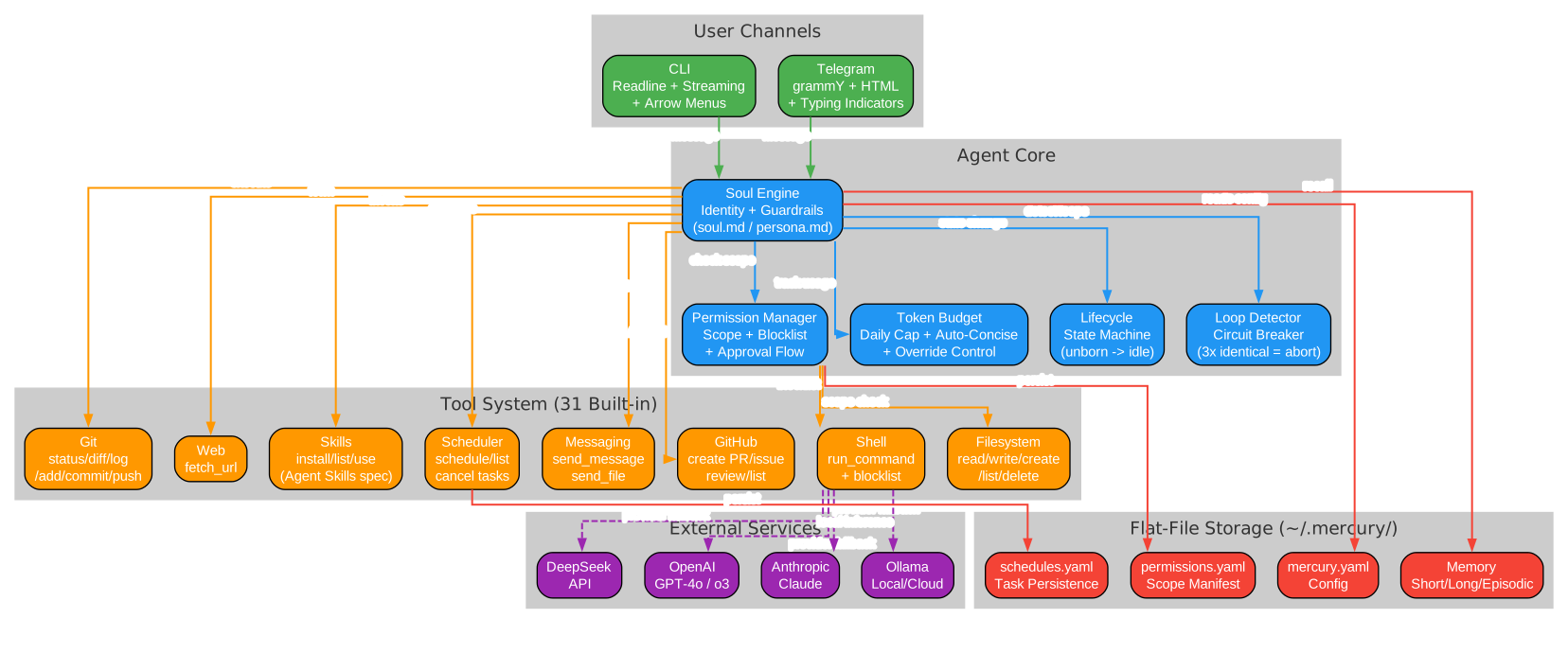
Table of Contents
- Mercury Agent: Soul-Driven AI Agents with Permission-Hardened Tools and Second Brain Memory
- Table of Contents
- What Makes Mercury Different
- The Soul-Driven Concept
- Architecture Deep Dive
- The Agentic Loop
- Permission-Hardened Security
- Second Brain Memory System
- Token Budget Management
- Multi-Channel Access
- Built-in Tools
- Extensible Skills System
- Daemon Mode and Scheduling
- Getting Started
- Configuration
- Provider Fallback
- Conclusion
What Makes Mercury Different
Most AI agents can read files, run commands, and fetch URLs — but they do it silently. Mercury takes a fundamentally different approach built on three pillars:
- Permission-first design — Every action that touches the outside world goes through a permission system. Shell commands are checked against a blocklist. File operations require folder-level scoping. No surprises.
- Persistent structured memory — The Second Brain uses SQLite with FTS5 full-text search to store 10 types of memories, auto-extract facts from conversations, and resolve conflicts automatically.
- Soul-driven personality — Instead of hardcoded corporate personas, Mercury’s personality is defined by markdown files you own and can edit:
soul.md,persona.md,taste.md, andheartbeat.md.

The Soul-Driven Concept
Mercury’s personality isn’t buried in code — it lives in four markdown files under ~/.mercury/soul/:
| File | Analogy | Purpose |
|---|---|---|
soul.md | Heart | Core values, principles, and identity |
persona.md | Face | How Mercury communicates — tone, style, mannerisms |
taste.md | Palate | Preferences for code style, design, and decision-making |
heartbeat.md | Breathing | Proactive behaviors — what Mercury does on its own |
This approach means you can fully customize Mercury’s behavior without touching a single line of TypeScript. Want an agent that’s terse and technical? Edit persona.md. Want one that prioritizes Python conventions? Update taste.md. The soul files are loaded into the system prompt at the start of every conversation, giving Mercury consistent personality across sessions.
Architecture Deep Dive
Mercury is built on a clean, modular architecture using TypeScript and Node.js 18+ with ESM modules:
src/
├── index.ts              # CLI entry (commander)
├── channels/             # Communication interfaces
│   ├── base.ts           # Abstract channel
│   ├── cli.ts            # CLI adapter (readline)
│   ├── telegram.ts       # Telegram adapter (grammY)
│   └── registry.ts       # Channel manager
├── core/                 # Channel-agnostic brain
│   ├── agent.ts          # Multi-step agentic loop
│   ├── lifecycle.ts      # State machine
│   └── scheduler.ts      # Cron + heartbeat
├── capabilities/         # Agentic tools & permissions
│   ├── permissions.ts    # Permission manager
│   ├── registry.ts       # Tool registration
│   ├── filesystem/       # File operations
│   ├── shell/            # Shell execution with blocklist
│   ├── skills/           # Skill management
│   └── scheduler/        # Scheduling tools
├── memory/               # Persistence layer
│   ├── store.ts          # Short/long/episodic memory
│   ├── second-brain-db.ts # SQLite storage (FTS5)
│   └── user-memory.ts    # Autonomous structured memory
├── providers/             # LLM APIs
│   ├── base.ts           # Abstract provider
│   ├── openai-compat.ts  # OpenAI-compatible providers
│   ├── anthropic.ts      # Anthropic Claude
│   └── registry.ts       # Provider fallback chain
├── soul/                 # Consciousness
│   └── identity.ts       # Soul/persona/taste loader
└── skills/               # Modular abilities
    ├── types.ts          # Skill type definitions
    ├── loader.ts         # SKILL.md parser
    └── index.ts          # Barrel exports
The architecture follows a clear separation of concerns: channels handle communication, core handles the agentic loop, capabilities handle tools and permissions, memory handles persistence, and providers handle LLM API calls.
The Agentic Loop
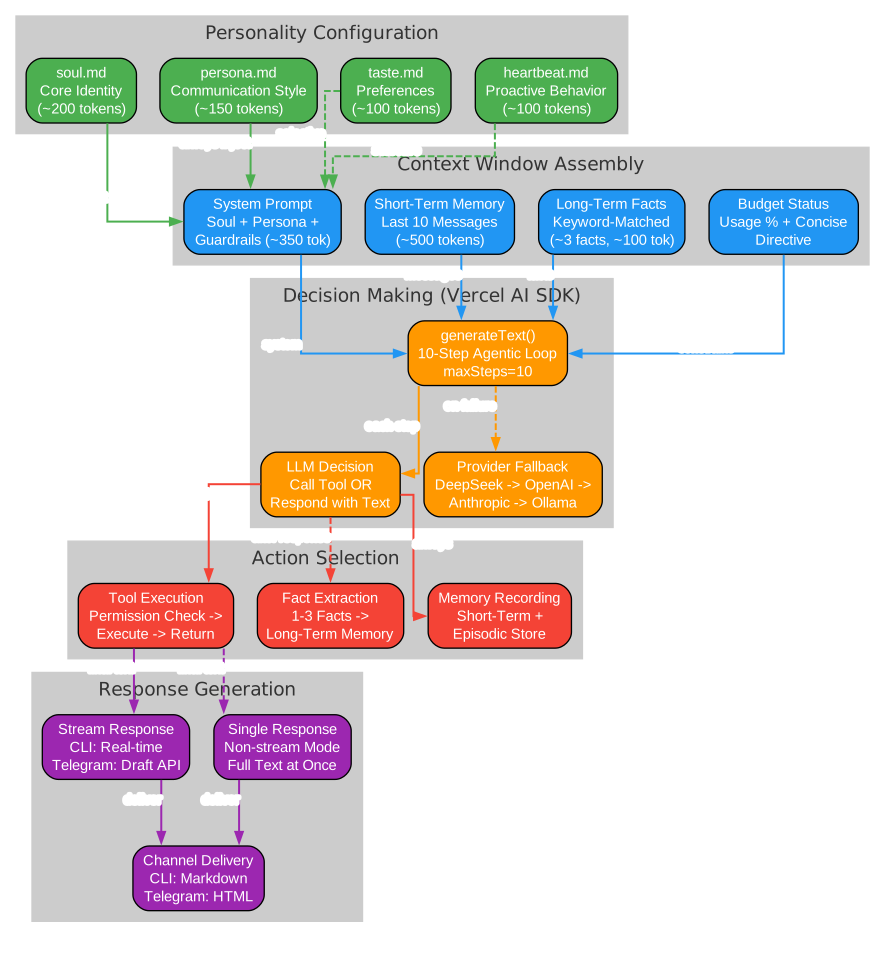
Mercury uses the Vercel AI SDK v4’s multi-step generateText() with tools, running up to 10 steps per conversation turn:
// Simplified agentic loop flow
User message → Agent loads system prompt (soul + guardrails + persona)
  → Agent calls generateText({ tools, maxSteps: 10 })
    → LLM decides: respond with text OR call a tool
      → If tool called:
        → Permission check (filesystem scope / shell blocklist)
        → If allowed: execute tool, return result to LLM
        → If denied: LLM gets denial message, adjusts approach
        → LLM continues (next step) — may call more tools or respond
      → If text: final response returned to user
  → Agent sends final response via channel
This loop means Mercury can chain multiple tool calls in a single conversation turn. For example, it might read a file, run a command to check dependencies, and then write a configuration file — all in one response cycle, with permission checks at each step.
Permission-Hardened Security
Mercury’s permission system is its core differentiator. Rather than granting blanket access, it enforces boundaries at every level:
Filesystem Permissions (Folder-Level Scoping)
- Paths without scope = no access — Mercury must ask the user
- User can grant:
y(one-time),always(saves to manifest),n(deny) - Manifest stored at
~/.mercury/permissions.yaml - Edit anytime — Mercury never bypasses
Shell Permissions
The shell system uses a three-tier approach:
| Category | Examples | Behavior |
|---|---|---|
| Blocked (never executed) | sudo *, rm -rf /, mkfs, dd if=, fork bombs, shutdown, reboot | Hard blocklist |
| Auto-approved (no prompt) | ls, cat, pwd, git status/diff/log, node, npm run/test | Safe commands |
| Needs approval | npm publish, git push, docker, rm -r, chmod, piped curl \| sh | User must approve |
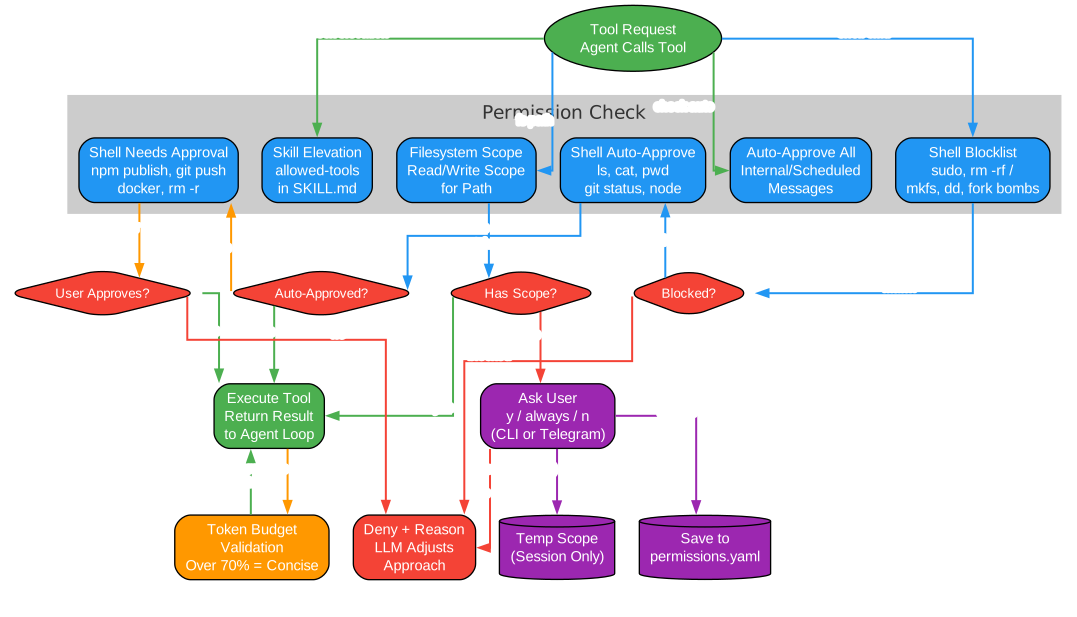
When Mercury needs a scope it doesn’t have, it prompts inline:
⚠ Mercury needs write access to ~/projects/myapp. Allow? (y/n/always):
> always
[Scope saved to ~/.mercury/permissions.yaml]
Second Brain Memory System
Mercury’s Second Brain is an autonomous, persistent user model that learns from conversations over time. It’s not a raw chat log or a document dump — it stores compact, structured memories it believes may help in future conversations.
10 Memory Types
| Type | Description | Tier |
|---|---|---|
| identity | Who you are | Durable |
| preference | What you like/dislike | Durable |
| goal | What you’re working toward | Active |
| project | What you’re building | Active |
| habit | Patterns in your behavior | Active |
| decision | Choices you’ve made | Active |
| constraint | Limitations to respect | Active |
| relationship | People in your context | Active |
| episode | Notable events | Episodic |
| reflection | Insights from patterns | Inferred |
How It Learns (Background, Invisible)
For each non-trivial conversation:
- Mercury responds to the user normally
- After the response is sent, a background
extractMemory()call extracts 0–3 typed memory candidates using a separate LLM call (~800 tokens) - Each candidate goes through
UserMemoryStore.remember()which:- Merges with existing memory if ≥74% overlap (strengthens evidence)
- Auto-resolves conflicts (higher confidence wins, equal confidence → newer wins)
- Auto-tiers: identity/preference → durable, goal/project → active
- Promotes active → durable after 3+ reinforcing observations
- Stores weak memories with low confidence — they decay naturally
- On each heartbeat, Mercury consolidates (re-synthesizes profile/active summaries, generates reflections) and prunes (dismisses stale memories, promotes reinforced ones)
The user never sees or waits for this process. No tool calls are involved in the agentic loop.
Memory Controls
/memory        → Opens arrow-key menu (CLI) or sends overview (Telegram)

Menu:
  Overview          — total memories, breakdown by type, learning status
  Recent            — last 10 memories (type + summary + confidence)
  Search            — full-text search across all memories
  Pause Learning    — toggle: stop/resume storing new memories
  Clear All         — confirm, then wipes all memories
  Back
All data stays on your machine in ~/.mercury/memory/second-brain/second-brain.db (SQLite + FTS5). No cloud.
Token Budget Management
Mercury enforces a daily token budget (default: 1,000,000 tokens) to prevent unexpected API costs:
- System prompt (soul + guardrails + persona): ~500 tokens per request
- Short-term context: last 10 messages
- Long-term facts: keyword-matched, ~3 facts injected
- Second brain: relevant user memories injected via
retrieveRelevant()(~900 chars) - Auto-concise: when over 70% of budget, Mercury automatically uses more concise responses
In-chat commands for budget management:
/budget              # Show token budget status
/budget override     # Override budget for one request
/budget reset        # Reset usage to zero
/budget set 2000000  # Change daily token budget
Multi-Channel Access
Mercury supports two communication channels with identical functionality:
CLI Channel
- Readline-based prompt with arrow-key command menus
- Real-time text streaming with cursor-save/restore and markdown re-rendering
- Inline permission prompts
- Permission mode picker on startup
Telegram Channel
- HTML formatting with editable streaming messages
- File uploads and typing indicators
- Multi-user access with admin/member roles
- Organization access model with pairing codes
# Telegram access management
mercury telegram list              # List approved and pending users
mercury telegram approve <code>    # Approve a pairing code
mercury telegram reject <id>       # Reject a pending request
mercury telegram promote <id>      # Promote member to admin
mercury telegram demote <id>       # Demote admin to member
mercury telegram reset             # Clear all access
Built-in Tools
Mercury comes with 31 built-in tools organized into categories:
| Category | Tools |
|---|---|
| Filesystem | read_file, write_file, create_file, edit_file, list_dir, delete_file, send_file, approve_scope |
| Shell | run_command, cd, approve_command |
| Messaging | send_message |
| Git | git_status, git_diff, git_log, git_add, git_commit, git_push |
| Web | fetch_url |
| Skills | install_skill, list_skills, use_skill |
| Scheduler | schedule_task, list_scheduled_tasks, cancel_scheduled_task |
| System | budget_status |
Extensible Skills System
Mercury supports the Agent Skills specification — modular, installable instruction sets that extend capabilities without code changes:
# Install a skill from a URL
/install_skill https://example.com/skills/daily-digest/SKILL.md

# List installed skills
/skills

# Use a skill
/use_skill daily-digest
Skills are stored under ~/.mercury/skills/ with a SKILL.md file containing YAML frontmatter and markdown instructions:
---
name: daily-digest
description: Send a daily summary of activity
version: 0.1.0
allowed-tools:
  - read_file
  - list_dir
  - run_command
---

# Daily Digest

Instructions for Mercury to follow when this skill is invoked...
The skills system uses progressive disclosure — only skill names and descriptions are loaded at startup (token-efficient), with full instructions loaded on demand via use_skill.
Daemon Mode and Scheduling
Mercury can run as a persistent background daemon with crash recovery:
mercury up          # Install service + start daemon + ensure running
mercury restart     # Restart the background process
mercury stop        # Stop the background process
mercury logs        # View recent daemon logs
mercury status      # Show if daemon is running
The daemon includes built-in crash recovery with exponential backoff (up to 10 restarts per minute) and auto-start on boot via system services:
| Platform | Method | Requires Admin |
|---|---|---|
| macOS | LaunchAgent (~/Library/LaunchAgents/) | No |
| Linux | systemd user unit (~/.config/systemd/user/) | No (linger for boot) |
| Windows | Task Scheduler (schtasks) | No |
Scheduler
Mercury supports both recurring and one-shot scheduled tasks:
# Recurring: daily at 9am
schedule_task with cron: "0 9 * * *"

# One-shot: 15 seconds from now
schedule_task with delay_seconds: 15
Tasks persist to ~/.mercury/schedules.yaml and restore on restart. Responses route back to the channel where the task was created.
Getting Started
Install and run Mercury in 30 seconds:
# Quick start with npx
npx @cosmicstack/mercury-agent

# Or install globally
npm i -g @cosmicstack/mercury-agent
mercury
First run triggers the setup wizard — enter your name, an API key, and optionally a Telegram bot token.
To reconfigure later:
mercury doctor
Requirements
- Node.js 20+ (required)
- An LLM API key (DeepSeek, OpenAI, Anthropic, Grok, or Ollama)
- Optional: Telegram bot token for mobile access
Configuration
All runtime data lives in ~/.mercury/ — not in your project directory:
| Path | Purpose |
|---|---|
~/.mercury/mercury.yaml | Main config (providers, channels, budget) |
~/.mercury/.env | API keys and tokens |
~/.mercury/soul/*.md | Agent personality files |
~/.mercury/permissions.yaml | Capabilities and approval rules |
~/.mercury/skills/ | Installed skills |
~/.mercury/schedules.yaml | Scheduled tasks |
~/.mercury/token-usage.json | Daily token usage tracking |
~/.mercury/memory/ | All memory stores |
Provider Fallback
Mercury supports multiple LLM providers with automatic fallback:
| Provider | Default Model | API Key | Notes |
|---|---|---|---|
| DeepSeek | deepseek-chat | DEEPSEEK_API_KEY | Default, cost-effective |
| OpenAI | gpt-4o-mini | OPENAI_API_KEY | GPT-4o, o3, etc. |
| Anthropic | claude-sonnet-4 | ANTHROPIC_API_KEY | Claude Sonnet, Haiku, Opus |
| Grok (xAI) | grok-4 | GROK_API_KEY | OpenAI-compatible endpoint |
| Ollama Cloud | gpt-oss:120b | OLLAMA_CLOUD_API_KEY | Remote Ollama via API |
| Ollama Local | gpt-oss:20b | No key needed | Local Ollama instance |
When a provider fails, Mercury automatically tries the next one. It remembers the last successful provider and starts there on the next request.
Conclusion
Mercury Agent represents a thoughtful approach to AI agent design — one that prioritizes safety, memory, and personality over raw capability. Its permission-hardened tools prevent the “silent execution” problem that plagues other agents. The Second Brain memory system creates a genuinely personalized experience that improves over time. And the soul-driven architecture means you own your agent’s personality, not a corporation.
With 31 built-in tools, multi-channel access, token budget enforcement, daemon mode with crash recovery, and an extensible skills system, Mercury is ready for both casual use and 24/7 production deployment. Whether you need a coding assistant that respects your file boundaries, a Telegram companion that remembers your preferences, or a scheduled task runner that operates autonomously — Mercury delivers.
Links:

Enjoyed this post? Never miss out on future posts by following us


