OpenSRE: AI-Powered Site Reliability Engineering Framework
When something breaks in production, the evidence is scattered everywhere – logs in one system, metrics in another, traces somewhere else, runbooks in a wiki, and the actual context buried in a Slack thread that nobody can find. Site Reliability Engineers spend more time hunting for information than actually fixing problems. OpenSRE is an open-source framework that changes this equation by building AI SRE agents that automatically investigate and resolve production incidents on your own infrastructure.
OpenSRE positions itself as the “SWE-bench for SRE” – an open reinforcement learning environment for agentic infrastructure incident response. Just as SWE-bench gave coding agents scalable training data and clear feedback loops, OpenSRE provides the missing layer for production incident response: scored synthetic RCA suites, end-to-end tests across cloud-backed scenarios, and a structured investigation pipeline that connects the 40+ tools you already run.
Built on LangGraph with a dual-LLM architecture, OpenSRE reasons across your connected systems, identifies anomalies, generates structured investigation reports with probable root causes, and posts summaries directly to Slack or PagerDuty – no context switching needed. The framework supports full LLM flexibility, letting you bring your own model from Anthropic, OpenAI, Ollama, Gemini, OpenRouter, NVIDIA NIM, or Amazon Bedrock.
How It Works
When an alert fires, OpenSRE automatically initiates a structured investigation workflow. The system fetches the alert context and correlated logs, metrics, and traces. It then reasons across your connected systems to identify anomalies, generates a structured investigation report with probable root cause, suggests next steps and optionally executes remediation actions, and posts a summary directly to your incident management tools.
Understanding the Investigation Pipeline
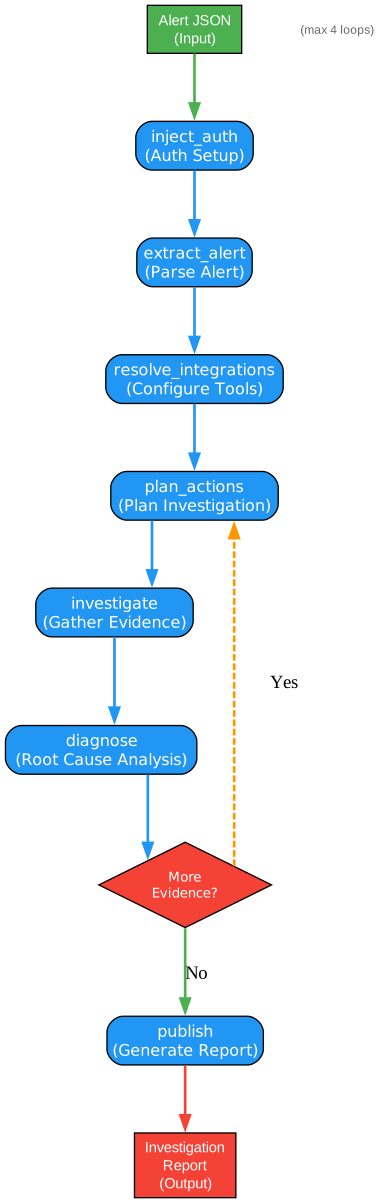
The investigation pipeline diagram above illustrates the complete flow that OpenSRE follows when processing a production incident. This pipeline is implemented as a LangGraph directed graph, where each node represents a discrete processing step and edges define the flow of state between them.
Entry Point: inject_auth
The pipeline begins at the inject_auth node, which serves as the entry point for all workflows. This node is responsible for loading and injecting authentication credentials for the various integrations that will be used during the investigation. Without valid credentials, subsequent nodes cannot query observability platforms, cloud providers, or incident management systems. The auth node ensures that all API keys, IAM roles, and service account credentials are resolved and available in the shared state before any data fetching begins.
Mode Routing
After authentication, the pipeline uses a conditional routing function (route_by_mode) to determine the workflow path. If the agent is operating in “investigation” mode, the flow proceeds to the extract_alert node for incident analysis. If the mode is “chat” or unspecified, the flow routes to a conversational agent that can handle general queries and tool-assisted interactions. This dual-mode design allows OpenSRE to serve both as an automated incident responder and as an interactive assistant for SRE teams.
Alert Extraction and Noise Filtering
The extract_alert node parses the incoming alert payload, extracting key metadata such as alert name, severity, pipeline name, and affected services. A critical feature here is noise detection: the route_after_extract function checks whether the alert is informational noise. If the alert is classified as noise, the pipeline terminates early at the END node, saving compute resources and avoiding unnecessary LLM calls. This prevents alert fatigue from propagating through the investigation pipeline.
Investigation Loop
For genuine alerts, the pipeline enters the core investigation loop consisting of resolve_integrations, plan_actions, investigate, and diagnose nodes. The diagnose node can route back to plan_actions if additional investigation is needed, up to a maximum of 4 loops. This iterative approach allows the agent to refine its understanding as new evidence is gathered, following leads that emerge from initial data collection. The loop counter and available action set are checked on each iteration to prevent infinite cycles.
Publishing Findings
Once the investigation reaches a conclusion – either through sufficient evidence, exhausted recommendations, or hitting the loop limit – the publish node generates the final structured report. This report includes the root cause, validated and non-validated claims, a causal chain, validity scores, and remediation steps. The findings are posted to configured channels such as Slack, PagerDuty, or Jira.
The Investigation Pipeline
The investigation pipeline is the heart of OpenSRE. Each node performs a specific role in transforming a raw alert into a validated root cause analysis. Let us examine each node in detail.
inject_auth
The inject_auth node is the first node in the LangGraph pipeline. It loads authentication credentials from the environment, secure local keychain, or .env files and injects them into the shared agent state. This ensures that all downstream nodes have access to the API keys and tokens they need to interact with external services. The node supports multiple credential sources including environment variables, AWS IAM roles, and integration-specific authentication flows.
extract_alert
The extract_alert node receives the raw alert payload and extracts structured information from it. This includes the alert name, severity level, affected pipeline or service, timestamps, and any annotations or labels attached to the alert. The node also performs an initial noise classification – if the alert is determined to be informational or a false positive, the pipeline short-circuits and terminates early. This is controlled by the route_after_extract routing function, which checks the is_noise flag in the state.
resolve_integrations
The resolve_integrations node maps the alert context to the relevant integrations. For example, if the alert originates from a Kubernetes cluster, this node resolves the EKS, CloudWatch, and Datadog integrations. If the alert involves a database, it resolves the MongoDB or PostgreSQL integration. This step ensures that only the relevant tools are presented to the planning node, reducing the search space and improving the efficiency of the investigation.
plan_actions
The plan_actions node is where the AI agent decides what to investigate. Using the lightweight “toolcall” LLM, this node selects the most relevant investigation actions from the available tool registry. It considers the alert context, available data sources, previously executed hypotheses, and a tool budget (default: 10 tools per step, maximum: 50) that caps the number of tools to prevent prompt size explosion and execution breadth. The node also supports dynamic rerouting – if new evidence changes the likely source family (for example, discovering an S3 audit key that enables tracing external vendor interactions), the plan is adjusted accordingly.
investigate
The investigate node executes the planned actions. Each action corresponds to a tool call against a specific integration – querying CloudWatch metrics, fetching Datadog logs, inspecting EKS pod health, or searching GitHub commits. The results are collected as evidence and added to the shared state. This node uses the toolcall LLM for efficient tool selection and execution, keeping costs low while gathering the data needed for root cause analysis.
diagnose
The diagnose node is the most computationally intensive step. It uses the heavyweight “reasoning” LLM to analyze all gathered evidence and determine the root cause. The node follows a structured process: first, it checks if evidence is available; then it builds a diagnosis prompt from the evidence; next, it calls the LLM to propose a root cause; finally, it validates claims against the evidence and calculates a validity score. The diagnosis produces a root cause category (such as configuration_error, code_defect, resource_exhaustion, dependency_failure, or infrastructure), validated and non-validated claims, a causal chain, and investigation recommendations. If recommendations exist and the loop count has not exceeded the maximum of 4, the pipeline loops back to plan_actions for further investigation.
publish
The publish node generates the final investigation report and distributes it to configured channels. The report includes the root cause statement, root cause category, causal chain, validated claims with evidence links, validity score, and remediation steps. Reports can be posted to Slack, PagerDuty, Jira, or Google Docs depending on the configured integrations. The node supports multiple output formatters including terminal rendering for CLI usage and editor-formatted output for integration with development environments.
Dual LLM Architecture
One of the most significant design decisions in OpenSRE is its dual-LLM architecture. Rather than using a single large language model for all tasks, OpenSRE separates responsibilities between two specialized models: a heavyweight “reasoning” model for complex analysis and a lightweight “toolcall” model for tool selection and action planning.
Understanding the Dual LLM Architecture
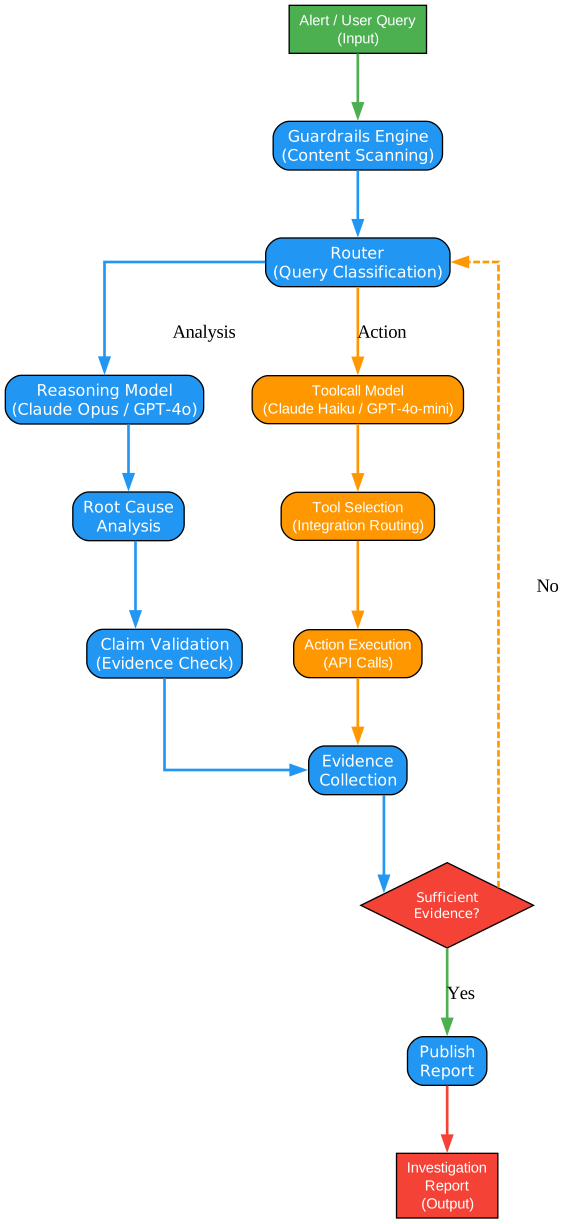
The dual LLM architecture diagram above illustrates how OpenSRE optimizes cost and performance by routing different types of tasks to appropriately sized models. This design pattern is critical for production AI systems where cost efficiency and response latency are as important as accuracy.
Reasoning Model (Heavyweight)
The reasoning model is the full-capability LLM used for tasks that require deep analysis and complex reasoning. In the Anthropic provider, this defaults to Claude Opus; in OpenAI, it defaults to GPT-4o. This model handles the most cognitively demanding parts of the investigation pipeline:
-
Root Cause Diagnosis: Analyzing all gathered evidence to determine the probable root cause, categorizing it, and building a causal chain. This requires synthesizing information from multiple sources, identifying patterns, and reasoning about cause-and-effect relationships across distributed systems.
-
Claim Validation: Evaluating whether the claims made in the root cause analysis are supported by the evidence. The reasoning model checks each claim against the collected data and categorizes it as validated or non-validated, directly influencing the validity score of the investigation.
-
Evidence Categorization: Organizing raw evidence into meaningful categories and identifying which pieces of evidence are most relevant to the current investigation. This requires understanding the semantic relationships between different data points.
Toolcall Model (Lightweight)
The toolcall model is a smaller, faster, and cheaper LLM used for tasks that require less reasoning depth. In the Anthropic provider, this defaults to Claude Haiku; in OpenAI, it defaults to GPT-4o mini. This model handles:
-
Action Planning: Selecting which investigation tools to invoke based on the alert context and available sources. This is essentially a routing and selection task that benefits from speed and low cost rather than deep reasoning.
-
Tool Selection: Mapping planned actions to specific tool implementations in the registry. The toolcall model identifies the right tool for each step, considering the available integrations and their capabilities.
-
Keyword Extraction: Extracting relevant keywords from alert descriptions for tool prioritization. This is a straightforward NLP task that does not require the full power of a reasoning model.
Cost Optimization Impact
The cost savings from this architecture are substantial. In a typical investigation, the toolcall model might be invoked 3-5 times during the planning phase, while the reasoning model is invoked once or twice during diagnosis. Since the toolcall model costs roughly 1/10th to 1/20th of the reasoning model per token, the overall investigation cost is significantly lower than using a single heavyweight model for all tasks. For teams running hundreds of investigations per day, this translates to meaningful cost reductions without sacrificing diagnostic quality.
Provider Flexibility
The dual-LLM architecture is provider-agnostic. OpenSRE supports Anthropic, OpenAI, Ollama, Gemini, OpenRouter, NVIDIA NIM, MiniMax, and Amazon Bedrock. Each provider has its own pair of reasoning and toolcall models, configured through the LLMSettings system. The LLM_PROVIDER environment variable controls which provider is active, and each provider defines its own model pair, base URL, and API key environment variable. This flexibility allows teams to choose the provider that best fits their cost, latency, and data residency requirements.
40+ Integrations
OpenSRE connects to over 40 tools and services across the modern cloud stack. These integrations are organized by category and cover the full spectrum of observability, infrastructure, databases, data platforms, development tools, incident management, communication, and agent deployment.

Understanding the Tool Ecosystem
The tool ecosystem diagram above maps the 40+ integrations supported by OpenSRE, organized into functional categories. Each category represents a distinct layer in the modern cloud infrastructure stack, and the integrations within each category provide the data sources that OpenSRE agents query during investigations.
AI / LLM Providers
The foundation layer includes seven LLM providers: Anthropic, OpenAI, Ollama, Google Gemini, OpenRouter, NVIDIA NIM, and Amazon Bedrock. These providers power the dual-LLM architecture discussed earlier. Ollama enables fully local, air-gapped deployments for organizations with strict data residency requirements. OpenRouter provides access to a wide range of models through a single API. NVIDIA NIM supports GPU-optimized inference for high-throughput scenarios. Bedrock offers IAM-based authentication without API keys, simplifying credential management for AWS-native teams.
Observability
The observability category is the most critical for incident investigation. It includes Grafana (with Loki for logs, Mimir for metrics, and Tempo for traces), Datadog (with context, events, logs, and metrics tools), Honeycomb for distributed tracing, Coralogix for log analytics, CloudWatch for AWS-native monitoring, Sentry for error tracking, and Elasticsearch for log search and aggregation. These integrations provide the raw signals – logs, metrics, and traces – that the investigation pipeline analyzes to identify root causes. On the roadmap are Splunk, New Relic, and Victoria Logs.
Infrastructure
Infrastructure integrations provide visibility into the compute and container layers. Kubernetes integration includes tools for listing clusters, namespaces, deployments, and pods, checking node health, and fetching pod logs. AWS integration covers S3, Lambda, EKS, EC2, and Bedrock. GCP and Azure are also supported. Roadmap items include Helm and ArgoCD for GitOps visibility.
Database
Database integrations allow the agent to query database health and performance metrics. Currently supported are MongoDB (including Atlas), ClickHouse, MariaDB, MySQL, PostgreSQL, and Azure SQL. These tools can inspect server status, replication health, slow queries, current operations, and table statistics. Roadmap items include RDS, Snowflake, and additional managed database services.
Data Platform
Data platform integrations cover the data pipeline and streaming layers. Apache Airflow, Apache Kafka, Apache Spark, and Prefect are supported. These integrations help diagnose issues in data pipelines, batch processing jobs, and streaming workloads. RabbitMQ is on the roadmap.
Dev Tools and Incident Management
Development tool integrations include GitHub (commits, file contents, repository tree, and code search), GitHub MCP, and Bitbucket. Incident management integrations include PagerDuty, Opsgenie, and Jira. These allow the agent to correlate code changes with incidents, create or update issues, and add investigation context to ongoing incidents.
Communication and Deployment
Communication integrations include Slack and Google Docs for posting investigation results. Deployment integrations cover Vercel, LangSmith, EC2, and ECS for agent deployment. The MCP (Model Context Protocol), ACP (Agent Communication Protocol), and OpenClaw protocols are also supported for inter-agent communication and tool discovery.
Deployment Options
OpenSRE supports multiple deployment and entry point options, making it flexible enough to fit into any existing workflow or infrastructure setup.
Understanding the Deployment Options
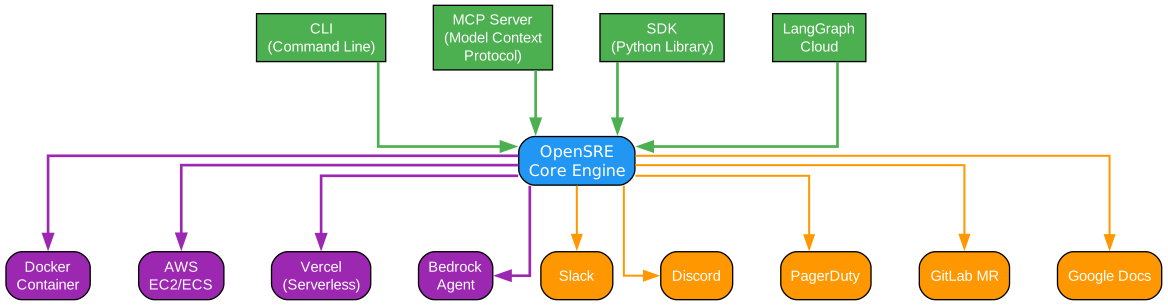
The deployment options diagram above illustrates the four primary ways to interact with OpenSRE, each designed for a different use case and operational context. This flexibility ensures that teams can adopt OpenSRE incrementally, starting with the simplest entry point and scaling to more sophisticated deployments as their needs evolve.
CLI (Command Line Interface)
The CLI is the most straightforward way to run OpenSRE. Built with Click and Rich, it provides a polished terminal experience with formatted output, progress indicators, and interactive prompts. The primary commands are opensre onboard for initial setup and opensre investigate for running investigations. The CLI supports passing alert payloads directly via the -i flag, making it easy to integrate with existing alerting pipelines that can execute shell commands. The onboard wizard walks users through configuring their LLM provider, validating integrations, and saving credentials securely. The CLI also includes a doctor command for diagnosing configuration issues, a guardrails command for managing content safety rules, and a tests command for running synthetic and end-to-end test suites.
MCP Server (Model Context Protocol)
The MCP server entry point exposes OpenSRE as an MCP tool, allowing other AI agents and applications to invoke investigations programmatically. Built on the FastMCP library, the server exposes a run_rca tool that accepts an alert payload along with optional overrides for alert name, pipeline name, and severity. This enables integration with AI agent frameworks that support the MCP protocol, allowing OpenSRE to be composed into larger agentic workflows. For example, a Slack bot agent could receive an alert, invoke the OpenSRE MCP tool to run an investigation, and post the results back to the channel – all without human intervention.
SDK (Software Development Kit)
The SDK entry point provides a programmatic Python API for running investigations. The run_investigation function accepts the same parameters as the CLI but can be called directly from Python code. This is ideal for teams that want to embed OpenSRE into their existing Python applications, custom automation scripts, or Jupyter notebooks. The SDK uses lazy imports to avoid loading optional dependencies at import time, keeping the import footprint minimal. This entry point is the most flexible for custom integrations, as it allows developers to wrap the investigation pipeline with their own pre-processing, post-processing, and error handling logic.
LangGraph Cloud
For teams already using LangGraph Cloud for deploying LangGraph-based agents, OpenSRE provides a compatible deployment path. The graph_pipeline.py module exports a build_graph function that returns a compiled LangGraph StateGraph, which can be deployed directly to LangGraph Cloud. This option provides managed infrastructure, automatic scaling, and integration with LangSmith for tracing and observability. The LangGraph Cloud deployment is ideal for production environments where reliability, scalability, and monitoring are critical requirements.
Choosing the Right Entry Point
For individual engineers or small teams getting started, the CLI is the recommended entry point. It requires minimal setup and provides immediate feedback in the terminal. For teams with existing AI agent infrastructure, the MCP server enables seamless integration. For custom automation needs, the SDK provides the most flexibility. For production-grade deployments with high availability requirements, LangGraph Cloud offers the most robust option.
Installation
OpenSRE can be installed using the one-liner installer script, Homebrew, or PowerShell. Choose the method that best fits your environment.
Linux and macOS (curl)
curl -fsSL https://raw.githubusercontent.com/Tracer-Cloud/opensre/main/install.sh | bash
macOS (Homebrew)
brew install Tracer-Cloud/opensre/opensre
Windows (PowerShell)
irm https://raw.githubusercontent.com/Tracer-Cloud/opensre/main/install.ps1 | iex
Development Setup
For contributors or teams that want to run from source, clone the repository and use the Makefile-based setup:
git clone https://github.com/Tracer-Cloud/opensre
cd opensre
make install
After installation, run the onboarding wizard to configure your LLM provider and validate integrations:
opensre onboard
The onboarding wizard will prompt you for your preferred LLM provider (Anthropic, OpenAI, Ollama, etc.), API keys, and optionally validate connections to Grafana, Datadog, Honeycomb, Coralogix, Slack, AWS, GitHub MCP, and Sentry.
Usage
Running an Investigation
To investigate an alert, pass the alert payload to the investigate command:
opensre investigate -i tests/e2e/kubernetes/fixtures/datadog_k8s_alert.json
This triggers the full investigation pipeline: alert extraction, integration resolution, action planning, evidence gathering, root cause diagnosis, and report publishing. The results are displayed in the terminal with formatted output.
Using the SDK
For programmatic access, use the Python SDK:
from app.entrypoints.sdk import run_investigation

result = run_investigation(
    raw_alert={
        "alert_name": "HighCPUUsage",
        "severity": "critical",
        "pipeline_name": "production-api",
    }
)

print(result["root_cause"])
print(f"Validity score: {result['validity_score']:.0%}")
Running the MCP Server
To start OpenSRE as an MCP server:
opensre mcp
Other AI agents can then invoke the run_rca tool through the MCP protocol to trigger investigations remotely.
Running Synthetic Tests
OpenSRE includes synthetic test suites for benchmarking investigation accuracy:
make benchmark
The synthetic test suites include scenarios for RDS PostgreSQL with various fault types such as dual-fault connection and CPU issues, replication lag with missing metrics, compositional CPU and storage problems, misleading events, false alert recovery, and checkpoint storms causing CPU saturation. Each scenario includes an alert payload, expected answer, and scoring criteria.
Guardrails Configuration
OpenSRE includes a guardrails engine that scans all LLM prompts for sensitive content. To manage guardrails rules:
opensre guardrails list
opensre guardrails test
The guardrails engine supports three actions: REDACT (replace matched content with a placeholder), BLOCK (prevent the prompt from being sent to the LLM), and AUDIT (log the match without modifying the content). Rules are defined in YAML and can include regex patterns and keyword lists.
Key Features
| Feature | Description |
|---|---|
| Structured incident investigation | Correlated root-cause analysis across all your signals – logs, metrics, traces, and runbooks |
| Runbook-aware reasoning | OpenSRE reads your runbooks and applies them automatically during investigation |
| Predictive failure detection | Catch emerging issues before they page you by analyzing trend data |
| Evidence-backed root cause | Every conclusion is linked to the data behind it with validity scores |
| Full LLM flexibility | Bring your own model – Anthropic, OpenAI, Ollama, Gemini, OpenRouter, NVIDIA NIM, Bedrock |
| Dual-LLM architecture | Heavyweight reasoning model for analysis, lightweight toolcall model for planning |
| Investigation loop | Up to 4 iterations with dynamic rerouting based on new evidence |
| Tool budget enforcement | Default 10 tools per step, maximum 50 tools to control cost and breadth |
| Guardrails engine | Detect, redact, block, and audit sensitive content in LLM prompts |
| 40+ integrations | AWS, Datadog, Grafana, MongoDB, Kafka, GitHub, Jira, and more |
| Synthetic testing | Scored RCA suites with adversarial red herrings for benchmarking |
| E2E testing | Real-world tests across Kubernetes, EC2, CloudWatch, Lambda, ECS, and Flink |
| Multiple entry points | CLI, MCP Server, SDK, and LangGraph Cloud deployment |
| Validity scoring | Quantified confidence in root cause claims based on evidence validation |
| Causal chain output | Step-by-step causal narrative from trigger to failure |
Conclusion
OpenSRE represents a significant step forward in automating production incident response. By combining a structured investigation pipeline with a dual-LLM architecture, 40+ integrations, and scored synthetic test suites, it provides both a practical tool for SRE teams and a benchmark environment for advancing AI-powered infrastructure reliability.
The framework’s design philosophy – separating reasoning from tool selection, enforcing tool budgets, supporting investigation loops with dynamic rerouting, and validating claims against evidence – reflects hard-won experience with production systems. These are not theoretical constructs; they are practical solutions to the real challenges of investigating distributed failures where evidence is scattered, noisy, and often misleading.
For teams looking to reduce mean time to resolution and improve the consistency of their incident investigations, OpenSRE offers a compelling open-source solution. The multiple entry points (CLI, MCP, SDK, LangGraph Cloud) make it easy to adopt incrementally, and the full LLM flexibility ensures that you can use the models that best fit your cost, latency, and data residency requirements.
Explore the repository, run the synthetic test suites, and see how OpenSRE can transform your incident response workflow:
GitHub Repository: https://github.com/Tracer-Cloud/opensre
Documentation: https://www.opensre.com/docs
Quickstart Guide: https://www.opensre.com/docs/quickstart Enjoyed this post? Never miss out on future posts by following us 


