The OpenAI Agents Python SDK is a lightweight yet powerful framework designed for building multi-agent AI workflows in Python. Released by OpenAI, this SDK provides a clean, provider-agnostic abstraction layer that supports not only the OpenAI Responses API and Chat Completions API, but also over 100 other LLM providers through LiteLLM and any-llm integrations. Whether you are building a simple chatbot or orchestrating complex multi-agent systems with handoffs, guardrails, and sandboxed execution, the OpenAI Agents SDK gives you the building blocks to do it efficiently and safely.
In this post, we will walk through the architecture of the SDK, explore its core concepts in depth, and demonstrate how to build production-ready agent workflows. From the agent execution loop to tool integrations, from guardrails to tracing, and from session management to sandbox agents, you will gain a thorough understanding of what this SDK offers and how to leverage it in your projects.
Architecture Overview
The OpenAI Agents SDK is built around a modular architecture that separates concerns cleanly. At the top level, you define Agents with their instructions, tools, and handoff configurations. The Runner component takes these agent definitions and executes them through a well-defined loop that handles LLM calls, tool invocations, guardrail checks, and agent handoffs. The SDK also provides built-in support for tracing and observability, allowing you to monitor every step of your agent workflows.
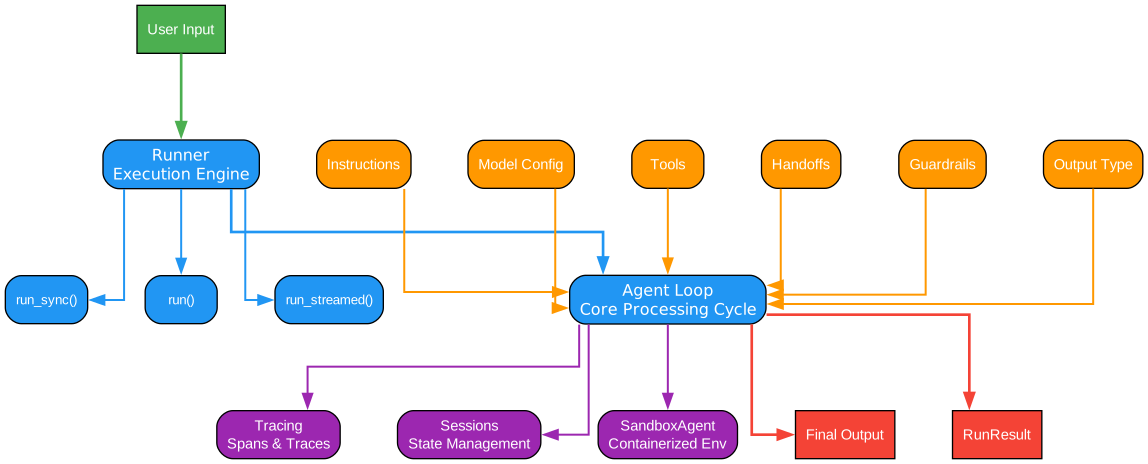
The architecture diagram above illustrates the layered design of the OpenAI Agents SDK. At the outermost layer, the Runner component serves as the primary entry point for executing agents. It accepts an agent definition, user input, and an optional run configuration, then orchestrates the entire execution lifecycle. The Runner supports three execution modes: run_sync() for synchronous execution, run() for asynchronous execution, and run_streamed() for streaming responses that emit events as they are generated.
Beneath the Runner, the Agent Loop forms the core processing engine. This loop repeatedly invokes the configured LLM model, processes the model’s response, and decides whether to return a final output, invoke a tool, or hand off to another agent. Each iteration of the loop begins with guardrail validation, ensuring that inputs and outputs meet safety and policy requirements before proceeding.
The Agent abstraction sits at the configuration layer. Each agent encapsulates a set of instructions (which can be static strings or dynamic functions), a list of tools it can use, handoff definitions that allow it to delegate tasks to other agents, model configuration specifying which LLM to use, and hooks that fire at various lifecycle events. This design makes agents composable – you can mix and match agents with different capabilities and connect them through handoffs to form complex workflows.
The Tools layer provides a rich set of built-in tool types including function tools, file search, web search, computer interaction, code interpretation, image generation, and more. Custom tools can also be defined to extend agent capabilities. Tools are invoked within the agent loop when the LLM decides a tool call is needed, and their results are fed back into the loop for further processing.
The Guardrails layer operates as a safety net, intercepting inputs before they reach the LLM and outputs before they are returned to the user. Input guardrails validate user prompts, output guardrails validate agent responses, and tool guardrails validate tool inputs and outputs. This multi-layered validation ensures that agents operate within defined boundaries.
Finally, the Tracing and Sessions layer provides observability and state management. Tracing captures detailed spans for every operation – agent invocations, function calls, LLM generations, guardrail checks, and handoffs. Sessions persist conversation state across multiple interactions using backends like SQLite, Redis, SQLAlchemy, MongoDB, or OpenAI Conversations.
The Agent Loop
The agent loop is the heart of the OpenAI Agents SDK. Understanding how it works is essential for building effective agent workflows. The loop follows a deterministic process that ensures predictable behavior while still allowing for flexible, dynamic interactions.
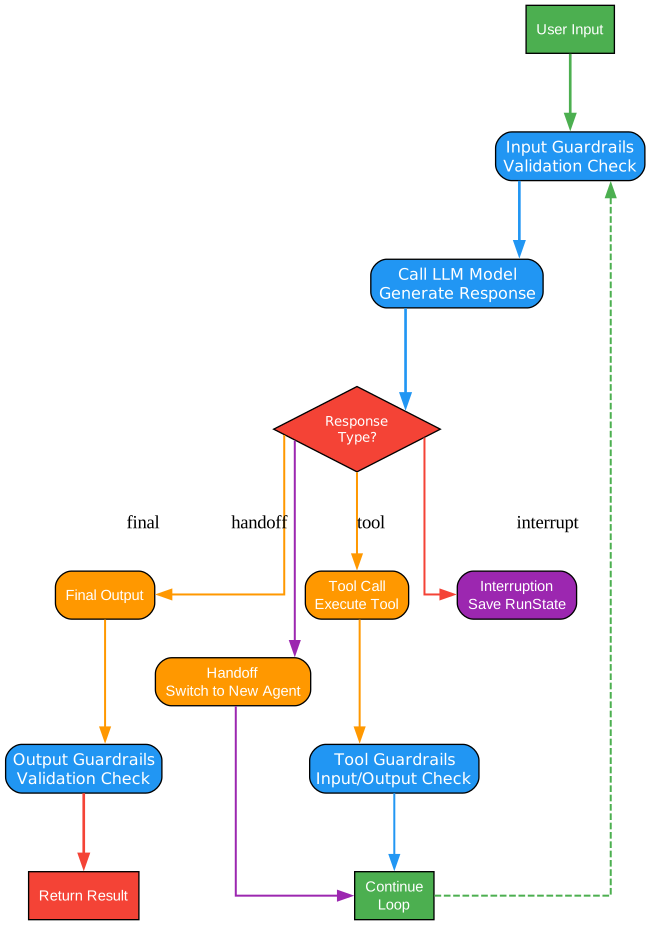
The agent loop diagram above shows the complete execution flow from start to finish. The process begins when the Runner receives an initial input along with an agent definition. This input is first passed through input guardrails, which validate the user’s message against configured safety rules. If any guardrail triggers a tripwire, the execution is halted and a GuardrailTripwireTriggered exception is raised, preventing potentially harmful or out-of-scope inputs from reaching the LLM.
Once input guardrails pass, the validated input is sent to the LLM model specified in the agent’s configuration. The model processes the input along with the agent’s instructions and any conversation history, then produces a response. This response can take several forms: a direct text output, a request to call one or more tools, or a request to hand off to another agent.
If the LLM produces a final output (meaning it has completed the task and has no further actions to take), the response is passed through output guardrails before being returned to the caller. Output guardrails validate that the agent’s response meets quality and safety standards.
If the LLM requests tool calls, the agent loop processes each tool invocation. Before executing a tool, tool input guardrails validate the tool’s input parameters. After the tool executes, tool output guardrails validate the tool’s results. The validated tool results are then appended to the conversation history, and the loop returns to the LLM for another iteration, allowing the model to reason about the tool results and decide on next steps.
If the LLM requests a handoff, the agent loop transfers control to the target agent specified in the handoff definition. The on_handoff callback is invoked, and an optional input_filter can transform the conversation context before passing it to the new agent. The loop then continues with the new agent, maintaining the overall conversation state while switching the active agent.
This loop continues until either a final output is produced, a guardrail is triggered, or an error occurs. The deterministic nature of this loop makes agent behavior predictable and debuggable, which is critical for production deployments.
Core Concepts
Agents
The Agent class is the central abstraction in the SDK. An agent encapsulates everything needed to define an AI assistant’s behavior:
from agents import Agent

agent = Agent(
    name="Research Assistant",
    instructions="You are a research assistant that helps find and summarize information.",
    model="gpt-4o",
    tools=[search_tool, summarize_tool],
    handoffs=[writing_agent, fact_check_agent],
    output_type=ResearchOutput,
)
The instructions parameter can be a static string or a dynamic function that receives the agent and context, allowing you to customize behavior at runtime. The model parameter specifies which LLM to use – this can be an OpenAI model name, a Model instance, or even a custom provider through LiteLLM. The tools parameter lists the tools available to the agent, and handoffs defines other agents this agent can delegate tasks to.
The output_type parameter enables structured output by specifying a Pydantic model or dataclass that the agent should return. When set, the SDK instructs the LLM to produce output conforming to that schema, and the result is automatically parsed and validated.
Runner
The Runner component is the execution engine that drives agent workflows. It provides three execution modes:
from agents import Agent, Runner

agent = Agent(name="Assistant", instructions="You are a helpful assistant")

# Synchronous execution
result = Runner.run_sync(agent, "Hello!")

# Asynchronous execution
result = await Runner.run(agent, "Hello!")

# Streaming execution
result = Runner.run_streamed(agent, "Hello!")
async for event in result.stream_events():
    print(event)
run_sync() is the simplest mode, blocking until the agent completes. run() is the async equivalent, suitable for web servers and other async contexts. run_streamed() returns a stream of events as they happen, enabling real-time UI updates. Each mode returns a RunResult (or RunResultStreaming for streamed runs) that contains the final output, the complete conversation history, and metadata about the run.
Tools
The SDK provides a rich set of built-in tool types that cover common agent use cases:
- FunctionTool: Wraps a Python function as a tool, with automatic schema generation from type hints
- FileSearchTool: Searches through files using vector search
- WebSearchTool: Performs web searches via the OpenAI API
- ComputerTool: Enables computer interaction (click, type, scroll)
- HostedMCPTool: Connects to MCP (Model Context Protocol) servers
- LocalShellTool / ShellTool: Executes shell commands locally
- ApplyPatchTool: Applies patches to files
- CodeInterpreterTool: Runs Python code in a sandboxed environment
- ImageGenerationTool: Generates images using DALL-E
- ToolSearchTool: Dynamically discovers available tools
from agents import Agent, FunctionTool

def get_weather(city: str) -> str:
    """Get the current weather for a city."""
    return f"The weather in {city} is sunny and 72F."

weather_tool = FunctionTool(
    name="get_weather",
    description="Get current weather for a city",
    func=get_weather,
)

agent = Agent(
    name="Weather Agent",
    instructions="Help users check the weather.",
    tools=[weather_tool],
)
Handoffs
Handoffs enable agents to delegate tasks to other specialized agents. When an agent determines that a task is better handled by another agent, it can transfer control through a handoff:
from agents import Agent, Runner

triage_agent = Agent(
    name="Triage",
    instructions="Route users to the appropriate specialist.",
    handoffs=[billing_agent, support_agent, sales_agent],
)

billing_agent = Agent(
    name="Billing",
    instructions="Handle billing inquiries.",
)

result = Runner.run_sync(triage_agent, "I need help with my invoice")
Handoffs are automatically exposed as tools named transfer_to_{agent_name}. The LLM can invoke these tools to delegate tasks. Each handoff can optionally include an input_filter that transforms the conversation context before passing it to the target agent, and an on_handoff callback that fires when the handoff occurs.
Tools and Integrations
The OpenAI Agents SDK provides extensive tool and integration capabilities that allow agents to interact with the outside world. From simple function calls to complex multi-service integrations, the SDK’s tool system is designed to be both comprehensive and extensible.

The tools and integrations diagram above illustrates the full scope of the SDK’s tool ecosystem. At the center, the Tool Registry manages all available tools for an agent. When the LLM decides to call a tool, the registry looks up the tool definition, validates the input against the tool’s schema, executes the tool, and returns the result.
On the left side, the Built-in Tools represent the SDK’s native tool types. FunctionTool is the most commonly used, allowing developers to wrap any Python function as an agent tool. The SDK automatically generates JSON schemas from the function’s type hints and docstring, making it easy for the LLM to understand when and how to use the tool. FileSearchTool enables agents to search through uploaded files using vector similarity search, making it ideal for RAG (Retrieval-Augmented Generation) workflows. WebSearchTool gives agents the ability to search the web for current information, which is essential for tasks that require up-to-date data.
ComputerTool provides a groundbreaking capability: allowing agents to interact with computer interfaces through clicking, typing, and scrolling. This enables agents to navigate websites, fill forms, and interact with any graphical interface. CodeInterpreterTool lets agents write and execute Python code in a sandboxed environment, enabling computational tasks, data analysis, and dynamic problem-solving. ImageGenerationTool integrates DALL-E for visual content creation.
On the right side, the Integration Layer shows how the SDK connects to external services. MCP (Model Context Protocol) support through HostedMCPTool allows agents to connect to MCP servers that provide additional tools and context. This is particularly powerful for enterprise environments where agents need to interact with internal APIs and services. LocalShellTool and ShellTool enable agents to execute shell commands, useful for DevOps and automation tasks. ApplyPatchTool allows agents to modify files by applying patches, which is essential for code-editing agents.
At the bottom, the Provider Integrations show how the SDK connects to different LLM providers. Beyond OpenAI’s own APIs, the SDK supports LiteLLM for access to over 100 LLM providers including Anthropic, Google, Mistral, Cohere, and many others. The any-llm integration provides another path to multi-provider support. The MultiProvider class allows you to configure multiple providers and route requests based on model availability, cost, or other criteria. This provider-agnostic design means you are never locked into a single LLM vendor.
The tool system also supports custom tools through the CustomTool class, allowing you to define tools with arbitrary schemas and execution logic. Combined with ToolSearchTool, which dynamically discovers available tools at runtime, the SDK provides a flexible and powerful foundation for building agents that can adapt to new capabilities on the fly.
Multi-Agent Orchestration
One of the most powerful features of the OpenAI Agents SDK is its support for multi-agent orchestration. Rather than building a single monolithic agent that tries to handle everything, you can create specialized agents that collaborate through handoffs to deliver better results.
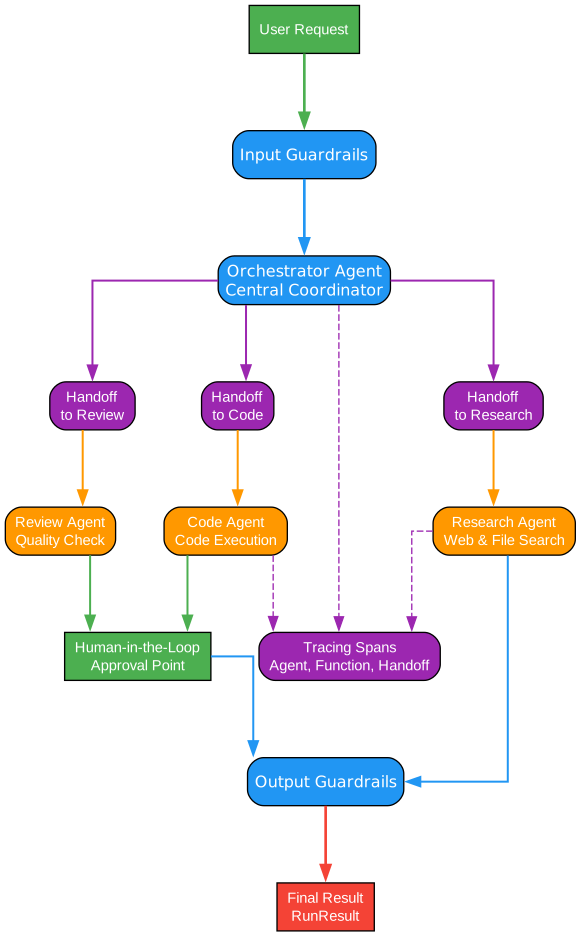
The multi-agent orchestration diagram above shows how multiple agents work together in a typical workflow. At the top, a Triage Agent serves as the entry point. This agent is responsible for understanding the user’s intent and routing the request to the most appropriate specialist agent. The triage agent has handoff definitions that connect it to each specialist, and its instructions guide it to make intelligent routing decisions.
In the middle layer, Specialist Agents handle domain-specific tasks. Each specialist has its own set of instructions, tools, and potentially its own handoff definitions. For example, a Research Agent might have web search and file search tools, while a Code Agent might have code interpreter and shell tools. Specialists can also hand off to each other when a task spans multiple domains – for instance, a research agent might hand off to a writing agent to compose a final report.
The Handoff Mechanism is what ties the multi-agent system together. When an agent invokes a handoff, the SDK transfers control to the target agent while preserving the conversation context. The input_filter parameter allows you to transform the context before passing it – for example, you might strip out irrelevant conversation history or add domain-specific context. The on_handoff callback lets you perform side effects when a handoff occurs, such as logging the transfer or updating a database.
At the bottom, the Shared Resources layer shows how agents can share common infrastructure. Session Management ensures that conversation state persists across agent transitions, so the receiving agent has full context of what happened before the handoff. Tracing captures spans for every agent invocation, tool call, and handoff, providing a complete audit trail of the multi-agent workflow. Guardrails apply consistently across all agents, ensuring that safety policies are enforced regardless of which agent is active.
The orchestration pattern also supports nested handoffs, where a specialist agent can hand off to another specialist, creating chains of delegation. For example, a customer support triage agent might hand off to a technical support agent, which in turn hands off to a code debugging agent. Each handoff is tracked in the trace, making it easy to debug and optimize the routing logic.
For complex workflows, you can also use agent-as-tool patterns, where one agent is used as a tool by another agent. This is different from handoffs – when an agent is used as a tool, the calling agent retains control and receives the result, rather than transferring control. This pattern is useful when you want to incorporate another agent’s output as part of a larger task without giving up control.
from agents import Agent, Runner

# Define specialist agents
research_agent = Agent(
    name="Researcher",
    instructions="Find relevant information on the given topic.",
    tools=[web_search_tool, file_search_tool],
)

writing_agent = Agent(
    name="Writer",
    instructions="Compose well-structured content based on research.",
)

# Triage agent with handoffs
triage_agent = Agent(
    name="Triage",
    instructions="Route requests to the appropriate specialist.",
    handoffs=[research_agent, writing_agent],
)

# Or use an agent as a tool
triage_agent = Agent(
    name="Triage",
    instructions="Use specialists to help answer questions.",
    tools=[
        research_agent.as_tool(
            tool_name="research",
            tool_description="Research a topic",
        ),
    ],
)
Guardrails and Safety
Safety is a first-class concern in the OpenAI Agents SDK. The guardrails system provides multiple checkpoints throughout the agent execution loop to ensure that inputs, outputs, and tool interactions remain within defined boundaries.
Input Guardrails validate user inputs before they reach the LLM. Each input guardrail consists of a function that receives the input and returns a GuardrailResult. If the guardrail’s tripwire is triggered, execution is halted immediately:
from agents import Agent, Runner, GuardrailFunctionOutput, InputGuardrail

async def check_relevance(
    ctx: RunContextWrapper, agent: Agent, input: str
) -> GuardrailFunctionOutput:
    is_relevant = await relevance_check_model(input)
    return GuardrailFunctionOutput(
        output_info={"relevant": is_relevant},
        tripwire_triggered=not is_relevant,
    )

agent = Agent(
    name="Assistant",
    instructions="You are a helpful assistant.",
    input_guardrails=[
        InputGuardrail(guardrail_function=check_relevance)
    ],
)
Output Guardrails validate the agent’s final output before it is returned to the user. These are useful for ensuring that responses meet quality standards, do not contain harmful content, or conform to expected formats.
Tool Input Guardrails and Tool Output Guardrails provide fine-grained control over tool interactions. Tool input guardrails validate the parameters passed to a tool before execution, while tool output guardrails validate the results returned by a tool. This is particularly important for tools that interact with external systems, where you want to ensure that the agent is not sending inappropriate requests or acting on invalid data.
The guardrails system is designed to be composable – you can stack multiple guardrails on the same agent, and each one is evaluated in sequence. If any guardrail triggers a tripwire, the execution is halted and a GuardrailTripwireTriggered exception is raised with details about which guardrail was triggered and why.
Tracing and Observability
The SDK includes a comprehensive tracing system that captures detailed information about every step of agent execution. Traces are composed of spans, each representing a discrete operation:
- Agent spans capture when an agent starts and finishes execution
- Function spans capture tool invocations and their results
- Generation spans capture LLM API calls and responses
- Guardrail spans capture guardrail checks and their outcomes
- Handoff spans capture agent transfers
- Custom spans allow you to add your own trace points
- MCP tool spans capture interactions with MCP servers
- Speech and transcription spans capture voice agent operations
from agents import trace

with trace("My workflow"):
    result = Runner.run_sync(agent, "Hello!")
    # All operations within this block are captured in the trace
Traces can be exported to OpenAI’s tracing dashboard or to custom backends through the TracingProcessor interface. This makes it easy to integrate with existing observability tools like Langfuse, Arize, or your own monitoring systems. The tracing system is enabled by default and adds minimal overhead to agent execution.
Session Management
The SDK provides a flexible session management system that persists conversation state across multiple interactions. This is essential for building agents that maintain context over time, such as customer support bots or research assistants.
Multiple session backends are supported out of the box:
- SQLiteSession: Stores sessions in a local SQLite database, ideal for development and single-server deployments
- RedisSession: Uses Redis for fast, in-memory session storage, suitable for production deployments with high throughput requirements
- SQLAlchemySession: Leverages SQLAlchemy for database-agnostic session storage, supporting PostgreSQL, MySQL, and other databases
- OpenAIConversationsSession: Uses OpenAI’s Conversations API for cloud-based session management
- MongoDBSession: Stores sessions in MongoDB, ideal for applications already using MongoDB
- EncryptedSession: Wraps another session backend with encryption, ensuring that session data is protected at rest
from agents import Agent, Runner
from agents.sessions import SQLiteSession

agent = Agent(name="Assistant", instructions="You are a helpful assistant.")

# Create a session that persists across interactions
session = SQLiteSession("user-123")

# First interaction
result1 = Runner.run_sync(agent, "My name is Alice", session=session)

# Second interaction - the agent remembers the name
result2 = Runner.run_sync(agent, "What is my name?", session=session)
print(result2.final_output)  # "Your name is Alice"
Sessions automatically manage the conversation history, including tool calls, handoffs, and guardrail results. This means that when a user returns to a conversation, the agent has full context of what happened previously, enabling seamless multi-turn interactions.
Sandbox Agents
One of the most advanced features of the OpenAI Agents SDK is the SandboxAgent, which enables agents to execute code and interact with files in containerized, isolated environments. This is critical for agents that need to run untrusted code, access repositories, or perform system operations without risking the host environment.
from agents import Runner
from agents.run import RunConfig
from agents.sandbox import Manifest, SandboxAgent, SandboxRunConfig
from agents.sandbox.entries import GitRepo
from agents.sandbox.sandboxes import UnixLocalSandboxClient

agent = SandboxAgent(
    name="Workspace Assistant",
    instructions="Inspect the sandbox workspace before answering.",
    default_manifest=Manifest(
        entries={"repo": GitRepo(repo="openai/openai-agents-python", ref="main")}
    ),
)

result = Runner.run_sync(
    agent,
    "Inspect the repo README and summarize what this project does.",
    run_config=RunConfig(sandbox=SandboxRunConfig(client=UnixLocalSandboxClient())),
)
The SandboxAgent uses a Manifest to define what resources should be available in the sandbox. Manifest entries can include Git repositories, local files, or other resources. The sandbox client manages the lifecycle of the containerized environment, creating it before execution and cleaning it up afterward.
Multiple sandbox providers are supported:
- UnixLocalSandboxClient: Uses local Docker containers for development
- E2BSandboxClient: Uses E2B’s cloud sandbox infrastructure
- ModalSandboxClient: Uses Modal’s serverless containers
- RunloopSandboxClient: Uses Runloop’s sandboxed execution environment
- CloudflareSandboxClient: Uses Cloudflare Workers for edge execution
- VercelSandboxClient: Uses Vercel’s serverless infrastructure
- BlaxelSandboxClient: Uses Blaxel’s sandboxed runtime
- DaytonaSandboxClient: Uses Daytona’s development environments
Each provider offers different trade-offs in terms of latency, isolation, and cost. For development, the local Docker client is convenient; for production, cloud-based providers offer better scalability and security.
Human-in-the-Loop
The SDK provides built-in support for human-in-the-loop workflows, allowing agents to request human approval before taking certain actions. This is essential for production deployments where agents need oversight before making critical decisions.
The needs_approval parameter on tools marks them as requiring human confirmation:
from agents import Agent, FunctionTool

delete_tool = FunctionTool(
    name="delete_file",
    description="Delete a file from the system",
    func=delete_file,
    needs_approval=True,  # Requires human approval before execution
)

agent = Agent(
    name="File Manager",
    instructions="Manage files on the system.",
    tools=[delete_tool],
)
When a tool marked with needs_approval is called, the SDK pauses execution and waits for human input. The RunState can be serialized and stored, allowing the approval to happen asynchronously. Once approved, the run can be resumed from where it left off:
from agents import Runner, RunState

# Start the run
result = Runner.run_sync(agent, "Delete the old log file")

# If approval is needed, save the state
state = RunState.from_run_result(result)

# Later, after human review, resume the run
result = Runner.run_sync(agent, resume_from=state)
This pattern enables powerful workflows where agents can operate autonomously for routine tasks but escalate to humans for sensitive operations. The RunState object captures the complete execution context, including conversation history, tool call results, and agent state, making it possible to resume runs even after long periods of time.
Installation and Quick Start
Getting started with the OpenAI Agents SDK is straightforward. The package is available on PyPI and can be installed with pip:
pip install openai-agents
The SDK requires Python 3.10 or later. Set your OpenAI API key as an environment variable:
export OPENAI_API_KEY="your-api-key-here"
Now you can create and run your first agent:
from agents import Agent, Runner

# Define a simple agent
agent = Agent(
    name="Assistant",
    instructions="You are a helpful assistant.",
)

# Run the agent synchronously
result = Runner.run_sync(agent, "Hello! Can you help me?")
print(result.final_output)

# Run the agent asynchronously
import asyncio

async def main():
    result = await Runner.run(agent, "Hello! Can you help me?")
    print(result.final_output)

asyncio.run(main())
For streaming responses:
from agents import Agent, Runner

agent = Agent(name="Assistant", instructions="You are a helpful assistant.")

result = Runner.run_streamed(agent, "Tell me a story")
async for event in result.stream_events():
    if event.type == "raw_response_event":
        print(event.data.delta, end="", flush=True)
Advanced Usage
Using Different LLM Providers
The SDK’s provider-agnostic design means you can easily switch between LLM providers:
from agents import Agent, Runner
from agents.models import LiteLLMModel

# Use a LiteLLM-supported model
agent = Agent(
    name="Assistant",
    instructions="You are a helpful assistant.",
    model=LiteLLMModel(model="anthropic/claude-3-opus-20240229"),
)

result = Runner.run_sync(agent, "Hello!")
Streaming with Events
The streaming mode provides granular control over how responses are processed:
from agents import Agent, Runner

agent = Agent(name="Assistant", instructions="You are a helpful assistant.")

result = Runner.run_streamed(agent, "Explain quantum computing")
async for event in result.stream_events():
    if event.type == "agent_updated_event":
        print(f"Agent changed to: {event.new_agent_name}")
    elif event.type == "run_item_event":
        if event.item.type == "tool_call_item":
            print(f"Tool called: {event.item.tool_name}")
        elif event.item.type == "message_output_item":
            print(f"Message: {event.item.raw_item}")
Custom Models with MultiProvider
For production deployments, you can use MultiProvider to route requests across multiple providers:
from agents import Agent, Runner
from agents.models import MultiProvider

provider = MultiProvider(
    providers={
        "openai": OpenAIProvider(),
        "anthropic": AnthropicProvider(),
    },
    default="openai",
)

agent = Agent(
    name="Assistant",
    instructions="You are a helpful assistant.",
    model=provider.get_model("gpt-4o"),
)
RealtimeAgent for Voice
The SDK also supports voice agents through RealtimeAgent, which uses WebSocket transport for real-time audio interaction:
from agents.realtime import RealtimeAgent, RealtimeRunner

agent = RealtimeAgent(
    name="Voice Assistant",
    instructions="You are a helpful voice assistant.",
    model="gpt-4o-realtime-preview",
)

# Connect and stream audio
runner = RealtimeRunner()
session = await runner.run(agent)
The RealtimeAgent integrates with speech-to-text and text-to-speech pipelines, enabling full voice interaction workflows with low latency.
Conclusion
The OpenAI Agents Python SDK provides a comprehensive, well-designed framework for building multi-agent AI workflows. Its key strengths include:
- Provider-agnostic design: Support for OpenAI, Anthropic, Google, and 100+ other LLM providers through LiteLLM and any-llm
- Clean abstractions: The Agent, Runner, and Tool abstractions make it easy to define, execute, and extend agent workflows
- Multi-agent orchestration: Handoffs and agent-as-tool patterns enable complex delegation and collaboration
- Safety first: Multi-layered guardrails ensure agents operate within defined boundaries
- Observability: Built-in tracing provides complete visibility into agent execution
- Session management: Multiple backend options for persisting conversation state
- Sandbox execution: Containerized environments for safe code execution
- Human-in-the-loop: Approval workflows for sensitive operations
- Voice support: RealtimeAgent for real-time audio interaction
The SDK is open source under the MIT license and actively maintained by OpenAI. Whether you are building a simple chatbot or a complex multi-agent system, the OpenAI Agents SDK provides the building blocks you need to create production-ready AI workflows.
For more information, visit the official repository and the documentation. Enjoyed this post? Never miss out on future posts by following us 


