ArcKit: Enterprise Architecture Governance and Vendor Procurement Toolkit
Enterprise architecture governance is one of the most complex and document-intensive disciplines in modern technology organizations. From stakeholder analysis and risk registers to vendor procurement and regulatory compliance, architecture teams must navigate a labyrinth of frameworks, standards, and templates – often while juggling multiple AI assistants and cloud platforms. ArcKit, an open-source toolkit with over 580 GitHub stars, tackles this challenge head-on by providing 68 AI-assisted slash commands, 10 autonomous research agents, and 70+ document templates that work across Claude Code, Gemini CLI, GitHub Copilot, Codex CLI, and OpenCode CLI. In this post, we explore how ArcKit transforms scattered architecture documents into a systematic, template-driven workflow.
Multi-Platform Architecture
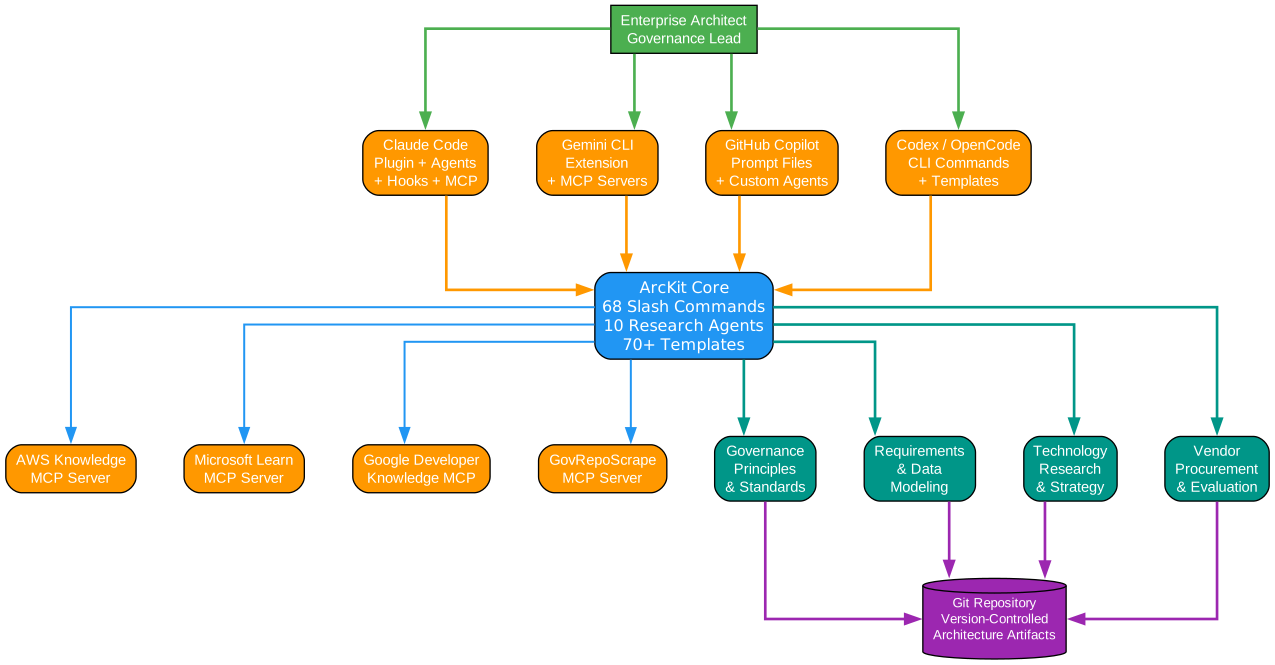
Understanding the ArcKit Architecture
The architecture diagram above illustrates how ArcKit delivers a unified governance experience across five distinct AI assistant platforms. This multi-platform design is a key differentiator – rather than locking teams into a single AI tool, ArcKit meets architects where they already work.
Platform Layer: Five AI Assistants
At the top of the architecture, five AI platforms connect to ArcKit’s command system:
-
Claude Code: Installed as a plugin via
/plugin marketplace add tractorjuice/arc-kit, providing the deepest integration with hooks, policies, and session memory. Claude Code users get the full ArcKit experience including automated context injection and file protection hooks. -
Gemini CLI: Installed as an extension via
gemini extensions install tractorjuice/arckit-gemini, offering the same 68 commands with Gemini-specific optimizations. The Gemini extension includes its own hooks for session initialization and manifest updates. -
GitHub Copilot: Delivered as a prompt pack for VS Code, enabling architects to invoke ArcKit workflows directly from the Copilot Chat interface. This is ideal for teams already embedded in the VS Code ecosystem.
-
Codex CLI: Available as a Codex extension with skills, agents, and MCP server configurations. Codex users benefit from ArcKit’s structured command system within OpenAI’s CLI environment.
-
OpenCode CLI: A community-maintained extension that brings ArcKit commands to the OpenCode platform, extending governance capabilities to yet another AI assistant.
Command Layer: 68 Slash Commands
Beneath the platform layer sits ArcKit’s command engine, processing all 68 slash commands organized into six governance phases. Each command reads from a template in .arckit/templates/, creates or reuses a numbered project directory (projects/NNN-name/), and writes versioned artifacts (ARC-NNN-TYPE-vX.Y.md). This systematic approach ensures traceability from stakeholders through goals, requirements, data models, components, and user stories.
MCP Server Layer: Cloud Research Integration
Three MCP (Model Context Protocol) servers provide real-time cloud research capabilities:
-
AWS Knowledge MCP: Queries AWS service documentation and best practices without requiring authentication. Architects can research EC2, Lambda, S3, and hundreds of other AWS services directly within their AI assistant.
-
Microsoft Learn MCP: Accesses Azure and Microsoft documentation for enterprise integration scenarios. This server enables research into Azure Active Directory, Azure Kubernetes Service, and other Microsoft cloud services.
-
Google Developer Knowledge MCP: Provides GCP documentation access, requiring a
GOOGLE_API_KEYfor authentication. This enables research into BigQuery, Cloud Run, Vertex AI, and other Google Cloud services.
Governance Pillars: Four Compliance Domains
The architecture rests on four governance pillars that represent ArcKit’s compliance coverage:
-
TCoP (Technology Code of Practice): UK Government’s technology standards framework, ensuring projects align with digital service standards.
-
GDS Service Standard: The Government Digital Service’s 14-point assessment framework for digital services.
-
NCSC CAF: The National Cyber Security Centre’s Cyber Assessment Framework, providing security assurance for government systems.
-
Orange/Green Book: HM Treasury’s risk management (Orange Book) and business case (Green Book) frameworks that underpin all UK Government procurement decisions.
Key Features and Capabilities
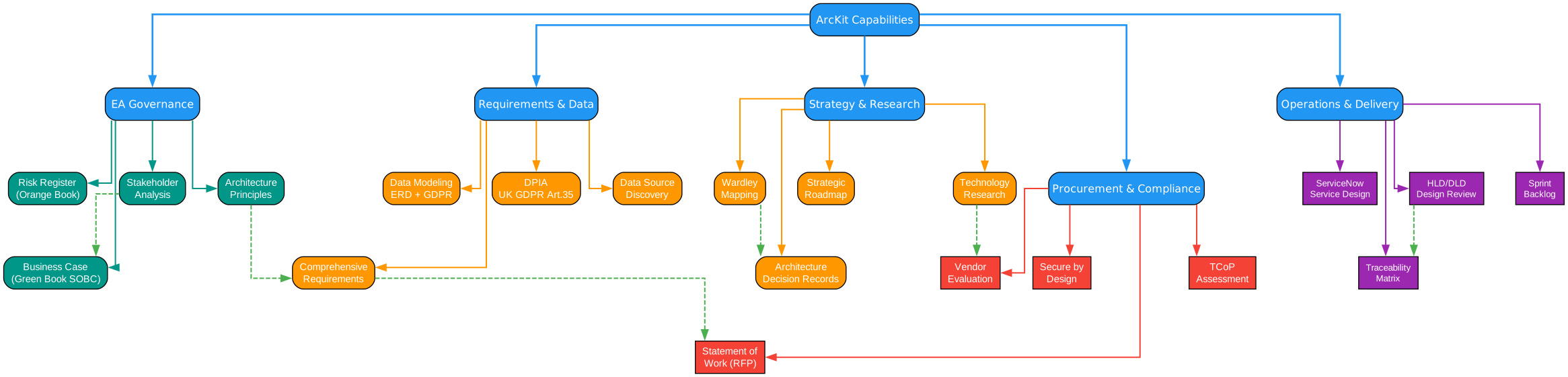
Understanding ArcKit’s Feature Domains
The features diagram above presents ArcKit’s capabilities across five interconnected domains, each addressing a critical aspect of enterprise architecture governance.
EA Governance Domain
The Enterprise Architecture Governance domain forms the backbone of ArcKit, providing the foundational commands that every project needs:
-
Project Planning (
/arckit:plan): Generates project plans aligned with GDS Agile Delivery phases, complete with Mermaid Gantt charts for timeline visualization. This command creates a structured project baseline that all subsequent governance artifacts reference. -
Architecture Principles (
/arckit:principles): Establishes global, cross-project architecture principles that serve as the decision-making framework for all design choices. These principles become the yardstick against which compliance is measured later in the workflow. -
Stakeholder Analysis (
/arckit:stakeholders): Produces comprehensive stakeholder maps with drivers, goals, and RACI matrices. Understanding who influences decisions and what drives them is essential for navigating organizational complexity. -
Risk Management (
/arckit:risk): Creates risk registers aligned with HM Treasury’s Orange Book methodology, ensuring that risk identification and mitigation follow established government standards. -
Strategic Outline Business Case (
/arckit:sobc): Generates SOBC documents following HM Treasury Green Book guidance, providing the financial justification and strategic rationale that UK Government projects require before proceeding.
Requirements and Data Domain
This domain handles the critical translation of business needs into technical specifications:
-
Requirements (
/arckit:requirements): Produces comprehensive requirements documents covering Business Requirements (BR), Functional Requirements (FR), Non-Functional Requirements (NFR), Integration Requirements (INT), and Data Requirements (DR). This five-category approach ensures nothing falls through the cracks. -
Data Model (
/arckit:data-model): Generates Entity-Relationship Diagrams with GDPR compliance considerations built in. The data model command ensures that data protection is considered from the design phase, not bolted on afterward. -
Data Protection Impact Assessment (
/arckit:dpia): Creates DPIA documents meeting GDPR Article 35 requirements, essential for any project processing personal data within UK Government contexts. -
Data Mesh Contract (
/arckit:data-mesh-contract): Produces federated data product contracts following the Open Data Contract Specification (ODCS v3.0.2), enabling modern data mesh architectures.
Strategy and Research Domain
The strategy and research domain provides the analytical tools for informed decision-making:
-
Wardley Mapping (
/arckit:wardley): Creates strategic Wardley Maps with evolution analysis, helping teams understand the maturity and strategic positioning of technology components. ArcKit extends this with value chain decomposition (wardley.value-chain), doctrine analysis (wardley.doctrine), climate assessment (wardley.climate), and gameplay strategies (wardley.gameplay). -
Technology Research (
/arckit:research): Conducts build-vs-buy analysis with total cost of ownership calculations. This command evaluates technology options against project requirements and produces structured comparison documents. -
Cloud Research Agents: Three specialized agents –
arckit-aws-research,arckit-azure-research, andarckit-gcp-research– leverage MCP servers to query live cloud documentation, ensuring research reflects current service offerings and pricing. -
Data Source Discovery (
/arckit:datascout): Discovers external data sources, APIs, and open data portals, scoring them against project requirements to identify integration opportunities.
Procurement and Compliance Domain
This domain streamlines the vendor selection and compliance process:
-
G-Cloud Search (
/arckit:gcloud-search): Searches the G-Cloud 14 framework for relevant cloud services, helping teams find pre-approved vendors and avoid lengthy procurement cycles. -
G-Cloud Clarification (
/arckit:gcloud-clarify): Generates clarification questions for G-Cloud suppliers, ensuring that procurement teams get the information they need to make informed decisions. -
Digital Outcomes and Specialists (
/arckit:dos): Supports DOS procurement for projects that need specialist skills or digital outcomes rather than cloud services. -
Statement of Work (
/arckit:sow): Creates RFP-ready Statements of Work that translate requirements into procurement documents. -
Vendor Evaluation (
/arckit:evaluate): Provides structured vendor scoring and evaluation frameworks, ensuring objective and consistent supplier assessment.
Operations and Delivery Domain
The operations domain ensures smooth transition from design to running services:
-
DevOps (
/arckit:devops): Assesses DevOps maturity and designs CI/CD pipelines, bridging the gap between architecture and operations. -
FinOps (
/arckit:finops): Conducts cloud cost optimization assessments, helping teams manage cloud spending against budget constraints. -
MLOps (
/arckit:mlops): For AI projects, assesses MLOps maturity and designs ML pipelines that ensure model governance and reproducibility. -
Operationalize (
/arckit:operationalize): Generates service operationalization plans and runbooks, ensuring that services are ready for production with proper monitoring and incident response procedures.
Governance Workflow
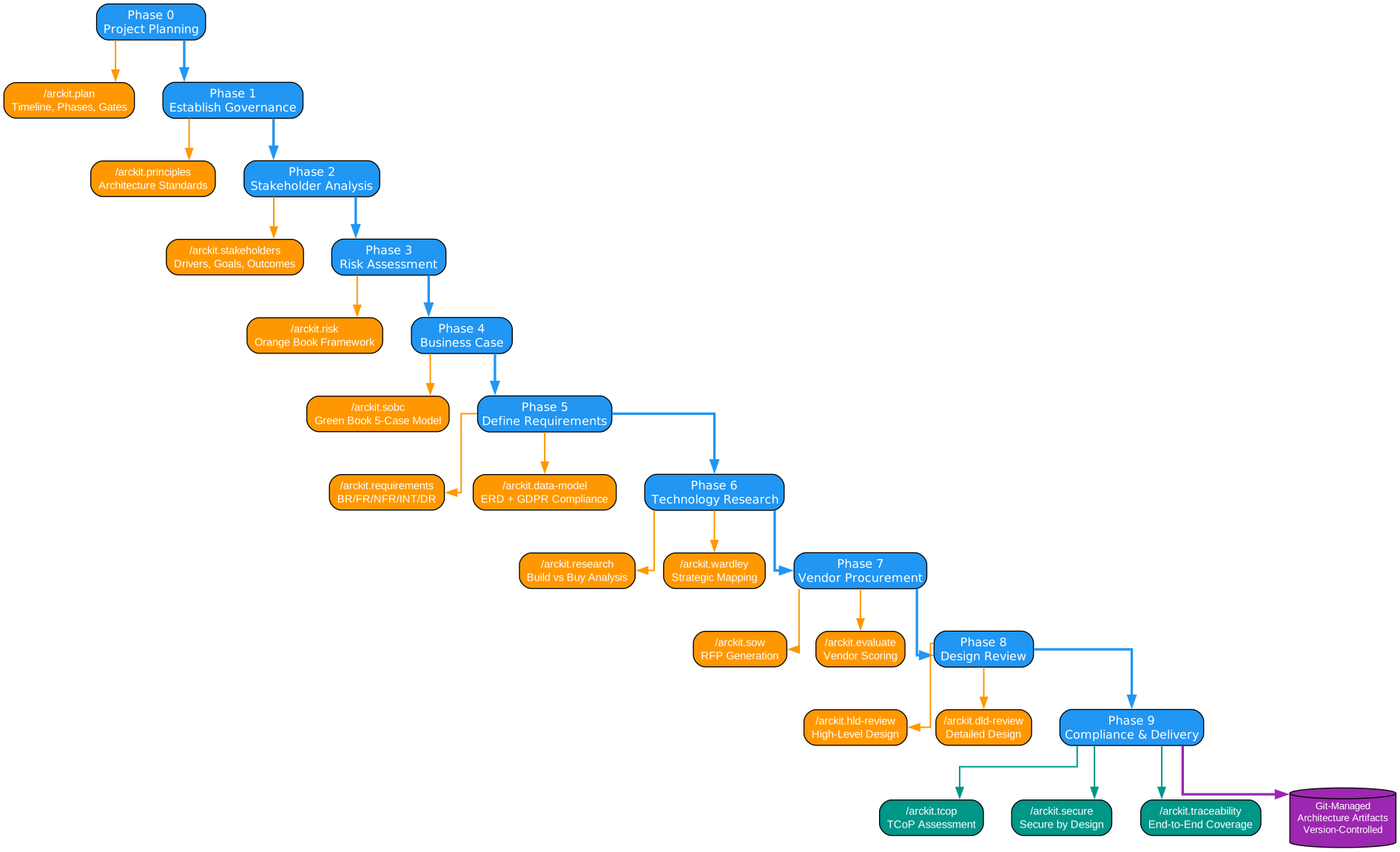
Understanding the Governance Workflow
The governance workflow diagram above illustrates ArcKit’s 10-phase lifecycle that guides projects from initial planning through to compliance and delivery. This structured approach ensures that no critical governance step is skipped, while remaining flexible enough to accommodate different project types.
Phase 0-1: Foundation (Plan, Principles, Stakeholders, Risk)
Every ArcKit project begins with establishing the foundation. The /arckit:init command creates the project structure, while /arckit:plan generates a project plan aligned with GDS Agile Delivery phases. Architecture principles set the decision-making framework, stakeholder analysis identifies who matters and what drives them, and risk registers capture threats and mitigations following HM Treasury Orange Book methodology.
This foundation phase is critical because all subsequent artifacts reference these initial documents. A project without clear principles lacks a decision-making compass; without stakeholder analysis, it risks building the wrong thing; without risk identification, it proceeds blindly into uncertainty.
Phase 2-4: Discovery and Requirements (SOBC, Requirements, Data)
The discovery phase translates strategic intent into actionable requirements. The Strategic Outline Business Case (/arckit:sobc) provides the financial and strategic justification required by HM Treasury’s Green Book. Requirements documents (/arckit:requirements) capture the full spectrum from business needs to technical specifications, while data models (/arckit:data-model) and DPIA assessments ensure data protection compliance from the outset.
The key insight here is that ArcKit treats requirements as a living chain of traceability. Each requirement links back to stakeholder goals and forward to design decisions, creating an unbroken thread from “why” to “how.”
Phase 5-6: Strategy and Design (Research, Wardley, Roadmap)
With requirements established, the strategy phase explores the solution landscape. Technology research (/arckit:research) evaluates build-vs-buy options, Wardley mapping (/arckit:wardley) visualizes the strategic positioning of components, and roadmaps (/arckit:roadmap) translate strategy into phased delivery plans.
Wardley mapping deserves special attention because it provides a visual language for strategic decision-making. By plotting components on an evolution axis from Genesis to Commodity, teams can identify which components offer competitive advantage and which should be commoditized. ArcKit’s Wardley suite extends beyond basic maps to include value chain decomposition, doctrine assessment, climate analysis, and gameplay strategies.
Phase 7: Procurement (G-Cloud, SOW, Evaluate)
The procurement phase connects strategy with vendor selection. For UK Government projects, G-Cloud search (/arckit:gcloud-search) finds pre-approved services, while clarification questions (/arckit:gcloud-clarify) ensure thorough vendor assessment. Statements of Work (/arckit:sow) translate requirements into procurement-ready documents, and vendor evaluation (/arckit:evaluate) provides objective scoring frameworks.
Phase 8-9: Design Reviews and Implementation
High-level design reviews (/arckit:hld-review) and detailed-level design reviews (/arckit:dld-review) ensure architectural quality before implementation begins. Architecture Decision Records (/arckit:adr) capture the rationale behind significant design choices, creating an audit trail that future teams can reference.
Phase 10-14: Operations, Compliance, and Reporting
The final phases cover operational readiness (DevOps, FinOps, MLOps), compliance verification (TCoP, Secure by Design, GDS Service Assessment), and stakeholder reporting (/arckit:story, /arckit:presentation). ArcKit’s compliance commands are particularly valuable for UK Government projects, where regulatory requirements are extensive and non-negotiable.
Vendor Procurement Pipeline
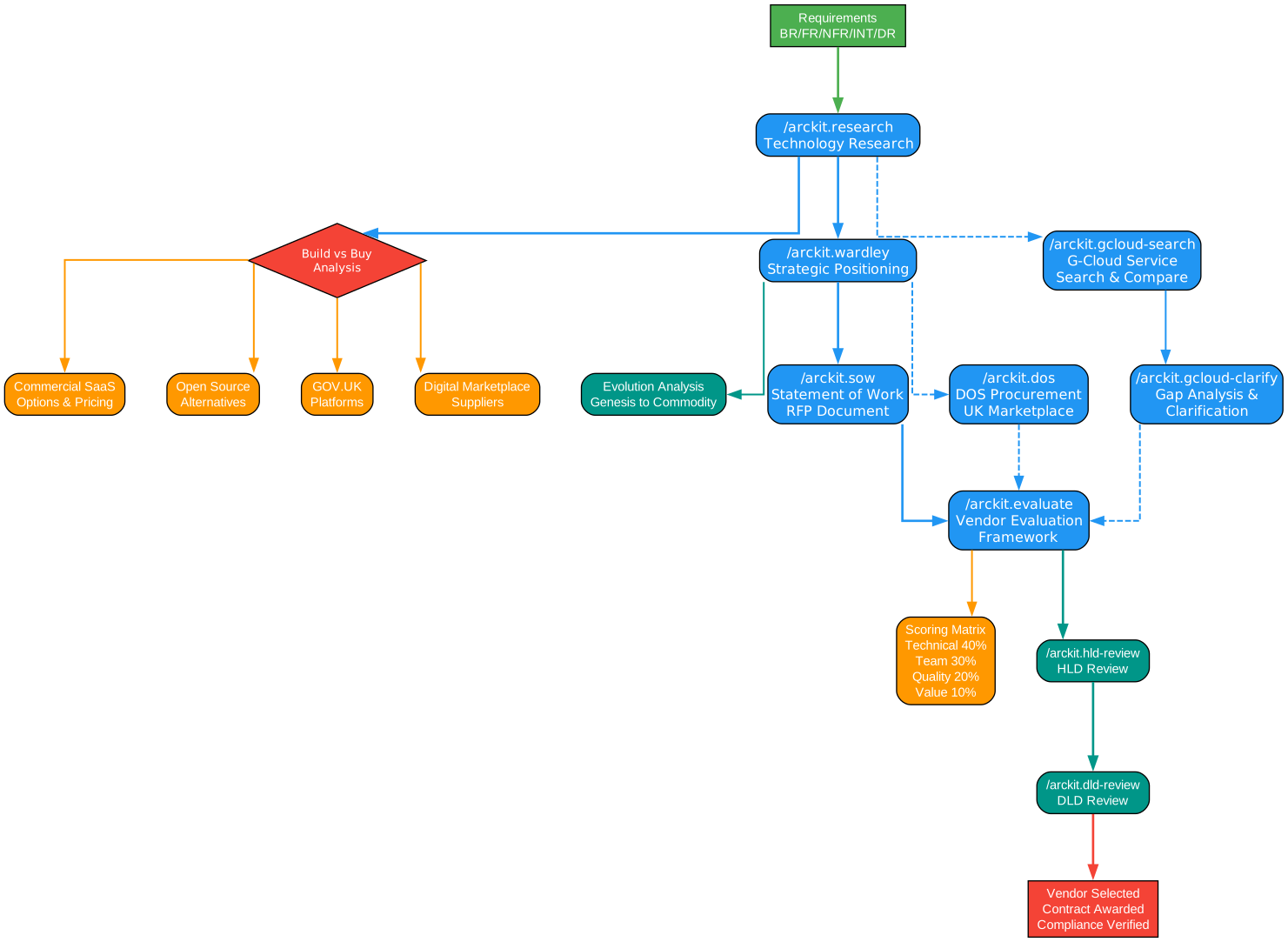
Understanding the Vendor Procurement Pipeline
The vendor procurement diagram above shows how ArcKit streamlines the journey from identifying requirements to selecting a vendor, with each step producing structured, auditable artifacts.
Requirements to Research
The procurement pipeline begins with well-defined requirements from the discovery phase. The /arckit:requirements command produces a comprehensive requirements document that serves as the foundation for all procurement decisions. Without clear requirements, vendor evaluation becomes subjective and inconsistent.
Technology Research and Wardley Mapping
The /arckit:research command conducts build-vs-buy analysis, evaluating whether internal development or external procurement best serves the project’s needs. When the answer is “buy,” Wardley mapping (/arckit:wardley) helps teams understand the maturity of available solutions in the market. Components in the Product or Commodity zones of a Wardley Map are strong candidates for procurement rather than custom development.
Cloud-Specific Research
For cloud-based solutions, three specialized research agents provide targeted intelligence:
-
AWS Research (
/arckit:aws-research): Queries AWS Knowledge MCP for service documentation, pricing models, and architectural best practices. No authentication required. -
Azure Research (
/arckit:azure-research): Accesses Microsoft Learn documentation for Azure services, enterprise integration patterns, and Microsoft’s Well-Architected Framework. -
GCP Research (
/arckit:gcp-research): Searches Google Cloud documentation for data analytics, AI/ML, and cloud-native services. Requires aGOOGLE_API_KEY.
G-Cloud Framework Search
For UK Government projects, the G-Cloud framework provides a streamlined procurement pathway. ArcKit’s /arckit:gcloud-search command searches G-Cloud 14 for relevant services, while /arckit:gcloud-clarify generates clarification questions that help procurement teams evaluate suppliers against specific requirements. This integration with the Digital Marketplace eliminates weeks of manual searching and comparison.
Statement of Work and Vendor Evaluation
The /arckit:sow command creates RFP-ready Statements of Work that translate technical requirements into procurement language. These documents include evaluation criteria, service levels, and compliance requirements that vendors must address.
Finally, /arckit:evaluate provides a structured scoring framework that ensures objective, consistent vendor assessment. Each vendor is evaluated against the same criteria, weighted according to project priorities, producing a transparent and defensible procurement decision.
Data Source Discovery
An often-overlooked aspect of procurement is data integration. The /arckit:datascout command discovers external data sources, APIs, and open data portals, scoring them against project requirements. This ensures that procured solutions can integrate with the data ecosystem they need to operate within.
UK Government Compliance
ArcKit provides comprehensive coverage of UK Government compliance frameworks, making it an invaluable tool for public sector projects. The compliance commands are organized into several key areas:
Technology Code of Practice (TCoP)
The /arckit:tcop command assesses projects against the UK Government’s Technology Code of Practice, which sets standards for how to design, build, and buy technology. TCoP covers areas including user needs, accessibility, security, privacy, and using open standards.
GDS Service Standard
The /arckit:service-assessment command prepares projects for GDS Service Standard assessments, evaluating against the 14 points that digital services must meet. This is a critical gate for any UK Government digital service going live.
Secure by Design
Two security assessment commands cover different contexts:
/arckit:secure: UK Government Secure by Design review for civilian departments/arckit:mod-secure: MOD Secure by Design review for defence projects, incorporating JSP 440 and IAMM requirements
AI-Specific Compliance
For projects with AI/ML components, ArcKit provides:
/arckit:ai-playbook: AI Playbook compliance check following the UK Government’s AI Playbook guidance/arckit:atrs: Algorithmic Transparency Recording Standard assessment, required for all UK Government AI systems/arckit:jsp-936: JSP 936 AI assurance documentation for MOD AI projects
Business Case Frameworks
/arckit:sobc: Strategic Outline Business Case following HM Treasury Green Book methodology/arckit:risk: Risk register following HM Treasury Orange Book methodology
Architecture Conformance
/arckit:principles-compliance: RAG-rated evidence mapping against architecture principles/arckit:conformance: Architecture conformance assessment covering ADR implementation, drift, and debt
Getting Started
Installation
ArcKit supports multiple AI assistant platforms. Choose the one that matches your workflow:
Claude Code
# Install ArcKit plugin for Claude Code
/plugin marketplace add tractorjuice/arc-kit
Gemini CLI
# Install ArcKit extension for Gemini CLI
gemini extensions install https://github.com/tractorjuice/arckit-gemini

# Prerequisites
npm install -g @google/gemini-cli@latest
GitHub Copilot
ArcKit is available as a prompt pack for GitHub Copilot in VS Code, enabling governance commands directly from the Copilot Chat interface.
Python CLI
# Install ArcKit CLI for project initialization
pip install git+https://github.com/tractorjuice/arc-kit.git

# Initialize a new project
arckit init
Configuration
For GCP research capabilities, configure your Google API key:
# Set via environment variable
export GOOGLE_API_KEY="your-api-key"

# Or configure in Gemini CLI settings
Template customization allows organizations to tailor ArcKit’s output to their specific needs:
# Create override directory
mkdir -p .arckit/templates

# Copy and customize a template
cp ~/.gemini/extensions/arckit/templates/requirements-template.md .arckit/templates/

# ArcKit automatically uses your override
Quick Start Workflow
Here is a typical ArcKit workflow for a UK Government project:
# 1. Initialize project
/arckit:init

# 2. Create project plan
/arckit:plan Create project plan for cloud migration with 6-month timeline

# 3. Establish governance
/arckit:principles Create cloud-first architecture principles

# 4. Discovery phase
/arckit:stakeholders Analyze stakeholders for payment gateway
/arckit:risk Create risk register for payment modernization
/arckit:sobc Create Strategic Outline Business Case with investment case

# 5. Requirements and design
/arckit:requirements Create requirements for payment gateway
/arckit:data-model Create data model with PCI-DSS compliance
/arckit:wardley Create Wardley map for payment infrastructure

# 6. Research and procurement
/arckit:research Research payment processing platforms
/arckit:aws-research Evaluate AWS payment services
/arckit:gcloud-search Search G-Cloud 14 for payment services

# 7. Design reviews
/arckit:hld-review Review high-level design for microservices
/arckit:secure Conduct Secure by Design review

# 8. Delivery
/arckit:backlog Generate sprint backlog with velocity 20 and 8 sprints
Autonomous Research Agents
ArcKit includes 10 autonomous research agents that handle web-intensive tasks:
| Agent | Purpose | Auth Required |
|---|---|---|
arckit-research | Market research, vendor evaluation, build vs buy | None |
arckit-datascout | Data source discovery, API catalogue search | None |
arckit-aws-research | AWS service research via AWS Knowledge MCP | None |
arckit-azure-research | Azure service research via Microsoft Learn MCP | None |
arckit-gcp-research | GCP service research via Google Developer Knowledge MCP | GOOGLE_API_KEY |
arckit-framework | Transform artifacts into structured frameworks | None |
arckit-gov-code-search | Search 24,500+ UK government repositories | None |
arckit-gov-landscape | Analyze government code ecosystem | None |
arckit-gov-reuse | Assess code reuse opportunities | None |
arckit-grants | Research funding and grant opportunities | None |
Hooks and Automation
ArcKit’s hook system provides automated guardrails during your session:
- Session Init: Injects ArcKit version and project status on startup
- Context Inject: Adds project artifact inventory before agent planning
- Filename Validator: Validates ARC-xxx naming convention on file writes
- File Protection: Blocks writes to sensitive or protected files
- Manifest Updater: Updates manifest.json after writing project files
These hooks ensure consistency across artifacts and prevent common errors like overwriting protected files or using inconsistent naming conventions.
Feature Summary
| Feature | Description |
|---|---|
| 68 Slash Commands | AI-assisted commands covering the full governance lifecycle |
| 10 Research Agents | Autonomous agents for cloud research, data discovery, and government code search |
| 70+ Templates | Versioned document templates following UK Government standards |
| 5 AI Platforms | Claude Code, Gemini CLI, GitHub Copilot, Codex CLI, OpenCode CLI |
| 3 MCP Servers | AWS Knowledge, Microsoft Learn, Google Developer Knowledge |
| 16-Phase Workflow | Structured governance from project init to compliance delivery |
| UK Gov Compliance | TCoP, GDS, NCSC CAF, Orange/Green Book, Secure by Design |
| Wardley Mapping | Full suite: value chain, doctrine, climate, gameplay |
| G-Cloud Integration | Search G-Cloud 14, generate clarification questions |
| Template Customization | Override defaults with organization-specific templates |
Conclusion
ArcKit represents a significant step forward in enterprise architecture governance tooling. By providing 68 AI-assisted commands across five major AI platforms, it eliminates the friction of switching between tools and frameworks. The 16-phase governance workflow ensures that no critical step is missed, while the UK Government compliance commands make it an essential tool for public sector projects.
The toolkit’s multi-platform approach is particularly noteworthy. Rather than forcing teams to adopt a specific AI assistant, ArcKit meets architects where they already work – whether that is Claude Code, Gemini CLI, GitHub Copilot, Codex, or OpenCode. This flexibility, combined with the depth of its template library and the breadth of its compliance coverage, makes ArcKit a compelling choice for any organization serious about architecture governance.
For teams working on UK Government projects, ArcKit’s coverage of TCoP, GDS Service Standard, NCSC frameworks, and HM Treasury business case methodologies provides a ready-made governance framework that would otherwise require months to establish from scratch. The G-Cloud and DOS procurement commands further streamline the vendor selection process, reducing procurement timelines from weeks to days.
To get started with ArcKit, visit the GitHub repository or the ArcKit documentation site for installation guides, command references, and workflow examples. Enjoyed this post? Never miss out on future posts by following us 


