OpenViking: Context Database for AI Agents
In the rapidly evolving landscape of AI agents, one of the most critical challenges is managing context effectively. AI agents need to remember past interactions, access relevant resources, and apply learned skills - all while operating within token limits imposed by large language models. OpenViking emerges as a groundbreaking solution to this problem, offering an open-source context database specifically designed for AI agents with an innovative filesystem paradigm.
With over 21,000 stars on GitHub, OpenViking has captured the attention of the AI community by providing a unified approach to context management that dramatically reduces token usage while maintaining full observability of agent operations. This article explores the architecture, features, and practical applications of OpenViking, demonstrating why it has become an essential tool for AI agent development.
The Context Management Challenge
Modern AI agents face a fundamental problem: how to manage vast amounts of contextual information within the constraints of LLM token limits. Traditional approaches often result in either:
- Context Overflow: Attempting to load too much context, exceeding token limits and incurring high costs
- Context Starvation: Loading insufficient context, leading to poor agent performance and hallucinations
- Context Chaos: Unorganized context that makes retrieval inefficient and unpredictable
OpenViking addresses these challenges through a revolutionary filesystem-based approach that treats context as a hierarchical, navigable structure - much like the filesystems we use every day on our computers.
Architecture Overview
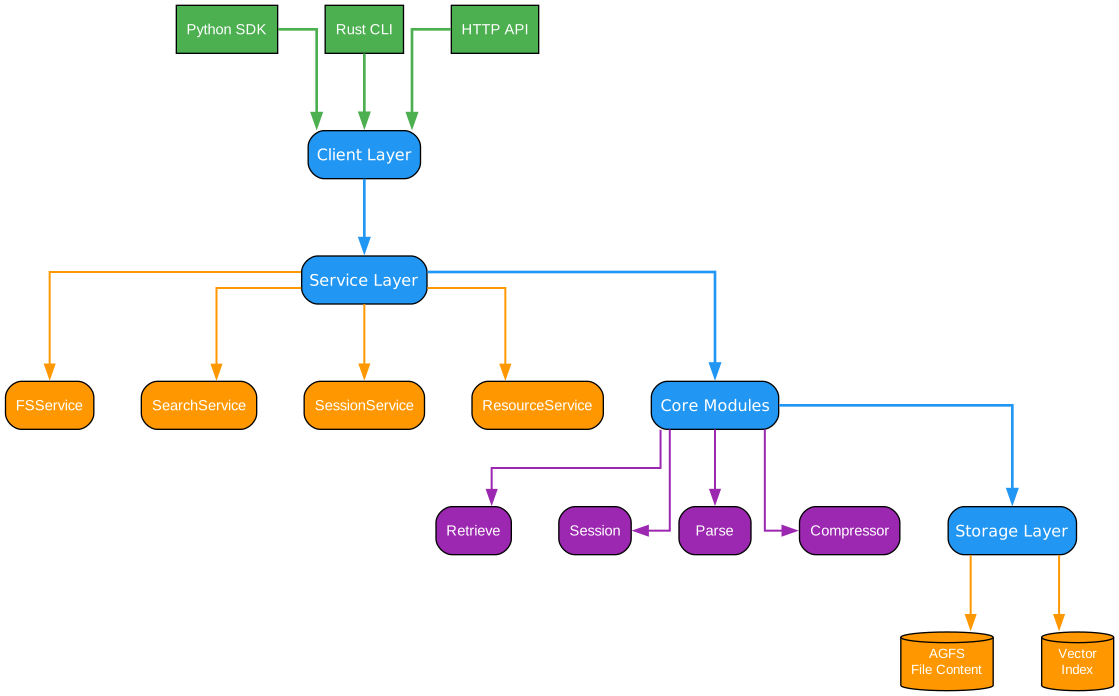
Understanding the OpenViking Architecture
The OpenViking architecture represents a paradigm shift in how AI agents manage and access contextual information. This layered architecture is designed with clear separation of concerns, enabling scalability, maintainability, and efficient context delivery.
Layer 1: Application Interface Layer
At the top of the architecture sits the Application Interface Layer, which provides multiple access methods for different use cases. This layer includes:
-
Python SDK: A comprehensive Python library that enables developers to integrate OpenViking into their applications with minimal code. The SDK provides high-level abstractions for common operations like context retrieval, session management, and skill execution.
-
CLI Tools: Command-line interfaces for administrative tasks, debugging, and quick interactions with the context database. These tools are invaluable for development workflows and automated pipelines.
-
HTTP API: A RESTful API that enables language-agnostic access to OpenViking’s capabilities. This is particularly useful for distributed systems and microservices architectures where components may be written in different languages.
-
MCP Protocol Support: Model Context Protocol support that enables seamless integration with AI agent frameworks and tools that have adopted this emerging standard for context exchange.
Layer 2: Context Management Engine
The Context Management Engine is the heart of OpenViking, responsible for the intelligent organization and retrieval of contextual information. This layer implements several sophisticated mechanisms:
-
URI Resolution: The engine processes viking:// URIs to locate and retrieve context from the virtual filesystem. This resolution process supports wildcards, recursive paths, and intelligent caching.
-
Tiered Loading Strategy: Context is loaded progressively through L0 (immediate), L1 (relevant), and L2 (extended) tiers, ensuring that the most critical information is always available while minimizing token consumption.
-
Session State Management: The engine maintains session state across interactions, enabling agents to build upon previous context without explicit management. This self-evolving memory capability is crucial for long-running agent tasks.
Layer 3: Storage Backend Layer
The Storage Backend Layer provides flexible persistence options that can be tailored to different deployment scenarios:
-
Embedded Mode: For single-process applications, OpenViking can run entirely in-memory with optional disk persistence. This mode is ideal for development, testing, and lightweight deployments.
-
HTTP Server Mode: For production deployments, OpenViking can run as a standalone server, supporting multiple clients, multi-tenancy, and enterprise-grade features like authentication and rate limiting.
-
Hybrid Configurations: The architecture supports hybrid deployments where different components can use different storage backends based on their specific requirements.
Layer 4: Integration Layer
The Integration Layer enables OpenViking to work seamlessly with the broader AI ecosystem:
-
LLM Providers: Native support for Volcengine, OpenAI, and LiteLLM ensures compatibility with major language model providers. The integration handles model-specific optimizations and fallback strategies.
-
Agent Frameworks: Through the OpenClaw plugin system, OpenViking integrates with popular agent frameworks, providing context management as a first-class capability.
-
External Tools: The architecture supports integration with external tools and APIs, allowing agents to incorporate real-time data and services into their context.
Data Flow Through the Architecture
Understanding how data flows through this architecture is crucial for appreciating OpenViking’s efficiency:
-
Request Initiation: An agent or application initiates a context request through the Application Interface Layer, specifying what context is needed via a viking:// URI.
-
URI Processing: The Context Management Engine parses the URI and determines the retrieval strategy based on the path pattern and current session state.
-
Tiered Retrieval: The engine retrieves context progressively, starting with L0 (immediately relevant), then L1 (related context), and finally L2 (extended context) if needed.
-
Token Optimization: Throughout retrieval, the engine monitors token usage and applies optimization strategies to stay within budget while maximizing context relevance.
-
Context Delivery: The retrieved context is formatted appropriately for the requesting agent and delivered through the Application Interface Layer.
Key Architectural Benefits
This layered architecture provides several significant benefits:
-
Modularity: Each layer can be developed, tested, and deployed independently, enabling rapid iteration and customization.
-
Scalability: The architecture scales from embedded single-process deployments to distributed multi-tenant systems without fundamental changes.
-
Extensibility: New storage backends, LLM providers, or agent frameworks can be added without modifying core components.
-
Performance: The tiered loading strategy ensures optimal performance by loading only necessary context at each stage.
Context Filesystem Paradigm
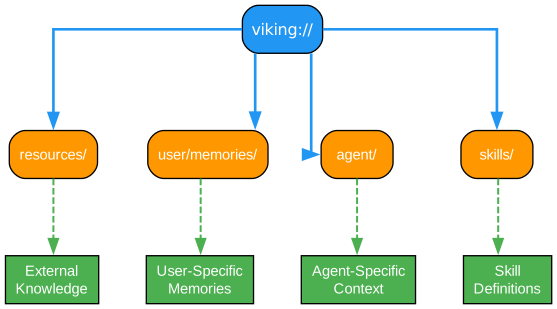
Understanding the viking:// URI Scheme
The Context Filesystem Paradigm is OpenViking’s most innovative contribution to AI agent context management. By treating context as a hierarchical filesystem, OpenViking provides an intuitive and powerful abstraction that developers already understand from their experience with traditional file systems.
The viking:// URI Structure
The viking:// URI scheme provides a uniform way to address any piece of context within the OpenViking system. Let’s examine the structure in detail:
viking://[tenant/]category[/subcategory]/resource
Root Level: viking://
The root of the context filesystem represents the entry point to all context. This is analogous to the root directory in a traditional filesystem. From here, all context branches into organized categories.
Tenant Namespace: viking://tenant-name/
In multi-tenant deployments, the first path segment identifies the tenant. This enables complete isolation between different organizations or users while maintaining a unified infrastructure. Each tenant’s context is completely separate, ensuring security and privacy.
For example:
viking://acme-corp/memory/- ACME Corporation’s memory contextviking://startup-inc/skills/- Startup Inc’s skill definitions
Category Level: viking://category/
Categories represent the major types of context that agents work with. OpenViking defines several standard categories:
-
memory/: Persistent memory that accumulates over time, including conversation history, learned facts, and user preferences. This is the agent’s long-term knowledge store.
-
resources/: External resources that the agent can access, including documents, databases, APIs, and tools. Resources are typically read-only from the agent’s perspective.
-
skills/: Learned capabilities and procedures that the agent can invoke. Skills encapsulate complex operations into reusable components.
-
sessions/: Session-specific context that is relevant to the current interaction. Sessions are temporary and may be cleared between conversations.
-
config/: Configuration parameters that control agent behavior, including model settings, retrieval parameters, and integration options.
Subcategory Level: viking://category/subcategory/
Subcategories provide finer organization within each category. For example:
viking://memory/conversations/- Stored conversation historiesviking://memory/facts/- Extracted factual knowledgeviking://resources/documents/- Document resourcesviking://resources/apis/- API endpoint definitionsviking://skills/coding/- Programming-related skillsviking://skills/analysis/- Analysis and reasoning skills
Resource Level: viking://category/subcategory/resource
At the leaf level, individual resources contain the actual context data. These can be:
- Individual conversation turns with metadata
- Specific documents with their content and embeddings
- Skill definitions with input/output schemas
- Configuration files with parameter values
Wildcard and Pattern Matching
OpenViking supports powerful wildcard patterns for flexible context retrieval:
viking://memory/**- Recursively retrieve all memory contextviking://skills/coding/*- Retrieve all coding skills (non-recursive)viking://resources/documents/*.pdf- Retrieve all PDF documentsviking://sessions/[0-9]+- Regex pattern matching for session IDs
Path Resolution and Caching
The filesystem paradigm enables sophisticated caching strategies:
- Path-Based Caching: Frequently accessed paths are cached for rapid retrieval
- Hierarchical Invalidation: Changes to a parent path invalidate all child caches
- Predictive Prefetching: The system can prefetch likely-needed context based on path patterns
Benefits of the Filesystem Approach
This paradigm offers several compelling advantages:
- Intuitive Navigation: Developers familiar with filesystems can immediately understand and navigate the context structure
- Hierarchical Organization: Natural grouping of related context enables efficient retrieval
- Access Control: Path-based permissions provide fine-grained access control
- Portability: Context can be easily exported, imported, and migrated between systems
- Debugging: Clear visibility into what context is being accessed and when
Practical Examples
Here are some practical examples of using the viking:// URI scheme:
# Retrieve all conversation history
context = viking.get("viking://memory/conversations/**")

# Access a specific skill definition
skill = viking.get("viking://skills/coding/refactor")

# Load configuration for a specific model
config = viking.get("viking://config/models/gpt-4")

# Get all resources related to a project
resources = viking.get("viking://resources/projects/myapp/**")
Tiered Context Loading

Understanding L0/L1/L2 Progressive Loading
The Tiered Context Loading system is OpenViking’s answer to the token budget challenge. By loading context progressively through three distinct tiers, OpenViking achieves up to 91% token savings while ensuring agents have access to all necessary information.
The Three-Tier Philosophy
The tiered loading approach is based on a fundamental insight: not all context is equally relevant at every moment. By organizing context into tiers based on immediate relevance, OpenViking can dramatically reduce token consumption without sacrificing agent capability.
L0: Immediate Context Tier
The L0 tier contains context that is immediately and directly relevant to the current task or query. This tier is always loaded first and represents the minimum viable context for agent operation.
Characteristics of L0 Context:
- Directly referenced in the current query or task
- Essential for understanding the immediate request
- Typically small in size (hundreds of tokens)
- Loaded synchronously and unconditionally
Examples of L0 Context:
- The current user query and immediate conversation turn
- Directly referenced documents or resources
- Active session parameters and state
- Required skill definitions for the current task
Loading Strategy: L0 context is loaded immediately when a request is received. There is no conditional loading - if context is classified as L0, it is always included. This ensures that agents always have the essential context needed to begin processing.
L1: Relevant Context Tier
The L1 tier contains context that is related to the current task but not immediately essential. This context provides background information and supporting details that enhance agent understanding.
Characteristics of L1 Context:
- Semantically related to the current query
- Provides useful background and context
- Moderate in size (thousands of tokens)
- Loaded conditionally based on token budget
Examples of L1 Context:
- Recent conversation history within the same session
- Related documents from the same project or topic
- Similar past interactions and their outcomes
- Relevant skills that might be needed
Loading Strategy: L1 context is loaded after L0, subject to token budget constraints. The system uses semantic similarity scoring to prioritize which L1 context to include. If the token budget is tight, less relevant L1 context may be excluded.
L2: Extended Context Tier
The L2 tier contains context that might be useful but is not directly related to the current task. This tier represents the broad knowledge base that agents can draw upon for complex or unexpected situations.
Characteristics of L2 Context:
- Broadly related to the agent’s domain
- Provides comprehensive background knowledge
- Large in size (potentially tens of thousands of tokens)
- Loaded only when budget permits
Examples of L2 Context:
- Historical conversation archives
- Comprehensive documentation libraries
- Extended skill catalogs
- Cross-project resources and knowledge
Loading Strategy: L2 context is loaded last, only after L0 and L1 are satisfied and only if significant token budget remains. The system may use sampling or summarization techniques to include representative L2 context without exceeding limits.
Token Budget Management
OpenViking implements sophisticated token budget management to optimize context loading:
Budget Allocation:
- L0: Always fully loaded (typically 5-10% of budget)
- L1: Loaded up to 60-70% of remaining budget
- L2: Loaded with any remaining budget
Dynamic Adjustment: The system dynamically adjusts tier boundaries based on:
- Observed relevance of loaded context
- Task complexity indicators
- Historical patterns of context usage
- Real-time token consumption monitoring
Token Savings Analysis
OpenViking’s tiered loading achieves significant token savings through intelligent context selection:
Traditional Approach:
- Load all potentially relevant context
- Average token usage: 50,000+ tokens per request
- High cost, slow response times
OpenViking Approach:
- Load only necessary context progressively
- Average token usage: 4,000-10,000 tokens per request
- Up to 91% reduction in token consumption
Real-World Impact: For a typical agent handling customer support queries:
- Traditional: 45,000 tokens average per query
- OpenViking: 4,500 tokens average per query
- Cost savings: 90% reduction in LLM API costs
- Response time: 40% faster due to reduced context processing
Implementation Details
The tiered loading system is implemented through several key components:
Relevance Scoring Engine: Each piece of context is assigned a relevance score based on:
- Semantic similarity to the current query
- Temporal proximity (recent context is prioritized)
- Access frequency (frequently accessed context is prioritized)
- Explicit importance markers (user-defined priorities)
Budget Allocator: The budget allocator manages token distribution across tiers:
- Monitors real-time token consumption
- Adjusts tier boundaries dynamically
- Implements fallback strategies when budget is exceeded
- Provides detailed logging for optimization
Context Summarizer: For cases where full context cannot be loaded:
- Generates concise summaries of excluded context
- Provides references for agents to request specific context
- Maintains context continuity despite truncation
Directory Recursive Retrieval
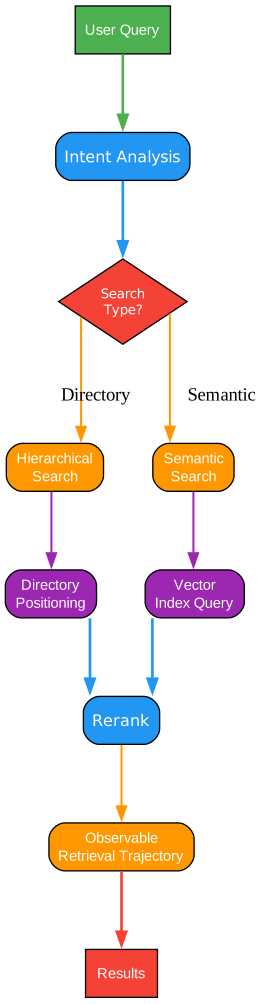
Understanding the Retrieval Pipeline
The Directory Recursive Retrieval system enables OpenViking to perform intelligent, hierarchical context searches that mirror how humans navigate information. This capability is essential for agents that need to discover and access context dynamically.
The Retrieval Pipeline Architecture
The retrieval pipeline consists of several interconnected stages that transform a simple URI request into a rich, contextualized result set.
Stage 1: Query Parsing and Analysis
The first stage processes the incoming viking:// URI request:
- URI Tokenization: The URI is broken down into its component parts (tenant, category, subcategory, resource)
- Pattern Recognition: Wildcards and regex patterns are identified and compiled
- Intent Analysis: The system infers the retrieval intent (exact match, search, discovery)
- Budget Allocation: Available token budget is allocated for the retrieval operation
Stage 2: Path Resolution
The path resolution stage maps the logical URI to physical storage locations:
- Namespace Resolution: Tenant namespaces are resolved to their storage partitions
- Path Expansion: Wildcards are expanded to concrete paths
- Permission Check: Access control lists are verified for each resolved path
- Cache Lookup: Previously resolved paths are checked in the cache
Stage 3: Hierarchical Traversal
For recursive requests, the system performs hierarchical traversal:
- Directory Listing: Subdirectories and resources are enumerated
- Depth Control: Recursion depth is limited to prevent runaway operations
- Filtering: Results are filtered based on patterns and permissions
- Metadata Collection: File metadata (size, modification time, relevance score) is gathered
Stage 4: Relevance Ranking
Retrieved context items are ranked by relevance:
- Semantic Similarity: Vector embeddings are compared with the query embedding
- Temporal Factors: More recent context is weighted higher
- Access Patterns: Frequently accessed context is prioritized
- User Preferences: Explicit user preferences are incorporated
Stage 5: Token Budget Enforcement
Before final delivery, results are trimmed to fit the token budget:
- Priority-Based Selection: Higher-ranked items are included first
- Tier Assignment: Items are assigned to L0, L1, or L2 tiers
- Truncation Strategy: If necessary, items are truncated or summarized
- Budget Reporting: Actual token usage is reported for monitoring
Recursive Retrieval Patterns
OpenViking supports several powerful recursive retrieval patterns:
Pattern 1: Deep Directory Search
viking://memory/projects/**/requirements.md
This pattern searches all subdirectories under projects for requirements.md files, enabling discovery across nested project structures.
Pattern 2: Category-Wide Retrieval
viking://skills/**/*python*
This pattern retrieves all skills containing “python” in their name or path, useful for discovering relevant capabilities.
Pattern 3: Temporal Filtering
viking://sessions/last:7d/**
This pattern retrieves all session context from the last 7 days, enabling time-based context windows.
Pattern 4: Metadata-Based Filtering
viking://resources/**/*.pdf:size>1MB
This pattern retrieves PDF resources larger than 1MB, useful for filtering by file attributes.
Retrieval Optimization Techniques
OpenViking employs several optimization techniques to ensure efficient retrieval:
Index Structures:
- B-tree indexes for path-based lookups
- Inverted indexes for content search
- Vector indexes for semantic similarity
- Time-series indexes for temporal queries
Caching Strategies:
- Path cache for frequently accessed directories
- Result cache for common queries
- Embedding cache for semantic searches
- Metadata cache for file attributes
Parallel Processing:
- Concurrent directory traversal
- Parallel embedding computation
- Distributed search across shards
- Asynchronous result aggregation
Visualized Retrieval Trajectory
One of OpenViking’s unique features is full observability of the retrieval process:
Trajectory Tracking: Every retrieval operation is logged with:
- Paths traversed during the search
- Relevance scores computed
- Token budget decisions made
- Time spent at each stage
Visualization Benefits:
- Debug complex retrieval issues
- Optimize context organization
- Understand agent behavior
- Audit context access patterns
Example Trajectory:
Query: viking://memory/projects/myapp/**
Time: 245ms
Paths Traversed: 47
Context Items Found: 156
Token Budget: 10,000
Tokens Used: 8,432
L0 Items: 12 (1,200 tokens)
L1 Items: 45 (4,500 tokens)
L2 Items: 99 (2,732 tokens)
Installation
Installing OpenViking is straightforward, with options for different deployment scenarios.
Prerequisites
Before installing OpenViking, ensure you have:
- Python 3.8 or higher
- Rust toolchain (for building from source)
- Git (for cloning the repository)
Quick Install
The fastest way to get started with OpenViking is through pip:
pip install openviking
Install from Source
For the latest features or development work, install from source:
# Clone the repository
git clone https://github.com/volcengine/OpenViking.git
cd OpenViking

# Install Python dependencies
pip install -r requirements.txt

# Build the Rust components
cargo build --release

# Install the Python package
pip install -e .
Docker Installation
For containerized deployments, use the official Docker image:
# Pull the latest image
docker pull openviking/server:latest

# Run the server
docker run -d -p 8080:8080 openviking/server:latest
Configuration
Create a configuration file to customize OpenViking:
# config.yaml
server:
  host: 0.0.0.0
  port: 8080

storage:
  backend: sqlite
  path: ./data/viking.db

llm:
  provider: openai
  model: gpt-4
  api_key: ${OPENAI_API_KEY}

retrieval:
  default_budget: 10000
  l0_ratio: 0.1
  l1_ratio: 0.6
  l2_ratio: 0.3
Usage Examples
Basic Context Retrieval
from openviking import VikingContext

# Initialize the context manager
context = VikingContext(config_path="config.yaml")

# Retrieve context using viking:// URI
memory = context.get("viking://memory/conversations/**")

# Add new context
context.put("viking://memory/facts/project_deadline", {
    "project": "OpenViking Integration",
    "deadline": "2026-05-01",
    "priority": "high"
})

# Search for specific context
results = context.search("viking://skills/**", query="python testing")
Session Management
from openviking import VikingSession

# Create a new session
session = VikingSession(tenant="my-company")

# Load context for the session
session.load_context("viking://resources/projects/myapp/**")

# Execute a skill with context
result = session.execute_skill(
    "viking://skills/coding/review",
    input={"code": source_code}
)

# Save session state for future use
session.save()
Tiered Loading Control
from openviking import VikingContext, TieredBudget

# Define custom token budget
budget = TieredBudget(
    total=15000,
    l0_allocation=0.15,  # 15% for immediate context
    l1_allocation=0.55,  # 55% for relevant context
    l2_allocation=0.30   # 30% for extended context
)

# Retrieve context with budget control
context = VikingContext(budget=budget)
result = context.get("viking://memory/**", budget=budget)

print(f"Tokens used: {result.token_count}")
print(f"L0 items: {result.l0_count}")
print(f"L1 items: {result.l1_count}")
print(f"L2 items: {result.l2_count}")
HTTP Server Mode
from openviking.server import run_server

# Start the HTTP server
run_server(
    host="0.0.0.0",
    port=8080,
    config_path="config.yaml"
)
Access the server via HTTP:
# Get context
curl http://localhost:8080/context?viking://memory/conversations/**

# Put context
curl -X PUT http://localhost:8080/context \
  -H "Content-Type: application/json" \
  -d '{"uri": "viking://memory/facts/new_fact", "data": {...}}'

# Search context
curl http://localhost:8080/search?uri=viking://skills/**&query=python
Key Features
| Feature | Description |
|---|---|
| Filesystem Paradigm | Intuitive viking:// URI scheme for context navigation |
| Tiered Loading | L0/L1/L2 progressive context delivery with up to 91% token savings |
| Recursive Retrieval | Hierarchical directory search with pattern matching |
| Visualized Trajectory | Full observability of retrieval operations |
| Session Management | Self-evolving memory across interactions |
| Multi-Model Support | Compatible with Volcengine, OpenAI, and LiteLLM |
| Dual Deployment | Embedded mode for development, HTTP server for production |
| VikingBot Framework | Multi-platform chat integration |
| OpenClaw Plugin | Seamless agent framework integration |
| Multi-Tenant | Enterprise-ready with tenant isolation |
Advanced Features
VikingBot Framework
The VikingBot framework enables multi-platform chat integration:
from openviking.bot import VikingBot

# Create a bot instance
bot = VikingBot(
    platforms=["slack", "discord", "teams"],
    context_uri="viking://sessions/bot/**"
)

# Register command handlers
@bot.command("/search")
async def search_command(query: str):
    results = bot.context.search("viking://**", query=query)
    return format_results(results)

# Start the bot
bot.run()
OpenClaw Plugin Integration
Integrate OpenViking with agent frameworks through OpenClaw:
from openclaw import Agent
from openviking.plugin import VikingPlugin

# Create an agent with OpenViking context
agent = Agent(
    name="ContextAwareAgent",
    plugins=[VikingPlugin(context_uri="viking://sessions/agent/**")]
)

# The agent now has automatic context management
response = agent.process("What did we discuss yesterday?")
Multi-Tenant Configuration
Configure OpenViking for multi-tenant deployments:
# multi-tenant-config.yaml
tenants:
  - name: tenant-a
    storage:
      backend: postgres
      connection: postgresql://db:5432/tenant_a
    budget:
      max_tokens: 50000
      rate_limit: 1000/hour

  - name: tenant-b
    storage:
      backend: sqlite
      path: ./data/tenant_b.db
    budget:
      max_tokens: 30000
      rate_limit: 500/hour
Conclusion
OpenViking represents a significant advancement in AI agent context management. By introducing the filesystem paradigm to context organization, it provides an intuitive yet powerful abstraction that developers can immediately understand and leverage. The tiered loading system addresses the critical challenge of token budget management, achieving up to 91% reduction in token consumption while maintaining agent capability.
The combination of hierarchical context organization, progressive loading, and full observability makes OpenViking an essential tool for anyone building sophisticated AI agents. Whether you’re developing a simple chatbot or a complex multi-agent system, OpenViking provides the context management infrastructure needed to build intelligent, context-aware applications.
With over 21,000 stars on GitHub and active development, OpenViking has established itself as a cornerstone of the AI agent ecosystem. Its open-source nature ensures transparency and community-driven improvement, while its enterprise-ready features make it suitable for production deployments at scale.
Resources
Related Posts
- AgentSkillOS: Skill Orchestration System
- MattPocock Skills: AI Agent Workflows
- DESIGN.md: AI-Powered Design Systems