Introduction
Prompts.chat, originally known as Awesome ChatGPT Prompts, has grown from a humble CSV file into the world’s largest open-source prompt engineering platform. Created by Fatih Kadir Akn (@f), the project has amassed over 143,000 GitHub stars, earned more than 40 academic citations, and been featured in Forbes – a trajectory that mirrors the explosive growth of generative AI itself.
What began as a community-curated collection of ChatGPT prompt templates has evolved into a comprehensive platform offering semantic search, multi-modal prompt types, an interactive prompting book, and deep integration with AI development tools. The platform now supports not just text prompts but also image, video, audio, structured, skill, and taste-based prompt types – each with its own schema and consumer applications.
The transformation from a static CSV to a full-featured Next.js application with PostgreSQL, MCP server integration, and a plugin architecture represents a broader shift in how the AI community thinks about prompts: from disposable text snippets to versioned, reusable, and composable building blocks. This post explores the architecture, lifecycle, ecosystem, and developer integration capabilities that make prompts.chat a cornerstone of the prompt engineering landscape.
Platform Architecture
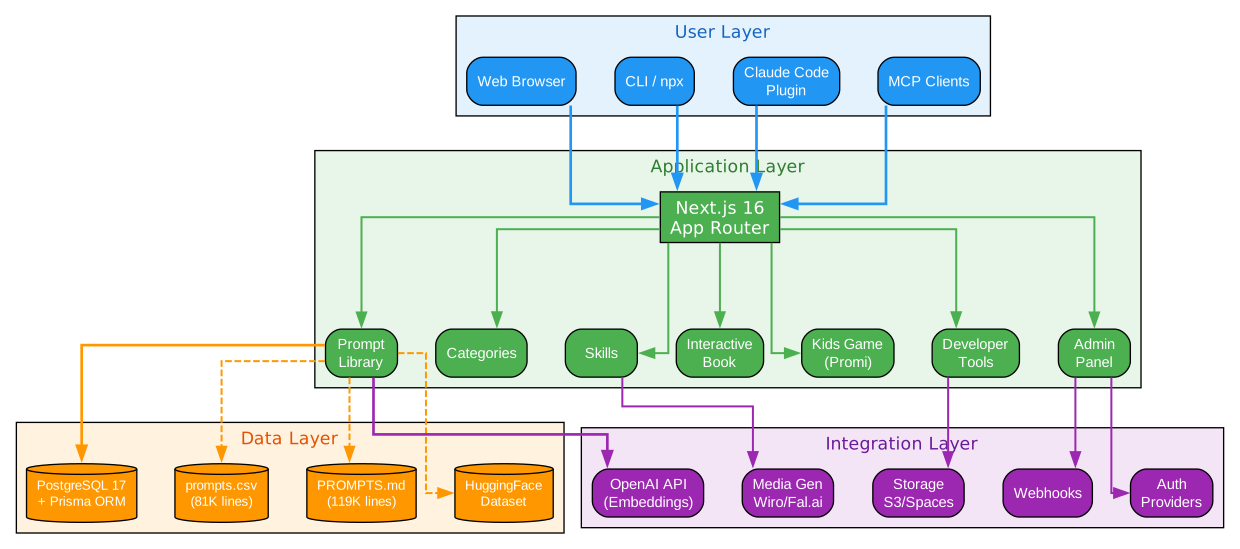
The platform architecture diagram reveals a four-layer system designed for extensibility and community-driven content management. At the top, the User Layer provides four distinct access points: the Web interface for browsing and managing prompts, the CLI tool for terminal-based workflows, the Claude Code Plugin for AI-assisted prompt discovery, and the MCP (Model Context Protocol) Server for programmatic integration with AI agents and tools. Each access point communicates with the same underlying Application Layer, ensuring consistency across all interaction modes.
The Application Layer is built on Next.js 16 with React 19, organized into 16 modular feature domains. These include Prompt Management for CRUD operations, Search with semantic vector matching, User Authentication via NextAuth, Collections for organizing prompts into thematic groups, and a Leaderboard system for surfacing high-quality community contributions. The modular architecture allows each feature to evolve independently while sharing a common data access layer through Prisma 6.19.
The Data Layer spans multiple storage backends optimized for different access patterns. PostgreSQL 17 serves as the primary relational store for users, prompts, comments, and votes. The original CSV format remains supported for backward compatibility and simple integrations. HuggingFace provides model-hosted embeddings for semantic search, while a vector store enables similarity-based prompt discovery. This polyglot persistence approach lets the platform leverage each store’s strengths without forcing a one-size-fits-all solution.
The Integration Layer connects the platform to external services: OpenAI’s API for prompt testing and generation, authentication providers for social login, cloud storage for media assets, and media generation services for image and video prompt outputs. The entire stack is written in TypeScript 5, ensuring type safety from the database schema through the API layer to the React components, with Prisma providing end-to-end type inference.
The Prompt Lifecycle
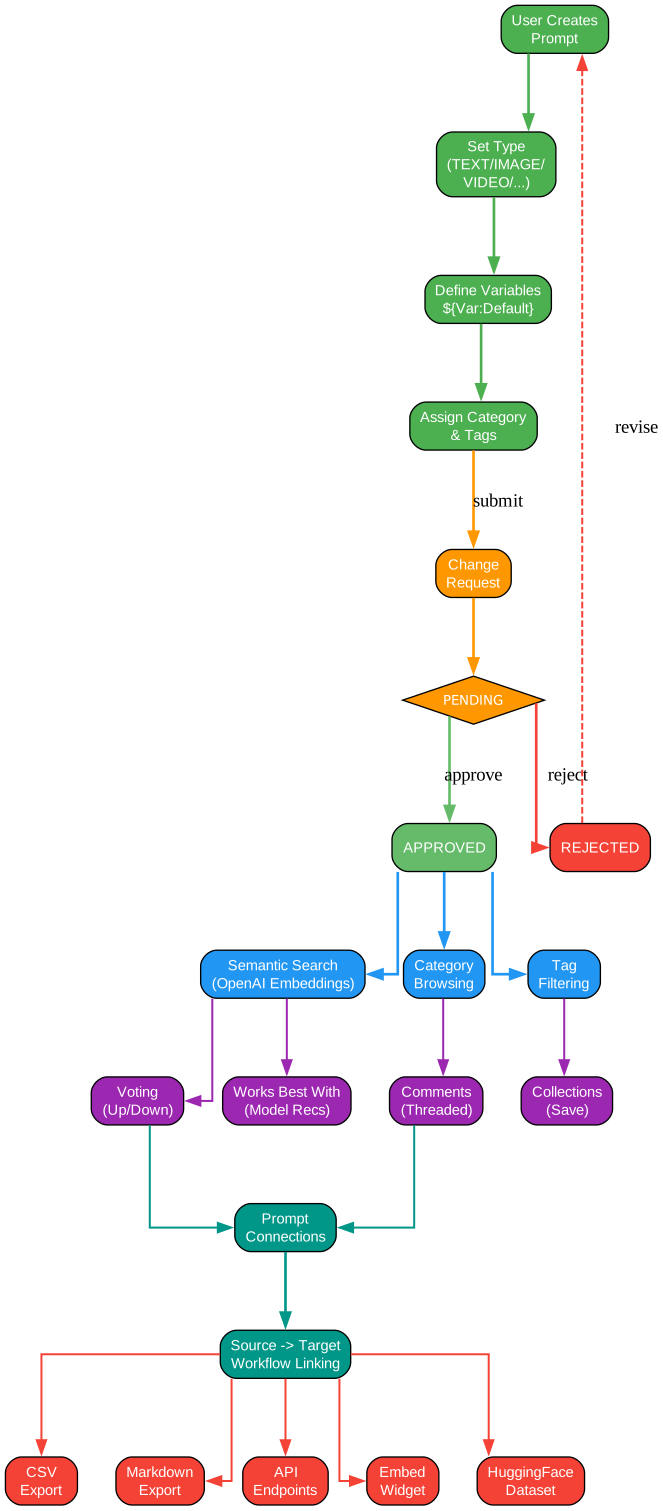
The prompt lifecycle diagram illustrates the six-stage journey that every prompt follows on the platform, from initial creation through community engagement and eventual export. This structured lifecycle ensures quality, discoverability, and reusability – transforming prompts from disposable text into curated, versioned resources.
Creation is the first stage, where authors compose prompts using a structured template system. The key innovation is the variable placeholder syntax: ${VariableName:DefaultValue}. This syntax allows prompts to be parameterized, making them reusable across different contexts. For example, a prompt template for code review might include ${ProgrammingLanguage:Python} and ${CodeSnippet}, enabling the same prompt to work across any programming language. Authors specify the prompt type (TEXT, IMAGE, VIDEO, AUDIO, STRUCTURED, SKILL, or TASTE), add tags for categorization, and choose a license.
Review follows creation, where community members and moderators evaluate the prompt’s clarity, effectiveness, and originality. The platform supports change requests – structured feedback that authors can accept, reject, or discuss. This review process acts as a quality gate, ensuring that prompts promoted in search results and leaderboards meet a baseline standard. Reviewers can also suggest alternative variable names or default values to improve a prompt’s generality.
Discovery leverages the platform’s semantic search capabilities, powered by vector embeddings. When a user searches for “write unit tests,” the system doesn’t just match keywords – it understands the intent and surfaces prompts related to testing methodologies, TDD workflows, and assertion patterns. The leaderboard and collection features further aid discovery by highlighting trending prompts and curated thematic groups.
Engagement features include upvoting, downvoting, commenting, and forking. Users can adapt an existing prompt to their needs by creating a fork with modified variables or additional instructions. The voting system surfaces high-quality prompts while burying ineffective ones, creating a natural quality gradient that guides new users toward proven templates.
Connection enables prompts to reference and compose with other prompts. A complex workflow might chain a “requirements analysis” prompt into a “code generation” prompt, then into a “testing” prompt. This composability transforms individual prompts into building blocks for larger AI workflows, similar to how Unix pipes connect simple commands into powerful pipelines.
Export is the final stage, where prompts can be consumed in multiple formats: direct copy to clipboard, API access via the MCP server, CLI invocation, or embedding in external applications through the widget system. Each export format preserves the variable placeholders, allowing downstream consumers to substitute their own values programmatically.
Prompt Types Ecosystem
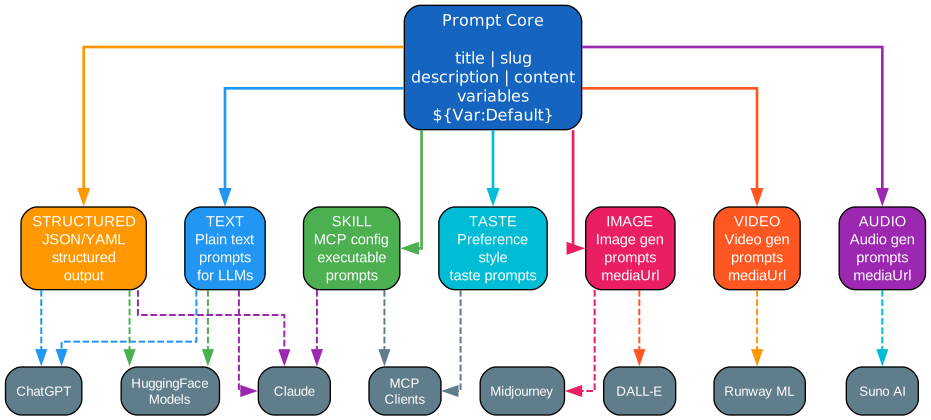
The prompt types ecosystem diagram showcases the seven distinct prompt categories that prompts.chat supports, each tailored to a specific modality and set of consumer applications. This multi-type architecture reflects the reality that modern AI interactions extend far beyond simple text exchanges.
TEXT prompts are the foundational type, encompassing conversational instructions, role-playing scenarios, and task-oriented directives. These prompts target ChatGPT, Claude, Gemini, and other large language models. A text prompt might instruct an LLM to act as a senior software engineer conducting a code review, complete with specific evaluation criteria and output formatting requirements. Text prompts support the full variable placeholder syntax and can be chained into multi-turn conversations.
IMAGE prompts target visual generation models like Midjourney, DALL-E, and Stable Diffusion. These prompts use specialized syntax for style references, aspect ratios, and quality parameters. The platform’s image prompt templates include variables for artistic style, subject matter, and composition, allowing users to generate consistent visual outputs across different image generation services.
VIDEO prompts are designed for models like Sora, Runway, and Pika, incorporating temporal directives such as camera movement, scene transitions, and duration. Video prompts represent the newest frontier in prompt engineering, as the community develops vocabulary and patterns for describing motion, pacing, and narrative structure in text form.
AUDIO prompts serve speech synthesis and music generation models, including ElevenLabs, Suno, and Bark. These prompts specify vocal characteristics, emotional tone, pacing, and acoustic environment. The variable system allows authors to parameterize voice age, accent, and speaking style.
STRUCTURED prompts produce outputs in defined formats – JSON, XML, CSV, or custom schemas. These are essential for programmatic workflows where AI output must be parsed and processed by downstream systems. A structured prompt might instruct an LLM to return a JSON object with specific fields, making the output directly consumable by APIs and databases.
SKILL prompts define reusable capabilities for AI agents, following the emerging skill pattern where prompts encapsulate domain expertise. A skill prompt for “database schema design” would include not just the instruction text but also input/output schemas, validation rules, and example interactions. These integrate with Claude Code, Cursor, and other AI-powered development tools.
TASTE prompts capture aesthetic preferences and style guidelines, enabling users to encode subjective judgments into shareable, reusable templates. A taste prompt might define what “clean code” means to a particular team, or what visual style a design team prefers. This type is unique to prompts.chat and reflects the platform’s recognition that many AI interactions involve subjective, context-dependent preferences.
Each prompt type maps to specific consumer applications, creating a many-to-many relationship between prompt templates and AI services. The platform’s type system ensures that prompts are validated against type-specific schemas before publication, preventing common errors like using image-specific parameters in a text prompt.
Community and Contribution Ecosystem
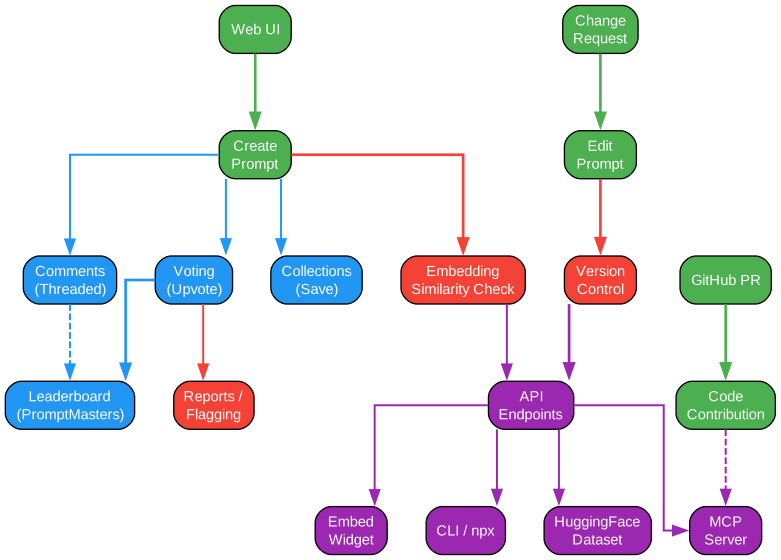
The community ecosystem diagram maps the interplay between contribution paths, quality mechanisms, community features, and distribution channels that sustain the platform’s growth. With over 143,000 stars and thousands of contributors, prompts.chat has developed robust systems for managing community-driven content at scale.
Contribution Paths support multiple entry points for different contributor profiles. Casual contributors can submit single prompts through the web interface or by editing the CSV file directly on GitHub. Power users leverage the CLI tool for batch operations, while developers integrate programmatically through the API and MCP server. Each path converges on the same review pipeline, ensuring that regardless of how a prompt is submitted, it undergoes the same quality checks before appearing in search results.
Community Features form the social layer that drives engagement and quality. The voting system allows any registered user to upvote or downvote prompts, creating a crowdsourced quality signal. Comments enable discussion about a prompt’s effectiveness, suggested modifications, and real-world results. Collections let users curate thematic groups of prompts – “Best Prompts for Code Review” or “Creative Writing Starter Pack” – which become discoverable resources in their own right. The leaderboard ranks prompts by a composite score of votes, usage frequency, and recency, providing a natural entry point for new users seeking proven templates.
Quality Mechanisms operate at multiple levels. Automated validation checks prompt syntax, variable placeholder formatting, and type-specific schema compliance before a prompt enters the review queue. Community review provides human evaluation of clarity, effectiveness, and originality. The change request system enables structured feedback loops where reviewers suggest specific improvements and authors can accept, reject, or negotiate changes. Moderation tools allow administrators to flag, quarantine, or remove prompts that violate community guidelines.
Distribution Channels ensure that prompts reach users wherever they work. The web interface serves as the primary browsing and discovery channel. The CLI tool (npx prompts.chat) brings prompt search and execution to the terminal. The MCP server enables AI agents like Claude to discover and use prompts within their workflows. The embed widget allows external websites to display interactive prompt browsers. Webhooks notify downstream systems when prompts are created, updated, or deprecated, enabling event-driven integrations with CI/CD pipelines and content management systems.
The ecosystem also supports a fork-and-derive pattern where community members can take an existing prompt, modify it for their specific use case, and publish the derivative as a new prompt with attribution to the original author. This pattern accelerates innovation by allowing incremental improvements rather than requiring each author to start from scratch.
Developer Integration
Prompts.chat provides multiple integration paths for developers who want to incorporate prompt engineering into their workflows and applications.
The MCP Server is the most powerful integration point for AI tool builders. The Model Context Protocol allows AI agents to discover, search, and use prompts programmatically. When an AI agent encounters a task that matches a prompt template, it can retrieve the prompt, substitute variables, and execute it – all without human intervention.
// Example: Using prompts.chat MCP server with Claude Code
// Configure in your Claude Code settings:
{
  "mcpServers": {
    "prompts-chat": {
      "command": "npx",
      "args": ["-y", "@anthropic/mcp-server-prompts-chat"]
    }
  }
}

// Once configured, Claude can search prompts:
// "Find me a prompt for writing unit tests"
// Claude will query the MCP server and use the best-matching prompt
The Claude Code Plugin adds slash commands directly into the Claude Code IDE experience. Typing /prompt followed by a search query surfaces relevant prompts from the platform, which can then be inserted into the current conversation with variable substitution.
The CLI tool provides terminal-based access to the full prompt library:
# Search for prompts
npx prompts.chat search "code review"

# Use a specific prompt with variables
npx prompts.chat use "act-as-senior-developer" --var "language=TypeScript"

# Submit a new prompt
npx prompts.chat submit --name "my-prompt" --type TEXT --file prompt.md
The platform exposes 20+ API endpoints covering prompt CRUD operations, search, user management, voting, collections, and leaderboard queries. All endpoints return JSON responses and support pagination, filtering, and sorting.
The Embed Widget enables any website to display an interactive prompt browser:
<!-- Embed prompts.chat widget in your documentation site -->
<script src="https://prompts.chat/widget.js"></script>
<div data-prompts-chat-widget="true"
     data-category="development"
     data-limit="10"></div>
Webhooks provide event-driven integration for automated workflows:
# Register a webhook for prompt creation events
curl -X POST https://prompts.chat/api/webhooks \
  -H "Authorization: Bearer $PCHAT_API_KEY" \
  -d '{"event": "prompt.created", "url": "https://myapp.com/webhook"}'
Self-Hosting and Customization
Organizations that need full control over their prompt infrastructure can self-host prompts.chat with extensive customization options.
White-label deployment allows companies to run their own branded instance with custom logos, color schemes, and domain names. The entire platform is open-source under a dual MIT + CC0 1.0 license, meaning there are no restrictions on commercial use or modification.
Configuration is managed through prompts.config.ts, a TypeScript configuration file that controls branding, feature flags, and integration settings:
// prompts.config.ts - Customization configuration
export default {
  branding: {
    name: "Acme Prompts",
    logo: "/assets/acme-logo.svg",
    primaryColor: "#0066CC",
  },
  features: {
    voting: true,
    comments: true,
    collections: true,
    leaderboard: true,
    mcpServer: true,
  },
  integrations: {
    openai: { apiKey: process.env.PCHAT_OPENAI_API_KEY },
    auth: { providers: ["github", "google"] },
  },
};
Environment variables using the PCHAT_* prefix allow runtime configuration without code changes:
# Core configuration
PCHAT_DATABASE_URL=postgresql://user:pass@localhost:5432/prompts
PCHAT_NEXTAUTH_SECRET=your-secret-key
PCHAT_OPENAI_API_KEY=sk-...

# Feature flags
PCHAT_ENABLE_VOTING=true
PCHAT_ENABLE_MCP_SERVER=true
PCHAT_MAX_PROMPTS_PER_USER=100
Docker Compose provides the simplest path to deployment:
# Clone the repository
git clone https://github.com/f/prompts.chat.git
cd prompts.chat

# Start all services
docker compose up -d

# The platform will be available at http://localhost:3000
The Plugin Architecture supports custom extensions for authentication providers, storage backends, and prompt type handlers. Plugins are registered in the configuration file and receive lifecycle hooks for initialization, request processing, and cleanup. This extensibility model allows organizations to integrate prompts.chat with internal systems like SSO providers, proprietary AI models, and custom content pipelines without modifying the core codebase.
Getting Started
Getting started with prompts.chat is straightforward, whether you want to browse prompts, contribute your own, or deploy a private instance.
For prompt users, the quickest path is the web interface at prompts.chat, where you can search, browse, and copy prompts directly. For terminal users:
# Install and search prompts from the CLI
npx prompts.chat search "act as"

# Use a prompt with variable substitution
npx prompts.chat use "act-as-linux-terminal"
For contributors, fork the repository on GitHub, add your prompt to the appropriate category, and submit a pull request. The community review process will provide feedback before your prompt is merged into the main collection.
For self-hosting, Docker Compose is the recommended approach:
git clone https://github.com/f/prompts.chat.git
cd prompts.chat
cp .env.example .env
# Edit .env with your configuration
docker compose up -d
For Vercel deployment, the platform supports one-click deployment:
# Deploy to Vercel
npx vercel --prod

# Or use the Vercel dashboard with the GitHub integration
Key resources:
- Repository: github.com/f/prompts.chat
- Documentation: prompts.chat/docs
- MCP Server:
npm install @anthropic/mcp-server-prompts-chat - CLI:
npx prompts.chat
Conclusion
Prompts.chat represents a significant evolution in how the AI community creates, shares, and consumes prompts. From its origins as a simple CSV file to its current form as a full-featured platform with semantic search, multi-modal prompt types, MCP integration, and a plugin architecture, it has grown alongside the generative AI field it serves.
The platform’s dual license – MIT for code and CC0 1.0 for content – ensures maximum accessibility for both developers and prompt authors. The community-driven model, with its voting, commenting, and collection features, has proven that prompt engineering benefits from the same collaborative dynamics that power open-source software development.
As AI tools continue to proliferate and specialize, the need for a centralized, searchable, and programmatically accessible prompt library will only grow. Prompts.chat is positioned to fill that role, serving as both a reference collection for newcomers and a powerful integration layer for developers building AI-powered applications. The platform’s commitment to extensibility through MCP, plugins, and API access ensures it will remain relevant as the AI landscape continues to evolve. Enjoyed this post? Never miss out on future posts by following us