Introduction
macOS users have long relied on system cleaners to reclaim disk space, remove leftover application files, and keep their machines running efficiently. The dominant player in this space, CleanMyMac, has built a substantial user base – but it comes with trade-offs that are increasingly difficult to ignore. Annual subscription fees, opaque cleaning algorithms, and an inability to audit what the software does behind the scenes have left privacy-conscious users searching for alternatives.
PureMac is a free, open-source macOS app manager and system cleaner that directly addresses these concerns. Built entirely in Swift with a native SwiftUI interface, PureMac provides comprehensive cleaning capabilities across nine distinct categories, a sophisticated app uninstaller with a 10-level heuristic file discovery engine, and – critically – zero telemetry. No network code. No analytics SDKs. No data leaving your machine.
The problem with proprietary macOS cleaners runs deeper than cost. When you grant a cleaning application Full Disk Access, it can read virtually every file on your system. Without the ability to audit the source code, you are placing implicit trust in a black box. Proprietary cleaners routinely embed analytics frameworks like Segment, Amplitude, or Sentry, which collect usage data, system profiles, and crash reports – then transmit them to third-party servers. PureMac takes the opposite approach: its entire codebase is available on GitHub under the MIT license, and its architecture is designed from the ground up to make data exfiltration structurally impossible.
For developers, system administrators, and anyone who values transparency in the software they run, PureMac represents a meaningful shift. It proves that a system cleaner can be both powerful and privacy-respecting, without requiring a subscription or sacrificing functionality.
Architecture Overview
PureMac follows the MVVM (Model-View-ViewModel) architecture pattern, leveraging Swift’s actor model for thread safety and SwiftUI for the presentation layer. This separation of concerns ensures that the scanning and cleaning engines operate independently of the UI, enabling both the graphical application and the CLI mode to share the same core logic.
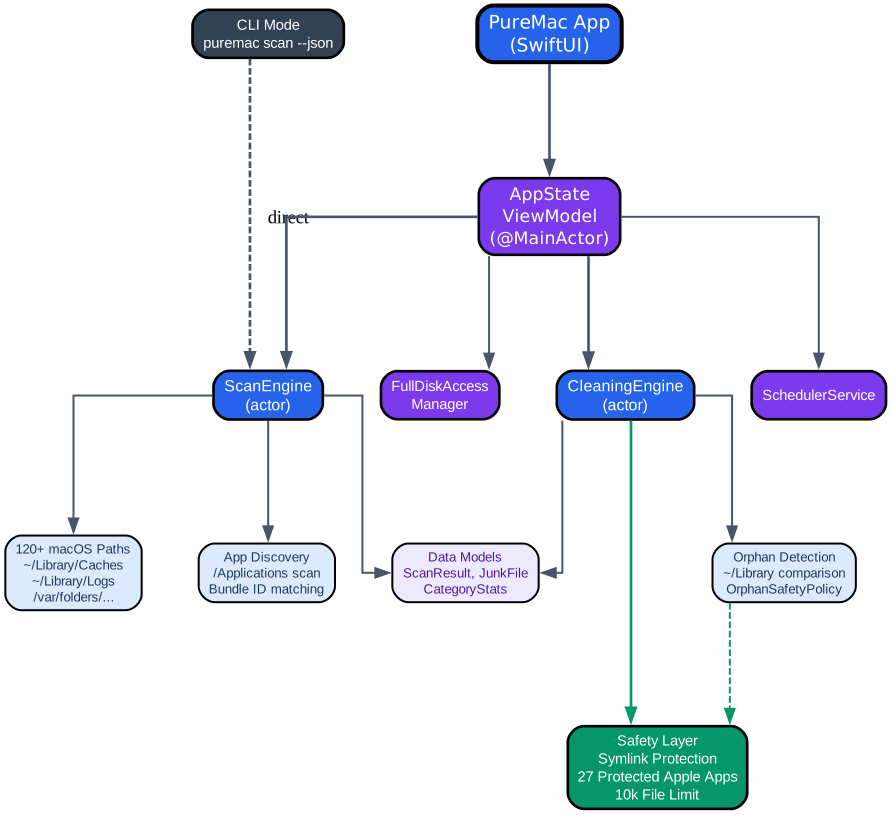
The architecture diagram illustrates the layered design of PureMac. At the top, two entry points feed into the system: the PureMac App (SwiftUI) and the CLI Mode. The SwiftUI app communicates with the AppState ViewModel, which is annotated with @MainActor to ensure all UI state mutations happen on the main thread. The CLI mode bypasses the ViewModel entirely and invokes the ScanEngine actor directly, making it suitable for scripting and automation workflows.
The services layer contains four key components. The ScanEngine actor handles all scanning operations – it traverses the 120+ macOS filesystem paths defined in the Locations database, discovers installed applications, and categorizes found junk files. The CleaningEngine actor manages the actual deletion of files, always passing through the Safety Layer before any destructive operation. The SchedulerService enables automatic scanning on configurable intervals (daily, weekly, or monthly), and the FullDiskAccessManager handles the macOS permission flow required for deep scanning.
Below the services layer, the filesystem interaction layer shows three domains: the 120+ macOS paths that the scan engine traverses, the app discovery mechanism that enumerates applications from /Applications and ~/Applications using Spotlight metadata and Info.plist fallbacks, and the orphan detection system that compares Library contents against installed app identifiers using the OrphanSafetyPolicy.
The Safety Layer sits at the bottom of the diagram, enforcing symlink attack prevention, protecting 27 Apple system apps from accidental deletion, and imposing a 10,000-file limit per operation to prevent catastrophic mass deletions. The bold green edge from CleaningEngine to Safety emphasizes that every cleaning operation must pass through this layer – there is no bypass path.
Cleaning Modules Deep Dive
PureMac organizes its cleaning capabilities into nine distinct categories, each targeting a specific type of disk waste. A tenth meta-category, Smart Scan, aggregates all nine into a single one-click operation.
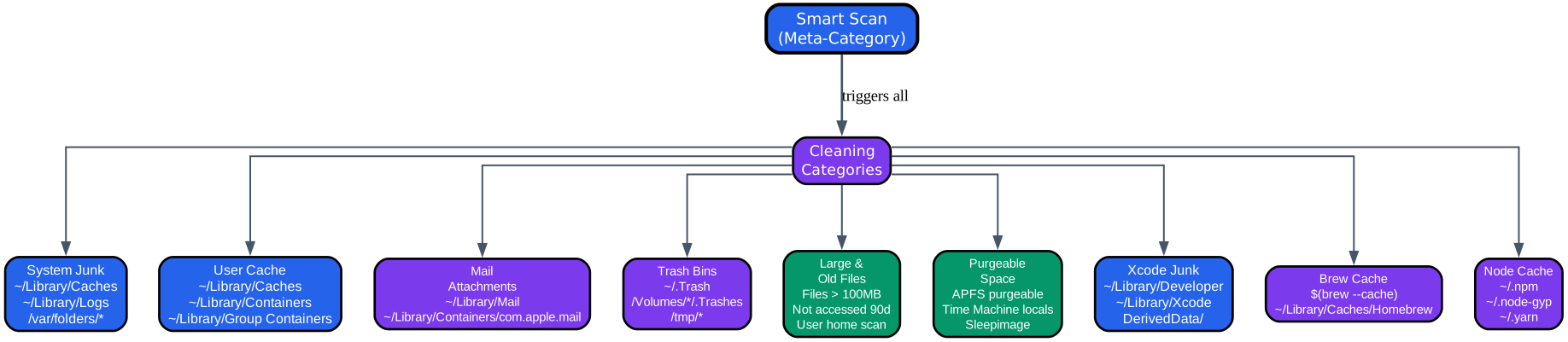
The cleaning modules diagram shows the hierarchical relationship between Smart Scan and the nine individual cleaning categories. Smart Scan sits at the top as the meta-category, triggering all category scans in sequence. When a user initiates a Smart Scan, PureMac iterates through each category, displays real-time progress with the current category name and completion percentage, and presents aggregated results with per-category toggles for selective cleaning.
The nine categories are organized into three rows in the diagram. The first row covers the most common cleaning targets: System Junk targets system caches, logs, and temporary files across /Library/Caches, /Library/Logs, and /var/folders/. User Cache dynamically discovers all application caches without relying on a hardcoded app list – it enumerates subdirectories within ~/Library/Caches and ~/Library/Containers to find cache data for every installed application. Mail Attachments scans downloaded email attachments stored in ~/Library/Mail and the Mail container.
The second row addresses space recovery: Trash Bins empties all user and volume trash directories. Large & Old Files scans the user’s home directory for files exceeding 100 MB (configurable in settings) or files not accessed within the past 90 days – importantly, these files are never auto-selected for deletion, requiring explicit user confirmation. Purgeable Space detects APFS purgeable disk space, including Time Machine local snapshots and sleep images.
The third row targets developer-specific waste: Xcode Junk cleans DerivedData, Archives, and simulator caches from ~/Library/Developer and ~/Library/Xcode. Brew Cache clears the Homebrew download cache, automatically detecting custom HOMEBREW_CACHE paths. Node Cache removes ~/.npm, ~/.node-gyp, and ~/.yarn directories that accumulate over time from JavaScript development.
The CleaningCategory enum defines these categories as first-class types in the codebase:
enum CleaningCategory: String, CaseIterable {
    case systemJunk = "System Junk"
    case userCache = "User Cache"
    case mailAttachments = "Mail Attachments"
    case trashBins = "Trash Bins"
    case largeAndOldFiles = "Large & Old Files"
    case purgeableSpace = "Purgeable Space"
    case xcodeJunk = "Xcode Junk"
    case brewCache = "Brew Cache"
    case nodeCache = "Node Cache"
    case smartScan = "Smart Scan"
}
Each category conforms to CaseIterable, enabling the Smart Scan to iterate through all scannable categories programmatically. The scannable computed property filters out the smartScan meta-category itself, preventing recursive scanning. Category icons are assigned via a computed property that maps each category to an appropriate SF Symbol, ensuring consistent visual representation across the Smart Scan view, category detail views, and CLI output.
App Uninstaller: 10-Level Heuristic Engine
The App Uninstaller is PureMac’s most technically sophisticated feature. When a user selects an application for uninstallation, PureMac must discover every file that application has created across the macOS filesystem – caches, preferences, containers, logs, support files, launch agents, and more. This is a fundamentally harder problem than it appears, because applications do not consistently name their files after their bundle identifiers or display names.
The AppPathFinder class implements a 10-level heuristic matching engine that progressively broadens its search criteria based on the configured sensitivity level. Each level uses a different normalization of the application’s identity:
-
Full bundle identifier – The most precise match. If a file’s normalized name contains the application’s full bundle identifier (e.g.,
com.apple.dt.xcode), it is considered a match. This level requires the bundle ID to be at least 5 characters to avoid false positives from short identifiers. -
App name – Matches files containing the application’s display name. In strict mode, this requires an exact match; in enhanced and deep modes, a substring match suffices.
-
Path component name – The
.appdirectory name without the extension. Some applications use different display names and bundle names, so the filesystem name provides an additional matching vector. -
Letters-only app name – Strips all non-letter characters from the app name and matches against the same normalization of filesystem entries. This catches files named with variant punctuation or spacing.
-
Last two bundle ID components – Extracts the final two segments of the bundle identifier (e.g.,
dt.xcodefromcom.apple.dt.xcode) and matches against those. This is useful when files use abbreviated forms of the bundle ID. -
Base bundle ID – Strips common suffixes like
.helper,.agent,.daemon,.service,.xpc,.launcher,.updater,.installer,.uninstaller,.login,.extension, and.pluginfrom the bundle ID, then matches the base. This discovers helper processes and agent binaries that share the parent application’s bundle ID prefix. -
Version-stripped app name – Removes trailing version numbers (e.g., “App 3.2.1” becomes “App”) and matches against the stripped form. This catches files created by older versions of the application.
-
Company name – Extracts the second component of a three-part bundle identifier (e.g., “google” from
com.google.chrome) and matches against it. This is the broadest heuristic and is only used in deep sensitivity mode. -
Team identifier – Matches against the code signing team identifier extracted from the application’s code signature. Some applications scatter files under their team ID rather than their bundle ID.
-
Entitlement-based matching – Uses the application’s entitlements to discover related files. In strict mode, this requires an exact match; in enhanced and deep modes, a substring match suffices.
These 10 levels are applied within three sensitivity tiers. Strict mode uses only levels 1-4 with exact matching, making it the safest option. Enhanced mode (the default) adds levels 5-7 with substring matching, providing a balance between discovery and safety. Deep mode enables all 10 levels, including company name and team identifier matching, for the most thorough cleanup.
The Conditions database contains 25+ per-app matching rules that override the heuristic engine for specific applications where bundle ID matching alone is insufficient. For example, Xcode’s condition includes terms like com.apple.dt and simulator while excluding xcodesapp and xcodecleaner to prevent cross-contamination with the third-party Xcodes app. Google Chrome’s condition includes both google and chrome but excludes iterm (which has a chromefeaturestate file) and monochrome. VS Code’s condition force-includes the ~/Library/Application Support/Code/ directory (which uses a different name than the bundle ID) and excludes VS Code Insiders.
The Locations database defines 120+ filesystem paths where applications leave files, spanning user home directories, the user Library hierarchy (Application Scripts, Application Support, Caches, Containers, Group Containers, HTTPStorages, Internet Plug-Ins, LaunchAgents, Logs, Preferences, PreferencePanes, Saved Application State, Services, WebKit), system-wide paths (/Applications, /Library, /Users/Shared), and developer tool paths (/usr/local/bin, /usr/local/etc, /usr/local/opt, /private/var/db/receipts). The engine dynamically appends Application Support subfolders at runtime by enumerating the directory, ensuring coverage of newly installed applications without code changes.
A set of 27 protected Apple apps – including Safari, Finder, App Store, Terminal, Activity Monitor, Mail, Calendar, Photos, Notes, and more – are permanently excluded from the uninstall list. The AppInfoFetcher checks each discovered application against this protected set before presenting it to the user.
Privacy-First Design: Zero Telemetry
PureMac’s zero-telemetry guarantee is not merely a policy – it is an architectural constraint. The application is designed so that data exfiltration is structurally impossible, not just disabled by configuration.
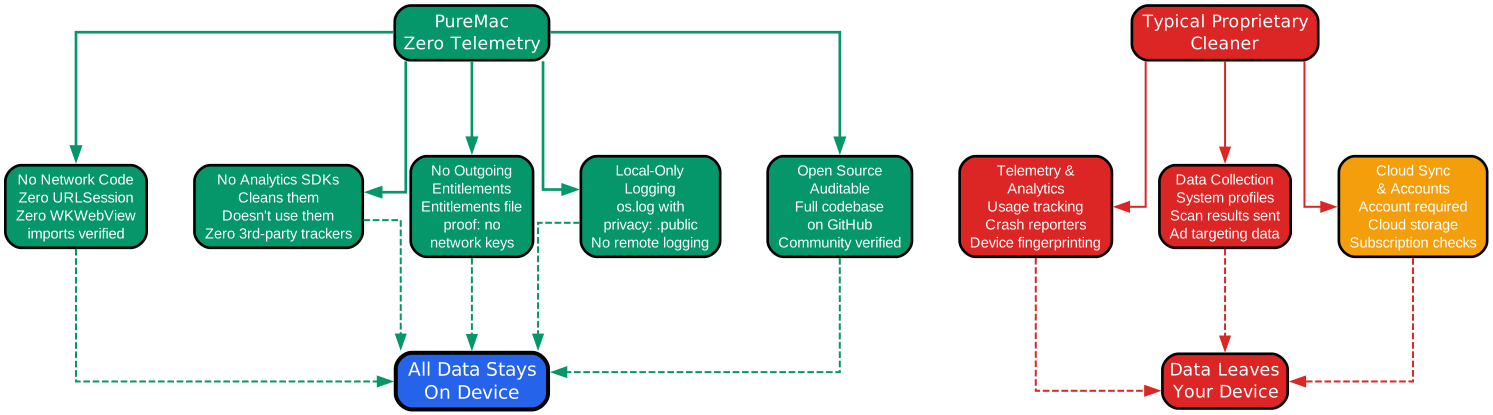
The privacy flow diagram contrasts PureMac’s architecture with that of a typical proprietary cleaner. On the left side, PureMac’s five privacy pillars all converge on “All Data Stays On Device.” On the right side, the proprietary cleaner’s telemetry, data collection, and cloud sync features all lead to “Data Leaves Your Device.”
The five pillars of PureMac’s privacy architecture are:
1. No Network Code. The PureMac codebase contains zero imports of URLSession, WKWebView, or any other networking API. There is no HTTP client, no socket layer, no network reachability check. Without network code, the application physically cannot transmit data, regardless of bugs, misconfiguration, or malicious intent. This is verifiable by searching the entire codebase for network-related imports.
2. No Analytics SDKs. PureMac does not embed any third-party analytics, crash reporting, or tracking SDKs. Ironically, PureMac’s cleaning engine actively removes the cache files created by these SDKs – it scans for and cleans caches from Segment (com.segment.analytics), Amplitude, Sentry (SentryCrash), Rollbar, Parse, and Realm. The Locations database includes explicit paths for these analytics caches. PureMac cleans the telemetry that other applications create; it does not add its own.
3. No Outgoing Entitlements. The macOS entitlements file that accompanies the signed application binary defines what system capabilities the app requires. PureMac’s entitlements file contains no network-related entitlements – no outgoing network, no incoming network, no network client or server declarations. Even if a future version of the codebase accidentally introduced network code, the macOS sandbox would prevent it from establishing connections because the entitlements would not permit it.
4. Local-Only Logging. PureMac uses Apple’s os.log unified logging system with the privacy: .public flag, meaning log messages are visible in Console.app but contain no sensitive data. The in-app Logger maintains a maximum of 1,000 entries, automatically pruning the oldest entries when the limit is exceeded. All log entries remain on the local device. There is no remote logging endpoint, no log shipping, and no crash reporter that transmits data externally.
5. Open Source Auditable. The entire PureMac codebase is available on GitHub under the MIT license. Any user, security researcher, or auditor can clone the repository and verify every claim made above. The absence of network code, analytics SDKs, and outgoing entitlements can be confirmed by reading the source. This is the ultimate privacy guarantee: trust, but verify.
In contrast, a typical proprietary cleaner operates as a black box. It may embed analytics frameworks that track usage patterns, collect system profiles, and transmit crash reports. It may require a user account with cloud synchronization of scan results. It may perform subscription validation checks that send device identifiers to remote servers. Without source code access, users have no way to verify what data is collected or where it is sent.
Safety Features
PureMac implements multiple safety layers to prevent accidental data loss, even when the user has Full Disk Access privileges.
Symlink Attack Prevention. Symbolic links can be used to trick cleaning software into deleting files outside the intended scope. A malicious or misconfigured symlink in ~/Library/Caches could point to /System or another critical directory. PureMac resolves all symlinks before deletion and validates that the resolved path falls within the allowed root set:
func isSafeToDelete(at url: URL) -> Bool {
    guard let resolved = try? FileManager.default.destinationOfSymbolicLink(atPath: url.path) else {
        return allowedRoots.contains { url.path.hasPrefix($0) }
    }
    return allowedRoots.contains { resolved.hasPrefix($0) }
}
The isSafeToDelete function first attempts to resolve the symlink target. If the URL is not a symlink, it checks whether the path itself starts with an allowed root. If the URL is a symlink, it checks whether the resolved target starts with an allowed root. This two-step validation ensures that neither the symlink itself nor its destination can escape the safety boundary.
Orphan Safety Policy. The OrphanSafetyPolicy defines a conservative allowlist of directories where orphaned files can be safely deleted: ~/Library/Caches, ~/Library/Logs, ~/Library/Saved Application State, ~/Library/HTTPStorages, ~/Library/WebKit, and ~/Library/Application Support/CrashReporter. Directories containing preferences, containers, keychains, mail, Safari data, messages, calendars, and other sensitive data are explicitly blocked. Files prefixed with com.apple. or named .globalpreferences.plist are always excluded.
Confirmation Dialogs. Every destructive operation requires explicit user confirmation. The Smart Scan view presents a confirmation dialog showing the total size of selected files before any deletion occurs. The dialog message explicitly states: “This will permanently delete the selected files. This cannot be undone.”
System App Protection. The 27 protected Apple apps cannot be uninstalled through PureMac. The AppInfoFetcher filters these apps from the installed applications list before it is even presented to the user, making accidental uninstallation impossible.
Large & Old Files Safety. Files identified as large or old are never auto-selected for deletion. Users must explicitly check each file or category, preventing accidental removal of important data that happens to be large or infrequently accessed.
File Count Limit. The AppInfoFetcher imposes a 10,000-file limit per application size calculation to prevent runaway enumeration. This also serves as a safety measure against operations that could affect an unexpectedly large number of files.
Comparison with CleanMyMac
PureMac and CleanMyMac serve similar purposes but differ fundamentally in their approach to user privacy, cost, and transparency.
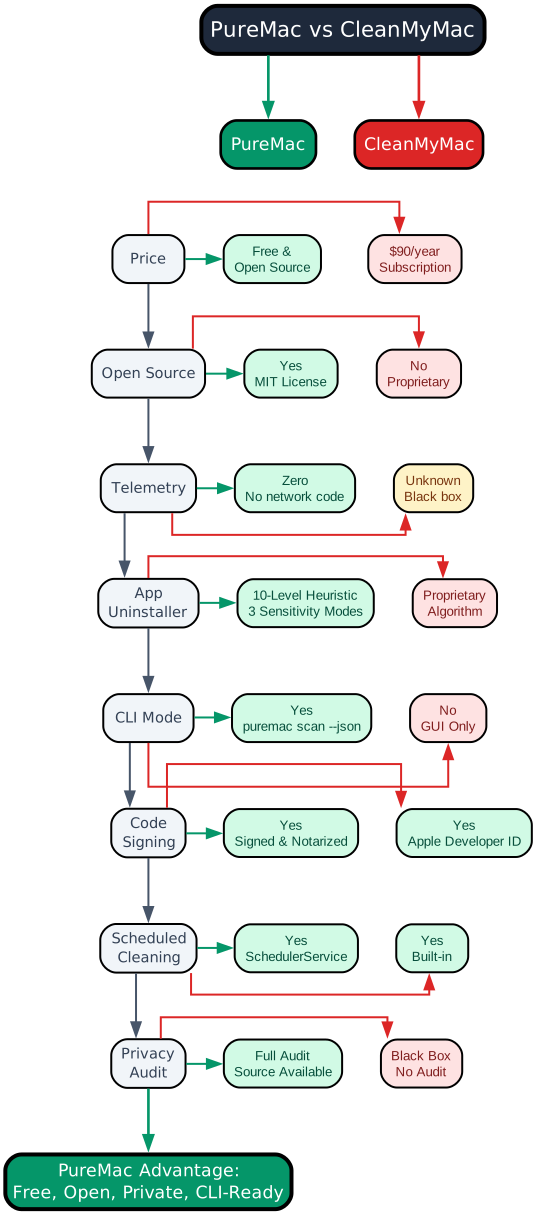
The comparison diagram presents a feature-by-feature analysis across eight dimensions. Each row shows a feature category in the center, with PureMac’s implementation on the left (green) and CleanMyMac’s on the right (red or amber). The diagram culminates in the “PureMac Advantage” summary at the bottom.
The comparison reveals that PureMac matches or exceeds CleanMyMac in most categories, with the primary trade-off being that CleanMyMac offers a more polished visual experience with animated cleaning visualizations. However, for users who prioritize privacy, cost, and automation capability, PureMac presents a compelling alternative.
| Feature | PureMac | CleanMyMac |
|---|---|---|
| Price | Free, MIT License | $90/year subscription |
| Open Source | Yes – full codebase on GitHub | No – proprietary |
| Telemetry | Zero – no network code | Unknown – black box |
| App Uninstaller | 10-level heuristic, 3 sensitivity modes | Proprietary algorithm |
| CLI Mode | Yes – puremac scan --json | No – GUI only |
| Code Signing | Signed and notarized | Signed and notarized |
| Scheduled Cleaning | Yes – SchedulerService | Yes – built-in |
| Privacy Audit | Full audit, source available | Black box, no audit |
The price difference is the most immediately visible distinction. CleanMyMac operates on a subscription model at approximately $90 per year, while PureMac is free and open source. For users who clean their systems occasionally, the subscription cost can be difficult to justify.
The telemetry question is more nuanced. CleanMyMac does not publicly disclose its data collection practices in a way that can be independently verified. PureMac’s zero-telemetry guarantee is architecturally enforced and source-verifiable. This distinction matters particularly because system cleaners require Full Disk Access – the most privileged permission on macOS.
The CLI mode is a feature that CleanMyMac entirely lacks. PureMac’s CLI enables automation workflows, scheduled scripts, and integration with existing toolchains. Developers can pipe scan results to other tools, trigger cleaning from shell scripts, or incorporate PureMac into CI/CD pipelines for build machine maintenance.
Getting Started
Installation via Homebrew
The recommended installation method is through Homebrew:
# Install via Homebrew
brew install --cask puremac
Homebrew installation provides automatic updates and integrates with the standard macOS application management workflow. PureMac is signed and notarized with an Apple Developer ID, so it installs without Gatekeeper warnings.
CLI Usage
PureMac includes a full command-line interface for scripting and automation:
# CLI usage
puremac scan                    # Scan all categories
puremac scan --category "User Cache"  # Scan specific category
puremac scan --json             # JSON output for scripting
puremac disk-info               # Show disk usage
puremac list                    # List installed apps
The scan --json flag outputs results as a JSON array, making it straightforward to parse with jq, Python, or any other tool. Each entry includes the category name, item count, and total size in bytes. The disk-info command shows total, used, free, and purgeable disk space. The list command enumerates all installed applications with their sizes and bundle identifiers.
Building from Source
For users who want to verify the codebase or contribute modifications, PureMac can be built from source:
# Build from source
brew install xcodegen
git clone https://github.com/momenbasel/PureMac.git
cd PureMac
xcodegen generate
xcodebuild -project PureMac.xcodeproj -scheme PureMac -configuration Release build
The build process uses XcodeGen to generate the Xcode project from the project.yml manifest, which defines the project structure, build settings, and code signing configuration. The project targets macOS 13.0 and later, supports both arm64 and x86_64 architectures, and uses Swift 5.9. Building from source allows users to audit every line of code before running it on their machine.
Community and Impact
PureMac is developed as an open source project under the MIT license, encouraging community contributions and forks. The project has been shaped significantly by community feedback, with v2.0 incorporating contributions from multiple developers.
Key community contributions include search and filter functionality, cleaning safety guards with confirmation dialogs, a UI overhaul, the app uninstaller with system app protection, and the onboarding experience. A symlink security vulnerability was identified and reported through the community, leading to the implementation of the symlink attack prevention system.
The project supports localization in English, Japanese (ja), Simplified Chinese (zh-Hans), and Traditional Chinese (zh-Hant). The localization files use Apple’s standard .strings format, and additional language contributions are welcome.
Distribution through Homebrew provides a trusted, verified channel that integrates with the existing macOS package management ecosystem. The Homebrew cask formula ensures that users receive verified, notarized binaries without needing to manually download and install DMG files.
The GitHub repository at https://github.com/momenbasel/PureMac hosts the full source code, issue tracker, and release downloads. Areas where community contributions are particularly welcome include XCTest coverage for the AppState and scan engine, additional localization languages, size and date filter presets in category views, and an app icon design.
Conclusion
PureMac demonstrates that a system cleaner can be both powerful and privacy-respecting. Its 10-level heuristic uninstaller engine, nine-category cleaning system, CLI mode, and scheduled cleaning capabilities match or exceed the feature set of proprietary alternatives – while its zero-telemetry architecture ensures that your data never leaves your device.
The architectural decisions that enforce privacy – no network code, no analytics SDKs, no outgoing entitlements, local-only logging, and full source availability – represent a model for how utility software should be built. When an application requires Full Disk Access, the least its developers can do is make the code auditable.
For macOS users who value transparency, privacy, and control over their systems, PureMac offers a credible, free, and open alternative to subscription-based cleaning tools. The code speaks for itself – and it says nothing to anyone but you.
The project is available at https://github.com/momenbasel/PureMac under the MIT license. Enjoyed this post? Never miss out on future posts by following us