RustDesk: Open Source Remote Desktop - The TeamViewer Alternative
Introduction
RustDesk is an open-source remote desktop application designed for self-hosting, providing a compelling alternative to proprietary solutions like TeamViewer and AnyDesk. With over 111,000 GitHub stars and a thriving community, RustDesk has rapidly become the go-to choice for organizations and individuals who value privacy, control, and transparency in their remote access tools.
The project addresses a fundamental concern with commercial remote desktop software: trust. When you use TeamViewer or AnyDesk, your connection data routes through their servers, and you have no way to audit what happens to your information. RustDesk eliminates this concern by giving you full control over the infrastructure. You can self-host the relay server, inspect the source code, and verify that end-to-end encryption truly protects your sessions.
Built with Rust for the core networking engine and Flutter for the cross-platform user interface, RustDesk delivers native performance on every platform while maintaining a consistent, intuitive user experience. Whether you are providing IT support, working remotely, or managing servers across multiple locations, RustDesk offers the reliability and security that modern workflows demand.
Core Architecture
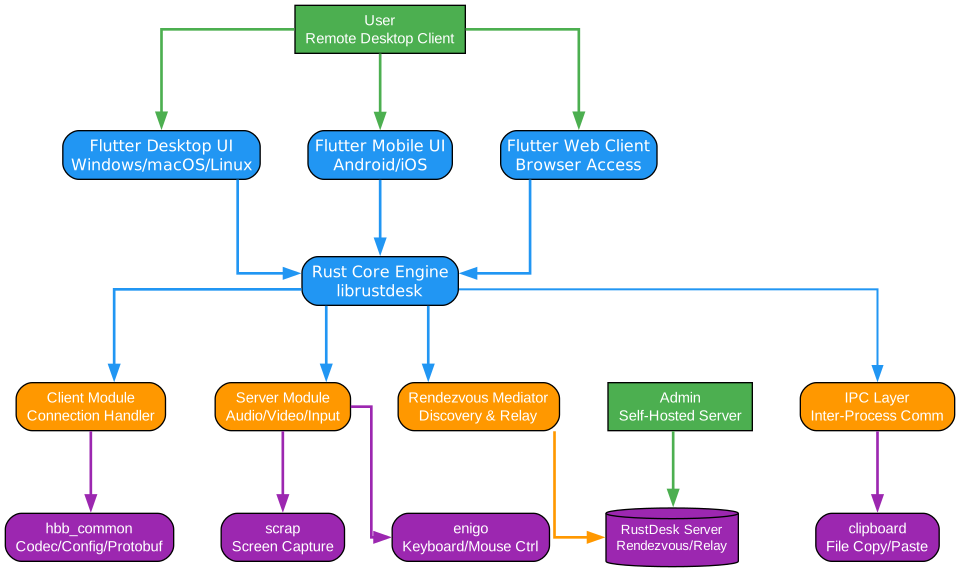
Understanding the RustDesk Architecture
The RustDesk architecture is built on a clear separation of concerns, with a Rust-based core engine handling all performance-critical operations and a Flutter-based UI layer providing cross-platform consistency. This dual-layer design ensures that the networking and encryption logic runs at native speed while the user interface remains responsive and familiar across all supported platforms.
Flutter UI Layer
The Flutter UI layer provides a unified, native-feeling interface across Windows, macOS, Linux, Android, and iOS. Flutter was chosen for its ability to render pixel-perfect interfaces on every platform without maintaining separate codebases for each operating system. The UI communicates with the Rust core through FFI (Foreign Function Interface) bindings, ensuring low-latency interaction between user actions and the networking engine. This layer handles address book management, connection settings, file transfer dialogs, and the remote desktop viewer that renders the incoming video stream.
Rust Core Engine
The Rust core engine is the heart of RustDesk, responsible for all networking, encryption, and video codec operations. Rust was selected for its memory safety guarantees and zero-cost abstractions, which are critical for a remote desktop application that must handle real-time video encoding, network traversal, and cryptographic operations simultaneously. The engine is organized into several modules: the client module manages outgoing connections, the server module handles incoming sessions, and the rendezvous mediator coordinates peer discovery.
Client Module
The client module manages the local side of a remote desktop session. It handles the UI rendering of the remote display, captures local input events (keyboard, mouse, touch), and sends them to the remote server. The client also manages the address book, connection history, and peer discovery through the rendezvous server. When initiating a connection, the client first contacts the rendezvous server to locate the remote peer, then attempts a direct P2P connection before falling back to a relay server.
Server Module
The server module runs on the remote machine that is being controlled. It captures the screen using platform-specific APIs, encodes the video stream using the VP9 or H.264 codec, and transmits it to the client. The server also receives input events from the client and injects them into the operating system’s input pipeline. On Windows, it uses the Desktop Duplication API for efficient screen capture; on Linux, it leverages X11 or Wayland protocols; on macOS, it uses the CoreGraphics framework.
Rendezvous Mediator
The rendezvous mediator is the coordination service that enables peers to find each other on the internet. When a client wants to connect to a remote machine, it queries the rendezvous server, which maintains a registry of online peers identified by their unique IDs. The rendezvous server also facilitates NAT traversal by exchanging connection metadata between peers, enabling direct P2P connections even when both machines are behind NAT or firewalls.
Shared Libraries
RustDesk leverages several key libraries: libsodium for cryptographic operations including authenticated encryption and key exchange, libvpx or libx264 for video encoding, libopus for audio compression, and libdatachannel for WebRTC-based connections. These libraries are statically linked where possible, reducing external dependencies and simplifying deployment.
Key Features

Understanding RustDesk’s Feature Set
RustDesk offers a comprehensive feature set that rivals commercial remote desktop solutions while maintaining full open-source transparency. Each feature is designed with privacy and self-hosting as primary considerations, ensuring that users never need to rely on third-party servers or services they cannot audit.
Self-Hosted Server
The self-hosted server capability is RustDesk’s defining feature. Unlike TeamViewer, which forces all traffic through their infrastructure, RustDesk allows you to run your own rendezvous and relay servers. This means your connection metadata, peer IDs, and relay traffic never touch a third-party server. The self-hosted server is distributed as a single binary with minimal dependencies, making it easy to deploy on any Linux server, VPS, or even a Raspberry Pi. Docker images are also available for containerized deployments, and the configuration supports high-availability setups with multiple relay nodes.
Cross-Platform Support
RustDesk runs natively on Windows, macOS, Linux, Android, and iOS, with consistent functionality across all platforms. The Flutter UI ensures that the user experience remains familiar regardless of the operating system, while the Rust core guarantees that performance-critical operations like video encoding and network traversal run at native speed. This cross-platform approach means IT teams can standardize on a single remote access tool for their entire fleet, regardless of the operating systems in use.
Core Capabilities
Beyond basic remote desktop access, RustDesk provides file transfer for moving documents between machines, TCP tunneling for accessing services on remote networks, and RDP/VPN support for integrating with existing infrastructure. The file transfer feature supports drag-and-drop operations and preserves file permissions where possible. TCP tunneling allows you to expose local ports through the remote connection, enabling access to web servers, databases, or any TCP service running on the remote machine without additional VPN software.
Privacy-First Design
Privacy is not an optional feature in RustDesk; it is the foundational principle. All connections are encrypted end-to-end using the AES-GCM cipher with 256-bit keys, and the encryption keys are derived using the x25519 Diffie-Hellman key exchange. Even if traffic passes through a relay server, the relay cannot decrypt the session content because the keys are exchanged directly between peers. The rendezvous server only sees connection metadata (peer IDs and IP addresses) and never has access to the encrypted payload.
No Registration Required
RustDesk does not require account creation or email verification. Each installation generates a unique cryptographic identity that serves as the peer ID. This approach eliminates the privacy implications of centralized user databases and allows immediate use without sharing personal information. For organizations that need centralized management, RustDesk offers an optional web console for managing address books and access policies.
Connection Workflow
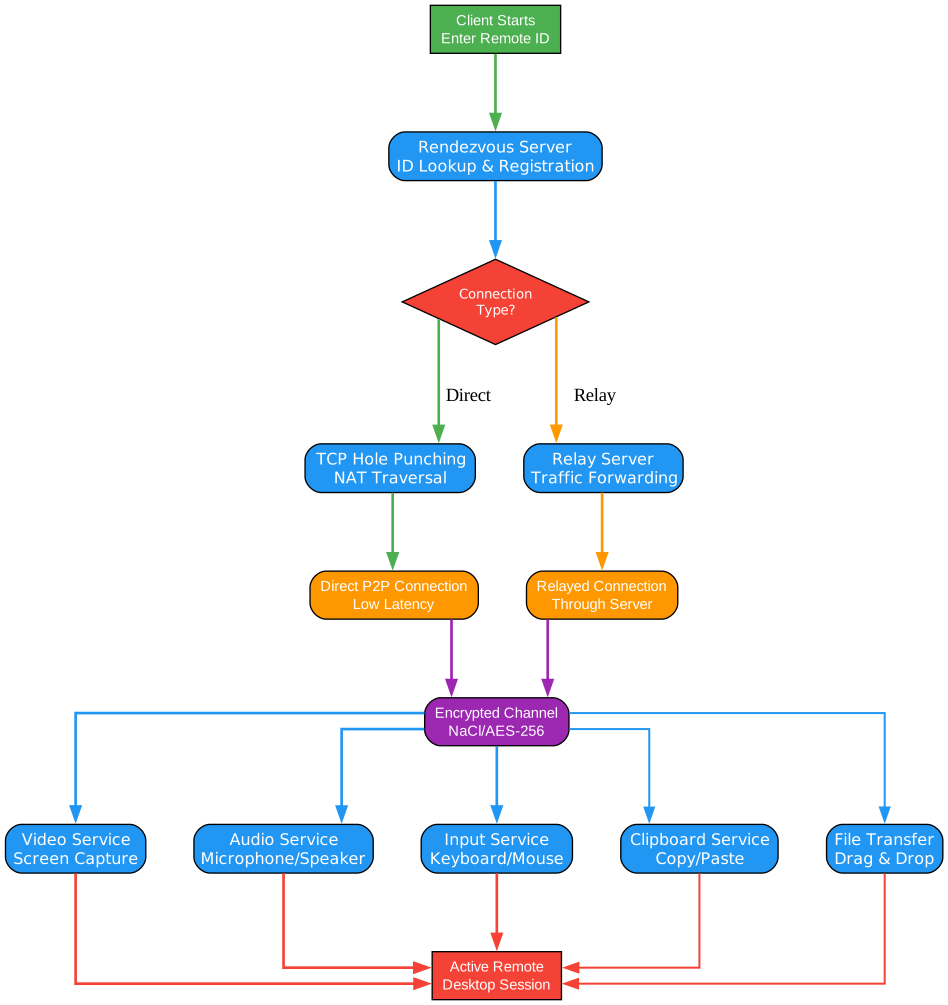
Understanding the Connection Workflow
The RustDesk connection workflow is designed to establish secure remote desktop sessions with minimal latency, preferring direct peer-to-peer connections and falling back to relay servers only when necessary. This multi-step process ensures reliability across diverse network conditions while maintaining end-to-end encryption throughout.
Step 1: Peer Discovery
When a user initiates a connection, the client first contacts the rendezvous server to locate the remote peer. The rendezvous server maintains a registry of all online RustDesk instances, each identified by a unique ID derived from their cryptographic key pair. The client sends the target peer ID to the rendezvous server, which responds with the remote peer’s current IP address and port information. If the target peer is offline, the rendezvous server returns an error, and the client displays a “peer offline” message. This discovery process typically completes in under 100 milliseconds on a well-connected server.
Step 2: NAT Traversal and P2P Hole Punching
Once the rendezvous server provides the remote peer’s address, RustDesk attempts to establish a direct P2P connection using UDP hole punching. This technique works by having both peers simultaneously send packets to each other’s public IP addresses, creating temporary openings in their respective NAT devices. RustDesk supports multiple hole punching strategies including STUN-based traversal, symmetric NAT detection, and port prediction. When successful, this creates a direct UDP connection between the peers with the lowest possible latency, typically adding only 1-2 milliseconds of overhead compared to a local network connection.
Step 3: Relay Fallback
When direct P2P connection is not possible due to restrictive NAT types (such as symmetric NAT) or corporate firewalls that block UDP traffic, RustDesk falls back to a relay server. The relay server acts as a transparent proxy, forwarding encrypted traffic between the two peers without decrypting it. While relay connections introduce additional latency due to the extra network hop, they ensure connectivity in virtually any network environment. The relay server can be self-hosted, giving organizations full control over the relay infrastructure and the ability to place relay nodes close to their users for minimal latency impact.
Step 4: Encrypted Channel Establishment
Regardless of whether the connection is P2P or relayed, RustDesk establishes an end-to-end encrypted channel using the x25519 Diffie-Hellman key exchange followed by AES-256-GCM authenticated encryption. The key exchange happens directly between the two peers, meaning that even the relay server cannot decrypt the traffic. Each session generates fresh encryption keys, providing forward secrecy so that compromising one session’s keys does not affect past or future sessions. The encrypted channel protects all data including the video stream, input events, file transfers, and chat messages.
Step 5: Session Services
Once the encrypted channel is established, RustDesk activates its session services. The remote machine begins capturing its screen using platform-specific APIs and encoding the video stream with VP9 or H.264. The local machine renders the incoming video stream and forwards keyboard, mouse, and touch events to the remote. Additional services like file transfer, TCP tunneling, and audio streaming are activated on demand through the same encrypted channel. The session continues until either party disconnects, with automatic reconnection handling brief network interruptions without requiring a new key exchange.
Security Model
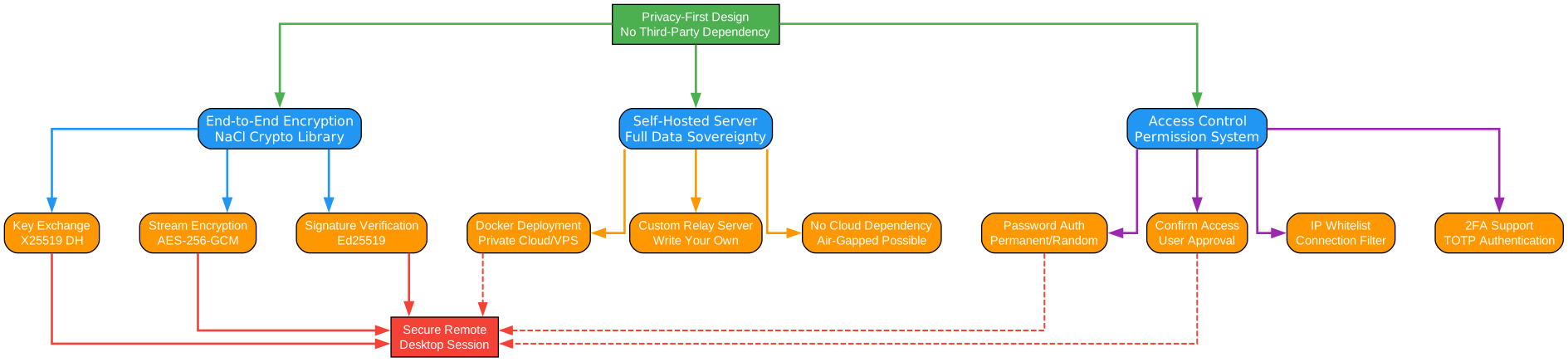
Understanding RustDesk’s Security Architecture
RustDesk implements a comprehensive security model that addresses the unique challenges of remote desktop access: untrusted networks, potential relay intermediaries, and the need for granular access control. Every layer of the system is designed with the assumption that the network is hostile and that intermediaries should never have access to plaintext data.
Privacy-First Philosophy
RustDesk’s security model starts from the principle that your data belongs to you. Unlike commercial remote desktop tools that route traffic through their servers and can theoretically inspect session content, RustDesk’s self-hosted architecture ensures that no third party has access to your connection data. The rendezvous server only sees peer IDs and IP addresses, the relay server only sees encrypted packets, and the source code is fully auditable. This privacy-first approach extends to the client application, which collects no telemetry, no usage statistics, and no crash reports unless explicitly enabled by the user.
End-to-End Encryption
All RustDesk sessions use end-to-end encryption based on the Noise Protocol Framework, specifically the NK pattern (Noise_K for key exchange). The encryption chain works as follows: first, both peers generate ephemeral x25519 key pairs. They then perform a Diffie-Hellman key exchange to derive a shared secret. This shared secret is used to initialize AES-256-GCM for the session, providing both encryption and authentication of every packet. The use of ephemeral keys ensures forward secrecy, meaning that even if a long-term key is compromised, past sessions remain secure. The encryption covers all data channels including video, input events, file transfers, and chat.
Self-Hosted Security Options
Self-hosting the RustDesk server provides several security advantages. First, you control the physical location of the server, enabling compliance with data residency requirements. Second, you can place the server behind your existing firewall and intrusion detection systems. Third, you can configure TLS for all client-server communication, preventing metadata leakage. Fourth, you can implement IP allowlisting to restrict which networks can access the rendezvous and relay services. For organizations with strict compliance requirements, the self-hosted server can be deployed in an air-gapped environment with no internet connectivity, using only internal network routes for peer discovery and relay.
Access Control
RustDesk provides multiple layers of access control to prevent unauthorized access. At the connection level, each RustDesk instance has a unique ID and an optional permanent password. For additional security, users can configure one-time passwords that change after each session, or require confirmation on the remote machine before accepting a connection. The web console provides centralized management of address books, allowing administrators to define which peers can connect to which machines. Role-based access control is available for team deployments, with separate roles for administrators, operators, and viewers.
Key Security Features Summary
| Feature | Description |
|---|---|
| E2E Encryption | AES-256-GCM with x25519 key exchange |
| Forward Secrecy | Ephemeral keys per session |
| Self-Hosted Server | Full control over infrastructure |
| No Registration | No email or personal data required |
| No Telemetry | Zero data collection by default |
| Access Confirmation | Remote user must approve connections |
| Permanent/One-Time Passwords | Flexible authentication options |
| TLS Support | Encrypted client-server communication |
| IP Allowlisting | Restrict server access by network |
Self-Hosting Guide
One of RustDesk’s most powerful features is the ability to self-host your own server infrastructure. This gives you complete control over your remote desktop connections, ensuring that no third party has access to your data.
Docker Deployment
The simplest way to deploy RustDesk servers is using Docker. The official Docker images are available on Docker Hub and provide both the rendezvous (hbbs) and relay (hbbr) services:
# Pull the latest RustDesk server images
docker pull rustdesk/rustdesk-server:latest

# Create a directory for persistent data
mkdir -p /opt/rustdesk-server

# Run the rendezvous server (hbbs)
docker run -d \
  --name hbbs \
  --net=host \
  -v /opt/rustdesk-server:/root \
  rustdesk/rustdesk-server:latest hbbs

# Run the relay server (hbbr)
docker run -d \
  --name hbbr \
  --net=host \
  -v /opt/rustdesk-server:/root \
  rustdesk/rustdesk-server:latest hbbr
Docker Compose Deployment
For production deployments, Docker Compose provides better manageability:
version: '3'
services:
  hbbs:
    container_name: hbbs
    image: rustdesk/rustdesk-server:latest
    command: hbbs
    volumes:
      - ./data:/root
    network_mode: host
    restart: unless-stopped

  hbbr:
    container_name: hbbr
    image: rustdesk/rustdesk-server:latest
    command: hbbr
    volumes:
      - ./data:/root
    network_mode: host
    restart: unless-stopped
# Start the services
docker compose up -d

# View logs
docker compose logs -f
Configuration
After deploying the server, configure your RustDesk clients to use your self-hosted infrastructure:
- Open RustDesk on your client machine
- Click the menu icon (three dots) next to the ID field
- Select “ID/Relay Server”
- Enter your server’s IP address or domain name
- The default port for hbbs is 21115 (TCP) and 21116 (TCP/UDP)
- The default port for hbbr is 21117 (TCP)
- Click “Apply” to save the configuration
For TLS encryption, place your certificate files in the server data directory:
# Copy your TLS certificate and key
cp /path/to/cert.pem /opt/rustdesk-server/cert.pem
cp /path/to/key.pem /opt/rustdesk-server/key.pem

# Restart the servers to pick up the certificates
docker restart hbbs hbbr
Advanced Server Configuration
For larger deployments, you can configure additional settings:
# Run hbbs with custom port and key
docker run -d \
  --name hbbs \
  --net=host \
  -v /opt/rustdesk-server:/root \
  rustdesk/rustdesk-server:latest hbbs \
  -p 21115 \
  -r 21117 \
  -k YOUR_PUBLIC_KEY

# Run hbbr with bandwidth limit (100 Mbps)
docker run -d \
  --name hbbr \
  --net=host \
  -v /opt/rustdesk-server:/root \
  rustdesk/rustdesk-server:latest hbbr \
  -p 21117 \
  -b 100
Getting Started
Getting started with RustDesk is straightforward, whether you want to use the public servers for quick testing or self-host for production use.
Installation
# Windows - Download the installer from GitHub Releases
# https://github.com/rustdesk/rustdesk/releases

# macOS - Use Homebrew
brew install --cask rustdesk

# Linux (Ubuntu/Debian)
wget https://github.com/rustdesk/rustdesk/releases/download/latest/rustdesk-linux.deb
sudo dpkg -i rustdesk-linux.deb

# Linux (Fedora/RHEL)
wget https://github.com/rustdesk/rustdesk/releases/download/latest/rustdesk-linux.rpm
sudo rpm -i rustdesk-linux.rpm

# Android - Available on Google Play Store and F-Droid
# iOS - Available on the App Store
Basic Usage
- Install RustDesk on both the local and remote machines
- Note the ID displayed on the remote machine’s RustDesk window
- Enter the remote ID in the local RustDesk client
- Connect - the remote user will see a connection request and can approve it
- Control the remote desktop - your screen will show the remote desktop, and your inputs will be sent to the remote machine
Building from Source
For users who want to audit or customize the code, RustDesk can be built from source:
# Clone the repository
git clone https://github.com/rustdesk/rustdesk.git
cd rustdesk

# Install Rust toolchain
curl --proto '=https' --tlsv1.2 -sSf https://sh.rustup.rs | sh

# Build the project
cargo build --release

# The binary will be available at target/release/rustdesk
Cross-Compilation
RustDesk supports cross-compilation for different platforms:
# Build for Windows from Linux
cargo build --release --target x86_64-pc-windows-msvc

# Build for macOS from Linux
cargo build --release --target x86_64-apple-darwin

# Build for ARM (Raspberry Pi)
cargo build --release --target aarch64-unknown-linux-gnu
Feature Comparison
| Feature | RustDesk | TeamViewer | AnyDesk |
|---|---|---|---|
| Open Source | Yes | No | No |
| Self-Hosted Server | Yes | No | No |
| End-to-End Encryption | Yes | Yes | Yes |
| No Registration Required | Yes | No | No |
| Cross-Platform | Yes | Yes | Yes |
| File Transfer | Yes | Yes | Yes |
| TCP Tunneling | Yes | Yes | No |
| RDP Support | Yes | No | No |
| VPN Support | Yes | Yes | No |
| No Telemetry | Yes | No | No |
| Free for Commercial Use | Yes | No | No |
| Custom Relay Server | Yes | No | No |
Troubleshooting
Common Issues and Solutions
Connection Fails with “Key Mismatch”
This error occurs when the public key of the server has changed. To resolve it:
# Remove the old key from the client
# On the client machine, delete the cached key file
rm -f ~/.config/rustdesk/id_rsa.pub

# Reconnect to the server
Relay Server Not Working
Check that the relay server (hbbr) is running and accessible:
# Check if hbbr is running
docker ps | grep hbbr

# Check the relay server logs
docker logs hbbr

# Verify the port is open
netstat -tlnp | grep 21117
Poor Performance on Linux
If you experience lag or low frame rates on Linux, try these optimizations:
# Use Wayland for better screen capture performance
# Set the environment variable
export WAYLAND_DISPLAY=wayland-0

# Or use X11 with the Desktop Duplication API
# Install the required dependencies
sudo apt install libxdo-dev libxfixes-dev libxrandr-dev
NAT Traversal Fails
If P2P connections fail and all traffic goes through the relay:
# Check your NAT type
# Enable UPnP on your router if available
# Ensure UDP traffic is allowed on ports 21115-21119

# For restrictive NATs, configure port forwarding
# Forward ports 21115-21119 to the RustDesk server
Conclusion
RustDesk represents a paradigm shift in remote desktop software. By combining the performance and safety of Rust with the cross-platform elegance of Flutter, it delivers a solution that is both powerful and accessible. The self-hosting capability puts control back in the hands of users and organizations, eliminating the privacy concerns that plague commercial alternatives.
With over 111,000 GitHub stars and an active community of contributors, RustDesk has proven that open-source remote desktop software can match and exceed the capabilities of proprietary solutions. Whether you are an individual looking for a free remote access tool, an IT team managing a fleet of machines, or an enterprise with strict compliance requirements, RustDesk provides the flexibility, security, and transparency that modern remote work demands.
The project continues to evolve rapidly, with regular updates adding features like multi-monitor support, session recording, and an enhanced web console for team management. As remote work becomes increasingly prevalent, RustDesk stands as a testament to the power of open-source software in addressing critical infrastructure needs without compromising on privacy or control. Enjoyed this post? Never miss out on future posts by following us 


