T3 Code: A Minimal Web GUI for Coding Agents
The AI coding agent landscape is evolving rapidly, with tools like OpenAI’s Codex and Anthropic’s Claude Code transforming how developers write software. However, interacting with these agents often means switching between terminal windows, managing multiple CLI sessions, and losing context across different tools. T3 Code, an open-source project by pingdotgg, addresses this problem head-on by providing a unified, minimal web GUI for coding agents.
With over 9,200 stars on GitHub and growing at +229 stars per day, T3 Code has quickly become one of the most popular developer tools in the AI coding space. Built with TypeScript and leveraging the Effect ecosystem for type-safe, composable architecture, T3 Code offers a clean interface for managing conversations with multiple AI coding agents from a single dashboard.
In this post, we will explore what T3 Code is, how its architecture works under the hood, and how you can get started using it today.
Understanding the Architecture
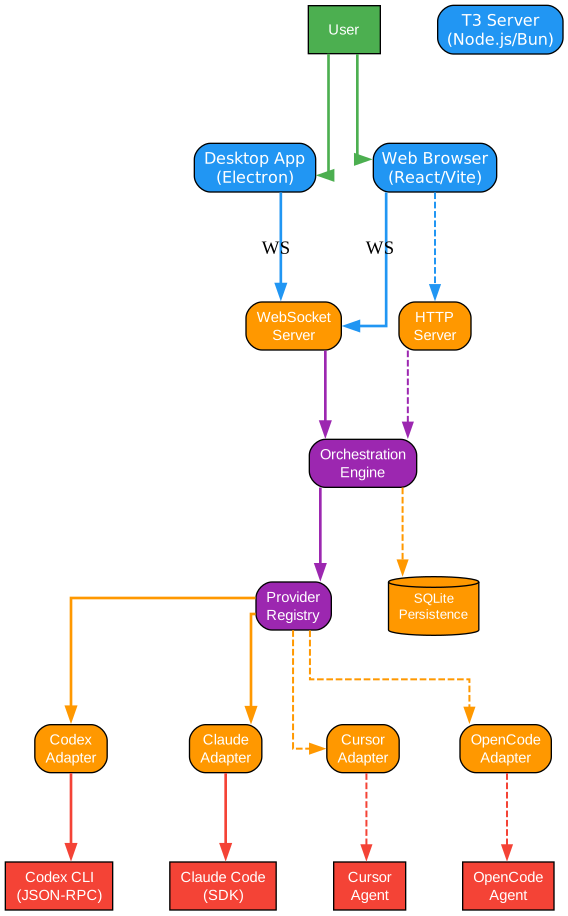
The architecture diagram above illustrates the core components of T3 Code and how they interact. Let us break down each component in detail:
User Entry Points
T3 Code provides two primary interfaces for users. The Desktop App, built with Electron, wraps the web experience in a native application with system integration features like auto-updates and native menus. The Web Browser interface, built with React and Vite, offers the same full-featured experience accessible from any modern browser. Both interfaces connect to the T3 Server via WebSocket, enabling real-time bidirectional communication for streaming agent responses.
T3 Server (Node.js/Bun)
The server is the heart of T3 Code. It runs as a Node.js or Bun process and handles two types of connections. The WebSocket Server manages persistent connections for real-time event streaming, while the HTTP Server handles REST API requests for file operations, authentication, and other non-streaming tasks. The server uses Effect’s RPC framework for type-safe communication between client and server, ensuring that all messages conform to shared contracts defined in the @t3tools/contracts package.
Orchestration Engine
The Orchestration Engine is the central coordinator that processes all provider events and projects them into a unified domain model. When a coding agent produces events like file changes, terminal commands, or approval requests, the Orchestration Engine normalizes these events regardless of which provider generated them. This means that whether you are using Codex, Claude, or any future provider, the UI presents a consistent experience. The engine also manages thread lifecycle, session persistence, and state recovery after reconnections.
Provider Registry and Adapters
The Provider Registry manages the lifecycle of coding agent sessions. Each supported agent has a dedicated adapter that translates between the agent’s native protocol and T3 Code’s internal representation. Currently, T3 Code supports four providers: Codex (via JSON-RPC over stdio), Claude (via the Anthropic Agent SDK), Cursor (in progress), and OpenCode (in progress). The adapter pattern makes it straightforward to add new providers without modifying the core orchestration logic.
SQLite Persistence
All session data, thread history, and configuration are persisted in SQLite. This ensures that conversations survive server restarts and browser refreshes. The persistence layer is built on Effect’s SQL abstractions, providing type-safe database operations.
Multi-Provider Support
Understanding the Provider System
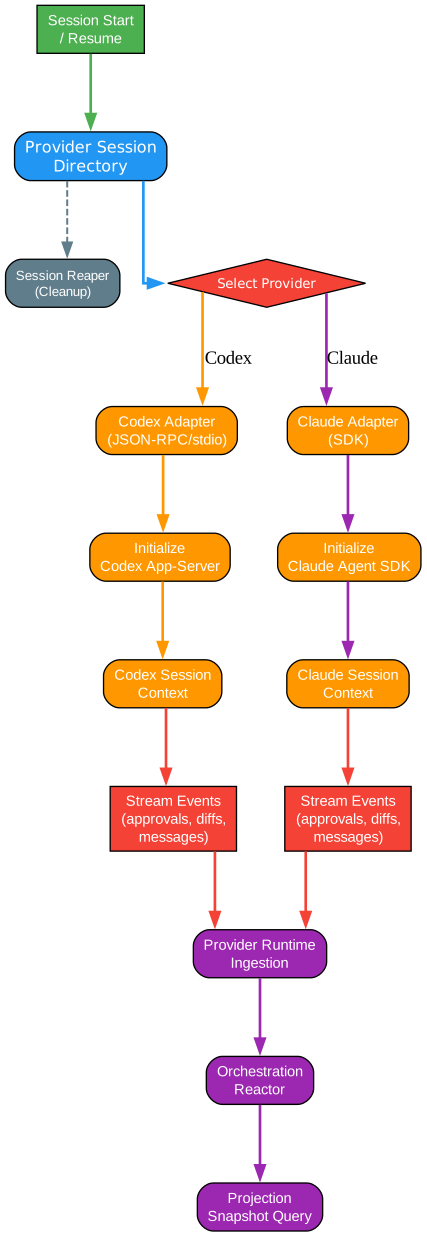
The provider system diagram illustrates how T3 Code manages multiple coding agent sessions simultaneously. This is one of the most powerful aspects of the architecture, enabling developers to work with different AI agents within the same unified interface.
Session Management
When a user starts a new session or resumes an existing one, the Provider Session Directory creates a new session context. Each session is isolated, maintaining its own state, conversation history, and provider-specific configuration. The Session Reaper runs in the background to clean up stale sessions, preventing resource leaks and ensuring the system remains responsive even under heavy load.
Provider Selection
The system uses a decision point to route sessions to the appropriate provider adapter. Currently, Codex and Claude are fully supported, with Cursor and OpenCode adapters under active development. Each adapter implements a common interface that the Orchestration Engine consumes, ensuring that provider-specific details are abstracted away from the rest of the system.
Codex Adapter Path
The Codex adapter communicates with OpenAI’s Codex CLI through JSON-RPC over stdio. When a session starts, the adapter spawns a codex app-server child process and establishes a bidirectional communication channel. The adapter translates Codex-specific events like approval requests, file change proposals, and command execution requests into T3 Code’s unified event format. This allows the UI to render Codex interactions consistently, regardless of the underlying protocol differences.
Claude Adapter Path
The Claude adapter uses the @anthropic-ai/claude-agent-sdk to communicate with Claude Code. Unlike Codex’s stdio-based approach, the Claude SDK provides a more structured API for managing conversations. The adapter wraps this SDK to produce the same unified event stream that the Orchestration Engine expects, enabling seamless switching between providers.
Event Processing Pipeline
All provider events flow through the Provider Runtime Ingestion layer, which normalizes and validates them before passing them to the Orchestration Reactor. The reactor applies business logic like thread management, checkpoint creation, and state projection. The Projection Snapshot Query provides the UI with optimized read models, ensuring fast rendering even for long conversations with many events.
WebSocket Communication and Data Flow

Understanding the Data Flow
The data flow diagram shows how information moves through T3 Code from user input to provider execution and back. This architecture is designed for real-time responsiveness and reliability.
Client-Side Components
On the client side, the Composer captures user input and sends it through the Client State store (powered by Zustand for efficient state management). The RPC Client, built on Effect’s RPC framework, serializes these commands and transmits them over the WebSocket connection. The Terminal component, powered by xterm.js, provides a full terminal emulator within the browser, allowing users to see command execution in real time.
WebSocket Transport
The WebSocket connection serves as the primary communication channel between client and server. T3 Code uses Effect’s RPC over WebSocket, which provides type-safe remote procedure calls with automatic serialization and deserialization. This means that every method call and response is validated at compile time, catching protocol mismatches before they reach production.
Server-Side Processing
On the server, the WS Handler routes incoming RPC calls to the appropriate service. The RPC Server, also built on Effect, processes these calls and dispatches them to the Orchestration Engine. The engine coordinates with various services including the Git Manager for version control operations, the Checkpoint Store for conversation snapshots, and the Terminal Manager for PTY-based terminal sessions.
Push Events
One of the key design decisions in T3 Code is the use of server-push events. Rather than requiring the client to poll for updates, the server proactively pushes orchestration events to connected clients whenever provider state changes. This push-based approach ensures that the UI always reflects the latest state without unnecessary network traffic. The dashed lines in the diagram represent these push events flowing back from the Orchestration Engine through the RPC Server and WebSocket to the client’s Thread View.
Monorepo Package Structure
Understanding the Package Structure
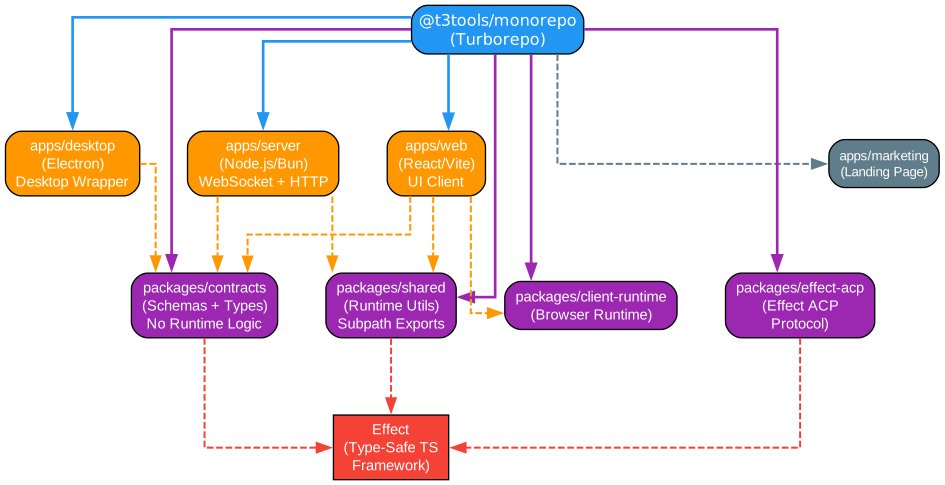
T3 Code is organized as a Turborepo monorepo, which enables efficient builds, shared dependencies, and clear separation of concerns. The diagram above shows how the different packages relate to each other and where the Effect framework fits in.
Apps Layer
The monorepo contains four applications. The apps/server package is the Node.js/Bun server that handles WebSocket connections, HTTP routes, and provider orchestration. The apps/web package is the React/Vite client that provides the browser-based UI. The apps/desktop package wraps the web app in an Electron shell for native desktop integration. The apps/marketing package serves the project’s landing page.
Packages Layer
The shared packages form the foundation of T3 Code’s type-safe architecture. The packages/contracts package contains all Effect Schema definitions and TypeScript contracts for provider events, WebSocket protocol, and model/session types. Critically, this package contains no runtime logic, only type definitions and schemas. The packages/shared package provides runtime utilities consumed by both server and web, using explicit subpath exports like @t3tools/shared/git to prevent barrel file bloat. The packages/client-runtime package handles browser-specific runtime concerns, and packages/effect-acp implements the Agent Communication Protocol using Effect.
Effect Framework
The Effect ecosystem is the backbone of T3 Code’s architecture. Effect provides type-safe, composable abstractions for concurrency, error handling, and dependency injection. The @effect/atom-react package enables reactive state management in the React UI, while @effect/platform provides cross-platform abstractions for HTTP, WebSocket, and other services. By building on Effect, T3 Code achieves a level of type safety and composability that would be difficult to replicate with traditional TypeScript patterns.
Key Features
| Feature | Description |
|---|---|
| Multi-Provider Support | Use Codex, Claude, and upcoming providers (Cursor, OpenCode) from a single interface |
| Real-Time Streaming | WebSocket-based push events for instant UI updates |
| Session Persistence | SQLite-backed storage ensures conversations survive restarts |
| Desktop and Web | Run as a native Electron app or in any modern browser |
| Type-Safe Protocol | Effect RPC ensures compile-time validation of all client-server communication |
| Git Integration | Built-in git management with checkpointing and diff viewing |
| Terminal Emulator | xterm.js-powered terminal for real-time command execution |
| Thread Management | Organize conversations into threads with history and recovery |
| Approval System | Review and approve file changes and command executions before they happen |
| Monorepo Architecture | Turborepo-based monorepo with shared contracts and utilities |
Installation
Run Without Installing
The fastest way to try T3 Code is with npx:
npx t3
This will download and run the latest version of the T3 Code server, and open the web interface in your browser.
Desktop App
For a more integrated experience, install the desktop app:
Windows (winget):
winget install T3Tools.T3Code
macOS (Homebrew):
brew install --cask t3-code
Arch Linux (AUR):
yay -S t3code-bin
You can also download the latest release from the GitHub Releases page.
Prerequisites
Before using T3 Code, you need to install and authenticate at least one coding agent provider:
For Codex:
# Install Codex CLI
npm install -g @openai/codex

# Authenticate
codex login
For Claude:
# Install Claude Code
npm install -g @anthropic-ai/claude-code

# Authenticate
claude auth login
Usage
Once T3 Code is running and you have authenticated with at least one provider, you can:
- Create a new project - Point T3 Code to a directory on your filesystem
- Start a conversation - Type your request in the composer and send it to the agent
- Review proposals - The agent will propose file changes, which you can review and approve or reject
- Monitor execution - Watch terminal output in real time as the agent executes commands
- Manage threads - Organize conversations into threads, each with its own history and context
- Switch providers - Use different coding agents for different tasks within the same project
Development Setup
If you want to contribute or build from source:
# Clone the repository
git clone https://github.com/pingdotgg/t3code.git
cd t3code

# Install dependencies (requires Bun)
bun install

# Start development server
bun run dev
The development setup uses Turborepo for efficient builds and mise for development tool management. The project is still in early stages, so expect bugs and breaking changes.
Technical Highlights
Effect-Driven Architecture
T3 Code’s use of the Effect ecosystem is a significant technical choice. Effect provides Layer-based dependency injection, which makes testing and composition straightforward. Every service in T3 Code is defined as an Effect Layer, enabling runtime wiring and test substitutions without global state or complex mocking frameworks.
Type-Safe RPC Protocol
The communication protocol between client and server is fully type-safe thanks to Effect RPC. Every method, request, and response is defined in the shared @t3tools/contracts package using Effect Schema. This means that if the server changes an API, the TypeScript compiler will catch the mismatch on the client side before it reaches users.
Provider Adapter Pattern
The provider system uses a clean adapter pattern where each coding agent implements a common interface. This makes it straightforward to add new providers without modifying the core orchestration logic. The adapters handle protocol translation, session lifecycle, and event normalization.
Orchestration Engine
The Orchestration Engine is the central nervous system of T3 Code. It processes all provider events through a series of reactors that handle thread management, checkpoint creation, state projection, and command dispatching. This event-sourced architecture ensures that the UI always has a consistent view of the system state, even during reconnections or provider failures.
Troubleshooting
| Issue | Solution |
|---|---|
| Codex not found | Install Codex CLI: npm install -g @openai/codex and run codex login |
| Claude not authenticated | Run claude auth login to set up credentials |
| WebSocket connection errors | Ensure the T3 server is running and the port is not blocked by a firewall |
| Desktop app not updating | Check GitHub Releases for the latest version |
| Build errors | Run bun install and ensure you are using Node.js v22+ or Bun v1.3+ |
Conclusion
T3 Code represents a significant step forward in how developers interact with AI coding agents. By providing a unified, type-safe, real-time web interface for multiple providers, it eliminates the friction of switching between terminal windows and managing separate agent sessions. The architecture, built on the Effect ecosystem, demonstrates how modern TypeScript can achieve both developer experience and runtime safety.
With its rapidly growing community and active development, T3 Code is poised to become an essential tool in the AI-assisted development workflow. Whether you are using Codex for code generation, Claude for complex reasoning tasks, or looking ahead to Cursor and OpenCode support, T3 Code gives you a single, polished interface for all your coding agents.
The project is still in its early stages, so now is a great time to get involved, provide feedback, and help shape the future of AI coding agent interfaces.
Links
- GitHub Repository: https://github.com/pingdotgg/t3code
- Discord Community: https://discord.gg/jn4EGJjrvv
- npm Package: https://www.npmjs.com/package/t3

Enjoyed this post? Never miss out on future posts by following us


