Warp: The Agentic Development Environment Born Out of the Terminal
Warp is a Rust-based terminal emulator that has evolved into a full-fledged agentic development environment, combining GPU-accelerated rendering, built-in AI agents, and cloud synchronization into a single cohesive platform. With over 43,000 stars on GitHub and backing from OpenAI as its founding sponsor, Warp represents a fundamental shift in how developers interact with their terminals – transforming them from passive command-line interfaces into active development partners that can triage issues, write specifications, implement code changes, and review pull requests. Unlike traditional terminal emulators that merely display text output, Warp integrates an AI agent called “Oz” that understands your codebase, executes shell commands, reads and writes files, and orchestrates multi-agent workflows – all from within the terminal you already use every day.
How It Works
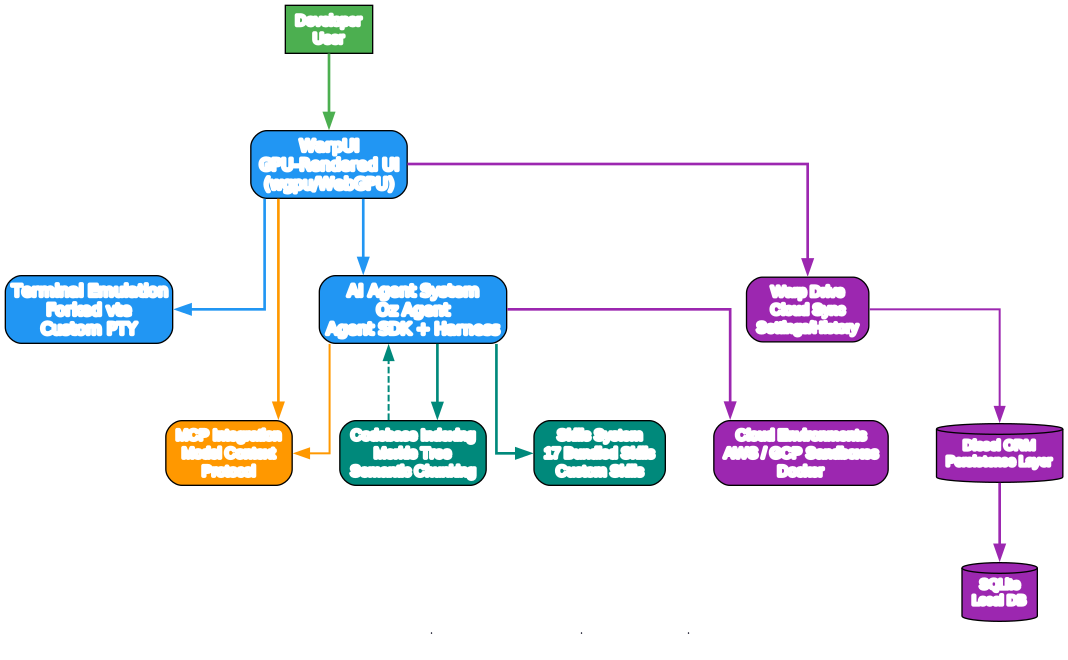
The architecture diagram above illustrates the layered design that makes Warp more than just a terminal emulator. Let us break down each component and how they interact:
Application Layer (app/) The main application binary sits at the top of the stack, orchestrating 40+ modules that handle everything from terminal emulation and shell management to AI integration and cloud synchronization. The ai/ module manages the built-in agent system, the terminal/ module handles shell sessions, the drive/ module powers cloud synchronization, and the workspace/ module manages session state. This modular design ensures that each concern is isolated while remaining tightly integrated through the Entity-Handle system.
WarpUI Framework (crates/warpui/) Beneath the application sits WarpUI, a custom GPU-rendered UI framework built on top of wgpu (WebGPU). Inspired by Flutter’s architecture, WarpUI uses an Entity-Component-Handle pattern where a global App object owns all views and models. Views hold ViewHandle<T> references to other views rather than direct ownership, enabling loose coupling and efficient re-rendering. The AppContext provides temporary access to handles during render and event cycles, while an Actions system handles event propagation. This architecture allows Warp to achieve smooth 60fps rendering even with large terminal outputs.
Core Libraries (crates/) The 63 workspace crates provide the foundational building blocks. warp_core offers platform abstractions, editor handles text editing, warp_terminal manages terminal emulation, persistence uses Diesel with SQLite for local storage, command processes shell commands, and computer_use enables platform-specific screenshot and action automation. Each crate is independently testable and follows Rust’s ownership model strictly.
Cross-Platform Runtime At the base, Warp compiles natively for macOS, Windows, and Linux with platform-specific code conditionally compiled through cfg attributes. A WebAssembly compilation target also exists for browser-based terminal access. The Tokio async runtime (v1.47.1) powers all concurrent operations, from shell I/O to network requests to AI agent communication.
Key Insight: Warp’s 63 workspace crates and 180+ feature flags represent a sophisticated modular architecture where each component can be developed, tested, and compiled independently – a design pattern borrowed from large-scale systems programming that enables the team to ship features rapidly without breaking existing functionality.
The Agent System
Understanding the Agent System
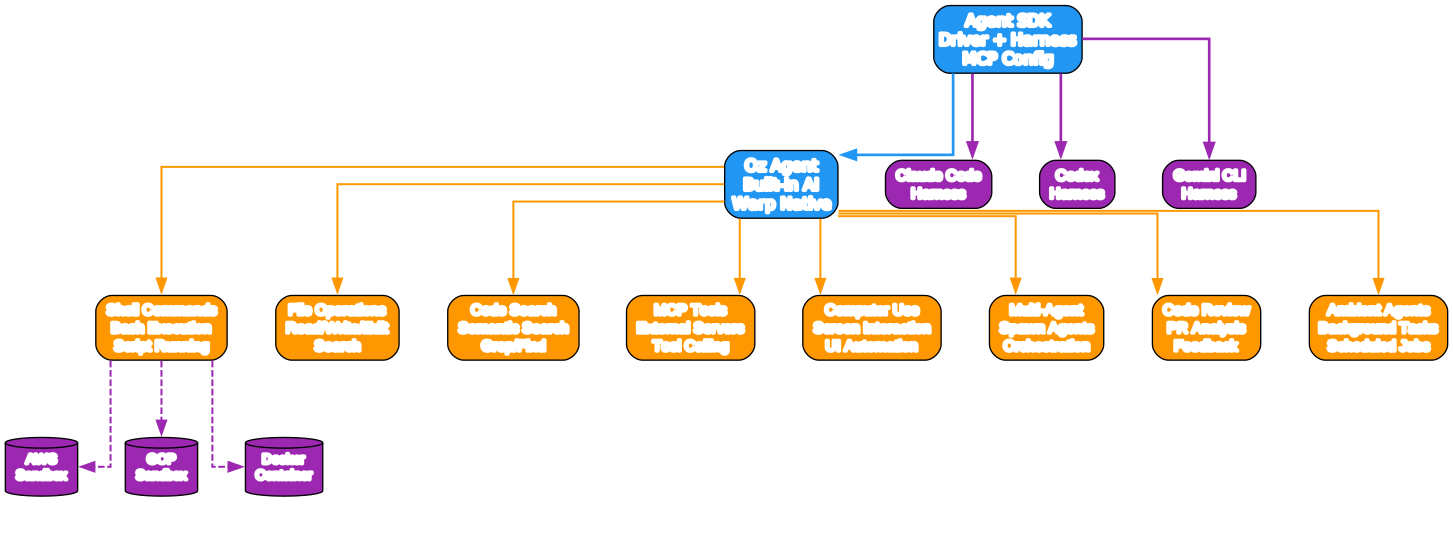
The agent system diagram above reveals how Warp’s AI capabilities are structured around a central agent loop with 25+ distinct action types. This is not a simple chatbot bolted onto a terminal – it is a fully integrated development agent that operates within the terminal context.
Agent Core (Oz) The built-in agent, codenamed “Oz,” runs inside the terminal session and has access to the full development environment. Oz can execute shell commands, read and write files, search the codebase using semantic search, grep, and glob patterns, make MCP tool calls, perform computer use actions like taking screenshots, and orchestrate multi-agent workflows. The agent operates in a loop: it receives a task, plans an approach, executes actions, observes results, and iterates until the task is complete or requires human intervention.
Action Types The agent system supports 25+ action types organized into several categories. Shell actions allow command execution with output capture. File actions enable reading, writing, and editing files with diff-based modifications. Search actions provide three modes: semantic search using codebase embeddings, grep for pattern matching, and glob for file discovery. MCP actions invoke external tools through the Model Context Protocol. Computer use actions automate platform-specific interactions. Code review actions analyze changes and provide feedback. Skill actions load and execute predefined agent skills from .agents/skills/, .warp/skills/, .claude/skills/, or .codex/skills/ directories.
Codebase Indexing One of the most powerful features is the full codebase indexing system. Warp embeds source code using a Merkle tree-based change detection mechanism that only re-indexes files that have actually changed. Semantic chunking breaks code into meaningful units rather than arbitrary line-based splits. Cross-repo context support allows the agent to understand relationships across multiple repositories, making it effective for monorepo and polyrepo workflows alike.
Skills System Warp ships with 17+ bundled agent skills that provide domain-specific expertise. Skills are loaded from multiple directories, enabling compatibility with Claude Code, Codex, and other agent frameworks. Each skill defines its capabilities, input schemas, and execution logic, allowing the agent to dynamically discover and invoke the right skill for a given task.
Takeaway: With the
--harnessflag, Warp can run third-party CLI agents like Claude Code, Codex, and Gemini CLI inside its terminal environment, giving you a unified interface for multiple AI coding assistants without switching tools.
Multi-Agent Orchestration
Understanding Multi-Agent Orchestration
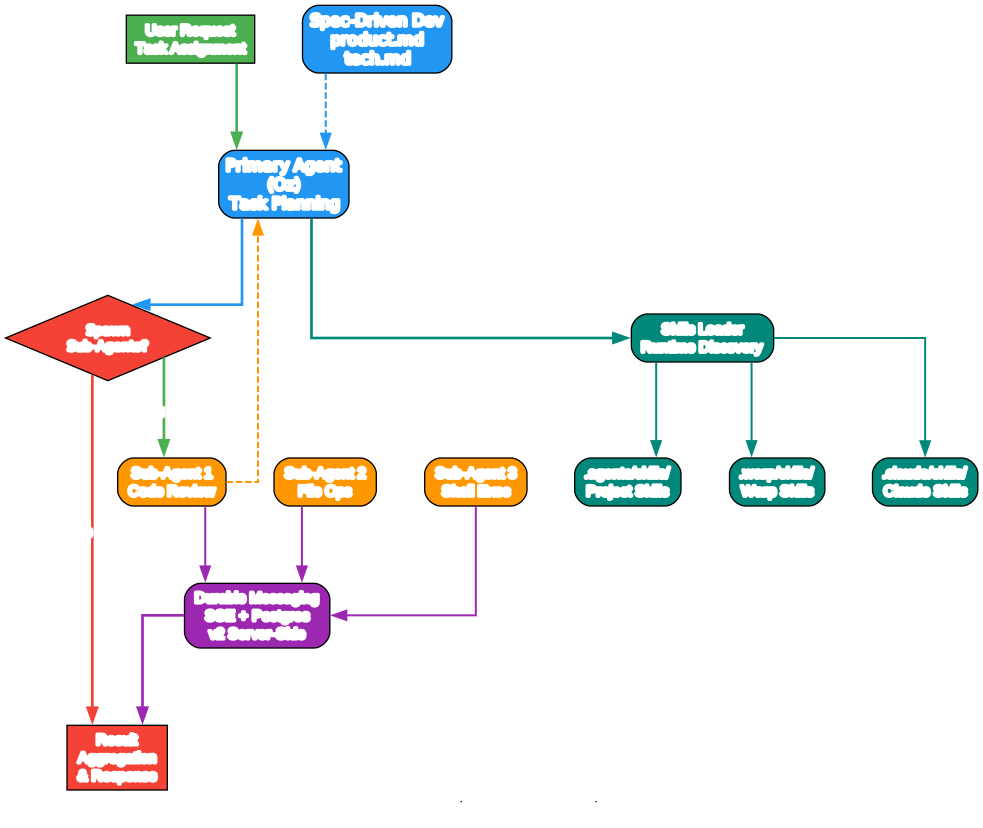
The orchestration diagram above shows how Warp coordinates multiple AI agents working in parallel on complex tasks. This is where Warp transcends being a simple terminal with AI features and becomes a true agentic development environment.
Orchestration Mode When a task is too complex for a single agent, Warp activates orchestration mode. The orchestrator decomposes the task into subtasks, assigns each to a specialized agent, and manages the communication between them. Each agent runs in its own sandboxed environment with access to the tools and context it needs. The orchestrator monitors progress, handles failures, and merges results into a coherent output.
V2 Server-Side Durable Messaging The orchestration system uses v2 server-side durable messaging built on Server-Sent Events (SSE) and Postgres. This architecture ensures that agent messages persist even if a connection drops, enabling reliable long-running workflows. When an agent completes a subtask, its results are durably stored and can be consumed by downstream agents even if the original connection was interrupted. The Postgres backend provides transactional guarantees and query capabilities for monitoring and debugging multi-agent workflows.
Cloud Environments Agents can run in cloud sandboxes on AWS or GCP, or locally using Docker. Cloud environments provide isolated, reproducible execution contexts that are independent of the developer’s local machine. This means you can dispatch compute-intensive tasks like large-scale code generation or testing to cloud resources while continuing to use your local terminal for other work. The sandbox system handles provisioning, execution, and cleanup automatically.
Spec-Driven Development Warp follows a spec-driven development process where feature requests go through a specification PR process before any code is written. Each spec includes a product.md defining user-facing requirements and a tech.md detailing the technical implementation plan. With 100+ spec directories in the repository, this process ensures that both the AI agents and human developers share a common understanding of what needs to be built before implementation begins.
Amazing: Warp’s orchestration system uses v2 server-side durable messaging with SSE and Postgres, meaning multi-agent workflows survive network interruptions and can span hours or even days of execution time without losing progress – a critical requirement for production-grade agentic systems.
Technology Stack
Understanding the Technology Stack
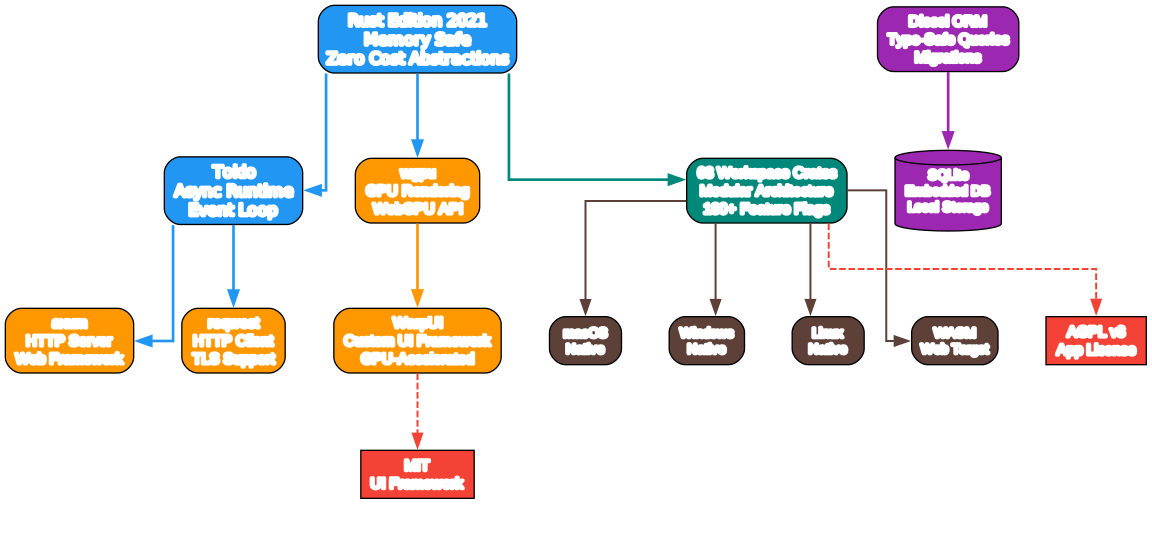
The technology stack diagram above maps out the key dependencies and how they layer together to form the Warp platform. Each layer serves a specific purpose and the choices reflect careful engineering decisions.
Rust Edition 2021 with Toolchain 1.92.0 Warp is built entirely in Rust, leveraging the language’s memory safety guarantees, zero-cost abstractions, and fearless concurrency. The choice of Rust Edition 2021 with toolchain 1.92.0 provides access to modern language features like const generics, improved error handling, and async/await syntax. Rust’s ownership model eliminates entire classes of bugs – use-after-free, null pointer dereferences, and data races – that plague terminal emulators written in C or C++.
Tokio 1.47.1 (Async Runtime) Tokio is the async runtime that powers all of Warp’s concurrent operations. From handling multiple shell sessions simultaneously to managing AI agent communication streams, Tokio’s work-stealing scheduler and efficient I/O driver ensure that the terminal remains responsive even under heavy load. The choice of Tokio over alternatives like async-std reflects its maturity, ecosystem breadth, and performance characteristics for I/O-heavy workloads.
wgpu 29.0.1 (GPU Rendering) The wgpu crate provides WebGPU-based rendering for Warp’s custom UI framework. Unlike terminal emulators that use platform-native text rendering or OpenGL, WarpUI renders the entire interface through the GPU pipeline. This enables smooth scrolling through large outputs, efficient text layout computation, and hardware-accelerated rendering of complex UI elements like inline AI suggestions, syntax highlighting, and interactive blocks. The wgpu abstraction also enables the WASM compilation target by providing a consistent rendering API across native and web platforms.
Diesel 2.3.4 + SQLite (Persistence) For local data storage, Warp uses Diesel as its ORM with SQLite as the backend. This combination provides zero-configuration embedded storage for terminal history, command completions, workspace state, and agent conversation logs. Diesel’s compile-time query checking catches SQL errors before runtime, while SQLite’s reliability and performance for local single-user workloads make it an ideal choice for a desktop application.
axum 0.8.4 (HTTP Server) axum powers Warp’s local HTTP server, handling communication between the terminal client and cloud services. It also serves as the foundation for MCP server integration, allowing external tools to communicate with Warp through well-defined HTTP endpoints. axum’s tower-based middleware stack enables clean separation of concerns for authentication, rate limiting, and request logging.
reqwest 0.12.28 (HTTP Client) The reqwest crate handles all outbound HTTP communication, from API calls to cloud services to fetching MCP server configurations. Its async-first design integrates naturally with Tokio, and its TLS support ensures secure communication channels.
Important: Warp’s dual-licensing model – AGPL v3 for the application and MIT for the UI framework crates – means you can freely use the WarpUI framework crates in your own projects under the permissive MIT license, while the Warp application itself is governed by the AGPL v3 copyleft license.
Installation
Prerequisites
Warp requires Rust toolchain 1.92.0 or later. The project provides bootstrap scripts that handle platform-specific dependency installation.
Building from Source
# Clone the repository
git clone https://github.com/warpdotdev/warp.git
cd warp

# Run the platform-specific bootstrap script
# This installs Rust, system dependencies, and build tools
./script/bootstrap

# Build and run Warp
./script/run

# Run presubmit checks (formatting, linting, and tests)
./script/presubmit
Running with Local Server
If you want to connect Warp to a local warp-server instance for development:
# Connect to server on default port 8080
cargo run --features with_local_server

# Connect to server on a custom port
SERVER_ROOT_URL=http://localhost:8082 WS_SERVER_URL=ws://localhost:8082/graphql/v2 cargo run --features with_local_server
Running Tests
# Run all tests with nextest (recommended)
cargo nextest run --no-fail-fast --workspace --exclude command-signatures-v2

# Run completer tests with v2 features
cargo nextest run -p warp_completer --features v2

# Run doc tests
cargo test --doc

# Run standard tests for individual packages
cargo test
Linting and Formatting
# Run all presubmit checks
./script/presubmit

# Format Rust code
cargo fmt

# Run clippy with all features and tests
cargo clippy --workspace --all-targets --all-features --tests -- -D warnings

# Format C/C++/Obj-C code
./script/run-clang-format.py -r --extensions 'c,h,cpp,m' ./crates/warpui/src/ ./app/src/

# Check WGSL shader formatting
find . -name "*.wgsl" -exec wgslfmt --check {} +
Features
| Feature | Description |
|---|---|
| Agentic Development | Built-in AI agent (Oz) that triages issues, writes specs, implements changes, and reviews PRs |
| Agent Mode | 25+ action types including shell execution, file I/O, codebase search, MCP calls, and computer use |
| Multi-Agent Orchestration | Parallel agent execution with v2 server-side durable messaging via SSE and Postgres |
| Third-Party Agent Harness | Run Claude Code, Codex, Gemini CLI via the --harness flag |
| Cloud Environments | Run agents in cloud sandboxes (AWS, GCP) or local Docker containers |
| MCP Integration | Full Model Context Protocol support with .mcp.json configuration, OAuth, and server gallery |
| WarpUI Framework | Custom GPU-rendered UI using wgpu (WebGPU), inspired by Flutter’s architecture |
| Cross-Platform | Native support for macOS, Windows, and Linux with conditional compilation |
| WASM Target | WebAssembly compilation for browser-based terminal access |
| Warp Drive | Cloud synchronization for workflows, notebooks, and settings across devices |
| Codebase Indexing | Merkle tree-based change detection, semantic chunking, and cross-repo context |
| Computer Use | Platform-specific screenshot capture and action automation |
| Feature Flags | 180+ runtime feature flags with dogfood, preview, and release tiers |
| Skills System | 17+ bundled agent skills loaded from multiple directories |
| Spec-Driven Development | Feature specs (product.md + tech.md) before code implementation |
| Dual License | AGPL v3 (app) + MIT (UI framework crates) |
Troubleshooting
Build Failures
Problem: Compilation fails with Rust version errors.
Solution: Ensure you are using Rust toolchain 1.92.0 or later. Run rustup update to get the latest stable toolchain, then run ./script/bootstrap to install all platform-specific dependencies.
rustup update
./script/bootstrap
wgpu Rendering Issues
Problem: The terminal window appears blank or rendering is corrupted.
Solution: WarpUI relies on GPU rendering through wgpu. Ensure your graphics drivers are up to date. On Linux, you may need to install Vulkan drivers:
# Ubuntu/Debian
sudo apt install mesa-vulkan-drivers

# Fedora
sudo dnf install mesa-vulkan-drivers
Feature Flag Conflicts
Problem: Build errors related to missing features or conflicting feature flags.
Solution: Warp uses 180+ feature flags organized in dogfood, preview, and release tiers. If you encounter feature-related build errors, try building with the default feature set:
cargo build --no-default-features
Local Server Connection Issues
Problem: Cannot connect to a local warp-server instance.
Solution: Verify the server is running and the environment variables are set correctly:
# Check if the server is running on the expected port
curl http://localhost:8080/health

# Set environment variables explicitly
export SERVER_ROOT_URL=http://localhost:8080
export WS_SERVER_URL=ws://localhost:8080/graphql/v2
cargo run --features with_local_server
Test Failures
Problem: Some tests fail when running the full test suite.
Solution: Use --no-fail-fast to continue running tests after failures, and exclude known-problematic test crates:
cargo nextest run --no-fail-fast --workspace --exclude command-signatures-v2
Conclusion
Warp represents a paradigm shift in terminal design – from passive text display to an active agentic development environment. By building a custom GPU-accelerated UI framework in Rust, integrating a powerful AI agent system with 25+ action types, supporting multi-agent orchestration with durable messaging, and embracing the Model Context Protocol for extensibility, Warp has created a platform that fundamentally changes how developers interact with their tools. The 63 workspace crates and 180+ feature flags demonstrate the engineering depth behind this project, while the spec-driven development process and dual-licensing model show thoughtful governance.
Whether you are looking for a modern terminal with AI assistance, a platform for running multiple coding agents, or a framework for building GPU-accelerated terminal applications, Warp delivers on all fronts. The combination of Rust’s safety guarantees, wgpu’s rendering performance, and the agent system’s extensibility makes this a project worth watching and contributing to.
Links:

Enjoyed this post? Never miss out on future posts by following us


