Thunderbolt: AI You Control
Thunderbolt is an open-source, cross-platform AI client developed under the Thunderbird umbrella that fundamentally rethinks how you interact with AI. Its mission is clear: choose your models, own your data, eliminate vendor lock-in. In a landscape dominated by closed, cloud-dependent AI tools, Thunderbolt stands out by giving users full control over their AI experience – from the models they use to where their data resides.
Built with TypeScript, React 19, and Tauri, Thunderbolt runs natively on every major platform: web, macOS, Linux, Windows, iOS, and Android. It supports frontier models from Anthropic, OpenAI, Mistral, and OpenRouter alongside local inference through Ollama and llama.cpp. With optional end-to-end encryption, offline-first architecture, and full self-hosting support, Thunderbolt is designed for users and organizations that refuse to compromise on privacy or flexibility.
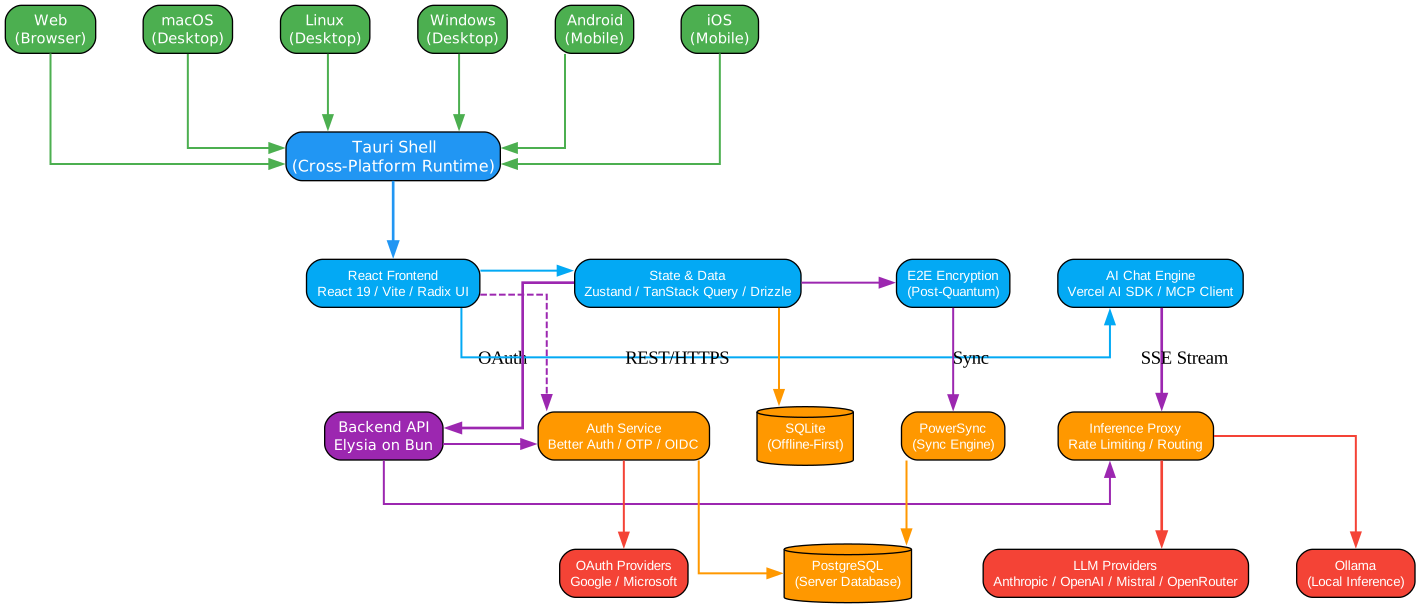
Understanding the Architecture
The architecture diagram above illustrates Thunderbolt’s three-tier design that cleanly separates the user device, server infrastructure, and external services. This separation is fundamental to Thunderbolt’s philosophy of user control and data sovereignty.
User Device Layer (Blue Boundary)
The local device is where all user interaction happens, and critically, where data sovereignty begins. The Tauri shell wraps the entire client experience, providing native performance on desktop (macOS, Linux, Windows) and mobile (iOS, Android) from a single React codebase. Inside this shell, four core subsystems work together:
-
React Frontend: Built with React 19, Vite, and Radix UI, the frontend delivers a responsive, accessible interface. Radix UI provides unstyled, composable primitives that ensure WCAG compliance while giving the design team full control over styling. The use of React 19 brings concurrent rendering features that keep the UI smooth even during streaming AI responses.
-
State and Data Layer: Zustand manages client-side UI state with minimal boilerplate, while TanStack Query handles server state caching and synchronization. Drizzle ORM provides type-safe database access to the local SQLite store, which serves as the single source of truth. This means the app works fully offline – every conversation, setting, and model configuration is persisted locally first.
-
AI Chat Engine: Powered by the Vercel AI SDK, the chat engine supports streaming responses via Server-Sent Events (SSE). The MCP (Model Context Protocol) client integration allows Thunderbolt to connect with external tool servers, enabling agents that can interact with filesystems, APIs, and databases. This transforms Thunderbolt from a simple chat interface into a programmable AI platform.
-
E2E Encryption: When enabled, all user data is encrypted client-side before leaving the device using AES-256-GCM with hybrid ECDH P-256 and ML-KEM-768 (post-quantum) key wrapping. The server stores only ciphertext and wrapped keys – it cannot read user data even if compelled or breached.
Server Infrastructure Layer (Purple Boundary)
The self-hostable backend runs on Elysia (a high-performance Bun framework) and provides four core services:
- Backend API: The central request handler that routes client requests to appropriate services, enforces authentication, and manages rate limiting.
- Auth Service: Built on Better Auth with OTP and OIDC support, it integrates with Keycloak for enterprise identity management. Google and Microsoft OAuth providers are supported out of the box.
- Inference Proxy: This is the critical piece that makes Thunderbolt model-agnostic. All LLM calls route through the proxy, which handles rate limiting, request routing, and streaming. This means you can switch between Claude, GPT, Mistral, or local models without changing any client code.
- PowerSync Engine: Provides real-time cross-device synchronization with PostgreSQL as the backing store. When E2E encryption is enabled, PowerSync syncs only ciphertext – the server never sees plaintext.
External Services Layer (Pink Boundary)
External dependencies are kept to a minimum and are all optional or replaceable: LLM providers for inference, OAuth providers for authentication, PostHog for analytics (self-hostable), and Resend for email delivery.
Key Features

Understanding the Feature Hub
The features diagram above presents Thunderbolt’s capabilities as an interconnected hub, where each feature branch represents a core pillar of the platform. Let’s examine each one in detail:
Cross-Platform Support
Thunderbolt runs everywhere – web, macOS, Linux, Windows, iOS, and Android – all from a single React codebase. The Tauri runtime provides native performance by wrapping the web view in a Rust-based shell, avoiding the memory overhead and sluggishness of Electron. On mobile, Tauri’s iOS and Android integrations provide access to native APIs like haptics, filesystem, and deep linking. This means you get a consistent AI experience across all your devices without sacrificing performance or native feel.
Multi-Provider LLM Support
Thunderbolt is fundamentally model-agnostic. The inference proxy supports Anthropic (Claude), OpenAI (GPT), Mistral, OpenRouter, and any OpenAI-compatible endpoint. For users who prioritize privacy or want zero-cost inference, Ollama and llama.cpp integration enables fully local model execution. Custom providers can be added through the settings interface by simply providing an API endpoint and key. This flexibility means you are never locked into a single vendor – switch models mid-conversation, compare outputs, or run entirely offline.
End-to-End Encryption
Thunderbolt’s E2E encryption is optional but powerful. When enabled, it implements a zero-knowledge architecture where all user data is encrypted client-side before sync. The encryption scheme uses AES-256-GCM for data encryption and a hybrid ECDH P-256 + ML-KEM-768 envelope for key wrapping, providing both classical and post-quantum security. Each device generates its own key pair, and the content key is wrapped separately for each device using hybrid encryption. A 24-word BIP-39 recovery key serves as the ultimate backup – it is shown once during setup and is the only way to recover data if all devices are lost.
Offline-First Design
Local SQLite is the source of truth. Every conversation, setting, and model configuration is persisted locally before any sync attempt. The app functions fully without network connectivity – you can browse conversations, compose messages, and configure settings offline. When connectivity returns, PowerSync reconciles changes in the background. This design eliminates the frustration of cloud-dependent tools that become paperweights without internet.
Self-Hostable Deployment
The entire server stack – backend API, PostgreSQL, PowerSync, and Keycloak – runs via Docker Compose for simple deployments or Kubernetes for enterprise environments. Pulumi infrastructure-as-code templates are provided for AWS Fargate and EKS deployments. This means organizations can run Thunderbolt entirely within their own infrastructure, behind their own firewalls, subject to their own compliance requirements.
MCP (Model Context Protocol) Support
MCP support is currently in preview and enables Thunderbolt to connect with external tool servers. This transforms the AI client from a simple chat interface into a programmable platform that can interact with filesystems, databases, APIs, and other services through standardized tool interfaces. As the MCP ecosystem grows, Thunderbolt users gain access to an expanding library of integrations without any client updates.
| Feature | Status |
|---|---|
| Web | Available |
| Mac | Available |
| Linux | Available |
| Windows | Available |
| Android | Available (App Store Release Planned) |
| iOS | Available (App Store Release Planned) |
| MCP Support | Preview |
| Custom Models / Providers | Available |
| OIDC Authentication | Available |
| Chat Widgets | Available |
| Chat Mode | Available |
| Search Mode | Available |
| Research Mode | Preview |
| Optional E2E Encryption | Preview |
| Cross-Device Cloud Sync | Preview |
| Tasks | Preview |
| Agent Memory | Planned |
| Agent Skills | Planned |
| Offline Support | Planned |
How It Works: User Interaction Workflow
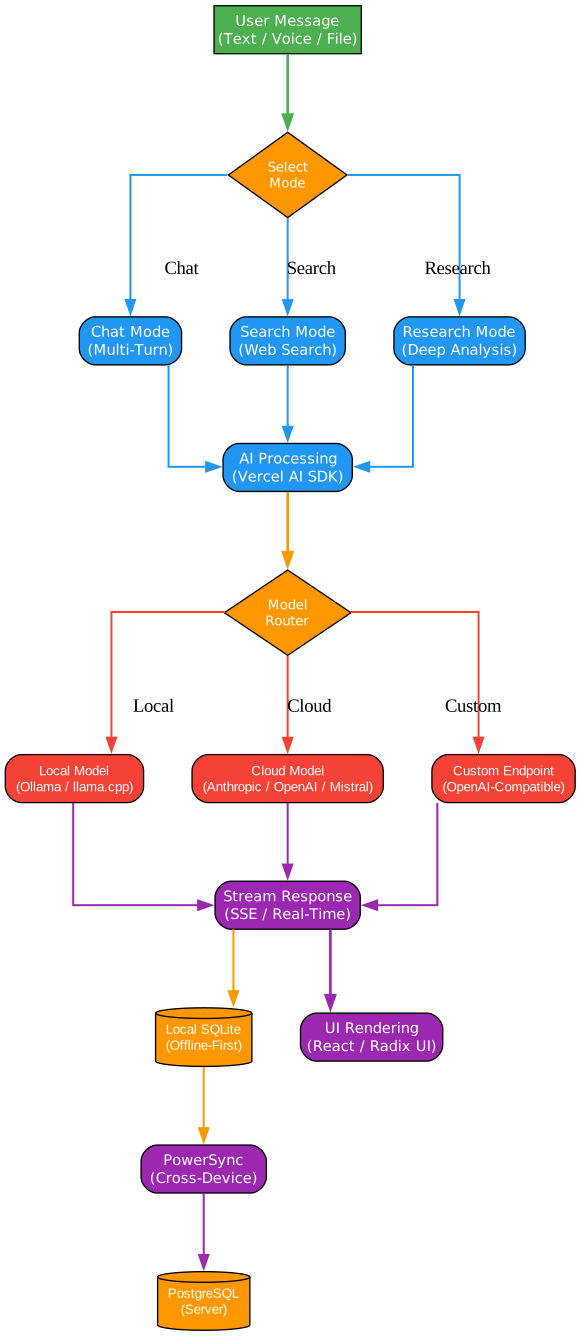
Understanding the Workflow
The workflow diagram above traces the complete user journey through Thunderbolt, from initial authentication to AI-powered conversation. Each step in this pipeline is designed to maintain the core principles of user control, data sovereignty, and offline resilience.
Step 1: Authentication
The journey begins with authentication, which supports multiple pathways. For enterprise deployments, OIDC through Keycloak provides SSO integration with existing identity providers. For personal or small-team deployments, simple OTP (one-time password) authentication via email is available. Google and Microsoft OAuth providers offer convenient sign-in options. The auth service, built on Better Auth, handles session management and token issuance. All authentication flows are designed to work with the self-hosted backend – no external auth dependencies are required.
Step 2: Model Configuration
Once authenticated, users configure their preferred LLM providers. This is where Thunderbolt’s model-agnostic philosophy becomes tangible. Users can add API keys for Anthropic, OpenAI, Mistral, or OpenRouter directly in the settings. For local inference, Ollama integration requires only that Ollama be running locally – Thunderbolt auto-discovers available models. Custom OpenAI-compatible endpoints can be added for self-hosted models or enterprise inference servers. Multiple providers can be configured simultaneously, and users can switch between them mid-conversation.
Step 3: Conversation and AI Interaction
The core experience is the AI chat interface, powered by the Vercel AI SDK. When a user sends a message, the following pipeline executes:
- The client constructs the request with the selected model provider and conversation context.
- The request routes through the backend inference proxy, which handles rate limiting and request routing.
- The proxy forwards the request to the appropriate LLM provider (or local Ollama instance).
- The response streams back via Server-Sent Events (SSE), providing real-time token-by-token rendering.
- The complete conversation is persisted to local SQLite immediately, ensuring no data loss even if the network drops mid-response.
Step 4: Data Persistence and Sync
Every piece of user data – conversations, settings, model configurations, encryption keys – is written to the local SQLite database first. This is the offline-first guarantee. When E2E encryption is enabled, data is encrypted with AES-256-GCM before it leaves the device. The PowerSync sync engine then handles cross-device synchronization in the background, reconciling changes when multiple devices modify data concurrently. The server stores only ciphertext, ensuring that even a compromised server cannot reveal user data.
Step 5: Cross-Device Access
With sync enabled, conversations started on one device are available on all others. The PowerSync engine handles conflict resolution and eventual consistency. When a new device joins, it generates its own key pair and must be approved by an existing trusted device, which wraps the content key for the new device. This approval flow ensures that only authorized devices can decrypt user data.
Technology Stack

Understanding the Technology Stack
The technology stack diagram above maps out every layer of Thunderbolt’s architecture, from the native runtime to the database. Each technology choice reflects deliberate engineering decisions that prioritize performance, developer experience, and user privacy.
Native Runtime: Tauri
Tauri replaces Electron with a Rust-based shell that wraps the system webview. This architectural choice has profound implications: the application binary is roughly 10x smaller than an equivalent Electron app, memory consumption is significantly lower, and the attack surface is reduced because Tauri uses the OS-native webview rather than bundling Chromium. The Rust layer also provides secure access to native APIs – filesystem operations, deep linking, haptics, and auto-updates – through a permission-based system that follows least-privilege principles.
Frontend: React 19 + Vite + Radix UI
React 19 brings concurrent rendering, server components (for future SSR), and improved error boundaries. Vite provides near-instant hot module replacement during development and optimized production builds with code splitting. Radix UI offers unstyled, accessible component primitives that serve as the foundation for Thunderbolt’s design system. This combination ensures the UI remains responsive during streaming AI responses, heavy data operations, and cross-device sync.
State Management: Zustand + TanStack Query + Drizzle ORM
Zustand provides lightweight, type-safe client state management with minimal boilerplate. TanStack Query handles server state caching, background refetching, and optimistic updates. Drizzle ORM provides type-safe SQL query building for the local SQLite database, ensuring that database operations are verified at compile time. Together, these three libraries create a clear separation between UI state, server state, and persistent state.
AI Engine: Vercel AI SDK + MCP Client
The Vercel AI SDK abstracts the differences between LLM providers into a unified interface. Switching from Claude to GPT to a local Ollama model requires changing only a configuration value – the streaming, tool calling, and conversation management APIs remain identical. The MCP (Model Context Protocol) client extends this by enabling connections to external tool servers, allowing AI agents to interact with filesystems, APIs, and databases through standardized interfaces.
Backend: Elysia on Bun
Elysia is a high-performance web framework built on Bun’s JavaScript runtime. Bun compiles JavaScript to native code using JavaScriptCore, providing startup times measured in milliseconds and throughput that significantly exceeds Node.js. Elysia adds type-safe routing, middleware composition, and OpenAPI schema generation on top of this foundation. The result is a backend that handles inference proxying, authentication, and sync coordination with minimal resource consumption.
Database: SQLite (Local) + PostgreSQL (Server)
SQLite on the client provides the offline-first guarantee. All data is written locally first, ensuring the app works without network connectivity. On the server, PostgreSQL serves as the durable store for sync and multi-device coordination. PowerSync bridges the two, providing real-time synchronization with conflict resolution. The use of SQLite on the client is particularly significant – it means Thunderbolt can handle thousands of conversations with instant search and retrieval, all without network latency.
Encryption: AES-256-GCM + ECDH P-256 + ML-KEM-768
The encryption stack combines proven classical cryptography with post-quantum resistance. AES-256-GCM provides authenticated encryption for all user data. ECDH P-256 enables secure key exchange between devices. ML-KEM-768 (formerly Kyber) adds post-quantum key encapsulation, protecting against future quantum computing attacks. The hybrid envelope scheme wraps the content key separately for each device, enabling secure multi-device access without a shared secret.
Authentication: Better Auth + Keycloak
Better Auth provides the core authentication primitives – session management, token issuance, and OAuth flow handling. For enterprise deployments, Keycloak serves as the identity provider, supporting SSO integration with LDAP, SAML, and existing enterprise directories. The combination supports OTP, OIDC, Google, and Microsoft authentication out of the box.
Getting Started
Prerequisites
Before setting up Thunderbolt, ensure you have the following installed:
- Bun - JavaScript runtime and package manager
- Rust - Required for Tauri native compilation
- Docker - For running the backend services (PostgreSQL, PowerSync, Keycloak)
Quick Start (Self-Hosted)
The fastest way to get Thunderbolt running is with Docker Compose:
# Clone the repository
git clone https://github.com/thunderbird/thunderbolt.git
cd thunderbolt

# Install dependencies
make setup

# Set up environment files
cp .env.example .env
cd backend && cp .env.example .env && cd ..

# Run the backend services (PostgreSQL, PowerSync, Keycloak)
make docker-up

# Run the backend API server
cd backend && bun dev

# In a separate terminal, run the frontend
bun dev
# Open http://localhost:1420 in your browser
For desktop or mobile development:
# Desktop (macOS, Linux, Windows)
bun tauri:dev:desktop

# iOS Simulator
bun tauri:dev:ios

# Android Emulator
bun tauri:dev:android
Docker Compose Deployment
For production self-hosting, Thunderbolt provides a complete Docker Compose configuration:
cd deploy
cp .env.example .env
docker compose up --build
This starts all required services:
| Service | URL | Purpose |
|---|---|---|
| App | http://localhost:3000 | Thunderbolt frontend |
| Keycloak Admin | http://localhost:8180 | Identity management |
| Backend API | Internal | Elysia API server |
| PostgreSQL | Internal | Database |
| PowerSync | Internal | Real-time sync engine |
Adding Model Providers
Once Thunderbolt is running, configure your LLM providers in the settings:
- OpenAI / Anthropic / Mistral: Enter your API key in Settings > Model Providers
- OpenRouter: Add your OpenRouter API key for access to hundreds of models
- Ollama: Install Ollama locally, pull models, and Thunderbolt auto-discovers them
- Custom: Add any OpenAI-compatible endpoint with a custom base URL and API key
Running Tests
Thunderbolt includes comprehensive test suites for both frontend and backend:
# Run frontend tests
bun run test

# Run frontend tests in watch mode
bun run test:watch

# Run backend tests
bun run test:backend

# Run end-to-end tests
bunx playwright test
E2E Encryption Deep Dive
Thunderbolt’s end-to-end encryption implementation deserves special attention because it represents a rare combination of usability and security in consumer AI tools.
Key Hierarchy
The encryption system uses a hierarchical key structure:
- Content Key (CK): A single AES-256-GCM key that encrypts all user data. This key is identical across all devices.
- Device Key Pairs: Each device generates an ECDH P-256 key pair and an ML-KEM-768 key pair when sync is enabled. Private keys never leave the device.
- Device Envelopes: The CK is wrapped separately for each device using hybrid ECDH + ML-KEM encryption. Only the device with the corresponding private keys can unwrap its envelope.
- Recovery Key: The CK encoded as a 24-word BIP-39 mnemonic, shown once during initial setup. This is the only way to recover data if all devices are lost.
User Flows
| Scenario | Description |
|---|---|
| First device | Enable sync, generate key pair and CK, wrap CK for self, recovery key shown once |
| Additional device | Generate key pair, wait for approval, trusted device wraps CK for new device |
| Recovery key | Enter 24-word phrase, CK decoded, canary verified, new envelope created |
| Sign out | All local keys cleared, next sign-in treated as new device |
| Revoke device | Envelope deleted, device can no longer decrypt or sync |
The wire format for encrypted columns is __enc:<iv-base64>:<ciphertext-base64>, making it easy to identify encrypted data in the database while keeping the actual content unreadable.
Self-Hosting for Enterprise
Thunderbolt is designed for organizations that need complete control over their data and infrastructure. The self-hosting story covers three deployment paths:
| Path | Best For | Details |
|---|---|---|
| Docker Compose | Local dev, demos, quick spin-up | Single command deployment |
| Kubernetes | Enterprise, production, teams with k8s expertise | Scalable, production-grade |
| Pulumi (AWS) | Cloud deployment to Fargate or EKS | Infrastructure as code |
All deployment paths use the same Docker images, ensuring consistency between development and production. The Docker Compose setup includes Keycloak for OIDC authentication, with a pre-configured realm that imports automatically on first boot.
Enterprise configuration defaults include OIDC authentication via Keycloak, disabled waitlist, and environment variables for custom database URLs and OIDC endpoints.
Troubleshooting
Common Issues
Issue: “Cannot connect to backend”
Ensure the backend service is running and accessible. Check that your .env file has the correct VITE_THUNDERBOLT_CLOUD_URL setting. For self-hosted deployments, this should point to your backend API URL.
Issue: “Ollama models not appearing”
Make sure Ollama is running locally on the default port (11434). Thunderbolt auto-discovers models from a running Ollama instance. If you have changed the Ollama port, update the Ollama connection URL in Thunderbolt’s settings.
Issue: “E2E encryption setup fails”
E2E encryption is currently in preview and has not yet undergone a cryptography audit. If you encounter issues, try disabling and re-enabling sync. Ensure all devices are on the same Thunderbolt version.
Issue: “Docker Compose fails to start”
Ensure no other services are using the required ports (3000, 5432, 8180). Run docker compose down -v to clean up any previous deployment data, then docker compose up --build again.
Issue: “Cross-device sync not working”
Cross-device sync is under active development. Ensure PowerSync is running and that both devices are authenticated with the same account. Check the browser console or Tauri dev tools for sync errors.
Conclusion
Thunderbolt represents a significant step forward in the AI client landscape. By combining cross-platform native performance (Tauri), offline-first architecture (SQLite + PowerSync), model-agnostic inference (Vercel AI SDK + proxy), and optional zero-knowledge encryption (AES-256-GCM + ML-KEM-768), it delivers an experience that respects user autonomy and data sovereignty without sacrificing functionality.
The project is under active development by the Thunderbird team, funded through a Mozilla grant, and is currently targeting enterprise customers who want on-prem deployment. With MCP support in preview and agent capabilities on the roadmap, Thunderbolt is evolving from an AI chat client into a programmable AI platform.
Whether you are an individual who values privacy, a team that needs self-hosted AI tools, or an enterprise that requires on-prem deployment with E2E encryption, Thunderbolt provides the foundation for AI interactions that you truly control.
Links:
- GitHub: https://github.com/thunderbird/thunderbolt
-
Documentation: Architecture FAQ Deployment - License: Mozilla Public License 2.0

Enjoyed this post? Never miss out on future posts by following us


