Introduction
WeChat is the dominant messaging platform in China, with over 1.3 billion active users who rely on it daily for communication, news consumption, and content bookmarking. The “Favorites” feature is one of the most used capabilities – users bookmark articles, chat records, images, videos, and notes for later reference. Yet all of this valuable data is locked away inside encrypted SQLCipher databases on the local filesystem, completely inaccessible to the user outside the WeChat application itself. There is no export button, no API, and no official way to analyze your own bookmarked content at scale.
wx-favorites-report changes that. This open-source project provides a complete pipeline that extracts WeChat favorites from the encrypted local database, decrypts the SQLCipher 4 protected files, parses the XML content across ten different item types, and generates a stunning single-file interactive HTML report with ECharts visualizations. The project has earned over 500 stars on GitHub, demonstrating the strong demand for a tool that unlocks WeChat’s walled garden of personal data.
What makes this project particularly remarkable is not just the technical achievement of breaking SQLCipher encryption, but the journey it took to get there. The key extraction process went through six distinct rounds of iteration – from naive memory scanning to sophisticated frida-based dynamic instrumentation – each round teaching hard lessons about macOS security, WeChat internals, and the limits of static analysis. The entire workflow is also packaged as a Claude Code Skill, meaning you can trigger the full pipeline with a single phrase and let an AI agent handle the complex multi-step process automatically.
The Challenge: Encrypted WeChat Data
WeChat stores all local data – including favorites – in SQLCipher 4 encrypted databases. SQLCipher is an open-source extension to SQLite that provides transparent 256-bit AES encryption of database files. The encryption parameters used by WeChat are aggressive: AES-256-CBC with HMAC-SHA512 for authentication, PBKDF2 key derivation with 256,000 iterations, a page size of 4,096 bytes, and a reserve region of 80 bytes per page for HMAC and salt storage. With 256,000 PBKDF2 rounds, brute-forcing the key is computationally infeasible – each derivation attempt takes roughly 100 milliseconds on modern hardware, meaning even a single candidate key verification is expensive.
The database file itself starts with a 16-byte salt in the first page, which is used as input to the PBKDF2 function along with the actual encryption key. Without the correct key, the database is unreadable. WeChat generates and stores this key in memory during runtime, but never writes it to disk in plaintext. On macOS, additional protections make accessing this key extremely difficult: System Integrity Protection (SIP) prevents debugging or injecting into applications in the /Applications directory, and the App Store version of WeChat has Hardened Runtime enabled, which blocks dynamic library injection via DYLD_INSERT_LIBRARIES. These layered defenses mean that simply reading the key from memory or attaching a debugger to the running process is not straightforward – it requires creative workarounds and a deep understanding of both macOS security architecture and WeChat’s internal database management.
Data Processing Pipeline

The data processing pipeline transforms WeChat’s encrypted favorites database into a fully interactive HTML visualization report through five distinct stages. At the top of the pipeline sits the WeChat Mac client, which manages the encrypted favorite.db file stored deep within the user’s Library container at ~/Library/Containers/com.tencent.xinWeChat/Data/Documents/xwechat_files/<wxid>/db_storage/favorite/favorite.db. This file is protected by SQLCipher 4 encryption, making it completely opaque to standard SQLite tools.
The first critical stage is key extraction. Using frida in spawn mode, the pipeline hooks the system-level CCKeyDerivationPBKDF function from the macOS CommonCrypto library. When WeChat opens the favorites database, it calls this function to derive the decryption key via PBKDF2 with 256,000 iterations. The frida hook intercepts this call, captures the derived key material, and matches it against the known salt from the database file header. This produces the raw enc_key – a 64-character hex string that is the actual encryption key for the database.
The second stage is decryption. Armed with the extracted key, the pipeline uses PyCryptodome to perform AES-256-CBC decryption on each 4,096-byte page of the database. Each page has an 80-byte reserve region containing the HMAC-SHA512 authentication tag and initialization vector material. The decryption process validates the HMAC on each page before decrypting, ensuring data integrity. The result is a standard plaintext SQLite database that can be queried with any SQLite client.
The third stage is parsing. The parse_favorites.py script opens the decrypted database and detects whether it is a WeChat 3.x or 4.x format by checking for the presence of fav_db_item (4.x) or FavItems (3.x) tables. For WeChat 4.x, each row in fav_db_item contains a content field with XML markup. The parser applies type-specific extraction logic for each of the ten content types – articles use <pagetitle> and <pagedesc>, chat records use nested <datalist><dataitem><datadesc> structures, files use <datatitle> and <datafmt>, and so on. Tags are read from the separate fav_tag_db_item and fav_bind_tag_db_item binding tables.
The fourth stage is JSON generation. The parser computes comprehensive statistics including total count, date range, daily average, type distribution, source rankings, monthly trends, hourly and weekly patterns, heatmap data, keyword frequencies, and tag distributions. All items and statistics are serialized into a single JSON file that serves as the intermediate data format.
The fifth and final stage is HTML report generation. The generate_report.py script reads the JSON data and produces a self-contained single-file HTML report. All ECharts JavaScript is loaded from CDN, and all item data is inlined directly into the HTML as a JavaScript object. The result is a portable file that can be opened in any browser, served via a local HTTP server, or shared without any external dependencies.
The Six-Round Key Extraction Journey
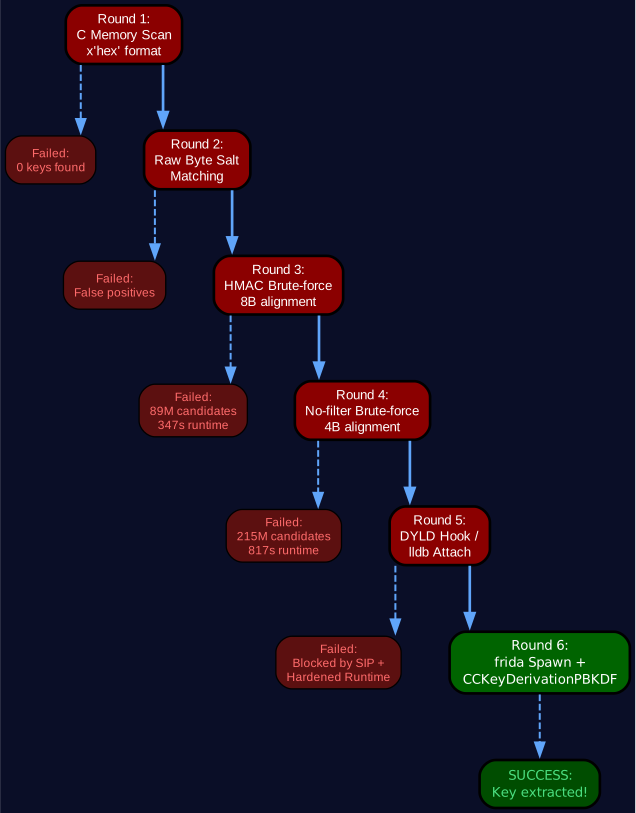
The key extraction process is the most challenging part of the entire pipeline, and it took six rounds of iteration to find a working approach. Each round revealed new constraints about macOS security, WeChat internals, and the fundamental architecture of SQLCipher key management.
Round 1: C Memory Scanning with x’hex’ Format. The initial approach was based on existing tools for WeChat 3.x on Windows, which stored encryption keys in memory as hex strings matching the pattern x'<64hex><32hex>'. A C program was compiled to scan all readable-writable memory regions of the WeChat process, searching for this specific format. The result: zero keys found. WeChat 4.x on macOS does not store keys in this hex string format – the key exists only as raw binary bytes in memory, making pattern-based string searches completely ineffective.
Round 2: Raw Salt Byte Matching. The second approach tried to find the key by searching memory for the database’s 16-byte salt (the first 16 bytes of the database file), then reading the adjacent 32 bytes as the potential key. This approach did find matches, but they were false positives – the matches were ASCII strings like “matchinfo” and “optimize” that happened to share byte patterns with the salt. The salt bytes appeared in memory as part of SQLite’s internal page cache structures, not adjacent to the actual encryption key.
Round 3: HMAC Brute-Force Verification with 8-Byte Alignment. The third approach was more sophisticated: scan every 8-byte aligned position in memory, treat each 32-byte sequence as a candidate key, and verify it by computing the HMAC-SHA512 of the first database page. This scanned 4.2 GB of memory with 89 million candidates over 347 seconds. The result: no valid key found. The problem was that an ASCII and zero-byte filter was applied to reduce the search space, and this filter inadvertently skipped the memory region containing the actual key.
Round 4: Unfiltered Brute-Force with 4-Byte Alignment. Round 4 removed all filtering and tried both 8-byte and 4-byte alignment. This expanded the search to 215 million candidates over 817 seconds. Still no valid key. The fundamental realization from this round was devastating: the key stored in memory is not the raw enc_key at all. After WeChat derives the key via 256,000 rounds of PBKDF2, it stores the derived key material in a transformed state. The raw enc_key that SQLCipher expects never exists in process memory in its original form – it is the output of the PBKDF2 derivation, not the input.
Round 5: DYLD Hook and lldb Attach. With static memory scanning proven futile, the approach shifted to dynamic instrumentation. DYLD_INSERT_LIBRARIES was attempted to inject a shared library that would intercept key operations. macOS blocked this entirely – the captured keys log file was empty. Next, lldb was tried to attach to the running WeChat process. The response: “Not allowed to attach to process.” Finally, task_for_pid was attempted on the original WeChat binary in /Applications, which returned error code 5 due to SIP protection. All three dynamic approaches were blocked by macOS security mechanisms.
Round 6: frida Spawn with CCKeyDerivationPBKDF Hook – Success! The breakthrough came from combining two key insights. First, the App Store version of WeChat has Hardened Runtime, but if you copy the application to ~/Desktop and re-sign it with an ad-hoc signature (codesign --force --deep --sign - ~/Desktop/WeChat.app), the Hardened Runtime flag is removed. Second, instead of trying to attach to a running process or inject libraries, frida can spawn a fresh process from the re-signed binary. The frida script hooks CCKeyDerivationPBKDF from the CommonCrypto system library – a function that WeChat must call to derive keys via PBKDF2. When the user opens the Favorites page in the spawned WeChat instance, the database key is derived and the hook captures it. By matching the captured salt against the known salt from favorite.db, the correct enc_key is identified. This approach works because it hooks a system library function rather than WeChat code, bypassing code signing restrictions entirely.
Report Visualization Features

The generated HTML report is a comprehensive, single-file interactive visualization that transforms raw database records into an insightful personal data dashboard. The report features seven distinct chart types plus an interactive browsing system, all rendered with ECharts 5.x and styled with a cohesive dark theme.
Statistical Dashboard Cards. At the top of the report, four gradient-styled cards display the headline numbers: total favorites count, the number of days spanned by the collection, the daily average, and the number of unique sources. These cards use a glassmorphism design with backdrop blur and hover animations, providing an immediate high-level summary of the data.
Highlight Discoveries. Below the cards, three highlight panels surface the most interesting insights: the single day with the most favorites saved, the most frequent source of bookmarked content, and the dominant content type with its percentage share. These are computed from the parsed data and presented with contextual detail lines.
Monthly Trend Chart. A smooth line chart with area fill visualizes the month-over-month trajectory of bookmarking activity. The gradient fill from blue to transparent creates a clear visual sense of accumulation and decline, making it easy to spot periods of high activity or drought.
Content Type Distribution. A donut chart breaks down favorites by their ten content types: articles, images, voice messages, videos, locations, files, chat records, notes, mini-programs, and text. The donut format shows both the proportional size and the absolute count for each type, with the center space available for a total count label.
Source Top 15. A horizontal bar chart ranks the top 15 sources of favorited content. Source names are truncated to 12 characters for readability, and the bars use a blue-to-purple gradient fill with rounded end caps. This chart immediately reveals which accounts, public numbers, or contacts contribute the most bookmarked content.
Activity Heatmap. A two-dimensional heatmap with weekdays on the Y-axis and hours on the X-axis shows when favorites are most commonly saved. The color scale ranges from the dark background through progressively brighter blues, making peak activity times immediately visible. This chart is particularly revealing for understanding personal usage patterns – whether you save content during work hours, late at night, or on weekends.
Keyword Cloud and Tag Cloud. Two word cloud visualizations surface the most common terms and tags across all favorites. The keyword cloud extracts Chinese and English terms from titles and descriptions, filters stop words, and displays the top 80 keywords with randomized colors from the theme palette. The tag cloud shows the distribution of WeChat’s native tagging system, using a diamond shape layout with no rotation for readability.
Interactive Browser. Beyond charts, the report includes a full-featured browsing interface with type filtering tabs, tag filtering tabs, full-text search across titles and descriptions, sort options (newest first, oldest first, by source), paginated card grid with 24 items per page, and a detail modal that shows the complete content, original link, source, and tags for each item. The browser uses event delegation for all click handling, ensuring compatibility with the file:// protocol.
Claude Code Skill Integration
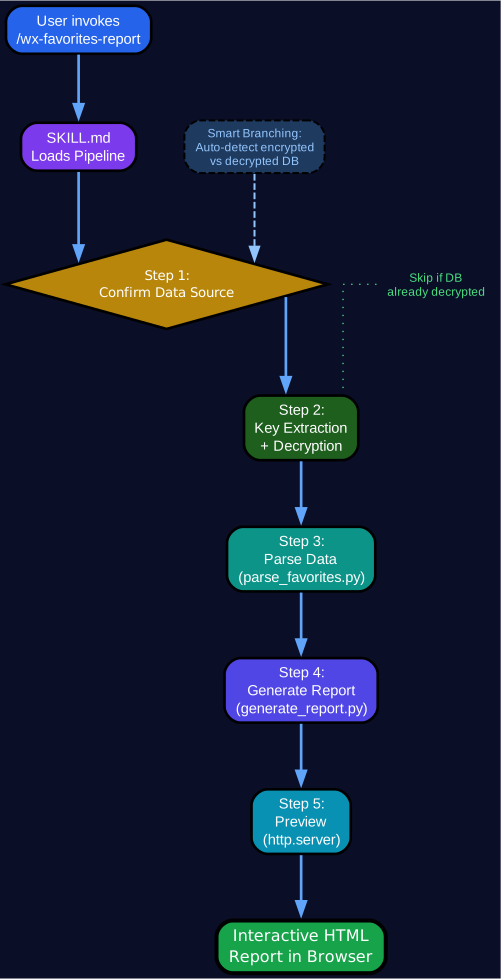
The entire wx-favorites-report pipeline is packaged as a Claude Code Skill – a self-contained, triggerable workflow definition that allows an AI agent to execute the complete multi-step process with a single command. This integration transforms what would be a complex manual procedure involving terminal commands, file path discovery, key matching, and report generation into a one-phrase operation.
The skill is defined in a SKILL.md file located at ~/.claude/skills/wechat-favorites-viz/SKILL.md. This file contains YAML frontmatter with the skill name, description, and trigger keywords, followed by detailed instructions for each pipeline stage. When a user types “wechat favorites visualization” or a similar trigger phrase in Claude Code, the skill is automatically loaded and its instructions are followed.
The skill implements a smart branching architecture. When triggered, it first checks the environment: is WeChat installed? Is frida available? Has the database been decrypted already? Based on these conditions, it branches to the appropriate starting point rather than always beginning from scratch. If a decrypted database already exists, it skips directly to parsing. If the key has already been extracted, it skips the frida step. This conditional execution saves significant time on repeated runs.
The one-command execution model means the user simply says “WeChat favorites visualization” in Claude Code, and the agent handles everything: installing dependencies with pip3 install frida frida-tools pycryptodome, copying and re-signing the WeChat application, running the frida hook script, waiting for the user to open the Favorites page, matching the captured key against the database salt, decrypting the database, parsing the XML content, computing statistics, and generating the HTML report. Each step logs its progress to stderr, giving the user visibility into the pipeline’s progress.
The SKILL.md definition includes the complete frida hook script inline, so there are no external dependencies to download. It also includes fallback instructions for manual execution if the automated pipeline encounters issues. The skill’s scripts directory contains three Python files: parse_favorites.py for data extraction, generate_report.py for HTML generation, and demo_data.py for generating sample data when a real database is not available. This modularity means each component can be tested and used independently, while the skill orchestrates them into a seamless workflow.
Technical Deep Dive
Dual WeChat Version Support. The parser automatically detects and adapts to both WeChat 3.x and 4.x database schemas. WeChat 3.x uses a relational structure with FavItems and FavDataItem tables joined on FavLocalID, where FavDataItem contains Datatitle and Datadesc columns. WeChat 4.x radically changed this to a single fav_db_item table where the content column contains XML markup that must be parsed differently for each of the ten content types. The detection is simple and robust: query sqlite_master for table names and branch accordingly. Tags also differ between versions – 3.x uses FavTagDatas and FavBindTagDatas, while 4.x uses fav_tag_db_item and fav_bind_tag_db_item.
Type-Specific XML Parsing. The XML content in WeChat 4.x is not standardized across content types. Articles use <weburlitem><pagetitle> for titles, but chat records use nested <datalist><dataitem><datadesc> structures where multiple messages are concatenated. Videos use <datatitle> inside <dataitem>, while files use <datatitle> with a separate <datafmt> for format and <fullsize> for file size. Images use <datatitle> with <realchatname> for the sender. The parser handles each type with dedicated extraction logic, falling back to a generic approach that tries all known field names for unrecognized types. HTML entities like 
 are decoded with html.unescape() and custom regex patterns for numeric entities.
Tag System with Binding Tables. WeChat’s tagging system is implemented as a many-to-many relationship through binding tables. In 4.x, fav_tag_db_item stores tag definitions with local_id, tag_id, and tag_name, while fav_bind_tag_db_item stores the associations with tag_local_id, fav_local_id, and flag columns. The parser reads both tables, builds a tag ID-to-name mapping, then resolves bindings to attach tag lists to each favorite item. This allows the report to display tag clouds and enable tag-based filtering in the browser.
Chinese Text Segmentation. The keyword extraction uses a simple but effective approach for Chinese text: regex pattern [\u4e00-\u9fff]{2,} matches sequences of two or more Chinese characters, while [a-zA-Z]{3,} matches English words of three or more letters. A comprehensive stop word list filters out common Chinese particles and English articles. This approach avoids the dependency on external segmentation libraries like jieba while still producing meaningful keyword clouds.
Event Delegation Pattern. The interactive browser uses event delegation instead of inline onclick handlers. This is a critical design decision because inline handlers do not work under the file:// protocol due to browser security restrictions. All click events are captured at the parent container level using addEventListener, and the closest() method identifies which card, button, or tab was clicked. This pattern is applied consistently across type tabs, tag tabs, pagination buttons, and item cards.
Single-File HTML Output. The generated report is a completely self-contained HTML file. All item data is serialized as a JavaScript object literal inlined in the script tag. ECharts and echarts-wordcloud are loaded from CDN, but all data, styles, and logic are embedded in the file. This means the report can be opened offline (with cached CDN resources), shared via email, or hosted on any static file server without a backend.
Dark Theme Design. The entire report uses a carefully crafted dark theme with a #0a0e27 background, #e0e6ff primary text, and accent colors of blue (#60a5fa), purple (#a78bfa), and pink (#f472b6). Chart containers use glassmorphism with rgba(255,255,255,0.04) backgrounds and backdrop-filter: blur(10px). All ECharts instances share a common darkTheme configuration object that sets transparent backgrounds and muted text colors, ensuring visual consistency across all seven chart types.
Code Examples
Installing Dependencies
The pipeline requires three Python packages: frida for dynamic instrumentation, frida-tools for the command-line interface, and pycryptodome for AES decryption:
pip3 install frida frida-tools pycryptodome
Frida requires no additional setup on macOS beyond the Python package. When frida spawns a process, it automatically handles the injection of its agent into the target. PyCryptodome provides the AES-256-CBC implementation used for page-by-page database decryption.
Type-Specific XML Parsing
The parser in parse_favorites.py handles each content type with dedicated extraction logic. Here is how it processes the three most common types – articles, chat records, and files:
if fav_type == 5:
    # Article/Link type
    title = _extract_xml_field(content, "pagetitle")
    desc = _extract_xml_field(content, "pagedesc")
    link = _extract_xml_field(content, "link") or row["source_id"] or ""
    thumb = _extract_xml_field(content, "pagethumb_url")

elif fav_type == 14:
    # Chat record type - multiple messages nested in datalist
    data_items = re.findall(r'<dataitem[^>]*>(.*?)</dataitem>', content, re.DOTALL)
    parts = []
    for di in data_items:
        d = re.search(r'<datadesc>(.*?)</datadesc>', di, re.DOTALL)
        s = re.search(r'<datasrcname>(.*?)</datasrcname>', di)
        t = re.search(r'<datasrctime>(.*?)</datasrctime>', di)
        d_text = _decode_xml_entities(d.group(1).strip()) if d else ""
        s_text = _decode_xml_entities(s.group(1)) if s else ""
        t_text = _decode_xml_entities(t.group(1)) if t else ""
        if d_text:
            line = f"{s_text} ({t_text}): {d_text}" if s_text else d_text
            parts.append(line)
    if parts:
        desc = "\n\n".join(parts)
    title = f"Chat Record ({len(parts)} messages)"

elif fav_type == 8:
    # File type
    title = _extract_xml_field(content, "datatitle")
    fmt = _extract_xml_field(content, "datafmt")
    size_str = _extract_xml_field(content, "fullsize")
    size_mb = int(size_str) / 1024 / 1024 if size_str.isdigit() else 0
    desc = f"File type: {fmt.upper()}" if fmt else ""
    if size_mb > 0:
        desc += f"\nFile size: {size_mb:.1f} MB" if size_mb >= 1 else f"\nFile size: {int(size_mb*1024)} KB"
Each type uses different XML tag names for the same logical fields – articles use <pagetitle> while files use <datatitle>, chat records use nested <datadesc> inside <dataitem> elements, and so on. The _extract_xml_field helper uses regex to find tag content, and _decode_xml_entities handles HTML entity decoding including numeric character references.
Running the Skill Pipeline
With the Claude Code Skill installed, the full pipeline can be triggered with a single phrase. For manual execution, the three-step process is:
# Step 1: Parse the decrypted database into JSON
python3 parse_favorites.py --input favorite_decrypted.db --output data.json

# Step 2: Generate the interactive HTML report
python3 generate_report.py --input data.json --output report.html

# Step 3: Open the report in a browser (use HTTP server for CDN access)
cd <output_directory> && python3 -m http.server 8765
open http://localhost:8765/report.html
The parse_favorites.py script auto-detects the input format – it accepts .db (SQLite), .csv, or .json files. The generate_report.py script produces a single HTML file with all data inlined, ready to open in any modern browser.
Conclusion
wx-favorites-report is a testament to persistence and creative problem-solving. The six-round key extraction journey – from naive memory scanning through HMAC brute-force to the final frida-based breakthrough – demonstrates that the most interesting engineering stories are often about what does not work before what does. Each failed round taught a specific lesson: WeChat 4.x does not store keys as hex strings, salt matching produces false positives, PBKDF2-derived keys exist in memory in transformed form, and macOS SIP blocks every conventional debugging approach. The frida solution works precisely because it hooks a system library function rather than application code, turning macOS’s own CommonCrypto infrastructure into the extraction mechanism.
The project also showcases the power of Claude Code Skills for orchestrating complex multi-step workflows. What would normally require a user to manually install dependencies, copy and re-sign an application, run a frida script, match cryptographic salts, decrypt a database, parse type-specific XML, and generate an HTML report – can now be triggered with a single phrase. The skill’s smart branching ensures that repeated runs skip already-completed steps, and the modular script architecture allows each component to be used independently. For anyone sitting on years of WeChat favorites data with no way to analyze it, wx-favorites-report provides both the technical capability and the elegant workflow to turn encrypted database records into beautiful, interactive personal insights. Enjoyed this post? Never miss out on future posts by following us 


