Introduction
Sim Studio AI is the open-source visual agent orchestration platform that transforms how developers build and deploy AI agent workflows. Instead of writing custom orchestration code, you design workflows on a drag-and-drop canvas – connecting LLM agents, tool integrations, conditional logic, and triggers – then run them instantly. With 200+ blocks, 150+ triggers, 16 LLM providers, and a production-grade DAG execution engine, Sim Studio AI bridges the gap between prompt engineering and production AI automation.
The platform addresses a fundamental challenge in the AI agent ecosystem: while frameworks like LangChain and CrewAI provide powerful orchestration primitives, they require developers to write and maintain complex Python or TypeScript code for every workflow. Sim Studio AI takes a different approach by making the orchestration itself visual and declarative. You draw your workflow on a canvas, configure each node through a UI, and the platform handles serialization, DAG construction, topological ordering, parallel execution, error handling, and state management automatically. This visual-first methodology dramatically reduces the time from idea to production, enabling both developers and non-technical users to build sophisticated multi-agent systems.
How It Works
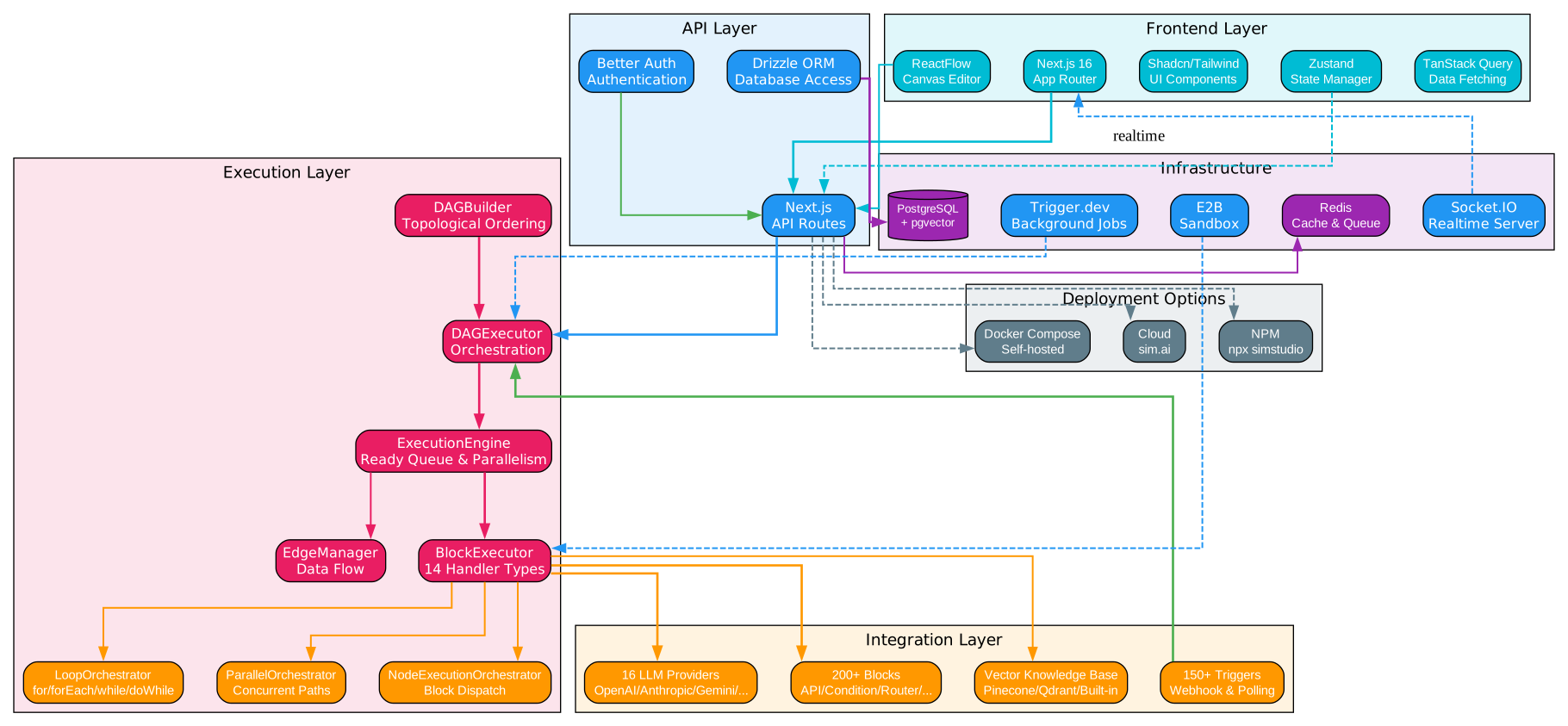
Sim Studio AI is built on a layered architecture that cleanly separates concerns across five distinct tiers. At the top, the Frontend Layer leverages Next.js 16 with the App Router for server-side rendering and routing, paired with ReactFlow as the core canvas engine for the visual workflow builder. The UI components are built with Shadcn and Tailwind CSS for a consistent, accessible design system, while Zustand manages client-side state and TanStack Query handles server-state synchronization and caching. This combination delivers a responsive, real-time editing experience even for complex workflows with dozens of interconnected nodes.
The API Layer sits beneath the frontend, implemented as Next.js API Routes that provide RESTful endpoints for workflow CRUD operations, execution management, and integration configuration. Authentication is handled by Better Auth, which supports multiple OAuth providers and session management. Database access flows through Drizzle ORM, a type-safe query builder that maps PostgreSQL tables to TypeScript types, ensuring compile-time safety for all data operations. The API layer also manages WebSocket connections via Socket.IO for real-time collaboration and execution status updates.
The Execution Layer is the heart of Sim Studio AI, implementing a full DAG (Directed Acyclic Graph) execution engine. The DAGBuilder component takes a serialized workflow JSON and constructs a directed graph with proper topological ordering. The DAGExecutor creates an execution context and orchestrates the overall run. The ExecutionEngine manages a ready queue, handles parallel block execution, and supports cancellation, pause/resume, and abort operations. The BlockExecutor routes each block to one of 14 specialized handler types (Agent, API, Condition, Router, Function, Trigger, Response, HumanInTheLoop, Workflow, Variables, Wait, Evaluator, Credential, Generic). The EdgeManager tracks connections and data flow between blocks, ensuring outputs from completed blocks are properly propagated to downstream dependencies. Three orchestrator classes handle advanced control flow: LoopOrchestrator supports for, forEach, while, and doWhile loops; ParallelOrchestrator manages concurrent branch execution; and NodeExecutionOrchestrator coordinates individual node runs.
The Integration Layer provides the connectivity that makes workflows useful. It includes 16 LLM providers (OpenAI, Anthropic, Google Gemini, Azure OpenAI, AWS Bedrock, DeepSeek, xAI, Cerebras, Groq, Mistral, Ollama, OpenRouter, Fireworks, vLLM, Vertex AI), 200+ pre-built blocks spanning communication, CRM, project management, developer tools, databases, cloud services, search, and documents, plus 150+ webhook and polling triggers across 40+ services. A Vector Knowledge Base supports Pinecone, Qdrant, and a built-in vector store for RAG workflows.
The Infrastructure Layer runs on PostgreSQL with the pgvector extension for vector storage, Redis for caching and queuing, Socket.IO for real-time communication, Trigger.dev for scheduled and background jobs, and E2B for secure sandboxed code execution. Deployment options include the managed cloud at sim.ai, a one-command NPM install via npx simstudio, or self-hosted Docker Compose for full control over data and infrastructure.
DAG Execution Engine
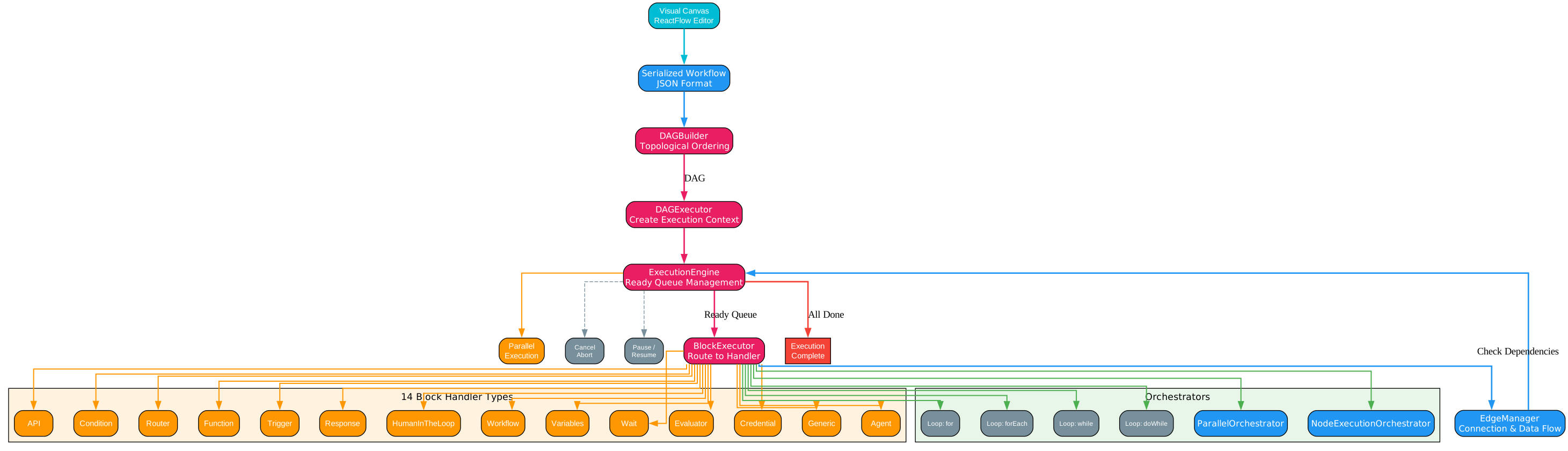
The DAG Execution Engine is what transforms a visual canvas drawing into a running workflow. Understanding this pipeline is essential for building reliable, production-grade automations. The process begins with workflow serialization: when you save a workflow in the visual builder, the ReactFlow canvas state is serialized into a structured JSON representation that captures every block, its configuration, and all edge connections with their typed data mappings. This JSON is the single source of truth for what the workflow does.
The DAGBuilder takes this serialized JSON and converts it into a proper Directed Acyclic Graph data structure. It validates that the graph contains no cycles (which would cause infinite loops), assigns topological ordering to determine execution precedence, and builds an adjacency list that maps each block to its downstream dependencies. This topological sort guarantees that a block only executes after all its upstream dependencies have completed, preventing race conditions and data integrity issues.
The DAGExecutor receives the constructed DAG and creates an execution context that tracks the overall workflow state, including variables, block outputs, error states, and execution metadata. It then hands off to the ExecutionEngine for the actual run. The DAGExecutor also manages workflow-level settings like timeout limits, retry policies, and error handling strategies.
The ExecutionEngine is the runtime orchestrator. It maintains a ready queue of blocks whose dependencies have all been satisfied. When a block enters the ready queue, the engine dispatches it for execution. Critically, the engine supports parallel execution: if multiple blocks are ready simultaneously (for example, after a parallel split node), they execute concurrently rather than sequentially. The engine also supports cancellation (stop the entire workflow), pause/resume (freeze execution state and continue later), and abort (immediately terminate with cleanup). These capabilities are essential for long-running workflows that may need human intervention or may encounter external failures.
The BlockExecutor is the polymorphic dispatcher that routes each block to its specialized handler. Sim Studio AI defines 14 handler types, each with distinct execution semantics. The Agent handler invokes an LLM with tools and prompts. The API handler makes HTTP requests. The Condition handler evaluates boolean expressions to route flow. The Router handler dispatches to one of multiple branches. The Function handler executes custom JavaScript/TypeScript code. The Trigger handler initiates workflow runs from external events. The Response handler formats and returns output. The HumanInTheLoop handler pauses execution until a human provides approval or feedback. The Workflow handler invokes a sub-workflow. The Variables handler reads or writes workflow state. The Wait handler introduces delays. The Evaluator handler assesses output quality. The Credential handler securely retrieves stored credentials. The Generic handler provides a fallback for custom block types.
The EdgeManager tracks the data flow between blocks. When a block completes, the EdgeManager collects its outputs and propagates them along the outgoing edges to downstream blocks. It handles type coercion when output and input schemas differ, and it manages conditional edges where data only flows if a condition is met. This decoupled data propagation model means blocks never need to know about each other directly – they simply consume inputs and produce outputs, and the EdgeManager handles the wiring.
The Orchestrators handle advanced control flow patterns. The LoopOrchestrator supports four loop types: for loops with a fixed iteration count, forEach loops that iterate over an array, while loops that continue until a condition is false, and doWhile loops that execute at least once before checking the condition. The ParallelOrchestrator spawns multiple branches concurrently and waits for all to complete before merging results. The NodeExecutionOrchestrator manages the lifecycle of individual node executions, including retries, timeouts, and error handling.
The complete execution flow follows this sequence: Start -> Build DAG from serialized JSON -> Topological Sort to determine execution order -> Initialize Ready Queue with blocks that have no dependencies -> Execute Block from ready queue -> BlockExecutor routes to appropriate handler -> Block produces output -> EdgeManager propagates output to downstream blocks -> Check if downstream dependencies are now satisfied -> Add newly ready blocks to queue -> Repeat until all blocks complete or an error/abort occurs -> Workflow Complete.
Integration Ecosystem

One of Sim Studio AI’s most compelling advantages is its massive integration library. With over 200 pre-built blocks and 150+ triggers, the platform connects to virtually every tool and service that a modern organization uses. This eliminates the need to write custom API clients or integration glue code – you simply drag a block onto the canvas, configure it with your credentials, and wire it into your workflow.
The LLM Provider layer supports 16 different providers, giving you maximum flexibility in choosing the right model for each task. OpenAI (GPT-4o, GPT-4o-mini, o1, o3) and Anthropic (Claude 3.5 Sonnet, Claude 3 Opus) cover the leading proprietary models. Google Gemini and Vertex AI provide access to Google’s model family. Azure OpenAI and AWS Bedrock offer enterprise-grade deployments with compliance and data residency guarantees. DeepSeek and xAI provide cost-effective alternatives. Cerebras offers ultra-fast inference with wafer-scale hardware. Groq delivers low-latency LPU inference. Mistral supports the European AI ecosystem. Ollama enables fully local, private model execution. OpenRouter and Fireworks provide multi-model routing. vLLM supports high-throughput self-hosted serving. This breadth means you can optimize each agent in your workflow for cost, latency, quality, or privacy requirements independently.
Communication integrations connect your workflows to the tools where your team already operates. Slack blocks can post messages, read channels, and react to events. Discord blocks manage server interactions. Gmail and Outlook blocks send and process email. Telegram and WhatsApp blocks enable bot-driven conversations. Microsoft Teams blocks integrate with enterprise collaboration. These communication blocks are frequently used as both triggers (start a workflow when a message arrives) and actions (send a notification when a workflow completes).
CRM integrations automate sales and customer management workflows. HubSpot blocks manage contacts, deals, and pipelines. Salesforce blocks interact with the full CRM object model. Pipedrive blocks manage deals and activities. Attio blocks work with the modern CRM’s flexible data model. These integrations enable workflows like “when a new lead is created in HubSpot, research the company using an LLM agent, enrich the CRM record, and notify the sales team on Slack.”
Project Management blocks connect to Jira, Linear, Asana, Monday, Notion, and Trello. These enable automations like triaging incoming bug reports with an LLM, auto-assigning issues based on content analysis, generating sprint summaries, and syncing tasks across platforms. The combination of LLM intelligence with project management data creates powerful workflow automations that reduce manual overhead.
Developer Tools integrations span GitHub, GitLab, Cursor, Vercel, Datadog, and Sentry. Workflows can automatically create pull requests based on LLM-generated code, deploy applications through Vercel, monitor errors in Datadog and Sentry, and trigger remediation workflows. These blocks bridge the gap between AI agents and the software development lifecycle.
Database blocks provide direct access to PostgreSQL, MongoDB, MySQL, DynamoDB, Redis, Neo4j, and Elasticsearch. This enables workflows that query databases for context, write LLM-generated insights back to storage, and maintain knowledge bases that agents can reference during execution. The Neo4j integration is particularly valuable for graph-based reasoning workflows.
Cloud/AWS integrations cover S3 for object storage, CloudFormation for infrastructure management, CloudWatch for monitoring, IAM for access control, SQS for message queuing, SES for email delivery, and STS for temporary credentials. These blocks enable infrastructure automation workflows that combine LLM decision-making with cloud resource management.
Search integrations include Google, Serper, DuckDuckGo, Exa, Tavily, and Perplexity. These are essential for agent workflows that need real-time information retrieval, web research, and fact-checking. An agent can use a search block to gather context, then process the results with an LLM block to extract relevant information.
Document integrations connect to Google Docs, Sheets, and Slides, Notion, Confluence, Dropbox, Box, and SharePoint. These enable workflows that generate reports, update spreadsheets, create presentations, and manage documentation – all driven by AI agents that understand the content and context.
The Trigger System provides 150+ webhook and polling triggers across 40+ services. Webhook triggers fire instantly when an external event occurs (a new Slack message, a GitHub push, a HubSpot contact creation). Polling triggers periodically check for new data at configurable intervals. This event-driven architecture means your workflows respond in real-time to business events without manual intervention.
The Copilot is an AI assistant built directly into the workflow builder. Instead of manually searching for and configuring blocks, you describe what you want in natural language and the Copilot generates the appropriate nodes, configures their connections, and places them on the canvas. It can also fix errors in existing workflows and suggest optimizations. This dramatically lowers the barrier to entry for building complex multi-agent systems.
Visual Workflow Builder
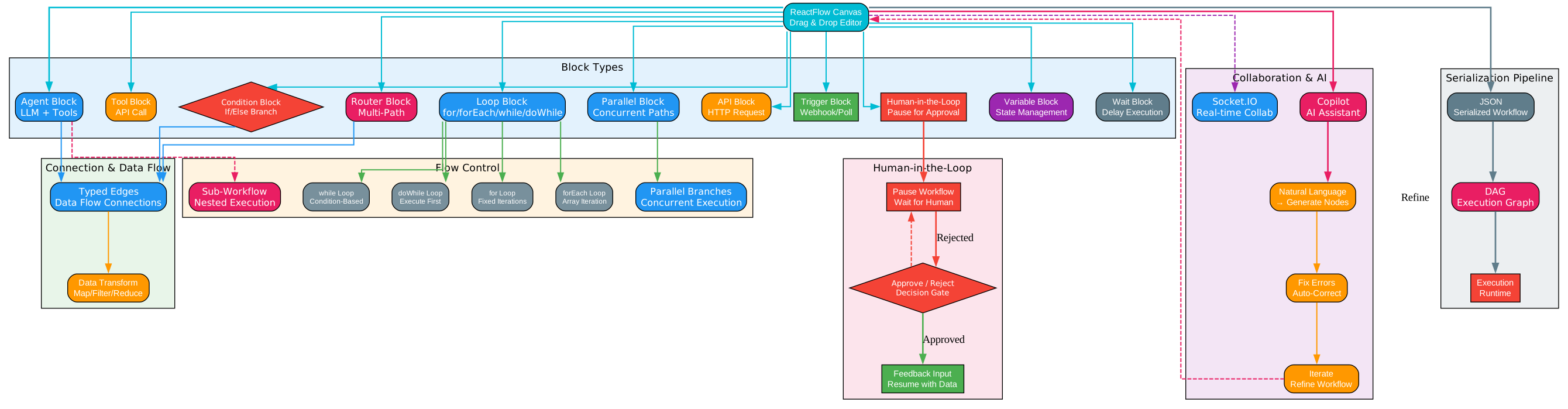
The Visual Workflow Builder is the centerpiece of the Sim Studio AI experience. Built on ReactFlow, an open-source library for building node-based editors, the canvas provides an intuitive drag-and-drop interface for designing agent workflows. Every element of the workflow – agents, tools, conditions, data transformations – is represented as a visual block that you can position, connect, and configure entirely through the UI.
The builder supports 11 distinct block types, each designed for a specific role in the workflow. Agent blocks encapsulate an LLM with a system prompt, tools, and model configuration – they are the reasoning engines of your workflow. Tool blocks provide specific capabilities like API calls, database queries, or file operations that agents can invoke. Condition blocks evaluate boolean expressions to route the workflow down different paths, enabling if/else branching logic. Router blocks dispatch to one of multiple output branches based on evaluated conditions, supporting complex multi-way decision trees. Loop blocks enable iterative execution with four loop types: for (fixed count), forEach (array iteration), while (condition-based), and doWhile (execute-then-check). Parallel blocks spawn concurrent branches that execute simultaneously, then merge results when all branches complete. API blocks make direct HTTP requests to any external service. Trigger blocks define how the workflow starts – from webhooks, polling schedules, or manual invocation. HumanInTheLoop blocks pause execution and wait for a human to review the current state, provide approval, or give feedback before the workflow continues. Variable blocks read from or write to the workflow’s shared state. Wait blocks introduce delays, useful for rate limiting or timed sequences.
Typed edge connections ensure data integrity throughout the workflow. Each block defines input and output ports with specific data types (string, number, object, array, boolean). When you connect two blocks, the builder validates that the output type of the source block is compatible with the input type of the target block. This type safety prevents runtime errors caused by mismatched data and makes workflows self-documenting – you can see at a glance what data flows where.
Loop support is a standout feature that most visual workflow builders lack. The four loop types cover virtually every iteration pattern. for loops run a fixed number of times, useful for batch processing. forEach loops iterate over an array produced by a previous block, enabling operations like “for each search result, summarize with an LLM.” while loops continue until a condition evaluates to false, useful for polling or retry patterns. doWhile loops execute at least once before checking the condition, useful for “try until success” patterns. Each loop type maintains its own iteration state and can be nested for complex processing pipelines.
Parallel branches enable concurrent execution of independent workflow paths. When a workflow needs to perform multiple operations that do not depend on each other – for example, searching three different databases simultaneously, or calling three different LLM providers for comparison – a parallel block splits the execution into concurrent branches. Each branch runs independently, and the parallel block waits for all branches to complete before merging their outputs and continuing. This can dramatically reduce total workflow execution time for I/O-bound operations.
Sub-workflows allow you to encapsulate a reusable workflow as a single block in another workflow. This enables a modular design pattern where complex workflows are composed from simpler, tested sub-workflows. For example, you might have a “research company” sub-workflow that searches the web, analyzes results with an LLM, and returns a structured summary. This sub-workflow can then be dropped into any larger workflow that needs company research, avoiding duplication and ensuring consistency.
Human-in-the-Loop is a first-class feature, not an afterthought. When a HumanInTheLoop block is reached during execution, the workflow pauses and sends a notification to the designated reviewer. The reviewer can see the current workflow state, the outputs of all preceding blocks, and the proposed next action. They can approve the workflow to continue, provide feedback that modifies the workflow state, or reject and terminate the run. This is critical for production workflows involving financial transactions, customer communications, or any action where human oversight is required.
Real-time collaboration via Socket.IO enables multiple team members to edit the same workflow simultaneously. Changes are propagated instantly to all connected clients, with conflict resolution handled through operational transformation. This makes Sim Studio AI suitable for team environments where workflows are designed collaboratively, reviewed by stakeholders, and iterated on before deployment.
The Copilot AI assistant transforms how workflows are built. Instead of manually searching through 200+ blocks to find the right one, you describe your intent in natural language: “Add a block that searches the web for recent news about this company.” The Copilot generates the appropriate block, configures it with sensible defaults, and places it on the canvas. It can also diagnose and fix errors in existing workflows, suggest optimizations for performance or cost, and iterate on designs based on feedback. This natural language interface dramatically reduces the learning curve and accelerates workflow development.
The entire design-to-execution pipeline follows a clear serialization path: Visual Canvas (ReactFlow state) -> JSON (structured workflow representation) -> DAG (directed acyclic graph with topological ordering) -> Execution (runtime with parallel processing, loops, and state management). This separation of concerns means the visual representation is always in sync with the executable workflow, and any change you make on the canvas is immediately reflected in the execution plan.
Installation
Sim Studio AI offers three installation methods to suit different needs, from quick evaluation to production deployment.
NPM (Quickest)
The fastest way to get started is through NPM. This method requires no cloning, no Docker, and no manual configuration:
npx simstudio
# Open http://localhost:3000
This single command downloads and launches Sim Studio AI with an embedded SQLite database for local evaluation. It is ideal for trying out the platform, prototyping workflows, and learning the visual builder. Note that the NPM quick-start uses local storage and is not intended for production workloads.
Docker Compose
For a self-hosted production deployment with full database support, Docker Compose is the recommended method:
git clone https://github.com/simstudioai/sim.git && cd sim
docker compose -f docker-compose.prod.yml up -d
# Open http://localhost:3000
This pulls pre-built images for the Sim Studio AI application, PostgreSQL with pgvector, and Redis. The production Docker Compose configuration includes proper volume mounts for data persistence, health checks for all services, and network isolation. It is the best option for teams that want self-hosted AI automation with minimal operational overhead.
Manual Setup
For developers who want full control over the stack, or who need to customize the build:
git clone https://github.com/simstudioai/sim.git && cd sim
bun install && bun run prepare
# Set up PostgreSQL, configure .env, run migrations
bun run dev:full
Manual setup requires Bun (the JavaScript runtime and package manager), Node.js 20 or later, and PostgreSQL 12+ with the pgvector extension. You will need to create a PostgreSQL database, configure the .env file with your database connection string and API keys, and run the Drizzle migrations to set up the schema. The bun run dev:full command starts both the Next.js frontend and the background worker processes. This method gives you the most flexibility for customization and contribution.
Usage
Building your first workflow with Sim Studio AI follows a straightforward process:
-
Launch Sim Studio AI – access the cloud version at sim.ai, run
npx simstudiofor a local instance, or use Docker Compose for a self-hosted deployment. -
Create a new workflow – click “New Workflow” to open a blank canvas. Give it a name and description.
-
Drag and drop blocks – from the left sidebar, drag Agent blocks (for LLM reasoning), Tool blocks (for API calls and integrations), Condition blocks (for branching logic), and any other block types your workflow needs onto the canvas.
-
Connect blocks with edges – click and drag from an output port on one block to an input port on another to define data flow. The typed connection system ensures compatible data types.
-
Configure each block – click a block to open its configuration panel. For Agent blocks, select the LLM provider, model, system prompt, and available tools. For API blocks, set the endpoint, headers, and authentication. For Condition blocks, write the boolean expression.
-
Add triggers – define how the workflow starts. Webhook triggers generate a unique URL that external services can POST to. Polling triggers check for new data at regular intervals. Manual triggers let you start the workflow from the UI.
-
Test and run – click “Run” to execute the workflow. The execution engine processes the DAG, and you can watch each block execute in real-time on the canvas. Check the execution logs for detailed output from each block.
-
Monitor execution – the real-time dashboard shows execution status, per-block cost tracking, latency metrics, and error details. Use these insights to optimize your workflows for performance and cost.
Comparison
| Feature | Sim Studio AI | LangChain | CrewAI | AutoGen |
|---|---|---|---|---|
| Visual Builder | Yes (full canvas) | No (code-only) | No (code-only) | No (code-only) |
| Integration Count | 200+ blocks | ~200 tools | ~50 tools | ~30 tools |
| LLM Providers | 16 | 60+ | 10+ | 5+ |
| Workflow Engine | DAG with loops/parallel | Chain/DAG | Sequential | Conversation |
| Self-Hosted | Yes | Yes | Yes | Yes |
| Human-in-the-Loop | Built-in | Manual | Manual | Manual |
| Trigger System | 150+ webhooks | No | No | No |
| Real-time Collab | Yes (Socket.IO) | No | No | No |
The key differentiator is the visual builder combined with the production-grade execution engine. LangChain offers more LLM providers and a rich Python ecosystem, but every workflow requires code. CrewAI focuses on role-based agent teams with sequential execution, but lacks visual design and advanced control flow. AutoGen pioneered multi-agent conversations, but its conversation-based model is less flexible than a DAG for complex workflows. Sim Studio AI uniquely combines the visual design experience with the execution power of a full DAG engine, making it the only platform where non-technical users can build production-grade multi-agent systems.
Features Summary
| Feature | Description |
|---|---|
| Visual Workflow Builder | ReactFlow-based drag-and-drop canvas for designing agent workflows |
| 200+ Blocks | Agent, API, Condition, Router, Function, Trigger, Response, and more |
| 150+ Triggers | Webhook and polling triggers across 40+ services |
| 16 LLM Providers | OpenAI, Anthropic, Google, Azure, AWS, DeepSeek, Ollama, and more |
| DAG Execution Engine | Production-grade execution with loops, parallel branches, sub-workflows |
| Human-in-the-Loop | Built-in pause for approval/feedback before continuing |
| Copilot AI | Generate nodes, fix errors, iterate from natural language |
| Vector Knowledge Base | Pinecone, Qdrant, built-in vector store for RAG |
| Real-time Collaboration | Socket.IO-based multi-user canvas editing |
| Agent-to-Agent (A2A) | Inter-agent communication protocol support |
| MCP Support | Model Context Protocol for external tool servers |
| Cost Tracking | Per-block cost tracking and monitoring |
| Self-Hosted | NPM, Docker Compose, or cloud deployment |
Conclusion
Sim Studio AI represents a significant step forward in making AI agent orchestration accessible to a broader audience. Its visual-first approach eliminates the code barrier that keeps many teams from adopting agent frameworks. The massive integration library of 200+ blocks and 150+ triggers means you can connect to the tools and services your organization already uses without writing custom integrations. The production-grade DAG execution engine with loops, parallel branches, sub-workflows, and human-in-the-loop ensures that visual does not mean toy – these are real production workflows with enterprise-grade reliability.
The self-hosted deployment option via NPM or Docker Compose gives organizations full control over their data and infrastructure, while the cloud option at sim.ai provides the fastest path to getting started. Whether you are a solo developer prototyping an agent workflow, a team building internal automations, or an enterprise deploying AI at scale, Sim Studio AI provides the tools and flexibility to match your needs.
- GitHub: https://github.com/simstudioai/sim
- Website: https://sim.ai

Enjoyed this post? Never miss out on future posts by following us


