ThClaws: Open-Source Rust AI Agent Harness with 17 LLM Providers and Agent Teams
ThClaws is an open-source, native-Rust AI agent harness platform that runs as a single binary on your own machine, delivering sovereign AI assistance without cloud dependencies. Developed by ThaiGPT Co., Ltd. based in Bangkok, Thailand, ThClaws combines three distinct interfaces — a desktop GUI, a CLI REPL, and a non-interactive prompt mode — into one cohesive experience. With support for 17 LLM providers, 26+ built-in tools, multi-agent team coordination, and an enterprise-grade open-core model, ThClaws positions itself as a compelling alternative to Electron-based AI coding tools by leveraging Rust’s performance and memory safety guarantees.
Whether you need an interactive coding assistant, a headless automation engine, or a multi-agent orchestration platform, ThClaws provides the infrastructure to coordinate AI agents that code, automate, remember, and collaborate — all from a single binary that respects your local sovereignty.
How It Works
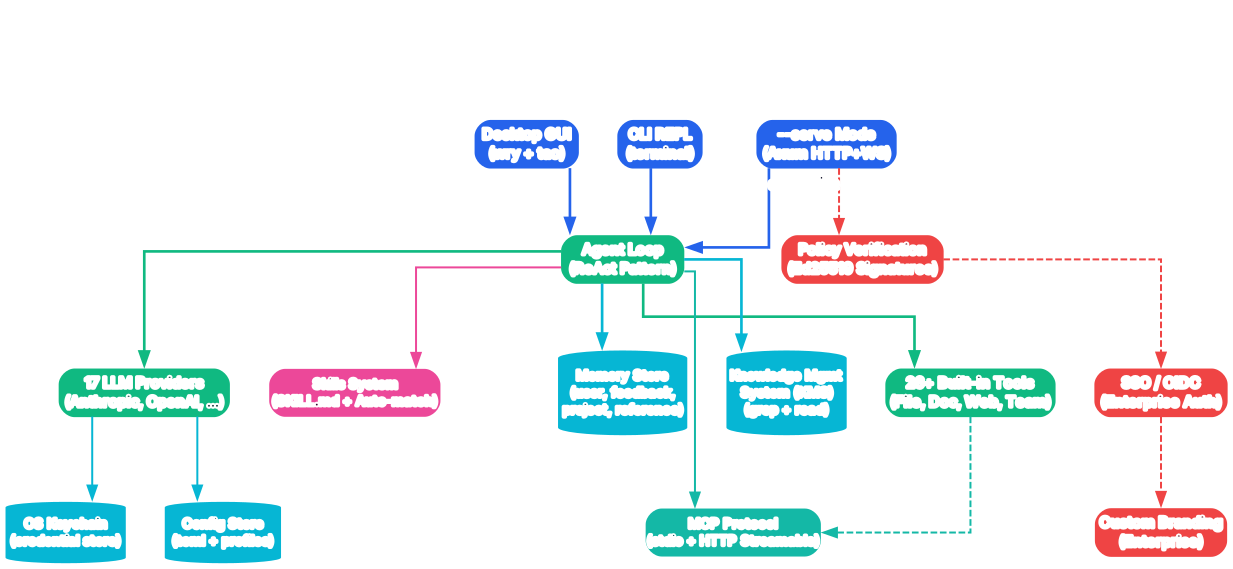
The architecture diagram above illustrates how ThClaws consolidates multiple interfaces and capabilities into a single Rust binary. Let us break down each component and its role in the system.
Single Binary, Three Interfaces
At the core of ThClaws is a unified Rust binary that exposes three distinct access modes. The desktop GUI mode launches a native window using the tao windowing library and wry webview, rendering a React-based interface built with Vite and TypeScript. The CLI REPL mode provides an interactive terminal session with full agent capabilities. The non-interactive mode accepts a single prompt via the -p flag, making it suitable for scripting and CI/CD pipelines where you need AI assistance without human interaction.
Agent Loop Architecture
The ThClaws agent operates through a structured loop: append user input, compact the conversation context when it grows too large, stream the request to the configured LLM provider, parse and execute any tool calls in the response, and then loop back for the next iteration. This loop can run up to 200 iterations in a single session, enabling complex multi-step tasks that require tool chaining and iterative refinement.
Frontend Compilation Pipeline
The React frontend is compiled into a single index.html file using vite-plugin-singlefile, then embedded directly into the Rust binary via include_str!. This means the entire application — backend logic, frontend assets, and tool implementations — ships as one self-contained executable with no external runtime dependencies.
LLM Provider Abstraction
ThClaws implements a provider abstraction layer that normalizes the API differences across 17 LLM services. Each provider implements a common trait for sending messages, receiving streaming responses, and handling tool calls. This abstraction allows users to switch between providers like Anthropic, OpenAI, Gemini, Ollama, and DeepSeek without changing their workflow or tool configurations.
Keychain Integration
API keys and credentials are stored in the operating system’s native keychain — macOS Keychain, Windows Credential Manager, or Linux Secret Service — rather than in plaintext configuration files. This ensures that sensitive authentication data never touches disk in an unencrypted form.
Key Insight: ThClaws achieves 46-74% input cost reduction on Anthropic’s Sonnet 4.6 model by strategically placing three
cache_control:ephemeralbreakpoints in the prompt, leveraging Anthropic’s prompt caching to avoid reprocessing unchanged context across turns.
Agent Teams
Understanding Agent Teams
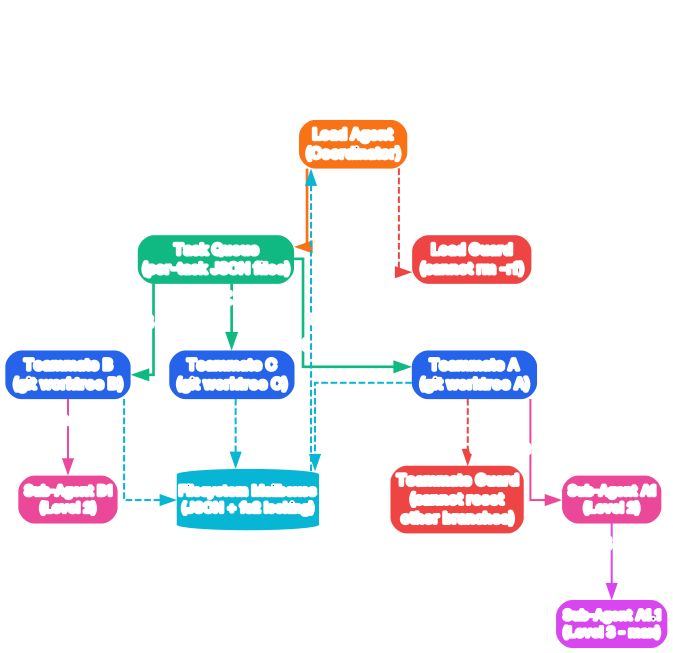
The Agent Teams diagram above shows how ThClaws coordinates multiple AI agents working together on complex tasks. This is one of the most distinctive features of the platform, enabling workflows that no single agent could accomplish alone.
Filesystem-Based Coordination
Unlike many multi-agent systems that require a message broker like Redis or RabbitMQ, ThClaws uses a filesystem-based coordination model. Each team maintains JSON arrays on disk, using fs2 file locking to prevent race conditions. Agents poll their mailboxes at approximately 1-second intervals, checking for new tasks or messages. This design eliminates infrastructure dependencies — if you can write files to disk, you can run agent teams.
Git Worktree Isolation
Each agent in a team operates within its own git worktree, providing complete filesystem isolation. This means multiple agents can modify code simultaneously without conflicting with each other. When an agent completes its task, its changes are committed in the worktree and can be merged back into the main branch. This approach mirrors how human developers use feature branches, but automated and coordinated by the AI team.
Sub-Agent Delegation
The Task tool enables an agent to spawn nested sub-agents for specialized work. A parent agent can delegate a focused subtask — such as writing tests for a specific module or researching a particular API — to a sub-agent that runs with its own context window and tool access. Recursion is supported up to 3 levels deep, allowing for hierarchical task decomposition where a lead agent coordinates managers, who in turn coordinate workers.
Mailbox Communication Pattern
The mailbox system follows a producer-consumer pattern. A lead agent writes task descriptions to a shared JSON file, and worker agents pick up tasks that match their capabilities. Results are written back to the mailbox, allowing the lead agent to aggregate outputs from multiple workers into a cohesive final deliverable. This pattern is particularly effective for tasks like parallel code review, multi-file refactoring, and distributed research.
Plan Mode Integration
Agent Teams integrate with ThClaws’ Plan Mode, which provides structured planning through EnterPlanMode, ExitPlanMode, and SubmitPlan operations. Before a team begins execution, the lead agent can create a detailed plan, review it with the user, and then distribute subtasks to team members. This ensures that multi-agent workflows proceed according to a coherent strategy rather than ad-hoc coordination.
Takeaway: With just
thclaws --cliand a team configuration, you gain a multi-agent orchestration system that requires no message broker, no Docker containers, and no cloud services — just a single binary and a filesystem.
Tools and Providers
Understanding the Tools and Providers Ecosystem
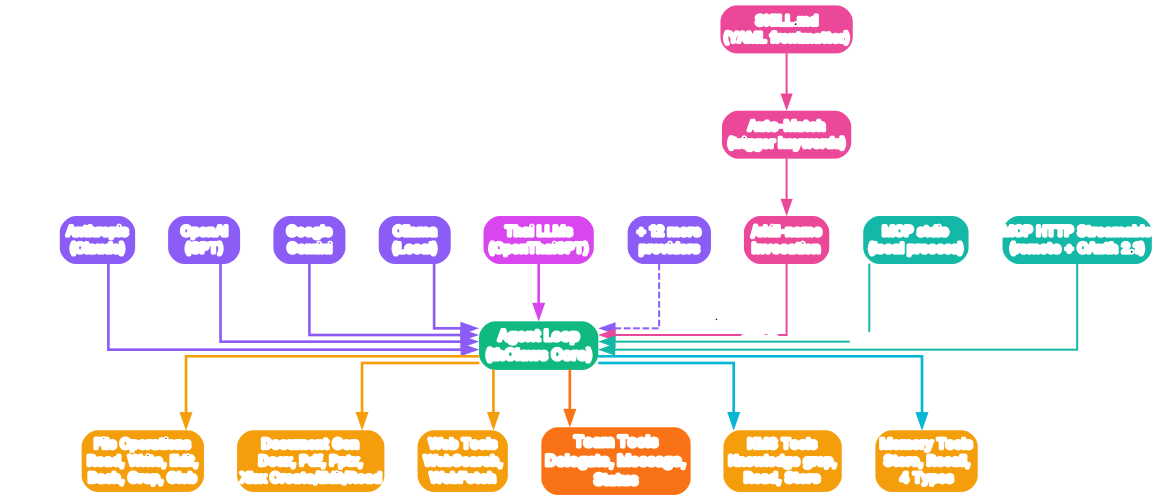
The Tools and Providers diagram above maps out the extensive ecosystem of LLM providers and built-in tools that ThClaws brings together in a single platform. This breadth of integration is what transforms ThClaws from a simple chat interface into a comprehensive agent harness.
17 LLM Providers
ThClaws supports 17 LLM providers out of the box, covering every major AI service and several niche options. The provider list includes Anthropic (Claude), OpenAI (GPT-4o, o1, o3), Google Gemini, Ollama for local models, OpenRouter as a unified gateway, DeepSeek for cost-effective reasoning, LMStudio for local model serving, Azure AI Foundry for enterprise deployments, and ThaiLLM for Thai language models. Each provider is configured through a simple TOML or JSON settings file, and credentials are stored securely in the OS keychain.
26+ Built-in Tools
The tool catalog spans file operations, web access, and document generation. File tools include Bash (command execution), Read, Write, Edit, Grep, and Glob — covering the full spectrum of code manipulation. Web tools include WebSearch and WebFetch for retrieving information from the internet. Document tools cover the full Microsoft Office suite: DocxCreate/Edit/Read for Word documents, PdfCreate/Read for PDFs, PptxCreate/Edit/Read for PowerPoint presentations, and XlsxCreate/Edit/Read for Excel spreadsheets. All document generation is implemented in pure Rust using libraries like printpdf, docx-rs, rust_xlsxwriter, and quick-xml — no LibreOffice dependency required.
MCP (Model Context Protocol) Integration
ThClaws implements the Model Context Protocol with support for both stdio and HTTP Streamable transports. MCP servers can be configured to provide additional tools and context sources. The implementation includes OAuth 2.1 with PKCE (Proof Key for Code Exchange) for secure authentication, making it suitable for enterprise environments where MCP servers require authorized access.
Skills System
The Skills system allows users to extend ThClaws with reusable, shareable skill definitions. Skills are defined in SKILL.md files with YAML frontmatter that specifies metadata, triggers, and instructions. Skills can be invoked explicitly with /skill-name or auto-matched based on the current context. Installation supports both git repositories and .zip archives, making it easy to share skills across teams and organizations.
Knowledge Management System (KMS)
The KMS provides per-project and per-user wikis that persist knowledge across sessions. It implements a Karpathy-style grep-and-read approach for efficient knowledge retrieval, allowing agents to quickly find relevant information without re-reading entire documents. The Memory Store supports four types of persistent data: user preferences, feedback from past interactions, project-specific context, and reference material.
Amazing: ThClaws includes pure Rust implementations for generating PDF, DOCX, XLSX, and PPTX documents — no LibreOffice, no Python, no external dependencies. This means an AI agent can create a complete PowerPoint presentation or Excel spreadsheet using only the single ThClaws binary.
Enterprise Features
Understanding Enterprise Features
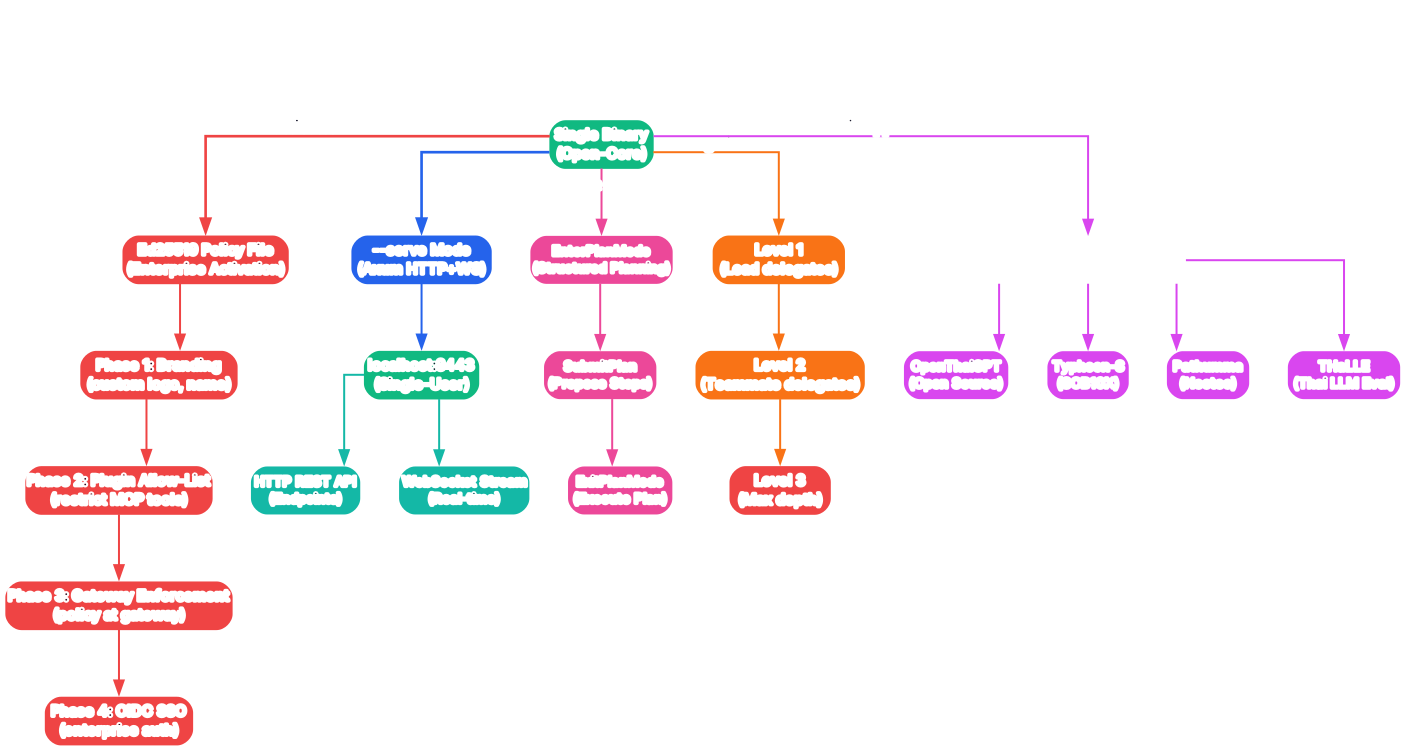
The Enterprise Features diagram above illustrates how ThClaws implements an open-core model where the same binary serves both community and enterprise users, with Ed25519-signed policy files activating advanced capabilities.
Open-Core Architecture
ThClaws uses a single binary for both community and enterprise editions. The distinction is made through an Ed25519-signed policy file that the binary verifies at startup. This fail-closed verification means that if the policy file is missing, corrupted, or tampered with, the binary falls back to community edition features rather than granting unauthorized enterprise access. This approach eliminates the need to maintain two separate codebases and ensures that enterprise features are always available but properly gated.
Four Enterprise Phases
The enterprise edition rolls out in four phases. Phase 1 focuses on branding customization, allowing organizations to replace ThClaws branding with their own logos, colors, and messaging. Phase 2 introduces a plugin allow-list that restricts which tools and MCP servers agents can access, enforcing organizational security policies. Phase 3 adds gateway enforcement, routing all LLM requests through a corporate gateway for auditing, logging, and compliance. Phase 4 implements OIDC SSO integration, enabling single sign-on through existing identity providers like Okta, Azure AD, or Google Workspace.
–serve Mode
The --serve flag transforms ThClaws from a desktop application into an Axum-based HTTP and WebSocket server. This mode enables browser-based access to the agent, making it possible to run ThClaws on a server and access it from any device with a web browser. The server supports multiple concurrent sessions, making it suitable for team deployments where several developers share a centralized ThClaws instance.
Thai LLM Ecosystem
As a product of ThaiGPT Co., Ltd., ThClaws includes dedicated support for the Thai LLM ecosystem through the ThaiLLM provider. This provider connects to NSTDA’s Thai language model aggregator, which provides access to models like OpenThaiGPT, Typhoon-S, Pathumma, and THaLLE. This makes ThClaws particularly valuable for developers working with Thai language content, offering native-level support that most international AI tools lack.
Security Model
The enterprise security model is built on defense in depth. API keys are stored in the OS keychain rather than configuration files. The Ed25519 policy signing uses public-key cryptography to prevent tampering. MCP connections support OAuth 2.1 with PKCE for secure server authentication. And the gateway enforcement in Phase 3 ensures that all LLM traffic can be audited and logged for compliance requirements.
Important: The open-core model means the community edition is fully functional for individual developers — the enterprise features are specifically for organizations that need branding control, plugin governance, request auditing, and SSO integration. There is no feature gating for core agent capabilities.
Installation
Pre-built Binaries
The fastest way to get started with ThClaws is to download a pre-built binary from GitHub Releases or the official website:
# Download from GitHub Releases
# Visit: https://github.com/thClaws/thClaws/releases

# Or download from the official website
# Visit: https://thclaws.ai/downloads
Build from Source
For developers who want to customize or contribute, ThClaws can be built from source:
# Clone the repository
git clone https://github.com/thClaws/thClaws.git
cd ThClaws

# Build the frontend
cd frontend
pnpm install
pnpm build
cd ..

# Build the Rust binary with GUI support
cargo build --release --features gui --bin thclaws

# Or use the build helper scripts
./scripts/build.sh     # macOS / Linux
./scripts/build.ps1    # Windows PowerShell
Minimum Requirements
- Rust 1.85+ (MSRV policy applies)
- Node.js 18+ and pnpm for frontend builds
- Operating system: macOS, Linux, or Windows
Configuration
ThClaws stores configuration in a TOML file and credentials in the OS keychain:
# Launch the GUI
thclaws

# Launch the CLI REPL
thclaws --cli

# Run a single prompt
thclaws -p "Explain the agent loop architecture"

# Run as a server
thclaws --serve --port 8080
Features
| Feature | Description |
|---|---|
| Three Interfaces | Desktop GUI, CLI REPL, and non-interactive prompt mode in one binary |
| 17 LLM Providers | Anthropic, OpenAI, Gemini, Ollama, OpenRouter, DeepSeek, LMStudio, Azure AI Foundry, ThaiLLM, and more |
| 26+ Built-in Tools | Bash, Read, Write, Edit, Grep, Glob, WebSearch, WebFetch, DocxCreate/Edit/Read, PdfCreate/Read, PptxCreate/Edit/Read, XlsxCreate/Edit/Read |
| Agent Teams | Multi-agent coordination via filesystem mailboxes with git worktree isolation |
| Sub-Agent Delegation | Task tool spawns nested agents, recursion up to 3 levels deep |
| Skills System | SKILL.md with YAML frontmatter, auto-matched or explicit invocation, install from git or .zip |
| MCP Integration | stdio and HTTP Streamable transports, OAuth 2.1 + PKCE authentication |
| Knowledge Management | Per-project and per-user wikis, Karpathy-style grep+read |
| Memory Store | Four types: user, feedback, project, reference |
| Plan Mode | Structured planning with EnterPlanMode/ExitPlanMode/SubmitPlan |
| –serve Mode | Axum HTTP+WebSocket server for browser-based access |
| Enterprise Edition | Ed25519-signed policy files, branding, plugin allow-list, gateway enforcement, OIDC SSO |
| OS Keychain | macOS Keychain, Windows Credential Manager, Linux Secret Service |
| Document Generation | PDF, DOCX, XLSX, PPTX in pure Rust — no LibreOffice dependency |
| Thai LLM Support | Dedicated ThaiLLM provider for NSTDA’s Thai language models |
| Prompt Caching | Anthropic prompt caching with 3 cache breakpoints for 46-74% cost reduction |
| UTF-8 Streaming | Fixed multi-byte UTF-8 handling for Thai, Chinese, and emoji in TCP streams |
Troubleshooting
Binary fails to launch on Linux
If the GUI binary fails to launch on Linux, ensure you have the required webkit2gtk dependencies installed:
# Ubuntu/Debian
sudo apt-get install libwebkit2gtk-4.1-dev libgtk-3-dev libayatana-appindicator3-dev

# Fedora
sudo dnf install webkit2gtk4.1-devel gtk3-devel libappindicator-gtk3-devel
Frontend build errors
If pnpm build fails during the frontend compilation step, verify your Node.js and pnpm versions:
# Check Node.js version (requires 18+)
node --version

# Check pnpm version
pnpm --version

# Clear cache and reinstall if needed
cd frontend
rm -rf node_modules
pnpm install
pnpm build
LLM provider connection issues
If ThClaws cannot connect to an LLM provider, check the following:
- Verify your API key is set correctly in the OS keychain
- Ensure the provider base URL is accessible from your network
- For Ollama, confirm the local server is running on the expected port
- For Azure AI Foundry, verify your deployment name and endpoint URL
# Test provider connectivity
thclaws --cli
# Then use: /provider <name> to switch providers
Agent Teams not coordinating
If agents in a team are not picking up tasks, check the following:
- Ensure all agents have write access to the shared mailbox directory
- Verify
fs2file locking is working on your filesystem (NFS may have issues) - Check that git worktrees are properly initialized for each agent
- Review the agent logs for task queue polling errors
UTF-8 display issues
ThClaws includes a critical fix for multi-byte UTF-8 characters that can be split across TCP packet boundaries. If you see garbled text when streaming responses in Thai, Chinese, or emoji:
- Ensure you are running the latest version of ThClaws
- The fix ensures incomplete UTF-8 sequences at packet boundaries are buffered and reassembled correctly
- If issues persist, report them with your provider, language, and operating system details
Conclusion
ThClaws represents a thoughtful approach to AI agent tooling — one that prioritizes local sovereignty, performance through Rust, and extensibility through open protocols. The combination of 17 LLM providers, 26+ built-in tools, filesystem-based agent teams, and pure Rust document generation creates a versatile platform that works as well for individual developers as it does for enterprise teams.
The open-core model is particularly well-designed: the community edition provides full agent capabilities without restriction, while enterprise features address genuine organizational needs like branding, governance, and compliance. The Ed25519-signed policy file approach means there is no separate binary to maintain and no hidden paywall for core functionality.
For developers working with Thai language content, the dedicated ThaiLLM provider and the UTF-8 streaming fix make ThClaws one of the few AI agent platforms with first-class Thai language support. And for teams that need to coordinate multiple agents on complex tasks, the filesystem-based team coordination model eliminates infrastructure overhead while maintaining robust isolation through git worktrees.
Links:
- GitHub: https://github.com/thClaws/thClaws
- Website: https://thclaws.ai

Enjoyed this post? Never miss out on future posts by following us


