Claude Context: Semantic Code Search MCP Plugin for Claude Code and AI Coding Agents
Claude Context is an MCP (Model Context Protocol) plugin that adds semantic code search to Claude Code and other AI coding agents, giving them deep context from your entire codebase. Instead of loading entire directories into context for every request – which can be very expensive for large codebases – Claude Context efficiently stores your codebase in a vector database and only retrieves relevant code when needed. This approach dramatically reduces token consumption while maintaining high-quality search results.
Developed by Zilliz, the team behind the Milvus vector database, Claude Context is designed to solve a fundamental problem: AI coding agents need comprehensive codebase context to be effective, but loading millions of lines of code into context windows is prohibitively expensive and often exceeds token limits. By using semantic search powered by hybrid retrieval (dense vectors + BM25), Claude Context finds the most relevant code snippets for any natural language query, bringing only the essential context into the agent’s working memory.
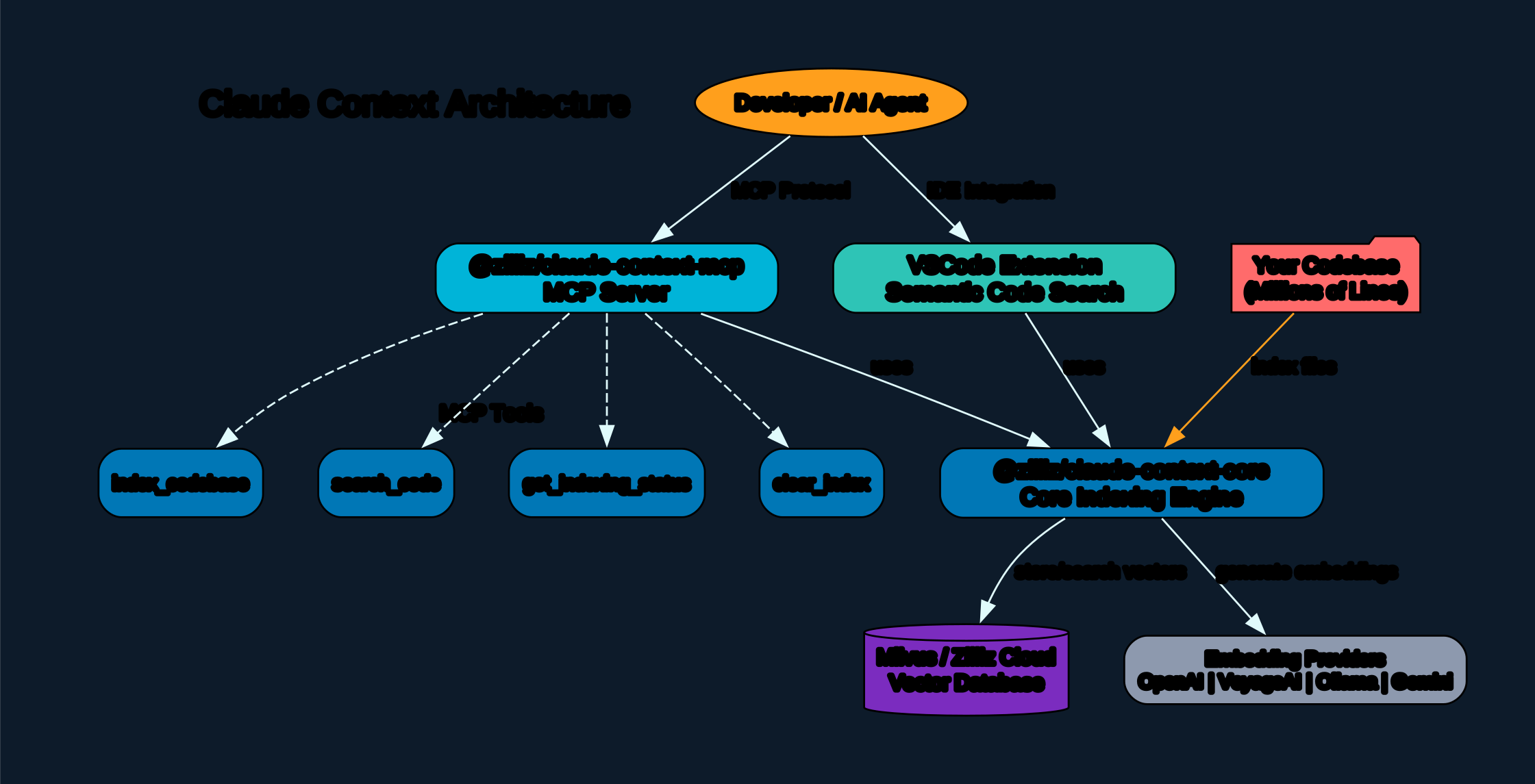
Understanding the Architecture
The architecture diagram above illustrates the four-layer design of Claude Context, showing how it bridges AI coding agents with vector-powered code search.
Layer 1: MCP Clients The top layer represents the various MCP-compatible clients that can connect to Claude Context. These include Claude Code (the primary target), Codex CLI, Cursor, VS Code (via extension), and any other MCP-compatible client. Each client communicates with the MCP server using the standard Model Context Protocol over stdio transport. This means Claude Context works with any tool that supports the MCP standard, making it highly versatile across different development environments.
Layer 2: MCP Server (@zilliz/claude-context-mcp) The MCP server package acts as the bridge between AI coding agents and the core indexing engine. It exposes four primary tools:
index_codebase: Indexes a codebase directory for hybrid search, supporting AST or LangChain splitters, custom file extensions, and ignore patternssearch_code: Searches the indexed codebase using natural language queries with hybrid search (BM25 + dense vector)clear_index: Clears the search index for a specific codebaseget_indexing_status: Returns the current indexing status with progress percentage
The server runs background indexing, manages snapshots for incremental updates, and synchronizes with the cloud vector database to maintain consistency.
Layer 3: Core Engine (@zilliz/claude-context-core) The core package contains the main indexing and search logic. It consists of four key components:
- Context Engine: The central orchestrator that coordinates the indexing and search workflows. It manages file traversal, chunk processing, and the overall pipeline.
- Code Splitter: Uses tree-sitter AST parsing to intelligently split code into semantic chunks based on functions, classes, and logical blocks. If AST parsing is not available for a language, it falls back to LangChain’s character-based splitter.
- Embedding Provider: Supports multiple embedding providers including OpenAI (text-embedding-3-small/large), VoyageAI (voyage-code-3), Ollama (local embeddings), and Gemini. This flexibility allows users to choose between cloud-based and local embedding models.
- File Synchronizer: Implements Merkle tree-based change detection for incremental indexing. Only changed files are re-processed, dramatically reducing re-indexing time.
Layer 4: Vector Database The bottom layer provides the storage and retrieval infrastructure. Claude Context supports both Milvus (open source, self-hosted) and Zilliz Cloud (fully managed serverless). The vector database stores hybrid indexes combining dense vector embeddings with BM25 sparse indexes for optimal retrieval quality.
VS Code Extension Additionally, Claude Context offers a VS Code extension called “Semantic Code Search” that provides an intuitive interface for searching code directly from the IDE, without needing to use the MCP protocol.
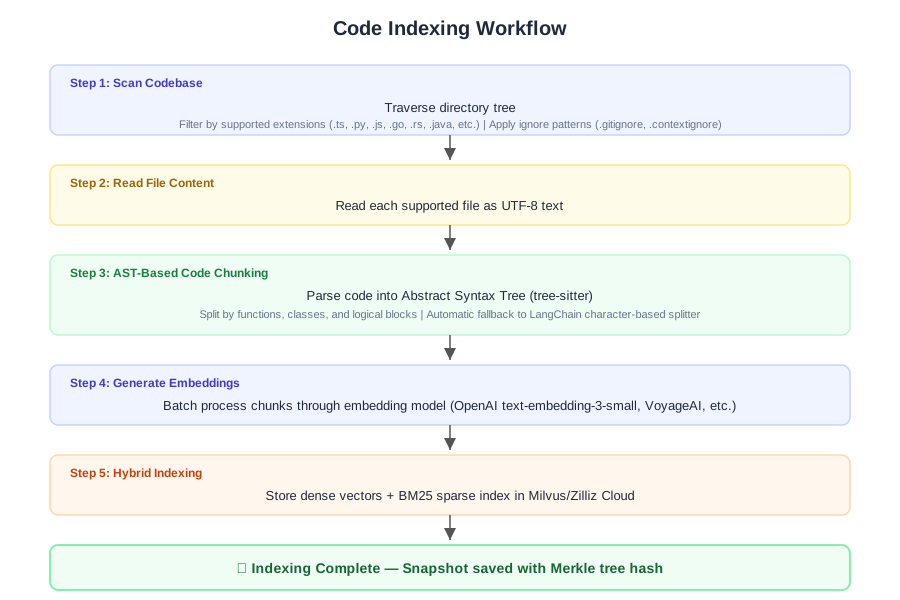
Understanding the Indexing Workflow
The indexing workflow diagram shows the six-step process Claude Context uses to transform raw source code into a searchable vector index.
Step 1: Scan Codebase The process begins by traversing the codebase directory tree. Claude Context filters files by supported extensions (.ts, .py, .js, .go, .rs, .java, .cpp, .cs, and many more) and applies ignore patterns from .gitignore, .contextignore, and default patterns (node_modules, dist, build, .git, etc.). Users can also provide custom extensions and ignore patterns through the MCP tool parameters.
Step 2: Read File Content Each supported file is read as UTF-8 text. Files that cannot be read (binary files, permission errors) are skipped gracefully without interrupting the indexing process.
Step 3: AST-Based Code Chunking This is where Claude Context differentiates itself from simple text splitters. Using tree-sitter, it parses each file into an Abstract Syntax Tree and splits the code at semantic boundaries – function declarations, class definitions, method bodies, and logical blocks. This ensures that each chunk represents a coherent unit of code that can be understood independently. For languages not supported by tree-sitter, it falls back to LangChain’s RecursiveCharacterTextSplitter.
Step 4: Generate Embeddings Code chunks are batched and passed through the configured embedding model. The default is OpenAI’s text-embedding-3-small (1536 dimensions), but users can configure text-embedding-3-large, voyage-code-3, or local models via Ollama. The batch size is configurable (default 100 chunks) to balance throughput and API rate limits.
Step 5: Hybrid Indexing This is the key innovation. Instead of storing only dense vector embeddings, Claude Context creates a hybrid index that combines:
- Dense vectors: Semantic embeddings that capture the meaning and intent of code
- BM25 sparse index: Traditional keyword-based retrieval that excels at exact matches and code-specific terms
The hybrid approach ensures that searches find relevant results even when the query uses different terminology than the code (handled by dense vectors) AND when the query contains specific function names or variable names (handled by BM25).
Step 6: Complete Once indexing is complete, a snapshot is saved containing the Merkle tree hash of the codebase state. This snapshot enables incremental indexing on subsequent runs, where only changed files are re-processed.
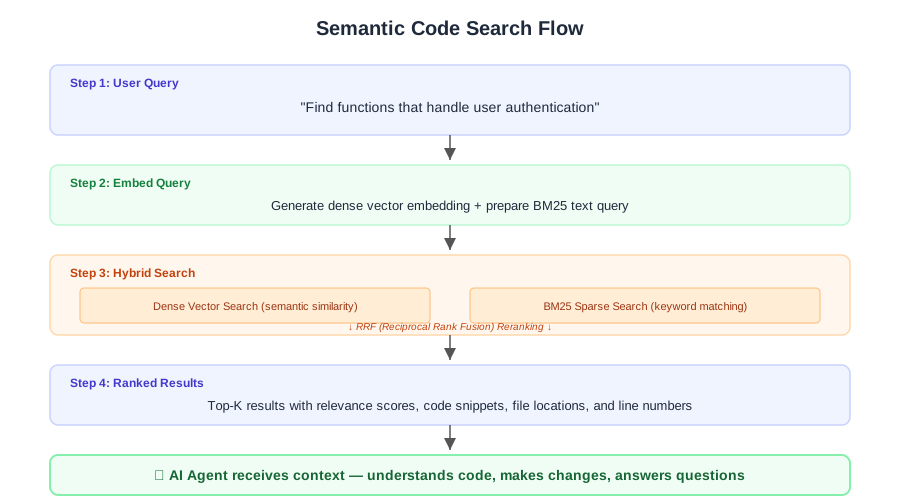
Understanding the Search Flow
The search flow diagram illustrates how Claude Context processes a natural language query from an AI coding agent.
Step 1: User Query The AI agent (e.g., Claude Code) sends a natural language query like “Find functions that handle user authentication” to the MCP server. The query is accompanied by the codebase path and optional parameters like result limit and extension filters.
Step 2: Embed Query The query is embedded using the same embedding model that was used during indexing. This ensures the query vector exists in the same semantic space as the indexed code chunks. For hybrid search, the raw query text is also preserved for BM25 matching.
Step 3: Hybrid Search The search executes two parallel retrieval strategies:
- Dense Vector Search: Finds code chunks that are semantically similar to the query, even if they use different terminology
- BM25 Sparse Search: Finds code chunks that contain the exact keywords from the query
The results from both strategies are combined using Reciprocal Rank Fusion (RRF), which assigns higher scores to results that appear in both result sets. This hybrid approach consistently outperforms either strategy alone, especially for code search where both semantic understanding and exact matching are important.
Step 4: Ranked Results The top-K results are returned with relevance scores, code snippets, file locations, and line numbers. The AI agent can then use this context to understand the codebase, make changes, or answer questions.
Step 5: AI Agent Uses Context The retrieved code snippets are injected into the AI agent’s context window, providing the relevant information needed without loading the entire codebase.

Understanding Incremental Indexing
The incremental sync diagram shows how Claude Context efficiently handles codebase changes over time using Merkle tree-based change detection.
Initial Full Index The first time a codebase is indexed, Claude Context performs a full scan: traversing all files, chunking, embedding, and storing vectors. It builds a Merkle tree – a cryptographic hash tree where each file’s hash is combined into a single root hash representing the entire codebase state.
Change Detection On subsequent indexing requests, Claude Context compares the current file hashes against the stored Merkle tree. This comparison instantly identifies three categories of changes:
- Added files: New files that don’t exist in the snapshot
- Modified files: Files whose content hash has changed
- Removed files: Files that exist in the snapshot but not on disk
Processing Changes Each category is handled differently:
- Added files: Chunked, embedded, and inserted into the vector database
- Modified files: Old chunks are deleted, then the file is re-chunked, re-embedded, and re-inserted
- Removed files: All chunks associated with the file are queried by relative path and deleted from the vector database
Snapshot Update After processing all changes, a new Merkle tree is computed and saved. This enables the next sync to start fresh with the new state.
The benefit is substantial: instead of re-indexing the entire codebase (which could take hours for large projects), incremental indexing typically completes in seconds or minutes, processing only the files that actually changed.
Installation
Claude Context is distributed as two npm packages and can be installed via npx without any local installation:
Prerequisites
- Node.js >= 20.0.0 and < 24.0.0
- A vector database: either a self-hosted Milvus instance or a free Zilliz Cloud account
- An OpenAI API key (or alternative embedding provider key)
Quick Start with Claude Code
The simplest way to use Claude Context is to add it as an MCP server to Claude Code:
claude mcp add claude-context \
  -e OPENAI_API_KEY=sk-your-openai-api-key \
  -e MILVUS_ADDRESS=your-zilliz-cloud-public-endpoint \
  -e MILVUS_TOKEN=your-zilliz-cloud-api-key \
  -- npx @zilliz/claude-context-mcp@latest
Configuration for Other MCP Clients
Claude Context works with any MCP-compatible client. Here are configuration examples for popular tools:
Cursor: Add to ~/.cursor/mcp.json:
{
  "mcpServers": {
    "claude-context": {
      "command": "npx",
      "args": ["-y", "@zilliz/claude-context-mcp@latest"],
      "env": {
        "OPENAI_API_KEY": "your-openai-api-key",
        "MILVUS_ADDRESS": "your-zilliz-cloud-public-endpoint",
        "MILVUS_TOKEN": "your-zilliz-cloud-api-key"
      }
    }
  }
}
Codex CLI: Add to ~/.codex/config.toml:
[mcp_servers.claude-context]
command = "npx"
args = ["@zilliz/claude-context-mcp@latest"]
env = { "OPENAI_API_KEY" = "your-openai-api-key", "MILVUS_TOKEN" = "your-zilliz-cloud-api-key" }
startup_timeout_ms = 20000
Gemini CLI: Add to ~/.gemini/settings.json:
{
  "mcpServers": {
    "claude-context": {
      "command": "npx",
      "args": ["@zilliz/claude-context-mcp@latest"],
      "env": {
        "OPENAI_API_KEY": "your-openai-api-key",
        "MILVUS_TOKEN": "your-zilliz-cloud-api-key"
      }
    }
  }
}
Usage
Once configured, using Claude Context is straightforward:
- Open Claude Code in your project directory:
cd your-project-directory claude - Index your codebase:
Index this codebase - Check indexing status:
Check the indexing status - Start searching:
Find functions that handle user authentication
Claude Context automatically detects the codebase, indexes it in the background, and makes it searchable via natural language queries. The AI agent can then use the search results to understand your code and make informed changes.
Using the Core Package Programmatically
For developers who want to build custom applications, the @zilliz/claude-context-core package provides the full API:
import { Context, MilvusVectorDatabase, OpenAIEmbedding } from '@zilliz/claude-context-core';

// Initialize embedding provider
const embedding = new OpenAIEmbedding({
    apiKey: process.env.OPENAI_API_KEY,
    model: 'text-embedding-3-small'
});

// Initialize vector database
const vectorDatabase = new MilvusVectorDatabase({
    address: process.env.MILVUS_ADDRESS,
    token: process.env.MILVUS_TOKEN
});

// Create context instance
const context = new Context({ embedding, vectorDatabase });

// Index your codebase with progress tracking
const stats = await context.indexCodebase('./your-project', (progress) => {
    console.log(`${progress.phase} - ${progress.percentage}%`);
});
console.log(`Indexed ${stats.indexedFiles} files, ${stats.totalChunks} chunks`);

// Perform semantic search
const results = await context.semanticSearch('./your-project', 'vector database operations', 5);
results.forEach(result => {
    console.log(`File: ${result.relativePath}:${result.startLine}-${result.endLine}`);
    console.log(`Score: ${(result.score * 100).toFixed(2)}%`);
});
Key Features
| Feature | Description |
|---|---|
| Hybrid Code Search | Combines dense vector embeddings with BM25 sparse search using RRF reranking for optimal results |
| Incremental Indexing | Merkle tree-based change detection re-indexes only modified files, saving time and API costs |
| AST-Based Chunking | Tree-sitter parsing splits code at semantic boundaries (functions, classes) for coherent chunks |
| Multiple Embedding Providers | Supports OpenAI, VoyageAI, Ollama, and Gemini for flexible deployment options |
| Milvus/Zilliz Integration | Scalable vector storage with Milvus (self-hosted) or Zilliz Cloud (fully managed) |
| MCP Protocol | Standard Model Context Protocol works with Claude Code, Codex CLI, Cursor, VS Code, and more |
| Background Indexing | Non-blocking indexing with progress tracking and snapshot persistence |
| Customizable | Configurable file extensions, ignore patterns, chunk sizes, and embedding models |
| VS Code Extension | Native IDE integration with semantic search UI |
| Cost Effective | ~40% token reduction compared to loading entire directories into context |
Evaluation Results
Claude Context has been rigorously evaluated against traditional grep-based code search. The evaluation demonstrates that Claude Context achieves approximately 40% token reduction under the condition of equivalent retrieval quality. This translates to significant cost and time savings in production environments.
The evaluation methodology uses real-world case studies from Django and xarray repositories, comparing Claude Context’s hybrid search against grep-based search for complex bug-fixing tasks. The results show that Claude Context not only reduces token consumption but also improves the quality of retrieved context by understanding the semantic meaning of queries rather than relying on exact keyword matches.
Comparison with Other Code Search Tools
| Tool | Approach | Strengths | Limitations |
|---|---|---|---|
| Claude Context | Hybrid (dense + BM25) | Semantic understanding, incremental indexing, MCP integration | Requires vector database setup |
| grep/ripgrep | Regex pattern matching | Fast, no setup, universal | No semantic understanding, exact match only |
| Serena Context7 | Proprietary | Good for large codebases | Closed source, limited customization |
| DeepWiki | AI documentation | Excellent for understanding | Read-only, no code modification |
| GitHub Code Search | Keyword + regex | Free, works on any repo | Limited to GitHub, no local indexing |
Troubleshooting
Q: What files does Claude Context decide to embed? Claude Context embeds files with supported programming language extensions (.ts, .tsx, .js, .jsx, .py, .java, .cpp, .c, .h, .hpp, .cs, .go, .rs, .php, .rb, .swift, .kt, .scala, .m, .mm) and markup files (.md, .markdown, .ipynb). It automatically ignores common build output directories, dependency folders, and version control directories.
Q: Can I use a fully local deployment setup? Yes. You can use Ollama for local embeddings and a self-hosted Milvus instance for the vector database. This eliminates any dependency on external APIs, making it suitable for air-gapped environments or organizations with strict data privacy requirements.
Q: Does it support multiple projects/codebases? Yes. Claude Context creates separate collections in the vector database for each codebase path. You can index multiple projects and search them independently. The MCP server manages snapshots for each codebase separately.
Q: How does Claude Context compare to other coding tools? Claude Context’s key differentiator is its hybrid search approach combined with MCP protocol integration. Unlike grep-based tools that require exact keyword matches, Claude Context understands the semantic meaning of queries. Unlike proprietary tools, it is open source and self-hostable.
Conclusion
Claude Context represents a significant advancement in how AI coding agents interact with codebases. By combining semantic search with the MCP protocol, it provides AI agents with the context they need without the cost of loading entire codebases into context windows. The hybrid search approach (dense vectors + BM25) ensures high-quality results for both semantic queries and exact keyword matches.
The project is open source under the MIT license and actively maintained by Zilliz, the company behind Milvus. Whether you are working with a small personal project or a multi-million line enterprise codebase, Claude Context can help your AI coding agent work more effectively and cost-efficiently.
Links
- GitHub Repository
- VS Code Marketplace
- Milvus Documentation
- Zilliz Cloud
- npm: @zilliz/claude-context-core
- npm: @zilliz/claude-context-mcp

Enjoyed this post? Never miss out on future posts by following us


