Introduction
CC Design is a Claude Code skill that transforms AI agents into expert product designers capable of producing high-fidelity HTML prototypes and design deliverables. Originally adapted from the Claude Artifacts design environment, CC Design has been re-engineered to work natively within Claude Code, leveraging Playwright MCP for visual verification and local Node.js scripts for production-ready export. The result is a disciplined, systematic design workflow that produces output rivaling professional design tools.
The skill operates on two core principles. First, context-first design: before writing a single line of HTML, CC Design loads brand styles, parses design tokens, and establishes a clear design intent through a structured checklist. Second, progressive disclosure: rather than stuffing every design rule into a single prompt, the architecture loads only the references and templates needed for the current task, keeping the context window lean and focused. A live demo showcasing the skill’s output is available at cc-design-demo.vercel.app.
What sets CC Design apart from generic AI code generation is its verification-first mindset. Every design passes through a three-phase verification protocol before delivery, catching structural errors, visual regressions, and design quality issues that typical AI output would miss. Combined with a library of 68+ brand design systems and a catalog of reusable design patterns, CC Design enables Claude Code to produce polished, production-grade designs consistently.
Progressive Disclosure Architecture

CC Design’s progressive disclosure architecture keeps the core SKILL.md concise while loading references and templates on demand
The progressive disclosure architecture is the backbone of CC Design’s efficiency. At its center sits the SKILL.md file, deliberately kept under 200 lines as the always-loaded core. This file contains only the essential workflow steps, the routing table, and high-level rules. By keeping the core compact, CC Design avoids consuming precious context window tokens with information that may not be relevant to the current task.
When a task arrives, the routing table maps the task type to specific reference documents and template files. The routing table is essentially a dispatch configuration that answers the question: given this kind of design task, which references and templates should be loaded? For example, a landing page task loads different references than a pitch deck or a mobile app prototype.
The reference layer contains 12 or more on-demand documents. These include design-excellence.md for quality standards, design-patterns.md for reusable component patterns, frontend-design.md for HTML/CSS best practices, getdesign-loader.md for brand style acquisition, react-babel-setup.md for the inline JSX compilation pipeline, verification-protocol.md for the three-phase check, question-protocol.md for structured clarification, starter-components.md for pre-built UI components, tweaks-system.md for the EDITMODE marker system, platform-tools.md for tool-specific guidance, interactive-prototype.md for interactive design patterns, and design-system-creation.md for building custom design systems. Each reference is loaded only when the routing table determines it is needed.
The template layer provides 7 template files that are copied directly into the project directory when needed. These include deck_stage.js for presentation slide formatting, design_canvas.jsx for the main design canvas component, animations.jsx for motion and transition effects, and device frame templates (android_frame.jsx, browser_window.jsx) for realistic preview contexts. These templates provide the structural scaffolding so the AI can focus on design decisions rather than boilerplate.
The scripts layer handles export operations. gen_pptx.js converts HTML designs to PowerPoint presentations, super_inline_html.js bundles all assets into a self-contained HTML file, and open_for_print.js produces PDF output via Playwright. Each script is invoked only at the delivery stage, keeping the design phase uncluttered.
This architecture minimizes context window consumption by ensuring that only the most relevant information occupies the AI’s attention at any given stage. A task that requires only a landing page design never loads the pitch deck references, and a mobile prototype task never loads the presentation templates. The result is faster inference, fewer hallucinations, and more focused output.
The 7-Step Design Workflow
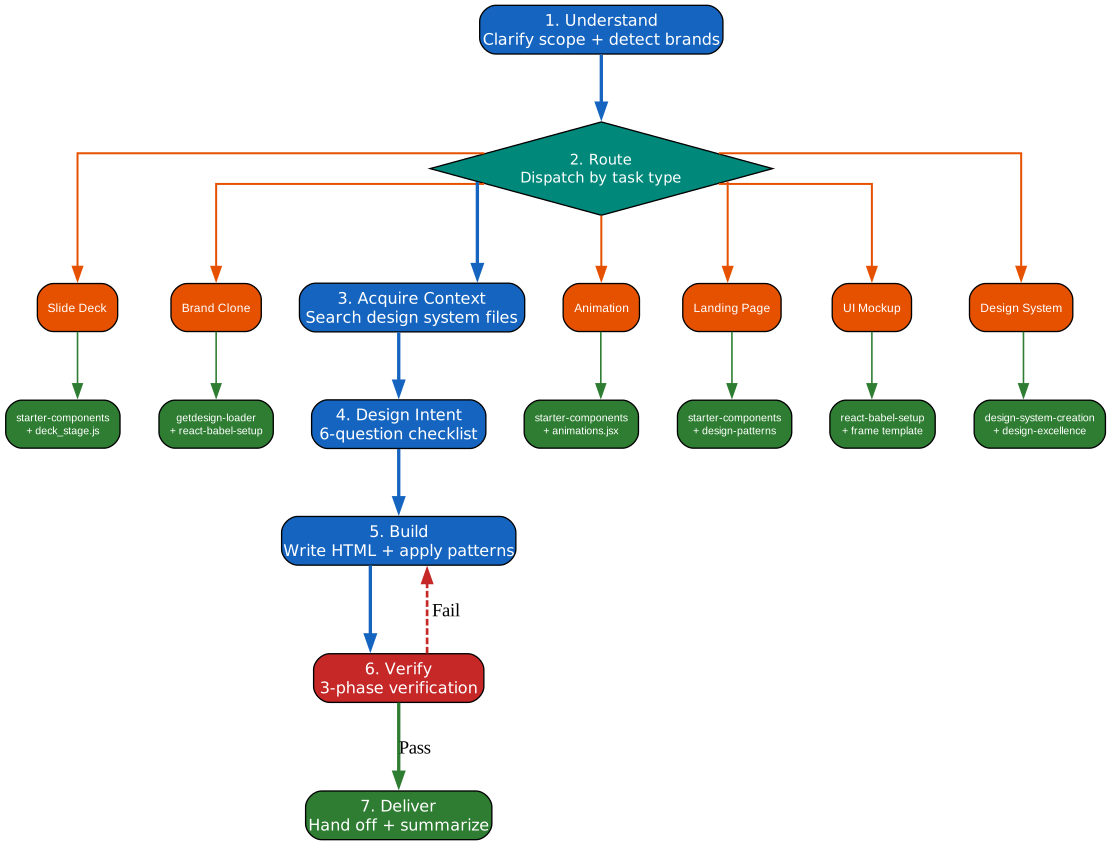
The seven-step design workflow with task-type routing and verification feedback loop
The seven-step design workflow provides a disciplined sequence from initial request to final deliverable. Each step has clear inputs, outputs, and decision criteria, ensuring that no critical design activity is skipped.
Step 1 – Understand: The workflow begins with structured clarification using the question-protocol. The AI asks targeted questions about the design goal, target audience, brand preferences, and content requirements. This step is capped at a maximum of 2 rounds of questions to prevent endless back-and-forth. The goal is to gather enough context to proceed confidently without overwhelming the user.
Step 2 – Route: The routing table dispatches the task to the appropriate reference set and template combination based on the task type. Common task types include landing pages, pitch decks, product pages, mobile prototypes, and marketing materials. Each type maps to a specific combination of references and templates that have been curated for that design domain.
Step 3 – Acquire Context: This step loads brand styles from the getdesign-loader, which contains design tokens and style rules for 68+ brands. If the user specifies a brand like Stripe or Vercel, the loader fetches the corresponding design system, parses the tokens, and injects them into the design context. The step also fetches any existing code or assets that need to be incorporated.
Step 4 – Design Intent: Before building, the AI completes a 6-question design intent checklist. The questions cover: (1) What is the focal point of this design? (2) What emotional tone should it convey? (3) What is the visual flow or reading order? (4) What spacing rhythm should be used? (5) What color palette supports the brand and mood? (6) What typography hierarchy communicates the content structure? This checklist forces deliberate design thinking before any code is written.
Step 5 – Build: The AI generates HTML using React and Babel for inline JSX compilation, leveraging starter components from the template library. The tweaks system uses EDITMODE markers to identify sections that can be adjusted, and localStorage persistence saves design iterations. The build step produces a fully functional HTML file that can be previewed in a browser.
Step 6 – Verify: The three-phase verification protocol checks structural integrity, visual quality, and design excellence. If any phase fails, the workflow loops back to the Build step with specific fix instructions. This feedback loop is critical: it ensures that every design meets quality standards before delivery.
Step 7 – Deliver: The final design is exported through the appropriate pipeline based on the deliverable type. Options include PPTX for presentations, self-contained HTML for web delivery, and PDF for print or document sharing. Each export path is handled by a dedicated Node.js script.
The feedback loop from Verify back to Build is what makes this workflow reliable. Rather than hoping the first draft is acceptable, CC Design systematically checks and iterates until the design passes all verification criteria.
Three-Phase Verification Protocol
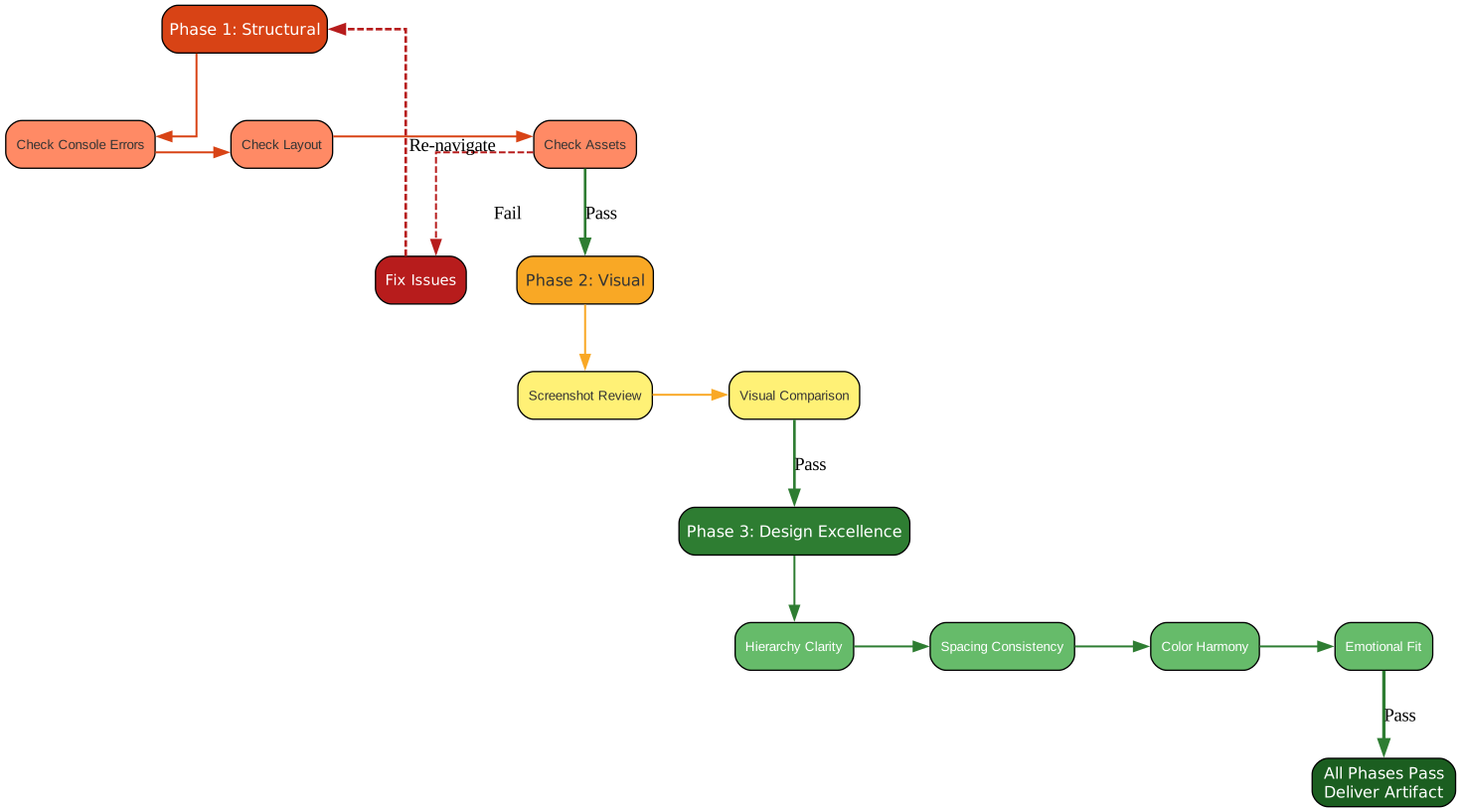
The three-phase verification protocol ensures structural integrity, visual quality, and design excellence
The three-phase verification protocol is CC Design’s quality gate. No design reaches the delivery stage without passing all three phases, and the protocol enforces a strict ordering: structural checks must pass before visual checks begin, and visual checks must pass before design excellence evaluation.
Phase 1 – Structural Verification: This phase checks the fundamentals. It looks for console errors in the browser, validates that the HTML layout renders correctly without broken elements, and confirms that all assets (images, fonts, stylesheets) load successfully. If Phase 1 fails, the fix is applied and the browser is re-navigated to the design, then Phase 1 runs again from the top. This prevents cascading failures where a structural issue masks visual or design problems.
Phase 2 – Visual Verification: Using Playwright MCP, this phase captures a screenshot of the rendered design and performs a visual review. The screenshot is compared against the design intent established in Step 4. Key checks include: Does the layout match the intended structure? Are colors rendering correctly? Is the typography hierarchy visible? Are there any visual artifacts or rendering bugs? Phase 2 catches issues that structural checks alone cannot detect, such as overlapping elements, incorrect spacing, or color mismatches.
Phase 3 – Design Excellence: This is the most subjective and most valuable phase. It evaluates the design against professional quality standards across four dimensions. First, visual hierarchy: does the design guide the eye to the most important elements? Second, spacing rhythm: is there consistent and intentional use of whitespace? Third, color harmony: do the colors work together to support the emotional tone? Fourth, emotional fit: does the overall design feel appropriate for the brand and purpose?
The emotional design decision tree provides specific guidance for common tones. Trust-oriented designs use blue tones, conservative spacing, and serif or neutral sans-serif typography. Excitement-oriented designs use vibrant gradients, dynamic layouts, and bold typography. Professional designs use muted palettes, generous whitespace, and refined type choices. Creative designs use expressive colors, asymmetric layouts, and distinctive typefaces.
Anti-slop rules prevent common AI design mistakes. No aggressive gradients that look artificial. No emoji unless the brand explicitly uses them. No overused fonts like Inter or Roboto as primary identity fonts. No generic stock-photo aesthetics. These rules keep the output looking intentional and polished rather than generated.
Export Pipeline
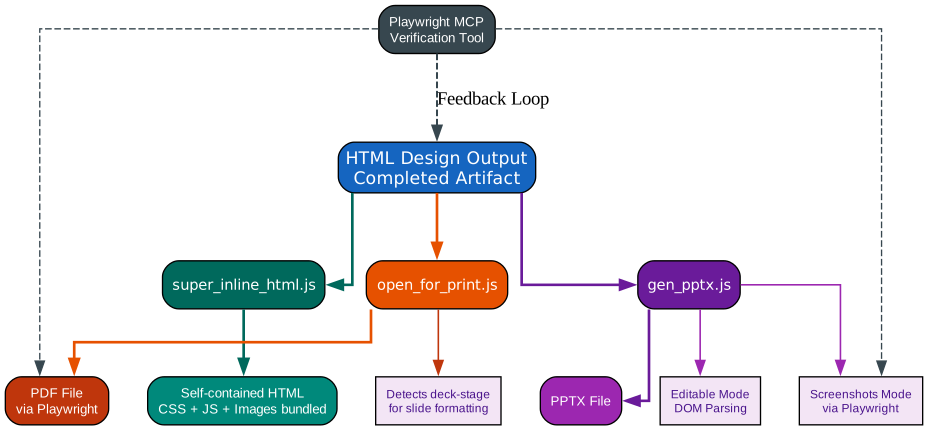
Three export paths transform HTML designs into PPTX, self-contained HTML, and PDF deliverables
The export pipeline transforms the verified HTML design into the deliverable format requested by the user. Three distinct export paths serve different delivery needs, each implemented as a standalone Node.js script that can be invoked from the command line.
gen_pptx.js – HTML to PPTX: This script converts HTML designs into PowerPoint presentations using two modes. The first mode is editable DOM parsing, which reads the HTML structure and maps elements to native PowerPoint objects like text boxes, shapes, and images. This produces an editable PPTX file where recipients can modify text, rearrange elements, and apply their own themes. The second mode uses Playwright to capture high-fidelity screenshots of each slide and embeds them as images in the PPTX. This mode preserves pixel-perfect visual fidelity at the cost of editability. The script automatically detects the deck_stage.js template and formats slides with proper dimensions and transitions.
super_inline_html.js – Self-Contained HTML: This script bundles the HTML file along with all its CSS, JavaScript, and image assets into a single self-contained HTML file. All external stylesheets are inlined, all scripts are embedded, and all images are converted to base64 data URIs. The result is a portable file that can be opened in any browser without an internet connection or a local server. This is ideal for sharing designs via email, uploading to document management systems, or archiving designs in a format that will never break due to missing assets.
open_for_print.js – HTML to PDF: This script uses Playwright to render the HTML design and export it as a PDF document. It detects the deck_stage.js template and applies proper slide formatting, including correct page dimensions, margins, and page breaks. For non-presentation designs, it produces a standard PDF with appropriate print styling. The script handles responsive layouts by rendering at a fixed viewport width before capturing, ensuring consistent output regardless of screen size.
Playwright MCP serves a dual role in the export pipeline. Beyond its primary function as a verification tool during the design phase, it provides the browser automation engine that powers both the screenshot mode of gen_pptx.js and the entire PDF export path of open_for_print.js. This shared infrastructure reduces dependencies and ensures that the rendering engine used for verification is the same one used for final export, eliminating surprises.
Each export path is designed to be invoked independently, allowing the workflow to produce multiple deliverable formats from a single verified design. A pitch deck, for example, might be exported as both an editable PPTX for the client and a self-contained HTML for web embedding.
Brand Style Cloning and Design Patterns
One of CC Design’s most powerful capabilities is its ability to clone and apply brand design systems. The getdesign-loader provides access to 68+ brand design systems, including Stripe, Vercel, Notion, Linear, Apple, Tesla, and many others. When a user specifies a brand, the loader fetches the corresponding design system, parses the design tokens (colors, typography, spacing, shadows), and injects them into the design context.
The brand detection workflow begins by checking the user’s request for brand names or stylistic references. If a brand is identified, the getdesign-loader fetches the brand’s design system document, which contains tokenized style rules rather than raw CSS. These tokens are then mapped to CSS custom properties that the design templates consume. For multi-brand blending, the loader can merge tokens from multiple brands, creating hybrid styles that combine, for example, Stripe’s color system with Linear’s typography choices.
The design patterns catalog provides reusable component templates organized by category: hero sections, card layouts, button systems, navigation bars, call-to-action sections, pricing tables, feature grids, and testimonial blocks. Each pattern includes HTML structure, CSS styling, and responsive behavior. The catalog enables the AI to assemble designs from proven patterns rather than inventing layouts from scratch.
CC Design uses the oklch color system for perceptual uniformity. Unlike HSL or RGB, oklch ensures that colors with the same lightness value appear equally bright to the human eye, and that adjusting hue does not shift perceived lightness. This produces more harmonious color palettes and more predictable contrast ratios for accessibility.
The tweaks system allows iterative refinement through EDITMODE markers. These markers are HTML comments that identify sections of the design that can be adjusted. When the user requests a change, the AI locates the relevant EDITMODE section and modifies only that portion, preserving the rest of the design. localStorage persistence saves the current state of tweaks, enabling the user to undo changes or compare iterations.
Conclusion
CC Design represents a significant step forward in AI-assisted design. By combining progressive disclosure architecture with a disciplined seven-step workflow, three-phase verification, and production-ready export pipelines, it transforms Claude Code from a generic code generator into a focused, reliable design expert. The skill’s ability to clone brand design systems, apply proven design patterns, and verify output against professional quality standards means that every deliverable meets a consistent bar of excellence.
The project is open source and available at github.com/ZeroZ-lab/cc-design. Whether you are building landing pages, pitch decks, product prototypes, or marketing materials, CC Design provides the structure and quality assurance needed to produce designs that stand up to professional scrutiny. Enjoyed this post? Never miss out on future posts by following us 


