LibreChat: The Enhanced ChatGPT Clone with 35K+ Stars
LibreChat is a self-hosted AI chat platform that unifies all major AI providers in a single, privacy-focused interface. With over 35,000 stars on GitHub, it has become one of the most popular open-source alternatives to ChatGPT, offering enhanced features, multi-model support, AI agents, and enterprise-ready authentication. Whether you want to run AI locally with Ollama or connect to cloud providers like OpenAI and Anthropic, LibreChat provides a unified experience that puts you in control of your AI infrastructure.
Understanding the LibreChat Architecture
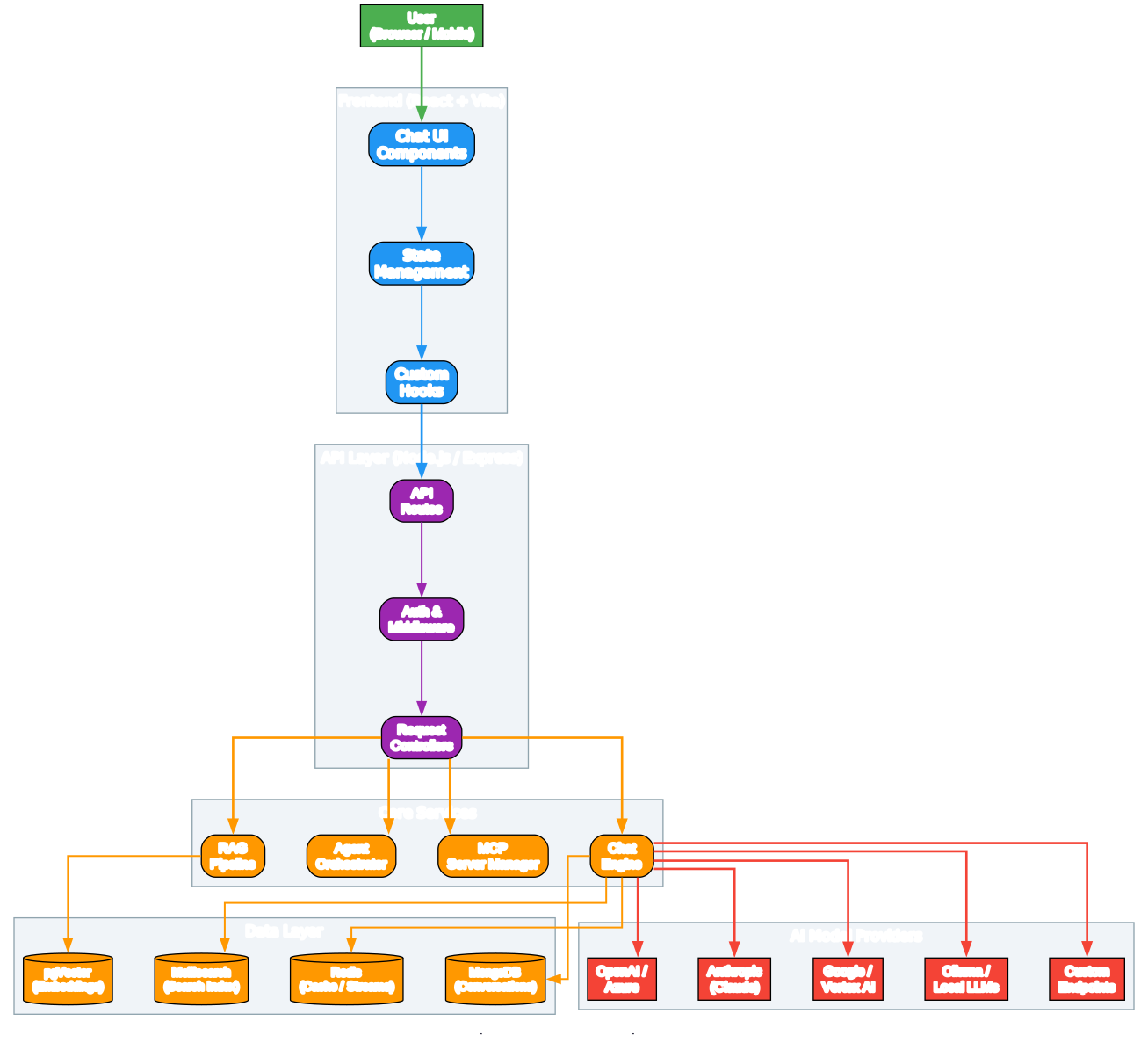
The architecture diagram above illustrates how LibreChat orchestrates its frontend, backend, core services, data layer, and AI provider integrations into a cohesive platform.
Frontend Layer (React + Vite): The frontend is built with React and bundled using Vite for fast development and optimized production builds. It consists of chat UI components that render conversations, a state management layer for handling application state, and custom hooks that encapsulate reusable logic for API calls, streaming responses, and user interactions. The UI is designed to be familiar to ChatGPT users while adding enhanced capabilities like conversation branching, preset management, and multimodal file uploads.
API Layer (Node.js / Express): The backend API is powered by Node.js with Express, providing RESTful endpoints and WebSocket support for real-time streaming. The API routes handle incoming requests, the authentication and middleware layer enforces security policies, and request controllers dispatch operations to the appropriate core services. This layer also manages user sessions, rate limiting, and request validation.
Core Services: The heart of LibreChat consists of four primary services. The Chat Engine manages conversation flow, message history, and context windowing. The Agent Orchestrator handles no-code custom assistants, enabling users to build specialized AI-driven helpers without writing code. The MCP Server Manager integrates Model Context Protocol servers, allowing agents to use external tools and APIs. The RAG Pipeline provides retrieval-augmented generation capabilities, combining vector search with language model responses for grounded answers.
Data Layer: LibreChat uses MongoDB as its primary database for storing conversations, user profiles, and configuration. Meilisearch powers the full-text search index for fast message and conversation discovery. pgVector stores embeddings for the RAG system, enabling semantic similarity search over documents. Redis handles caching and resumable streams, ensuring that AI responses can reconnect and resume if the user’s connection drops.
AI Model Providers: LibreChat supports a wide ecosystem of AI providers including OpenAI, Azure OpenAI, Anthropic Claude, Google Vertex AI, and local models through Ollama. Custom endpoints allow integration with any OpenAI-compatible API, giving users flexibility to connect to self-hosted or specialized model services without requiring a proxy.

Feature Breakdown
LibreChat organizes its capabilities into four major categories that cater to different user needs.
Chat and Conversations: The platform supports multimodal chat, allowing users to upload and analyze images alongside text using vision-capable models. Conversation branching enables users to explore different response paths from any point in a conversation. The fork and continue feature lets users split conversations at any message, creating parallel discussion threads. Custom presets allow saving and sharing preferred model configurations, system prompts, and parameter settings.
Agents and Tools: LibreChat’s no-code agent builder lets users create specialized AI assistants with custom instructions, tools, and knowledge bases. MCP server integration extends agent capabilities by connecting to external APIs, databases, and services through the Model Context Protocol. The agent marketplace enables community sharing of pre-built agents. The code interpreter provides secure, sandboxed execution of Python, Node.js, Go, C/C++, Java, PHP, Rust, and Fortran code directly within chat sessions.
Media and Generation: The platform includes text-to-image generation supporting DALL-E, Stable Diffusion, Flux, and GPT-Image-1. Code artifacts allow creation of React, HTML, and Mermaid diagrams directly in chat. Speech-to-text and text-to-speech capabilities enable hands-free voice interactions, with support for OpenAI, Azure OpenAI, and ElevenLabs voice models.
Enterprise and Security: LibreChat provides multi-user support with OAuth2, LDAP, and SAML authentication. Built-in moderation tools and token spend tracking help administrators manage usage. The platform supports role-based access control, user groups, and collaborative sharing of agents, prompts, and presets.
Message Processing Workflow
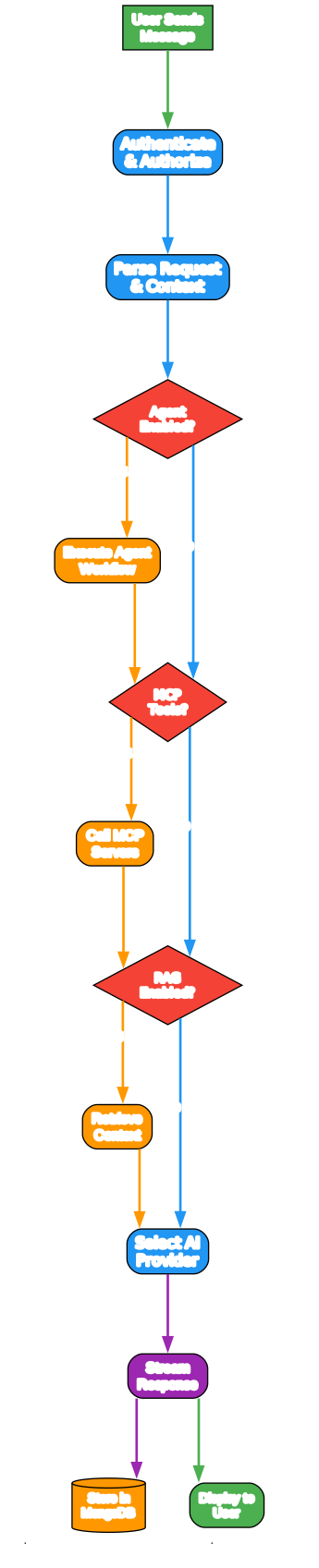
The workflow diagram shows how a user message travels through LibreChat’s processing pipeline from input to response.
When a user sends a message, the request first passes through authentication and authorization checks to verify the user’s identity and permissions. The request is then parsed to extract the message content, conversation context, and any attached files or references.
The system checks whether an agent is enabled for the current conversation. If an agent is active, the agent orchestrator executes the agent workflow, which may involve tool selection, MCP server calls, and multi-step reasoning. After agent processing (or if no agent is enabled), the system checks for MCP tools that need to be invoked.
If MCP tools are configured, the MCP server manager calls the appropriate external services and incorporates their results into the context. Next, the system checks whether RAG is enabled. If so, the RAG pipeline retrieves relevant documents from the vector database and adds them to the prompt context.
The AI provider selector then chooses the appropriate model based on user preferences, endpoint availability, and load balancing. The request is streamed to the selected provider, and the response is both displayed to the user in real-time and stored in MongoDB for persistence. Redis ensures that the stream can resume if the connection is interrupted.
Ecosystem and Deployment Options
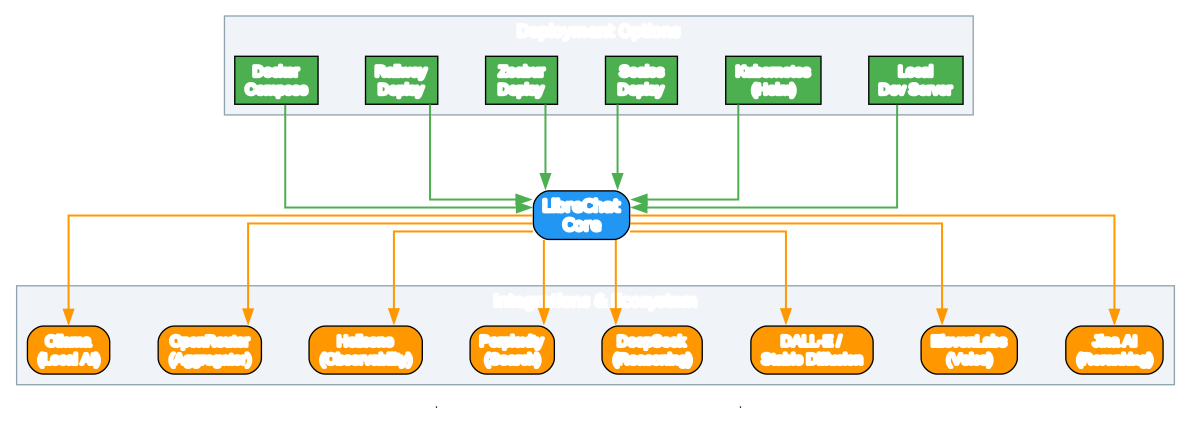
LibreChat offers flexible deployment options to suit different environments and technical requirements.
Deployment Methods: Docker Compose is the recommended approach for self-hosting, providing a complete stack with MongoDB, Meilisearch, pgVector, and the RAG API. One-click deploy buttons are available for Railway, Zeabur, and Sealos for users who prefer managed platforms. Kubernetes deployment is supported via Helm charts for production-scale environments. For development, a local dev server can be started directly from the source code.
Integration Ecosystem: LibreChat integrates with a broad range of AI and utility services. Ollama enables completely local AI inference without cloud dependencies. OpenRouter provides access to hundreds of models through a single API. Helicone offers observability and analytics for AI API calls. Perplexity adds web search capabilities. DeepSeek brings advanced reasoning models. Image generation works with DALL-E and Stable Diffusion. ElevenLabs powers high-quality voice synthesis. Jina AI provides reranking for improved search results.
Installation
Docker Compose (Recommended)
# Clone the repository
git clone https://github.com/danny-avila/LibreChat.git
cd LibreChat

# Copy the example environment file
cp .env.example .env

# Copy the example configuration file
cp librechat.example.yaml librechat.yaml

# Start all services
docker compose up -d
The application will be available at http://localhost:3080.
Local Development
# Clone the repository
git clone https://github.com/danny-avila/LibreChat.git
cd LibreChat

# Install dependencies
npm install

# Build packages
npm run build:packages

# Start the backend
npm run backend:dev

# In a separate terminal, start the frontend
npm run frontend:dev
Configuration
Edit librechat.yaml to configure AI endpoints, authentication providers, and feature toggles. The configuration file supports granular control over file storage strategies, interface customization, and agent permissions.
Key Features
| Feature | Description |
|---|---|
| Multi-Model Support | Connect to OpenAI, Anthropic, Google, Azure, and 20+ local or remote providers |
| AI Agents | Build no-code custom assistants with tools, MCP servers, and file search |
| MCP Integration | Use Model Context Protocol servers to extend agent capabilities |
| Code Interpreter | Execute Python, Node.js, Go, Java, and more in a secure sandbox |
| RAG Pipeline | Retrieve and ground responses using your own document collections |
| Image Generation | Generate images with DALL-E, Stable Diffusion, Flux, and GPT-Image-1 |
| Speech Support | Speech-to-text and text-to-speech with multiple provider options |
| Conversation Branching | Fork and continue conversations from any message |
| Multi-User | OAuth2, LDAP, SAML authentication with role-based access |
| Resumable Streams | Auto-reconnect streaming responses if connection drops |
| Multilingual UI | Support for 25+ languages including English, Chinese, Arabic, and more |
| Custom Endpoints | Use any OpenAI-compatible API without a proxy |
Troubleshooting
MongoDB connection errors: Ensure the MongoDB container is running with docker compose ps. If the database is not initializing, check that the data-node directory has proper permissions.
AI provider API errors: Verify that your API keys are correctly set in the .env file. For custom endpoints, ensure the base URL and model names match the provider’s specifications.
Frontend build failures: Run npm run build:data-provider before building the client. Ensure you are using Node.js version 18 or higher.
Agent tools not working: Check that MCP servers are correctly configured in librechat.yaml and that the server endpoints are accessible from the LibreChat container.
Conclusion
LibreChat stands out as a comprehensive, self-hosted alternative to ChatGPT that gives users and organizations full control over their AI infrastructure. With support for dozens of AI providers, powerful agent capabilities through MCP integration, enterprise-grade authentication, and flexible deployment options, it addresses the needs of individual developers, small teams, and large organizations alike. The active community and regular releases ensure that the platform continues to evolve with the rapidly changing AI landscape.
Links
- GitHub Repository: github.com/danny-avila/LibreChat
- Official Website: librechat.ai
- Documentation: librechat.ai/docs
- RAG API: github.com/danny-avila/rag_api
- Discord Community: discord.librechat.ai

Enjoyed this post? Never miss out on future posts by following us


