Introduction
Open WebUI is an extensible, feature-rich, and user-friendly self-hosted AI platform designed to operate entirely offline. With over 132,000 stars on GitHub, it has become the de facto standard for organizations and individuals who need full control over their AI infrastructure without relying on external cloud services. The platform provides a ChatGPT-style web interface that connects to local and remote LLM runners, supporting Ollama and OpenAI-compatible APIs as primary backends, with additional integrations for Anthropic, Google Gemini, and other providers.
The core problem Open WebUI solves is straightforward: most AI platforms require sending data to third-party cloud services, creating privacy, compliance, and availability concerns. Open WebUI eliminates this dependency by running entirely on your own infrastructure, whether that is a single laptop, a corporate data center, or a Kubernetes cluster. Its plugin architecture, built-in RAG engine, and support for 15 vector database backends make it suitable for everything from personal experimentation to enterprise deployment. The combination of an intuitive frontend with a powerful backend has driven its massive adoption across the self-hosted AI community.
System Architecture
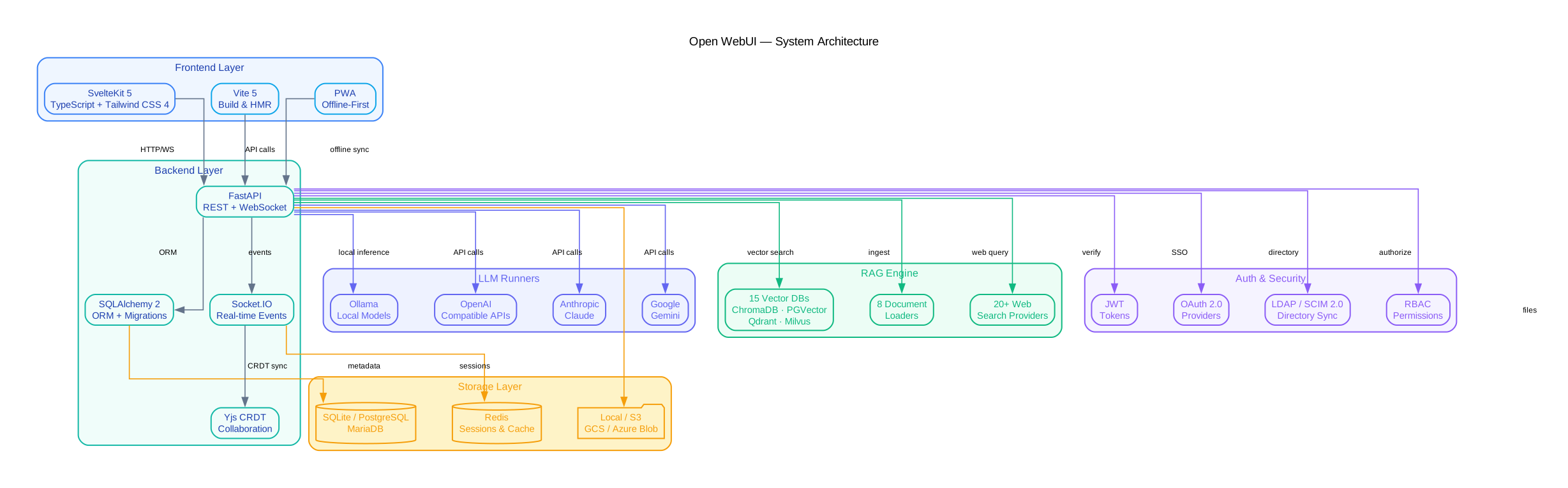
The architecture diagram above illustrates the layered design of Open WebUI, which separates concerns across four primary tiers: the frontend presentation layer, the backend API layer, the LLM runner integration layer, and the persistent storage layer. This separation allows each component to scale and evolve independently while maintaining clean interfaces between them.
The frontend is built with SvelteKit 5, TypeScript, and Tailwind CSS 4, delivering a responsive single-page application that runs in the browser. SvelteKit 5 introduces runes-based reactivity, which reduces boilerplate and improves performance for the real-time streaming of LLM responses. The frontend communicates with the backend exclusively through REST API calls and WebSocket connections, enabling it to function as a progressive web app (PWA) that can be installed on mobile devices.
The backend is a FastAPI application using SQLAlchemy 2 as its ORM layer. FastAPI provides automatic OpenAPI documentation generation, request validation through Pydantic models, and native async support for handling concurrent LLM streaming connections. SQLAlchemy 2 supports both synchronous and asynchronous query patterns, allowing the backend to handle database operations without blocking the event loop. The backend exposes a comprehensive REST API that the frontend consumes, and it also serves as the integration point for all external services.
The LLM runner integration layer abstracts the communication with language model providers. Ollama is the primary local runner, accessed via its REST API at a configurable base URL. OpenAI-compatible endpoints enable integration with any service that implements the OpenAI chat completion API, including Azure OpenAI, LM Studio, vLLM, and LiteLLM. Additional providers such as Anthropic (Claude), Google Gemini, and Cohere are supported through dedicated adapter modules. Each provider implements a common interface, so switching between local and cloud-based models requires only a configuration change.
The storage layer supports multiple database backends for different deployment scales. SQLite is the default for single-node installations, requiring zero configuration. PostgreSQL and MariaDB are supported for production deployments that need concurrent access, replication, or advanced indexing. File and object storage uses a provider abstraction that supports local filesystem, S3-compatible APIs (including MinIO), Google Cloud Storage, and Azure Blob Storage. This allows organizations to store uploaded documents and generated images in their existing infrastructure without modification.
The authentication and security layer sits across the entire stack, implementing JWT-based session management, OAuth 2.0 with PKCE for social login, LDAP directory integration for enterprise environments, and SCIM 2.0 for automated user provisioning. Role-based access control (RBAC) with fine-grained permissions ensures that users can only access models, documents, and tools appropriate to their role. All API endpoints enforce authentication by default, and the platform supports optional API key-based access for automation workflows.
RAG Pipeline Deep Dive
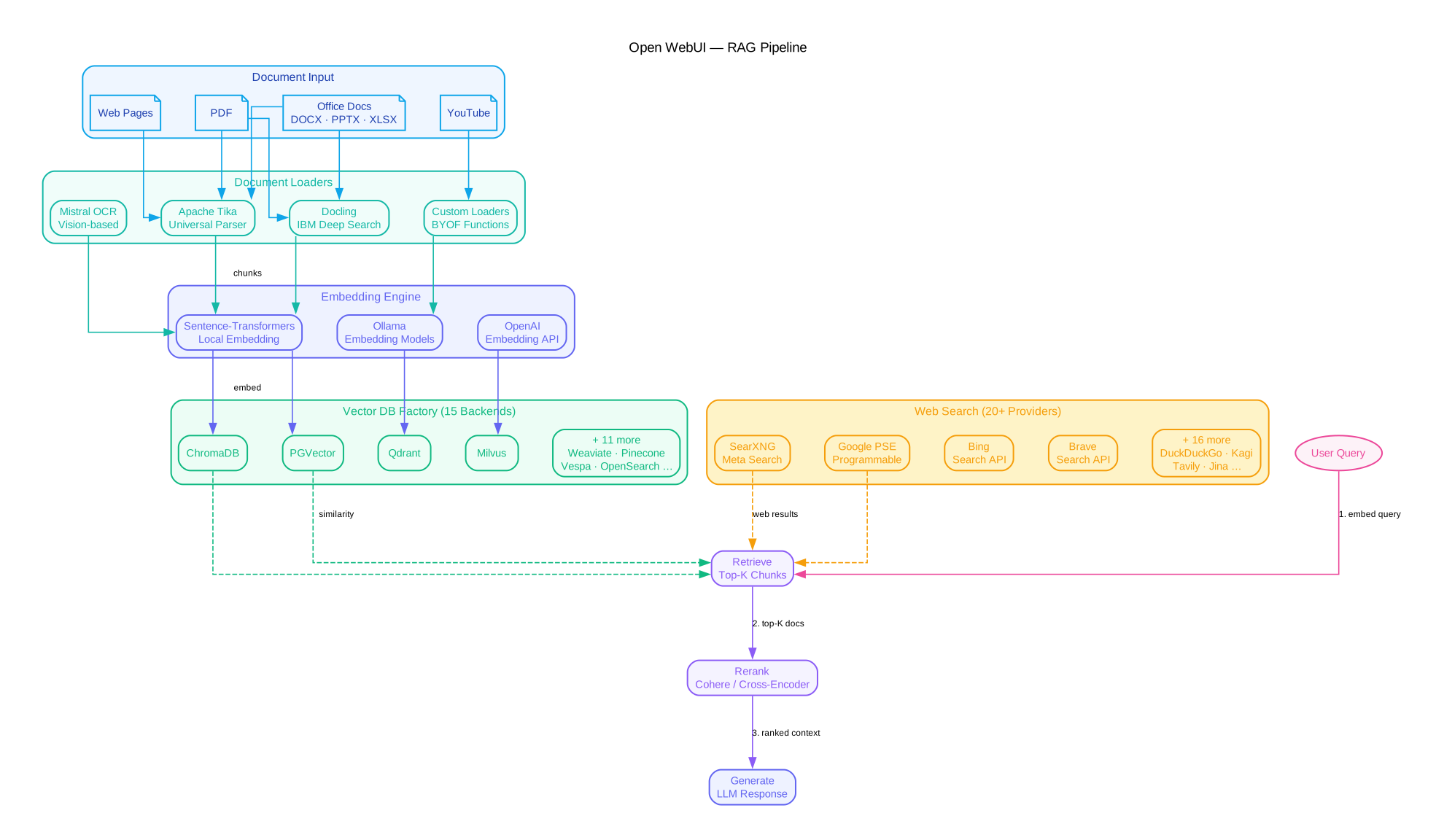
The RAG (Retrieval-Augmented Generation) pipeline is one of Open WebUI’s most sophisticated subsystems, enabling the platform to answer questions based on user-uploaded documents without requiring the LLM to have been trained on that data. The diagram above traces the complete flow from document ingestion through query-time retrieval and generation.
Document ingestion begins when a user uploads a file through the web interface or API. The system routes the document to one of several available document loaders based on file type and configuration. Apache Tika provides broad format support for office documents, PDFs, and legacy formats. Docling, developed by IBM, offers high-quality extraction for scientific papers and technical documents with structure preservation. Mistral OCR provides optical character recognition for scanned documents and images. Each loader extracts text content and metadata, then passes the raw text to the chunking stage.
Chunking and embedding breaks the extracted text into semantically meaningful segments using configurable strategies: fixed-size chunks with overlap, sentence-level splitting, or semantic chunking that respects document structure. Each chunk is then processed by an embedding model, defaulting to sentence-transformers for local operation. The embedding vectors are stored in a vector database along with metadata such as source file, page number, and chunk position. This metadata enables filtered retrieval during query time.
The vector database layer uses a Factory pattern to support 15 different backends: Chroma, Milvus, Qdrant, Pinecone, Weaviate, pgvector, FAISS, OpenSearch, Elasticsearch, Milvus Lite, LanceDB, TiDB, Couchbase, ClickHouse, and Redis. Each backend implements a common interface for insert, search, and delete operations. The Factory pattern means adding a new vector database requires only implementing the interface and registering it in the configuration, with no changes to the rest of the pipeline.
Web search integration augments the document-based retrieval with real-time information from the internet. Open WebUI supports over 20 web search providers including Google, Bing, DuckDuckGo, Brave, SearXNG, Kagi, Serper, SerpAPI, Tavily, Jina, and more. When web search is enabled for a query, the system simultaneously searches the document store and the configured web search providers, then merges and deduplicates the results.
The query flow follows a Retrieve-Rerank-Generate pattern. When a user submits a query, the system embeds the query using the same model used during ingestion, retrieves the top-k most similar chunks from the vector database, optionally reranks them using a cross-encoder model for improved relevance, constructs a prompt that includes the retrieved context, and sends it to the configured LLM for generation. The entire pipeline is configurable through environment variables and the admin panel, allowing operators to tune chunk sizes, retrieval counts, reranking models, and embedding dimensions to match their specific use case.
Feature Ecosystem
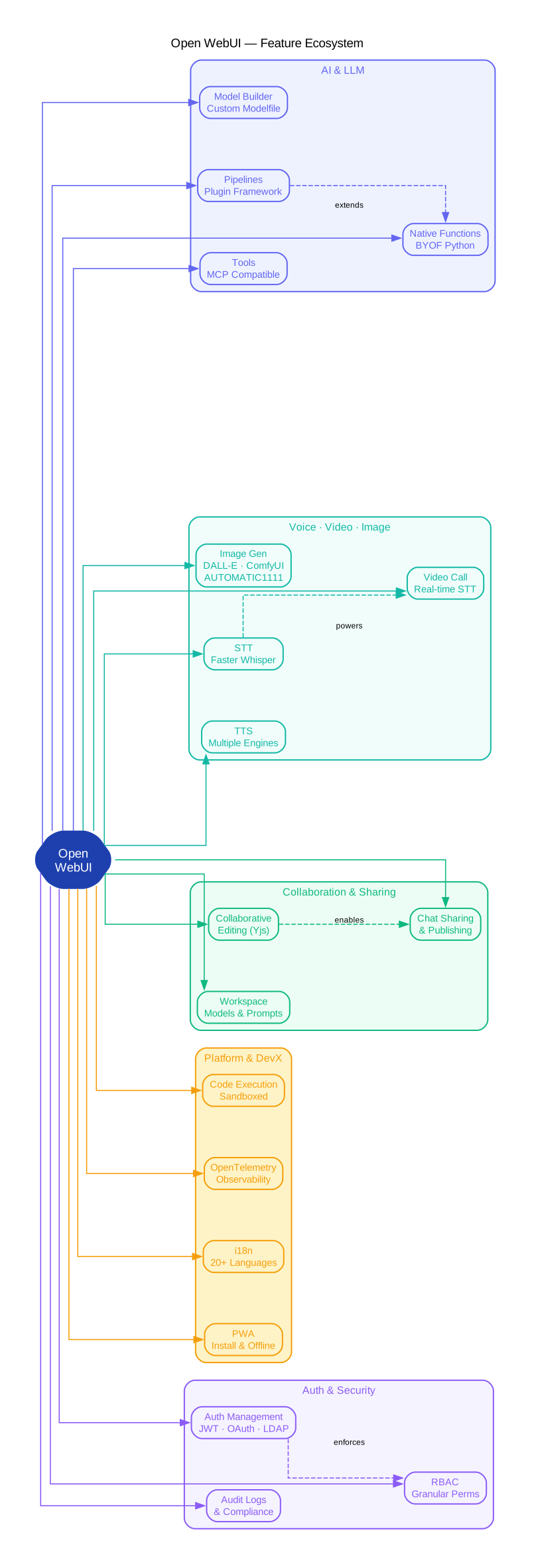
The feature ecosystem diagram maps the major capability areas of Open WebUI, showing how the platform extends well beyond basic chat functionality into a comprehensive AI workspace. Each feature area is designed as a modular component that can be enabled, disabled, or extended independently.
Voice and video capabilities transform text-based chat into a multimodal experience. Speech-to-text (STT) supports multiple engines including OpenAI Whisper (local and API), Deepgram, and Groq, enabling voice input for chat messages. Text-to-speech (TTS) supports OpenAI TTS, ElevenLabs, and local engines, allowing the system to read responses aloud. The combination of STT and TTS enables fully voice-driven interactions, which is particularly valuable for accessibility and hands-free use cases. Video calling integrates with WebRTC for real-time camera input, allowing vision-capable models to analyze live video feeds.
Image generation integrates with multiple rendering backends. DALL-E integration provides OpenAI’s image generation through the API. ComfyUI support enables complex image generation workflows using Stable Diffusion models with custom node graphs. AUTOMATIC1111 integration provides a simpler Stable Diffusion interface. Each backend is accessible through a unified interface in the chat, where users can request image generation inline with their conversation. Generated images are stored in the configured object storage backend and linked to the conversation for future reference.
Code execution provides sandboxed runtime environments for running code generated by LLMs. Pyodide runs Python directly in the browser using WebAssembly, enabling immediate execution without server-side infrastructure. RestrictedPython provides a server-side sandbox with configurable security policies for more complex computations. The code execution feature supports automatic detection of code blocks in LLM responses, with optional automatic execution and result display. This turns the chat interface into an interactive computational notebook.
Collaborative editing uses Yjs, a CRDT (Conflict-free Replicated Data Type) library, to enable real-time multi-user editing of documents and notes within the platform. Yjs ensures that all participants see a consistent state regardless of network conditions or concurrent edits. This feature integrates with the chat system, allowing teams to collaboratively refine prompts, annotate documents, and build knowledge bases together.
The Pipelines plugin framework is the extensibility backbone of Open WebUI. Pipelines are Python modules that can modify or augment any part of the chat flow: filtering messages, injecting context, calling external APIs, or implementing custom retrieval strategies. The framework provides a standard API for pipeline lifecycle management, and pipelines can be installed through the admin panel without modifying the core codebase. This has enabled a growing ecosystem of community-contributed plugins for specialized use cases.
Additional features include a Model Builder for creating and fine-tuning custom models through the interface, comprehensive internationalization (i18n) with support for over 30 languages, PWA support for installing the application on mobile devices, and a playground mode for testing prompts and parameters outside of conversations.
Deployment Topology
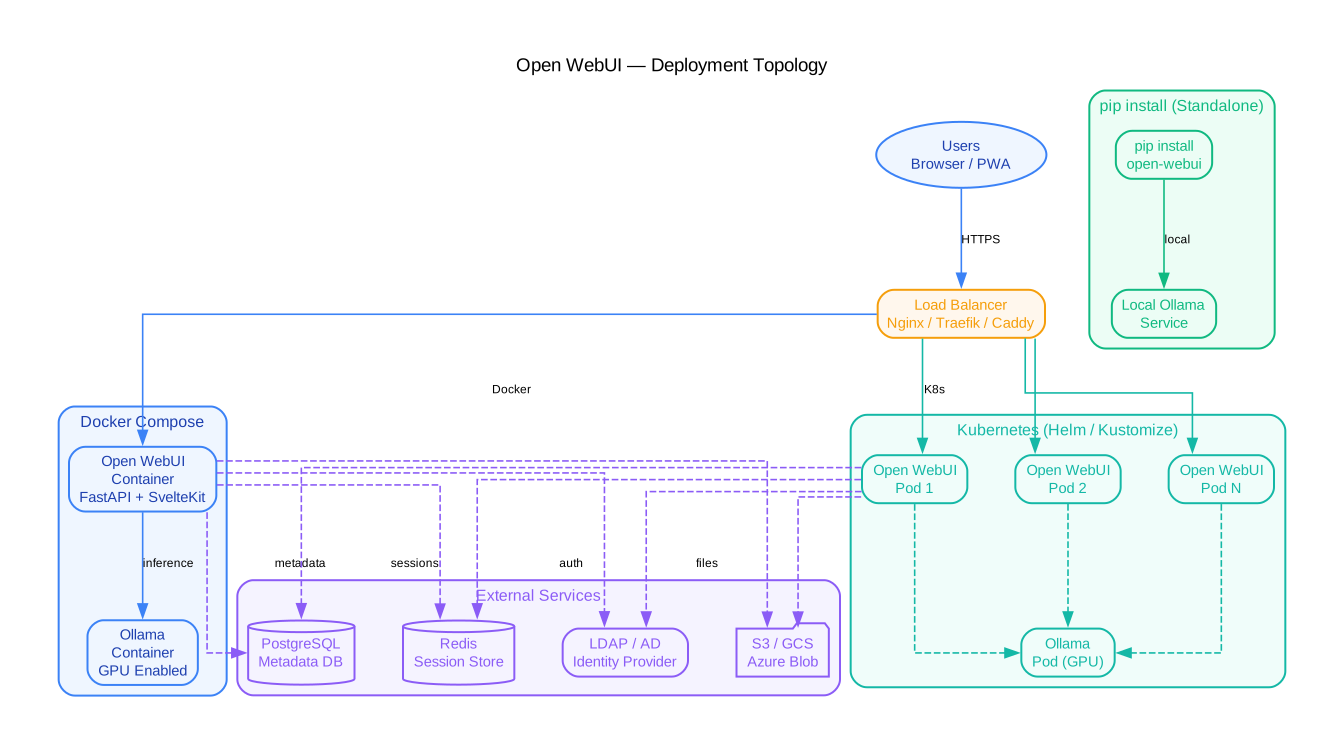
The deployment topology diagram illustrates the various ways Open WebUI can be deployed, from a single Docker container on a laptop to a horizontally scaled Kubernetes cluster in a data center. This flexibility is central to the platform’s design philosophy: it should work identically whether running on a developer’s machine or in a production environment.
Docker is the primary deployment method, and the official container image is available on GitHub Container Registry (ghcr.io/open-webui/open-webui:main). The simplest deployment runs a single container with an embedded SQLite database and local file storage, suitable for personal use or small teams. The container exposes port 8080 internally and maps to a host port of the operator’s choosing. Persistent data is stored in a Docker volume mounted at /app/backend/data, which contains the database, uploaded files, and configuration.
Docker Compose extends the single-container setup by defining multi-service stacks. A typical compose file includes the Open WebUI container, an Ollama container for local LLM inference, and optionally a Redis container for session storage. The compose configuration manages networking between containers, volume mounts for persistent data, and environment variable injection for runtime configuration. This approach provides a reproducible deployment that can be version-controlled alongside application configuration.
Kubernetes deployment is supported through both Helm charts and Kustomize overlays. The Helm chart provides parameterized configuration for replica counts, resource limits, ingress controllers, and persistent volume claims. Kustomize overlays enable environment-specific customization (development, staging, production) without duplicating the base configuration. For horizontal scaling, the Kubernetes deployment can run multiple Open WebUI replicas behind a service load balancer, with Redis managing session state across replicas. PostgreSQL or MariaDB replaces SQLite as the database backend for multi-replica deployments, since SQLite does not support concurrent writes from multiple processes.
The pip install method provides a Python-native deployment option for environments where Docker is not available or not preferred. Installing Open WebUI as a Python package creates the open-webui command-line tool, which starts the server with default settings. This method is particularly useful for development, CI/CD pipelines, or integration into existing Python-based infrastructure. The pip-installed version supports the same environment variables and configuration options as the containerized version.
External services integration connects the deployment to infrastructure outside the Open WebUI container. This includes LLM API endpoints (Ollama, OpenAI, Anthropic), vector database servers (Chroma, Milvus, Qdrant), object storage services (S3, GCS, Azure Blob), authentication providers (OAuth, LDAP), and observability tools (OpenTelemetry, Prometheus). Each external service is configured through environment variables, and the platform gracefully handles service unavailability with appropriate error messages and retry logic.
Horizontal scaling with Redis session management enables the platform to serve thousands of concurrent users. Redis stores session data, rate limiting counters, and caching keys, allowing any replica to serve any authenticated user. The stateless nature of the application servers, combined with external database and storage backends, means that scaling is primarily a matter of adding more replicas and configuring the load balancer to distribute traffic evenly.
Getting Started
The fastest way to get Open WebUI running is with Docker. The following command pulls the latest image and starts the server with Ollama integration configured to use the host network:
docker run -d -p 3000:8080 --add-host=host.docker.internal:host-gateway -v open-webui:/app/backend/data --name open-webui --restart always ghcr.io/open-webui/open-webui:main
This single command creates a persistent volume for data storage, maps port 3000 on the host to port 8080 in the container, and configures the container to reach Ollama running on the host machine via the host.docker.internal hostname. After the container starts, open http://localhost:3000 in your browser to access the interface. The first user to register automatically becomes the administrator.
For a more complete setup with both Open WebUI and Ollama running as containers, use Docker Compose:
services:
  ollama:
    image: ollama/ollama
    container_name: ollama
    volumes:
      - ollama:/root/.ollama
    ports:
      - "11434:11434"

  open-webui:
    image: ghcr.io/open-webui/open-webui:main
    container_name: open-webui
    ports:
      - "3000:8080"
    volumes:
      - open-webui:/app/backend/data
    environment:
      - OLLAMA_BASE_URL=http://ollama:11434
    depends_on:
      - ollama
Save this as docker-compose.yml and run docker compose up -d. The Compose configuration handles networking between the two containers automatically, and the OLLAMA_BASE_URL environment variable tells Open WebUI where to find the Ollama API.
If Docker is not available, Open WebUI can be installed directly with pip:
pip install open-webui
open-webui serve
This starts the server on port 8080 with default settings. The pip-installed version supports all the same features as the containerized version, including RAG, authentication, and model management.
Environment variables control the runtime configuration. Here are the most commonly used variables:
# LLM Configuration
export OLLAMA_BASE_URL=http://localhost:11434
export OPENAI_API_KEY=sk-your-key-here

# Database
export DATABASE_URL=postgresql://user:pass@localhost:5432/openwebui

# Vector DB
export VECTOR_DB=chroma

# Storage
export STORAGE_PROVIDER=s3
export S3_ENDPOINT_URL=https://s3.amazonaws.com
export S3_ACCESS_KEY_ID=your-key
export S3_SECRET_ACCESS_KEY=your-secret
Each variable maps to a specific subsystem. The OLLAMA_BASE_URL and OPENAI_API_KEY configure the LLM runners. The DATABASE_URL switches from SQLite to PostgreSQL for production deployments. The VECTOR_DB variable selects the vector database backend for RAG operations. The storage variables configure object storage for uploaded files and generated images.
Advanced Configuration
RAG with Vector Databases
Configuring the RAG pipeline for production use involves selecting an appropriate vector database and tuning retrieval parameters. For small deployments, Chroma (the default) requires no additional setup. For larger deployments with millions of documents, Milvus or Qdrant provide better performance and scalability:
# Milvus configuration
export VECTOR_DB=milvus
export MILVUS_URI=http://milvus:19530
export MILVUS_DB_NAME=default

# Qdrant configuration
export VECTOR_DB=qdrant
export QDRANT_URI=http://qdrant:6333
export QDRANT_API_KEY=your-api-key

# RAG tuning
export CHUNK_SIZE=1500
export CHUNK_OVERLAP=100
export RAG_TOP_K=5
export RAG_RELEVANCE_THRESHOLD=0.5
The CHUNK_SIZE and CHUNK_OVERLAP control how documents are split during ingestion. Larger chunks provide more context but may dilute relevance. The RAG_TOP_K variable determines how many chunks are retrieved for each query, and RAG_RELEVANCE_THRESHOLD filters out chunks below a similarity score threshold.
OAuth and LDAP Authentication
For enterprise deployments, Open WebUI supports OAuth 2.0 and LDAP for centralized authentication. OAuth enables single sign-on with providers like Google, GitHub, Microsoft, and Keycloak:
# OAuth configuration
export ENABLE_OAUTH_SIGNUP=true
export OAUTH_PROVIDER_NAME=google
export OAUTH_CLIENT_ID=your-client-id
export OAUTH_CLIENT_SECRET=your-client-secret
export OAUTH_SCOPES=openid email profile

# LDAP configuration
export ENABLE_LDAP=true
export LDAP_SERVER_HOSTNAME=ldap.example.com
export LDAP_SERVER_PORT=636
export LDAP_USE_TLS=true
export LDAP_BIND_DN=cn=admin,dc=example,dc=com
export LDAP_BIND_PASSWORD=admin-password
export LDAP_SEARCH_BASE=ou=users,dc=example,dc=com
export LDAP_SEARCH_FILTER=(uid={0})
export LDAP_ATTRIBUTE_USERNAME=uid
export LDAP_ATTRIBUTE_MAIL=mail
LDAP integration supports both bind authentication and search-based user lookup. When a user logs in with their LDAP credentials, Open WebUI searches the directory for the user, authenticates against the LDAP server, and creates a local account with the appropriate attributes. SCIM 2.0 support enables automated user provisioning and deprovisioning from identity management systems.
S3-Compatible Object Storage
For deployments that need durable, scalable file storage, Open WebUI supports S3-compatible object storage. This works with AWS S3, MinIO, Google Cloud Storage (via S3 interop), and Azure Blob Storage (via S3 interop):
export STORAGE_PROVIDER=s3
export S3_ENDPOINT_URL=https://s3.amazonaws.com
export S3_ACCESS_KEY_ID=AKIAIOSFODNN7EXAMPLE
export S3_SECRET_ACCESS_KEY=wJalrXUtnFEMI/K7MDENG/bPxRfiCYEXAMPLEKEY
export S3_BUCKET_NAME=open-webui-data
export S3_REGION=us-east-1
When S3 storage is configured, all uploaded documents, generated images, and user files are stored in the specified bucket. The platform handles presigned URL generation for secure access, and the storage abstraction ensures that the rest of the application remains unaware of the underlying storage implementation.
OpenTelemetry Observability
For production monitoring, Open WebUI supports OpenTelemetry for distributed tracing, metrics, and logging:
export OTEL_TRACING=true
export OTEL_EXPORTER_OTLP_ENDPOINT=http://otel-collector:4317
export OTEL_SERVICE_NAME=open-webui
export OTEL_TRACES_SAMPLER=parentbased_traceidratio
export OTEL_TRACES_SAMPLER_ARG=0.1
This configuration sends trace data to an OpenTelemetry Collector, which can forward to Jaeger, Zipkin, Grafana Tempo, or any compatible backend. The sampling configuration controls the volume of trace data, with 0.1 meaning 10% of requests are traced. Metrics and structured logging follow the same OpenTelemetry conventions, providing a unified observability stack.
Conclusion
Open WebUI has established itself as the leading self-hosted AI platform by solving a fundamental tension in the AI ecosystem: the need for powerful, feature-rich AI tools without sacrificing data sovereignty. Its layered architecture – SvelteKit frontend, FastAPI backend, pluggable LLM runners, and flexible storage backends – provides the modularity needed to adapt to environments ranging from a single developer’s laptop to a multi-replica Kubernetes cluster serving thousands of users.
The built-in RAG pipeline with support for 15 vector databases, 20+ web search providers, and multiple document loaders makes it immediately useful for knowledge management workflows. The Pipelines plugin framework ensures that the platform can grow to meet specialized requirements without forking the codebase. Combined with enterprise-grade authentication (OAuth, LDAP, SCIM), observability (OpenTelemetry), and deployment options (Docker, Kubernetes, pip), Open WebUI delivers a production-ready platform that respects the self-hosted ethos.
If you are evaluating self-hosted AI platforms, star the Open WebUI repository on GitHub and try the Docker quickstart command above. The platform is actively maintained with frequent releases, and the community around it continues to grow. Enjoyed this post? Never miss out on future posts by following us 


